windows live mail 2011 signatures and biz cards

grayble

New member
Local time
12:19 PM
Messages
1
i cannot add a file in the signature tab.. want to use a custom and cannot add it..help
 

My Computer My Computer

At a glance

windows 7 64bit
OS
windows 7 64bit
I believe the signatures feature that was part of OE, WM, and 2009/2010 WLM has been removed in WLM 2011.

EDIT: As Kari points out (below) the statement I made above is wrong. However, something was removed: the ability to choose which signature to use from a drop down list.

 
Last edited:

My Computer My Computer

At a glance

Windows 8 Pro w/MC 32-bitIntel Atom 1.86 GHz2 GBIntel GMA 500
Computer type
PC/Desktop
Computer Manufacturer/Model Number
OQO 2+
OS
Windows 8 Pro w/MC 32-bit
CPU
Intel Atom 1.86 GHz
Motherboard
OQO 2+
Memory
2 GB
Graphics Card(s)
Intel GMA 500
Sound Card
IDT
Monitor(s) Displays
LCD
Screen Resolution
800 x 480 (portable) 1280 x 1024 (docked)
Hard Drives
64 GB SSD
PSU
9 Ah Battery (portable) or OQO Brick (docked)
Case
Shirt Pocket Sized
Cooling
Tiny Fan
Keyboard
Slide out (portable) DiNovo Edge (docked)
Mouse
Eraser head (portable) Logitech Bluetooth (docked)
Internet Speed
WWAN or 802.11G (portable) T1 (docked)
Browser
IE 10
Other Info
DVD-RW OQO Docking Station
Why on earth would they remove the signatures feature? As far as I'm concerned, that's the death knell for the app. I'll stick with Thunderbird. I have no use for something so dumbed down!
 

My Computer My Computer

At a glance

Windows 7 pro 64AMD Athlon(tm) 64 X2 Dual Core Processor 5600+1024 MB (2 ranks, 4 banks)NVIDIA GeForce 8600 GT (Microsoft Corporation...
Computer Manufacturer/Model Number
Custom
OS
Windows 7 pro 64
CPU
AMD Athlon(tm) 64 X2 Dual Core Processor 5600+
Motherboard
Biostar TF560 A2+
Memory
1024 MB (2 ranks, 4 banks)
Graphics Card(s)
NVIDIA GeForce 8600 GT (Microsoft Corporation - WDDM v1.1)
Sound Card
Realtek on board High Definition Audio (HDA)
Monitor(s) Displays
Acer H233H 1920 x 1080 @ 60 Hz
Hard Drives
0. 298 GB internal NTFS
1. 186 GB internal NTFS
2. 596 GB USB FAT32
3. 74 GB USB NTFS
Cooling
3 fans
Hi Grayble and Ritergeek, welcome to the Seven Forums. Of course you can add a signature in your messages in Windows Live Mail 2011.

How to create a signature in Windows Live Mail 2011.
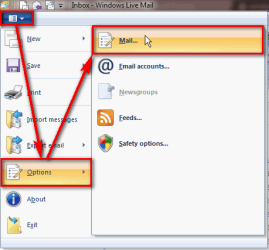
  1. Open the WLM main menu by clicking the white arrowhead on top left, select Options > Mail
    .
    WLM_Signature_01.png
    .
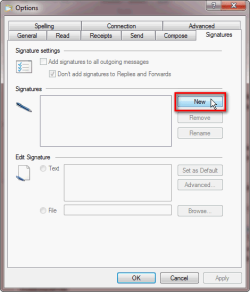
  2. Select Signatures tab, click New
    .
    WLM_Signature_02.png
    .
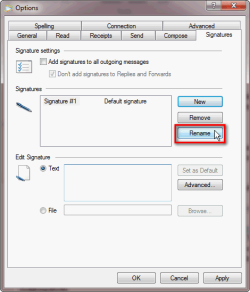
  3. By default, the new signature is named Signature #X. If you want to rename your signature, click Rename and type the name you want to use
    .
    WLM_Signature_03.png
    .
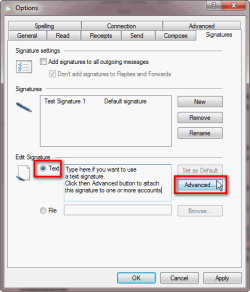
  4. Select Text if you want to use a text signature, type your signature to the text field. Click then Advanced button to attach the signature to one or more email accounts. If not attached to any accounts, the signature exists but is not going to be used
    .
    WLM_Signature_04.png
    .
    WLM_Signature_05.png
    .
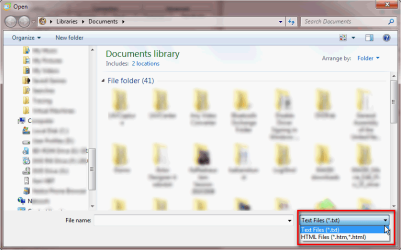
  5. If you already have a signature stored in a file and you want to use it instead, select File and click Browse
    .
    WLM_Signature_06.png
    .
  6. Find the file you want to use and click OK. The signature file must be a text file or an HTML file. Remember to attach it to accounts in which you want to use the signature as told above in step 4
    .
    WLM_Signature_07.png
    .
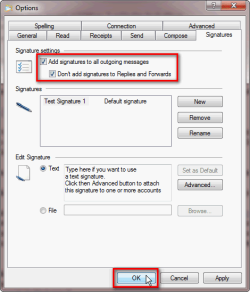
  7. Check the box Add signature to all outgoing messages, click OK to save the signature and settings
    .
    WLM_Signature_08.png

Kari
 
Last edited:

My Computer My Computer

At a glance

Windows 10 Pro x64 EN-GB1.6 GHz Intel Core i7-720QM Processor6 GBATI Mobility Radeon HD 5850 Graphics
Computer type
Laptop
Computer Manufacturer/Model Number
HP ENVY 17-1150eg
OS
Windows 10 Pro x64 EN-GB
CPU
1.6 GHz Intel Core i7-720QM Processor
Memory
6 GB
Graphics Card(s)
ATI Mobility Radeon HD 5850 Graphics
Sound Card
Beats sound system with integrated subwoofer
Monitor(s) Displays
17" laptop display, 22" LED and 32" Full HD TV through HDMI
Screen Resolution
1600*900 (1), 1920*1080 (2&3)
Hard Drives
Internal: 2 x 500 GB SATA Hard Disk Drive 7200 rpm
External: 2TB for backups, 3TB USB3 network drive for media
Cooling
As Envy runs a bit warm, I have it on a Cooler Master pad
Keyboard
Logitech diNovo Media Desktop Laser (bluetooth)
Mouse
Logitech Performance Mouse MX
Internet Speed
50/10 Mbps VDSL
Antivirus
Windows Defender 4.3.9431.0
Browser
Maxthon 3.5.2., IE11
Worked perfectly

Kari, you are a wizard. Your solution worked perfectly. Thanks. :cool:
 

My Computer My Computer

At a glance

Windows 7 Home Premium x64
OS
Windows 7 Home Premium x64
Back
Top