Windows Live Mail 2012 error 0x8ccc0003 - Win 7

Compumind

New member
Local time
12:49 AM
Messages
10
Hi all,

Simply put...

Is there any way possible to attach and send a image file of any type without creating a Microsoft Account?

I don't want Microsoft to have access to my images/scans, etc.

TIA,

Compumind :D
 

My Computer My Computer

Computer type
PC/Desktop
OS
Windows 7 Professional x64
Internet Speed
Fast!

My Computer My Computer

Computer type
PC/Desktop
OS
Windows 10 Home x64
CPU
INTEL Core i5-750 Quad-Core 3.37GHz
Motherboard
ASUS P7P55D
Memory
HyperX Fury Black Series 8GB (2 x 4GB) 1866Mhz
Graphics Card(s)
EVGA GeForce GTX 750 Superclocked 1GB 128-Bit GDDR5
Monitor(s) Displays
LG 32MA68HY 32" IPS
Screen Resolution
1920 x 1080
Hard Drives
Samsung 840 Evo 120GB, SEAGATE 500GB Barracuda® 7200.12, SATA 3 Gb/s, 7200 RPM, 16MB cache
PSU
ANTEC TruePower New TP-550, 80 PLUS, 550W
Case
ANTEC Three Hundred Illusion
Cooling
COOLER MASTER Hyper 212 Plus, 4 x 120mm 1 x 140mm Noctua's
Internet Speed
85 + Mbps
Antivirus
Avast
Browser
Vivaldi
Hi A Guy,

I know of that thread, thanks anyway!

Problem is I don't understand why I need a Microsoft Account at all to send a picture. That's so weird!
I value my privacy. Is there a reasonable workaround or do I have to do it "the hard way" ? :rolleyes:

Cheers,

Compumind :)
 

My Computer My Computer

Computer type
PC/Desktop
OS
Windows 7 Professional x64
Internet Speed
Fast!
You generally have to have a MS account to use any of their services. But unless I read it wrong, you don't need one to send pictures, only use the Send to > Mail recipient function. Hopefully someone with personal experience with WLM will reply. A Guy
 

My Computer My Computer

Computer type
PC/Desktop
OS
Windows 10 Home x64
CPU
INTEL Core i5-750 Quad-Core 3.37GHz
Motherboard
ASUS P7P55D
Memory
HyperX Fury Black Series 8GB (2 x 4GB) 1866Mhz
Graphics Card(s)
EVGA GeForce GTX 750 Superclocked 1GB 128-Bit GDDR5
Monitor(s) Displays
LG 32MA68HY 32" IPS
Screen Resolution
1920 x 1080
Hard Drives
Samsung 840 Evo 120GB, SEAGATE 500GB Barracuda® 7200.12, SATA 3 Gb/s, 7200 RPM, 16MB cache
PSU
ANTEC TruePower New TP-550, 80 PLUS, 550W
Case
ANTEC Three Hundred Illusion
Cooling
COOLER MASTER Hyper 212 Plus, 4 x 120mm 1 x 140mm Noctua's
Internet Speed
85 + Mbps
Antivirus
Avast
Browser
Vivaldi
one can send a picture thru your pop account using wlm, it does not have to go through a live account, I do it all the time
 

My Computer My Computer

Computer type
PC/Desktop
Computer Manufacturer/Model Number
Dell Computers
OS
Windows 7 Pro 32/64 bit and Windows 10 Pro 32 Bit/64bit
Memory
4gigs
Graphics Card(s)
AMD Radeon HD and Nvidia
Monitor(s) Displays
Samsung 24". INC 19". Dell 22 ". Dell 17" & 19"
@robinb9 -

Tried using WLM 2012 on 2 different Win 7 Pro/x64 machines without a live Microsoft Account.
Can't do it without encountering the above error message.

Kindly explain how you are doing it without an active MS Account.

Many thanks! :)
 

My Computer My Computer

Computer type
PC/Desktop
OS
Windows 7 Professional x64
Internet Speed
Fast!
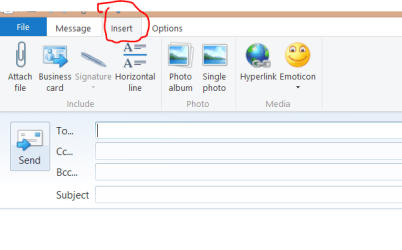
Use the Insert tab.

Insert.PNG

Jim :cool:
 

My Computer My Computer

Computer type
PC/Desktop
Computer Manufacturer/Model Number
Home Built
OS
Windows 8.1 Pro w/Media Center 64bit, Windows 7 HP 64bit
CPU
Phenom II X6 1100T
Motherboard
ASUS M5A99X EVO
Memory
Crucial Balistic 8gb DDR3-1866 CL9
Graphics Card(s)
MSI R6850 Cyclone IGD5 PE
Sound Card
On Board
Monitor(s) Displays
ASUS VE258Q 25" LED with DVI-HDMI-DisplayPort
Screen Resolution
1920 x 1080
Hard Drives
Two WD Cavier Black 2TB Sata III, WD My Book Essential 2TB USB 3.0
PSU
Seasonic X650 80 Plus GOLD Modular
Case
Corsair 400R
Cooling
Antec Kuhler H2O 620, Two 120mm and four 140mm
Keyboard
Logitech K120
Mouse
Logitech Marble Mouse USB, Logitech Precision Game Pad
Internet Speed
15MB
Antivirus
Norton IS 2013, Malwarebytes Pro Beta 2
Browser
IE-11, FF-27
Other Info
APC UPS ES 750, Netgear WNR3500L Gigabit & Wireless N Router with SamKnows Test Program, Motorola SB6120 Gigabit Cable Modem. Brother HL-2170W Laser Printer, Epson V300 Scanner
Yes use insert, then click on the paperclip for an attachment, find the picture and attach it instead of having it go in the body of the email
 

My Computer My Computer

Computer type
PC/Desktop
Computer Manufacturer/Model Number
Dell Computers
OS
Windows 7 Pro 32/64 bit and Windows 10 Pro 32 Bit/64bit
Memory
4gigs
Graphics Card(s)
AMD Radeon HD and Nvidia
Monitor(s) Displays
Samsung 24". INC 19". Dell 22 ". Dell 17" & 19"
Sending pictures as an attachment in WLM

When using WLM it often mandatorily uses MS Skydrive to post pictures. I searched for ways to avoid it but just now found out an easy way to do it. If you have your picture saved on your hard drive all you have to do is open a new e-mail as well as open the file where your picture is. Then just click and hold on the picture and move it to the blank area to thee left of the subject line and release. It will put it as an attachment, not in Skydrive. It is so much easier than other ways described and you do not have to try to disable Skydrive. Perhaps this will work for you.
 

My Computer My Computer

Computer type
PC/Desktop
Computer Manufacturer/Model Number
Power Spec B648
OS
win 7 64
CPU
i-5 4570 @ 3.2ghz
Memory
8gb DDR3 -1600
Hard Drives
2 tb - 7200rpm
Antivirus
Kaspersky ONE
Browser
IE
Back
Top