Windows Live Mail 2012 save contacts

rickluc

New member
Member
VIP
Local time
3:14 PM
Messages
121
I installed new Windows Live Mail 2011 and it upgraded on its own to 2012. Can you tell me where to go to setup my email accounts to save contacts in our contact folder for addresses we send email to, I know I've seen that option some where?
I just had a computer person reinstall Windows 7 on my computer. He saved all my documents and pictures. Failed to save our two email accounts. Wife is complaining about losing her old emails, is there a folder where I might find them?
Thanks
 

My Computer

OS
Windows 7 Home Premium 32 bit
Thanks Roderunner Maybe I didn't ask my question correctly. I had several contacts show up when I started to compose a message and started typing the recipient name in the to field. I never entered them into the list, they would just stay in the contact list after sending message. I've seen the option to have Windows Live Mail automatically store them when you send someone an email, isn't this correct?
 

My Computer

OS
Windows 7 Home Premium 32 bit
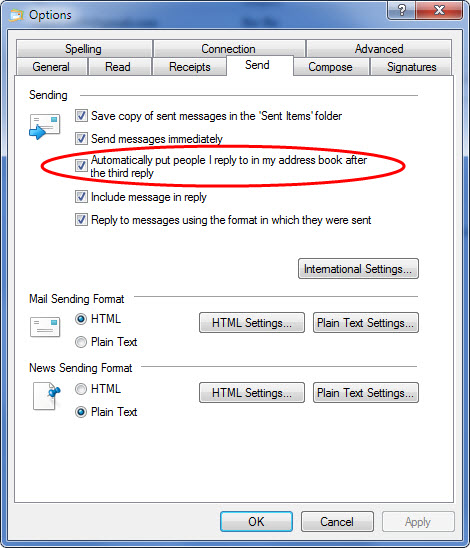
Is this the setting you are looking for?

x8J2PqB.jpg

x8J2PqB
 

My Computer

Computer type
PC/Desktop
Computer Manufacturer/Model Number
Homebuild
OS
Windows 7 Ultimate 64 bit SP1
CPU
DualCore Intel Pentium D 820, 2800 MHz (14 x 200)
Motherboard
Gigabyte EX58-UD3R
Memory
Kingston DDR3 (PC3-10700H) 6.0GB
Graphics Card(s)
AMD Radeon HD 6450
Sound Card
Realtek ALC882/D/M
Monitor(s) Displays
Samsung SyncMaster 2233SW
Screen Resolution
1920 x 1080
Hard Drives
Drive #1 - WDC WD2500JB-22REA0 (232 GB)
Drive #2 - WDC WD6400AAKS-65A7B0 (596 GB)
PSU
EVGA Supernova 750w G2 Gold
Cooling
5 x 80mm Generic Fans
Keyboard
Microsoft Comfort Curve 2000
Mouse
SteelSeries IKARI 62001-1 Laser or Microsoft Laser 6000
Internet Speed
1500/256
Antivirus
NOD32 v10.1.235.0
Browser
FireFox 59.0.2 X64bit
Other Info
Telstra Technicolor TG799vac Modem
LG HL-DT-ST DVDRAM GH20NS15 ATA Device
16X52X32X52 COMBO SCSI CDRom Device
Logitech Wave Keyboard
Microsoft 6000 Laser Mouse
Thanks Roderunner Maybe I didn't ask my question correctly. I had several contacts show up when I started to compose a message and started typing the recipient name in the to field. I never entered them into the list, they would just stay in the contact list after sending message. I've seen the option to have Windows Live Mail automatically store them when you send someone an email, isn't this correct?
If you don't use WLM signed - in, how do you expect it to know who is using it, therefore nothing will get saved, regardless of your WLM settings.
-
WLM might save some contacts addresses of mail in the system i.e. read mail. As I only use it signed - in I can't verify this.
 
Last edited:

My Computer

Computer Manufacturer/Model Number
Look in my Signature.
OS
Win7 H.Prem. 32bit+SP1
Where would I find this option window? Thanks
 

My Computer

OS
Windows 7 Home Premium 32 bit
Back
Top