windows live mail ERROR: 0x80048820

soup2511

New member
Member
Local time
3:46 PM
Messages
46
Location
Kolkata, India
Hello, what is this thing ????:mad:

Unable to send or receive messages for the Live (souptik.duttaroy) account.
Server Error: 0x80048820
Server: 'http://mail.services.live.com/DeltaSync_v2.0.0/Sync.aspx'
Windows Live Mail Error ID: 0x80048820
 

My Computer My Computer

Computer type
Laptop
Computer Manufacturer/Model Number
Hp Pavilion dv6-6155tx
OS
Windows 7 Home Basic 64-bit Service Pack 1
CPU
Intel i5-2430M
Memory
8GB DDR3 (2x4GB)
Graphics Card(s)
ATI Radeon 6490M
Screen Resolution
1366 x 768
Hard Drives
750 GB Hitachi HDD
Hi,

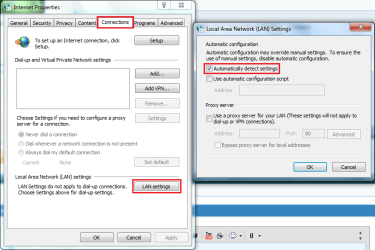
This could be a LAN settings error. Please try the following...

1, Open Control Panel > Network and Internet > Internet Options
2, Click the Connections tab then click LAN Settings
3, Make sure that the Automatically detect settings box is checked.

LAN Settings.PNG

Once checked click OK > OK and see if you have any luck


OS
 

My Computer My Computer

Computer Manufacturer/Model Number
Compaq Desktop
OS
Windows 7 Ultimate x64
CPU
AMD Sempron Dual Core
Memory
3GB
Graphics Card(s)
NVIDIA GeForce 6150SE nForce 430
Screen Resolution
1024x768
Hard Drives
150GB Sata
Hi,

This could be a LAN settings error. Please try the following...

1, Open Control Panel > Network and Internet > Internet Options
2, Click the Connections tab then click LAN Settings
3, Make sure that the Automatically detect settings box is checked.

View attachment 141160

Once checked click OK > OK and see if you have any luck


OS

Yes, that check-box is checked. I have been using WLM for quite sometime now, but I faced this problem just today... Moreover my gmail acc. which I have redirected to my WLM is working perfectly ....
 

My Computer My Computer

Computer type
Laptop
Computer Manufacturer/Model Number
Hp Pavilion dv6-6155tx
OS
Windows 7 Home Basic 64-bit Service Pack 1
CPU
Intel i5-2430M
Memory
8GB DDR3 (2x4GB)
Graphics Card(s)
ATI Radeon 6490M
Screen Resolution
1366 x 768
Hard Drives
750 GB Hitachi HDD
Strange :s

What AV are you using? Try temporarily disabling real-time protection and see if it'll let you connect.
 

My Computer My Computer

Computer Manufacturer/Model Number
Compaq Desktop
OS
Windows 7 Ultimate x64
CPU
AMD Sempron Dual Core
Memory
3GB
Graphics Card(s)
NVIDIA GeForce 6150SE nForce 430
Screen Resolution
1024x768
Hard Drives
150GB Sata
Strange :s

What AV are you using? Try temporarily disabling real-time protection and see if it'll let you connect.

Yes, It works now!!!! :D I am using Kaspersky Internet Security 2011, maybe the firewall blocked WLM after an update...
 

My Computer My Computer

Computer type
Laptop
Computer Manufacturer/Model Number
Hp Pavilion dv6-6155tx
OS
Windows 7 Home Basic 64-bit Service Pack 1
CPU
Intel i5-2430M
Memory
8GB DDR3 (2x4GB)
Graphics Card(s)
ATI Radeon 6490M
Screen Resolution
1366 x 768
Hard Drives
750 GB Hitachi HDD
Will mark the thread solved..... Thanks Orbital Shark....
But how do I do it ??????
 

My Computer My Computer

Computer type
Laptop
Computer Manufacturer/Model Number
Hp Pavilion dv6-6155tx
OS
Windows 7 Home Basic 64-bit Service Pack 1
CPU
Intel i5-2430M
Memory
8GB DDR3 (2x4GB)
Graphics Card(s)
ATI Radeon 6490M
Screen Resolution
1366 x 768
Hard Drives
750 GB Hitachi HDD
That's good news :)

Have a look through all of KIS2011 settings to see if it's added a new port to the block list or something relating to Windows Live
 

My Computer My Computer

Computer Manufacturer/Model Number
Compaq Desktop
OS
Windows 7 Ultimate x64
CPU
AMD Sempron Dual Core
Memory
3GB
Graphics Card(s)
NVIDIA GeForce 6150SE nForce 430
Screen Resolution
1024x768
Hard Drives
150GB Sata
Strange issue !!!! I have checked the firewall settings and WLM is placed in "trusted" .... Now I re-enable KIS2011 and WLM is working again !!!!
 

My Computer My Computer

Computer type
Laptop
Computer Manufacturer/Model Number
Hp Pavilion dv6-6155tx
OS
Windows 7 Home Basic 64-bit Service Pack 1
CPU
Intel i5-2430M
Memory
8GB DDR3 (2x4GB)
Graphics Card(s)
ATI Radeon 6490M
Screen Resolution
1366 x 768
Hard Drives
750 GB Hitachi HDD
According to Steve Gibson, if you don't need to "automatically detect settings" you may want to uncheck it since it slows down IE:
Security Now! Transcript of Episode #289
"And in fact one of my favorite tips for people using IE, whenever I go to someone's house and they've got some problem and say, hey, can you take a look at my computer, if I fire up Internet Explorer, and it takes a long time, I go, "ough," and immediately go into their Internet options and turn off, under LAN settings, automatically detect settings. This is a really annoying thing that Microsoft has always done with Internet Explorer that delays its startup every time you launch it." [He later goes on to explain what the auto detect process involves.]
 

My Computer My Computer

Computer type
PC/Desktop
Computer Manufacturer/Model Number
OQO 2+
OS
Windows 8 Pro w/MC 32-bit
CPU
Intel Atom 1.86 GHz
Motherboard
OQO 2+
Memory
2 GB
Graphics Card(s)
Intel GMA 500
Sound Card
IDT
Monitor(s) Displays
LCD
Screen Resolution
800 x 480 (portable) 1280 x 1024 (docked)
Hard Drives
64 GB SSD
PSU
9 Ah Battery (portable) or OQO Brick (docked)
Case
Shirt Pocket Sized
Cooling
Tiny Fan
Keyboard
Slide out (portable) DiNovo Edge (docked)
Mouse
Eraser head (portable) Logitech Bluetooth (docked)
Internet Speed
WWAN or 802.11G (portable) T1 (docked)
Browser
IE 10
Other Info
DVD-RW OQO Docking Station
A sound theory...Only I've just tried it and have seen no discernible difference between having it checked or unchecked :confused:
 

My Computer My Computer

Computer Manufacturer/Model Number
Compaq Desktop
OS
Windows 7 Ultimate x64
CPU
AMD Sempron Dual Core
Memory
3GB
Graphics Card(s)
NVIDIA GeForce 6150SE nForce 430
Screen Resolution
1024x768
Hard Drives
150GB Sata
A sound theory...Only I've just tried it and have seen no discernible difference between having it checked or unchecked :confused:
Perhaps I should have tried that test myself before posting; but I thought it was interesting. Steve is a celebrity of sorts but since he knows a lot about programming and what can go wrong with anything new, he only last year upgraded from Windows 2000 to XP! Perhaps today's computers and OSs go through the auto detect process a lot faster than they used to.
 

My Computer My Computer

Computer type
PC/Desktop
Computer Manufacturer/Model Number
OQO 2+
OS
Windows 8 Pro w/MC 32-bit
CPU
Intel Atom 1.86 GHz
Motherboard
OQO 2+
Memory
2 GB
Graphics Card(s)
Intel GMA 500
Sound Card
IDT
Monitor(s) Displays
LCD
Screen Resolution
800 x 480 (portable) 1280 x 1024 (docked)
Hard Drives
64 GB SSD
PSU
9 Ah Battery (portable) or OQO Brick (docked)
Case
Shirt Pocket Sized
Cooling
Tiny Fan
Keyboard
Slide out (portable) DiNovo Edge (docked)
Mouse
Eraser head (portable) Logitech Bluetooth (docked)
Internet Speed
WWAN or 802.11G (portable) T1 (docked)
Browser
IE 10
Other Info
DVD-RW OQO Docking Station
True ;)

He sounds quite behind the times if he's only just got onto XP :roflmao:
 

My Computer My Computer

Computer Manufacturer/Model Number
Compaq Desktop
OS
Windows 7 Ultimate x64
CPU
AMD Sempron Dual Core
Memory
3GB
Graphics Card(s)
NVIDIA GeForce 6150SE nForce 430
Screen Resolution
1024x768
Hard Drives
150GB Sata
True ;)

He sounds quite behind the times if he's only just got onto XP :roflmao:
Maybe so but he is purposely behind the times by about 10 years. I'm sure he can do more with Windows XP than we can do with Watson. He writes all his code in assembly language, so it's as efficient as possible. He makes his living from a single 1.5MB file he wrote a decade ago called "Spinrite".
 

My Computer My Computer

Computer type
PC/Desktop
Computer Manufacturer/Model Number
OQO 2+
OS
Windows 8 Pro w/MC 32-bit
CPU
Intel Atom 1.86 GHz
Motherboard
OQO 2+
Memory
2 GB
Graphics Card(s)
Intel GMA 500
Sound Card
IDT
Monitor(s) Displays
LCD
Screen Resolution
800 x 480 (portable) 1280 x 1024 (docked)
Hard Drives
64 GB SSD
PSU
9 Ah Battery (portable) or OQO Brick (docked)
Case
Shirt Pocket Sized
Cooling
Tiny Fan
Keyboard
Slide out (portable) DiNovo Edge (docked)
Mouse
Eraser head (portable) Logitech Bluetooth (docked)
Internet Speed
WWAN or 802.11G (portable) T1 (docked)
Browser
IE 10
Other Info
DVD-RW OQO Docking Station
I would have loved to start a new thread but could not find a place to do that. So I guess I'm stuck here. Every day, multiple times a day I get the error message 0x80048820 saying that mail cannot be sent or received to/from my hotmail account. From what I see on the internet this has been a continual problem since 2009. Does Microsoft ever intend to fix this problem? I've tried every suggestion that I've seen and nothing has resolved the problem. From what I can tell these suggestions are just guesses on the part of the people making the suggestions. They are wildly divergent ideas that sometimes work and sometimes not, in my case none of them work. They are not resolutions, they are cross your fingers and hope. Heck of a way to run a railroad. I switched the Windows Live Mail because I didn't want to deal with the frustrations of Hotmail Connector and MS Outlook. From the frying pan to the fire??? Is there a third option for retrieving hotmail emails to my computer? I even deleted and recreated my email account and was without email for almost a week while all my emails downloaded. I have a very slow connection and downloading the emails seem to take forever. I don't want to do that again. A very frustrated and very unhappy client of Microsoft. Carole Saylor (morlaine)
 

My Computer My Computer

Computer Manufacturer/Model Number
Toshiba Satellite L455D laptop
OS
Windows 7 Ultimate 32bit SP1
Memory
2 GB

My Computer My Computer

Computer type
PC/Desktop
Computer Manufacturer/Model Number
OQO 2+
OS
Windows 8 Pro w/MC 32-bit
CPU
Intel Atom 1.86 GHz
Motherboard
OQO 2+
Memory
2 GB
Graphics Card(s)
Intel GMA 500
Sound Card
IDT
Monitor(s) Displays
LCD
Screen Resolution
800 x 480 (portable) 1280 x 1024 (docked)
Hard Drives
64 GB SSD
PSU
9 Ah Battery (portable) or OQO Brick (docked)
Case
Shirt Pocket Sized
Cooling
Tiny Fan
Keyboard
Slide out (portable) DiNovo Edge (docked)
Mouse
Eraser head (portable) Logitech Bluetooth (docked)
Internet Speed
WWAN or 802.11G (portable) T1 (docked)
Browser
IE 10
Other Info
DVD-RW OQO Docking Station
I've tried everything suggested in this thread and a few other things that I can't even remember. But the error messages continue.
 

My Computer My Computer

Computer Manufacturer/Model Number
Toshiba Satellite L455D laptop
OS
Windows 7 Ultimate 32bit SP1
Memory
2 GB
If you want a solution I found it by my own as you know Live mail offert the automatic set up and the manual setup.
Remove your account from livemail and add it back and select the manual configuration enable your pop server in your mail option (on hotmail website) is required.
Go to this link writed below and follow the instruction there is the only way to make it work.
How to Access Free Windows Live Hotmail via POP in Any Email Program - About Email
Have a nice day!
 

My Computer My Computer

Computer Manufacturer/Model Number
Microsoft
OS
Windows 7 Ultimate 64Bit
CPU
Intel I5-2500k
Motherboard
GA-H67A-UD3H-B3
Memory
Corsair Vengence 8GB 1600MHZ DDR3 Kit C9
Graphics Card(s)
Ati Radeon 9600 Series
Sound Card
Integrated HD
Monitor(s) Displays
Asus VW246H HDMI 1080P 24"
Screen Resolution
1920x1080
Hard Drives
Western Digital 1TB
PSU
Antec TP Quatro 1000W
Case
NZXT Phantom Black
Cooling
Zalman CNPS8000A Compact
Internet Speed
8MB
Hi,

I've just been suffering with this exact same problem. After trying everything people had posted on threads like this one to no avail, i played around a bit myself and managed to fix it. My fix seems a little nonsensical but i've back tested it a few times and it definitely is the cause of the issue on my computer.

The fix is in 'Options->Email accounts->'your mail server (in my case hotmail)'
Then click Properties.
Go to the server tab and actually remove your password (and the 'remember password' tickbox)

(my Server URL says http://mail.services.live.com/DeltaSync_v2.0.0/sync.aspx on this page)

It seems this 'extra' mail server login is confusing the server somehow and generating the 0x80048820 error.

(When i tried putting my password back in with 'remember password' ticked, the same annoying server error is again generated).

Let me know if this works for you,

Steve
 

My Computer My Computer

OS
Windows 7 Ultimate x64
I have a different discovery for this error

I've come to the conclusion that my problem with this error code is related to very slow access time to the Live Mail servers. This error appears on an irregular basis and lately hardly at all, so I can't see that removing my password would have any affect.

I think the slow access time is because of my internet provider rather than Live Mail but I don't know how to prove that. Also, I have internet through a 3G data card which is very slow, but where I live, it's the only game in town.

But thank you for the suggestion. morlaine
 

My Computer My Computer

Computer Manufacturer/Model Number
Toshiba Satellite L455D laptop
OS
Windows 7 Ultimate 32bit SP1
Memory
2 GB
morlaine, the reason you should try removing the password to your mail account is because there are two login's potentially happening simultaneously. Removing the password removes one of the unnecessary logins. There is the login to Windows Live Services and also to your mail account (using the same ID). My theory is that these two processes are interfering with each other somehow causing the 0x80048849 error. As you say, slow network access could also affect communicating with the server but i would recommend you remove your password (removing the redundant login) and see what happens.

Hope that helps,
Steve

Note - Another user (on a different thread) also found removing the password fixed a different error message (Server error: 0x80048849)
 

My Computer My Computer

OS
Windows 7 Ultimate x64
Back
Top