
Solved Windows Live Mail Error ID: 0x80004005 Windows 7

sonyvaio2012

New member
Member
Local time
11:07 PM
Messages
48
I have bought a new Sony Vaio laptop and am trying to get it set up. I have put in all my email details correctly, but I keep getting this message:

Unable to send or receive messages for the Avalonmoz (jenni) account. An unknown error has occurred.
Server: 'mail.avalonmoz.com'
Windows Live Mail Error ID: 0x80004005
Protocol: POP3
Port: 110
Secure(SSL): No
I have looked extensively for help on the Internet. The thing is, that my password and username are 100% correct. I can send and receive email on my phone and my tablet. I can also log on to Network Solutions on the internet and access my email with the very same password. And I am certain of this.
Please will someone help me with this. I have no idea what to do now. I have tried every combination of settings! I do have Norton 360 which I have just installed - something I read mentioned that may cause a problem.
Thank you, Jenni


My Computer My Computer

At a glance

Windows 7 Home Premium 64 bitIntel (R) Core (TM) i5-2450M CPU @2.5GHz
Computer Manufacturer/Model Number
Sony Vaio
OS
Windows 7 Home Premium 64 bit
CPU
Intel (R) Core (TM) i5-2450M CPU @2.5GHz
Hi Jenni, welcome to Seven Forums.

What setting do you use in WLM POP3 or IMAP?
 

My Computer My Computer

At a glance

Win7 H.Prem. 32bit+SP1
Computer Manufacturer/Model Number
Look in my Signature.
OS
Win7 H.Prem. 32bit+SP1
Temporarily disable norton and then see if WLM performs as it should.
 

My Computer My Computer

At a glance

Win7 Pro-64 Biti7-2600-3.4GHz8 GIG DDR3onboard
Computer Manufacturer/Model Number
Put together
OS
Win7 Pro-64 Bit
CPU
i7-2600-3.4GHz
Motherboard
ASRock Z68M
Memory
8 GIG DDR3
Graphics Card(s)
onboard
Sound Card
onboard
Hard Drives
Seagate 1TB 7200RPM
PSU
680 W
Case
black
Cooling
stock fans
Keyboard
Microsoft
Mouse
Microsoft optical
Pop3
 

My Computer My Computer

At a glance

Windows 7 Home Premium 64 bitIntel (R) Core (TM) i5-2450M CPU @2.5GHz
Computer Manufacturer/Model Number
Sony Vaio
OS
Windows 7 Home Premium 64 bit
CPU
Intel (R) Core (TM) i5-2450M CPU @2.5GHz
Hi, I am using POP3.

I have turned off the smartwall in Norton and tried again - it still does the same. I also did a "repair" on windows live essentials.

The WLM is working with my gmail account though, but not for my own domain.
 

My Computer My Computer

At a glance

Windows 7 Home Premium 64 bitIntel (R) Core (TM) i5-2450M CPU @2.5GHz
Computer Manufacturer/Model Number
Sony Vaio
OS
Windows 7 Home Premium 64 bit
CPU
Intel (R) Core (TM) i5-2450M CPU @2.5GHz
Hi, I am using POP3.

I have turned off the smartwall in Norton and tried again - it still does the same. I also did a "repair" on windows live essentials.

The WLM is working with my gmail account though, but not for my own domain.
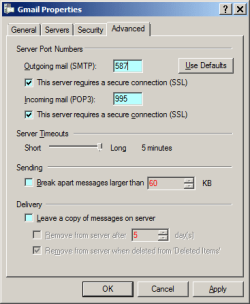
Check your account properties 'Servers' tab for input spelling errors. Then go to the 'Advanced' tab, it should look like this:-

RR.png
 

My Computer My Computer

At a glance

Win7 H.Prem. 32bit+SP1
Computer Manufacturer/Model Number
Look in my Signature.
OS
Win7 H.Prem. 32bit+SP1
Hi there,

I changed the settings - mine had ports 2525 and 110 and no SSL checked - I just copied the settings from my old laptop.

Now I got this message

Unable to send or receive messages for the Avalonmoz (jenni) account. The connection to the server has failed.
Server: 'mail.avalonmoz.com'
Windows Live Mail Error ID: 0x800CCC0E
Protocol: POP3
Port: 995
Secure(SSL): Yes
Socket Error: 10013
 

My Computer My Computer

At a glance

Windows 7 Home Premium 64 bitIntel (R) Core (TM) i5-2450M CPU @2.5GHz
Computer Manufacturer/Model Number
Sony Vaio
OS
Windows 7 Home Premium 64 bit
CPU
Intel (R) Core (TM) i5-2450M CPU @2.5GHz
I also set up my husbands email account and another one from work, and I got the same. The passwords are all correct and working fine on the other computers.
 

My Computer My Computer

At a glance

Windows 7 Home Premium 64 bitIntel (R) Core (TM) i5-2450M CPU @2.5GHz
Computer Manufacturer/Model Number
Sony Vaio
OS
Windows 7 Home Premium 64 bit
CPU
Intel (R) Core (TM) i5-2450M CPU @2.5GHz
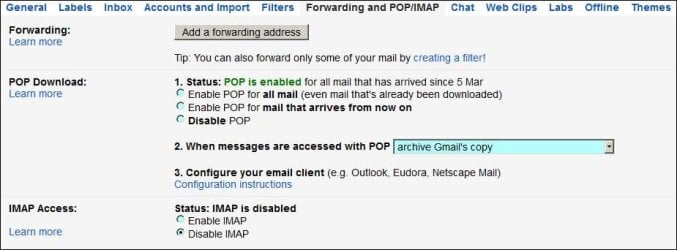
Has POP been set to 'on' in the Avalonmoz (jenni) account.?
 

My Computer My Computer

At a glance

Win7 H.Prem. 32bit+SP1
Computer Manufacturer/Model Number
Look in my Signature.
OS
Win7 H.Prem. 32bit+SP1
Do you mean where in asks for authentication? I have the options:

log on with clear text authentication
" secure password authentication
" authenticated POP (APOP)

the first one is checked.
 

My Computer My Computer

At a glance

Windows 7 Home Premium 64 bitIntel (R) Core (TM) i5-2450M CPU @2.5GHz
Computer Manufacturer/Model Number
Sony Vaio
OS
Windows 7 Home Premium 64 bit
CPU
Intel (R) Core (TM) i5-2450M CPU @2.5GHz
I've been trying to copy ans paste, but it won't work.

My settings are like this

incoming POP3 mail.avalonmoz.com
outgoing SMTP mail.avalonmoz.com
[email protected]
* log on using clear text
Outgoing requires authentication - settings same as incoming

Then,
outgoing (SMTP) 2525
incoming POP3 110
and no SSL required
 

My Computer My Computer

At a glance

Windows 7 Home Premium 64 bitIntel (R) Core (TM) i5-2450M CPU @2.5GHz
Computer Manufacturer/Model Number
Sony Vaio
OS
Windows 7 Home Premium 64 bit
CPU
Intel (R) Core (TM) i5-2450M CPU @2.5GHz
NO! I mean by accessing your account settings directly as my Gmail image shows.

RR.JPG
 

My Computer My Computer

At a glance

Win7 H.Prem. 32bit+SP1
Computer Manufacturer/Model Number
Look in my Signature.
OS
Win7 H.Prem. 32bit+SP1
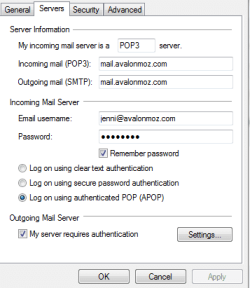
Jenni, can you post an image of your account properties 'Servers' tab.
 

My Computer My Computer

At a glance

Win7 H.Prem. 32bit+SP1
Computer Manufacturer/Model Number
Look in my Signature.
OS
Win7 H.Prem. 32bit+SP1
I'm trying to send a screen capture - not done this before!!
servers tab.PNG

In that last screen you sent, where did you find those screens? Should I be looking on my actual Networks Solutions site?

It is now clear that it is all our avalonmoz.com e-mails that are not working with WLM, so I'm guessing it must need different setting to the older email software we have all been using.
 

My Computer My Computer

At a glance

Windows 7 Home Premium 64 bitIntel (R) Core (TM) i5-2450M CPU @2.5GHz
Computer Manufacturer/Model Number
Sony Vaio
OS
Windows 7 Home Premium 64 bit
CPU
Intel (R) Core (TM) i5-2450M CPU @2.5GHz
Hi Jenni,
As in your image above:-
In the box 'incoming mail' (POP3) delete all and input:- pop.avalonmoz.com
In the box 'Outgoing mail' (SMTP) delete all and input:- smtp.avalonmoz.com
Then set the 'Advanced' tab as in my image exactly.
 

My Computer My Computer

At a glance

Win7 H.Prem. 32bit+SP1
Computer Manufacturer/Model Number
Look in my Signature.
OS
Win7 H.Prem. 32bit+SP1
Hi there,

I have deleted and reentered the incoming and outgoing to read pop. and smtp. respectively.

My advanced tab doesn't look like yours does though, unless you have sent something else? I am attaching a copy of my advanced tab.

Advanced tab.PNG

I reslly hope that we can resolve this. I looked up help from network solutions and followed that exactly - but it still won't work! I really appreciate your help!
 

My Computer My Computer

At a glance

Windows 7 Home Premium 64 bitIntel (R) Core (TM) i5-2450M CPU @2.5GHz
Computer Manufacturer/Model Number
Sony Vaio
OS
Windows 7 Home Premium 64 bit
CPU
Intel (R) Core (TM) i5-2450M CPU @2.5GHz
Hi there again - so sorry, I have now found the first copy of your advanced tab that you sent - I am finding it a bit tricky moving around the forum!

I will try that now......
 

My Computer My Computer

At a glance

Windows 7 Home Premium 64 bitIntel (R) Core (TM) i5-2450M CPU @2.5GHz
Computer Manufacturer/Model Number
Sony Vaio
OS
Windows 7 Home Premium 64 bit
CPU
Intel (R) Core (TM) i5-2450M CPU @2.5GHz
I can't believe this, I have got everything entered exactly and it still won't work. I'm getting this message,

Unable to send or receive messages for the Avalonmoz (jenni) account. The connection to the server has failed.
Server: 'pop.avalonmoz.com'
Windows Live Mail Error ID: 0x800CCC0E
Protocol: POP3
Port: 995
Secure(SSL): Yes
Socket Error: 10013
 

My Computer My Computer

At a glance

Windows 7 Home Premium 64 bitIntel (R) Core (TM) i5-2450M CPU @2.5GHz
Computer Manufacturer/Model Number
Sony Vaio
OS
Windows 7 Home Premium 64 bit
CPU
Intel (R) Core (TM) i5-2450M CPU @2.5GHz
Hi Jenni, sorry for my delayed reply. You never tickd the 2 boxes ending ....SSL you will have to reinput 587 in the top box.
 

My Computer My Computer

At a glance

Win7 H.Prem. 32bit+SP1
Computer Manufacturer/Model Number
Look in my Signature.
OS
Win7 H.Prem. 32bit+SP1
@sonyvaio2012:

the network solutions instructions for WLM
This tutorial will take you through the step by step process of setting up your Network Solutions email with Windows Live Mail for windows 7. If you would like to see a video step by step click here.
  1. With Windows live mail open click the add email account link
  2. Enter the following information:
  3. Email Address: Enter your full mail address
    [email protected]
  4. Password: Enter your password.
    ********
  5. Your Name: Enter your name as you would like it to appear in the "From" field of your outgoing messages.
    YourName
  6. Click the check mark box that says Manually configure server settings
  7. For your server information enter:
    1. For your Incoming mail server (POP3): type "mail" followed by your domain name (e.g. mail.example.com)
      mail.avalon.com
    2. For your Outgoing mail server (SMTP): type "smtp." followed by your domain name (e.g. smtp.example.com)
      smtp.avalon.com
  8. For your Login ID: enter your full Network Solutions' Email Address.
    [email protected]
  9. Click on the check mark box for “Outgoing Server Requires Authentication
  10. Change your outgoing server setting to 2525 or 587 if you are with Verizon you should change your port to 587
  11. Click next then finish to complete your email setup
and........

When setting up:

  • POP - choose POP and the incoming server port will default to 110
  • IMAP - choose IMAP and the incoming server port will default to 143
  • All other settings are the same.

Note - Substitute your actual domain name for "yourdomain.com" and substitute the first part of your email address for "user."


  • Username = [email protected]
  • Password = the password you set up when you configured your mail box
  • Incoming Mail Server = mail.yourdomain.com
  • Outgoing Mail Server = smtp.yourdomain.com
    • Outgoing Server Requires Authentication (typically found in advanced options or settings)
    • Do NOT check "Log on Using Secure Password Authentication"
    • Use the same Username and Password as Incoming or select "Use Same Settings as Incoming"
  • Outgoing Server Port = 2525 or 587
    • This is subject to change based on the individual preferences of your ISP


My Computer My Computer

At a glance

x64 (6.3.9600) Win8.1 Pro & soon dual boot x6...AMD A6-3420M APU with Radeon(tm) HD Graphics6.00 GBAMD Radeon(TM) HD 6520G
Computer type
Laptop
Computer Manufacturer/Model Number
HP Pavilion dv6-6c10us
OS
x64 (6.3.9600) Win8.1 Pro & soon dual boot x64 (6.1.7601) Win7_SP1 HomePrem
CPU
AMD A6-3420M APU with Radeon(tm) HD Graphics
Motherboard
Hewlett-Packard 1805
Memory
6.00 GB
Graphics Card(s)
AMD Radeon(TM) HD 6520G
Sound Card
(1) AMD High Definition Audio Device (2) IDT High Definiti
Monitor(s) Displays
HP W2072a 20" LCD (1600 x 900) @ 60 Hz
Screen Resolution
1366 x 768 x 32 bits (4294967296 colors) @ 60 Hz
Hard Drives
ST640LM0 00 HM641JI SATA Disk Device
Keyboard
Logitech k520 wireless KB
Mouse
Logitech m320 wireless mouse (bundled with KB)
Internet Speed
15/5 | 54 MB Wireless 'n'
Antivirus
Realtime: Defender or Avast | On-demand: Malwarebytes, ESET
Browser
IE 11 on Win8, IE 10 on win 7
Other Info
Media: [Gimp, Audacity, VLC] || Comm: [WEmail 2012, Skype] || Productivity: [OpenOffice,| Textpad] || Utils: [Sysinternals, cCleaner, Speccy, Defraggler]
Back
Top