Solved Windows Live Mail Error ID: 0x80004005 Windows 7

My Computer My Computer

At a glance

Windows 7 Home Premium 64 bitIntel (R) Core (TM) i5-2450M CPU @2.5GHz
Computer Manufacturer/Model Number
Sony Vaio
OS
Windows 7 Home Premium 64 bit
CPU
Intel (R) Core (TM) i5-2450M CPU @2.5GHz
What anti-virus program do you have?
Is it set to scan eMail? If it is change it to NOT scan eMail and try WLM again.[/QUOTE]

I have been on to the norton, but I cannot see an option to take off e mail scan.
 

My Computer My Computer

At a glance

Windows 7 Home Premium 64 bitIntel (R) Core (TM) i5-2450M CPU @2.5GHz
Computer Manufacturer/Model Number
Sony Vaio
OS
Windows 7 Home Premium 64 bit
CPU
Intel (R) Core (TM) i5-2450M CPU @2.5GHz
Hi Slartybart,
my post #35 was using the account name & password Jenni sent in an email.
You'll also notice the settings shown in my post #36 and your post #32 don't match.
Post #37 Between the three of us, this issue will get resolved.
I always thought 2's company, 3's a crowd.:D


Hey , guys........

do you know each other??

I promise that I am trying everything that either of you are suggesting.

I will just be so grateful to get this problem sorted out. We have our own business here and this is causing such a problem for me.

Thanks you - both - for helping me. I really appreciate your efforts on my behalf.
 

My Computer My Computer

At a glance

Windows 7 Home Premium 64 bitIntel (R) Core (TM) i5-2450M CPU @2.5GHz
Computer Manufacturer/Model Number
Sony Vaio
OS
Windows 7 Home Premium 64 bit
CPU
Intel (R) Core (TM) i5-2450M CPU @2.5GHz
Researching a different issue, I found that a lot of Windows related issues have been fixed in ESET v5.2.
ESET website search results for: ESET upgrade

In post 34 I mentioned turning off AV mail scanning. I took a look at ESET and found this:
Don't fret too much about the "not recommended" warning. That layer of protection is somewhat redundant since any AV product worth it's reputation scans the email when it is stored as a file.

I have searched and I can't find anything to do with ESET.
 

My Computer My Computer

At a glance

Windows 7 Home Premium 64 bitIntel (R) Core (TM) i5-2450M CPU @2.5GHz
Computer Manufacturer/Model Number
Sony Vaio
OS
Windows 7 Home Premium 64 bit
CPU
Intel (R) Core (TM) i5-2450M CPU @2.5GHz
Sorry Jenni, I thought you were using ESET. My comment about ESET must have confused you a lot. I removed my post from this thread regarding ESET - I wonder who I was helping on that problem.

No, Roderunner and I are just both users here - we don't know each other. Well, we do now.

The settings in my post 32 are the ones documented by NS and they work on my machine. They work on your office machines. They work on your tablet. I was also able to send and receive a number of test eMails using those settings and the testid you provided. Please stick with those settings, I know you had to use your tablet because of the issue we're trying to solve on your new machine.

Just so I'm clear - you have Norton right?

Going back through the thread I saw in post# 5 that your WLM is fine using Gmail servers - is this correct? If so, the issue is not WLM or anti-virus on your machine. I'll have a look at NS again.

Could you set up an account in WLM per post#32 and do another test? There's been a number of changes and I'd like to get a clean test with any error codes. Please do not make any other changes to the WLM account.

To make this easier, I sent you the account configuration from my machine that uses your servers. I'll reference AvalonJen as the account once you import that config, ok?

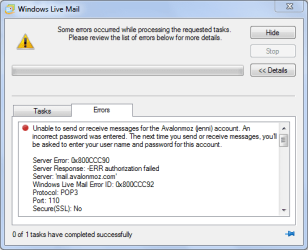
I'd like to see screen shots of the configuration and any error codes you get when WLM tries to receive. I know this sounds like you've been here before - you have, but there have been a number of conflicting suggestions and I'm not sure what was set when. So we'll take it one step at a time. I'd like to focus on the error you post#1.

Thanks for your patience. Let me see what NetSol can tell me about the WLM issue you're experiencing.

No, I cannot login into your machine. I suppose I could technically, but I'm just a volunteer here.

 

My Computer My Computer

At a glance

x64 (6.3.9600) Win8.1 Pro & soon dual boot x6...AMD A6-3420M APU with Radeon(tm) HD Graphics6.00 GBAMD Radeon(TM) HD 6520G
Computer type
Laptop
Computer Manufacturer/Model Number
HP Pavilion dv6-6c10us
OS
x64 (6.3.9600) Win8.1 Pro & soon dual boot x64 (6.1.7601) Win7_SP1 HomePrem
CPU
AMD A6-3420M APU with Radeon(tm) HD Graphics
Motherboard
Hewlett-Packard 1805
Memory
6.00 GB
Graphics Card(s)
AMD Radeon(TM) HD 6520G
Sound Card
(1) AMD High Definition Audio Device (2) IDT High Definiti
Monitor(s) Displays
HP W2072a 20" LCD (1600 x 900) @ 60 Hz
Screen Resolution
1366 x 768 x 32 bits (4294967296 colors) @ 60 Hz
Hard Drives
ST640LM0 00 HM641JI SATA Disk Device
Keyboard
Logitech k520 wireless KB
Mouse
Logitech m320 wireless mouse (bundled with KB)
Internet Speed
15/5 | 54 MB Wireless 'n'
Antivirus
Realtime: Defender or Avast | On-demand: Malwarebytes, ESET
Browser
IE 11 on Win8, IE 10 on win 7
Other Info
Media: [Gimp, Audacity, VLC] || Comm: [WEmail 2012, Skype] || Productivity: [OpenOffice,| Textpad] || Utils: [Sysinternals, cCleaner, Speccy, Defraggler]
There are a number of threads solved that relate to WLM accounts. I'm hoping that once you setup AvalonJen as a new account in WLM using the config file I sent you, the issue will be resolved.

Those threads involve mail being stuck in the account - so a new account shouldn't have that issue.

We'll see.
 

My Computer My Computer

At a glance

x64 (6.3.9600) Win8.1 Pro & soon dual boot x6...AMD A6-3420M APU with Radeon(tm) HD Graphics6.00 GBAMD Radeon(TM) HD 6520G
Computer type
Laptop
Computer Manufacturer/Model Number
HP Pavilion dv6-6c10us
OS
x64 (6.3.9600) Win8.1 Pro & soon dual boot x64 (6.1.7601) Win7_SP1 HomePrem
CPU
AMD A6-3420M APU with Radeon(tm) HD Graphics
Motherboard
Hewlett-Packard 1805
Memory
6.00 GB
Graphics Card(s)
AMD Radeon(TM) HD 6520G
Sound Card
(1) AMD High Definition Audio Device (2) IDT High Definiti
Monitor(s) Displays
HP W2072a 20" LCD (1600 x 900) @ 60 Hz
Screen Resolution
1366 x 768 x 32 bits (4294967296 colors) @ 60 Hz
Hard Drives
ST640LM0 00 HM641JI SATA Disk Device
Keyboard
Logitech k520 wireless KB
Mouse
Logitech m320 wireless mouse (bundled with KB)
Internet Speed
15/5 | 54 MB Wireless 'n'
Antivirus
Realtime: Defender or Avast | On-demand: Malwarebytes, ESET
Browser
IE 11 on Win8, IE 10 on win 7
Other Info
Media: [Gimp, Audacity, VLC] || Comm: [WEmail 2012, Skype] || Productivity: [OpenOffice,| Textpad] || Utils: [Sysinternals, cCleaner, Speccy, Defraggler]
I think I know the root cause of this issue. WLM "helps" you set up an account by filling in values for known servers (Gmail, Yahoo, Hotmail, etc.).

I suspect that when you set up the Gmail account - WLM used it's known IMAP configuration. That's why your WLM doesn't have the same problem when you connect through Gmail servers.

I also suspect that when you set up Avalon, that WLM tried to help configure the account for you. There's no way WLM could know about Avalon because it's your private domain, not a public domain - so WLM took an educated guess. This is where I believe the issue begins. Some times WLM's best guess corrupts accounts - I have seen this before on my own machine.

POP3 and IMAP are just different protocols for messaging.

There are two paths that will test this theory.

  1. Import the WLM account I eMailed to you.
    You'll need to tick "Include this account when receiving or synchronizing" on the General Tab of this account's properties
  2. Set up a new account for your user / domain using IMAP.
    Note: tick the manual configure box if you set up this account

    There are two differences from what I posted in #32
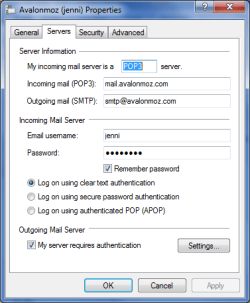
    • Server Type=IMAP, not POP3
    • incoming port=143, not 110
    • everything else is the same as in #32
I'm fairly certain that either of these tracks will solve the incoming mail issue in WLM. But... the other PC with WinMail causes some doubt.
 

My Computer My Computer

At a glance

x64 (6.3.9600) Win8.1 Pro & soon dual boot x6...AMD A6-3420M APU with Radeon(tm) HD Graphics6.00 GBAMD Radeon(TM) HD 6520G
Computer type
Laptop
Computer Manufacturer/Model Number
HP Pavilion dv6-6c10us
OS
x64 (6.3.9600) Win8.1 Pro & soon dual boot x64 (6.1.7601) Win7_SP1 HomePrem
CPU
AMD A6-3420M APU with Radeon(tm) HD Graphics
Motherboard
Hewlett-Packard 1805
Memory
6.00 GB
Graphics Card(s)
AMD Radeon(TM) HD 6520G
Sound Card
(1) AMD High Definition Audio Device (2) IDT High Definiti
Monitor(s) Displays
HP W2072a 20" LCD (1600 x 900) @ 60 Hz
Screen Resolution
1366 x 768 x 32 bits (4294967296 colors) @ 60 Hz
Hard Drives
ST640LM0 00 HM641JI SATA Disk Device
Keyboard
Logitech k520 wireless KB
Mouse
Logitech m320 wireless mouse (bundled with KB)
Internet Speed
15/5 | 54 MB Wireless 'n'
Antivirus
Realtime: Defender or Avast | On-demand: Malwarebytes, ESET
Browser
IE 11 on Win8, IE 10 on win 7
Other Info
Media: [Gimp, Audacity, VLC] || Comm: [WEmail 2012, Skype] || Productivity: [OpenOffice,| Textpad] || Utils: [Sysinternals, cCleaner, Speccy, Defraggler]
There are a few other things you can try if the new POP3 or IMAP account doesn't help.

Repair WLM - go to Control Panel -> Programs and Features
Dbl Click WLM and select Repair


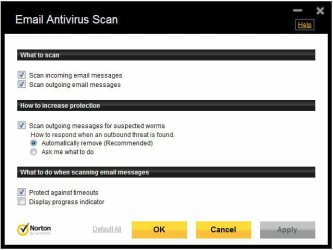
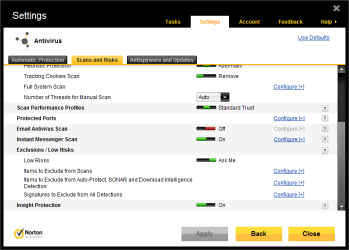
Norton eMail scan settings.

The easiest way to test to see if Norton eMail scannng is the culprit is to turn that option off completely. If turning that off solves the problem, then you could leave it off - it's a redundant scan anyway - or turn it back on and try different configurations for that option.

Outbound eMail seems to work ok on your machine - so focus on the inbound configuration in Norton eMail scanning. I'd try turning off the timeout setting - if WLM receives mail (inbound/pop) then that was causing the problem. Then I'd try turning off the inbound scan in Norton. If any of these settings gets WLM working, then it definitely is Norton.
 

Attachments

  • Norton eMail Scan.jpg
    Norton eMail Scan.jpg
    49.3 KB · Views: 12
  • Norton eMail Scan-b.jpg
    Norton eMail Scan-b.jpg
    30.7 KB · Views: 14

My Computer My Computer

At a glance

x64 (6.3.9600) Win8.1 Pro & soon dual boot x6...AMD A6-3420M APU with Radeon(tm) HD Graphics6.00 GBAMD Radeon(TM) HD 6520G
Computer type
Laptop
Computer Manufacturer/Model Number
HP Pavilion dv6-6c10us
OS
x64 (6.3.9600) Win8.1 Pro & soon dual boot x64 (6.1.7601) Win7_SP1 HomePrem
CPU
AMD A6-3420M APU with Radeon(tm) HD Graphics
Motherboard
Hewlett-Packard 1805
Memory
6.00 GB
Graphics Card(s)
AMD Radeon(TM) HD 6520G
Sound Card
(1) AMD High Definition Audio Device (2) IDT High Definiti
Monitor(s) Displays
HP W2072a 20" LCD (1600 x 900) @ 60 Hz
Screen Resolution
1366 x 768 x 32 bits (4294967296 colors) @ 60 Hz
Hard Drives
ST640LM0 00 HM641JI SATA Disk Device
Keyboard
Logitech k520 wireless KB
Mouse
Logitech m320 wireless mouse (bundled with KB)
Internet Speed
15/5 | 54 MB Wireless 'n'
Antivirus
Realtime: Defender or Avast | On-demand: Malwarebytes, ESET
Browser
IE 11 on Win8, IE 10 on win 7
Other Info
Media: [Gimp, Audacity, VLC] || Comm: [WEmail 2012, Skype] || Productivity: [OpenOffice,| Textpad] || Utils: [Sysinternals, cCleaner, Speccy, Defraggler]
Nortonemailscanoff.PNGHi there,

Okay, I'm back with my computer. I copied your screenshot and found the Norton e-mail off option. I will new set up my account again and send you the screen shots of that.
 

My Computer My Computer

At a glance

Windows 7 Home Premium 64 bitIntel (R) Core (TM) i5-2450M CPU @2.5GHz
Computer Manufacturer/Model Number
Sony Vaio
OS
Windows 7 Home Premium 64 bit
CPU
Intel (R) Core (TM) i5-2450M CPU @2.5GHz
Could you set up an account in WLM per post#32 and do another test? There's been a number of changes and I'd like to get a clean test with any error codes. Please do not make any other changes to the WLM account.

To make this easier, I sent you the account configuration from my machine that uses your servers. I'll reference AvalonJen as the account once you import that config, ok?

I'd like to see screen shots of the configuration and any error codes you get when WLM tries to receive.

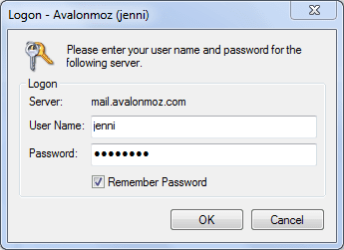
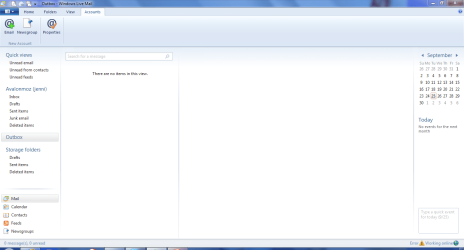
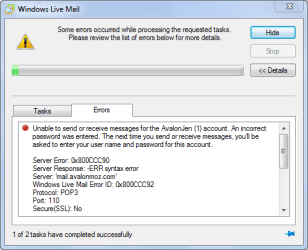
Okay, I set up a new account as per 32 and these are the screen shots. It asks for my password about 3 times before the final error message.


2.PNG

3.PNG

4.PNG

5.PNG

6.PNG[/ATTACH]

I can access my e-mail by going on to Network solutions website from my computer, so I will download and try your config file next.
 

My Computer My Computer

At a glance

Windows 7 Home Premium 64 bitIntel (R) Core (TM) i5-2450M CPU @2.5GHz
Computer Manufacturer/Model Number
Sony Vaio
OS
Windows 7 Home Premium 64 bit
CPU
Intel (R) Core (TM) i5-2450M CPU @2.5GHz
  1. Import the WLM account I eMailed to you.
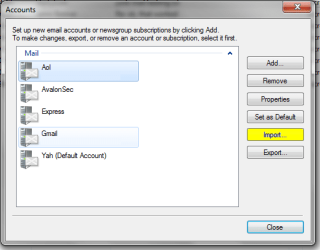
I know it must be here, but I can't find where I have the option on import or export??

WLM1.PNG
 

My Computer My Computer

At a glance

Windows 7 Home Premium 64 bitIntel (R) Core (TM) i5-2450M CPU @2.5GHz
Computer Manufacturer/Model Number
Sony Vaio
OS
Windows 7 Home Premium 64 bit
CPU
Intel (R) Core (TM) i5-2450M CPU @2.5GHz
Hi again,

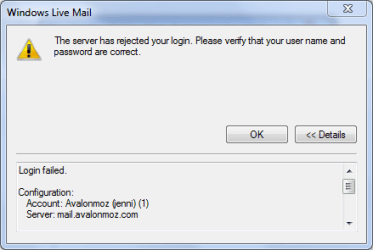
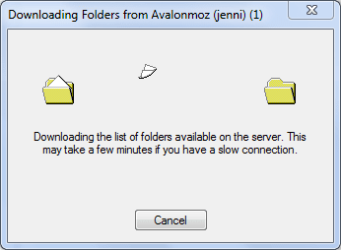
I started again with a new account and the IMAP settings. It then says it has to download folders before I can read messages... and then comes up with these errors.

I promise that my password is correct. It works on everyhting else!!

IMAP.PNG

IMAP2.PNG

IMAP3.PNG
 

My Computer My Computer

At a glance

Windows 7 Home Premium 64 bitIntel (R) Core (TM) i5-2450M CPU @2.5GHz
Computer Manufacturer/Model Number
Sony Vaio
OS
Windows 7 Home Premium 64 bit
CPU
Intel (R) Core (TM) i5-2450M CPU @2.5GHz
Ok, good so far. Glad you could find the Norton eMail scan setting - that might help. When this is done, you might decide to turn it back on, but if eMail stops afterwards, you know where to turn it off.

First, the SMTP server is smtp.avalonmoz.com...... not smtp@avalonmoz.com
see if that corrects the server error in post# 51

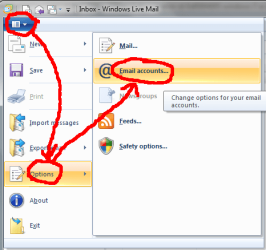
Second, I thought the import might might not be clear. The little blue box to the left of the ribbon menus is the drop down menu..... see attached image. Yeah, I know I said Export before...... found out that options works too and it is easier to describe.

Third, I don't see anything wrong with the IMAP account. The login fails, it starts the folder download and then times out.

The next steps are up to you, but keep me up-to-date on what you do.
1. Correct the Outgoing Server on the POP3 shown in #51
--> I do this all the time. My fingers think @ not dot - lol
2. Import the account I sent - hopefully I clarified how to get to the dialog so you can accomplish that
3. Provide more account information (screenshots) of the IMAP account - perhaps there are typos in that - dunno
--> The Details tab scroll box might provide more info - the screen shot only shows login failed, account, and server.

The above suggestions are OR (1 or 2 or 3) - take it one step at a time. Try send/receive after each, if one works for you, you're done. If not, you can try the next.
 

Attachments

  • a0.png
    a0.png
    17.8 KB · Views: 5
  • a1.PNG
    a1.PNG
    13.6 KB · Views: 7

My Computer My Computer

At a glance

x64 (6.3.9600) Win8.1 Pro & soon dual boot x6...AMD A6-3420M APU with Radeon(tm) HD Graphics6.00 GBAMD Radeon(TM) HD 6520G
Computer type
Laptop
Computer Manufacturer/Model Number
HP Pavilion dv6-6c10us
OS
x64 (6.3.9600) Win8.1 Pro & soon dual boot x64 (6.1.7601) Win7_SP1 HomePrem
CPU
AMD A6-3420M APU with Radeon(tm) HD Graphics
Motherboard
Hewlett-Packard 1805
Memory
6.00 GB
Graphics Card(s)
AMD Radeon(TM) HD 6520G
Sound Card
(1) AMD High Definition Audio Device (2) IDT High Definiti
Monitor(s) Displays
HP W2072a 20" LCD (1600 x 900) @ 60 Hz
Screen Resolution
1366 x 768 x 32 bits (4294967296 colors) @ 60 Hz
Hard Drives
ST640LM0 00 HM641JI SATA Disk Device
Keyboard
Logitech k520 wireless KB
Mouse
Logitech m320 wireless mouse (bundled with KB)
Internet Speed
15/5 | 54 MB Wireless 'n'
Antivirus
Realtime: Defender or Avast | On-demand: Malwarebytes, ESET
Browser
IE 11 on Win8, IE 10 on win 7
Other Info
Media: [Gimp, Audacity, VLC] || Comm: [WEmail 2012, Skype] || Productivity: [OpenOffice,| Textpad] || Utils: [Sysinternals, cCleaner, Speccy, Defraggler]
Hi there,

Right, I found the drop down menu as you showed (duh!!) and I imported your configuration. I noted that it had the 2525, but otherwise was the same as I've been trying. Except for my mistake on the smtp@!!

I get this error message

password error.PNG

It just seems to be determined to not recognise me, although it is still sending mail, even photos - so larger emails.

I remember you wrote about "fix" WLM, I will look for that message and go and do that now.
 

My Computer My Computer

At a glance

Windows 7 Home Premium 64 bitIntel (R) Core (TM) i5-2450M CPU @2.5GHz
Computer Manufacturer/Model Number
Sony Vaio
OS
Windows 7 Home Premium 64 bit
CPU
Intel (R) Core (TM) i5-2450M CPU @2.5GHz
Hi,

I found your thread and I had done this before. It says windows live essentials rather than mail, so I thought I hadn't done it.

Anyway, I thought I should just do it again anyway. It said Windows live essential successfully fixed.

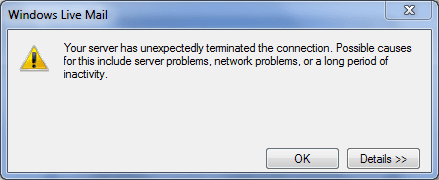
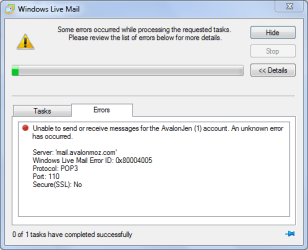
So I tried WLM again and got this message, which is right back to where I started!!

errormessage.PNG
 

My Computer My Computer

At a glance

Windows 7 Home Premium 64 bitIntel (R) Core (TM) i5-2450M CPU @2.5GHz
Computer Manufacturer/Model Number
Sony Vaio
OS
Windows 7 Home Premium 64 bit
CPU
Intel (R) Core (TM) i5-2450M CPU @2.5GHz
Yeah, we're back to the beginning which is ok because all of the changes to the accounts are out of the way.

Let make sure I know where your system stands
AvalonJen imported
WL repaired sucessfully
SMTP: Outgoing mail is ok
POP3: incoming mail error-0x80004005
Original account is not included in receiving or synchronizing
IMAP account is not included in receiving or synchronizing
Norton eMail scanniing is turned off.

If you verify all of the above and have booted your system and incoming eMail is giving you the error - we'll go to the next possible fix.

Open an elevated Command Prompt (right click - run as administrator)

In the command prompt window execute the following commands - post any errors
cd C:\windows\SysWow64

regsvr32 jscript.dll

regsvr32 vbscript.dll
Boot your system and try eMail

There is a followup step to this that might be necessary, but let's see if this alone fixes it.
 

My Computer My Computer

At a glance

x64 (6.3.9600) Win8.1 Pro & soon dual boot x6...AMD A6-3420M APU with Radeon(tm) HD Graphics6.00 GBAMD Radeon(TM) HD 6520G
Computer type
Laptop
Computer Manufacturer/Model Number
HP Pavilion dv6-6c10us
OS
x64 (6.3.9600) Win8.1 Pro & soon dual boot x64 (6.1.7601) Win7_SP1 HomePrem
CPU
AMD A6-3420M APU with Radeon(tm) HD Graphics
Motherboard
Hewlett-Packard 1805
Memory
6.00 GB
Graphics Card(s)
AMD Radeon(TM) HD 6520G
Sound Card
(1) AMD High Definition Audio Device (2) IDT High Definiti
Monitor(s) Displays
HP W2072a 20" LCD (1600 x 900) @ 60 Hz
Screen Resolution
1366 x 768 x 32 bits (4294967296 colors) @ 60 Hz
Hard Drives
ST640LM0 00 HM641JI SATA Disk Device
Keyboard
Logitech k520 wireless KB
Mouse
Logitech m320 wireless mouse (bundled with KB)
Internet Speed
15/5 | 54 MB Wireless 'n'
Antivirus
Realtime: Defender or Avast | On-demand: Malwarebytes, ESET
Browser
IE 11 on Win8, IE 10 on win 7
Other Info
Media: [Gimp, Audacity, VLC] || Comm: [WEmail 2012, Skype] || Productivity: [OpenOffice,| Textpad] || Utils: [Sysinternals, cCleaner, Speccy, Defraggler]
Hi,

I can verify ask the items on your list - until you say ”boot your system”. If I have, I'm not aware of doing it! I'm not sure how to either! Sorry, not the most literate, but I good at following instructions.

I'm also not sure where to input the command prompt once I have booted.
 

My Computer My Computer

At a glance

Windows 7 Home Premium 64 bitIntel (R) Core (TM) i5-2450M CPU @2.5GHz
Computer Manufacturer/Model Number
Sony Vaio
OS
Windows 7 Home Premium 64 bit
CPU
Intel (R) Core (TM) i5-2450M CPU @2.5GHz
You're doing ok, I need to learn to speak human - lol

Boot = restart

See if receiving mail works after you restart the computer and then I'll walk you thru the command prompt - how to launch as administrator....if we need to do that step.

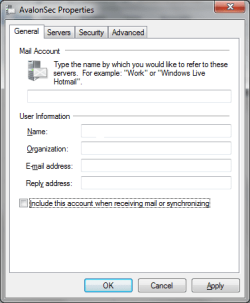
I'm only interested in the AvalonJen account - I know that is configured per Network Solutions recommended settings. Please modify the properties of all other accounts (see image):
clear the box next to "Include this account when receiving mail or synchronizing.

Thanks for being so patient and following instructions and providing feedback - it really does help. It just takes time - our timezone difference doesn't help either.

While I'm thinking about it, have you run Windows Update and update Norton - making sure everything is up-to-date eliminates some problems. If you haven't yet, please do update both Windows and Norton. - Thanks.

There are many possible causes and I'm trying to eliminate them one at a time, the "easiest" first.
.
 

Attachments

  • donotinclude.png
    donotinclude.png
    11.2 KB · Views: 8

My Computer My Computer

At a glance

x64 (6.3.9600) Win8.1 Pro & soon dual boot x6...AMD A6-3420M APU with Radeon(tm) HD Graphics6.00 GBAMD Radeon(TM) HD 6520G
Computer type
Laptop
Computer Manufacturer/Model Number
HP Pavilion dv6-6c10us
OS
x64 (6.3.9600) Win8.1 Pro & soon dual boot x64 (6.1.7601) Win7_SP1 HomePrem
CPU
AMD A6-3420M APU with Radeon(tm) HD Graphics
Motherboard
Hewlett-Packard 1805
Memory
6.00 GB
Graphics Card(s)
AMD Radeon(TM) HD 6520G
Sound Card
(1) AMD High Definition Audio Device (2) IDT High Definiti
Monitor(s) Displays
HP W2072a 20" LCD (1600 x 900) @ 60 Hz
Screen Resolution
1366 x 768 x 32 bits (4294967296 colors) @ 60 Hz
Hard Drives
ST640LM0 00 HM641JI SATA Disk Device
Keyboard
Logitech k520 wireless KB
Mouse
Logitech m320 wireless mouse (bundled with KB)
Internet Speed
15/5 | 54 MB Wireless 'n'
Antivirus
Realtime: Defender or Avast | On-demand: Malwarebytes, ESET
Browser
IE 11 on Win8, IE 10 on win 7
Other Info
Media: [Gimp, Audacity, VLC] || Comm: [WEmail 2012, Skype] || Productivity: [OpenOffice,| Textpad] || Utils: [Sysinternals, cCleaner, Speccy, Defraggler]
Norton "solutions"

Keep in mind that our focus is on POP3 - Gmail works because it is most likely configured as an IMAP account (can you confirm that the Gmail account in WLM uses POP3?)

Try posts 59 and 60 first

and as always - restart your computer after each step - then try eMail.

- we'll come back to post 57 later (I'm building a cmd file to make it really easy for you)


.
 

My Computer My Computer

At a glance

x64 (6.3.9600) Win8.1 Pro & soon dual boot x6...AMD A6-3420M APU with Radeon(tm) HD Graphics6.00 GBAMD Radeon(TM) HD 6520G
Computer type
Laptop
Computer Manufacturer/Model Number
HP Pavilion dv6-6c10us
OS
x64 (6.3.9600) Win8.1 Pro & soon dual boot x64 (6.1.7601) Win7_SP1 HomePrem
CPU
AMD A6-3420M APU with Radeon(tm) HD Graphics
Motherboard
Hewlett-Packard 1805
Memory
6.00 GB
Graphics Card(s)
AMD Radeon(TM) HD 6520G
Sound Card
(1) AMD High Definition Audio Device (2) IDT High Definiti
Monitor(s) Displays
HP W2072a 20" LCD (1600 x 900) @ 60 Hz
Screen Resolution
1366 x 768 x 32 bits (4294967296 colors) @ 60 Hz
Hard Drives
ST640LM0 00 HM641JI SATA Disk Device
Keyboard
Logitech k520 wireless KB
Mouse
Logitech m320 wireless mouse (bundled with KB)
Internet Speed
15/5 | 54 MB Wireless 'n'
Antivirus
Realtime: Defender or Avast | On-demand: Malwarebytes, ESET
Browser
IE 11 on Win8, IE 10 on win 7
Other Info
Media: [Gimp, Audacity, VLC] || Comm: [WEmail 2012, Skype] || Productivity: [OpenOffice,| Textpad] || Utils: [Sysinternals, cCleaner, Speccy, Defraggler]
Back
Top