Windows Live Mail - lost contacts

tielfeathers

New member
Local time
2:25 PM
Messages
10
I have been using windows live mail for years, and today I noticed my contacts have all disappeared. I try to restore to a former date, but it wouldn't let me do that, either. I have Windows 7, had taken the computer in because my windows mail got corrupted and it kept downloading Outlook.com for my mail. I did not want that mail program. The computer tech fixed it for me, but at that point my contacts disappeared. AFter working on it longer, I don't know what he did, but the contacts showed up finally.

That was three days ago, now my contacts are gone again. Any suggestions how to get them back? When I log into my email program, it is titled Windows Live Mail 2012.

Thank you.
 

My Computer

OS
windows 7 Home premium
Hello Tielfeathers,

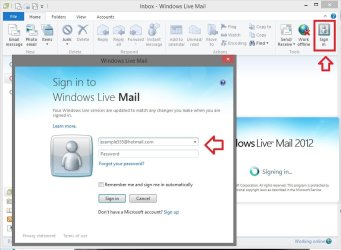
With the way they are disappearing like that, you might check to see if you are still signed in to Windows Live Mail with your Microsoft account (Windows Live account) like below.

Usually your contacts are tied to the account you sign in to WLM with.

Sign-in.jpg

Hope this helps, :)
Shawn
 

My Computer

Computer type
PC/Desktop
Computer Manufacturer/Model Number
Self built custom
OS
64-bit Windows 11 Pro for Workstations
CPU
Intel i7-8700K OC'd to 5 GHz
Motherboard
ASUS ROG Maximus XI Formula Z390
Memory
64 GB (4x16GB) G.SKILL TridentZ RGB DDR4 3600 MHz
Graphics Card(s)
ASUS ROG-STRIX-GTX1080TI-O11G-GAMING
Sound Card
Integrated
Monitor(s) Displays
2 x Samsung Odyssey G7 27"
Screen Resolution
2560x1440
Hard Drives
1TB Samsung 990 PRO M.2,
4TB Samsung 990 PRO PRO M.2,
TerraMaster F8 SSD Plus NAS
PSU
Seasonic Prime Titanium 850W
Case
Thermaltake Core P3
Cooling
Corsair Hydro H115i
Keyboard
Logitech wireless K800
Mouse
Logitech MX Master 4
Internet Speed
2 Gb/s Download and 100 Mb/s Upload
Antivirus
Malwarebyte Anti-Malware Premium
Browser
Google Chrome
Other Info
Logitech Z625 speaker system,
Logitech BRIO 4K Pro webcam,
HP Color LaserJet Pro MFP M477fdn,
APC SMART-UPS RT 1000 XL - SURT1000XLI,
Galaxy S23 Plus phone
Ok, I saw that box come up, but it's linked to another hotmail account. Didn't know I had to sign in. Now my contacts have shown up. Thanks!!! Does this mean I have to have a live mail account box pop up all the time to get my contacts? I was thinking of deleting my hotmail account.
 

My Computer

OS
windows 7 Home premium

My Computer

Computer type
PC/Desktop
Computer Manufacturer/Model Number
Self built custom
OS
64-bit Windows 11 Pro for Workstations
CPU
Intel i7-8700K OC'd to 5 GHz
Motherboard
ASUS ROG Maximus XI Formula Z390
Memory
64 GB (4x16GB) G.SKILL TridentZ RGB DDR4 3600 MHz
Graphics Card(s)
ASUS ROG-STRIX-GTX1080TI-O11G-GAMING
Sound Card
Integrated
Monitor(s) Displays
2 x Samsung Odyssey G7 27"
Screen Resolution
2560x1440
Hard Drives
1TB Samsung 990 PRO M.2,
4TB Samsung 990 PRO PRO M.2,
TerraMaster F8 SSD Plus NAS
PSU
Seasonic Prime Titanium 850W
Case
Thermaltake Core P3
Cooling
Corsair Hydro H115i
Keyboard
Logitech wireless K800
Mouse
Logitech MX Master 4
Internet Speed
2 Gb/s Download and 100 Mb/s Upload
Antivirus
Malwarebyte Anti-Malware Premium
Browser
Google Chrome
Other Info
Logitech Z625 speaker system,
Logitech BRIO 4K Pro webcam,
HP Color LaserJet Pro MFP M477fdn,
APC SMART-UPS RT 1000 XL - SURT1000XLI,
Galaxy S23 Plus phone
Ok, I saw that box come up, but it's linked to another hotmail account. Didn't know I had to sign in. Now my contacts have shown up. Thanks!!! Does this mean I have to have a live mail account box pop up all the time to get my contacts? I was thinking of deleting my hotmail account.
If you happen to have one or more Hotmail accounts, and you don't want to use Hotmail or Outlook.com as your email service, you can delete all of them except the one that you want to use as your Microsoft Account (aka Live ID). [Don't delete the one with your contacts until you export them to your PC in a location you can get to again when you want to import them into your WLM in a different account (Live ID) or when you use WLM without "signing-in".] It's good to have a Microsoft Account in case you want to use a Microsoft service or feature that requires one. If you like Windows Live Mail (the Microsoft replacement for Outlook Express and Windows Mail) you can use it without "signing in" to a Microsoft Account with your "ID" and use an email service provider separate from Microsoft using their IMAP or POP3/SMTP settings just as you did with the older email programs. But you can also optionally and automatically "sign-in" as well. If you do sign-in you can use the same email service provider(s) with the added Microsoft features of live Contact management and optional Photo email. I mention this because the continuous contact management is so useful: you never have to worry about backing up your contacts, or exporting/importing them either. They are always there and up-to-date on whatever PC you install WLM and sign-in to it. There are also at the website "http://contacts.live.com".
 

My Computer

Computer type
PC/Desktop
Computer Manufacturer/Model Number
OQO 2+
OS
Windows 8 Pro w/MC 32-bit
CPU
Intel Atom 1.86 GHz
Motherboard
OQO 2+
Memory
2 GB
Graphics Card(s)
Intel GMA 500
Sound Card
IDT
Monitor(s) Displays
LCD
Screen Resolution
800 x 480 (portable) 1280 x 1024 (docked)
Hard Drives
64 GB SSD
PSU
9 Ah Battery (portable) or OQO Brick (docked)
Case
Shirt Pocket Sized
Cooling
Tiny Fan
Keyboard
Slide out (portable) DiNovo Edge (docked)
Mouse
Eraser head (portable) Logitech Bluetooth (docked)
Internet Speed
WWAN or 802.11G (portable) T1 (docked)
Browser
IE 10
Other Info
DVD-RW OQO Docking Station
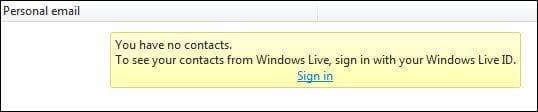
I always use WLM signed-in but only use it with my Gmail Account and have full access to my Hotmail.com contacts. This is the message I got when I signed-out.

Capture.JPG

Exporting contacts to WLM if not signed-in will not be remembered the next time WLM is opened.
 

My Computer

Computer Manufacturer/Model Number
Look in my Signature.
OS
Win7 H.Prem. 32bit+SP1
and to add, you can backup the contacts as a csv file and this way if you ever loose them you can import them back in again
 

My Computer

Computer type
PC/Desktop
Computer Manufacturer/Model Number
Dell Computers
OS
Windows 7 Pro 32/64 bit and Windows 10 Pro 32 Bit/64bit
Memory
4gigs
Graphics Card(s)
AMD Radeon HD and Nvidia
Monitor(s) Displays
Samsung 24". INC 19". Dell 22 ". Dell 17" & 19"
Back
Top