Windows Live Mail Picture Size

qtrim

New member
Local time
4:34 AM
Messages
8
If I'm composing and email in Windows Live Mail and I click on "Add Photos" I can add them and put a frame and comments nicely, but the pictures send are quite small. How can I get it to email the pictures larger and still be able to add comments under them?
 

My Computer My Computer

OS
Windows 7 Final
CPU
Core 2 Quad Q9550
Hi qtrim :)

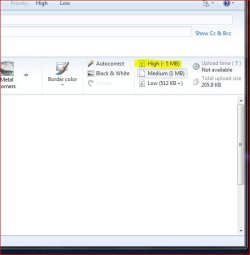
When sending a mail with a picture included in the body of the message select: High (-5MB) and this will send your photo in the original resolution.

mail.JPG

Hope this helps.;)


.
 
Last edited:

My Computer My Computer

Computer Manufacturer/Model Number
Samsung R60 Plus
OS
Operating System Microsoft Windows 7 Ultimate Build 7600
CPU
Mobile DualCore Intel Core 2 Duo T5550, 1833 MHz (1
Motherboard
ATI Radeon Xpress 1100/1250
Memory
2GB (DDR2-667 DDR2 SDRAM)
Graphics Card(s)
ATI Radeon Xpress 1200 Series (256 MB)
Sound Card
Realtek ALC262 @ ATI SB600 - High Definition
Monitor(s) Displays
Samsung LTN154X3-L01 [15.4" LCD]
Screen Resolution
1280x800
PSU
na
Case
na
Cooling
na
Keyboard
na
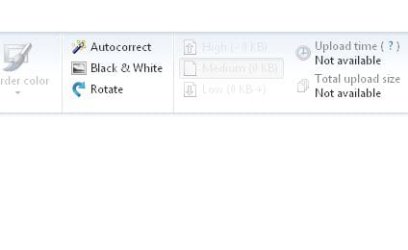
The High, Med, Low is greyed out for me.
 

Attachments

  • Capture.JPG
    Capture.JPG
    13.8 KB · Views: 11

My Computer My Computer

OS
Windows 7 Final
CPU
Core 2 Quad Q9550

My Computer My Computer

Computer Manufacturer/Model Number
Samsung R60 Plus
OS
Operating System Microsoft Windows 7 Ultimate Build 7600
CPU
Mobile DualCore Intel Core 2 Duo T5550, 1833 MHz (1
Motherboard
ATI Radeon Xpress 1100/1250
Memory
2GB (DDR2-667 DDR2 SDRAM)
Graphics Card(s)
ATI Radeon Xpress 1200 Series (256 MB)
Sound Card
Realtek ALC262 @ ATI SB600 - High Definition
Monitor(s) Displays
Samsung LTN154X3-L01 [15.4" LCD]
Screen Resolution
1280x800
PSU
na
Case
na
Cooling
na
Keyboard
na
Back
Top