Windows Live Mail query

DH59

New member
Local time
5:05 PM
Messages
14
Hi,

I've just upgraded computers to one with Windows 7 Home Premium 64-bit - prior to this my computer was Windows XP.

I used Outlook Express before, but obviously this has now gone, so I am contemplating WLM, which is already installed on the system. I was also thinking of trying Outlook, but still not sure.

I have managed to import the old OE messages and address book into WLM, with a bit of a performance, as I could not see the folders initially, but it seemed to sort itself out in the end.

I haven't set up any email accounts, as we have just changed service providers anyway, so I have decided to stick with my Hotmail accounts. And this is my issue.

I have two Hotmail accounts, normally checked online, and a Gmail account (hardly used, but valid and may be used for certain things), and a Yahoo account (used very little). I thought I would set them all up in WLM, but my question, particularly regarding the Hotmail accounts, as I have used them quite a lot over the past few years, is will all the existing emails online immediately download onto my system once the account is set up? Some I might need to download, but I have hundreds that I do not really want or need on my system.

I have not yet used WLM by signing in to my Live ID, and I'm not sure that this is what I want to do, really. Is this necessary, or what are the consequences of not using the Live ID?

Thanks for any pointers you can give me before I make a complete mess of things!

Diane
 

My Computer

OS
Windows 7 Home Premium 64 bit
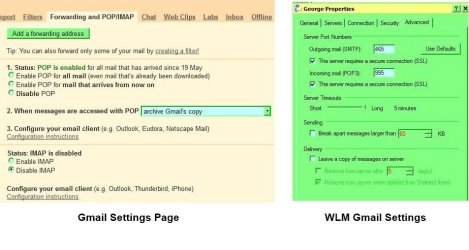
Hi DH59, here's how mine is set. I sign in with my Live ID, add my gmail account which is accessed using POP, and Gmail archives them for me, therefore I never lose an Email. ( see Gmail settings for other options )
As I don't use my Hotmail account very often, it is deleted. It is also where my contacts are stored, so they don't get lost. It then remembers my 'Safe' & 'Blocked' senders and the need to type Email addresses is not required.
More info if needed.
 

My Computer

Computer Manufacturer/Model Number
Look in my Signature.
OS
Win7 H.Prem. 32bit+SP1
Hi,

I've just upgraded computers to one with Windows 7 Home Premium 64-bit - prior to this my computer was Windows XP.

I used Outlook Express before, but obviously this has now gone, so I am contemplating WLM, which is already installed on the system. I was also thinking of trying Outlook, but still not sure.

I have managed to import the old OE messages and address book into WLM, with a bit of a performance, as I could not see the folders initially, but it seemed to sort itself out in the end.

I haven't set up any email accounts, as we have just changed service providers anyway, so I have decided to stick with my Hotmail accounts. And this is my issue.

I have two Hotmail accounts, normally checked online, and a Gmail account (hardly used, but valid and may be used for certain things), and a Yahoo account (used very little). I thought I would set them all up in WLM, but my question, particularly regarding the Hotmail accounts, as I have used them quite a lot over the past few years, is will all the existing emails online immediately download onto my system once the account is set up? Some I might need to download, but I have hundreds that I do not really want or need on my system.

I have not yet used WLM by signing in to my Live ID, and I'm not sure that this is what I want to do, really. Is this necessary, or what are the consequences of not using the Live ID?

Thanks for any pointers you can give me before I make a complete mess of things!

Diane


Go ahead and setup your hotmail and gmail accounts into Windows Live Mail program.
You have to sign in with your Windows Live ID in order that Winodws Live will sync with all your accounts. It is important to do so.
Also while setting up the account, make sure you have " Leave a copy of messages at server " under Advanced tab.

P.S. I have 2 hotmail accounts and one Gmail account plus my default account set up in my Windows Live Mail.

Yahoo!mail is a different issue. Last time I check you need to pay $19.95 subscription fee to upgrade to Yahoo!Plus, without which you cannot set it into Windows Live Mail.
 

My Computer

Computer Manufacturer/Model Number
Acer Aspire 7741Z
OS
Windows 7 Home Premium 64-bit, SP1
CPU
Intel Pentium P6200, Cores 2, 2.13 GHz
Memory
4 GB
Graphics Card(s)
Intel HD
Sound Card
unknown
Monitor(s) Displays
17.3 inches
Screen Resolution
1600 x 900
Hard Drives
640 GB, 5400 PRM
Yahoo!mail is a different issue. Last time I check you need to pay $19.95 subscription fee to upgrade to Yahoo!Plus, without which you cannot set it into Windows Live Mail.
It works for me without upgrading.
 

My Computer

Computer Manufacturer/Model Number
Look in my Signature.
OS
Win7 H.Prem. 32bit+SP1
Yahoo!mail is a different issue. Last time I check you need to pay $19.95 subscription fee to upgrade to Yahoo!Plus, without which you cannot set it into Windows Live Mail.
It works for me without upgrading.

Unless that tutorial is misinforming....
excerpt :
This tutorial shows you how to setup Yahoo! Mail in Windows Live Mail: you will still be able to check you emails from a web browser, as you did before. Please note that in order to check your Yahoo! emails from an email program, you need to pay the yearly $20 for "Yahoo! Mail Plus" service. Third-party plugins like YPOPS allow you to bypass the paid subscription, but these will not be covered in this tutorial.

Despite of rumors according to which you are no longer required to have Yahoo! Mail Plus to check your account from Windows Live Mail, and you can use any regular (free) Yahoo! Mail accounts with Windows Live Mail, the official Yahoo! Mail documentation seems to indicate that you do still need the Yahoo! Mail Plus service.

Source of the info :
Setup Yahoo! Mail in Windows Live Mail

Using YPOPS has the " possible " danger of account being terminated by Yahoo.
 

My Computer

Computer Manufacturer/Model Number
Acer Aspire 7741Z
OS
Windows 7 Home Premium 64-bit, SP1
CPU
Intel Pentium P6200, Cores 2, 2.13 GHz
Memory
4 GB
Graphics Card(s)
Intel HD
Sound Card
unknown
Monitor(s) Displays
17.3 inches
Screen Resolution
1600 x 900
Hard Drives
640 GB, 5400 PRM
Thanks for the replies.

I can do without setting up the Yahoo account, really. It's only connected with Yahoo Chat, which I rarely use, and for my Flickr account. I have actually read elsewhere that you can check the Yahoo mails, but cannot use WLM to reply to them.

So, as for the others, in addition, I also have a personal email account connected with the domain name for my website, which at the moment I am checking via webmail through my webhost's website. I presume this will still work if I'm signing in to WLM with my Live ID?

I understand the option to leave a copy on the server, but do I actually get a copy of the Hotmail emails downloaded onto my computer, or is WLM simply mirroring what's in the Hotmail message store?

I also have numerous folders in the Hotmail accounts that I created to save certain emails. How will that work once the account is set up in WLM? Do I recreate the folders locally, or will WLM 'see' them on Hotmail (similar question to previous one, really)?

Edit: Looking in the Gmail settings, do I need to disable POP as well as enable IMAP? Or do they both need to be enabled?
 
Last edited:

My Computer

OS
Windows 7 Home Premium 64 bit
Nearly there!

I have managed to set up the Gmail account as a test, and the emails (29) on the server were downloaded. However, I also noticed three unread emails under the Quick Views section. They could not have been Gmail emails, as that email address is only used for messages from Google services, and there are not many of those as I haven't made a lot of use of them. After I had viewed the three messages they disappeared from sight and I can't see any trace of them anywhere.

I suspect they may have been emails from one of my Hotmail accounts (even though I have not yet set that account up in WLM), which was associated to the Gmail account, mainly for logging in to a Blogger blog which is no longer used. I have now disassociated the two accounts, but the question is where have these emails gone?

I have checked all the Deleted folders, and all the folders on the Hotmail account itself, and they are completely gone! I did nothing with these emails other than read them.

I also managed to acquire 130 feed messages. I did some research on this, and have now managed to get rid of them and unsubscribed from these feeds. Not that I subscribed in the first place! I haven't used IE for years, and I certainly haven't made any use of feed subscriptions for anything. Microsoft being 'helpful' again!!
 

My Computer

OS
Windows 7 Home Premium 64 bit
You have to sign in with your Windows Live ID in order that Winodws Live will sync with all your accounts. It is important to do so.

Also while setting up the account, make sure you have " Leave a copy of messages at server " under Advanced tab.

I found the following info HERE regarding signing in with Live ID, so it looks as if I only need to do that if I want to use the listed features, which I am doubtful I will.

And on the Gmail account properties, I can't see any option to leave a copy on the server, but I presume that will happen by default if set as IMAP?
 

My Computer

OS
Windows 7 Home Premium 64 bit
This image shows my settings for Gmail.

RR.jpg
 

My Computer

Computer Manufacturer/Model Number
Look in my Signature.
OS
Win7 H.Prem. 32bit+SP1
Thanks Roderunner.

There are some differences: In Gmail I have IMAP Enabled and POP Disabled. And in WLM settings for the Gmail account, I do not have the Delivery option at the bottom of the window. My incoming mail is set to IMAP and port 993.
 

My Computer

OS
Windows 7 Home Premium 64 bit
I tried using IMAP with Gmail in WLM and found it to be too much trouble. I strongly recommend POP.
 

My Computer

Computer Manufacturer/Model Number
Look in my Signature.
OS
Win7 H.Prem. 32bit+SP1
The instructions I followed said to enable IMAP, and things do appear to be working with the test messages I've sent and received. Now I just need to do the Hotmail accounts.
 

My Computer

OS
Windows 7 Home Premium 64 bit
The instructions I followed said to enable IMAP, and things do appear to be working with the test messages I've sent and received. Now I just need to do the Hotmail accounts.
I'm using WLM 2010 are you ?
Hotmail will not need setting, its all done automatically by WLM.
 

My Computer

Computer Manufacturer/Model Number
Look in my Signature.
OS
Win7 H.Prem. 32bit+SP1
I'm using WLM 2010 are you ?
Hotmail will not need setting, its all done automatically by WLM.

No, it's 2011.

I have looked at how to do the Hotmail. It looks as if that is what will happen, so I should be OK. Famous last words!!
 

My Computer

OS
Windows 7 Home Premium 64 bit
Glad to hear it.
 

My Computer

Computer Manufacturer/Model Number
Look in my Signature.
OS
Win7 H.Prem. 32bit+SP1
Strange thing happened to my email connected to my domain name, though. The Draft, Sent, and Trash folders appear to have set themselves as sub-folders of the Inbox. On the webmail service of that account they are positioned normally at the same level. I only have one email in the Inbox, which downloaded as soon as I set up the account - I didn't know it was there as the account has only just been set up with my new website. In talks with my webhost to see if they can shed any light on why this might have happened.
 

My Computer

OS
Windows 7 Home Premium 64 bit
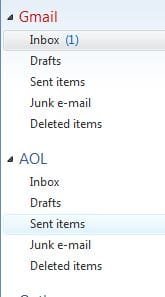
Can you post an image of your folders. Remember, I'm using POP so Storage folders are kept hidden as I don't need them.

RR.JPG
 

My Computer

Computer Manufacturer/Model Number
Look in my Signature.
OS
Win7 H.Prem. 32bit+SP1
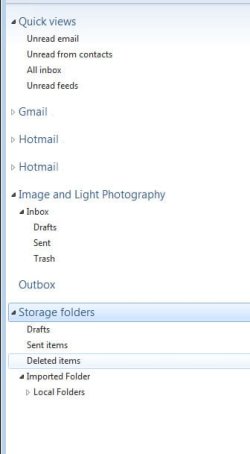
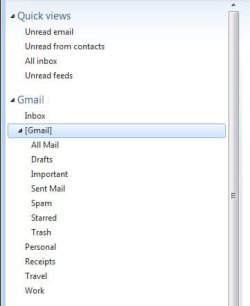
Here are screenshots of the folders. I've also noticed that the Gmail folders appear to have nested folders where I would have thought they would be all on one level.

When I sent a test email yesterday, from the Image and Light account, the sent mail went into the Sent folder of my general Storage Folders, not the Sent folder of the actual account. It was then I noticed the nesting and wondered whether that had anything to do with it, although I also sent a test email using the Gmail account and that has correctly been stored in the Gmail Sent folder.

As I said before, the folders on the webmail server of my Image and Light account are all on the same level. On the Gmail it seems to have mixed up what folders are visible by default and what appears in the additional drop-down of folders on the webmail server.

The Local Folders under the Storage Folders contain my old emails imported from OE. I only need them for reference, as the account used for those emails is no longer active since changing ISP. I haven't set up an email account for our new ISP as I thought it simpler to use a web-based account, should we ever change again in the future, to save informing everyone of the change.
 

Attachments

  • folders.jpg
    folders.jpg
    14.7 KB · Views: 3
  • gmail.jpg
    gmail.jpg
    11.8 KB · Views: 2

My Computer

OS
Windows 7 Home Premium 64 bit
Back
Top