Windows Live Mail query

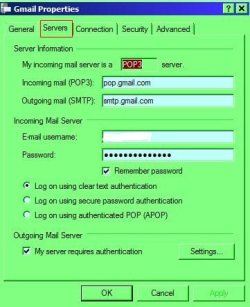
I suggest you delete Gmail from WLM then set it as my image in post #9. I'll then show how to fine tune it.

RR.JPG
 

My Computer

Computer Manufacturer/Model Number
Look in my Signature.
OS
Win7 H.Prem. 32bit+SP1
I have deleted the Gmail account from WLM, and then logged on to it via the web and made a few changes there. In the settings, I went to the Labels tab, which I discovered refers to the folders, and selected to hide the ones that I didn't want, and unticked the box to 'Show in IMAP' for certain ones. I then set up the account again in WLM - still as IMAP. There are not as many extra folders now, but I now have an Inbox folder, underneath which (at the same level) is a [Gmail] folder, and within that (as sub-folders) are the Drafts, Sent and Trash.

I suspect it's something to do with the account being IMAP, as both my Image and Light account and Gmail account appears to show sub-folders. The Hotmail ones are fine and presumably are set up as POP. I just left them to configure automatically.

The most puzzling thing is that my Image and Light account will still not store the sent messages in its own 'Sent' folder, but continues to place the sent email in the 'Sent Items' folder in the default Storage Folders (note different names). I even tried changing the properties of the folders for that account. It had in the settings 'Sent Items', which is the name of the folder in Storage Folders, whereas the sent mail folder in the I&L account is named 'Sent'. Changing that has made no difference to where the sent mails go. Gmail is placing sent emails correctly in its own 'Sent Mail' folder.

I'm baffled, but leaving it be for now. At least it's all working - so far.

 

My Computer

OS
Windows 7 Home Premium 64 bit
I have deleted the Gmail account from WLM, and then logged on to it via the web and made a few changes there. In the settings, I went to the Labels tab, which I discovered refers to the folders, and selected to hide the ones that I didn't want, and unticked the box to 'Show in IMAP' for certain ones. I then set up the account again in WLM - still as IMAP. There are not as many extra folders now, but I now have an Inbox folder, underneath which (at the same level) is a [Gmail] folder, and within that (as sub-folders) are the Drafts, Sent and Trash.

I suspect it's something to do with the account being IMAP, as both my Image and Light account and Gmail account appears to show sub-folders. The Hotmail ones are fine and presumably are set up as POP. I just left them to configure automatically.

The most puzzling thing is that my Image and Light account will still not store the sent messages in its own 'Sent' folder, but continues to place the sent email in the 'Sent Items' folder in the default Storage Folders (note different names). I even tried changing the properties of the folders for that account. It had in the settings 'Sent Items', which is the name of the folder in Storage Folders, whereas the sent mail folder in the I&L account is named 'Sent'. Changing that has made no difference to where the sent mails go. Gmail is placing sent emails correctly in its own 'Sent Mail' folder.

I'm baffled, but leaving it be for now. At least it's all working - so far.

This is an old article, but it addresses the problems above. Read on :
Ramesh Bhaskar » Blog Archive » Gmail IMAP and Windows Live Mail Beta (client)
 

My Computer

Computer Manufacturer/Model Number
Acer Aspire 7741Z
OS
Windows 7 Home Premium 64-bit, SP1
CPU
Intel Pentium P6200, Cores 2, 2.13 GHz
Memory
4 GB
Graphics Card(s)
Intel HD
Sound Card
unknown
Monitor(s) Displays
17.3 inches
Screen Resolution
1600 x 900
Hard Drives
640 GB, 5400 PRM
Thanks t-4-2,

Just checked that thread and opened up the IMAP tab as indicated, but I am unable to edit those paths. I can add the Root folder path box, but the Special Folders boxes are greyed out and not editable.

I added the [Gmail] into the Root folder box and all that did was add the Drafts, Sent, Spam and Trash folders again, but did not get rid of the [Gmail] folder and its sub-folders, so they were repeated. When I undid what I'd added, I got another set of the above folders and a second [Gmail] folder.

I will deleted and add it again and leave well alone!
 

My Computer

OS
Windows 7 Home Premium 64 bit
Thanks t-4-2,

Just checked that thread and opened up the IMAP tab as indicated, but I am unable to edit those paths. I can add the Root folder path box, but the Special Folders boxes are greyed out and not editable.

I added the [Gmail] into the Root folder box and all that did was add the Drafts, Sent, Spam and Trash folders again, but did not get rid of the [Gmail] folder and its sub-folders, so they were repeated. When I undid what I'd added, I got another set of the above folders and a second [Gmail] folder.

I will deleted and add it again and leave well alone!

Sorry it does not help you. Wonder why Special folder is grayed out.

Unless you have over-riding reason you must use IMAP protocol, I'd suggest you switch to POP protocol.
Remove your IMAP Gmail account and follow this simple POP setup tutorial :
Add Your Gmail To Windows Live Mail - Mysticgeek’s Realm
How to enable POP protocol :
Enabling POP - Gmail Help
 

My Computer

Computer Manufacturer/Model Number
Acer Aspire 7741Z
OS
Windows 7 Home Premium 64-bit, SP1
CPU
Intel Pentium P6200, Cores 2, 2.13 GHz
Memory
4 GB
Graphics Card(s)
Intel HD
Sound Card
unknown
Monitor(s) Displays
17.3 inches
Screen Resolution
1600 x 900
Hard Drives
640 GB, 5400 PRM
Well, I don't really know whether I need to use IMAP or not. I was just going on all the instructions I've seen so far seem to say that you need to activate IMAP to set up Gmail. Until the article you've just linked to, that is.

As this particular account is used very little, I'm tempted to leave it as it is for now. It's working OK.

I am still looking into why my other IMAP account is placing sent messages into the default Sent items folder and not the account's own Sent folder. That is my biggest mystery at the moment, but at least I know that it's happening and where to look for those emails.
 

My Computer

OS
Windows 7 Home Premium 64 bit
Well, I don't really know whether I need to use IMAP or not. I was just going on all the instructions I've seen so far seem to say that you need to activate IMAP to set up Gmail. Until the article you've just linked to, that is.

As this particular account is used very little, I'm tempted to leave it as it is for now. It's working OK.

I am still looking into why my other IMAP account is placing sent messages into the default Sent items folder and not the account's own Sent folder. That is my biggest mystery at the moment, but at least I know that it's happening and where to look for those emails.

Ok then. Suggest that you keep the links for future reference.

I have Gmail POP account in my Windows Live Mail. Never had the issues you mentioned. That is why I asked you to switch.
 

My Computer

Computer Manufacturer/Model Number
Acer Aspire 7741Z
OS
Windows 7 Home Premium 64-bit, SP1
CPU
Intel Pentium P6200, Cores 2, 2.13 GHz
Memory
4 GB
Graphics Card(s)
Intel HD
Sound Card
unknown
Monitor(s) Displays
17.3 inches
Screen Resolution
1600 x 900
Hard Drives
640 GB, 5400 PRM
Yes, it appears that Roderunners Gmail folders are all lined up nicely, so that is why I presumed it must be a IMAP issue. I will keep the links and come back to this when my brain is not hurting so much!

The issue regarding the sent messages going into a folder outside of the account folders is to do with my domain email, not the Gmail one. The Gmail sends OK and keeps the sent mail in the correct account Sent folder.
 

My Computer

OS
Windows 7 Home Premium 64 bit
Back
Top