Solved windows live mail update lost all of my contacts

npen50

New member
Local time
12:42 PM
Messages
3
I just tried to send an email and Windows Live Mail did an automatic update. I couldn't send an email without it. When the computer re-booted all of my contacts are gone. Help, I'm not a computer expert but how can I retrieve them? All of my calendar works but no contacts. Wish it was the opposite....I'd tellyou the version but I don't know how to find it. I don't "sign in" when I get my email. But now even if I needed to that part is "frozen", can't type anything there. Hope someone can help. Thanks
 

My Computer My Computer

At a glance

windows7
OS
windows7
Programs and Features>Windows Live Essentials; highlight; use the change/uninstall link at the top; in the next window choose "repair". All the installed components of the Essentials package should be repaired, including Mail. This should repair WLM so that it is working properly so you should be able to "sign-in", however if your contact list was created without "signing in" it won't help to sign in. Assuming your "not-signed-in" contact list is still on your computer it may come back when not signed in but if it doesn't you could try to do an "Import" from the contacts pane, but that only works if you have previously made a backup "Export" of your contacts.
 
Last edited:

My Computer My Computer

At a glance

Windows 8 Pro w/MC 32-bitIntel Atom 1.86 GHz2 GBIntel GMA 500
Computer type
PC/Desktop
Computer Manufacturer/Model Number
OQO 2+
OS
Windows 8 Pro w/MC 32-bit
CPU
Intel Atom 1.86 GHz
Motherboard
OQO 2+
Memory
2 GB
Graphics Card(s)
Intel GMA 500
Sound Card
IDT
Monitor(s) Displays
LCD
Screen Resolution
800 x 480 (portable) 1280 x 1024 (docked)
Hard Drives
64 GB SSD
PSU
9 Ah Battery (portable) or OQO Brick (docked)
Case
Shirt Pocket Sized
Cooling
Tiny Fan
Keyboard
Slide out (portable) DiNovo Edge (docked)
Mouse
Eraser head (portable) Logitech Bluetooth (docked)
Internet Speed
WWAN or 802.11G (portable) T1 (docked)
Browser
IE 10
Other Info
DVD-RW OQO Docking Station
Thanks, I just printed the idea but unfortunately I just did a "paid" service and they fixed it. Don't know why Micro. has the updates that always seem to cause problems whe I didn't have any before! Ope I don't need to sue your sugggestion next time. I also have a backup list ready...
 

My Computer My Computer

At a glance

windows7
OS
windows7
The same thing happened to me, and I did try "repair"--but it didn't work. Not only did my contact list disappear with my forced update--even when I add a contact now to recreate the list, it is added, but I can't see the list. Any other ideas?
 

My Computer My Computer

At a glance

Windows 7
OS
Windows 7
The same thing happened to me, and I did try "repair"--but it didn't work. Not only did my contact list disappear with my forced update--even when I add a contact now to recreate the list, it is added, but I can't see the list. Any other ideas?
I suggested the "Repair" option to fix any current problems with the current installation of WLM. If repair doesn't work, I suggested a complete uninstall and reinstall of the program. However, repairing or reinstalling the program is unlikely to make lost contacts magically return just like reinstalling Microsoft Word will not make lost documents reappear. That's why I also suggested looking at both your "signed-in" contact list and your "not-signed-in" contact list to make sure you are looking at the correct list.

Upon Googling the issue, I find that most people do blame the latest update for WLE, which apparently is mandatory for WLE 2011 users. Some say they were successful in getting their contacts back by doing a system restore which undoes all or some of the updates to Windows depending upon the point to which the restore was made. If you decide to try that and it works to restore your contacts, you should use the export option in the contact window to export them to a *.csv file for safe keeping of the contacts even though their organization into "groups" will be lost. Then go back to Windows update to update your system again. If Microsoft has still not yet fixed the issue that caused the lost-contact problem they will be lost again but that's ok since you can now go back to the contact window and "Import" your *.csv file.
 

My Computer My Computer

At a glance

Windows 8 Pro w/MC 32-bitIntel Atom 1.86 GHz2 GBIntel GMA 500
Computer type
PC/Desktop
Computer Manufacturer/Model Number
OQO 2+
OS
Windows 8 Pro w/MC 32-bit
CPU
Intel Atom 1.86 GHz
Motherboard
OQO 2+
Memory
2 GB
Graphics Card(s)
Intel GMA 500
Sound Card
IDT
Monitor(s) Displays
LCD
Screen Resolution
800 x 480 (portable) 1280 x 1024 (docked)
Hard Drives
64 GB SSD
PSU
9 Ah Battery (portable) or OQO Brick (docked)
Case
Shirt Pocket Sized
Cooling
Tiny Fan
Keyboard
Slide out (portable) DiNovo Edge (docked)
Mouse
Eraser head (portable) Logitech Bluetooth (docked)
Internet Speed
WWAN or 802.11G (portable) T1 (docked)
Browser
IE 10
Other Info
DVD-RW OQO Docking Station
I have uninstalled and reinstalled (albeit through going back to a previous time)--I did get a fleeting glance of my contact list before I was forced again to install the update. I cannot sign in. No matter what trail I follow I end up being told: "The Windows Live ID is incorrect. Please try again." I tried my name, but of course that did not work--they want an email address. I even tried my totally unrelated work email address, but of course that did not work either. Perhaps that is the core problem? And is that what you mean when you say "signed-in" contacts. If not, I have no idea what you are talking about. (THANKS for discussing this with me!!)
 

My Computer My Computer

At a glance

Windows 7
OS
Windows 7
...And is that what you mean when you say "signed-in" contacts...
Yes. Signing in will help in the future so that your contact list will be duplicated and kept up to date at contacts.live.com. But if you never used it before, it would be empty. You could go to Hotmail.com and create a new LiveID which would be the same as your new Hotmail address.

To possibly solve the "missing contacts" problem you could do a system restore to before the update(s) that messed things up. Then if the contacts come back (not-signed-in contacts) you can "Export" them to a safe place as a *.csv file. Then go back to Windows Update to redo the updates that it shows, plus or including the WLM update that causes the problem. Now it's ok since you have a contact list backup from which you can "Import".
 

My Computer My Computer

At a glance

Windows 8 Pro w/MC 32-bitIntel Atom 1.86 GHz2 GBIntel GMA 500
Computer type
PC/Desktop
Computer Manufacturer/Model Number
OQO 2+
OS
Windows 8 Pro w/MC 32-bit
CPU
Intel Atom 1.86 GHz
Motherboard
OQO 2+
Memory
2 GB
Graphics Card(s)
Intel GMA 500
Sound Card
IDT
Monitor(s) Displays
LCD
Screen Resolution
800 x 480 (portable) 1280 x 1024 (docked)
Hard Drives
64 GB SSD
PSU
9 Ah Battery (portable) or OQO Brick (docked)
Case
Shirt Pocket Sized
Cooling
Tiny Fan
Keyboard
Slide out (portable) DiNovo Edge (docked)
Mouse
Eraser head (portable) Logitech Bluetooth (docked)
Internet Speed
WWAN or 802.11G (portable) T1 (docked)
Browser
IE 10
Other Info
DVD-RW OQO Docking Station
I already, as I mentioned, did the system-restore thing--twice. The first time I saw my contacts, but as soon as I clicked on something, the forced update showed up. I tried it again and didn't even get that far. And I can't sign in!! My email address is q.com, not hotmail. When I try to sign up for a new ID it says: "This email address is part of a reserved domain such as live.com, hotmail.com, or msn.com. Please enter a different email address." But it is my only address.
 

My Computer My Computer

At a glance

Windows 7
OS
Windows 7
...And I can't sign in!! My email address is q.com, not hotmail. When I try to sign up for a new ID it says: "This email address is part of a reserved domain such as live.com, hotmail.com, or msn.com. Please enter a different email address." But it is my only address.
You need a LiveID to sign-in to WLM to get contacts saved on their site or use other on-line services provided by Microsoft. It will take the form of an email address for Hotmail but you don't have to use it as an address; use it only to "sign-in" and when setting up your email accounts in WLM, just set up the pop3 or imap accounts you intend to use (and delete the Hotmail address if it shows up as another email account). Keep the Hotmail thingy just for "signing-in".
 

My Computer My Computer

At a glance

Windows 8 Pro w/MC 32-bitIntel Atom 1.86 GHz2 GBIntel GMA 500
Computer type
PC/Desktop
Computer Manufacturer/Model Number
OQO 2+
OS
Windows 8 Pro w/MC 32-bit
CPU
Intel Atom 1.86 GHz
Motherboard
OQO 2+
Memory
2 GB
Graphics Card(s)
Intel GMA 500
Sound Card
IDT
Monitor(s) Displays
LCD
Screen Resolution
800 x 480 (portable) 1280 x 1024 (docked)
Hard Drives
64 GB SSD
PSU
9 Ah Battery (portable) or OQO Brick (docked)
Case
Shirt Pocket Sized
Cooling
Tiny Fan
Keyboard
Slide out (portable) DiNovo Edge (docked)
Mouse
Eraser head (portable) Logitech Bluetooth (docked)
Internet Speed
WWAN or 802.11G (portable) T1 (docked)
Browser
IE 10
Other Info
DVD-RW OQO Docking Station
Gmail! I used my unused Gmail address (they wouldn't let me start a hotmail address)--and it worked! Not that I have contacts back, but I can at least start a new list, which is way better than not. Thank you SO much for your advice.
 

My Computer My Computer

At a glance

Windows 7
OS
Windows 7
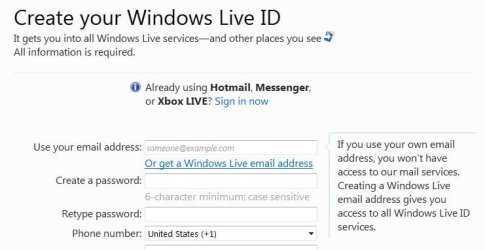
If I try to create a LiveID using "my own email address" I get this message which tells me that I can't use it to use the Windows Live services, so I don't understand the point of offering the option to use "your own email address". Perhaps I'm misunderstanding what they are saying in that message. Hopefully it will work as you want to allow you to "sign-in" and use your gmail as a "LiveID".
 

Attachments

  • LiveID.JPG
    LiveID.JPG
    40 KB · Views: 10
Last edited:

My Computer My Computer

At a glance

Windows 8 Pro w/MC 32-bitIntel Atom 1.86 GHz2 GBIntel GMA 500
Computer type
PC/Desktop
Computer Manufacturer/Model Number
OQO 2+
OS
Windows 8 Pro w/MC 32-bit
CPU
Intel Atom 1.86 GHz
Motherboard
OQO 2+
Memory
2 GB
Graphics Card(s)
Intel GMA 500
Sound Card
IDT
Monitor(s) Displays
LCD
Screen Resolution
800 x 480 (portable) 1280 x 1024 (docked)
Hard Drives
64 GB SSD
PSU
9 Ah Battery (portable) or OQO Brick (docked)
Case
Shirt Pocket Sized
Cooling
Tiny Fan
Keyboard
Slide out (portable) DiNovo Edge (docked)
Mouse
Eraser head (portable) Logitech Bluetooth (docked)
Internet Speed
WWAN or 802.11G (portable) T1 (docked)
Browser
IE 10
Other Info
DVD-RW OQO Docking Station
Don't know if this will help - I used Outlook before this laptop (had 2 years) and I never signed in to Windows Live Mail, (well, maybe I did the first couple of times) but when I try to open mail, it automatically says I've "tried to sign in too many times with the wrong password, please wait and try again later." If I click OK another popup for Windows Live Mail Sign-on" If I click cancel instead, my mail just appears. I have vanished 'contacts' after this stupid live essentials update but I restored and exported my contacts. But yet, as soon as I closed email, I had to re-do the update and they were gone again. But at least I have ALL that info/details available in a new folder.
 

My Computer My Computer

At a glance

windows 7 home premium, 64bit
OS
windows 7 home premium, 64bit
A lot of us are posting in different places. Ron at least is a helpful poster but even he is stymied by this absurd Microsoft update, message, and bottleneck.

AGAIN -
MICROSOFT Pleasse get your act together and accept for the major user community that attempts Live Mail, your update is a nightmare. Restoring functionality and or contacts is at best iffy, hard to understand, and full of potholes.

PLEASE HELP!!!!
 

My Computer My Computer

At a glance

WIndows 7 Home
OS
WIndows 7 Home
Back
Top