Solved Windows Live Mail

denwilliam

New member
Member
VIP
Local time
1:56 AM
Messages
201
Been having a few problems receiving error messages 0x800048849 and 0x80048820 and have been advised to check and adjust the MTU.Anybody know of a easy way to do this?.
 

My Computer

Computer type
Laptop
Computer Manufacturer/Model Number
Toshiba Satellite Pro C870-1E2
OS
Windows 7 Professional 64 Bit

My Computer

Computer Manufacturer/Model Number
Look in my Signature.
OS
Win7 H.Prem. 32bit+SP1
Three cheers for Scotland,this is just what I have been looking for.
 

My Computer

Computer type
Laptop
Computer Manufacturer/Model Number
Toshiba Satellite Pro C870-1E2
OS
Windows 7 Professional 64 Bit
If any further assistance is required just ask.
 

My Computer

Computer Manufacturer/Model Number
Look in my Signature.
OS
Win7 H.Prem. 32bit+SP1
oh dear,oh dear,thought the problem was cracked but when I follow your procedure I keep receiving "bad parameter".What now my Scotish friend as I am up the creek without a paddle again.
 

My Computer

Computer type
Laptop
Computer Manufacturer/Model Number
Toshiba Satellite Pro C870-1E2
OS
Windows 7 Professional 64 Bit
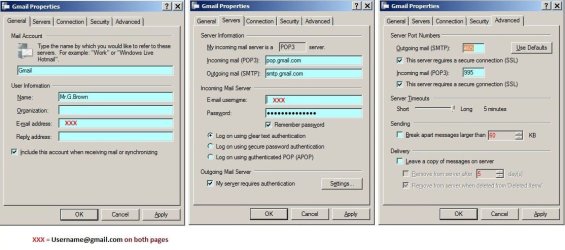
It could be your settings in Windows Live Mail. Compare your settings with my Gmail.

White Paper.JPG
 

My Computer

Computer Manufacturer/Model Number
Look in my Signature.
OS
Win7 H.Prem. 32bit+SP1
The only difference I can see is that my "Outgoing mail server (smtp) is a different number to the exaample.
 

My Computer

Computer type
Laptop
Computer Manufacturer/Model Number
Toshiba Satellite Pro C870-1E2
OS
Windows 7 Professional 64 Bit
Have you checked all for possible spelling mistakes.
 

My Computer

Computer Manufacturer/Model Number
Look in my Signature.
OS
Win7 H.Prem. 32bit+SP1
Reapeated them over and over again and as far as I can see there is no mistake.Whatever I enter all I receive in return is "Bad Parameter".Entered your instructions verbatim but no joy.
 

My Computer

Computer type
Laptop
Computer Manufacturer/Model Number
Toshiba Satellite Pro C870-1E2
OS
Windows 7 Professional 64 Bit
Has the mail account your using been allowed to be accessed by POP3 ?
 

My Computer

Computer Manufacturer/Model Number
Look in my Signature.
OS
Win7 H.Prem. 32bit+SP1
Affirmative to you last question.There are two methods I can implement to use Windows Live Mail,automatic or manual.Only enter Pop 3 when entering details manual.
 

My Computer

Computer type
Laptop
Computer Manufacturer/Model Number
Toshiba Satellite Pro C870-1E2
OS
Windows 7 Professional 64 Bit
If you add an account to WLM using the auto method, it will use IMAP.
 

My Computer

Computer Manufacturer/Model Number
Look in my Signature.
OS
Win7 H.Prem. 32bit+SP1
What difference does that make to the problems I have been having and receiving "Bad parameter" when trying to obtain mtu.Are you saying it would be better to use the manuel entry?.
 

My Computer

Computer type
Laptop
Computer Manufacturer/Model Number
Toshiba Satellite Pro C870-1E2
OS
Windows 7 Professional 64 Bit
Sorry but I am now getting utterly confused,which error are you asking for?,the one where I ping in cmd and receive "Bad parameter",or the error codes 0x80048849 and 0x80048820.As I thought I said earlier the mail is working fine now but sometimes it decides to play silly bugger and starts throwing those two dreaded codes about.
 

My Computer

Computer type
Laptop
Computer Manufacturer/Model Number
Toshiba Satellite Pro C870-1E2
OS
Windows 7 Professional 64 Bit
Hey Den,

Could you tell me what you are entering and where. I'm joining this conversation late and I'm not clear if you're working on the MTU (adapter / computer) or on your WL Mail settings.

It would be helpful to know your eMail service provider - sometimes the port for the protocol isn't standard... AOL uses SMTP: 587 non-SSL. It's easy enough to find the correct port and if it requires security. if you know the provider.

SMTP: 465 (SSL)
POP: 995 (SSL)

SMTP: 25
POP: 110

and it's all different if you're using IMAP instead of POP

also - it's easy to miss, but on the 2nd page of Roadrunner's WL Mail example there is a chackbox at the bottom "My server requires authentication" - make sure that is check if your provider requires it or unchecked if they don't require it.

Peace!

Reapeated them over and over again and as far as I can see there is no mistake.Whatever I enter all I receive in return is "Bad Parameter".Entered your instructions verbatim but no joy.

Peace!
 

My Computer

Computer type
Laptop
Computer Manufacturer/Model Number
HP Pavilion dv6-6c10us
OS
x64 (6.3.9600) Win8.1 Pro & soon dual boot x64 (6.1.7601) Win7_SP1 HomePrem
CPU
AMD A6-3420M APU with Radeon(tm) HD Graphics
Motherboard
Hewlett-Packard 1805
Memory
6.00 GB
Graphics Card(s)
AMD Radeon(TM) HD 6520G
Sound Card
(1) AMD High Definition Audio Device (2) IDT High Definiti
Monitor(s) Displays
HP W2072a 20" LCD (1600 x 900) @ 60 Hz
Screen Resolution
1366 x 768 x 32 bits (4294967296 colors) @ 60 Hz
Hard Drives
ST640LM0 00 HM641JI SATA Disk Device
Keyboard
Logitech k520 wireless KB
Mouse
Logitech m320 wireless mouse (bundled with KB)
Internet Speed
15/5 | 54 MB Wireless 'n'
Antivirus
Realtime: Defender or Avast | On-demand: Malwarebytes, ESET
Browser
IE 11 on Win8, IE 10 on win 7
Other Info
Media: [Gimp, Audacity, VLC] || Comm: [WEmail 2012, Skype] || Productivity: [OpenOffice,| Textpad] || Utils: [Sysinternals, cCleaner, Speccy, Defraggler]
I can appreciate where and how the confusion has arisen and the two factions have become intermingled.To try and unravel this gordian knot let us return to the beginning:-When using Windows Live Mail sometimes there would be error codes 0x80048849 and or 0x80048820 popping up.It was suggested that the fault could be due to Maximum Transmission Unit problems so my Scottish friend sent me details as to how to find the maximum number of packages etc.When I tried to obtain this information following his instructions using ping in cmd that is when I receive :Bad parameter:.Hope this helps to clarify the situation.
 

My Computer

Computer type
Laptop
Computer Manufacturer/Model Number
Toshiba Satellite Pro C870-1E2
OS
Windows 7 Professional 64 Bit
Den,

Hmmm, I just opened Roadies PDF and copied the ping command, pasted it in my user cmd window and got:

Microsoft Windows [Version 6.1.7601]
Copyright (c) 2009 Microsoft Corporation. All rights reserved.

ping -f -l 1472 google.co.uk

Pinging google.co.uk [74.125.228.31] with 1472 bytes of data:
Reply from 74.125.228.31: bytes=1472 time=23ms TTL=252
Request timed out.
Reply from 74.125.228.31: bytes=1472 time=18ms TTL=252
Request timed out.

Ping statistics for 74.125.228.31:
Packets: Sent = 4, Received = 2, Lost = 2 (50% loss),
Approximate round trip times in milli-seconds:
Minimum = 18ms, Maximum = 23ms, Average = 20ms

Have you tried copy and paste or are you typing it in?
you have to right click in the cmd window to paste - not sure if you knew that.

I might also suggest trying the ping in an elevated (run as administrator) cmd if you are not an administrator. That shouldn't matter, but ya never know..
One last thing. If it is an MTU issue, there are lots of posts re: Comcast / MTU
I searched: this string - check the Comcast specific hits first - they own it they probably have the answer you need.

I think this thread is closed since you said your mail is working. Maybe a new thread referencing MTU or the error codes might get more bites.

Good luck.
 

My Computer

Computer type
Laptop
Computer Manufacturer/Model Number
HP Pavilion dv6-6c10us
OS
x64 (6.3.9600) Win8.1 Pro & soon dual boot x64 (6.1.7601) Win7_SP1 HomePrem
CPU
AMD A6-3420M APU with Radeon(tm) HD Graphics
Motherboard
Hewlett-Packard 1805
Memory
6.00 GB
Graphics Card(s)
AMD Radeon(TM) HD 6520G
Sound Card
(1) AMD High Definition Audio Device (2) IDT High Definiti
Monitor(s) Displays
HP W2072a 20" LCD (1600 x 900) @ 60 Hz
Screen Resolution
1366 x 768 x 32 bits (4294967296 colors) @ 60 Hz
Hard Drives
ST640LM0 00 HM641JI SATA Disk Device
Keyboard
Logitech k520 wireless KB
Mouse
Logitech m320 wireless mouse (bundled with KB)
Internet Speed
15/5 | 54 MB Wireless 'n'
Antivirus
Realtime: Defender or Avast | On-demand: Malwarebytes, ESET
Browser
IE 11 on Win8, IE 10 on win 7
Other Info
Media: [Gimp, Audacity, VLC] || Comm: [WEmail 2012, Skype] || Productivity: [OpenOffice,| Textpad] || Utils: [Sysinternals, cCleaner, Speccy, Defraggler]
If I configure Live Mail manually then pop3 is used and there is no problem.When it is automatically configured that is when it is prone to those cursed error codes.Implemented one or two changes given by helpful people on different forums and everything seems to be working o.k..Thanks for your assistance,greatly appreciated.
 

My Computer

Computer type
Laptop
Computer Manufacturer/Model Number
Toshiba Satellite Pro C870-1E2
OS
Windows 7 Professional 64 Bit
You're welcome Den,

I thought it might have been related to account setup. When I first setup an account for AOL, I was pleased that WLMail did automatic configuration.... Then I had some errors (different from yours) and had to double check the account settings. I essentially deleted the IMAP accounts that WLMail created and manually setup up a POP3 account for AOL. Sounds as though you did something similar.

Glad your problem is solved,

Peace!
 

My Computer

Computer type
Laptop
Computer Manufacturer/Model Number
HP Pavilion dv6-6c10us
OS
x64 (6.3.9600) Win8.1 Pro & soon dual boot x64 (6.1.7601) Win7_SP1 HomePrem
CPU
AMD A6-3420M APU with Radeon(tm) HD Graphics
Motherboard
Hewlett-Packard 1805
Memory
6.00 GB
Graphics Card(s)
AMD Radeon(TM) HD 6520G
Sound Card
(1) AMD High Definition Audio Device (2) IDT High Definiti
Monitor(s) Displays
HP W2072a 20" LCD (1600 x 900) @ 60 Hz
Screen Resolution
1366 x 768 x 32 bits (4294967296 colors) @ 60 Hz
Hard Drives
ST640LM0 00 HM641JI SATA Disk Device
Keyboard
Logitech k520 wireless KB
Mouse
Logitech m320 wireless mouse (bundled with KB)
Internet Speed
15/5 | 54 MB Wireless 'n'
Antivirus
Realtime: Defender or Avast | On-demand: Malwarebytes, ESET
Browser
IE 11 on Win8, IE 10 on win 7
Other Info
Media: [Gimp, Audacity, VLC] || Comm: [WEmail 2012, Skype] || Productivity: [OpenOffice,| Textpad] || Utils: [Sysinternals, cCleaner, Speccy, Defraggler]
Back
Top