
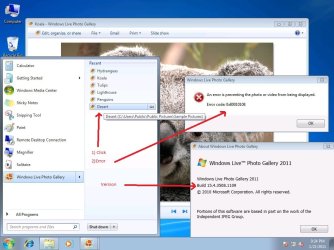
Windows Live Photo Gallery error code 0x80010108

vaidas3

New member
Pro User
Local time
6:49 AM
Messages
351
After instaling most new version of windows live gallery I get this error.
can someone confirm it? is it bug? because I got it on two different systems.
Error shows up when I try to open recent picture.
It opens pictures from explorer window ok.
 

Attachments

  • error.jpg
    error.jpg
    94.7 KB · Views: 2,525

My Computer My Computer

Computer type
PC/Desktop
Computer Manufacturer/Model Number
Self Built PC
OS
Windows 7 pro 64bit. (SP1)
CPU
Intel core I5 2400
Motherboard
Gigabyte H61
Memory
8GB DDR3 Kingston
Graphics Card(s)
Gigabyte GF GTX650OC
Sound Card
Realtek HD audio
Monitor(s) Displays
LCD 20"
Screen Resolution
1600x900
Hard Drives
INTEL SSD 320 80GB +Seagate 7200.12 1TBx3
PSU
Coolermaster RX450W
Case
Coolermaster atx case
Cooling
stock cooler
Keyboard
logitech
Mouse
logitech
Internet Speed
FTTD 100mbps
Perhaps I can help, but first a little test.

Take a memory card that has photos on it. Import them using WLPG. DO NOT ERASE FROM CARD.

Remove the card. Does the error present itself?

Insert the card. Does the error present itself?
 

My Computer My Computer

OS
Windows 7 Ultimate x64
CPU
P4 3.2
Motherboard
Intel 815GM
Memory
DDR 400
Graphics Card(s)
ATI HD3850
Sound Card
C-Media 7.1
Monitor(s) Displays
SyncMaster 244T
Screen Resolution
1920*1200
Hard Drives
Several
PSU
500
Case
PowerSpec $24
Cooling
ThermalTake copper
Internet Speed
Blazing
Perhaps I can help, but first a little test.

Take a memory card that has photos on it. Import them using WLPG. DO NOT ERASE FROM CARD.

Remove the card. Does the error present itself?

Insert the card. Does the error present itself?


Problem is not about importing from memory card.
problem is I can not open pictures from recent menu (new windows 7 function in start menu for opening recently opened files) (i can not open from old style recent items too) but files are perfectly fine: not deleted, not changed and can be opened from windows explorer (open folder double click and opens perfectly fine with windows live photo gallery.)

i dont use memory cards i import my photos from camera connecting usb cable
but problem is not this.

error is (as you can see in picture i attached in forst post) even with default windows 7 pictures (samples that are there after install)

and all the solutions so far is about importing but i have problem with pictures already in my pictures library... importing has nothing to do with this problem.

i googled this myself ... and im sure this is a bug in new version
i just want other people that has new version to confirm it.

Thanks everyone who tried or ties to help its really appreciated
 

My Computer My Computer

Computer type
PC/Desktop
Computer Manufacturer/Model Number
Self Built PC
OS
Windows 7 pro 64bit. (SP1)
CPU
Intel core I5 2400
Motherboard
Gigabyte H61
Memory
8GB DDR3 Kingston
Graphics Card(s)
Gigabyte GF GTX650OC
Sound Card
Realtek HD audio
Monitor(s) Displays
LCD 20"
Screen Resolution
1600x900
Hard Drives
INTEL SSD 320 80GB +Seagate 7200.12 1TBx3
PSU
Coolermaster RX450W
Case
Coolermaster atx case
Cooling
stock cooler
Keyboard
logitech
Mouse
logitech
Internet Speed
FTTD 100mbps
The particular error code relates to an inability to locate a resource.

Not all error codes are accurate, similar to vlookup returning a false response in an Excel formula.

I do agree that my post was a whiff, though. I cannot recreate the error on three different systems.
 

My Computer My Computer

OS
Windows 7 Ultimate x64
CPU
P4 3.2
Motherboard
Intel 815GM
Memory
DDR 400
Graphics Card(s)
ATI HD3850
Sound Card
C-Media 7.1
Monitor(s) Displays
SyncMaster 244T
Screen Resolution
1920*1200
Hard Drives
Several
PSU
500
Case
PowerSpec $24
Cooling
ThermalTake copper
Internet Speed
Blazing
after some time i did nothing major (no software install/unistall, no seriuos config changes) with the system, just work stuff.
error shows up not 100%. now only around 40% of the time i get this error (doing same thing).. that is really strange.
maybe system will fix itself after some time :)

it's really strange how random now this error is.
 

My Computer My Computer

Computer type
PC/Desktop
Computer Manufacturer/Model Number
Self Built PC
OS
Windows 7 pro 64bit. (SP1)
CPU
Intel core I5 2400
Motherboard
Gigabyte H61
Memory
8GB DDR3 Kingston
Graphics Card(s)
Gigabyte GF GTX650OC
Sound Card
Realtek HD audio
Monitor(s) Displays
LCD 20"
Screen Resolution
1600x900
Hard Drives
INTEL SSD 320 80GB +Seagate 7200.12 1TBx3
PSU
Coolermaster RX450W
Case
Coolermaster atx case
Cooling
stock cooler
Keyboard
logitech
Mouse
logitech
Internet Speed
FTTD 100mbps
I have the same problem as well. When trying to access an image using Windows Live on the recent menu, it denies the action with the error message:

An error is preventing the photo or video from being displayed. Error Code: 0x80010108
 

My Computer My Computer

OS
Windows 7 Professional 64bit
having same issue

I'm having the same issue - 100% of the time. Very frustrated!!! Ready to go back to XP!!!
 

My Computer My Computer

OS
windows 7 home premium 64-bit
I'm having the same issue - 100% of the time. Very frustrated!!! Ready to go back to XP!!!


no need to go back to xp :) its windows live photo gallery problem not windows 7

you can just downgrade windows live essentials.

by the way i wrote to windows live support
they know this problem and said it will be solved in future althought they dont know when.
 

My Computer My Computer

Computer type
PC/Desktop
Computer Manufacturer/Model Number
Self Built PC
OS
Windows 7 pro 64bit. (SP1)
CPU
Intel core I5 2400
Motherboard
Gigabyte H61
Memory
8GB DDR3 Kingston
Graphics Card(s)
Gigabyte GF GTX650OC
Sound Card
Realtek HD audio
Monitor(s) Displays
LCD 20"
Screen Resolution
1600x900
Hard Drives
INTEL SSD 320 80GB +Seagate 7200.12 1TBx3
PSU
Coolermaster RX450W
Case
Coolermaster atx case
Cooling
stock cooler
Keyboard
logitech
Mouse
logitech
Internet Speed
FTTD 100mbps
it seems error has been fixed in latest (15.4.3538.513) version i recommend upgrade.
 

My Computer My Computer

Computer type
PC/Desktop
Computer Manufacturer/Model Number
Self Built PC
OS
Windows 7 pro 64bit. (SP1)
CPU
Intel core I5 2400
Motherboard
Gigabyte H61
Memory
8GB DDR3 Kingston
Graphics Card(s)
Gigabyte GF GTX650OC
Sound Card
Realtek HD audio
Monitor(s) Displays
LCD 20"
Screen Resolution
1600x900
Hard Drives
INTEL SSD 320 80GB +Seagate 7200.12 1TBx3
PSU
Coolermaster RX450W
Case
Coolermaster atx case
Cooling
stock cooler
Keyboard
logitech
Mouse
logitech
Internet Speed
FTTD 100mbps
Back
Top