Windows Mail

How to Reinstate Windows Mail in Windows 7

   Warning
Microsoft no longer supports Windows Mail, aka WinMail. It's recommended you use another well known supported email client. This Tutorial is for Advanced users who importantly have the Technical Ability to make the changes, have backups of everything including your OS, and to be your own tech support for WinMail going forward. If you decide to complete this tutorial you accept the fact that you are using WinMail as-is. It might be necessary to uninstall other email clients to resolve any WinMail conflicts in some environments. Understand it's likely that new OS updates from Microsoft will break WinMail's operation, and to fix make it necessary to rerun the tutorial again to reinstate it. With those things in mind, this tutorial was written so that you can rerun it without affecting WinMail user data.
Please see this Errata (Bug List) post before you install, to be aware of the current information about known issues using WinMail within Windows 7, these issues are programmatic and in most cases cannot be resolved by this tutorial, and will never be fixed.

Having said all of that disclaimer, if you have the technical ability, and can put up with the annoying minor byproduct bugs, then like so many of us still enjoy using WinMail on Windows 7 ...ymmv!


   Tip
As of January, 2025, the instructions given here supersede all other instructions given in forthcoming older posts. Realize some of the posts that follow are over 16 years old, and many of the link pointers within have become mislinked over time, many of the files or information within them is outdated, incomplete, or superseded with more accurate information - and so be careful. However you can always be sure that the latest info from all research is incorporated into this tutorial post, and its downloads are the latest available. This post is continuously kept up-to-date, and so..
...Always refer to this Tutorial post for the very latest updated information

This is the 4th iteration of the Windows 7, WinMail tutorial.

The process of this tutorial Will Not work to reinstate WinMail on Windows 8/10 !
Windows 8/10 users please go Here


Start here
  1. Download tutorial package TutReWinMail.zip

    Download

  2. Extract the TutReWinMail.zip into your user Downloads folder
    • Note: Be sure once extracted this is the address of the ''TutReWinMail'' folder:
    • C:\Users\username\Downloads\TutReWinMail... ... (if it's not there please put it there)
  3. Navigate to your user Downloads\TutReWinMail folder to be sure the above is correct.
    • (..if you need more verbose install instructions to follow, download this WinMail Local Tutorial.zip)
    • Advanced Users can proceed below:
      (..log in for Full Access, being able to get support, remove ads, like, and even to post, etc..)
Advanced Users: ..use this easy excellent overview of the steps in the local tutorial:
  • Open an Administrator Command Prompt. (screenshot showing in Administrator mode)
  • copy/paste this line into the command prompt: cd %USERPROFILE%\Downloads\TutReWinMail\
  • Your command prompt must now be showing you are at That Same Folder Address ..which contains the tutorial files that the batch file in the next step executes programs and copies files specifically from that folder address - if it's not there the batch file will fail since it cannot find what it needs!
  • Next type in either winmail32 or win64mail <matching OS bit, to interactively process These Next Steps
  • If you've finished to the bottom as shown in last screenshot, restart your machine (sets registry)
  • Create a shortcut from WinMail.exe to your Desktop
  • Open WinMail - it may prompt you one (or both) of These Two Notices ..click yes, and okay.
  • They now should be already set, but you can manually check/set at any time These Default Settings
  • That's pretty much all there is to it, and from here you setup the rest of the Windows Mail client (aka: WinMail) as normal within its various tab menus for Accounts, Options, Layout, etc, etc, to suit your individual needs.
  • Lastly, but should be the First thing you do, is to Create A WinMail Backup (new version) ..Go to this next link and when you get there scroll down to the heading: Backup/Restore Procedures for further instructions.
   Information
See How to open an elevated Administrator Command Prompt
Important: The exact text provided by the tutorial must be entered into the Administrator Command Prompt.
Hint: to avoid typos, copy/paste the entire line containing the command into the Command Prompt window.
Also see: How to Enable Copy to Clipboard from the Windows 7 Command Prompt

Every effort has been made to make this a step-by-step process, however, it is beyond the scope of a single tutorial to provide information on every command or concept. Search the Main Tutorial Section if you need greater detail on a concept or command presented in this tutorial.


Good luck, and long live WinMail :thumbsup:


   Note
Made possible by members:
Mark (aka Mr GRiM) - provided the original tutorial
Poppa Bear - continued Mark's work within the 2nd version
endeavor - provided continuous feedback, changes, invaluable testing instrumental to tutorial operations
EKManitis - propose the batch code that made operations easier
Slartybart - updated, tested, and consolidated all of the above into the 3rd version
endeavor - reviewed, updated, tested, and incorporated all of the above into this 4th version
...and also a special thanks to All the other members who presented discovery for this project


Attachments

  • TutReWinMail.zip
    TutReWinMail.zip
    1.8 MB · Views: 4,994
  • msoe_64.zip
    msoe_64.zip
    404 bytes · Views: 1,531
  • WinMailEdit.zip
    WinMailEdit.zip
    404 bytes · Views: 6
  • Win74umsZip.zip
    Win74umsZip.zip
    404 bytes · Views: 106
  • msoe_32.zip
    msoe_32.zip
    404 bytes · Views: 1,052
  • ACP.jpg
    ACP.jpg
    19.6 KB · Views: 1,083
  • DefaultClickYes-OkayAssociation.jpg
    DefaultClickYes-OkayAssociation.jpg
    52.8 KB · Views: 899
  • ProcessingBatch.jpg
    ProcessingBatch.jpg
    194.2 KB · Views: 1,147
  • PasteCDCommand.jpg
    PasteCDCommand.jpg
    33.1 KB · Views: 696
  • WinMail_Local_Tutorial.zip
    WinMail_Local_Tutorial.zip
    6.1 KB · Views: 1,202
  • FolderOptionsSet.jpg
    FolderOptionsSet.jpg
    61.5 KB · Views: 695
  • WinMailAdvanceOptionsBlank.jpg
    WinMailAdvanceOptionsBlank.jpg
    276.4 KB · Views: 93
  • Win7x64AdvancedTab+FileVersions.jpg
    Win7x64AdvancedTab+FileVersions.jpg
    298.9 KB · Views: 112
  • AdvancedTabBefore&After_fixed.jpg
    AdvancedTabBefore&After_fixed.jpg
    106.9 KB · Views: 50
  • CheckManually.jpg
    CheckManually.jpg
    209.5 KB · Views: 136
  • Win10_SetDefault.jpg
    Win10_SetDefault.jpg
    66.2 KB · Views: 33
Last edited by a moderator:
It's not your fault, no worries. You are a great person, and I appreciate you.

My only point about the word wrap is where the first two characters of the second line in my quote in some posts I see got split from the third and rest of the characters like this:
[-
H
...and was not my intention but only a word wrap problem of the quote system, but I wanted to make sure that when it's copied into the registry file that was all one line, that's all I meant by that, and needs to be that way to be entered correctly and effective. Sorry for any misunderstandings trying to convey that point.

About the Link issue, I can guarantee that if you had a fresh install of Windows 7 and re-instated WinMail with the Tutorial, that just like mine and everyone else's, x86 & x64, you would be able to click links as you read emails in your preview pane of an email, and it would open up the links target. Frankly though I don't use that function very often, and fwiw is easy to copy that link into your browser to use it that way if necessary.

As you can imagine it's nearly impossible for me to know what you have done to your installation in the interim over the years that affected WinMail causing it not being able to open links. It could be most anything you tried installing extra, or side effect of an install, or other. If I had your computer in my hands I could track it down and fix it, but not the other way around.
 

My Computer

Computer type
PC/Desktop
Computer Manufacturer/Model Number
..all towers built from scratch
OS
Vista/Win7/8/10/11 (x86/x64)
CPU
i7
Ah, well I actually did my copy/paste of your regedit from the body of the email notification of your reply, and it had no such splits of characters there!
My WinMail link issue has always been there from the day I installed WinMail on this computer. In fact, that was one of the first things I did(not wanting to use Windows Live Mail), so there weren't any programs, other than what HP puts on out of box, and the Windows stuff at that point. Even now, I don't have very many programs that I installed on this, other than some video editing software and dvd burning program, 1 virus protection program and Malwarebytes. If it every worked correctly, then started not working, I wd have known it was an issue that could be fixed...I just assumed it was part of using the 'wrong' email program in Windows 7 since links never worked, and have dealt with it all this time.
As you pointed out, I just copy link to browser, but even after a couple years, one's impulse is to click on the link, especially since I use other computers also! And the resulting chain of IE errors keeps on coming at you, window after window!
But, hey, I got Windows Mail back and for that I'm very grateful to you! Thanks, Terri
 

My Computer

Computer type
PC/Desktop
Computer Manufacturer/Model Number
HP pavillion 7-1054
OS
windows 7 home premium 64 bit
CPU
6gb
Good info Terri, and well written, and with information that is important and helpful, and was also good to read some background details finally.
I really want it fixed for you, I'll think on it; I know in the end the resolve will be simple, but, as I said without having my hands on your keyboard with all my software equipment using some forethought and testing, to flow it all into a resolvent or fix, it's nearly impossible for me to re-create your exact setup no matter how much I want to (which I do) to help you solve the issue. I will keep a thought open about it for you going forward though.

Thinking a bit, I do recall on my own setups, it was a while ago though, that once in a while, yes clicking a link within WinMail would not work right in some way. It was a few years ago, but yes I do remember it. It has not failed in a few years though !!! This brings me to a logical question, what version of IE (Internet Explorer) are you using? One way to tell that is when you are on a webpage online, go up to and click the top tab of:
Help> About Internet Explorer: ..and in here mine says version 11.0.9600.17959
My only point here - I just want to make sure you are not on IE v8, or v9, or v10 ...I just care that you have some version of v11 is all; and yes, what version of IE does affect the operation of WinMail when it comes to these browser issues.
 

My Computer

Computer type
PC/Desktop
Computer Manufacturer/Model Number
..all towers built from scratch
OS
Vista/Win7/8/10/11 (x86/x64)
CPU
i7
fwiw, just a reminder that an updated and always current description of all the problems that affect WinMail users on Windows 7, 8, or 10 whom use WinMail out of its native environment (which is Vista) and will never be fixed, will always be located in this post Here: WinMail Bug list


.
 
Last edited:

My Computer

Computer type
PC/Desktop
Computer Manufacturer/Model Number
..all towers built from scratch
OS
Vista/Win7/8/10/11 (x86/x64)
CPU
i7
Thank you for that info, Endeavor, and I have a couple things to report. Since you told me my problem wasn't universal at all, I delved into IE and found a setting where Windows Live Mail was listed as an accelerator on add-ins for IE. I changed that setting to 'remove as default,' and then also disabled it. So far, now I can click on the link in my notification email about your replies to a post, and it takes me to Windows 7 Forum!!! I tried one other link within email and it was also successful, so fingers-crossed, it was just a missed setting fix. In future, I'll definitely ck that WinMail Bug list, when I encounter a glitch, so yet again, thank you!
Now, it's time to talk about my original WinMail problem, which led me to foolishly running the sfc, amongst other trouble-shooting measures. Until I got WinMail up and running, it was pointless to bring up original problem.
I had opened WinMail back in December, it came up normally, received new emails, except the screen which wd preview email was blank...clicking on an emai, I got a prompt that said I didn't have enough memory to display email, on this 6g ram, 1 tetrabyte hard drive computer. Even a simple text only email, with no attachment. I thought maybe my in box had gotten too big even tho that's what I love about WinMail, it seems to handle huge amts of emails much better than outlook express. But cutting amt emails in In box by 2/3 didn't change anything. Thus trouble-shooting including sfc, and that's when you came in.
Now, I know you'll jump on same culprit I did for my problem, the video editing program, and some videos I had on hard drive...that's my theory, unless you tell me that I need to export some of the huge amt emails out of WinMail, I think total of 3g emails. I really don't think that's the answer b/c pretty sure I've read of others in this thread having much more emails in their WinMail program.
Furhermore, and probably tied in with this as I've read that IE11 can be a memory hog, now I can't run IE 11. Every time I install from Windows Update, the result is it won't open, or in a couple attempts this week, it comes up blank screen, stays a few seconds, then closes. No error accompanies this behavior. So, I keep rolling back to IE 10 by un-installing IE11, and IE10 works fine, but of course, is now unsupported, so I need to get 11 to work.
WinMail is back to displaying all emails fine, but I noticed when I clk on a picture attachment, it won't open. If I save to desktop, it opens fine, but before I could always open any attachment w/o saving. I'm sure that's related.
So, do I need to get videos off this hard drive, a total of maybe 10 hours of video. I didn't think that was all that much when I hear about ppl keeping many movies on their computer. Of course the hard drive has tons of room left, 846 gb free, but this seems a ram issue, I'm guessing.
 

My Computer

Computer type
PC/Desktop
Computer Manufacturer/Model Number
HP pavillion 7-1054
OS
windows 7 home premium 64 bit
CPU
6gb
You are only now telling me you have Windows Live Mail installed! LoL, but I asked you and you told me you did not install any extra programs! I really have no support for WLM and especially when someones has both WM & WLM installed at the same time (although others have done it before just fine) That's probably your whole problem all along.

Your other mention of clicking a message and getting prompted you have not enough memory to display it, sounds more like a WLM issue again, but does not have anything to do with the 'meaning' of the message it's giving, and certainly nothing to do with how many videos or whatever is on your Hard Drive elsewhere not related to WinMail. That Memory message is generic and means something else entirely, and has nothing to do with RAM or HD space left.

However just to mention I've seen people who get unnecessary excessive large email stores, then yes WinMail will start to open and perform sluggishly. There is a limit of what WinMail will carry within efficiently. Looking at mine I see my own ''WindowsMail.MSMessageStore'' file is about 150 MB and I even belong to many tech newsgroups which are loaded on WinMail ...but if you are saying yours is over 1 GB (which btw is 1000 MB) then that's too big. If ones needs to cleanup and delete very large emails with attachments you can right click on an email and select to SaveAs, and save it as an .eml extension in a dedicated folder somewhere else if you still want to save it, and then delete it out of WinMail. Also quantities of unnecessary emails that serve no purpose can and should be deleted. Compacting email stores is fine for what it does, but it can and will not solve the problem of having way too much content within it in the first place.

IE11 for me was a great improvement over all other versions pre-IE10. Yes IE11 can be tricky to install since it needs a number of prerequisites installed first. I personally prefer IE11 on my Win7 setups, but having said that yes I do remember IE10 actually was fine - and if it works good for you then keep it okay.

Clicking on picture attachments or opening attachments in WinMail has settings in Options that govern that, familiarize yourself with them and their functions. Again though if you have Windows Live Mail installed, then all bets are off and really there's nothing I can do to support that, only to say that on a fresh install with no other conflicting email programs to get in the way, then WinMail as far as all these things you bring up work just fine.

Remember please we want to keep this WinMail thread only pertaining to re-instating WinMail and is its only purpose, and I offer no support for anything other than re-instating WinMail. When searching elsewhere in this or other forums, or searching Google for advice, remember to be extremely Very Discerning as to what is the Correct advice and answer is, before committing changes to your system.
 

My Computer

Computer type
PC/Desktop
Computer Manufacturer/Model Number
..all towers built from scratch
OS
Vista/Win7/8/10/11 (x86/x64)
CPU
i7
I've never used Windows Live Mail on this computer, and really didn't realize I could seperate it out from other Windows Live Essentials programs and uninstall it, till I cked the Forum's tutorials on it. I immediately followed instructions and uninstalled Windows Live Mail plus Live Messenger this morning.
The clicking on attachments and not opening is new behavior, but I'll ck settings to see if somehow they got changed.
Also, it sounds worthwhile to just back-up a ton of emails and then delete off Windows Mail. Would instructions for making a back up email file in WinMail when it's installed on Windows 7, be the same as for Vista, as that's what comes up on search, but I assume it's just because WinMail is native only to Vista, and method wd be same?
 

My Computer

Computer type
PC/Desktop
Computer Manufacturer/Model Number
HP pavillion 7-1054
OS
windows 7 home premium 64 bit
CPU
6gb
I also want to clarify that the Tutorial is in fact up to date and current for Windows 7 x86 & x64 users to run SFC without it replacing the msoe.dll incorrectly as to proper WinMail operation. It has been so since 6/1/2015

fwiw, the previous posts with Terri having a problem with her WinMail x64 install being bothering by SFC at all, is only because she had re-instated her WinMail before that date and used the outdated tutorial files. If she had downloaded the latest and ran the current tutorial again - it would of automatically taken care of replacing her msoe.dll correctly and at the same time setting her registry correctly against future SFC issues. I take responsibility for not connecting the dots between the time-line sooner.

Going forward, anyone that runs SFC and it breaks WinMail for either x86 or x64 users specifically on Windows 7, is only because you do not have the correct and latest Tutorial files. Be sure you download the latest from page 1
 

My Computer

Computer type
PC/Desktop
Computer Manufacturer/Model Number
..all towers built from scratch
OS
Vista/Win7/8/10/11 (x86/x64)
CPU
i7
Ok, that's good to know that Tutorial included sfc fix. It seems to me I should back-up my emails, then delete about 3/4's of them from WinMail, compact all boxes, then do a fresh install from Tutorial. I'm assuming the emails I have remaining in the program after my purge will transfer over on the re-install from Tutorial?
 

My Computer

Computer type
PC/Desktop
Computer Manufacturer/Model Number
HP pavillion 7-1054
OS
windows 7 home premium 64 bit
CPU
6gb
The fact that WLM was installed Terri, and then even if you did not use it, the changes it makes had already been made, and especially when it's un-installed can mess up things even more.

Just because you run the latest Tutorial again, does Not mean it will fix the problems that WLM or any other email client install caused; the Tutorial files were not designed to do that. That is why I am a big supporter of OS partition image backups, it saves the hassle of fresh OS and program re-installs.

The WinMail Tutorial was created only (or best) to re-instate WinMail on an OS that has not had any other e-mail clients installed, before or afterwards, and for that I can vouch for it's good operation.

It will not hurt to try running the Tutorial again as it was designed specifically Not to change any of your current WinMail settings you already have, or touch any of your current emails. The same cannot be said if you install another client on top of WinMail, of which once another e-mail client is installed on top of WinMail, then the best way to revert it is for a backup partition image restore, or even local System Restore, otherwise it can be laborious to set it straight again and that task depends on ones computer skills.
 

My Computer

Computer type
PC/Desktop
Computer Manufacturer/Model Number
..all towers built from scratch
OS
Vista/Win7/8/10/11 (x86/x64)
CPU
i7
I think ... WLM and WinMail can co-exist (testing this was sooooo long ago!).

The issue is which client takes precedence - WLM and WinMail both claim the same associations and Windows has to decide which program to launch (default programs).

That being said - this tutorial should 'repair' any changes that WLM made (associate objects with WinMail, set default program ...). The exe, dll, and cfg files reside in different locations - although a few are global (MSHTML.dll for example) - the tut does not touch the global files, only the msoe.dll specific to WinMail.
Note: WinMail Calendar is covered in a separate tutorial

You only need one eMail client - it's a preference thing (or dictated by IT) ... pick one or another.

I was glad to see that the original issue observed by Terri was due to not using the current tutorial download - this should be the first recommendation to other users experiencing difficulty.

Bill
.
 

My Computer

Computer type
Laptop
Computer Manufacturer/Model Number
HP Pavilion dv6-6c10us
OS
x64 (6.3.9600) Win8.1 Pro & soon dual boot x64 (6.1.7601) Win7_SP1 HomePrem
CPU
AMD A6-3420M APU with Radeon(tm) HD Graphics
Motherboard
Hewlett-Packard 1805
Memory
6.00 GB
Graphics Card(s)
AMD Radeon(TM) HD 6520G
Sound Card
(1) AMD High Definition Audio Device (2) IDT High Definiti
Monitor(s) Displays
HP W2072a 20" LCD (1600 x 900) @ 60 Hz
Screen Resolution
1366 x 768 x 32 bits (4294967296 colors) @ 60 Hz
Hard Drives
ST640LM0 00 HM641JI SATA Disk Device
Keyboard
Logitech k520 wireless KB
Mouse
Logitech m320 wireless mouse (bundled with KB)
Internet Speed
15/5 | 54 MB Wireless 'n'
Antivirus
Realtime: Defender or Avast | On-demand: Malwarebytes, ESET
Browser
IE 11 on Win8, IE 10 on win 7
Other Info
Media: [Gimp, Audacity, VLC] || Comm: [WEmail 2012, Skype] || Productivity: [OpenOffice,| Textpad] || Utils: [Sysinternals, cCleaner, Speccy, Defraggler]
I'm suddenly getting the oddest behaviour in VWM in my Win 7 OS. Very occasionally I go to send an email and up pops that dreaded box asking for user name and password which I fill in and off it goes. I did a search and most people seem to think it's a corrupted profile which I refuse to believe considering a) I only just set it all up a short while ago when I switched mail clients and b) my ISP has been having endless cable problems causing slowness and connectivity issues, which I tend to blame for this too.
It all works fine for ages, then boom up pops the box again.
Thoughts anyone?
 
Last edited:

My Computer

Computer type
PC/Desktop
Computer Manufacturer/Model Number
Alienware® ALX X58
OS
Win 7 Ult SP1/Win 10 Pro (all x64)
CPU
Intel® Core™ i7-975 Extreme O/C to 4.02 GHz, 8MB Cache
Motherboard
Asus® P6T Deluxe V2 X58 LGA1366
Memory
24GB Corsair Vengeance DDR3 SDRAM at 1600MHz - 6 x 4096MB
Graphics Card(s)
1792 MB NVIDIA® GeForce® GTX 295 Dual Core
Sound Card
Onboard Soundmax® High-Definition 7.1 Performance Audio
Monitor(s) Displays
Samsung XL2370 LED backlit 23" W/S 2ms response time
Screen Resolution
1920 X 1080
Hard Drives
2 x 500gb SATA II
1 x 1TB SATA II
1 external eSATA LaCie 3TB
(Non-RAID)
PSU
Alienware® 1200 Watt Multi-GPU
Case
Alienware® P2 ALX Chassis with AlienIce™ 3.0 Video Cooling
Cooling
Alienware® High-Perf. Liquid Cooling + Acoustic Dampening
Keyboard
Microsoft® Wireless Entertainment 8000 + Logitech® G15 Wired
Mouse
Microsoft® Wireless Laser 8000 + Logitech® G9 Wired
Internet Speed
1Gb/s
Antivirus
McAfee LiveSafe
Browser
Firefox - latest
Other Info
Using non-RAID on purpose as I find RAID to be too temperamental.
Now set to AHCI
Ex_Brit,

Over the years I have got that same thing.
Usually I have found that if I simply X-out or Cancel that popup, Close WM, reopen WM, it goes away.
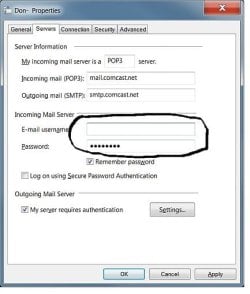
A long time ago, when I may have fiddled around with my settings, or may have OK"d the box, I lost all or part of my email address and/or password in the familiar window below. Reset both and all is OK.
 

Attachments

  • wm7.jpg
    wm7.jpg
    33.4 KB · Views: 471

My Computer

Computer type
PC/Desktop
Computer Manufacturer/Model Number
Hp p6608f
OS
Windows 7 Home Premium 64
CPU
Intel(R) Core(TM) i3 CPU
Memory
8.00 GB
Graphics Card(s)
ATI Radeon HD 4600 Series
Sound Card
(1) ATI High Definition Audio Device (2) Realtek High Defi
Monitor(s) Displays
one Asus VW266H one Samsung T260HD
Screen Resolution
1920 x 1200
Hard Drives
ST3750528AS
Other Info
BIOS Date: 04/09/10 10:04:52 Ver: 5.28
Thanks. Those entries are all intact and correct on mine. It is strange but will try what you suggest, close and reopen WM and see if that works.
Most of the time it's fine so am not too worried.
Thanks again.
 

My Computer

Computer type
PC/Desktop
Computer Manufacturer/Model Number
Alienware® ALX X58
OS
Win 7 Ult SP1/Win 10 Pro (all x64)
CPU
Intel® Core™ i7-975 Extreme O/C to 4.02 GHz, 8MB Cache
Motherboard
Asus® P6T Deluxe V2 X58 LGA1366
Memory
24GB Corsair Vengeance DDR3 SDRAM at 1600MHz - 6 x 4096MB
Graphics Card(s)
1792 MB NVIDIA® GeForce® GTX 295 Dual Core
Sound Card
Onboard Soundmax® High-Definition 7.1 Performance Audio
Monitor(s) Displays
Samsung XL2370 LED backlit 23" W/S 2ms response time
Screen Resolution
1920 X 1080
Hard Drives
2 x 500gb SATA II
1 x 1TB SATA II
1 external eSATA LaCie 3TB
(Non-RAID)
PSU
Alienware® 1200 Watt Multi-GPU
Case
Alienware® P2 ALX Chassis with AlienIce™ 3.0 Video Cooling
Cooling
Alienware® High-Perf. Liquid Cooling + Acoustic Dampening
Keyboard
Microsoft® Wireless Entertainment 8000 + Logitech® G15 Wired
Mouse
Microsoft® Wireless Laser 8000 + Logitech® G9 Wired
Internet Speed
1Gb/s
Antivirus
McAfee LiveSafe
Browser
Firefox - latest
Other Info
Using non-RAID on purpose as I find RAID to be too temperamental.
Now set to AHCI
Ex_Brit, the few times this same thing has happened to me, it definitely has been my isp; there's no intermittent WM issues here imho, unless you have been playing with your settings. Also the fact that you're saying your isp has been having endless problems lately also gives wide credence to that assumption as well.

If everything is in order as Donz points out, then it has to be your isp.
 

My Computer

Computer type
PC/Desktop
Computer Manufacturer/Model Number
..all towers built from scratch
OS
Vista/Win7/8/10/11 (x86/x64)
CPU
i7
That's what I thought, thanks for all the help ;-)
 

My Computer

Computer type
PC/Desktop
Computer Manufacturer/Model Number
Alienware® ALX X58
OS
Win 7 Ult SP1/Win 10 Pro (all x64)
CPU
Intel® Core™ i7-975 Extreme O/C to 4.02 GHz, 8MB Cache
Motherboard
Asus® P6T Deluxe V2 X58 LGA1366
Memory
24GB Corsair Vengeance DDR3 SDRAM at 1600MHz - 6 x 4096MB
Graphics Card(s)
1792 MB NVIDIA® GeForce® GTX 295 Dual Core
Sound Card
Onboard Soundmax® High-Definition 7.1 Performance Audio
Monitor(s) Displays
Samsung XL2370 LED backlit 23" W/S 2ms response time
Screen Resolution
1920 X 1080
Hard Drives
2 x 500gb SATA II
1 x 1TB SATA II
1 external eSATA LaCie 3TB
(Non-RAID)
PSU
Alienware® 1200 Watt Multi-GPU
Case
Alienware® P2 ALX Chassis with AlienIce™ 3.0 Video Cooling
Cooling
Alienware® High-Perf. Liquid Cooling + Acoustic Dampening
Keyboard
Microsoft® Wireless Entertainment 8000 + Logitech® G15 Wired
Mouse
Microsoft® Wireless Laser 8000 + Logitech® G9 Wired
Internet Speed
1Gb/s
Antivirus
McAfee LiveSafe
Browser
Firefox - latest
Other Info
Using non-RAID on purpose as I find RAID to be too temperamental.
Now set to AHCI
I've had the same thing happen in this corner of the world, but it happens to MailWasher. I always run that first to get rid of the spam. After it does that, then it opens my email program. It's just something whacky going on with the ISP as has been said. Every once in a while I can't get email at all for 3 - 4 minutes, but then it'll all cool down and off we go.

RK
 

My Computer

OS
Windows 7
I'm glad I'm not alone....! ;-)
 

My Computer

Computer type
PC/Desktop
Computer Manufacturer/Model Number
Alienware® ALX X58
OS
Win 7 Ult SP1/Win 10 Pro (all x64)
CPU
Intel® Core™ i7-975 Extreme O/C to 4.02 GHz, 8MB Cache
Motherboard
Asus® P6T Deluxe V2 X58 LGA1366
Memory
24GB Corsair Vengeance DDR3 SDRAM at 1600MHz - 6 x 4096MB
Graphics Card(s)
1792 MB NVIDIA® GeForce® GTX 295 Dual Core
Sound Card
Onboard Soundmax® High-Definition 7.1 Performance Audio
Monitor(s) Displays
Samsung XL2370 LED backlit 23" W/S 2ms response time
Screen Resolution
1920 X 1080
Hard Drives
2 x 500gb SATA II
1 x 1TB SATA II
1 external eSATA LaCie 3TB
(Non-RAID)
PSU
Alienware® 1200 Watt Multi-GPU
Case
Alienware® P2 ALX Chassis with AlienIce™ 3.0 Video Cooling
Cooling
Alienware® High-Perf. Liquid Cooling + Acoustic Dampening
Keyboard
Microsoft® Wireless Entertainment 8000 + Logitech® G15 Wired
Mouse
Microsoft® Wireless Laser 8000 + Logitech® G9 Wired
Internet Speed
1Gb/s
Antivirus
McAfee LiveSafe
Browser
Firefox - latest
Other Info
Using non-RAID on purpose as I find RAID to be too temperamental.
Now set to AHCI

My Computer

Computer type
PC/Desktop
Computer Manufacturer/Model Number
Alienware® ALX X58
OS
Win 7 Ult SP1/Win 10 Pro (all x64)
CPU
Intel® Core™ i7-975 Extreme O/C to 4.02 GHz, 8MB Cache
Motherboard
Asus® P6T Deluxe V2 X58 LGA1366
Memory
24GB Corsair Vengeance DDR3 SDRAM at 1600MHz - 6 x 4096MB
Graphics Card(s)
1792 MB NVIDIA® GeForce® GTX 295 Dual Core
Sound Card
Onboard Soundmax® High-Definition 7.1 Performance Audio
Monitor(s) Displays
Samsung XL2370 LED backlit 23" W/S 2ms response time
Screen Resolution
1920 X 1080
Hard Drives
2 x 500gb SATA II
1 x 1TB SATA II
1 external eSATA LaCie 3TB
(Non-RAID)
PSU
Alienware® 1200 Watt Multi-GPU
Case
Alienware® P2 ALX Chassis with AlienIce™ 3.0 Video Cooling
Cooling
Alienware® High-Perf. Liquid Cooling + Acoustic Dampening
Keyboard
Microsoft® Wireless Entertainment 8000 + Logitech® G15 Wired
Mouse
Microsoft® Wireless Laser 8000 + Logitech® G9 Wired
Internet Speed
1Gb/s
Antivirus
McAfee LiveSafe
Browser
Firefox - latest
Other Info
Using non-RAID on purpose as I find RAID to be too temperamental.
Now set to AHCI
Back
Top