Windows Mail

How to Reinstate Windows Mail in Windows 7

   Warning
Microsoft no longer supports Windows Mail, aka WinMail. It's recommended you use another well known supported email client. This Tutorial is for Advanced users who importantly have the Technical Ability to make the changes, have backups of everything including your OS, and to be your own tech support for WinMail going forward. If you decide to complete this tutorial you accept the fact that you are using WinMail as-is. It might be necessary to uninstall other email clients to resolve any WinMail conflicts in some environments. Understand it's likely that new OS updates from Microsoft will break WinMail's operation, and to fix make it necessary to rerun the tutorial again to reinstate it. With those things in mind, this tutorial was written so that you can rerun it without affecting WinMail user data.
Please see this Errata (Bug List) post before you install, to be aware of the current information about known issues using WinMail within Windows 7, these issues are programmatic and in most cases cannot be resolved by this tutorial, and will never be fixed.

Having said all of that disclaimer, if you have the technical ability, and can put up with the annoying minor byproduct bugs, then like so many of us still enjoy using WinMail on Windows 7 ...ymmv!


   Tip
As of January, 2025, the instructions given here supersede all other instructions given in forthcoming older posts. Realize some of the posts that follow are over 16 years old, and many of the link pointers within have become mislinked over time, many of the files or information within them is outdated, incomplete, or superseded with more accurate information - and so be careful. However you can always be sure that the latest info from all research is incorporated into this tutorial post, and its downloads are the latest available. This post is continuously kept up-to-date, and so..
...Always refer to this Tutorial post for the very latest updated information

This is the 4th iteration of the Windows 7, WinMail tutorial.

The process of this tutorial Will Not work to reinstate WinMail on Windows 8/10 !
Windows 8/10 users please go Here


Start here
  1. Download tutorial package TutReWinMail.zip

    Download

  2. Extract the TutReWinMail.zip into your user Downloads folder
    • Note: Be sure once extracted this is the address of the ''TutReWinMail'' folder:
    • C:\Users\username\Downloads\TutReWinMail... ... (if it's not there please put it there)
  3. Navigate to your user Downloads\TutReWinMail folder to be sure the above is correct.
    • (..if you need more verbose install instructions to follow, download this WinMail Local Tutorial.zip)
    • Advanced Users can proceed below:
      (..log in for Full Access, being able to get support, remove ads, like, and even to post, etc..)
Advanced Users: ..use this easy excellent overview of the steps in the local tutorial:
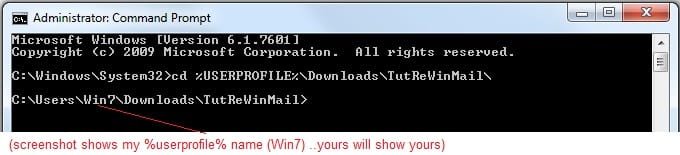
  • Open an Administrator Command Prompt. (screenshot showing in Administrator mode)
  • copy/paste this line into the command prompt: cd %USERPROFILE%\Downloads\TutReWinMail\
  • Your command prompt must now be showing you are at That Same Folder Address ..which contains the tutorial files that the batch file in the next step executes programs and copies files specifically from that folder address - if it's not there the batch file will fail since it cannot find what it needs!
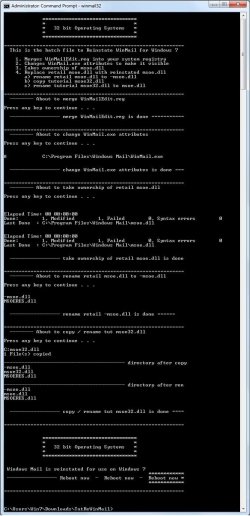
  • Next type in either winmail32 or win64mail <matching OS bit, to interactively process These Next Steps
  • If you've finished to the bottom as shown in last screenshot, restart your machine (sets registry)
  • Create a shortcut from WinMail.exe to your Desktop
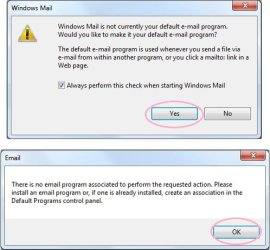
  • Open WinMail - it may prompt you one (or both) of These Two Notices ..click yes, and okay.
  • They now should be already set, but you can manually check/set at any time These Default Settings
  • That's pretty much all there is to it, and from here you setup the rest of the Windows Mail client (aka: WinMail) as normal within its various tab menus for Accounts, Options, Layout, etc, etc, to suit your individual needs.
  • Lastly, but should be the First thing you do, is to Create A WinMail Backup (new version) ..Go to this next link and when you get there scroll down to the heading: Backup/Restore Procedures for further instructions.
   Information
See How to open an elevated Administrator Command Prompt
Important: The exact text provided by the tutorial must be entered into the Administrator Command Prompt.
Hint: to avoid typos, copy/paste the entire line containing the command into the Command Prompt window.
Also see: How to Enable Copy to Clipboard from the Windows 7 Command Prompt

Every effort has been made to make this a step-by-step process, however, it is beyond the scope of a single tutorial to provide information on every command or concept. Search the Main Tutorial Section if you need greater detail on a concept or command presented in this tutorial.


Good luck, and long live WinMail :thumbsup:


   Note
Made possible by members:
Mark (aka Mr GRiM) - provided the original tutorial
Poppa Bear - continued Mark's work within the 2nd version
endeavor - provided continuous feedback, changes, invaluable testing instrumental to tutorial operations
EKManitis - propose the batch code that made operations easier
Slartybart - updated, tested, and consolidated all of the above into the 3rd version
endeavor - reviewed, updated, tested, and incorporated all of the above into this 4th version
...and also a special thanks to All the other members who presented discovery for this project


Attachments

  • TutReWinMail.zip
    TutReWinMail.zip
    1.8 MB · Views: 4,994
  • msoe_32.zip
    msoe_32.zip
    404 bytes · Views: 1,052
  • msoe_64.zip
    msoe_64.zip
    404 bytes · Views: 1,531
  • WinMailEdit.zip
    WinMailEdit.zip
    404 bytes · Views: 6
  • Win74umsZip.zip
    Win74umsZip.zip
    404 bytes · Views: 106
  • ProcessingBatch.jpg
    ProcessingBatch.jpg
    194.2 KB · Views: 1,147
  • ACP.jpg
    ACP.jpg
    19.6 KB · Views: 1,083
  • DefaultClickYes-OkayAssociation.jpg
    DefaultClickYes-OkayAssociation.jpg
    52.8 KB · Views: 899
  • PasteCDCommand.jpg
    PasteCDCommand.jpg
    33.1 KB · Views: 696
  • WinMail_Local_Tutorial.zip
    WinMail_Local_Tutorial.zip
    6.1 KB · Views: 1,202
  • FolderOptionsSet.jpg
    FolderOptionsSet.jpg
    61.5 KB · Views: 695
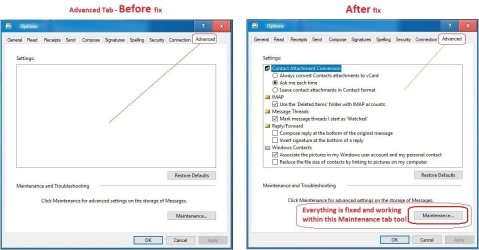
  • WinMailAdvanceOptionsBlank.jpg
    WinMailAdvanceOptionsBlank.jpg
    276.4 KB · Views: 93
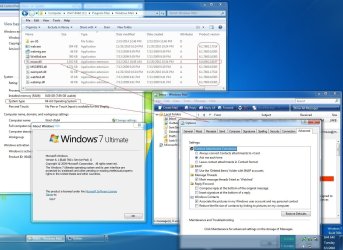
  • Win7x64AdvancedTab+FileVersions.jpg
    Win7x64AdvancedTab+FileVersions.jpg
    298.9 KB · Views: 112
  • AdvancedTabBefore&After_fixed.jpg
    AdvancedTabBefore&After_fixed.jpg
    106.9 KB · Views: 50
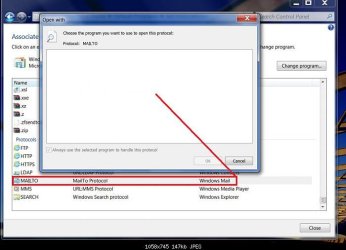
  • CheckManually.jpg
    CheckManually.jpg
    209.5 KB · Views: 136
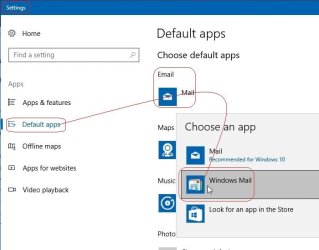
  • Win10_SetDefault.jpg
    Win10_SetDefault.jpg
    66.2 KB · Views: 33
Last edited by a moderator:
Thanks endeavor for your answer,
you know sometimes small things can drive you mad when there is no explanation ...
i just wanted to be sure i'm doing things fine.
thanks for patience as well.
 

My Computer

Computer type
PC/Desktop
OS
98SE/XP/windows7 32bit/ win10
Windows mail is missing/blank from Open With window
Hi all
after reinstate windows mail into 2 machine (all works fine now )
i noticed in one machine that windows mail is absent from "open with" window,
even though it is present in default program->associate file types or protocol....
How can i fix that?
i think its a registry key but its only a guess
*windows mail is default mail
i really want to avoid reinstate windows mail again...
Thanks!

I want to answer that question this long way around please, just so you will get used to where to post and where to look for answers for WinMail problems on Windows 7
On Page1 of the very First Post in this thread, and up on top one of the very first lines it says:
Please see the Errata post...
Click that Errata link please - which brings to the Errata (Bugs List) post, and scroll down about half the page to where it says:
<~ If for some reason your right click on a file and.....>
...now right after that you will see where it says Screenshot 1 or Screenshot 2 - I think your issue is Screenshot 2 and so click it and follow the detail of what it suggests... ...and then post back here with how you made out.
 

My Computer

Computer type
PC/Desktop
Computer Manufacturer/Model Number
..all towers built from scratch
OS
Vista/Win7/8/10/11 (x86/x64)
CPU
i7
Thanks for detailed checkup!
-right click on a file and ''SendTo: Mail Recipient'' is working fine
-
WinMail is set as the default email client via the Control Panel as shown exactly as in this Screenshot 1 and Screenshot 2
-windows mail is still absent from "open with" window (as my photo show)
again, i do think its a registry key but its only a guess since in other win 7 pc there is no such issue.

*sfc /verifyonly show no violation
 

Attachments

  • Untitled.jpg
    Untitled.jpg
    49.7 KB · Views: 447
Last edited:

My Computer

Computer type
PC/Desktop
OS
98SE/XP/windows7 32bit/ win10
Just curious, did you try and install another email application on that pc?

Anyway all of your your MailTo protocol associations should have been already set when the re-instate process merged the winmailedit.reg file . . . in the proper order of events.

Anyway for now, d-click to merge just the reg file: 'WinMailEdit.reg' again, reboot, and report back.
(hopefully that will re-set the ....\WindowsMail.Url.Mailto\DefaultIcon icon)

PS,
Besides the fact that your 'Associate File Type' screenshot does not have the WinMail icon showing in its 'selection box' ...I can still see importantly that you have WinMail set as default, as I circled in red Here..
...and so besides that small issue of the missing icon in that box, more importantly, please tell me exactly what is not working on your WM Client itself ? ? ?


.
 
Last edited:

My Computer

Computer type
PC/Desktop
Computer Manufacturer/Model Number
..all towers built from scratch
OS
Vista/Win7/8/10/11 (x86/x64)
CPU
i7
-i did not install another email application.
-merged the winmailedit.reg did not help...
- i do have have WinMail set as default
-All works fine besides the missing icon in that box (small issue but annoying:shock:)
If you'll come up with something pleas e let me know
Thanks for your help
i appreciate it !
 

My Computer

Computer type
PC/Desktop
OS
98SE/XP/windows7 32bit/ win10
~fwiw, a lot if various parameters are set upon first use, I've seen (actually tracked) dozens (sometimes hundreds) of entries get set as each function of WinMail is used for the 'first time' after setup ..and so please just for gp, follow through completely with using the Send To: Mail Recipient
..send to: a file to yourself in an email, but just follow though using the function to see if that position sets.

~Also for gp, take a screenshot on what your pc shows, of what yours shows compared to what the 'bottom' of my 'screenshot 2' shows with those three boxes check marks set (I just want to see it is all)

~Also for gp, do this to check, right click in the open on your Desktop, create New> Text Document ...and rename it something like test.txt, and now rename the extension of it to txt.eml, then if not immediately or about 15 seconds it should now change and show itself with the WM icon, and then when you right click it, and up in the column list, select "Open With" and see if you have WinMail listed in there? ...if it is (or browse it there) and select it, and click OK - I just want to go through with the process to set inner workings .. (no need to open it after since it's not a real email file, but if/when you actually file>save a particular email out of WM to your desktop, is when at that time it will open and you can read it normally (I use that function a lot))

...I can't think of anything else right now, but the answer is simple in this case; however again, and Importantly, if everything is working fine is what matters! ..with this WinMail re-instated on Win7 process, and you can just file this small issue of yours as another one for your post #1762 list ...LoL
 

My Computer

Computer type
PC/Desktop
Computer Manufacturer/Model Number
..all towers built from scratch
OS
Vista/Win7/8/10/11 (x86/x64)
CPU
i7
man what a mess...

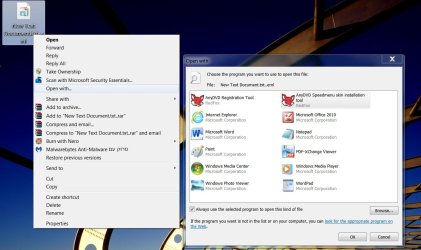
screen 1 - upon renaming to .eml the icon is changing.
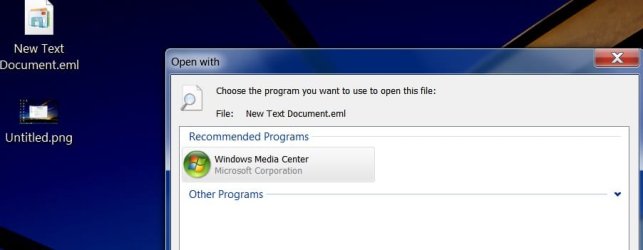
right click show no menu ,when i hit the line "open with.." from the menu there is no recommended program and i get the list of programs not including windows mail. (So it's the 2nd place where windows mail is not shown in the program box )
in my second win 7 machine -right click show no menu,but upon hit the line "open with.." windows mail is the chosen marked recommended program.
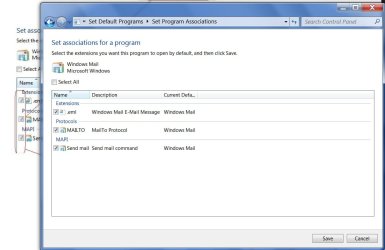
screen 2 - you asked for three boxes check.
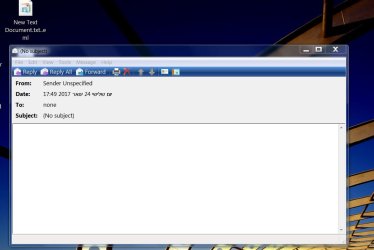
screen 3- if i hit twice the icon .eml it opens a mail window as you see.
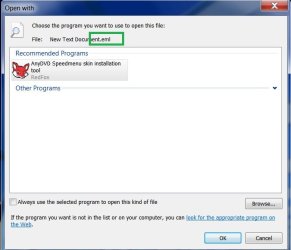
screen 4 - something totally weird :rolleyes:
after right click the .eml i got the list of programs (as in screen 1)i choose "browse" and selected "WinMail.exe" .when i hit it Anydvd was chosen, i tried again to re select WinMail.exe but Anydvd was chosen instead...
* .eml - does not appear in "associate a file type or protocol with a program" in both win7 machine.
At this point i did a system restore back to the point i started .
-i think that WinMail.exe or other component of windows mail is not register as it should be, and i have no clue why Anydvd was chosen....
 

Attachments

  • 1.jpg
    1.jpg
    229.1 KB · Views: 361
  • 2.jpg
    2.jpg
    136.5 KB · Views: 336
  • 3.jpg
    3.jpg
    109 KB · Views: 347
  • 4.jpg
    4.jpg
    70.6 KB · Views: 405

My Computer

Computer type
PC/Desktop
OS
98SE/XP/windows7 32bit/ win10
(..just a fyi, sometimes (but not always) with big or many screenshots, for the forum rendering sake you can just put a link in like i did, and that's why i did it like that..)

screen 4 - something totally weird :rolleyes:
after right click the .eml i got the list of programs (as in screen 1)i choose "browse" and selected "WinMail.exe" .when i hit it Anydvd was chosen, i tried again to re select WinMail.exe but Anydvd was chosen instead...
* .eml - does not appear in "associate a file type or protocol with a program" in both win7 machine.

At this point i did a system restore back to the point i started.


Okay to your screenshots, and that's why I had you go through those motions of different things and screenshots so we could visually see what anomalies show up, just like we see there, which is your answer.

Now, that's an old version of SlyFox AnyDVD and not the new RedFox version which is certainly fine! ...but my point is, depending on what version and most importantly where you got it from (it's not my business) ..but my point is that there are versions of SlyFox installers out there that do not 'hash check' or verify to the original, or patches, etc, that have viruses in them that will cause all kinds of havoc. Otherwise if everything is legit well then you have other issues, which are not WinMail thread related.

Anyway you did the right thing to do a restore for sure, but what kind of restore?
Hopefully you have a complete OS backup partition image restore that's old enough to get back to a point Before the offending problems were introduced that will set you free, especially if it's a virus or trojan not identifiable by current methods, then going back is imperative! ..imho
 

My Computer

Computer type
PC/Desktop
Computer Manufacturer/Model Number
..all towers built from scratch
OS
Vista/Win7/8/10/11 (x86/x64)
CPU
i7
thanks for your screen shot advice,
-Anydvd is fine, the same version is on my 2nd machine so i do not think that's the issue.
- i did system restore(windows build in) and i use backup constantly on ext . hard drive.
-virus or trojan malware are out of the question - i use constantly MBAM, MSE, ESET online 1/month.
so we could not solve the issue unfortunately :(
though i do wonder why program box (open with) does not including windows mail
maybe it'll fix by itself somehow...
Thanks again for your dedicated help!
Cheers
 

My Computer

Computer type
PC/Desktop
OS
98SE/XP/windows7 32bit/ win10
As for your AV I said not currently identifiable no matter what you have installed, but if your sure it's not that then okay good. Anyway you have something wrong, and so you can not rule anything out so easily.
Your issue is not going to fix itself though. Hopefully it's simple.

A full OS partition backup to a point in time, I'd guess to before you installed AnyDVD, will fix it.

(fwiw to your previous message .eml is not listed in my association list either, but it's Not the problem anyway)

I doubt it, but you also could have corrupted icons fixable by Options 1 on this tutorial:
Icon Cache - Rebuild
..or icons association could be corrupted, but you would think that many would be off.

When I previously said merge the WinMailEdit.reg, I specifically meant the current one dated 6/1/2015 out of the TutReWinMail folder - I'll assume that's the one you did.

I've said this before and I'll say it again that re-instating WinMail is really simple and takes just a few minutes, and when it's done on a fresh install of Windows 7 (or method for 8 or 10) it will Not have any of these problems!
It actually takes longer to type this message than it does to re-instate WinMail

These problems you are having are not caused by WinMail. It's something you inadvertently did as evidenced by what's showing on your last screenshot.
 

My Computer

Computer type
PC/Desktop
Computer Manufacturer/Model Number
..all towers built from scratch
OS
Vista/Win7/8/10/11 (x86/x64)
CPU
i7
-i do not have a OS copy before installing AnyDVD unfortunately...
but as i wrote above the same version is on my 2nd machine does not affect windows mail.
- Icon Cache - Rebuild did not help (but good idea to try!)
- 6/1/2015 out of the TutReWinMail folder -yes i used this one
- re-instating WinMail over the old one you think?

update- i deleted anydvd using revo uninstaller- it did not help and now media center is selected even though
i choose windows mail...
so its not anydvd issue i think
 

Attachments

  • aa.jpg
    aa.jpg
    58.2 KB · Views: 167
Last edited:

My Computer

Computer type
PC/Desktop
OS
98SE/XP/windows7 32bit/ win10
- re-instating WinMail over the old one you think?

It won't hurt, yes for sure try it first (pretty sure it won't solve the problem but need to rule everything out) No need to change any files, everything is already in place, just run the procedure as is.

fwiw when I grow a new OS, after every day of new installing I will create a full OS partition backup.
On brand new OS installs, installing the OS is easy, but takes days to install all your favorite software and set it up the way you want. Like for Windows 7 i had it evolving for years, and you can bet I still have OS partitions saved at every milestone of its evolution. I always! create a full backup image before I make software installations, that way if I don't like something, it's just faster, easier, and much more accurate for me to restore, especially on any big updates that go awry.

update- i deleted anydvd using revo uninstaller- it did not help and now media center is selected even though i choose windows mail... so its not anydvd issue i think
If you had any bugaboo that got installed along with it and it morphed, then an uninstall won't uninstall the problem. However I will get off of that subject now, because if it's the original hash checked Slysoft installer and your own real license key and nothing else was used, then it's surly fine and not the cause, no more than I could now say that what's showing in its place as Windows Media Center is the problem ...not.

Since this is not WinMail related then maybe you will be better served to post out in the forums, I'd guess under General Forums, but be sure to word it correctly. Any screenshots make minimal, for instance don't show that one with New Text Document.eml in the background, that will confuse people what you did. (I had specifically said to rename it test.eml anyway, but it was just to verify associations)
I'm sure once you tell someone you installed WinMail on Windows 7 though, and they don't know anything about it, then surly they will balk at you for doing so and say that's the problem. LoL, gosh you can't win on this.

It's not a WinMail Problem at all though !

It's probably something minor, just make sure you go through the motions and click app for the things in these Screenshot 1, 2, etc Try any and all of those things again, to rule it out, can't hurt.
..by now you should have already re-run the tutorial on top of itself, that won't hurt anything either.

I don't know what you did along the way to break it, but I do know one thing for sure - that doing a new fresh install of Windows 7 will surly fix it! :p

ps
Next time make complete OS partition backups, and this small issue or any other future install issues that go wrong, will never be a problem again for you, because in a flash you can restore right back to where you were before you started the installation. I've done it literally thousands of times already in my lifetime as a software tester, and it's saved me from a year of time wasted already.


.
 
Last edited:

My Computer

Computer type
PC/Desktop
Computer Manufacturer/Model Number
..all towers built from scratch
OS
Vista/Win7/8/10/11 (x86/x64)
CPU
i7
fresh install of Windows 7 will surly fix it!
tongue.gif
fresh install is always the last resource and fix everything :rolleyes:
-re-instating WinMail over the old one- did not help either.i think i will leave situation as it is right now windows itself works fine.
Again, thanks for your detailed answers and advice's

p.s- do you always make complete OS partition backups?
what program do you use for OS backup?
 
Last edited:

My Computer

Computer type
PC/Desktop
OS
98SE/XP/windows7 32bit/ win10
You did not say, but I assumed you also actually 'physically clicked through' all the make default buttons I asked for in screenshot 1 & 2. You don't need to answer but I will assume Yes that you did, and the point to do it was to see if it would reset anything of itself, so you have to try it.

-re-instating WinMail over the old one- did not help either.i think i will leave
situation as it is right now windows itself works fine.

Yes then I agree with you if that's what you want.

what program do you use for OS backup?

It's a combination of 1 of the top 7 imagers, but everyone has their own preference and ideas of what's the best imager for them, and everyone is right for their own personal opinions, different needs, beliefs and experiences :)
It's just like asking someone which car they like better, or motorcycle, or even religion - everyone has their own preferences, and one persons needs may not fit another's.

p.s- do you always make complete OS partition backups?

Yes I only ever use Full OS partition backups, and never make the add-on incrementals of them; I never use the built-in MS backup either.
My setups are unique with multiple primary OS partitions on SD's and corresponding 2 TB spinning HD's to complement them, x3.
I create single partition backups for the Primary OS's, but will also do a Full total 10 partition backup (combined into a one large image) of my whole tower setup, and then store those backup images on physical dedicated spinner HD's local and offsite. I have backups of everything I've done for the last 14 years, and all evolutions of every OS I've builded upon (which is most all of them) ..and can image right back to any dated evolution of them for testing or building further upon, quite easily.
__________________

Hopefully your issue is something minor and simple that happened that set your default associations askew somehow, and that you can reverse it or set it aright. Interesting though that even though it said AnyDVD, or now Media Center - it still opens in WinMail, and so that says something.... well, I'll think on it.
 

My Computer

Computer type
PC/Desktop
Computer Manufacturer/Model Number
..all towers built from scratch
OS
Vista/Win7/8/10/11 (x86/x64)
CPU
i7
I don't necessarily agree with all of that PCMag list and I would not have posted that link imho, a few are ok, besides it's just an Editor Rating from that particular site, and so it's from and in his own opinion and not a Global one. Realize many sites show certain products because they were compensated in some way to show and feature them, and the product may not really be in the top tier of Global choices.

This is OT for this WinMail thread though.


.
 
Last edited:

My Computer

Computer type
PC/Desktop
Computer Manufacturer/Model Number
..all towers built from scratch
OS
Vista/Win7/8/10/11 (x86/x64)
CPU
i7
Funny, I did some checking on the status of my own W.M. after reading these posts and was quite surprised. First though, I want to mention that I did go to Windows 10, but got so frustrated because it seemed like it was constantly running, taking up so many resources in doing whatever, so that I could not even type without waiting between letters. Probably updating. Whatever it was, it was a nuisance! I had the new version of Outlook Express running on that and liked it a lot.
Anyway, like I said, it was so frustrating always having to wait on Windows 10 to get done doing whatever it was doing so I could use the machine that I decided to go back to Windows 7 (Pro). I set up W.M. like I had before and believe me, I like Windows 7 a whole lot more than 10 because I can actually use it and have more control over it. I went over some of the remarks in these posts about W.M. being default etc., so I checked to see how mine was doing, even though I use it all the time. I do have MS Office 2007 on it so of course I have MS Outlook which I use more for business.
When I brought up the Control Panel so set the Default programs, W.M. was not even listed! And when I did a right click on my old .eml files, I had no option at all for W.M. So I did as was suggested by our Professor Endeavor and ran the 2015 version of WinMailEdit.reg. BINGO! W.M. was back in the Control Panel list for Default programs and once again I had the option of choosing it to use with my .eml files.
It sure seems good to have W.M. running again with no crazy upsets by Windows 10 and its updates! YEA for Windows Mail!
OH! BTW, I kept Windows 10 and put Windows 7 on a different hard drive. It only takes a few seconds to swap out the drives. I do want to keep up with 10 so I know a little about it, but most of my time I'm flying my plane with 7. :-) I do have one machine, a desktop, with 2 hard drives, one with Vista on it (no kidding) and the other with 10. I also have an older Dell laptop with a dual boot setup, 1 hard drive, with XP Media Center on one partition and 7 Pro on the other. Not bad for an 80 year old geezer! Do I hear any "AMEN!"s out there???????? heh heh
 

My Computer

OS
Windows 7
I set up W.M. like I had before..
<smile> I remember well the way you set it up before but at first it wasn't like the Page 1 tutorial suggested, and it did not work right at first then either <smile> ...you had your own way of doing things <smile>

When I brought up the Control Panel so set the Default programs, W.M. was not
even listed! And when I did a right click on my old .eml files, I had no option
at all for W.M.
On a fresh install with no other email programs installed, if one uses the page 1 tutorial and follows exactly, then none of these problems you or previous posters mention will exist, because the files and process within the tutorial starts the reinstatement of WM and everything gets setup accordingly, tested/working/proven a thousand + times. And so in that order of events some things are first set default, but then when you first open WinMail you are also prompted to set WinMail as the default email client, shown at the end of this screenshot I made back in 2012 to show it, and the whole process. (sorry if the screenshot was made too big back then, so open full)
And so if someone ends up that they don't have this-or-that showing or working right (besides what's in the known errata bug list) then quite simply, they didn't follow the directions correctly, or used an older or alternate method.

I kept Windows 10 and put Windows 7 on a different hard drive. It only takes a
few seconds to swap out the drives.
Actually that's a great idea if someone does not want to get involved with or which boot-loaders to use and all the complication that 'may' come with that, and so swapping out drives is a great idea to keep the OS's separate and safe for your selected use, without the other OS interfering.
In a real sense my 3 primary OS partition setups are setup that same way, but, they are on the same HD. I do that by when booting out of one OS and into whichever of the three OS's there, it leaves the others behind set inactive and hidden: = results are that each one cannot see the other. This is OT to the WM thread though.

Yes I will give you that Amen, and congratulations for being so hip @ 80
 

My Computer

Computer type
PC/Desktop
Computer Manufacturer/Model Number
..all towers built from scratch
OS
Vista/Win7/8/10/11 (x86/x64)
CPU
i7
Thank you for that "Amen", Lad. There will be an offering plate for donations back at the door for your donations. Have a great day, folks. :-)
 

My Computer

OS
Windows 7
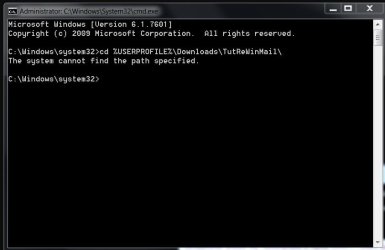
Administrator command prompt can't find path

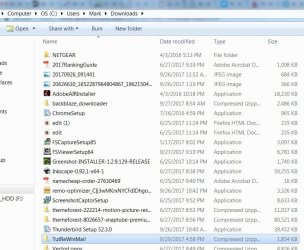
I've followed the instructions on reinstating Windows Mail in Windows 7 numerous times but I'm unable to get past the command prompt "system cannot find the path specified". The file is where it's supposed to be so not sure what the problem is - am I forgetting something?
 

Attachments

  • W7CommandPrompt1.jpg
    W7CommandPrompt1.jpg
    51 KB · Views: 57
  • WindowsMailFileLocationW7.jpg
    WindowsMailFileLocationW7.jpg
    230.9 KB · Views: 86

My Computer

Computer type
PC/Desktop
Computer Manufacturer/Model Number
HP
OS
windows 7 home premium 64 bit
Back
Top