Windows Mail

How to Reinstate Windows Mail in Windows 7

   Warning
Microsoft no longer supports Windows Mail, aka WinMail. It's recommended you use another well known supported email client. This Tutorial is for Advanced users who importantly have the Technical Ability to make the changes, have backups of everything including your OS, and to be your own tech support for WinMail going forward. If you decide to complete this tutorial you accept the fact that you are using WinMail as-is. It might be necessary to uninstall other email clients to resolve any WinMail conflicts in some environments. Understand it's likely that new OS updates from Microsoft will break WinMail's operation, and to fix make it necessary to rerun the tutorial again to reinstate it. With those things in mind, this tutorial was written so that you can rerun it without affecting WinMail user data.
Please see this Errata (Bug List) post before you install, to be aware of the current information about known issues using WinMail within Windows 7, these issues are programmatic and in most cases cannot be resolved by this tutorial, and will never be fixed.

Having said all of that disclaimer, if you have the technical ability, and can put up with the annoying minor byproduct bugs, then like so many of us still enjoy using WinMail on Windows 7 ...ymmv!


   Tip
As of January, 2025, the instructions given here supersede all other instructions given in forthcoming older posts. Realize some of the posts that follow are over 16 years old, and many of the link pointers within have become mislinked over time, many of the files or information within them is outdated, incomplete, or superseded with more accurate information - and so be careful. However you can always be sure that the latest info from all research is incorporated into this tutorial post, and its downloads are the latest available. This post is continuously kept up-to-date, and so..
...Always refer to this Tutorial post for the very latest updated information

This is the 4th iteration of the Windows 7, WinMail tutorial.

The process of this tutorial Will Not work to reinstate WinMail on Windows 8/10 !
Windows 8/10 users please go Here


Start here
  1. Download tutorial package TutReWinMail.zip

    Download

  2. Extract the TutReWinMail.zip into your user Downloads folder
    • Note: Be sure once extracted this is the address of the ''TutReWinMail'' folder:
    • C:\Users\username\Downloads\TutReWinMail... ... (if it's not there please put it there)
  3. Navigate to your user Downloads\TutReWinMail folder to be sure the above is correct.
    • (..if you need more verbose install instructions to follow, download this WinMail Local Tutorial.zip)
    • Advanced Users can proceed below:
      (..log in for Full Access, being able to get support, remove ads, like, and even to post, etc..)
Advanced Users: ..use this easy excellent overview of the steps in the local tutorial:
  • Open an Administrator Command Prompt. (screenshot showing in Administrator mode)
  • copy/paste this line into the command prompt: cd %USERPROFILE%\Downloads\TutReWinMail\
  • Your command prompt must now be showing you are at That Same Folder Address ..which contains the tutorial files that the batch file in the next step executes programs and copies files specifically from that folder address - if it's not there the batch file will fail since it cannot find what it needs!
  • Next type in either winmail32 or win64mail <matching OS bit, to interactively process These Next Steps
  • If you've finished to the bottom as shown in last screenshot, restart your machine (sets registry)
  • Create a shortcut from WinMail.exe to your Desktop
  • Open WinMail - it may prompt you one (or both) of These Two Notices ..click yes, and okay.
  • They now should be already set, but you can manually check/set at any time These Default Settings
  • That's pretty much all there is to it, and from here you setup the rest of the Windows Mail client (aka: WinMail) as normal within its various tab menus for Accounts, Options, Layout, etc, etc, to suit your individual needs.
  • Lastly, but should be the First thing you do, is to Create A WinMail Backup (new version) ..Go to this next link and when you get there scroll down to the heading: Backup/Restore Procedures for further instructions.
   Information
See How to open an elevated Administrator Command Prompt
Important: The exact text provided by the tutorial must be entered into the Administrator Command Prompt.
Hint: to avoid typos, copy/paste the entire line containing the command into the Command Prompt window.
Also see: How to Enable Copy to Clipboard from the Windows 7 Command Prompt

Every effort has been made to make this a step-by-step process, however, it is beyond the scope of a single tutorial to provide information on every command or concept. Search the Main Tutorial Section if you need greater detail on a concept or command presented in this tutorial.


Good luck, and long live WinMail :thumbsup:


   Note
Made possible by members:
Mark (aka Mr GRiM) - provided the original tutorial
Poppa Bear - continued Mark's work within the 2nd version
endeavor - provided continuous feedback, changes, invaluable testing instrumental to tutorial operations
EKManitis - propose the batch code that made operations easier
Slartybart - updated, tested, and consolidated all of the above into the 3rd version
endeavor - reviewed, updated, tested, and incorporated all of the above into this 4th version
...and also a special thanks to All the other members who presented discovery for this project


Attachments

  • TutReWinMail.zip
    TutReWinMail.zip
    1.8 MB · Views: 4,994
  • msoe_32.zip
    msoe_32.zip
    404 bytes · Views: 1,052
  • msoe_64.zip
    msoe_64.zip
    404 bytes · Views: 1,531
  • WinMailEdit.zip
    WinMailEdit.zip
    404 bytes · Views: 6
  • Win74umsZip.zip
    Win74umsZip.zip
    404 bytes · Views: 106
  • ProcessingBatch.jpg
    ProcessingBatch.jpg
    194.2 KB · Views: 1,147
  • DefaultClickYes-OkayAssociation.jpg
    DefaultClickYes-OkayAssociation.jpg
    52.8 KB · Views: 899
  • ACP.jpg
    ACP.jpg
    19.6 KB · Views: 1,083
  • PasteCDCommand.jpg
    PasteCDCommand.jpg
    33.1 KB · Views: 696
  • WinMail_Local_Tutorial.zip
    WinMail_Local_Tutorial.zip
    6.1 KB · Views: 1,202
  • FolderOptionsSet.jpg
    FolderOptionsSet.jpg
    61.5 KB · Views: 695
  • WinMailAdvanceOptionsBlank.jpg
    WinMailAdvanceOptionsBlank.jpg
    276.4 KB · Views: 93
  • Win7x64AdvancedTab+FileVersions.jpg
    Win7x64AdvancedTab+FileVersions.jpg
    298.9 KB · Views: 112
  • AdvancedTabBefore&After_fixed.jpg
    AdvancedTabBefore&After_fixed.jpg
    106.9 KB · Views: 50
  • CheckManually.jpg
    CheckManually.jpg
    209.5 KB · Views: 136
  • Win10_SetDefault.jpg
    Win10_SetDefault.jpg
    66.2 KB · Views: 33
Last edited by a moderator:
4Winner,

This is just an amateur opinion. I'm by no means an expert on this.

I have been away from this for a long time, but still enjoying Windows Mail on 7.

It looks to me that something is wrong with the TutReWinMail folder in your Downloads.
It shows it as a "Compressed Zip folder" . Should be "File folder".
Looks to me that it's zipped.

I suggest right clicking the original downloaded zipped folder Win74umsZip.zip, (in Downloads) and Extract All.
Making sure it extracts to the same folder that you are in (Downloads)
You should then see TutReWinMail File folder.

You may have to delete the existing TutReWinMail Compressed Zip folder or rename it.

And run the batch file again.

Again, This is just an amateur opinion. I'm by no means an expert on this.

Don
 

My Computer

Computer type
PC/Desktop
Computer Manufacturer/Model Number
Hp p6608f
OS
Windows 7 Home Premium 64
CPU
Intel(R) Core(TM) i3 CPU
Memory
8.00 GB
Graphics Card(s)
ATI Radeon HD 4600 Series
Sound Card
(1) ATI High Definition Audio Device (2) Realtek High Defi
Monitor(s) Displays
one Asus VW266H one Samsung T260HD
Screen Resolution
1920 x 1200
Hard Drives
ST3750528AS
Other Info
BIOS Date: 04/09/10 10:04:52 Ver: 5.28
I had it running once but gave it up because there are no security updates to it...
Go with Thunderbird, you'll bet better off and safer too.
 

My Computer

OS
Windows 7 64 bit
I've followed the instructions on reinstating Windows Mail in Windows 7 numerous times but I'm unable to get past the command prompt "system cannot find the path specified". The file is where it's supposed to be so not sure what the problem is - am I forgetting something?

First of all 4winners, welcome to the SevenForums !

I see what the problem is and your mouse actually has it highlighted in your screenshot, which is that ''TutReWinMail'' still shows as a zip file. And so the answer is you never extracted it yet, for the command line process to be able to access the folders contents to do its work - Donz is absolutely right ;)

As for what Banyarola said, well, they don't use WinMail anymore so consider the source; however their point is well taken and is an understood known factor for us long time WinMail users, who understand all the subtleties of using it as is..

Anyway, the procedure is foolproof I thought, and as the instructions say in step 2
"Extract the TutReWinMail.zip into your user Downloads folder"
If you did that (which it seems you didn't) then the rest would be a success to move forward.
Remember this procedure is more for advanced users with moderate computer experience, who understand what's said in the disclaimer/warning article on page 1, and have the technical ability to move forward.

Thank you


.
 
Last edited:

My Computer

Computer type
PC/Desktop
Computer Manufacturer/Model Number
..all towers built from scratch
OS
Vista/Win7/8/10/11 (x86/x64)
CPU
i7
RE: Administrator command prompt can't find path

Yes that was it - Thanks endeavour and Donz. Appreciate your input.

I have all my winmail files backed up from a 32bit vista going into a 64bit W7 and I am now learning that may be problematic - so I haven't continued past the command prompt yet. Anyone know if that will in fact be an issue and if so is there a work around?
 

My Computer

Computer type
PC/Desktop
Computer Manufacturer/Model Number
HP
OS
windows 7 home premium 64 bit
You need to be much more specific with your general questions for me to understand what your problem is; we can't know what you are thinking, so please detail out the problems better. Remember WinMail is not supported and so you need to be your own research tech for it. Please make sure first you have read and understand all the things listed in the Errata (bug list) link given at the beginning of the Page 1 tutorial, which goes over the problems of using WinMail on Win7 x86 x64

Otherwise as far as the initial setup of WinMail whether x86 or x64, everything necessary is all taken care of automatically by the tutorial process for each command prompt entry, either winmail32 or win64mail. That's the very easy part of reinstating Vista WinMail on Windows 7 to get it up and running first. Then the hardest part (of any email client) is setting up all the Options and Accounts, which I don't cover in this thread, but it's the same as when You first setup WinMail in Vista yourself.

Besides that, I would also consider (along with whatever else you saved) is to preserve your original message store folder on your Vista setup, and zip it, so that no matter what you may do wrong or right, that zip file preserves the original store up to the day you saved it; only use its extracted folder to play with - what I'm talking about is zipping the folder:
C:\Users\...yourcomputername...\AppData\Local\Microsoft\Windows Mail
..and saving it aside. Also going forward after it's all setup on Win7, is to occasionally save (zip/rar) that same folder every so often keeping it dated. I can't tell you how many times this can come in handy and save the day. You can never have enough backups, and best yet is a partition backup.

good luck 4winners


..
 
Last edited:

My Computer

Computer type
PC/Desktop
Computer Manufacturer/Model Number
..all towers built from scratch
OS
Vista/Win7/8/10/11 (x86/x64)
CPU
i7
Or you know...install WLE 2012. I dual boot Windows 7 and Windows 10 and all I did was install the last version of WLE and WLM works like a charm no hacking needed.
 

My Computer

Computer type
PC/Desktop
Computer Manufacturer/Model Number
Custom Build
OS
Windows 7 Ultimate x64 / Windows 10 Home x64
CPU
Intel i7 6700K
Motherboard
ASRock Z170 Extreme7+ LGA 1151 Intel Z170 HDMI SATA 6Gb/s US
Memory
16GB
Graphics Card(s)
GeForce GTX 980 TI
Monitor(s) Displays
HP 25VX | AOC 27 Inch
Screen Resolution
1920x1080
Hard Drives
Windows 7: 250GB
Windows 10: 1TB
Storage: 3TB
PSU
CoolerMaster 700W
Case
ThermalTake Chaser MK-1
Cooling
Fan
Keyboard
Razer Blackwidow Chroma
Mouse
Razer Mamba
Antivirus
Kaspersky Total Security
Browser
Chrome
Hi all, I'm hoping someone can help me with a problem I'm having with this.

A few months ago I followed all the steps with TutReWinMail and it worked perfectly, I'd been using Windows Mail on Windows 10 without any issues until today. I have had multiple reminders popping up saying a new Windows 10 update was ready be installed with new features.

I kept ignoring these reminders and put it off for a couple of weeks but had one reminder too many today and went ahead with the update to make them stop. Once the update had finished I noticed straight away that Windows Mail had vanished and so had to go through the whole process of adding it again and following this method again to get it to work.

It's now installed and I've followed all the steps again but it just will not work. When I click the WinMail shortcut nothing appears to happen, it doesn't open but my laptop slowed down really badly and became almost unusable. I opened Task Manager to find that Windows Mail was listed over 100 times as a background app and was still increasing in number so had to shut down and restart the machine.

I've tried to open it a couple of times and it always does the same. I'll be lost without Windows Mail and hate the Windows 10 Mail app.

Does anyone have any ideas on why it would do this and how I can get it to work again?

Many thanks!
 

My Computer

Computer type
PC/Desktop
OS
windows 10
Hello az87aris and welcome to the SevenForums,

Since the Windows 7 tutorial will not work to reinstate WinMail in Windows 8/10, I think you mistakenly posted in the wrong forum but no problem though.
The answers to your questions have been explained over in the Eight Forums WinMail thread which addresses each one! of your specific questions. (Basically because of your new update, you just need to re-run that tutorial over again, to get it working)

If you have any further questions please finish asking your questions there since this forum is only for Windows 7 WinMail users.

Thank you

.

.
.
 
Last edited:

My Computer

Computer type
PC/Desktop
Computer Manufacturer/Model Number
..all towers built from scratch
OS
Vista/Win7/8/10/11 (x86/x64)
CPU
i7
We have Windows Mail on a Win 7 x64 Pro system. Have had this for about 10 years, works fine, wouldn't be without it. Installed via the instructions here. Thanks for the instructions.

Recently decided to change system's HD for one of larger capacity. Backed up system with Macrium Reflect. Used cloning software from Apricon. Swapped HDs. Programs that I tested seemed to work, except Win Mail. Received messages as noted below regarding WindowsMail.MSMessageStore ...

-------------------------
First message: Windows Mail could not be started. The application was unable to open the Windows Mail message store. Windows Mail was unable to locate its message database. If you've moved the database files to a new location, click OK to reset the database path to that location. Otherwise, click Cancel to proceed, any existing messages found will be available under Orphaned Accounts. (0x00000000)
Click ok then get....

Second Message:
Windows Mail could not be started. The application was unable to open the Windows Mail Message store. Your computer may be out of memory or your disk is full. (0x800700002) Click ok program closes.
-------------------------

I know where the messagestore is supposed to be. I copied the bu to the 'regular' location. No help.

Copied all the Win Mail files from the Macrium Reflect copy to the new HD. No help. It appears that Win Mail deletes what ever I do as it tries to open the program.

Any ideas? Thanks.
 

My Computer

Computer type
PC/Desktop
OS
Win 7 Home Premium x64 SP1
endeavor,

Thanks for the reply

As mentioned above copying all WinMail folders and files was no help. This includes WindowsMail.MSMesageStore.

Read post $368, 369, etc. on eightforums. Error msgs seem same. Folders under userprofile\..\..\..\Windows Mail showing as dates are placed there by winmail when it tries to open/find msgstore and dies. Every time i tried to open WinMail on the cloned HD I received a new folder like that.

I may try a different clone pgm. Will also compare registry settings, although I do not know why that would be affected if clone works.

FWIW pls fwd copy of wmutil151.zip.
 

My Computer

Computer type
PC/Desktop
OS
Win 7 Home Premium x64 SP1
If done correctly from your latest sources, it works every time and I've personally done it more times than I can count. If it helps you can link some screenshots showing what you are doing, just like that person did there, which in the process revealed where his problem was. Take your time to figure it out.

I've also linked the wmutil151.zip on the WinMail Bug List page, read down till you find Windows Mail Utilities. It may also be good for you to know the other information on this post.
 

My Computer

Computer type
PC/Desktop
Computer Manufacturer/Model Number
..all towers built from scratch
OS
Vista/Win7/8/10/11 (x86/x64)
CPU
i7
Progress report = No progress!

Started over completely today. Backed up Reserved and C: partition as an image. Separately copied User\..\..\etc\Windows Mail folder to separate location on my external BU HD. Backed up registry entry for Windows Mail also. Did same with C:\Program Files\Windows Mail.

Re-cloned HD again. All programs that I tested on new HD worked; i.e.browser, MS Office, other items. Deleted cloned version of User\..\..\etc\Windows Mail. Copied User\..\..\etc\Windows Mail from BU to new HD. Merged registry BU.

Started Windows Mail. Same as before. Cannot recover msgstore. Program during this startup process deletes the MsgStore that exists under User\..\..\etc\Windows Mail. Also deletes the .pat file, both .jrs files. Makes a new folder showing the current date and a random number as the folder name. Folder is empty.

Redid all copies. This pass also deleted Windows Mail folder under Program Files, replaced same with the BU version. Still no joy. Also used winutil151.exe, no help.

Am now back on the original HD; all is well.
 

Attachments

My Computer

Computer type
PC/Desktop
OS
Win 7 Home Premium x64 SP1
When I have some time in the next few days, I will put the new HD back in, and see if there are entries in the CBS log. I have fixed some problems before by crawling thru that log. Or else Event Logs.

i do know that if i run sfc /scannow and files get 'fixed', i have to replace the files in C:\Program Files\Windows Mail because sfc does not like the .dll that Win Mail uses. Don't seem to recall this being mentioned in the WinMail Bug List mentioned above.
 

My Computer

Computer type
PC/Desktop
OS
Win 7 Home Premium x64 SP1
Problem with Winfdows mail after restore from Backup

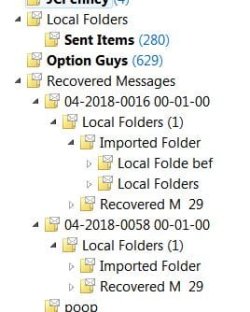
Thaks to this wonderful forum I have been using Windows (Vista) Mail in Windows 7 on many computers ever since win 7 came out. I am experiencing a problem that I have never had before. I had to restore Windows Mail from a Norton Ghost backup in March. Now, every time I open Windows Mail I am getting more and more of these empty folders appearing. They have names like "recovered, imported, local" have to keep deleting them. Has anyone ever had this problem and does anyone know how to get rid of it?

I am uploading a jpg of the folders in question. Hopefully, I am doing it properly
 

Attachments

  • Folders.JPG
    Folders.JPG
    29.9 KB · Views: 788

My Computer

Computer type
PC/Desktop
Computer Manufacturer/Model Number
Blackbird 002 (rebuilt-upgraded)
OS
Win 7 Ultimate SP1 64 bit
CPU
Core i7 950 3.06 GHz
Motherboard
GigaByte
Memory
24 gigs Corsair XMS3
Graphics Card(s)
NVIDIA GeForce GTX 460
Monitor(s) Displays
2 X Dell flat screen E228 WFP
Screen Resolution
1680 x 1050
Hard Drives
Raptor RAID 0 array & 3 other internal and several external drives. Just added 1TB Samsung SSD
Case
Blackbird 002
Cooling
liquid
Keyboard
Logitech wireless
Mouse
Logitech wireless
Internet Speed
14.63 / 2.11 Mbps
Antivirus
Fsecure
Browser
Firefox
Hello kewl1,

Yes I have seen that issue before a few times, on my own setup over the years.

The way I always fixed it, was to perform the Backup/Restore process that is outlined on the Errata (Bug List) page linked on Post 1, that of course fixes it every single time, as long as your backup does not have that same condition, then when you restore it the problem will be gone. The only downside, is that any emails (or newsgroup posts) that were downloaded since the last dated time of your backup, will be missing. I never go a few weeks without creating a backup and so was never a big deal for me. I see yours was back in March so that's not too bad; but again, as long as that condition did not exist in your backup. I don't think you'll need to restore the reg in this case, but, you should always have a backup (export) copy of it saved for good reason anyway!


About your Norton Ghost - are you saying you made a partition image backup using it, and if so can you recover just individual folders out of it? If yes, then you want to separately copy the folder:
C:\Users\Win7\AppData\Local\Microsoft\Windows Mail
..out of it, and following the instructions on the Backup/Restore procedure, you will Delete your current folder (or cut/paste it somewhere else for possible future reference is a better idea) ..but when it's removed, then copy/paste your Ghost copy of it to its exact place. (Do NOT copy one over the other!) That should do it. Read the notes carefully to understand, once you do, proceed. WinMail.exe is of course should Not be running while you do this.

It's possible the utility WMUtil that is attached on the bug list page, might help; I don't think so, but you can try it.


.
 
Last edited:

My Computer

Computer type
PC/Desktop
Computer Manufacturer/Model Number
..all towers built from scratch
OS
Vista/Win7/8/10/11 (x86/x64)
CPU
i7
Hi endeavor,

Thanks very much. Nice to see you still here after all these years. Sorry for the slow reply. I used to get an email when there was a reply in this forum. I changed my email two months ago and maybe forgot to change it in here. I will try what you suggested for sure.

Yes, I can restore individual files. In this case, I think I restored one or more folders so perhaps that was the problem.
 

My Computer

Computer type
PC/Desktop
Computer Manufacturer/Model Number
Blackbird 002 (rebuilt-upgraded)
OS
Win 7 Ultimate SP1 64 bit
CPU
Core i7 950 3.06 GHz
Motherboard
GigaByte
Memory
24 gigs Corsair XMS3
Graphics Card(s)
NVIDIA GeForce GTX 460
Monitor(s) Displays
2 X Dell flat screen E228 WFP
Screen Resolution
1680 x 1050
Hard Drives
Raptor RAID 0 array & 3 other internal and several external drives. Just added 1TB Samsung SSD
Case
Blackbird 002
Cooling
liquid
Keyboard
Logitech wireless
Mouse
Logitech wireless
Internet Speed
14.63 / 2.11 Mbps
Antivirus
Fsecure
Browser
Firefox
Can we export emails into win10 if we were using Windows mail?
 

My Computer

OS
Windows 7 Ultimate
CPU
AMD Athlon II X4 630 (95W) Quad Core Socket AM3
Motherboard
GIGABYTE MA785GMT-UD2H
Memory
Patriot Viper Series DDR3 PC3-10666 1333MHz 4GB CL 7-7-7-20
Graphics Card(s)
Geforce GTX550 TI
Sound Card
built in realtech hd
Can we export emails into win10 if we were using Windows mail?

Hello andjayik,

If you re-instate WinMail onto Win10 then yes you can bring your Win7 WinMail emails with you, but only for WinMail, but No you cannot transfer WM emails into the Win10 stock Mail Client.

Understand though WinMail on Win10 is much more complicated to setup than how it is in Windows 7, and is for advanced users only.

Any other Win8 or Win10 WinMail questions, please post there, thank you
How to Reinstate WinMail onto Windows 8 or Windows 10
 
Last edited:

My Computer

Computer type
PC/Desktop
Computer Manufacturer/Model Number
..all towers built from scratch
OS
Vista/Win7/8/10/11 (x86/x64)
CPU
i7
Was talking about transfering emails from windows mail to the windows 10 email client?
 

My Computer

OS
Windows 7 Ultimate
CPU
AMD Athlon II X4 630 (95W) Quad Core Socket AM3
Motherboard
GIGABYTE MA785GMT-UD2H
Memory
Patriot Viper Series DDR3 PC3-10666 1333MHz 4GB CL 7-7-7-20
Graphics Card(s)
Geforce GTX550 TI
Sound Card
built in realtech hd
Was talking about transferring emails from windows mail to the windows 10 email client?


I don't have much experience with the built-in Mail Client of Win10, I've only used it twice and have no use for it really, since my only focus in these forums is on the Vista Windows Mail (aka WinMail) ..and keeping up with re-instating that forward on Win7/Win8/Win10/Server (x86/x64)

However, as far as I know and have heard from everyone wanting to, the built-in stock on-board Windows 10 Mail Client (Not Windows Mail) ..does not allow for the normal importing of emails or contacts from earlier MS built-in eMail programs. It's hard to imagine MS would not have an easy way for their previous OE/WM/WLM users to do that, but I've never researched it further, and have no interest, or need really.

There is a sort-of a round-a-bout way to do it a little bit, but I've never had the reason to try it yet.
_____________________


Long Live WinMail :thumbsup:


..
 
Last edited:

My Computer

Computer type
PC/Desktop
Computer Manufacturer/Model Number
..all towers built from scratch
OS
Vista/Win7/8/10/11 (x86/x64)
CPU
i7
Back
Top