Windows Mail

How to Reinstate Windows Mail in Windows 7

   Warning
Microsoft no longer supports Windows Mail, aka WinMail. It's recommended you use another well known supported email client. This Tutorial is for Advanced users who importantly have the Technical Ability to make the changes, have backups of everything including your OS, and to be your own tech support for WinMail going forward. If you decide to complete this tutorial you accept the fact that you are using WinMail as-is. It might be necessary to uninstall other email clients to resolve any WinMail conflicts in some environments. Understand it's likely that new OS updates from Microsoft will break WinMail's operation, and to fix make it necessary to rerun the tutorial again to reinstate it. With those things in mind, this tutorial was written so that you can rerun it without affecting WinMail user data.
Please see this Errata (Bug List) post before you install, to be aware of the current information about known issues using WinMail within Windows 7, these issues are programmatic and in most cases cannot be resolved by this tutorial, and will never be fixed.

Having said all of that disclaimer, if you have the technical ability, and can put up with the annoying minor byproduct bugs, then like so many of us still enjoy using WinMail on Windows 7 ...ymmv!


   Tip
As of January, 2025, the instructions given here supersede all other instructions given in forthcoming older posts. Realize some of the posts that follow are over 16 years old, and many of the link pointers within have become mislinked over time, many of the files or information within them is outdated, incomplete, or superseded with more accurate information - and so be careful. However you can always be sure that the latest info from all research is incorporated into this tutorial post, and its downloads are the latest available. This post is continuously kept up-to-date, and so..
...Always refer to this Tutorial post for the very latest updated information

This is the 4th iteration of the Windows 7, WinMail tutorial.

The process of this tutorial Will Not work to reinstate WinMail on Windows 8/10 !
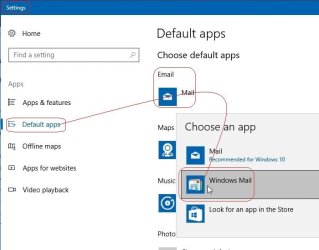
Windows 8/10 users please go Here


Start here
  1. Download tutorial package TutReWinMail.zip

    Download

  2. Extract the TutReWinMail.zip into your user Downloads folder
    • Note: Be sure once extracted this is the address of the ''TutReWinMail'' folder:
    • C:\Users\username\Downloads\TutReWinMail... ... (if it's not there please put it there)
  3. Navigate to your user Downloads\TutReWinMail folder to be sure the above is correct.
    • (..if you need more verbose install instructions to follow, download this WinMail Local Tutorial.zip)
    • Advanced Users can proceed below:
      (..log in for Full Access, being able to get support, remove ads, like, and even to post, etc..)
Advanced Users: ..use this easy excellent overview of the steps in the local tutorial:
  • Open an Administrator Command Prompt. (screenshot showing in Administrator mode)
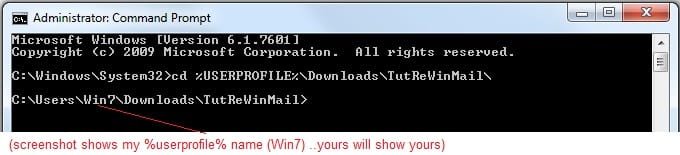
  • copy/paste this line into the command prompt: cd %USERPROFILE%\Downloads\TutReWinMail\
  • Your command prompt must now be showing you are at That Same Folder Address ..which contains the tutorial files that the batch file in the next step executes programs and copies files specifically from that folder address - if it's not there the batch file will fail since it cannot find what it needs!
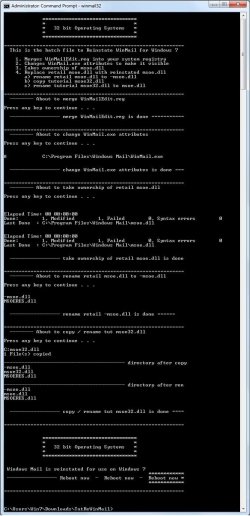
  • Next type in either winmail32 or win64mail <matching OS bit, to interactively process These Next Steps
  • If you've finished to the bottom as shown in last screenshot, restart your machine (sets registry)
  • Create a shortcut from WinMail.exe to your Desktop
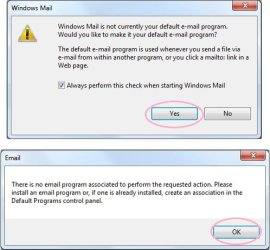
  • Open WinMail - it may prompt you one (or both) of These Two Notices ..click yes, and okay.
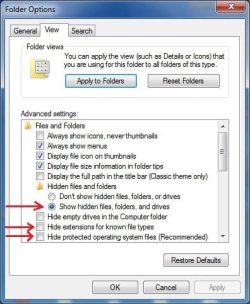
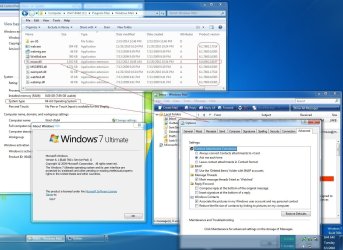
  • They now should be already set, but you can manually check/set at any time These Default Settings
  • That's pretty much all there is to it, and from here you setup the rest of the Windows Mail client (aka: WinMail) as normal within its various tab menus for Accounts, Options, Layout, etc, etc, to suit your individual needs.
  • Lastly, but should be the First thing you do, is to Create A WinMail Backup (new version) ..Go to this next link and when you get there scroll down to the heading: Backup/Restore Procedures for further instructions.
   Information
See How to open an elevated Administrator Command Prompt
Important: The exact text provided by the tutorial must be entered into the Administrator Command Prompt.
Hint: to avoid typos, copy/paste the entire line containing the command into the Command Prompt window.
Also see: How to Enable Copy to Clipboard from the Windows 7 Command Prompt

Every effort has been made to make this a step-by-step process, however, it is beyond the scope of a single tutorial to provide information on every command or concept. Search the Main Tutorial Section if you need greater detail on a concept or command presented in this tutorial.


Good luck, and long live WinMail :thumbsup:


   Note
Made possible by members:
Mark (aka Mr GRiM) - provided the original tutorial
Poppa Bear - continued Mark's work within the 2nd version
endeavor - provided continuous feedback, changes, invaluable testing instrumental to tutorial operations
EKManitis - propose the batch code that made operations easier
Slartybart - updated, tested, and consolidated all of the above into the 3rd version
endeavor - reviewed, updated, tested, and incorporated all of the above into this 4th version
...and also a special thanks to All the other members who presented discovery for this project


Attachments

  • TutReWinMail.zip
    TutReWinMail.zip
    1.8 MB · Views: 4,994
  • msoe_32.zip
    msoe_32.zip
    404 bytes · Views: 1,052
  • msoe_64.zip
    msoe_64.zip
    404 bytes · Views: 1,531
  • WinMailEdit.zip
    WinMailEdit.zip
    404 bytes · Views: 6
  • Win74umsZip.zip
    Win74umsZip.zip
    404 bytes · Views: 106
  • ACP.jpg
    ACP.jpg
    19.6 KB · Views: 1,083
  • DefaultClickYes-OkayAssociation.jpg
    DefaultClickYes-OkayAssociation.jpg
    52.8 KB · Views: 899
  • ProcessingBatch.jpg
    ProcessingBatch.jpg
    194.2 KB · Views: 1,147
  • PasteCDCommand.jpg
    PasteCDCommand.jpg
    33.1 KB · Views: 696
  • WinMail_Local_Tutorial.zip
    WinMail_Local_Tutorial.zip
    6.1 KB · Views: 1,202
  • FolderOptionsSet.jpg
    FolderOptionsSet.jpg
    61.5 KB · Views: 695
  • WinMailAdvanceOptionsBlank.jpg
    WinMailAdvanceOptionsBlank.jpg
    276.4 KB · Views: 93
  • Win7x64AdvancedTab+FileVersions.jpg
    Win7x64AdvancedTab+FileVersions.jpg
    298.9 KB · Views: 112
  • AdvancedTabBefore&After_fixed.jpg
    AdvancedTabBefore&After_fixed.jpg
    106.9 KB · Views: 50
  • CheckManually.jpg
    CheckManually.jpg
    209.5 KB · Views: 136
  • Win10_SetDefault.jpg
    Win10_SetDefault.jpg
    66.2 KB · Views: 33
Last edited by a moderator:
Windows Mail Help file mail.h1s

Ahh, I just now noticed that the Windows Mail help file doesn't work either. I could have sworn at one time that it did, I guess not. I did find the mail.h1s help file in Vista, replaced it in Win 7 but it was a no show.

Hi Greg S, If there is a downloadable CHM version of the Compiled Microsoft Help file mail.h1s (e.g. Office 2010 Beta Resource Kit Technical Library (Office2010BetaResKit 2.chm) in Compiled Help format [http://www.microsoft.com/downloads/details.aspx?displaylang=en&FamilyID=e6dcc787-4653-49da-aeef-564a64dd4ac5]), then after it was downloaded, a simple shortcut to desktop would solve the problem. Alas, I could not find a CHM version of mail.h1s. Had Windows Mail been offered as an "upgrade" option to Windows XP users, there may have been hope.

As you so ingeniously discovered re: using all Vista Windows Mail files vs. using all Win7 Windows Mail files except the Win7 msoe.dll, the ideal would be to use the Win7 mail.h1s file. In addition to the Vista mail.h1s being a foreign help file, it may not have the same links within all of Win7 help as Win7 mail.h1s.

The question is, whether Win7 mail.h1s was disabled itself? (in which case Vista mail.h1s may be the only option), or if it was just disabled through the registry and/or a help file permissions problem.

A security vector resulting from the ability to add help files has been exploited by malware, so Windows uses Microsoft Help Validator Files along with C:\Windows\helppane.exe (Microsoft Help and Support) to minimize that security vector. Win7 mail.h1s may require permissions to be reinstated, for which: takeown & icalcs (Take Ownership.reg) or SubInACL may be required in order for a user to be granted the permission, to grant the permissions for Win7 mail.h1s. I found these files on Win7 Ult.x64:

C:\ProgramData\Microsoft\Assistance\Client\1.0\en-US\Help_CValidator.H1D
[Microsoft Help Validator File (.H1D); Attributes: HSAI ]

C:\ProgramData\Microsoft\Assistance\Client\1.0\en-US\Help_MValidator.Lck
[LCK File (.Lck); Attributes: HSAI ]

C:\ProgramData\Microsoft\Assistance\Client\1.0\en-US\Help_MValidator.H1D
[Microsoft Help Validator File (.H1D); Attributes: HSAI ]
 
One person having a somewhat related problem, tracked down the first two files on Vista [http://forums.techguy.org/windows-vista/739535-solved-windows-help-screens-problem.html] by using a Process Monitorfilter to isolate helppane.exe, and then changed the permissions on the two files to allow user access.

If you have Process Monitor, you should be able to track the real-time file system, Registry and process/thread activity using non-destructive filters; and determine where attempting to use mail.h1s fails and the root cause of why. The latest version of Process Monitor v2.8 (Nov 3, 2009), can be downloaded here [http://technet.microsoft.com/en-us/sysinternals/bb896645.aspx]. As a side note, the latest version of Process Explorer v12.01 (April 1, 2010), can be downloaded here []Content not found. An interesting comparison may be to use a Process Monitorfilter to isolate WinMail.exe when clicking Windows Mail help on Vista vs. Windows Mail help on Win7.
 
It seems that the decision to not use Windows Calendar in Win7 was made early on, while the decision to not have Windows Mail as an option, was more of a "last minute" one, if the Local Group Policy Editor (GPedit.ms) is any indication in: Computer Configuration\
Administrative Templates\Windows Components\Windows Calendar => Supported on: Windows Vista only
Administrative Templates\Windows Components\Windows Mail => Supported on: At least Windows Vista
Likewise in: User Configuration\
Administrative Templates\Windows Components\Windows Calendar=> Supported on: Windows Vista only
Administrative Templates\Windows Components\Windows Mail => Supported on: At least Windows Vista
 
There may be hope that the Win7 mail.h1s file was fully linked within all of Win7 help; and all that is required is Registry key changes and/or the granting of help file permissions. Maybe you can compare the Windows Mail help Registry files on Vista vs. Win7. Registry files I found (may be others) related to C:\Windows\Help\Windows\en-US\mail.h1s [H1S File (.h1s); Attributes: A] on Win7 Ult.x64:
 
HKEY_CURRENT_USER\Software\Microsoft\Windows\CurrentVersion\Explorer\FileExts\.h1s\OpenWithList
(Default) REG_SZ (value not set)
a REG_SZ (WinMail.exe)
MRUList REG_SZ (a)
 
HKEY_CURRENT_USER\Software\Microsoft\Windows\CurrentVersion\Explorer\FileExts\.h1s\OpenWithProgids
(Default) REG_SZ (value not set)
h1sfile REG_NON (zero length binary value)
 
HKEY_CURRENT_USER\Software\Microsoft\Windows\CurrentVersion\Explorer\FileExts\.h1s\UserChoice
(Default) REG_SZ (value not set)
Progid REG_SZ (Applications\WinMail.exe)
 
HKEY_CLASSES_ROOT\.H1S
(Default) REG_SZ h1sfile
 
HKEY_LOCAL_MACHINE\SOFTWARE\Classes\.H1S
(Default) REG_SZ h1sfile
 
HKEY_LOCAL_MACHINE\SOFTWARE\Classes\h1sfile
(Default) REG_SZ Compiled Windows Help file
FriendlyTypeName REG_EXPAND_SZ %SystemRoot%\System32\apds.dll,-152
NoOpen REG_SZ
 
HKEY_LOCAL_MACHINE\SOFTWARE\Classes\h1sfile\DefaultIcon
(Default) REG_EXPAND_SZ %SystemRoot%\System32\apds.dll,-210
 
I'm not asking you to do anything, only if you still wanted to get the Windows Mail help file (mail.h1s) to work, then perhaps the above may be of some help.
Best regards, 2CR LZW

P.S. I would have provided the Registry files C:\Windows\Help\Windows\en-US\mail.h1s on Vista Ult.x64 except I had a motherboard failure on my M6300 and Dell replaced it for free with the M6400 w/Win7 Ult.x64. It was then, I was stunned to learn, that the "security" permission features of UAC denied me access to my own data! Even after using takeown & icalcs, It was still access denied. So I had to swap out the new Win7 Ult.x64 hard drive and replace it with the old M6300 Vista Ult.x64 drive in the M6400. I then used Notepad to copy the data to an external drive connected to the M6400, thereby bypassing the OS UAC altogether. After I figure out the size and placement of about a dozen partitions for the 2 new internal drives, I will use Hard Disk Manager 2010 Pro by Paragon to do a P2P Adjust bare-metal system deployment, to make sure I have all of the data, and to export the Vista software settings etc. I'm not sure if by doing so, the date time-stamps of folders and files will be reset, so before I do I will run SubInACL, and then use Robocopy to not only get a log to insure everything was copied, but also to maintain the data date time-stamps. Long story short, it will be awhile before I have a Vista VM onboard.
 

My Computer

Computer Manufacturer/Model Number
Dell M6400 Mobile Workstation
OS
Win7 Ult-x64
Memory
8GB Ram
Graphics Card(s)
Nvidia Quadro Fx 3700M 1GB
Sound Card
Creative Sound Blaster X-Fi Xtreme Audio Notebook
Monitor(s) Displays
EIZO CE240W
Hard Drives
Seagate 250GB & 500GB 7200rpm Hard Drives w/Short Stroked Partitions for both: Swap Space (aka Page File) & 3ds Max Composite Media Cache (aka Scratch Disk).
Send Mails from EXCEL-2007

Only after having included this entry in the register was possible to send emails from EXCEL-2007.

[HKEY_LOCAL_MACHINE\SOFTWARE\Clients\Mail]
@="Windows Mail"
 

My Computer

OS
Windows 7
As a workaround you could try installing just the mail component of Windows Live Mail, because WinLiveMail relies on having the original Windows Mail Folders intact in their original form in order for it to work. When loading it should auto detect if there are any corrupt files and replace them.

Also after loading WinLiveMail run system file check by opening: Start Orb/All Programs/Accessories/Run

In the Run command box type in: sfc /scannow
Then click: OK

Now try running the tutorial from the top.

~~~~~~~~~~~~~~~~~~~~~~~~~~~

This sounds scary. If somehow after WinMail is sucessfully installed and in operation, one should accidentally click on Win Live Mail install (maybe from Microsoft Updates or somehow), would all your WinMail be deleted?
Dick
 
Last edited:

My Computer

OS
Windows 7 home premium
As a workaround you could try installing just the mail component of Windows Live Mail, because WinLiveMail relies on having the original Windows Mail Folders intact in their original form in order for it to work. When loading it should auto detect if there are any corrupt files and replace them.

Also after loading WinLiveMail run system file check by opening: Start Orb/All Programs/Accessories/Run

In the Run command box type in: sfc /scannow
Then click: OK

Now try running the tutorial from the top.

~~~~~~~~~~~~~~~~~~~~~~~~~~~

This sounds scary. If somehow after WinMail is sucessfully installed and in operation, one should accidentally click on Win Live Mail install (maybe from Microsoft Updates or somehow), would all your WinMail be deleted?
Dick
This has already been done. After running the tutorial, I have installed the Mail component only of Windows Live, in both a 32 & 64bit installation of Windows 7, and it was possible to run both WinLiveMail and WinMail side by side; and choose either one as default at will. No emails from WinMail were lost or corrupted.

However, in some environments it has been reported that Windows Live Mail needed to be uninstalled before the tutorial would work. I suspect the problems occurred with WinLiveMail when a full import of the Vista Windows Mail folder had been used, instead of just the msoe.dll file, because the native Windows Mail folder in Windows 7 is used by WinLiveMail; and the full Vista import would include Vista files that conflict with WinLiveMail.

The probablility is that if WinLiveMail was installed first, then a full import of Vista Windows Mail folder would bork it by removing needed files. Or the other way round, WinLiveMail would bork WinMail by restoring corrupted files on installation, or on running sfc /scannow, or updates. Prior to the modified method both updates and sfc /scannow were known causes of conflicts.

To ECSA re:
Only after having included this entry in the register was possible to send emails from EXCEL-2007.

[HKEY_LOCAL_MACHINE\SOFTWARE\Clients\Mail]
@="Windows Mail"
I am running Office 2007 Enterprise, and have been able to send emails from the Excel Spreadsheet interface without needing to instal the registry key mentioned. This could be done with either WinLiveMail or WinMail.exe.
 
Last edited:

My Computer

Computer Manufacturer/Model Number
Self-assembled
OS
Win7 Ultimate 64bit Retail
CPU
Intel i7 960 quad core
Motherboard
Intel DX58SO2 Extreme
Memory
12 GB Kingston DDR 3 1300
Graphics Card(s)
PCI Express Gigabyte GTX 550 Ti
Sound Card
Gigabyte GTX 550 Ti Graphics/5 Sound card
Monitor(s) Displays
Samsung WS Syncmaster S23A350H
Screen Resolution
1920 x 1080
Hard Drives
OS on 128 GB Corsair SSD SATA 3 + Storage on 1 TB Western Digital Black SATA 2
Case
Cooler Master CM690 II Advanced Mid Tower
Cooling
CPU, top, front and rear extractor fans
Keyboard
Microsoft Intellitype Wireless Multimedia
Mouse
Microsoft Intellipoint2 Wireless
Internet Speed
100 MB/sec Theoretical max. Actual average 0.5MB/sec
Other Info
Back-up PC with Vista Ultimate OEM 32bit. Intel i5 2400 Quad Core CPU, DH67CL mobo, 8 GB Kingston DDR3 1300 RAM,
Microsoft: Vested Interest in Allowing WinMail on Win7?

poppa bear;670081Hi 2CR LZW. Thanks for your input and kind remarks. [... said:
Also, Microsoft informed me that the Windows Mail folder in program files in Windows 7 was put there solely for the purpose of enabling Windows Live Mail to operate. I don't think many people realise this, or the fact that this whole business came about because of problems with fair trading rules in the European market. [...] Cheers PB.
Hi PB,
As applications on portable devices (esp. mobile phones) are increasingly being used to access data, that not long ago was the sole domain of the computer, and as technology changes (e.g. if Sprint's 4G network delivers a 10x increase in speed over 3G) at a fast pace, a shift in consumer preferences may occur sooner than anticipated.

Avoidance of the EU assumed bundling = antitrust violations notwithstanding, the wisdom of having the mail client independent of an OS's product cycle, allows Microsoft the ability to adapt to the marketplace in a timely manner instead of once every three years or so.

While the decision not to have Windows Mail as an official option for Windows 7, was a disappointment to the vast majority of users represented by the over 151,000 views of this tutorial, I understand the reasoning. If not, a good number of people may have downloaded Windows Mail w/o realizing all of the advantages of Windows Live Mail, and the other Live applications. In a competitive marketplace, Microsoft wants the consumer to use the best they have to offer, lest the Windows Mail user, switches to the competitors best w/o giving Windows Live Mail its due.

However, what is deemed best for the majority, may not be for a considerable number of users, pace the number of people and business's that tried Vista and opted for XP. One can read the previous 468 posts in this tutorial for the numerous reasons why, that after trying Windows Live Mail, so many opted to go to extra ordinary means to continue using Windows Mail. For me, it was a business decision.

It seems Windows Live Mail is geared towards families, as when it encounters multiple email accounts, it assumes they represent different family members and each one gets their own set of folders. I use three email accounts for various aspects of the business and 28 subfolders to keep track of all business expenses. No matter what email account the mail is received in, they can easily be sorted into the appropriate expense folder in Windows Mail. In contrast, Windows Live Mail produces 84 folders to keep track of business expenses, which is an additional expense of time (= 3x money), for which the benefits of WLM fail to overcome both the increase in cost; and the decrease in performance due to the additional services required to run WLM. In addition, the benefits of WLM do not justify the increased exposure to security vectors (sync, sharing, remote desktop, etc.) in a business setting. In short, great for families does not = good for business.

Does Microsoft have a vested interest in allowing Windows Mail on Windows 7?
While their steadfast customers wonder if the next month's patch Tuesday for Windows Updates will disable Windows Mail in Windows 7, I hope Microsoft considers the following from a legal point of view:

One could hardly claim you were tying the consumers' hands.

Microsoft would be showing great respect for the decisions of individuals.

Far from inhibiting fair competition, rather than downloading Windows Live Mail, or any of your competitors software, consumer choice went to extraordinary measures to use Windows Mail by Microsoft.

In the global marketplace, Microsoft ensured fair competition, and in contrast to claims our decision was "because it was jammed down our throats" we demonstrate, beyond a shadow of doubt (considering all of the easily obtainable offerings from your competitor's), that we choose Windows Mail based solely on its merits.

From a business perspective your not losing any revenue, both Windows Live Mail & Windows Mail are free.

And more importantly, you won't be losing us to your competitors', but you will be gaining customer loyalty.

Beyond us sevenforums members, who already have Windows 7, killing Windows Mail with an "update," will lose Microsoft revenue, as those who don't upgrade to Windows 7, because they prefer Windows XP/Outlook Express or Vista/Windows Mail to the Windows 7/Windows Live Mail option.

On the 1 year anniversary of Windows 7, graft us back in as an option within WLM (you can hide it deep within the interface options (if its there, we will find it).

However, if that is not possible without making us use all the services (for sync, sharing, remote desktop, etc.) that decrease our performance and needlessly increases our exposure to security vectors, then provide a standalone Windows Mail to download. If an analogy would help, as:

Windows Live Mail is to Windows 7 : Windows Mail is to XP Mode in Windows 7.

PB, if you or any other members, have points to add or subtract, maybe someone could compile a bit more cogent post, and have someone with Microsoft contacts get it to a decision maker, and stop some zealot from killing all the work that went into this Windows Mail tutorial.
Best regards, 2CR LZW
 

My Computer

Computer Manufacturer/Model Number
Dell M6400 Mobile Workstation
OS
Win7 Ult-x64
Memory
8GB Ram
Graphics Card(s)
Nvidia Quadro Fx 3700M 1GB
Sound Card
Creative Sound Blaster X-Fi Xtreme Audio Notebook
Monitor(s) Displays
EIZO CE240W
Hard Drives
Seagate 250GB & 500GB 7200rpm Hard Drives w/Short Stroked Partitions for both: Swap Space (aka Page File) & 3ds Max Composite Media Cache (aka Scratch Disk).
PB, if you or any other members, have points to add or subtract, maybe someone could compile a bit more cogent post, and have someone with Microsoft contacts get it to a decision maker, and stop some zealot from killing all the work that went into this Windows Mail tutorial.
Best regards, 2CR LZW
Hi 2CR LZW,

I haven't had time to fully digest your post, but in the main totally agree with the line of reasoning presented. There are a few points I would like to make.

1. I originally became involved in this issue in November 2009, when I did a post for Techspot Forums using information from this forum. I later joined this forum and you know the rest of the story from there. The point is, my Techspot Forum has had close to 6,000 views in just over 4 months, in addition to the 151,000 views on this forum. Considering the original tutorial here started about a year ago, and the back of the problem had been broken, while 6,000 views is comparatively small, it is still relatively significant considering the fact that it only occured late in the day.

2. The broader issue is the swing away from stand alone programs to Windows Live programs which also includes Windows Calendar, and Windows Movie Maker.

Windows Live Movie Maker for example, does not edit MP3 songs which the old Movie Maker did. And the list goes on.

3. The question is, what is the best way to get this across to Microsoft? And in this respect I have corresponded with Microsoft Australia re this issue.

I referred them via links to this tutorial thread, and the Techspot one. And apart from highlighting the general discontent by consumers at the loss of Windows Mail, I also pointed out a few of the more salient posts, including one by a system builder, here, who became so fed up with client's saying they would not buy Windows 7 unless they could get Windows Mail installed, that he developed his own program to import WinMail from Vista.

The person from Microsoft with whom I have been been in contact is:

Jeff Putt, and his email address is: [email protected]

He advised me that Microsoft are bringing out a Wave 4 version of Windows Live Mail later this month, and asked if I would check it out, which I intend to do.

However, it's not really what I think that matters, but the general ground swell of public consumer opinion. In my humble opinion, the best possible way to get the message across is for as many consumers as possible to voice their disapproval direct to Microsoft. How to enlist them to do this is another matter altogether, of course. Perhaps you would be kind enough to offer any thoughts you might have towards achieving this goal?

As a general aside, I do know Microsoft take notice of consumer feed-back. A few years ago I had a row with MS Australia re activation of WinXP when experimenting with multiple partitions and OSs. I also criticised the fact that the auto options for optical drives had not worked properly in all versions from Win98 to XP, and asked how to turn it off completely. They wanted to charge me $50 for a techo to tell me how to do this, to which I strongly objected. And finally, I pointed out that it was not possible to make a partition active using the Repair utility on boot up from the XP installation CD.

In response, as a gesture of good will, at no cost to me, they upgraded my XP Home Upgrade from Win98, to a retail version of XP Pro with SP2 pre-loaded; and also included in Vista, a single switch to turn off all optical drive auto functions; and also a partition manager in Vista which allowed different partitions to be set as active, as well as an option to re-size partitons. Finally they gave me two free sessions with one of their techos, valued at $50/session. I was quite impressed with this response. And for this reason exhort consumers to make direct contact.

I'd appreciate hearing your, or any other members' thoughts on this issue.

Cheers PB
 

My Computer

Computer Manufacturer/Model Number
Self-assembled
OS
Win7 Ultimate 64bit Retail
CPU
Intel i7 960 quad core
Motherboard
Intel DX58SO2 Extreme
Memory
12 GB Kingston DDR 3 1300
Graphics Card(s)
PCI Express Gigabyte GTX 550 Ti
Sound Card
Gigabyte GTX 550 Ti Graphics/5 Sound card
Monitor(s) Displays
Samsung WS Syncmaster S23A350H
Screen Resolution
1920 x 1080
Hard Drives
OS on 128 GB Corsair SSD SATA 3 + Storage on 1 TB Western Digital Black SATA 2
Case
Cooler Master CM690 II Advanced Mid Tower
Cooling
CPU, top, front and rear extractor fans
Keyboard
Microsoft Intellitype Wireless Multimedia
Mouse
Microsoft Intellipoint2 Wireless
Internet Speed
100 MB/sec Theoretical max. Actual average 0.5MB/sec
Other Info
Back-up PC with Vista Ultimate OEM 32bit. Intel i5 2400 Quad Core CPU, DH67CL mobo, 8 GB Kingston DDR3 1300 RAM,
As you so ingeniously discovered re: using all Vista Windows Mail files vs. using all Win7 Windows Mail files except the Win7 msoe.dll, the ideal would be to use the Win7 mail.h1s file. In addition to the Vista mail.h1s being a foreign help file, it may not have the same links within all of Win7 help as Win7 mail.h1s..
You are correct, it does not have the same links.

The question is, whether Win7 mail.h1s was disabled itself? (in which case Vista mail.h1s may be the only option), or if it was just disabled through the registry and/or a help file permissions problem.
It appears that it is not disabled but it does not contain the proper info, as best I can tell. more on this further down

Win7 mail.h1s may require permissions to be reinstated, for which:
In my simple testing, security was not an issue for Win 7 or Vista help files. Ownership was taken with full privileges added/checked for me as an Admin User.

If you have Process Monitor, you should be able to track the real-time file system, Registry and process/thread activity
I am aware of Process Monitor but used Malware Defender HIPs which logged all activities.

It seems that the decision to not use Windows Calendar in Win7 was made early on, while the decision to not have Windows Mail as an option, was more of a "last minute" one, if the Local Group Policy Editor (GPedit.ms) is any indication in: Computer Configuration\
Administrative Templates\Windows Components\Windows Calendar => Supported on: Windows Vista only
Administrative Templates\Windows Components\Windows Mail => Supported on: At least Windows Vista
Likewise in: User Configuration\
Administrative Templates\Windows Components\Windows Calendar=> Supported on: Windows Vista only
Administrative Templates\Windows Components\Windows Mail => Supported on: At least Windows Vista
 
There may be hope that the Win7 mail.h1s file was fully linked within all of Win7 help; and all that is required is Registry key changes and/or the granting of help file permissions. Maybe you can compare the Windows Mail help Registry files on Vista vs. Win7. Registry files I found (may be others) related to C:\Windows\Help\Windows\en-US\mail.h1s [H1S File (.h1s); Attributes: A] on Win7 Ult.x64:
 
HKEY_CURRENT_USER\Software\Microsoft\Windows\CurrentVersion\Explorer\FileExts\.h1s\OpenWithList
(Default) REG_SZ (value not set)
a REG_SZ (WinMail.exe)
MRUList REG_SZ (a)
 
HKEY_CURRENT_USER\Software\Microsoft\Windows\CurrentVersion\Explorer\FileExts\.h1s\OpenWithProgids
(Default) REG_SZ (value not set)
h1sfile REG_NON (zero length binary value)
 
HKEY_CURRENT_USER\Software\Microsoft\Windows\CurrentVersion\Explorer\FileExts\.h1s\UserChoice
(Default) REG_SZ (value not set)
Progid REG_SZ (Applications\WinMail.exe)
 
HKEY_CLASSES_ROOT\.H1S
(Default) REG_SZ h1sfile
 
HKEY_LOCAL_MACHINE\SOFTWARE\Classes\.H1S
(Default) REG_SZ h1sfile
 
HKEY_LOCAL_MACHINE\SOFTWARE\Classes\h1sfile
(Default) REG_SZ Compiled Windows Help file
FriendlyTypeName REG_EXPAND_SZ %SystemRoot%\System32\apds.dll,-152
NoOpen REG_SZ
 
HKEY_LOCAL_MACHINE\SOFTWARE\Classes\h1sfile\DefaultIcon
(Default) REG_EXPAND_SZ %SystemRoot%\System32\apds.dll,-210
 
I'm not asking you to do anything, only if you still wanted to get the Windows Mail help file (mail.h1s) to work, then perhaps the above may be of some help.
Best regards, 2CR LZW
Here's where you may have me,lol. I can't remember for sure about comparing the registry for the help files or not. I think that I did but it's been some time back and can't remember for sure. Either way, I don't think the registry in this case would make a difference since the Win 7 help file is incomplete. Granted, one could try as I did to make the Vista help file work but the problem is not security related as mentioned above but the Vista Help file for Win Mail would have to replace the Win 7 Win Mail help file due to the names being the same. Replacing Win 7 Mail help file can not be an option since, although it is incomplete, it carries info for other Windows apps/UI within it. My best guess at how to make it work would have been to merge the two files or edit Win 7 help file with Vista Help file info. If that could be done and it worked, then we would also have to delete the registry reference of the modded help file. The registry ref for this is just like the msoe.dll and it points to winsxs. If it's not removed, the original would be replaced after running SFC/MRT/Some Win updates.
 
Last edited:

My Computer

Computer Manufacturer/Model Number
Averatec 6130HS-20
OS
Windows 7 Professional 32-bit (6.1, Build 7600)
CPU
Intel(R) Pentium(R) 4 3.00 GHz HT
Memory
2.0 GB
Graphics Card(s)
ATI Mobility Radeon 9600 64MB
Sound Card
Realtek AC'97 Audio
Screen Resolution
1280 x 800
Hard Drives
Seagate 96023A 60GB 7200RPM -
Seagate FreeAgentDesktop 250GB
Cooling
20 Inch Box Fan
Mouse
Targus PAWM10 Wireless Optical Laptop Mouse
poppa bear;670081Hi 2CR LZW. Thanks for your input and kind remarks. [... said:
Also, Microsoft informed me that the Windows Mail folder in program files in Windows 7 was put there solely for the purpose of enabling Windows Live Mail to operate. I don't think many people realise this, or the fact that this whole business came about because of problems with fair trading rules in the European market. [...] Cheers PB.
Hi PB,
As applications on portable devices (esp. mobile phones) are increasingly being used to access data, that not long ago was the sole domain of the computer, and as technology changes (e.g. if Sprint's 4G network delivers a 10x increase in speed over 3G) at a fast pace, a shift in consumer preferences may occur sooner than anticipated.

Avoidance of the EU assumed bundling = antitrust violations notwithstanding, the wisdom of having the mail client independent of an OS's product cycle, allows Microsoft the ability to adapt to the marketplace in a timely manner instead of once every three years or so.

While the decision not to have Windows Mail as an official option for Windows 7, was a disappointment to the vast majority of users represented by the over 151,000 views of this tutorial, I understand the reasoning. If not, a good number of people may have downloaded Windows Mail w/o realizing all of the advantages of Windows Live Mail, and the other Live applications. In a competitive marketplace, Microsoft wants the consumer to use the best they have to offer, lest the Windows Mail user, switches to the competitors best w/o giving Windows Live Mail its due.

However, what is deemed best for the majority, may not be for a considerable number of users, pace the number of people and business's that tried Vista and opted for XP. One can read the previous 468 posts in this tutorial for the numerous reasons why, that after trying Windows Live Mail, so many opted to go to extra ordinary means to continue using Windows Mail. For me, it was a business decision.

It seems Windows Live Mail is geared towards families, as when it encounters multiple email accounts, it assumes they represent different family members and each one gets their own set of folders. I use three email accounts for various aspects of the business and 28 subfolders to keep track of all business expenses. No matter what email account the mail is received in, they can easily be sorted into the appropriate expense folder in Windows Mail. In contrast, Windows Live Mail produces 84 folders to keep track of business expenses, which is an additional expense of time (= 3x money), for which the benefits of WLM fail to overcome both the increase in cost; and the decrease in performance due to the additional services required to run WLM. In addition, the benefits of WLM do not justify the increased exposure to security vectors (sync, sharing, remote desktop, etc.) in a business setting. In short, great for families does not = good for business.

Does Microsoft have a vested interest in allowing Windows Mail on Windows 7?
While their steadfast customers wonder if the next month's patch Tuesday for Windows Updates will disable Windows Mail in Windows 7, I hope Microsoft considers the following from a legal point of view:

One could hardly claim you were tying the consumers' hands.

Microsoft would be showing great respect for the decisions of individuals.

Far from inhibiting fair competition, rather than downloading Windows Live Mail, or any of your competitors software, consumer choice went to extraordinary measures to use Windows Mail by Microsoft.

In the global marketplace, Microsoft ensured fair competition, and in contrast to claims our decision was "because it was jammed down our throats" we demonstrate, beyond a shadow of doubt (considering all of the easily obtainable offerings from your competitor's), that we choose Windows Mail based solely on its merits.

From a business perspective your not losing any revenue, both Windows Live Mail & Windows Mail are free.

And more importantly, you won't be losing us to your competitors', but you will be gaining customer loyalty.

Beyond us sevenforums members, who already have Windows 7, killing Windows Mail with an "update," will lose Microsoft revenue, as those who don't upgrade to Windows 7, because they prefer Windows XP/Outlook Express or Vista/Windows Mail to the Windows 7/Windows Live Mail option.

On the 1 year anniversary of Windows 7, graft us back in as an option within WLM (you can hide it deep within the interface options (if its there, we will find it).

However, if that is not possible without making us use all the services (for sync, sharing, remote desktop, etc.) that decrease our performance and needlessly increases our exposure to security vectors, then provide a standalone Windows Mail to download. If an analogy would help, as:

Windows Live Mail is to Windows 7 : Windows Mail is to XP Mode in Windows 7.

PB, if you or any other members, have points to add or subtract, maybe someone could compile a bit more cogent post, and have someone with Microsoft contacts get it to a decision maker, and stop some zealot from killing all the work that went into this Windows Mail tutorial.
Best regards, 2CR LZW

Yea, I quoted it all! I think it's worth reading again because I like what you wrote. I will be one of the ones who fall into the category of using something else other than Windows Live anything other than their Live System Cleaner. It seems to do an excellent job although I use it as reference only when it comes to the reg cleaning part. I gather the info and clean it myself.
 

My Computer

Computer Manufacturer/Model Number
Averatec 6130HS-20
OS
Windows 7 Professional 32-bit (6.1, Build 7600)
CPU
Intel(R) Pentium(R) 4 3.00 GHz HT
Memory
2.0 GB
Graphics Card(s)
ATI Mobility Radeon 9600 64MB
Sound Card
Realtek AC'97 Audio
Screen Resolution
1280 x 800
Hard Drives
Seagate 96023A 60GB 7200RPM -
Seagate FreeAgentDesktop 250GB
Cooling
20 Inch Box Fan
Mouse
Targus PAWM10 Wireless Optical Laptop Mouse
Thank you Mark and Poppa Bear!

I was about to give up. This worked like a charm! I have my WinMail back and could not be happier. Thanks to Mark for publishing the fix and thanks to Poppa Bear for the updated fix! :thumbsup: Great work guys!
 

My Computer

Computer Manufacturer/Model Number
Self
OS
Windows 7 Ultimate 64-bit
CPU
Intel Core i7 920 Nehalem
Motherboard
ASUS P6T Deluxe
Memory
Corsair XMS3 6GB
Graphics Card(s)
ASUS EN9800GTX+ DK/HTDI/512M
Monitor(s) Displays
Acer X233Hbid 23" & Dell E1
Screen Resolution
1920x1080 & 1280x1024
Hard Drives
Western Digital VelociRaptor 10000 RPM
Western Digital Raptor 10000 PM
PSU
Coolmax CUQ-1200B 1200W ATX12V
Case
Thermaltake Armor Series VA8003BWS Full
Keyboard
Microsoft Digital Media Pro
Mouse
Logitech MX Revolution
Internet Speed
20MBps - 30MBps down , 1.5MBps to 2.5MBps up
Other Info
Mouse Pad RAZER|RZ02, it is almost as big as the desk!
I was about to give up. This worked like a charm! I have my WinMail back and could not be happier. Thanks to Mark for publishing the fix and thanks to Poppa Bear for the updated fix! :thumbsup: Great work guys!
Hey that's great. And a special thanks to Greg S who pioneered the modified tutorial!

Cheers PB
 

My Computer

Computer Manufacturer/Model Number
Self-assembled
OS
Win7 Ultimate 64bit Retail
CPU
Intel i7 960 quad core
Motherboard
Intel DX58SO2 Extreme
Memory
12 GB Kingston DDR 3 1300
Graphics Card(s)
PCI Express Gigabyte GTX 550 Ti
Sound Card
Gigabyte GTX 550 Ti Graphics/5 Sound card
Monitor(s) Displays
Samsung WS Syncmaster S23A350H
Screen Resolution
1920 x 1080
Hard Drives
OS on 128 GB Corsair SSD SATA 3 + Storage on 1 TB Western Digital Black SATA 2
Case
Cooler Master CM690 II Advanced Mid Tower
Cooling
CPU, top, front and rear extractor fans
Keyboard
Microsoft Intellitype Wireless Multimedia
Mouse
Microsoft Intellipoint2 Wireless
Internet Speed
100 MB/sec Theoretical max. Actual average 0.5MB/sec
Other Info
Back-up PC with Vista Ultimate OEM 32bit. Intel i5 2400 Quad Core CPU, DH67CL mobo, 8 GB Kingston DDR3 1300 RAM,
Location of complete instructions

There are a lot of posts to this thread. I am ready to migrate to Win7 from Vista (I have a Win7 CD) and want to be sure I do everything necessary to have Win Mail work when I am finished. Which post (or posts) of this thread do I need to follow to get the job done properly?
Thanks,
Dick
 

My Computer

OS
Windows 7 home premium
I used the tutorial on the first page and got mine working, first attempt =)

I did a custom install (clean install) of Windows 7.
 

My Computer

Computer Manufacturer/Model Number
Self
OS
Windows 7 Ultimate 64-bit
CPU
Intel Core i7 920 Nehalem
Motherboard
ASUS P6T Deluxe
Memory
Corsair XMS3 6GB
Graphics Card(s)
ASUS EN9800GTX+ DK/HTDI/512M
Monitor(s) Displays
Acer X233Hbid 23" & Dell E1
Screen Resolution
1920x1080 & 1280x1024
Hard Drives
Western Digital VelociRaptor 10000 RPM
Western Digital Raptor 10000 PM
PSU
Coolmax CUQ-1200B 1200W ATX12V
Case
Thermaltake Armor Series VA8003BWS Full
Keyboard
Microsoft Digital Media Pro
Mouse
Logitech MX Revolution
Internet Speed
20MBps - 30MBps down , 1.5MBps to 2.5MBps up
Other Info
Mouse Pad RAZER|RZ02, it is almost as big as the desk!
There are a lot of posts to this thread. I am ready to migrate to Win7 from Vista (I have a Win7 CD) and want to be sure I do everything necessary to have Win Mail work when I am finished. Which post (or posts) of this thread do I need to follow to get the job done properly?
Thanks,
Dick
Once you have your new installation of Windows 7 up and running, use the modified version at the very beginning of this tutorial taking care to follow the steps exactly as shown. You don't need any Vista files to enable Windows Mail application. Everything is there, including the required Vista msoe.dll file in either 32 or 64bit.

  • If you are loading a 64bit version of Windows 7, be sure to read Footnote 3 at the bottom of the tutorial.
  • Do not attempt to open WinMail.exe until you have completely finished the steps of the tutorial.
  • Steps 5 & 6 show how to import Windows Calendar and make it run in WinMail.exe interface; and the simple way to import all your Vista emails, contacts, and personal folders.
Cheers PB
 

My Computer

Computer Manufacturer/Model Number
Self-assembled
OS
Win7 Ultimate 64bit Retail
CPU
Intel i7 960 quad core
Motherboard
Intel DX58SO2 Extreme
Memory
12 GB Kingston DDR 3 1300
Graphics Card(s)
PCI Express Gigabyte GTX 550 Ti
Sound Card
Gigabyte GTX 550 Ti Graphics/5 Sound card
Monitor(s) Displays
Samsung WS Syncmaster S23A350H
Screen Resolution
1920 x 1080
Hard Drives
OS on 128 GB Corsair SSD SATA 3 + Storage on 1 TB Western Digital Black SATA 2
Case
Cooler Master CM690 II Advanced Mid Tower
Cooling
CPU, top, front and rear extractor fans
Keyboard
Microsoft Intellitype Wireless Multimedia
Mouse
Microsoft Intellipoint2 Wireless
Internet Speed
100 MB/sec Theoretical max. Actual average 0.5MB/sec
Other Info
Back-up PC with Vista Ultimate OEM 32bit. Intel i5 2400 Quad Core CPU, DH67CL mobo, 8 GB Kingston DDR3 1300 RAM,

My Computer

OS
Windows 7 Professional 64 bit
CPU
Intel Core 2 Quad Q8300
Motherboard
GIGABYTE P43-ES3G
Memory
Patriot Gaming 2 x 2 GB
Graphics Card(s)
ASUS ENGTX285
Sound Card
Realtek ALC888
Monitor(s) Displays
iiyama ProLite E2473HDS
Screen Resolution
1920 x 1080
Hard Drives
WDC WD6400AAKS
WDC WD6400AAKS
PSU
Corsair TX650V2
Case
CoolerMaster CM690 Advanced Dominator II
Cooling
Standard Colling
Keyboard
Trust eLight illumunated keyboard
Mouse
Labtec Laser Mouse
Internet Speed
Download 2.30 MB/s Upload 0.31 MB/s
Nice one Mark, clear and concise help!
I'm a new comer to Windows 7, directly from Windows XP Pro, I gave Vista a wide birth as i'd heard nothing good about it.
But i'm impressed with Win7 so far and always appreciate the time taken by people like yourself to get a forum together.
Thanks again m8 :)
Markkyboy
 

My Computer

Computer Manufacturer/Model Number
Dell Optiplex 320
OS
Windows 7 Pro
CPU
3.4Ghz Pentium 4
Motherboard
Dell?
Memory
DDR2 PC4200U - 2GB
Graphics Card(s)
Nvidia 256mb PCI-E
Sound Card
Built in
Monitor(s) Displays
LG 42" Plasma TV
Screen Resolution
1280 x 1024 @ 32bit
Hard Drives
2 x 400GB SATA
PSU
OEM
Case
OEM
Cooling
OEM
Keyboard
Logitech LX710
Mouse
Logitech Laser
Internet Speed
Thru Nokia X6 16GB
As a general aside, I do know Microsoft take notice of consumer feed-back. A few years ago I had a row with MS Australia re activation of WinXP when experimenting with multiple partitions and OSs. I also criticised the fact that the auto options for optical drives had not worked properly in all versions from Win98 to XP, and asked how to turn it off completely. They wanted to charge me $50 for a techo to tell me how to do this, to which I strongly objected. And finally, I pointed out that it was not possible to make a partition active using the Repair utility on boot up from the XP installation CD.

Cheers PB

It might be a good idea if an online survey is posted somewhere on this forum to find out how many members are unhappy with the windows live mail.
 

My Computer

OS
windows 7 Home Premium
Great

Thank you I couldn't live withouth my Windows Mail !!!!!!!!!! :thumbsup:
 

My Computer

OS
Windows 7 - 64 bit Home Premium
As a general aside, I do know Microsoft take notice of consumer feed-back. A few years ago I had a row with MS Australia re activation of WinXP when experimenting with multiple partitions and OSs. I also criticised the fact that the auto options for optical drives had not worked properly in all versions from Win98 to XP, and asked how to turn it off completely. They wanted to charge me $50 for a techo to tell me how to do this, to which I strongly objected. And finally, I pointed out that it was not possible to make a partition active using the Repair utility on boot up from the XP installation CD.

Cheers PB

It might be a good idea if an online survey is posted somewhere on this forum to find out how many members are unhappy with the windows live mail.

yes it woluld be a good idea can someone make a voiting with google docs ?
 

My Computer

OS
Windows 7 Professional 64 bit
CPU
Intel Core 2 Quad Q8300
Motherboard
GIGABYTE P43-ES3G
Memory
Patriot Gaming 2 x 2 GB
Graphics Card(s)
ASUS ENGTX285
Sound Card
Realtek ALC888
Monitor(s) Displays
iiyama ProLite E2473HDS
Screen Resolution
1920 x 1080
Hard Drives
WDC WD6400AAKS
WDC WD6400AAKS
PSU
Corsair TX650V2
Case
CoolerMaster CM690 Advanced Dominator II
Cooling
Standard Colling
Keyboard
Trust eLight illumunated keyboard
Mouse
Labtec Laser Mouse
Internet Speed
Download 2.30 MB/s Upload 0.31 MB/s
Thanks!

Modified Method to Enable Windows Mail in Windows 7

Hope this helps. Cheers PB

Came here since there are no Windows 7 newsgroups and am trying to revert back to Windows Mail. Tried WLM but the IMAP folder display sucks (esp. the "download" button). Contacts suck even more with the 3 locations: web, contacts folder, and WLM local contacts folder. Also the constant reminder to "sigh in" to hotmail to see my contacts that are on line but not the local ones.

One thing that wories me is the start of your procedure calls for running an extensive registry edit file. But what if I have to stop using it due to M$ sabotage or something else unforseen. There is no "undo" registry file. Will that matter if I need to revert back to doing a clean install of WLM or some other emal program?:confused:
 

My Computer

Computer type
PC/Desktop
Computer Manufacturer/Model Number
OQO 2+
OS
Windows 8 Pro w/MC 32-bit
CPU
Intel Atom 1.86 GHz
Motherboard
OQO 2+
Memory
2 GB
Graphics Card(s)
Intel GMA 500
Sound Card
IDT
Monitor(s) Displays
LCD
Screen Resolution
800 x 480 (portable) 1280 x 1024 (docked)
Hard Drives
64 GB SSD
PSU
9 Ah Battery (portable) or OQO Brick (docked)
Case
Shirt Pocket Sized
Cooling
Tiny Fan
Keyboard
Slide out (portable) DiNovo Edge (docked)
Mouse
Eraser head (portable) Logitech Bluetooth (docked)
Internet Speed
WWAN or 802.11G (portable) T1 (docked)
Browser
IE 10
Other Info
DVD-RW OQO Docking Station
Back
Top