Windows Manager tweak

rompelstilchen

New member
Local time
1:56 PM
Messages
1
Hello,

[win7 Pro 32 bits]

sometimes i move my mouse somewhere on the screen and all the windows become transparent

i cant articulate enough to say how much i hate this, and i was wondering if someone had released an update/patch/driver whatever to remove this horrible useless pathetic nightmare

i looked everywhere i cant find any disabling option about this
who wants to have his movie or video disapearing just because he accidentaly moved the mouse in a corner or f@#k knows where....:mad::mad::mad::mad::cry::cry::cry::cry:

thanks for your help
 

My Computer

Computer type
PC/Desktop
OS
7
At the far right end of the Taskbar is a button (assuming your Taskbar is in the default location).

If you hover the mouse pointer over it, it makes all of the windows transparent so that you can view the desktop.
If you click it, it minimises the open windows.

I'm not sure how to disable it.
 

My Computer

Computer type
PC/Desktop
Computer Manufacturer/Model Number
n/a
OS
W7 Ultimate SP1, LM19.2 MATE, W10 Home 1703, W10 Pro 1703 VM, #All 64 bit
CPU
AMD Phenom II x6 1100T, 3.3 GHz
Motherboard
ASUS M4A88T-M/USB3 (AM3)
Memory
12GB DDR3 1333 G-Skill (4GB x 2), G-Skill (2GB x 2)
Graphics Card(s)
NVIDIA GeForce GTX 660
Sound Card
Realtek?
Monitor(s) Displays
Samsung S23B350
Screen Resolution
1920x1080
Hard Drives
WD Green 2TB (SATA), WD Green 3TB (SATA), WD Blue 4TB (SATA), WD Blue 6TB (SATA)
PSU
Cooler Master
Case
Antec GX300 Tower
Cooling
3x Antec TRICOOL 120mm Fans
Mouse
Wired Optical
Internet Speed
DSL
Antivirus
Avast
Browser
Pale Moon (64 bit)
Other Info
2018-12-27 Upgraded HDDs
2015-12-10 Upgraded case, graphics card, storage
2015-08-15 Upgraded motherboard & RAM
2015-07-15 Upgraded LM17.1 to LM17.2
I think it depends what desktop theme you are using. I use the old fashioned Classic theme and that doesn't make the windows trans[arent. I feel it is probably a feature of and Aero Theme. Just a thought.
rompelstilchen Try changing the theme and see if that cures your problem!
 

My Computer

Computer type
PC/Desktop
OS
Microsoft Windows 7 Home Premium 64-bit 7601 Multiprocessor Free Service Pack 1
CPU
Intel(R) Core(TM) i7-3770 CPU @ 3.40GHz
Motherboard
ASUSTeK COMPUTER INC. P8H77-M
Memory
8.00 GB
Graphics Card(s)
Intel(R) HD Graphics 4000
Sound Card
On Board
Monitor(s) Displays
Dell 24"
Screen Resolution
1920 x 1080
Hard Drives
(1) INTEL SSDSC2CT180A3 ATA Device (2) ST500DM002-1BD142 ATA Device (3) WDC WD3200AAKS-75L9A0 ATA Device (4) Generic- Compact Flash USB Device (5) Generic- MS/MS-Pro USB Device (6) Generic- SD/MMC USB Device (7) Generic- SM/xD-Picture USB
PSU
500w Corsair
Case
Cooler Master
Cooling
3 Fans
Keyboard
Logitech MK300
Mouse
Logitech WOM
Internet Speed
75Mb
Antivirus
Norton 360
Browser
Firefox, Opera, IE
Hello,

[win7 Pro 32 bits]

sometimes i move my mouse somewhere on the screen and all the windows become transparent

i cant articulate enough to say how much i hate this, and i was wondering if someone had released an update/patch/driver whatever to remove this horrible useless pathetic nightmare

i looked everywhere i cant find any disabling option about this
who wants to have his movie or video disapearing just because he accidentaly moved the mouse in a corner or f@#k knows where....:mad::mad::mad::mad::cry::cry::cry::cry:

thanks for your help

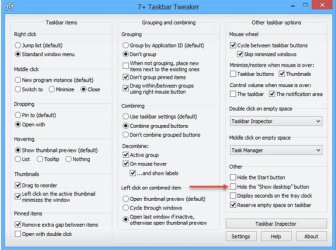
If you are referring to the "bottom right corner" of the screen, there is no setting in Windows 7 to remove it. However, it can be removed with a 3rd party application available at;

7+ Taskbar Tweaker - RaMMicHaeL's Blog

See screenshot;

Hide Show Desktop Button.jpg

HTH
 

My Computer

Computer type
PC/Desktop
Computer Manufacturer/Model Number
Custom Built
OS
Windows 7 Professional x64
CPU
Intel i5 quad processor
Motherboard
DP67BG
Memory
16 GB
Graphics Card(s)
Radeon HD 5770
Sound Card
Realtek High Definition Audio
Monitor(s) Displays
Samsung SyncMaster
Screen Resolution
1920X1080
Hard Drives
WD 2TB (SATA Internal)
WD 1TB (USB External)
PSU
Corsair GS800
Case
Tower (Generic)
Cooling
3 Internal Fans
Keyboard
MS Wireless
Mouse
MS Optical Wired
Internet Speed
54 mbps
Antivirus
Emsisoft
Browser
IE-Version 9, Palemoon-Version 24.2.0
There is a setting in windows 7 to disable it. True to hide it completely you will need to use sir George answer.

Right click your taskbar, and choose properties.

Uncheck use aero peek to preview the desktop.

This way the button in the very bottom right of your taskbar when clicked will show the desktop, but hovering over it will not make the windows transparent.
 

My Computer

Computer type
PC/Desktop
Computer Manufacturer/Model Number
Custom Built
OS
Windows 10 Pro
CPU
AMD Ryzen 5 2400G Processor with Radeon RX Vega 11 Graphics
Motherboard
ASRock X470 Master SLI/AC AM4 AMD Promontory X470 SATA 6Gb/s
Memory
G.SKILL Ripjaws V Series 16GB (2 x 8GB) 288-Pin DDR4 SDRAM D
Graphics Card(s)
2047MB NVIDIA GeForce GTX 1060 6GB (EVGA)
Sound Card
Motherboard Built in
Monitor(s) Displays
Acer R240HY bidx 23.8-Inch IPS HDMI DVI VGA (1920 x 1080) Wi
Screen Resolution
1920 x 1080
Hard Drives
1TB Sandisk SSD PLUS (Main drive)
500 GB Seagate 7200 RPM (Games)
500 GB Western Digital 7200 RPM (Virtual Machines)
PSU
CORSAIR TX Series TX650M 650W 80+ Gold Modular Power Supply
Case
CORSAIR CARBIDE SPEC-02 Mid-Tower Gaming Case, Red LED Fan
Cooling
220mm, two 120mm, and four 60mm fans
Keyboard
Wired Dell keyboard
Mouse
Wireless Logitech mouse
Internet Speed
250mb down, 30mb up
Antivirus
Panda Cloud Antivirus
Browser
Chrome-ish x64
Other Info
Your awesome for reading this.
There is a setting in windows 7 to disable it. True to hide it completely you will need to use sir George answer.

Right click your taskbar, and choose properties.

Uncheck use aero peek to preview the desktop.

This way the button in the very bottom right of your taskbar when clicked will show the desktop, but hovering over it will not make the windows transparent.
That is perfectly true Andrew but only if you are running an Aero Theme. If like me you run a non Aero theme the Active Window does NOT go transparent when you hover over the "Show desktop" button! The option "Use Aero peek to preview the desktop." is greyed out in non Aero themes in Task Bar Properties.
 

My Computer

Computer type
PC/Desktop
OS
Microsoft Windows 7 Home Premium 64-bit 7601 Multiprocessor Free Service Pack 1
CPU
Intel(R) Core(TM) i7-3770 CPU @ 3.40GHz
Motherboard
ASUSTeK COMPUTER INC. P8H77-M
Memory
8.00 GB
Graphics Card(s)
Intel(R) HD Graphics 4000
Sound Card
On Board
Monitor(s) Displays
Dell 24"
Screen Resolution
1920 x 1080
Hard Drives
(1) INTEL SSDSC2CT180A3 ATA Device (2) ST500DM002-1BD142 ATA Device (3) WDC WD3200AAKS-75L9A0 ATA Device (4) Generic- Compact Flash USB Device (5) Generic- MS/MS-Pro USB Device (6) Generic- SD/MMC USB Device (7) Generic- SM/xD-Picture USB
PSU
500w Corsair
Case
Cooler Master
Cooling
3 Fans
Keyboard
Logitech MK300
Mouse
Logitech WOM
Internet Speed
75Mb
Antivirus
Norton 360
Browser
Firefox, Opera, IE
There is a setting in windows 7 to disable it. True to hide it completely you will need to use sir George answer.

Right click your taskbar, and choose properties.

Uncheck use aero peek to preview the desktop.

This way the button in the very bottom right of your taskbar when clicked will show the desktop, but hovering over it will not make the windows transparent.
That is perfectly true Andrew but only if you are running an Aero Theme. If like me you run a non Aero theme the Active Window does NOT go transparent when you hover over the "Show desktop" button! The option "Use Aero peek to preview the desktop." is greyed out in non Aero themes in Task Bar Properties.

That is true.

rompelstilchen is using an aero theme, which is why the windows are going transparent though. Windows cannot go completely transparent with a non areo theme. So on that point it does not matter.
 

My Computer

Computer type
PC/Desktop
Computer Manufacturer/Model Number
Custom Built
OS
Windows 10 Pro
CPU
AMD Ryzen 5 2400G Processor with Radeon RX Vega 11 Graphics
Motherboard
ASRock X470 Master SLI/AC AM4 AMD Promontory X470 SATA 6Gb/s
Memory
G.SKILL Ripjaws V Series 16GB (2 x 8GB) 288-Pin DDR4 SDRAM D
Graphics Card(s)
2047MB NVIDIA GeForce GTX 1060 6GB (EVGA)
Sound Card
Motherboard Built in
Monitor(s) Displays
Acer R240HY bidx 23.8-Inch IPS HDMI DVI VGA (1920 x 1080) Wi
Screen Resolution
1920 x 1080
Hard Drives
1TB Sandisk SSD PLUS (Main drive)
500 GB Seagate 7200 RPM (Games)
500 GB Western Digital 7200 RPM (Virtual Machines)
PSU
CORSAIR TX Series TX650M 650W 80+ Gold Modular Power Supply
Case
CORSAIR CARBIDE SPEC-02 Mid-Tower Gaming Case, Red LED Fan
Cooling
220mm, two 120mm, and four 60mm fans
Keyboard
Wired Dell keyboard
Mouse
Wireless Logitech mouse
Internet Speed
250mb down, 30mb up
Antivirus
Panda Cloud Antivirus
Browser
Chrome-ish x64
Other Info
Your awesome for reading this.
Back
Top