Solved Windows Media Player Playback

hammad37

New member
Local time
4:10 PM
Messages
15
hi everyone,
i am having a problem with my Windows Media Player Playback.
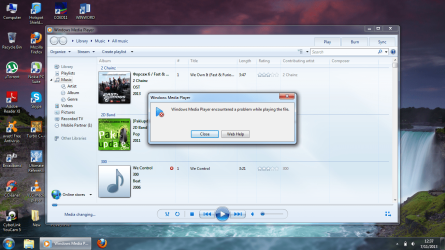
Whenever i try to play an mp3 file or a video file it gives an error that i have shown in the screenshot.
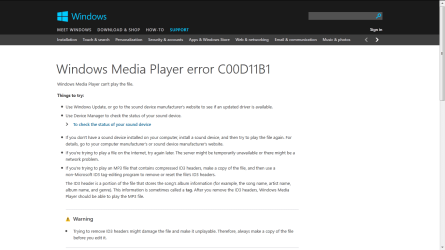
that error suggested web help.I tried web help but didn't worked out.i have included that webpage screenshot also.
So i can't play anything in the Windows media player or in VLC player.Something's wrong with all the music files.
My audio driver is updated and sound device is working.
please see the screenshots, you will understand all.
thank you.
 

Attachments
  • 1.png
    1.png
    268.2 KB · Views: 14
  • 2.png
    2.png
    30.4 KB · Views: 5

My Computer

Computer type
Laptop
Computer Manufacturer/Model Number
HP 1000 notebook pc
OS
Windows 7 Ultimate x64
CPU
intel
Memory
2GB
Graphics Card(s)
intel hd 3000
Sound Card
Realtek high definition
Screen Resolution
1366*768
Hard Drives
Hitachi 500GB
Internet Speed
3.1Mb/s
Antivirus
avast
Browser
firefox
Hi and welcome to the forum Hammad.
i dont have an answer for this ,but i can say it used to happen to me, the files used to play then they didnt.
i think it has something to do with the tags but i cant say for sure.
i can tell you as a result of this issue i tried winamp and found it would play those files wmp wouldnt. so the files were fine.
i have used winamp for several years now and find it to be better.

i hope you get a solution to this as it is of an interest to me too.
 

My Computer

Computer Manufacturer/Model Number
Hewlett packard/p6512uk
OS
Microsoft Windows 7 Home Premium 64-bit 7600
CPU
IIx4 amd athelon 635 processor
Motherboard
FOXCONN 2AA9
Memory
2x2gb
Graphics Card(s)
ati radeon HD 5450
Sound Card
(1) Realtek High Definition Audio (2) AMD High Definition
Monitor(s) Displays
samsung lcd tv 32"
Screen Resolution
1360x 768
Hard Drives
(1) WDC WD10 01FAES-60Z2A0 SATA Disk Device (2) Maxtor OneTouch USB Device (3) ST310003 33AS USB Device (4) WD My Book 1111 USB Device
PSU
?
Cooling
air!
Keyboard
wireless hp
Mouse
wireless Hp,optical
Internet Speed
1.10mb/s
Antivirus
MSE
Browser
Firefox
thank you boohbah for a possible solution.yeah as far as i know something's wrong with the media information rights that cause wmp not to play file but i want to know if someone knows how to remove that information tags stored with each media file ?
Suggestions are wellcomed.i want to solve that problem.
 

My Computer

Computer type
Laptop
Computer Manufacturer/Model Number
HP 1000 notebook pc
OS
Windows 7 Ultimate x64
CPU
intel
Memory
2GB
Graphics Card(s)
intel hd 3000
Sound Card
Realtek high definition
Screen Resolution
1366*768
Hard Drives
Hitachi 500GB
Internet Speed
3.1Mb/s
Antivirus
avast
Browser
firefox
you could try removing the tags with mp3tag , funnily enough winamp has a brilliant facility for fetching the metadata for tagging .

the way to do it with winamp is to open all the tracks for an album in winamp , highlight them all by clicking the first track holding shift and click the last track, they will all be highlighted. then, right click /send to /auto tag and follow the prompts in the auto tag window.
this will renew the tags and possibly allow wmp to play them.

winamp has a very good record for me of finding the information.

Mp3tag - the universal Tag Editor (ID3v2, MP4, OGG, FLAC, ...)

edit: there is a decent thread about it here will more ways to rename the id3 tags,
winamp is a good way as its all automated.
 

My Computer

Computer Manufacturer/Model Number
Hewlett packard/p6512uk
OS
Microsoft Windows 7 Home Premium 64-bit 7600
CPU
IIx4 amd athelon 635 processor
Motherboard
FOXCONN 2AA9
Memory
2x2gb
Graphics Card(s)
ati radeon HD 5450
Sound Card
(1) Realtek High Definition Audio (2) AMD High Definition
Monitor(s) Displays
samsung lcd tv 32"
Screen Resolution
1360x 768
Hard Drives
(1) WDC WD10 01FAES-60Z2A0 SATA Disk Device (2) Maxtor OneTouch USB Device (3) ST310003 33AS USB Device (4) WD My Book 1111 USB Device
PSU
?
Cooling
air!
Keyboard
wireless hp
Mouse
wireless Hp,optical
Internet Speed
1.10mb/s
Antivirus
MSE
Browser
Firefox
yeah that looks great man, i was also searching a few hours back and found a software ID3Kill.
well i used it, it was quite simple, it simply deleted all the ID2 and ID3 tags from each mp3 file on my system.
I restarted the laptop and checked it was working good also i have cleared the C:\ProgramData\Microsoft\Windows\DRM folder.
That folder stores the DRM info.
For the time being its good, lets see if that proves to be a permanent solution.
Because before that i tried several other tools they make wmp work good once but when i restart computer
problem came again.
I hope this won't happen now.I have restarted multiple times to check.it working yet.
Also i have changed the wmp settings (Tools>>Options) to never download any media information for any file.
I will report again.
 

My Computer

Computer type
Laptop
Computer Manufacturer/Model Number
HP 1000 notebook pc
OS
Windows 7 Ultimate x64
CPU
intel
Memory
2GB
Graphics Card(s)
intel hd 3000
Sound Card
Realtek high definition
Screen Resolution
1366*768
Hard Drives
Hitachi 500GB
Internet Speed
3.1Mb/s
Antivirus
avast
Browser
firefox
Go type Troubleshooting at the Start Menu search bar. This will take you to the Troubleshooting menu at the Control Panel, now look for "View All" at the left hand side panel of the Troubleshooting section and run all three troubleshooting packs in there that are related to Windows Media Player then try playing an Mp3 with Windows Media Player.

A small utility called Fixwin also has fixes for Windows Media Player.

Download FixWin - MajorGeeks


I suspect this maybe because of something that have gone wrong or went missing in the Registry that rendered WMP unable to play natively supported MP3 files.
 

My Computer

Computer Manufacturer/Model Number
Custom Built
OS
Windows 7 Ultimate 32 Bit, Windows Developer Preview, Linux Mint 9 Gnome 32 Bit
CPU
Intel Pentium Dual CPU E2180@2GHz
Motherboard
Elitegroup 671T-M3
Graphics Card(s)
NVIDIA GeForce 7200 GS
Monitor(s) Displays
AOC TFT1560 15" LCD Monitor
Screen Resolution
1024x768
Keyboard
Logitech USB Keyboard
thank you for answering man.
troubleshooting couldn't find problem and i
tried your referred software but it didn't worked.
 

My Computer

Computer type
Laptop
Computer Manufacturer/Model Number
HP 1000 notebook pc
OS
Windows 7 Ultimate x64
CPU
intel
Memory
2GB
Graphics Card(s)
intel hd 3000
Sound Card
Realtek high definition
Screen Resolution
1366*768
Hard Drives
Hitachi 500GB
Internet Speed
3.1Mb/s
Antivirus
avast
Browser
firefox
yeah that looks great man, i was also searching a few hours back and found a software ID3Kill.
well i used it, it was quite simple, it simply deleted all the ID2 and ID3 tags from each mp3 file on my system.
I restarted the laptop and checked it was working good also i have cleared the C:\ProgramData\Microsoft\Windows\DRM folder.
That folder stores the DRM info.
For the time being its good, lets see if that proves to be a permanent solution.
Because before that i tried several other tools they make wmp work good once but when i restart computer
problem came again.
I hope this won't happen now.I have restarted multiple times to check.it working yet.
Also i have changed the wmp settings (Tools>>Options) to never download any media information for any file.
I will report again.

fingers crossed.
:D
 

My Computer

Computer Manufacturer/Model Number
Hewlett packard/p6512uk
OS
Microsoft Windows 7 Home Premium 64-bit 7600
CPU
IIx4 amd athelon 635 processor
Motherboard
FOXCONN 2AA9
Memory
2x2gb
Graphics Card(s)
ati radeon HD 5450
Sound Card
(1) Realtek High Definition Audio (2) AMD High Definition
Monitor(s) Displays
samsung lcd tv 32"
Screen Resolution
1360x 768
Hard Drives
(1) WDC WD10 01FAES-60Z2A0 SATA Disk Device (2) Maxtor OneTouch USB Device (3) ST310003 33AS USB Device (4) WD My Book 1111 USB Device
PSU
?
Cooling
air!
Keyboard
wireless hp
Mouse
wireless Hp,optical
Internet Speed
1.10mb/s
Antivirus
MSE
Browser
Firefox
its no solved yet man in spite all the above tricks.:mad:
Still searching.
Make some suggestions guys.
 

My Computer

Computer type
Laptop
Computer Manufacturer/Model Number
HP 1000 notebook pc
OS
Windows 7 Ultimate x64
CPU
intel
Memory
2GB
Graphics Card(s)
intel hd 3000
Sound Card
Realtek high definition
Screen Resolution
1366*768
Hard Drives
Hitachi 500GB
Internet Speed
3.1Mb/s
Antivirus
avast
Browser
firefox
Get a free file converter. Try converting the file to the same format or another format, then back again. That may eliminate any corruption that may be present in the file.
 

My Computer

Computer type
PC/Desktop
Computer Manufacturer/Model Number
Custom Build
OS
Windows 7 Home Premium 64 bit
CPU
Intel Core i7-4790
Motherboard
GA-Z87X-D3H
Memory
G.SKILL 8GB (2 x 4GB) DDR3 F3-10666CL9D-8GBNT
Graphics Card(s)
AMD Radeon R7 250
Sound Card
Realtek ALC892
Monitor(s) Displays
Samsung UN32EH5000, Dell 1703FPT
Screen Resolution
1920 x 1080, 1280 x 1024
Hard Drives
WD5003AZEX
WD10EZEX
Samsung HD103SJ
Samsung 128 GB 840 PRO
PSU
SeaSonic M12II SS-500GM
Case
Fractal Design Define R4
Cooling
Zalman CNPS9900ALED
Keyboard
Logitech K800
Mouse
Logitech M705
Internet Speed
16 Mbps
Antivirus
Avast
Browser
Firefox
Other Info
Bose Companion 2 Multimedia Speakers

My Computer

Computer Manufacturer/Model Number
HP, Dell, Gateway, Toshiba - 4 laptops and 2 desktops
OS
Vista, Windows7, Mint Mate, Zorin, Windows 8
CPU
from 1.6GHz Duo to i7
Monitor(s) Displays
2x HP w2207
Hard Drives
5x HDD, 7x SSD, 12x Externals
Keyboard
with trackball - no mices
Mouse
Trackball mice
Internet Speed
DSL 6000
yeah thank you all the guys for suppourting.After 2 weeks of this nonsense error what i have done i that i have turned wmp feature off from add/remove programs and after restarting installed jetaudio player which played the files successfully.wmp didn't played anything till its END.
before that i tried jetaudio in presence of wmp but then it also refused to play any file.But now its playing good.
Although i haven't tried that conversion method yet which seems a reasonable method.
So now jetaudio (also plays all files) is working good for me and wmp is like vanished from windows.
But please when someone finds a true solution to this then please post here.
Thank you everyone.
 

My Computer

Computer type
Laptop
Computer Manufacturer/Model Number
HP 1000 notebook pc
OS
Windows 7 Ultimate x64
CPU
intel
Memory
2GB
Graphics Card(s)
intel hd 3000
Sound Card
Realtek high definition
Screen Resolution
1366*768
Hard Drives
Hitachi 500GB
Internet Speed
3.1Mb/s
Antivirus
avast
Browser
firefox
this method is like a solution when you have all options gone. I have done it because i couldn't play any file on my system for almost 3 weeks.Thats pretty bad situation man.
So that is like a necessary step.
Anyone who finds the real solution is welcomed to post it here.
Thank you.
 

My Computer

Computer type
Laptop
Computer Manufacturer/Model Number
HP 1000 notebook pc
OS
Windows 7 Ultimate x64
CPU
intel
Memory
2GB
Graphics Card(s)
intel hd 3000
Sound Card
Realtek high definition
Screen Resolution
1366*768
Hard Drives
Hitachi 500GB
Internet Speed
3.1Mb/s
Antivirus
avast
Browser
firefox
Guys Guys Guys The Problem Persists.
Unfortunately Jetaudio is also not working after 12 hours.
This has got more serious now so please i need your help to solve it.
I have also tried the format factory conversion method but its not working.
Help Needed.
 

My Computer

Computer type
Laptop
Computer Manufacturer/Model Number
HP 1000 notebook pc
OS
Windows 7 Ultimate x64
CPU
intel
Memory
2GB
Graphics Card(s)
intel hd 3000
Sound Card
Realtek high definition
Screen Resolution
1366*768
Hard Drives
Hitachi 500GB
Internet Speed
3.1Mb/s
Antivirus
avast
Browser
firefox

My Computer

Computer Manufacturer/Model Number
HP, Dell, Gateway, Toshiba - 4 laptops and 2 desktops
OS
Vista, Windows7, Mint Mate, Zorin, Windows 8
CPU
from 1.6GHz Duo to i7
Monitor(s) Displays
2x HP w2207
Hard Drives
5x HDD, 7x SSD, 12x Externals
Keyboard
with trackball - no mices
Mouse
Trackball mice
Internet Speed
DSL 6000
unfortunately it also didn't help also, Whs.
Can i uninstall that DRM windows update that causes this problem ?
Help.
 

My Computer

Computer type
Laptop
Computer Manufacturer/Model Number
HP 1000 notebook pc
OS
Windows 7 Ultimate x64
CPU
intel
Memory
2GB
Graphics Card(s)
intel hd 3000
Sound Card
Realtek high definition
Screen Resolution
1366*768
Hard Drives
Hitachi 500GB
Internet Speed
3.1Mb/s
Antivirus
avast
Browser
firefox
If you know which update it is, you can uninstall it from the 'Installed Updates'. And next time it shows up, hide it.
 

My Computer

Computer Manufacturer/Model Number
HP, Dell, Gateway, Toshiba - 4 laptops and 2 desktops
OS
Vista, Windows7, Mint Mate, Zorin, Windows 8
CPU
from 1.6GHz Duo to i7
Monitor(s) Displays
2x HP w2207
Hard Drives
5x HDD, 7x SSD, 12x Externals
Keyboard
with trackball - no mices
Mouse
Trackball mice
Internet Speed
DSL 6000
I have uninstalled all the updates of my system.Its easy.Check this.
How to Uninstall All Windows Updates: 7 Steps (with Pictures)
Because as far as i think that problem came in my life because as i remember i few weeks back i installed an update from windows update named "Digital Rights Management for media".I think that is the real cause of that error (i have seen its detailed description also).
Now after uninstalling all updates and using Tunebite 8 platinum i have De-DRM allmost all the files on my system.
Now everything seems to work good.windows media player is playing all files.
I pray it proves to be a permanent solution.Ameen.
I will report performance again.
 

My Computer

Computer type
Laptop
Computer Manufacturer/Model Number
HP 1000 notebook pc
OS
Windows 7 Ultimate x64
CPU
intel
Memory
2GB
Graphics Card(s)
intel hd 3000
Sound Card
Realtek high definition
Screen Resolution
1366*768
Hard Drives
Hitachi 500GB
Internet Speed
3.1Mb/s
Antivirus
avast
Browser
firefox
i couldn't find that specific update on my system so i removed all of them.
 

My Computer

Computer type
Laptop
Computer Manufacturer/Model Number
HP 1000 notebook pc
OS
Windows 7 Ultimate x64
CPU
intel
Memory
2GB
Graphics Card(s)
intel hd 3000
Sound Card
Realtek high definition
Screen Resolution
1366*768
Hard Drives
Hitachi 500GB
Internet Speed
3.1Mb/s
Antivirus
avast
Browser
firefox
Guys the method of deleting all updates (in order to delete a DRM related update) also didn't worked.
i spent next 1 whole day doing a fresh windows and all related softwares and drivers but i came to know that the problem was still there so after being dishearten when i still researched on it on net (i have copied all the music content from my second laptop) i found that it was all due to that my WINDOWS AUDIO PLAYBACK SERVICE keeps shutting down without any notice and it shows status "Started" in windows services.
So whenever i refresh that service everything becomes good.
But it doesn't remain started always.
Also the Multimedia Scheduler service in On and RPC endpoint mapper in On but RPC locator service is not running.
Guys please suggest a solid solution for this problem to Make Windows Audio always working.
Thank You.
 

My Computer

Computer type
Laptop
Computer Manufacturer/Model Number
HP 1000 notebook pc
OS
Windows 7 Ultimate x64
CPU
intel
Memory
2GB
Graphics Card(s)
intel hd 3000
Sound Card
Realtek high definition
Screen Resolution
1366*768
Hard Drives
Hitachi 500GB
Internet Speed
3.1Mb/s
Antivirus
avast
Browser
firefox
Back
Top