S simon333 New member Local time 8:36 AM Messages 9 May 24, 2011 #1 hi, ive just got a new screen and used the windows personalize to change the screen colours (mainly the gamma) but on rebooting my changes have been lost. what am i doing wrong. My Computer My Computer OSwin 7 x64
hi, ive just got a new screen and used the windows personalize to change the screen colours (mainly the gamma) but on rebooting my changes have been lost. what am i doing wrong.
Roderunner Exterminator Guru Gold Member VIP Local time 8:36 AM Messages 2,362 Location Scotland May 24, 2011 #2 Did you save the changes ? My Computer My Computer Computer Manufacturer/Model NumberLook in my Signature.OSWin7 H.Prem. 32bit+SP1
S simon333 New member Thread Starter Local time 8:36 AM Messages 9 May 25, 2011 #3 i think so, i went thru the whole sequence and clicked on finish. there didnt appear to be a save option. thanks. My Computer My Computer OSwin 7 x64
i think so, i went thru the whole sequence and clicked on finish. there didnt appear to be a save option. thanks.
Roderunner Exterminator Guru Gold Member VIP Local time 8:36 AM Messages 2,362 Location Scotland May 25, 2011 #4 simon333 said: i think so, i went thru the whole sequence and clicked on finish. there didnt appear to be a save option. thanks. Click to expand... What operating system are you using ? My Computer My Computer Computer Manufacturer/Model NumberLook in my Signature.OSWin7 H.Prem. 32bit+SP1
simon333 said: i think so, i went thru the whole sequence and clicked on finish. there didnt appear to be a save option. thanks. Click to expand... What operating system are you using ?
S simon333 New member Thread Starter Local time 8:36 AM Messages 9 May 26, 2011 #5 im using win 7 x64 My Computer My Computer OSwin 7 x64
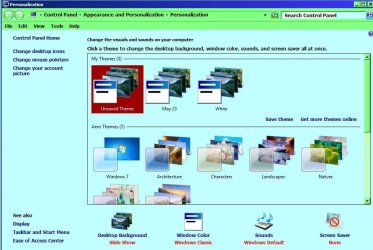
Roderunner Exterminator Guru Gold Member VIP Local time 8:36 AM Messages 2,362 Location Scotland May 26, 2011 #6 Once you have clicked apply & ok after making changes, this screen appears and shows as unsaved. My Computer My Computer Computer Manufacturer/Model NumberLook in my Signature.OSWin7 H.Prem. 32bit+SP1
S simon333 New member Thread Starter Local time 8:36 AM Messages 9 May 27, 2011 #7 i dont get that screen coming up or get an apply to lite up so i cant apply the changes, i must be going about it the wrong way My Computer My Computer OSwin 7 x64
i dont get that screen coming up or get an apply to lite up so i cant apply the changes, i must be going about it the wrong way
Roderunner Exterminator Guru Gold Member VIP Local time 8:36 AM Messages 2,362 Location Scotland May 28, 2011 #8 Keep trying, you'll get it eventually Simon. My Computer My Computer Computer Manufacturer/Model NumberLook in my Signature.OSWin7 H.Prem. 32bit+SP1