Windows.old Folder - Delete

How to Delete the Windows.old Folder in Windows 7

   Information
If you performed repair install, upgrade install, or a custom install without formatting the drive for a clean install and selected to install Windows 7 on the same partition of the previous Windows installation, then you may have a C:\Windows.old folder left over in your new installation.

If you already had a C:\Windows.old folder in the installation that you performed a repair install, upgrade install, or a custom install on, then it would be renamed to say C:\Windows.old.000 (older previous installation) in addition to the C:\Windows.old folder. The most recent previous installation will always be in the C:\Windows.old folder.

This will show you how to delete the Windows.old folder(s) generated during the installation to free up the hard drive space that the Windows.old folder(s) takes.
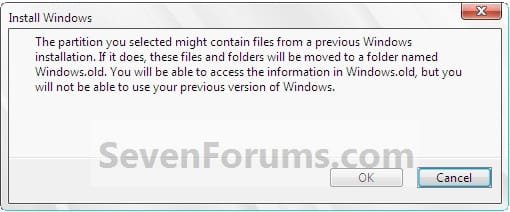
Install.jpg

   Note
The C:\Windows.old folder contains folders and files from the previous Windows installation. Be sure to copy any files or data that you may still want to keep to another location before deleting this folder.
   Tip
For how to

restore a Windows 7-based computer to a previous Windows installation by using the Windows.old folder, see: How to restore a Windows 7-based computer to a previous Windows installation by using the Windows.old folder
   Warning
Be sure to copy any files that you want out of the Windows.old folder before you delete it. Once deleted, they are gone.

You must logged in as an administrator to be able to do the steps in this tutorial.


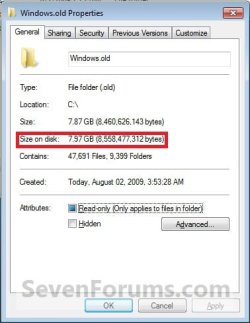
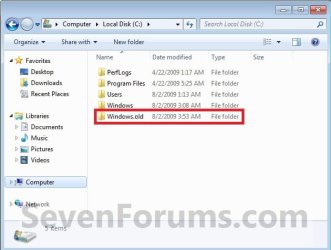
EXAMPLE: Windows.old Folder
NOTE: Notice how much space this folder uses.
Windows7-1.jpgWindows7-1B.jpg


OPTION ONE

Delete "Windows.old" Folder Using Disk Cleanup


1. Open Disk Cleanup.
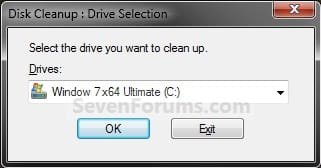
2. If prompted, select the Windows 7 C: drive, and click on OK. (see screenshot below)
NOTE: You will only see this if you have more than one HDD or partition with a drive letter.
Step1.jpg
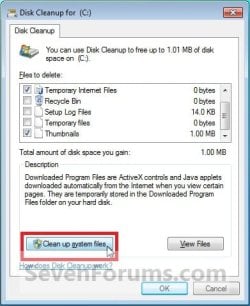
3. Click on the Clean up system files button. (see screenshot below)
Windows7-2.jpg
4. If prompted by UAC, then click on Yes.

5. Repeat step 2 above.

6. Check the Previous Windows installations box, and click on OK. (see screenshot below)
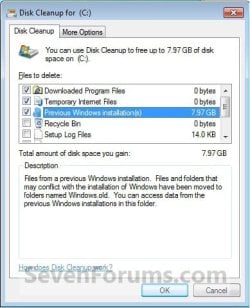
Windows7-3.jpg
7. Click on Delete Files. (see screenshot below)
Windows7-4.jpg
8. When Disk Cleanup finishes, the C:\Windows.old folder(s) will be deleted.
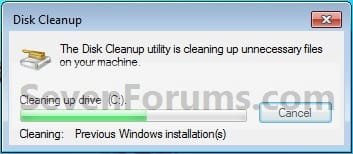
Windows7-5.jpg


OPTION TWO

Delete "Windows.old" Folder Using Elevated Command Prompt


1. Open a Elevated command prompt.

2. In the elevated command prompt, copy and paste the command below, and press Enter. (see screenshot below)
NOTE: If you had another say windows.old.000 folder that you also wanted to delete, then you could repeat this command substituting that name instead to also delete it.
RD /S /Q %SystemDrive%\windows.old
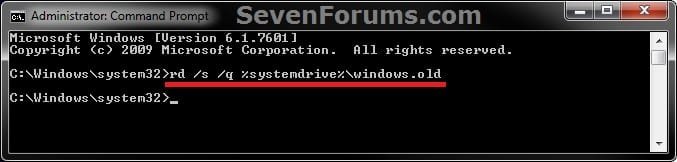
ELVTD_CMD.jpg
3. Close the command prompt.


OPTION THREE

Delete "Windows.old" Folder Using Command Prompt at Boot


NOTE: This would be a good option to do if OPTION ONE or OPTION TWO was unable to delete your C:\Windows.old folder.
1. Open the Disk Management (diskmgmt.msc), and make note of the name (ex: none) and total size (ex: 126 GB) of your Windows 7 drive. (see screenshot below)
NOTE: You will need to know this in step 3C.
Disk_Mangement.jpg
2. Using either you Windows 7 installation DVD or system repair disc, boot to a command prompt at boot (click on link for how).

3. To Verify the Windows 7 Drive Letter at Boot
NOTE: The Windows 7 drive letter may not always be C: at boot like it is while Windows is started, so be sure to verify it's drive letter before doing the command in step 4 for it to work.
A) In the command prompt, type diskpart and press enter. (see screenshot below)

B) In the command prompt, type list volume and press enter. (see screenshot below)

C) From the listed volumes, look for and verify the drive letter (ex: D: ) of your Windows 7 drive (ex: 126 GB w/ no name). (see screenshot below)

D) In the command prompt, type exit and press enter. (see screenshot below)
CMD-1.jpg
4. To Delete the "Windows.old" Folder
A) In the command prompt, type the command below and press enter. (see screenshot below)
NOTE: Be sure to substitute D in the command below with the actual drive letter of your Windows 7 drive as displayed from step 3 above instead. If you had another say windows.old.000 folder that you also want to delete, then you could repeat this command substituting that name instead of Windows.old to also delete it.
RD /S /Q "D:\Windows.old"
B) Close the command prompt window.
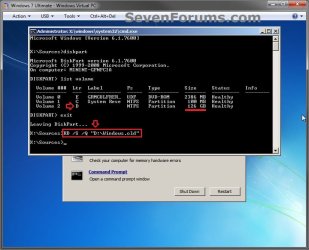
CMD-2.jpg
5. Click on the Restart button to restart the computer and start Windows 7, and to verify that the Windows.old folder has been deleted.
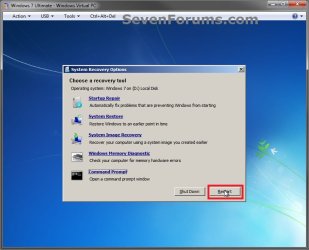
CMD-3.jpg
That's it,
Shawn


Last edited:
Hello ElJefe, and welcome to Seven Forums.

Take ownership and "Allow" your user account "Full Control" of the C:\Windows.old folder to see if you may be able to delete it afterwards.

Hope this helps,
Shawn
 

My Computer

Computer type
PC/Desktop
Computer Manufacturer/Model Number
Self built custom
OS
64-bit Windows 11 Pro for Workstations
CPU
Intel i7-8700K OC'd to 5 GHz
Motherboard
ASUS ROG Maximus XI Formula Z390
Memory
64 GB (4x16GB) G.SKILL TridentZ RGB DDR4 3600 MHz
Graphics Card(s)
ASUS ROG-STRIX-GTX1080TI-O11G-GAMING
Sound Card
Integrated
Monitor(s) Displays
2 x Samsung Odyssey G7 27"
Screen Resolution
2560x1440
Hard Drives
1TB Samsung 990 PRO M.2,
4TB Samsung 990 PRO PRO M.2,
TerraMaster F8 SSD Plus NAS
PSU
Seasonic Prime Titanium 850W
Case
Thermaltake Core P3
Cooling
Corsair Hydro H115i
Keyboard
Logitech wireless K800
Mouse
Logitech MX Master 4
Internet Speed
2 Gb/s Download and 100 Mb/s Upload
Antivirus
Malwarebyte Anti-Malware Premium
Browser
Google Chrome
Other Info
Logitech Z625 speaker system,
Logitech BRIO 4K Pro webcam,
HP Color LaserJet Pro MFP M477fdn,
APC SMART-UPS RT 1000 XL - SURT1000XLI,
Galaxy S23 Plus phone
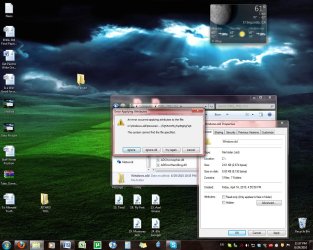
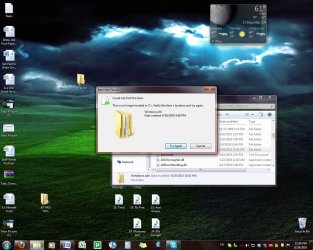
I tried taking ownership of it and nothing. Then I tried removing the read-only checkmark and a weird message came up. I've also tried renaming it, moving it, cmd removing it, Tune-up Shredder-ing it, using disk cleanup. Nothing has worked.
 

Attachments

  • Untitled2.jpg
    Untitled2.jpg
    410.9 KB · Views: 212
  • Untitled.jpg
    Untitled.jpg
    411 KB · Views: 204

My Computer

OS
Windows 7 Ultimate 64-bit (6.1, Build 7600)
CPU
AMD Athlon 64 X2 Dual Processor 6000+, ~3.0GHz
Motherboard
GA-MA770-DS3
Memory
3072 MB RAM
Graphics Card(s)
ATI Radeon HD 4600
Monitor(s) Displays
SyncMaster 932B/191B
Screen Resolution
1280 x 1024
Hard Drives
C: 232 GB
PSU
Thermaltake TR2 W0070RUC 430W ATX12V V2.2 Intel Core i7
Case
RAIDMAX Ares ATX-801WB Black SECC Steel ATX Mid Tower
Lmao, beat this people. 170GB left in windows.old.

I think I have the record, haha?
 

My Computer

OS
Windows 7 Ultimate 64bit
I tried taking ownership of it and nothing. Then I tried removing the read-only checkmark and a weird message came up. I've also tried renaming it, moving it, cmd removing it, Tune-up Shredder-ing it, using disk cleanup. Nothing has worked.

ElJefe,

See if you may be able to delete the C:\Windows.old folder from a command prompt at boot.

http://www.sevenforums.com/tutorials/55721-folder-delete-command-prompt.html

You can use this command below:

RD /S /Q "C:\Windows.old"
 

My Computer

Computer type
PC/Desktop
Computer Manufacturer/Model Number
Self built custom
OS
64-bit Windows 11 Pro for Workstations
CPU
Intel i7-8700K OC'd to 5 GHz
Motherboard
ASUS ROG Maximus XI Formula Z390
Memory
64 GB (4x16GB) G.SKILL TridentZ RGB DDR4 3600 MHz
Graphics Card(s)
ASUS ROG-STRIX-GTX1080TI-O11G-GAMING
Sound Card
Integrated
Monitor(s) Displays
2 x Samsung Odyssey G7 27"
Screen Resolution
2560x1440
Hard Drives
1TB Samsung 990 PRO M.2,
4TB Samsung 990 PRO PRO M.2,
TerraMaster F8 SSD Plus NAS
PSU
Seasonic Prime Titanium 850W
Case
Thermaltake Core P3
Cooling
Corsair Hydro H115i
Keyboard
Logitech wireless K800
Mouse
Logitech MX Master 4
Internet Speed
2 Gb/s Download and 100 Mb/s Upload
Antivirus
Malwarebyte Anti-Malware Premium
Browser
Google Chrome
Other Info
Logitech Z625 speaker system,
Logitech BRIO 4K Pro webcam,
HP Color LaserJet Pro MFP M477fdn,
APC SMART-UPS RT 1000 XL - SURT1000XLI,
Galaxy S23 Plus phone
Great post, thanks!

I just got 44GB back! :)

@fabricius - I think you do have the record lol
 

My Computer

Computer Manufacturer/Model Number
Custom built PC
OS
Windows 7 Ultimate x64 w/SP1
CPU
Intel Core i7 IvyBridge 3.5Ghz
Motherboard
ASUS P8Z77-V-LX
Memory
8GB
Graphics Card(s)
XFX Radeon HD7750
Sound Card
Onboard
Monitor(s) Displays
19.5 Hanns.G
Screen Resolution
1440 X 900
Hard Drives
120GB SSD
1TB HDD
PSU
750W
Case
Antec 302
Cooling
N/A
Internet Speed
5980Kbs
Deleting from command prompt at boot worked. Thanks very much Brink
 

My Computer

OS
Windows 7 Ultimate 64-bit (6.1, Build 7600)
CPU
AMD Athlon 64 X2 Dual Processor 6000+, ~3.0GHz
Motherboard
GA-MA770-DS3
Memory
3072 MB RAM
Graphics Card(s)
ATI Radeon HD 4600
Monitor(s) Displays
SyncMaster 932B/191B
Screen Resolution
1280 x 1024
Hard Drives
C: 232 GB
PSU
Thermaltake TR2 W0070RUC 430W ATX12V V2.2 Intel Core i7
Case
RAIDMAX Ares ATX-801WB Black SECC Steel ATX Mid Tower
You're most welcome ElJefe. I'm happy to hear that you got it deleted. :)
 

My Computer

Computer type
PC/Desktop
Computer Manufacturer/Model Number
Self built custom
OS
64-bit Windows 11 Pro for Workstations
CPU
Intel i7-8700K OC'd to 5 GHz
Motherboard
ASUS ROG Maximus XI Formula Z390
Memory
64 GB (4x16GB) G.SKILL TridentZ RGB DDR4 3600 MHz
Graphics Card(s)
ASUS ROG-STRIX-GTX1080TI-O11G-GAMING
Sound Card
Integrated
Monitor(s) Displays
2 x Samsung Odyssey G7 27"
Screen Resolution
2560x1440
Hard Drives
1TB Samsung 990 PRO M.2,
4TB Samsung 990 PRO PRO M.2,
TerraMaster F8 SSD Plus NAS
PSU
Seasonic Prime Titanium 850W
Case
Thermaltake Core P3
Cooling
Corsair Hydro H115i
Keyboard
Logitech wireless K800
Mouse
Logitech MX Master 4
Internet Speed
2 Gb/s Download and 100 Mb/s Upload
Antivirus
Malwarebyte Anti-Malware Premium
Browser
Google Chrome
Other Info
Logitech Z625 speaker system,
Logitech BRIO 4K Pro webcam,
HP Color LaserJet Pro MFP M477fdn,
APC SMART-UPS RT 1000 XL - SURT1000XLI,
Galaxy S23 Plus phone
Just use Unlocker 1.9.0. Does the trick.
 

My Computer

Computer type
PC/Desktop
Computer Manufacturer/Model Number
Built By Mike
OS
Windows 7 Pro, x64
CPU
I7 3770k @ 4.4 Gigs
Motherboard
AsRock Z77 Extreme6
Memory
16 (2x8) Gigs Corsair DDR3 1600
Graphics Card(s)
EVGA GTX 680 Signature 2
Sound Card
X-Fi Xtreme Gamer Pro, Logitech Z-5500 5.1 Speaker System
Monitor(s) Displays
Acer P236H 23"
Screen Resolution
1920x1080
Hard Drives
Crucial M500 120 GB SSD, 2 WD 640 Gig Black, WD 1 TB Black, WD 2 TB Black (eSata)
PSU
Corsair TX750w
Case
HSPC Top Deck Tech Station
Cooling
Noctua NH-U14S Heatsink with dual Noctua fans
Keyboard
Deck Lighted
Mouse
Roccat Kone Pure
Internet Speed
Cable
Antivirus
AVG
Other Info
2 DVD SATA R/W Drives

My Computer

Computer Manufacturer/Model Number
HP Media Center
OS
Windows 7 32 bit
CPU
AMD 5200+ dual core
Memory
2 GB
Graphics Card(s)
NVidia GeForce 6150SE 128 MB
Monitor(s) Displays
CRT
Screen Resolution
1280x1024
Hard Drives
500 GB Sata internal :

SIIG USB 3.0 docking stations w/WD Caviar Black 6 Gb/s drives
Keyboard
PS/2
Mouse
PS/2 Wheel Mouse
Other Info
SIIG USB 3.0 PCIexpress card.
Outstanding, really nice tutorial it helped me out alot.

I'd re-installed Windows twice this year and i've been stuck with these Windows.old folders with no idea how to shift them. Thanks to this tut its now possible and has left me with 135gb of free space.

Thanks!
 

My Computer

Computer Manufacturer/Model Number
HP-Pavilion
OS
Windows 7 Professional x64
CPU
AMD Phenom 9500 Quad-Core Processor 2.20 GHz
Memory
4x 2gb Crucial sticks total = 8gb
Graphics Card(s)
ATI Radeon HD 5700 Series
Sound Card
MS High Definition Audio Device
Monitor(s) Displays
Samsung T240 24 inch Widescreen LCD Monitor /w HDMI
Screen Resolution
1920 x 1200
Hard Drives
2x 500gb Internal Hardrives
1x 500gb External Hardrive
1x 1TB iOmega Home Media External Hardrive
Keyboard
Logitech G15 gaming keyboard
Internet Speed
8mb
You're most welcome Ark, and welcome to Seven Forums. :)
 

My Computer

Computer type
PC/Desktop
Computer Manufacturer/Model Number
Self built custom
OS
64-bit Windows 11 Pro for Workstations
CPU
Intel i7-8700K OC'd to 5 GHz
Motherboard
ASUS ROG Maximus XI Formula Z390
Memory
64 GB (4x16GB) G.SKILL TridentZ RGB DDR4 3600 MHz
Graphics Card(s)
ASUS ROG-STRIX-GTX1080TI-O11G-GAMING
Sound Card
Integrated
Monitor(s) Displays
2 x Samsung Odyssey G7 27"
Screen Resolution
2560x1440
Hard Drives
1TB Samsung 990 PRO M.2,
4TB Samsung 990 PRO PRO M.2,
TerraMaster F8 SSD Plus NAS
PSU
Seasonic Prime Titanium 850W
Case
Thermaltake Core P3
Cooling
Corsair Hydro H115i
Keyboard
Logitech wireless K800
Mouse
Logitech MX Master 4
Internet Speed
2 Gb/s Download and 100 Mb/s Upload
Antivirus
Malwarebyte Anti-Malware Premium
Browser
Google Chrome
Other Info
Logitech Z625 speaker system,
Logitech BRIO 4K Pro webcam,
HP Color LaserJet Pro MFP M477fdn,
APC SMART-UPS RT 1000 XL - SURT1000XLI,
Galaxy S23 Plus phone
Thanks Brink bro... i had deleted my windowsold folder by taking the ownership of that folder... :)
btw, what do those RD ,S and Q mean? :-/What do they stand for?
 

My Computer

OS
Windows 7 Ultimate 64 bit
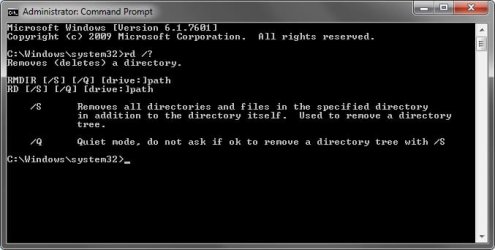
You're most welcome CPU. Here you go mate. :)

RD= Remove Directory

RD.jpg
 

My Computer

Computer type
PC/Desktop
Computer Manufacturer/Model Number
Self built custom
OS
64-bit Windows 11 Pro for Workstations
CPU
Intel i7-8700K OC'd to 5 GHz
Motherboard
ASUS ROG Maximus XI Formula Z390
Memory
64 GB (4x16GB) G.SKILL TridentZ RGB DDR4 3600 MHz
Graphics Card(s)
ASUS ROG-STRIX-GTX1080TI-O11G-GAMING
Sound Card
Integrated
Monitor(s) Displays
2 x Samsung Odyssey G7 27"
Screen Resolution
2560x1440
Hard Drives
1TB Samsung 990 PRO M.2,
4TB Samsung 990 PRO PRO M.2,
TerraMaster F8 SSD Plus NAS
PSU
Seasonic Prime Titanium 850W
Case
Thermaltake Core P3
Cooling
Corsair Hydro H115i
Keyboard
Logitech wireless K800
Mouse
Logitech MX Master 4
Internet Speed
2 Gb/s Download and 100 Mb/s Upload
Antivirus
Malwarebyte Anti-Malware Premium
Browser
Google Chrome
Other Info
Logitech Z625 speaker system,
Logitech BRIO 4K Pro webcam,
HP Color LaserJet Pro MFP M477fdn,
APC SMART-UPS RT 1000 XL - SURT1000XLI,
Galaxy S23 Plus phone
You're most welcome. :)
 

My Computer

Computer type
PC/Desktop
Computer Manufacturer/Model Number
Self built custom
OS
64-bit Windows 11 Pro for Workstations
CPU
Intel i7-8700K OC'd to 5 GHz
Motherboard
ASUS ROG Maximus XI Formula Z390
Memory
64 GB (4x16GB) G.SKILL TridentZ RGB DDR4 3600 MHz
Graphics Card(s)
ASUS ROG-STRIX-GTX1080TI-O11G-GAMING
Sound Card
Integrated
Monitor(s) Displays
2 x Samsung Odyssey G7 27"
Screen Resolution
2560x1440
Hard Drives
1TB Samsung 990 PRO M.2,
4TB Samsung 990 PRO PRO M.2,
TerraMaster F8 SSD Plus NAS
PSU
Seasonic Prime Titanium 850W
Case
Thermaltake Core P3
Cooling
Corsair Hydro H115i
Keyboard
Logitech wireless K800
Mouse
Logitech MX Master 4
Internet Speed
2 Gb/s Download and 100 Mb/s Upload
Antivirus
Malwarebyte Anti-Malware Premium
Browser
Google Chrome
Other Info
Logitech Z625 speaker system,
Logitech BRIO 4K Pro webcam,
HP Color LaserJet Pro MFP M477fdn,
APC SMART-UPS RT 1000 XL - SURT1000XLI,
Galaxy S23 Plus phone
So does this just delete the windows.old folder? Or does it delete AppData, Users and Program Files from previous too?
 

My Computer

Computer Manufacturer/Model Number
Dell Inspiron
OS
Windows 7 Ultimate N 32bit
Hard Drives
320GB
250GB
Hello Jack, and welcome to Seven Forums.

This will only delete the C:\Windows.old folder and all of it's contents.

Hope this helps,
Shawn
 

My Computer

Computer type
PC/Desktop
Computer Manufacturer/Model Number
Self built custom
OS
64-bit Windows 11 Pro for Workstations
CPU
Intel i7-8700K OC'd to 5 GHz
Motherboard
ASUS ROG Maximus XI Formula Z390
Memory
64 GB (4x16GB) G.SKILL TridentZ RGB DDR4 3600 MHz
Graphics Card(s)
ASUS ROG-STRIX-GTX1080TI-O11G-GAMING
Sound Card
Integrated
Monitor(s) Displays
2 x Samsung Odyssey G7 27"
Screen Resolution
2560x1440
Hard Drives
1TB Samsung 990 PRO M.2,
4TB Samsung 990 PRO PRO M.2,
TerraMaster F8 SSD Plus NAS
PSU
Seasonic Prime Titanium 850W
Case
Thermaltake Core P3
Cooling
Corsair Hydro H115i
Keyboard
Logitech wireless K800
Mouse
Logitech MX Master 4
Internet Speed
2 Gb/s Download and 100 Mb/s Upload
Antivirus
Malwarebyte Anti-Malware Premium
Browser
Google Chrome
Other Info
Logitech Z625 speaker system,
Logitech BRIO 4K Pro webcam,
HP Color LaserJet Pro MFP M477fdn,
APC SMART-UPS RT 1000 XL - SURT1000XLI,
Galaxy S23 Plus phone
Shawn,
I don't have one to experiment with, but I thought one could:
1. log on as an administrator
2. run cmd.exe as administrator
3. delete window.old and all underneath with /s and /f options.

Or must one log in using the built-in administrator account for this to work?
karl
 

My Computer

Computer Manufacturer/Model Number
Toshiba Satellite S875D-S7239 laptop
OS
MS Windows 7 Ultimate SP1 64-bit
CPU
AMD A10-4600M
Motherboard
AMD Pumori (Socket FT1)
Memory
6.00 GB Dual-Channel DDR3 @ 798MHz (11-11-12-28)
Graphics Card(s)
AMD Radeon HD 7660G
Sound Card
High Definition Audio Device
Monitor(s) Displays
Generic PnP Monitor (1600x900@60Hz)
Screen Resolution
1600x900@60Hz
Hard Drives
SSD 119GB Corsair CSSD-V128GB2 ATA Device
Keyboard
Standard PS/2 Keyboard
Mouse
HP Wireless Optical Mobile Mouse Model FHA-3410
Internet Speed
What the local pub, local coffee shop offers.
Other Info
Optical Drive:MATSHITA BD-CMB UJ160B ATA Device


Also have an Asus ha1002xp netbook with Win 7 Ultimate installed.
Hello Karl,

The DEL command is for deleting files in folders and not the folder itself, while the RD command is for deleting folders and it's contents. Unfortunately, RD only has the /S and /Q switches and not the /F switch like DEL to force it.

If OPTION ONE doesn't work, then it may be due to some "in use" or permissions issue.

If it's a "in use" issue, then it would have to be deleted at boot to avoid that issue.

If it's not a "in use" issue, then yes it may be able to be deleted with the RD command in a elevated command prompt inside Windows 7. You could be logged in as any administrator to do this. It doesn't have to be the built-in Administrator.

I only added the option to do it at boot instead of in a elevated command prompt inside Windows 7 since it should work at boot in all situations.

I'll go ahead and had that option with the command below though. Thank you. :)

rd /s /q %systemdrive%\windows.old
 

My Computer

Computer type
PC/Desktop
Computer Manufacturer/Model Number
Self built custom
OS
64-bit Windows 11 Pro for Workstations
CPU
Intel i7-8700K OC'd to 5 GHz
Motherboard
ASUS ROG Maximus XI Formula Z390
Memory
64 GB (4x16GB) G.SKILL TridentZ RGB DDR4 3600 MHz
Graphics Card(s)
ASUS ROG-STRIX-GTX1080TI-O11G-GAMING
Sound Card
Integrated
Monitor(s) Displays
2 x Samsung Odyssey G7 27"
Screen Resolution
2560x1440
Hard Drives
1TB Samsung 990 PRO M.2,
4TB Samsung 990 PRO PRO M.2,
TerraMaster F8 SSD Plus NAS
PSU
Seasonic Prime Titanium 850W
Case
Thermaltake Core P3
Cooling
Corsair Hydro H115i
Keyboard
Logitech wireless K800
Mouse
Logitech MX Master 4
Internet Speed
2 Gb/s Download and 100 Mb/s Upload
Antivirus
Malwarebyte Anti-Malware Premium
Browser
Google Chrome
Other Info
Logitech Z625 speaker system,
Logitech BRIO 4K Pro webcam,
HP Color LaserJet Pro MFP M477fdn,
APC SMART-UPS RT 1000 XL - SURT1000XLI,
Galaxy S23 Plus phone
Shawn,
Thanks. I had meant to say RD rather than delete, which as you pointed out doesn't have the force option.

My real question was whether I could simply by logging in under an administrative account, running cmd as administrator, get rid of windows.old using RD. If I had one on this laptop, I'd try myself. Just didn't know whether this wasn't a feasibility.
 

My Computer

Computer Manufacturer/Model Number
Toshiba Satellite S875D-S7239 laptop
OS
MS Windows 7 Ultimate SP1 64-bit
CPU
AMD A10-4600M
Motherboard
AMD Pumori (Socket FT1)
Memory
6.00 GB Dual-Channel DDR3 @ 798MHz (11-11-12-28)
Graphics Card(s)
AMD Radeon HD 7660G
Sound Card
High Definition Audio Device
Monitor(s) Displays
Generic PnP Monitor (1600x900@60Hz)
Screen Resolution
1600x900@60Hz
Hard Drives
SSD 119GB Corsair CSSD-V128GB2 ATA Device
Keyboard
Standard PS/2 Keyboard
Mouse
HP Wireless Optical Mobile Mouse Model FHA-3410
Internet Speed
What the local pub, local coffee shop offers.
Other Info
Optical Drive:MATSHITA BD-CMB UJ160B ATA Device


Also have an Asus ha1002xp netbook with Win 7 Ultimate installed.
Back
Top