Windows.old Folder - Delete

How to Delete the Windows.old Folder in Windows 7

   Information
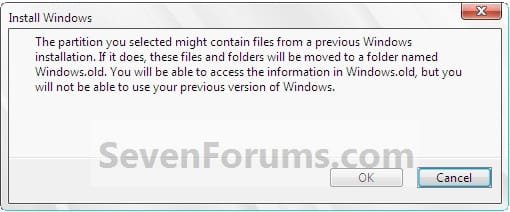
If you performed repair install, upgrade install, or a custom install without formatting the drive for a clean install and selected to install Windows 7 on the same partition of the previous Windows installation, then you may have a C:\Windows.old folder left over in your new installation.

If you already had a C:\Windows.old folder in the installation that you performed a repair install, upgrade install, or a custom install on, then it would be renamed to say C:\Windows.old.000 (older previous installation) in addition to the C:\Windows.old folder. The most recent previous installation will always be in the C:\Windows.old folder.

This will show you how to delete the Windows.old folder(s) generated during the installation to free up the hard drive space that the Windows.old folder(s) takes.
Install.jpg

   Note
The C:\Windows.old folder contains folders and files from the previous Windows installation. Be sure to copy any files or data that you may still want to keep to another location before deleting this folder.
   Tip
For how to

restore a Windows 7-based computer to a previous Windows installation by using the Windows.old folder, see: How to restore a Windows 7-based computer to a previous Windows installation by using the Windows.old folder
   Warning
Be sure to copy any files that you want out of the Windows.old folder before you delete it. Once deleted, they are gone.

You must logged in as an administrator to be able to do the steps in this tutorial.


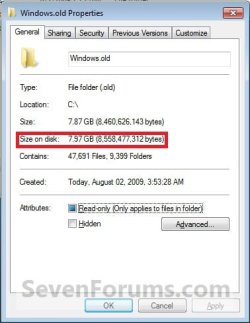
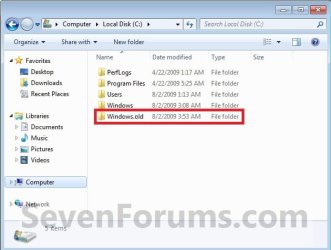
EXAMPLE: Windows.old Folder
NOTE: Notice how much space this folder uses.
Windows7-1.jpgWindows7-1B.jpg


OPTION ONE

Delete "Windows.old" Folder Using Disk Cleanup


1. Open Disk Cleanup.
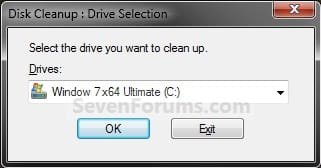
2. If prompted, select the Windows 7 C: drive, and click on OK. (see screenshot below)
NOTE: You will only see this if you have more than one HDD or partition with a drive letter.
Step1.jpg
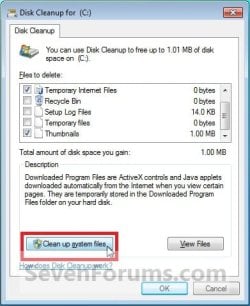
3. Click on the Clean up system files button. (see screenshot below)
Windows7-2.jpg
4. If prompted by UAC, then click on Yes.

5. Repeat step 2 above.

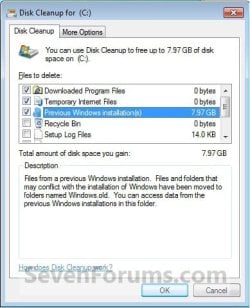
6. Check the Previous Windows installations box, and click on OK. (see screenshot below)
Windows7-3.jpg
7. Click on Delete Files. (see screenshot below)
Windows7-4.jpg
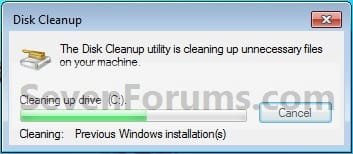
8. When Disk Cleanup finishes, the C:\Windows.old folder(s) will be deleted.
Windows7-5.jpg


OPTION TWO

Delete "Windows.old" Folder Using Elevated Command Prompt


1. Open a Elevated command prompt.

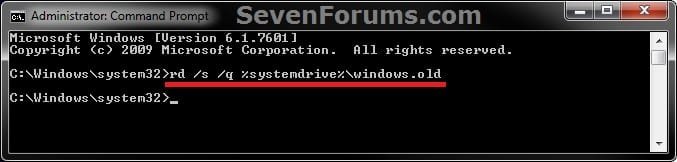
2. In the elevated command prompt, copy and paste the command below, and press Enter. (see screenshot below)
NOTE: If you had another say windows.old.000 folder that you also wanted to delete, then you could repeat this command substituting that name instead to also delete it.
RD /S /Q %SystemDrive%\windows.old
ELVTD_CMD.jpg
3. Close the command prompt.


OPTION THREE

Delete "Windows.old" Folder Using Command Prompt at Boot


NOTE: This would be a good option to do if OPTION ONE or OPTION TWO was unable to delete your C:\Windows.old folder.
1. Open the Disk Management (diskmgmt.msc), and make note of the name (ex: none) and total size (ex: 126 GB) of your Windows 7 drive. (see screenshot below)
NOTE: You will need to know this in step 3C.
Disk_Mangement.jpg
2. Using either you Windows 7 installation DVD or system repair disc, boot to a command prompt at boot (click on link for how).

3. To Verify the Windows 7 Drive Letter at Boot
NOTE: The Windows 7 drive letter may not always be C: at boot like it is while Windows is started, so be sure to verify it's drive letter before doing the command in step 4 for it to work.
A) In the command prompt, type diskpart and press enter. (see screenshot below)

B) In the command prompt, type list volume and press enter. (see screenshot below)

C) From the listed volumes, look for and verify the drive letter (ex: D: ) of your Windows 7 drive (ex: 126 GB w/ no name). (see screenshot below)

D) In the command prompt, type exit and press enter. (see screenshot below)
CMD-1.jpg
4. To Delete the "Windows.old" Folder
A) In the command prompt, type the command below and press enter. (see screenshot below)
NOTE: Be sure to substitute D in the command below with the actual drive letter of your Windows 7 drive as displayed from step 3 above instead. If you had another say windows.old.000 folder that you also want to delete, then you could repeat this command substituting that name instead of Windows.old to also delete it.
RD /S /Q "D:\Windows.old"
B) Close the command prompt window.
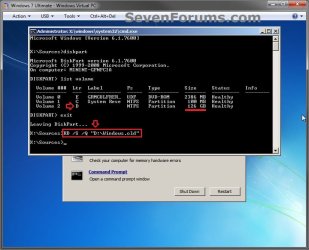
CMD-2.jpg
5. Click on the Restart button to restart the computer and start Windows 7, and to verify that the Windows.old folder has been deleted.
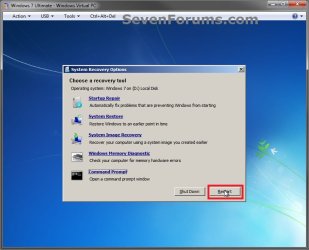
CMD-3.jpg
That's it,
Shawn


Last edited:
Thanks Brink for welcome. You’ve also given me some advice on Vista forum, before my recent change to 7.

Just ran “Disk Cleanup” again after posting this morning. Watched it collecting system data for over ½ hr. and let continue without monitoring, checked 2 hours later and computer was asleep (no HDD activity from indicator light and lighted power button changed from green to amber). Moved mouse to wake and “Disk Cleanup” window showed still checking for system data. If IRC same thing happened with option 2, cmd prompt within win7. Option 3 (boot) didn’t put computer to sleep but after displaying several lines of data, it just stopped with curser blinking as though still collecting data but didn’t proceed any further until I canceled cmd prompt with control/C. Even “take ownership” seems to hang when checking on large data folders.

Thanks for your help in advance and the help this thread has given others.

Edit: By the way normal computer functions give no problems.

Edit 2: Further information, just ran “take ownership” on windows.old folder. After ~ 80 lines of ownership assignment (stopped assigning), waited ~ 35 min. without any advancement before canceling.
 
Last edited:

My Computer

Computer type
PC/Desktop
Computer Manufacturer/Model Number
Compaq
OS
Windows 7 Home Premium 32bit.
CPU
AMD Athlon x2 2.30 GHz
Memory
4 GB Ram
It is odd that it even does this while trying to delete the folder from a command prompt at boot.
 

My Computer

Computer type
PC/Desktop
Computer Manufacturer/Model Number
Self built custom
OS
64-bit Windows 11 Pro for Workstations
CPU
Intel i7-8700K OC'd to 5 GHz
Motherboard
ASUS ROG Maximus XI Formula Z390
Memory
64 GB (4x16GB) G.SKILL TridentZ RGB DDR4 3600 MHz
Graphics Card(s)
ASUS ROG-STRIX-GTX1080TI-O11G-GAMING
Sound Card
Integrated
Monitor(s) Displays
2 x Samsung Odyssey G7 27"
Screen Resolution
2560x1440
Hard Drives
1TB Samsung 990 PRO M.2,
4TB Samsung 990 PRO PRO M.2,
TerraMaster F8 SSD Plus NAS
PSU
Seasonic Prime Titanium 850W
Case
Thermaltake Core P3
Cooling
Corsair Hydro H115i
Keyboard
Logitech wireless K800
Mouse
Logitech MX Master 4
Internet Speed
2 Gb/s Download and 100 Mb/s Upload
Antivirus
Malwarebyte Anti-Malware Premium
Browser
Google Chrome
Other Info
Logitech Z625 speaker system,
Logitech BRIO 4K Pro webcam,
HP Color LaserJet Pro MFP M477fdn,
APC SMART-UPS RT 1000 XL - SURT1000XLI,
Galaxy S23 Plus phone
It is odd that it even does this while trying to delete the folder from a command prompt at boot.
LOL, Just my luck to have a weird problem. I did add couple edits to previous post. Thinking maybe corrupt file? Maybe run file check and repair? What you think? :confused:
 

My Computer

Computer type
PC/Desktop
Computer Manufacturer/Model Number
Compaq
OS
Windows 7 Home Premium 32bit.
CPU
AMD Athlon x2 2.30 GHz
Memory
4 GB Ram
You might see if the free program Unlocker may be able to delete it for you.
 

My Computer

Computer type
PC/Desktop
Computer Manufacturer/Model Number
Self built custom
OS
64-bit Windows 11 Pro for Workstations
CPU
Intel i7-8700K OC'd to 5 GHz
Motherboard
ASUS ROG Maximus XI Formula Z390
Memory
64 GB (4x16GB) G.SKILL TridentZ RGB DDR4 3600 MHz
Graphics Card(s)
ASUS ROG-STRIX-GTX1080TI-O11G-GAMING
Sound Card
Integrated
Monitor(s) Displays
2 x Samsung Odyssey G7 27"
Screen Resolution
2560x1440
Hard Drives
1TB Samsung 990 PRO M.2,
4TB Samsung 990 PRO PRO M.2,
TerraMaster F8 SSD Plus NAS
PSU
Seasonic Prime Titanium 850W
Case
Thermaltake Core P3
Cooling
Corsair Hydro H115i
Keyboard
Logitech wireless K800
Mouse
Logitech MX Master 4
Internet Speed
2 Gb/s Download and 100 Mb/s Upload
Antivirus
Malwarebyte Anti-Malware Premium
Browser
Google Chrome
Other Info
Logitech Z625 speaker system,
Logitech BRIO 4K Pro webcam,
HP Color LaserJet Pro MFP M477fdn,
APC SMART-UPS RT 1000 XL - SURT1000XLI,
Galaxy S23 Plus phone
You might see if the free program Unlocker may be able to delete it for you.
THANK YOU! The unlocker program did the job; because of site confusion downloading I used this unlocker program IObit Unlocker, Solution for "undelete files or folders" Problems on Windows 8, 7, Vista, XP, 10 - IObit which cleared all folders/files except for main folder windows.old and user folder within even though both empty (0 bytes). The main goal was accomplished, almost 20 GB gained. You’re indispensable to novice like me for sure (added to your Reputation). Thank you again.
 

My Computer

Computer type
PC/Desktop
Computer Manufacturer/Model Number
Compaq
OS
Windows 7 Home Premium 32bit.
CPU
AMD Athlon x2 2.30 GHz
Memory
4 GB Ram
Hi Struggling,
Although NOT recommended,
the file could be removed directly via C > windows > windows.old.
note because of admin rights you may have to remove the files within the folder its-self. (bottom-up)

Roy
 

My Computer

Computer type
PC/Desktop
Computer Manufacturer/Model Number
medionl/Aspire 6930G/acer x55a
OS
W7 home premium 32bit/W7HP 64bit/w10 tp insider ring
CPU
E5300 dual core
Motherboard
medion MS7366
Memory
3gb
Graphics Card(s)
Nvidia Geforce 7100 Nforce 630i
Monitor(s) Displays
avixc
Internet Speed
n (isp resticted to 72)
Antivirus
mse/pands
Browser
palemoon
Other Info
Belkin Fd7050 n USB using Railink RT2870 drivers, more upto date
I'm glad it could help. :)
 

My Computer

Computer type
PC/Desktop
Computer Manufacturer/Model Number
Self built custom
OS
64-bit Windows 11 Pro for Workstations
CPU
Intel i7-8700K OC'd to 5 GHz
Motherboard
ASUS ROG Maximus XI Formula Z390
Memory
64 GB (4x16GB) G.SKILL TridentZ RGB DDR4 3600 MHz
Graphics Card(s)
ASUS ROG-STRIX-GTX1080TI-O11G-GAMING
Sound Card
Integrated
Monitor(s) Displays
2 x Samsung Odyssey G7 27"
Screen Resolution
2560x1440
Hard Drives
1TB Samsung 990 PRO M.2,
4TB Samsung 990 PRO PRO M.2,
TerraMaster F8 SSD Plus NAS
PSU
Seasonic Prime Titanium 850W
Case
Thermaltake Core P3
Cooling
Corsair Hydro H115i
Keyboard
Logitech wireless K800
Mouse
Logitech MX Master 4
Internet Speed
2 Gb/s Download and 100 Mb/s Upload
Antivirus
Malwarebyte Anti-Malware Premium
Browser
Google Chrome
Other Info
Logitech Z625 speaker system,
Logitech BRIO 4K Pro webcam,
HP Color LaserJet Pro MFP M477fdn,
APC SMART-UPS RT 1000 XL - SURT1000XLI,
Galaxy S23 Plus phone
Hi Struggling,
Although NOT recommended,
the file could be removed directly via C > windows > windows.old.
note because of admin rights you may have to remove the files within the folder its-self. (bottom-up)

Roy
Hey torchwood,
All files have already been removed with unlock program (0 bytes in windows.old). However tried the C > windows > windows.old approach after restore point created, but it also failed to remove folder. I’m not really concerned about useless folder since basically no/little drive space is consumed by it. Thanks for your suggestion though.
 

My Computer

Computer type
PC/Desktop
Computer Manufacturer/Model Number
Compaq
OS
Windows 7 Home Premium 32bit.
CPU
AMD Athlon x2 2.30 GHz
Memory
4 GB Ram
Thanks. It is very helpful. But this folder come again after a restart. I not want to delete this again and again using DOS. Is this problem is only in my system?:confused:
 

My Computer

Computer type
Laptop
Computer Manufacturer/Model Number
Dell
OS
Window 7 Ultimate 64 bit
THANK YOU! The unlocker program did the job; because of site confusion downloading I used this unlocker program IObit Unlocker, Solution for "undelete files or folders" Problems on Windows 8, 7, Vista, XP, 10 - IObit

Hiyya Strugglin mate IObits stuff in my mind causes more problems thta it is worth so be careful.
 

My Computer

Computer type
PC/Desktop
Computer Manufacturer/Model Number
Own build (new) Desk1 / Asus ROG Win 7 / Desk2 1st build
OS
Desk1 7 Home Prem / Desk2 10 Pro / Main lap Asus ROG 10 Pro 2 laptop Toshiba 7 Pro Asus P2520 7 & 10
CPU
Desk1 i5 3750K / Laptop i7 GTX 860M / Desk2 i5 2500
Motherboard
Desk1 Asus P877-V / Desk2 Gigabyte H67 UD3H / Laptop ?
Memory
Desk1 8GB (1866) / Desk2 16GB (1333) / Laptop 8Gb DDR3
Graphics Card(s)
Desk 1& 2NVidia GTX 650 & Laptops on board Intel
Sound Card
Desk 1 & 2 -XONAR DG Realtek High Def audio Laptop
Monitor(s) Displays
Desk 1 Benq HD 2450 / Desk2 Philips 24" / Laptop 17.5"
Screen Resolution
1920x1080 D1 & D2 & Laptop 1
Hard Drives
Desk1 Samsung 120GB 830 SSD
Asus ROG 256GB 850 Pro SSD
Desk2 Samsung 840 256 SSD
Toshiba 120GB EVO
PSU
Desk 1 Corsair HX 1050/ Laptop ? / Desk 2 Corsair HX 650
Case
Desk 1 Cooler HAF XM ? Toshiba laptop / Desk2 Coolermaster
Cooling
Fans on all Desk1 -2 Desk2 - all Coolermasters 5 Laptop ?
Keyboard
Desk 1 MS Sidewinder X6 Desk 2 MS Sidewinder X 4
Mouse
Desk 1&2 - Gigabyte MS 900 gamer - laptop - Logitec wireless
Internet Speed
ADSL2+
Other Info
One other Desktop (tester) and spare Toshba laptop both with SSD's
Running Kaspersky 2016 ISS on all machines config'd identically
Logitec audio stereo systems on each machine (x3)
Canon MG5250MFC
Router/modem TP-Link running WPA2SK
Hiyya Strugglin mate IObits stuff in my mind causes more problems thta it is worth so be careful.
Hi ICIT2LOL, thanks for warning but it’s been about 4 months since I used the unlocker and have not experienced any problems yet. Sorry if it caused you any problems or you have read of problems. If you know of any I should watch out for, please let me know.

By any chance you mean IObits stuff in general I will certainly be aware going forward. Thanks again.
 

My Computer

Computer type
PC/Desktop
Computer Manufacturer/Model Number
Compaq
OS
Windows 7 Home Premium 32bit.
CPU
AMD Athlon x2 2.30 GHz
Memory
4 GB Ram
Thanks. It is very helpful. But this folder come again after a restart. I not want to delete this again and again using DOS. Is this problem is only in my system?:confused:
Just folder coming back or does it contain files? As I posted my windows.old and user folder within could not be removed, but properties of both was zero bytes. If I recall correctly, I had to unlock/delete folders/files from user main folder itself.
 

My Computer

Computer type
PC/Desktop
Computer Manufacturer/Model Number
Compaq
OS
Windows 7 Home Premium 32bit.
CPU
AMD Athlon x2 2.30 GHz
Memory
4 GB Ram
By any chance you mean IObits stuff in general I will certainly be aware going forward. Thanks again.

Well let me put it like this I had it once a very long time ago and it was rubbish then and as far as I know still is - never going on any of my machines at least.;)
 

My Computer

Computer type
PC/Desktop
Computer Manufacturer/Model Number
Own build (new) Desk1 / Asus ROG Win 7 / Desk2 1st build
OS
Desk1 7 Home Prem / Desk2 10 Pro / Main lap Asus ROG 10 Pro 2 laptop Toshiba 7 Pro Asus P2520 7 & 10
CPU
Desk1 i5 3750K / Laptop i7 GTX 860M / Desk2 i5 2500
Motherboard
Desk1 Asus P877-V / Desk2 Gigabyte H67 UD3H / Laptop ?
Memory
Desk1 8GB (1866) / Desk2 16GB (1333) / Laptop 8Gb DDR3
Graphics Card(s)
Desk 1& 2NVidia GTX 650 & Laptops on board Intel
Sound Card
Desk 1 & 2 -XONAR DG Realtek High Def audio Laptop
Monitor(s) Displays
Desk 1 Benq HD 2450 / Desk2 Philips 24" / Laptop 17.5"
Screen Resolution
1920x1080 D1 & D2 & Laptop 1
Hard Drives
Desk1 Samsung 120GB 830 SSD
Asus ROG 256GB 850 Pro SSD
Desk2 Samsung 840 256 SSD
Toshiba 120GB EVO
PSU
Desk 1 Corsair HX 1050/ Laptop ? / Desk 2 Corsair HX 650
Case
Desk 1 Cooler HAF XM ? Toshiba laptop / Desk2 Coolermaster
Cooling
Fans on all Desk1 -2 Desk2 - all Coolermasters 5 Laptop ?
Keyboard
Desk 1 MS Sidewinder X6 Desk 2 MS Sidewinder X 4
Mouse
Desk 1&2 - Gigabyte MS 900 gamer - laptop - Logitec wireless
Internet Speed
ADSL2+
Other Info
One other Desktop (tester) and spare Toshba laptop both with SSD's
Running Kaspersky 2016 ISS on all machines config'd identically
Logitec audio stereo systems on each machine (x3)
Canon MG5250MFC
Router/modem TP-Link running WPA2SK
Hi Chris,

Other than having to approve the deletion for a few system files in that folder, I had no problems with just right clicking on it and deleting it. There have been quite a few people that have reported not to be able to do so though. :confused:

I, for one, found it almost impossible, except through "Disk Cleanup". It would always be the "Macromed", in the Sys32 folder, and the "Flash" folder. It's been a while since I worked in Windows 7, unfortunately, but that was my history with it.
 

My Computer

Computer Manufacturer/Model Number
BIOSTAR Group A55MH
OS
Windows 7 Ultimate 64-bit
CPU
2.90 gigahertz AMD A8-3850 APU with Radeon HD Graphics
Motherboard
BIOSTAR Group A55MH Bus Clock: 100 megahertz BIOS: American
Memory
8170 Megabytes Usable Installed Memory
Graphics Card(s)
ATI Radeon HD 5450 [Display adapter]
Sound Card
AMD High Definition Audio Device
Monitor(s) Displays
Samsung SyncMaster [Monitor] (19.1"vis, s/n HA19HVDP427004,
Screen Resolution
1440x900
Hard Drives
1500.20 Gigabytes Usable Hard Drive Capacity
1104.84 Gigabytes Hard Drive Free Space
Case
DELL Dimension 3000
Keyboard
HP KB 0228
Mouse
GH optical-wired
Internet Speed
50+MB
Back
Top