
The partition where I install programs, and keep the drivers seems to be gone.
Here are some of the pics I took to help you understand my problem.
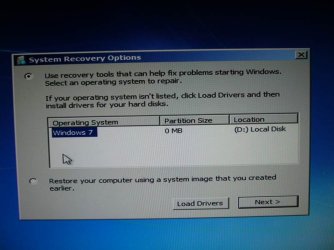
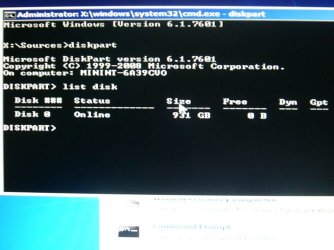
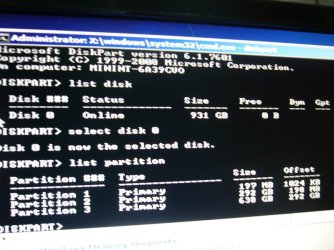
I tried Partition Wizard, then it couldn't find my 300 Gb partition.

I know, I should have taken the picture after the full scan recovery partition was done. But it still couldn't find that partition. So I was already too frustrated to do it
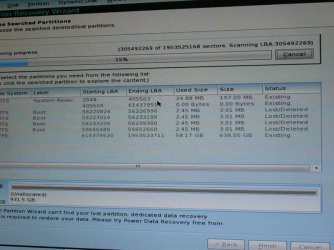
I'm very new to Windows 7, so I don't how my 1 Tb HDD has 3 partitions(200 Mb, 300+ Gb, and 600+ Gb).
How this all happen, and what I've been doing?? well..
- last week my PC started failing to boot Win 7
- I could access Safe Mode though
- then on the next day, somehow it could go back to Win 7 like normal
- after using it for several minutes, it just stopped working. I couldn't even move my mouse pointer. so I pressed reset button
- then it started failing to boot my Windows again
- this time I couldn't even access Safe Mode
- it would load some drivers, then it'd reseted itself
- since that day I've been researching(found this pretty awesome site)...and figuring out how to restore my PC to how it was.
- I've gone to several places to get system repair disc
- I've been trying to fix it via system repair disc's automatic repair thingy...for many times
- I've been attempting to fully search my HDD for the lost partition, with Partition Wizard
- I've been trying to find the lost partition with Power Data Recovery (free ver.)....
- but everytime the app started, the background looks very bright and pinky.... and everything becomes unreadable.
- regardless, I still tried to find it Power Data Recovery......waited for around 12 or so hours..
I think I found the 300 Gb partition..but I couldn't figure out how to restore it....
- pressed the wrong button, and all the scanning result was gone... so I must wait for hours again....if I want to reattempt searching for the lost partition.
so... if anyone knows how I can restore my PC to how it was.... please post.
thank you for reading
Here are some of the pics I took to help you understand my problem.
I tried Partition Wizard, then it couldn't find my 300 Gb partition.
I know, I should have taken the picture after the full scan recovery partition was done. But it still couldn't find that partition. So I was already too frustrated to do it
I'm very new to Windows 7, so I don't how my 1 Tb HDD has 3 partitions(200 Mb, 300+ Gb, and 600+ Gb).
How this all happen, and what I've been doing?? well..
- last week my PC started failing to boot Win 7
- I could access Safe Mode though
- then on the next day, somehow it could go back to Win 7 like normal
- after using it for several minutes, it just stopped working. I couldn't even move my mouse pointer. so I pressed reset button
- then it started failing to boot my Windows again
- this time I couldn't even access Safe Mode
- it would load some drivers, then it'd reseted itself
- since that day I've been researching(found this pretty awesome site)...and figuring out how to restore my PC to how it was.
- I've gone to several places to get system repair disc
- I've been trying to fix it via system repair disc's automatic repair thingy...for many times
- I've been attempting to fully search my HDD for the lost partition, with Partition Wizard
- I've been trying to find the lost partition with Power Data Recovery (free ver.)....
- but everytime the app started, the background looks very bright and pinky.... and everything becomes unreadable.
- regardless, I still tried to find it Power Data Recovery......waited for around 12 or so hours..
I think I found the 300 Gb partition..but I couldn't figure out how to restore it....
- pressed the wrong button, and all the scanning result was gone... so I must wait for hours again....if I want to reattempt searching for the lost partition.
so... if anyone knows how I can restore my PC to how it was.... please post.
thank you for reading
Last edited:
My Computer
- OS
- Windows 7 Ultimate x64
- CPU
- Intel i3 3 Ghz
- Memory
- 8 Gb DDR3
- Sound Card
- on board
- Screen Resolution
- 1600x900
- Hard Drives
- 1 Tb SATA


