Last night i noticed by PC decided to randomly shut down but didnt think much of it as thought it might be something i scheduled and forgot but 30 mins ago it happened again - so first thing i done was scan with Malwarebytes which found nothing and also done a scan with Microsoft Security Essentials and nothing found
Have looked around on the net and have already tried Memtest+ and HDD checking software very recently on my PC and they both returned nothing
What should i try ?
Thanks
AT
My Computer
At a glance
Windows 7 Home Premium 64bit SP1QUAD Q8300 2.5GHZ4GB 399MHZ RAM DDR2 (2x2GB)Sapphire Nvidia Geforce GT230 1.5GB DDR2
One other Desktop (tester) and spare Toshba laptop both with SSD's
Running Kaspersky 2016 ISS on all machines config'd identically
Logitec audio stereo systems on each machine (x3)
Canon MG5250MFC
Router/modem TP-Link running WPA2SK
I have added my CHKDSK Results - as you will see - it fixed quite a few things and i also ran a scan with SAS and ADW and the only things that were picked up by them were advert cookies apart from one registry item named "Conduit" which i know is linked to Conduit Search but i dont have that on my pc so it must have been left over from an installer , below there is a screenshot from Speccy :
I havent noticed it since
Attachments
CHKDSKResults.txt
7.5 KB
· Views: 3
My Computer
At a glance
Windows 7 Home Premium 64bit SP1QUAD Q8300 2.5GHZ4GB 399MHZ RAM DDR2 (2x2GB)Sapphire Nvidia Geforce GT230 1.5GB DDR2
Ok Alan Conduit mate is a toolbar that downloads with stuff if one isn't vigilant when installing things - have done this sort of thing many times myself.
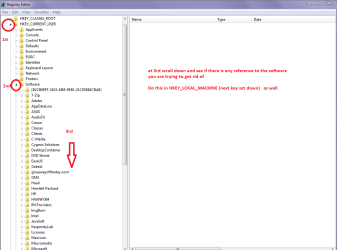
To check to see if things are really cleared out (but ONLY if you are not absolutely sure) I usually go to regedit and open out the HKEY_CURRENT_USER and HKEY_LOCAL_MACHINE go to the Software as in pic and scroll down the list if there is any trace of the wretch there I just highlight it and delete.
One other Desktop (tester) and spare Toshba laptop both with SSD's
Running Kaspersky 2016 ISS on all machines config'd identically
Logitec audio stereo systems on each machine (x3)
Canon MG5250MFC
Router/modem TP-Link running WPA2SK
Im always vigilant with installers and theres nothing related to it in Add/Remove Programs and yeah Revo is great - have been using it for over a year and just checked the Registry and nothing else is in there either - im guessing a bad installer installed the reg keys but not the actual toolbar itself if that makes sense
But yeah , havent noticed a random shutdown since
Thanks for the help so far , much appreciated
My Computer
At a glance
Windows 7 Home Premium 64bit SP1QUAD Q8300 2.5GHZ4GB 399MHZ RAM DDR2 (2x2GB)Sapphire Nvidia Geforce GT230 1.5GB DDR2
Ok Alan we had beter look elsewhere then good to know you are on the same page LOL!!
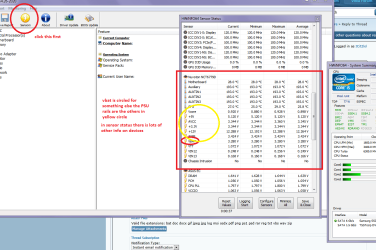
Mate first port of call would be the volts on the PSU try this HWiNFO, HWiNFO32/64 - Download get the right bit version (you will know this already but I have to say it) run it close the right hand window go to Sensors in the large window and then scroll down to the volts - see pic
If ypou have a multimeter (digital not analogue) you might just check the volts at pin 8 (grey cable) - it is the Power_Good pin and regulates whether the machine will boot or run
see this Voltage Rails - Power Supply 101: A Reference Of Specifications scroll down to the POwer_Good section
Attachments
HW INFO VOLTS.PNG
57.3 KB
· Views: 1
My Computer
At a glance
Desk1 7 Home Prem / Desk2 10 Pro / Main lap A...Desk1 i5 3750K / Laptop i7 GTX 860M / Desk2 i...Desk1 8GB (1866) / Desk2 16GB (1333) / Laptop...Desk 1& 2NVidia GTX 650 & Laptops on board Intel
Computer type
PC/Desktop
Computer Manufacturer/Model Number
Own build (new) Desk1 / Asus ROG Win 7 / Desk2 1st build
OS
Desk1 7 Home Prem / Desk2 10 Pro / Main lap Asus ROG 10 Pro 2 laptop Toshiba 7 Pro Asus P2520 7 & 10
One other Desktop (tester) and spare Toshba laptop both with SSD's
Running Kaspersky 2016 ISS on all machines config'd identically
Logitec audio stereo systems on each machine (x3)
Canon MG5250MFC
Router/modem TP-Link running WPA2SK
I mean i guess at this point its just finding out if theres anything else causing it - because even though i havent noticed it since i done the CHKDSK , i have a hunch that something else is causing it
My Computer
At a glance
Windows 7 Home Premium 64bit SP1QUAD Q8300 2.5GHZ4GB 399MHZ RAM DDR2 (2x2GB)Sapphire Nvidia Geforce GT230 1.5GB DDR2
Well the next thing is to have a good look around inside the case for dustetc etc and have a good look at all the capacitors you can see - any bulging orleaking ones and signs of scorching on the motherboard and maybe just reseatall the cards and sticks once more.
I take it the CPU has a stock cooler on it? and when was the last time thethermal compounds replaced / redone? because according to the HW Info those CPUtemps are a tad on the warm side if this is just on idle - the Tcase I know isn't much of a guide but it is just 71.4C
One other Desktop (tester) and spare Toshba laptop both with SSD's
Running Kaspersky 2016 ISS on all machines config'd identically
Logitec audio stereo systems on each machine (x3)
Canon MG5250MFC
Router/modem TP-Link running WPA2SK
Have just checked the capacitors very recently and also reinstalled the RAM / Graphics card where at one point it would beep wierdly but that problem has passed and havent seen it for 2 months
Temps taken from Core Temp 1.0 RC6 x64 :
And i could re apply the paste but at the most it will drop 6c and yeah its a stock cooler from Acer and the PSU is a pretty cheap one (since it was just replacing a basic blown PSU that Acer had provided when built :
Well mate we have got through a lot now and I have to say the finger could be pointing to that PSU as you say it is a cheap one and a dual 12v rail one at that. I did notice one of the 3.3v rails in the HW was a tad low but am not real sure what that voltage relates to.
Yes I guess a temp drop would only be in the range you state but all the same this is at idle what does it do on say a malware scan? I would be inclined to look at a decent cooler and think about that PSU .
Plus you said the RAM made a very strange beep a while ago could be the RAM is also not that good although you have done a memtest. Can you remember what the beep was actually like as in was it a double beep triple etc etc as you know there are set things for set beep codes.
Anyway run say a malware scan and watch the Core Temp as you do it.
Now I don't like saying it but all in all looks like the machine maybe getting near its use by date.
I have an old one a bit like yours I use (a Q9650 core with 4GB DDR2 that I had to replace the PSU on twice using ever larger output ones) for testing but would not rely on it for general use.
Maybe if the budget can stand it - time for a build mate??
My Computer
At a glance
Desk1 7 Home Prem / Desk2 10 Pro / Main lap A...Desk1 i5 3750K / Laptop i7 GTX 860M / Desk2 i...Desk1 8GB (1866) / Desk2 16GB (1333) / Laptop...Desk 1& 2NVidia GTX 650 & Laptops on board Intel
Computer type
PC/Desktop
Computer Manufacturer/Model Number
Own build (new) Desk1 / Asus ROG Win 7 / Desk2 1st build
OS
Desk1 7 Home Prem / Desk2 10 Pro / Main lap Asus ROG 10 Pro 2 laptop Toshiba 7 Pro Asus P2520 7 & 10
One other Desktop (tester) and spare Toshba laptop both with SSD's
Running Kaspersky 2016 ISS on all machines config'd identically
Logitec audio stereo systems on each machine (x3)
Canon MG5250MFC
Router/modem TP-Link running WPA2SK
Just ran Core Temp while doing a SAS Complete Scan w/Full Boost - it seems to be hitting around 63c MAX at 75-80 percent load
And RAM-wise the beep was i think just one long one if i remember rightly but then id move the sticks into different slots and it would beep - move them around again and it would be fine so it didnt make sense
And i have been debating on a new custom build or not but im in that situation where yes , i can can afford a new one but when this PC works , which is most of the time , it does what i need it to to be honest so im not sure what to do although ive though to myself if i did build a new one id go slightly overkill for my needs incase i do end up doing other things on it
My Computer
At a glance
Windows 7 Home Premium 64bit SP1QUAD Q8300 2.5GHZ4GB 399MHZ RAM DDR2 (2x2GB)Sapphire Nvidia Geforce GT230 1.5GB DDR2
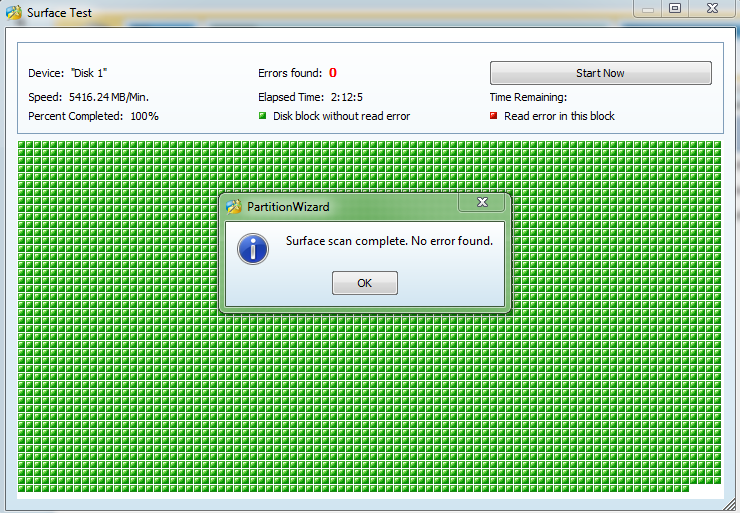
Ok temps look ok to me and I just had another look at your first post and you said you ran some hard drive tests - am just wondering which ones you ran as most run the usual Seatools or the brand it is.
Now on building I am really sorry you are stuck with this machine right now but you are right it is best (in my view) to build in a bit of overkill without going completely mad. When you are ready just drop a thread in here and you will instantly get advice from everyone it is a topic of great discussion
Attachments
MINI TOOL SURFACE.PNG
50.6 KB
· Views: 0
My Computer
At a glance
Desk1 7 Home Prem / Desk2 10 Pro / Main lap A...Desk1 i5 3750K / Laptop i7 GTX 860M / Desk2 i...Desk1 8GB (1866) / Desk2 16GB (1333) / Laptop...Desk 1& 2NVidia GTX 650 & Laptops on board Intel
Computer type
PC/Desktop
Computer Manufacturer/Model Number
Own build (new) Desk1 / Asus ROG Win 7 / Desk2 1st build
OS
Desk1 7 Home Prem / Desk2 10 Pro / Main lap Asus ROG 10 Pro 2 laptop Toshiba 7 Pro Asus P2520 7 & 10
One other Desktop (tester) and spare Toshba laptop both with SSD's
Running Kaspersky 2016 ISS on all machines config'd identically
Logitec audio stereo systems on each machine (x3)
Canon MG5250MFC
Router/modem TP-Link running WPA2SK
Thanks again - i will check out the Surface test later as its like almost 6am here - and the tool i used before was indeed SeaTools - i will update this thread later on today in around 6 hours or less - gonna get a little sleep as i have to go out early
Cheers
AT
My Computer
At a glance
Windows 7 Home Premium 64bit SP1QUAD Q8300 2.5GHZ4GB 399MHZ RAM DDR2 (2x2GB)Sapphire Nvidia Geforce GT230 1.5GB DDR2
One other Desktop (tester) and spare Toshba laptop both with SSD's
Running Kaspersky 2016 ISS on all machines config'd identically
Logitec audio stereo systems on each machine (x3)
Canon MG5250MFC
Router/modem TP-Link running WPA2SK
Hum Alan am back online and seems like the hardware although not perfect (as in new) I am beginning to run out of ideas as things have been cleaned reseated etc etc.
Just going back to the software side I am wondering if a run with this might eliminate some deeply embedded malware if nothing else.
USING THE KASPERSKY RESCUE DISK
Downloadthe software from here Download Kaspersky Rescue Disk 10 and make a bootabledisk or USB stick. Set the BIOS to boot from either the optical drive or the USB stickwhichever you prefer I like the disk myself but the choice is yours.
One other Desktop (tester) and spare Toshba laptop both with SSD's
Running Kaspersky 2016 ISS on all machines config'd identically
Logitec audio stereo systems on each machine (x3)
Canon MG5250MFC
Router/modem TP-Link running WPA2SK
To be honest , looking at what we have done already - and considering i havent noticed any issues like shutting down since the CHKDSK thing - it might be best just to leave it and see how long it goes before i get any issues again as right now its working fine
Gonna give the Kaspersky thing a go anyway and see if it picks anything up just for the sake of it
My Computer
At a glance
Windows 7 Home Premium 64bit SP1QUAD Q8300 2.5GHZ4GB 399MHZ RAM DDR2 (2x2GB)Sapphire Nvidia Geforce GT230 1.5GB DDR2
Yes mate I think you are right I was going to say something along the same lines but all the same I do dislike things beating me LOL!! and you do from time to time get some members being forever pedantic and it can be very annoying but you have been very patient and I must say it has been a pleasure working with you
Yes those scans are worth doing for the heck of it and don't take long and cannot do any harm anyway. Let me know how it goes.
John
My Computer
At a glance
Desk1 7 Home Prem / Desk2 10 Pro / Main lap A...Desk1 i5 3750K / Laptop i7 GTX 860M / Desk2 i...Desk1 8GB (1866) / Desk2 16GB (1333) / Laptop...Desk 1& 2NVidia GTX 650 & Laptops on board Intel
Computer type
PC/Desktop
Computer Manufacturer/Model Number
Own build (new) Desk1 / Asus ROG Win 7 / Desk2 1st build
OS
Desk1 7 Home Prem / Desk2 10 Pro / Main lap Asus ROG 10 Pro 2 laptop Toshiba 7 Pro Asus P2520 7 & 10
One other Desktop (tester) and spare Toshba laptop both with SSD's
Running Kaspersky 2016 ISS on all machines config'd identically
Logitec audio stereo systems on each machine (x3)
Canon MG5250MFC
Router/modem TP-Link running WPA2SK



 and theres nothing related to it in Add/Remove Programs and yeah Revo is great - have been using it for over a year
  and just checked the Registry and nothing else is in there either - im guessing a bad installer installed the reg keys but not the actual toolbar itself if that makes sense