Windows screen flashes, random grey screen & random black screen

rtlawson

New member
Local time
2:33 PM
Messages
13
This is driving me crazy.

Right after I boot my laptop, the screen flashes randomly.

Also something is stealing focus from what I am working on to something else.

Then it likes to suddenly go to a grey screen. I have to manually reboot.

If that is not enough, it like to just reboot.

Scanned with my AVG and Kaspersky, nothing found. Tried TrendMicro House Call, nothing. Dr. Web, nothing.

All drivers are up to date.

I have run it in the safe mode for about an hour with no problems. No new software installed recently. I went to restore and it was only dated from the previous day, so no help there.

I would prefer not to Nuke and pave, but if that what I need to do, I can.

Any thoughts, theories, explosives you can recommend for this?

I await with enlarging piles of hair as I pull it out.


Roger
 

My Computer

Computer type
Laptop
Computer Manufacturer/Model Number
Acer
OS
Windows 7 Ultimate 32bit
CPU
T3400
Hard Drives
320
Antivirus
AVG Free
Browser
Firefox V23
Welcome to SF!

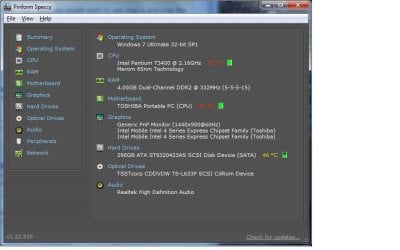
This sounds like a case of overheating, Download Speccy and upload a Screenshot
when in normal use (not Safe-Mode).
 

My Computer

Computer type
PC/Desktop
OS
Windows 10
CPU
Intel Core i5 3570K
Motherboard
Asus P8Z77V-PRO
Memory
16GB 1600Mhz G.Skill
Graphics Card(s)
Gigabyte GTX 970 G1-Gaming
PSU
Seasonic 1000W Platinum
Case
Fractal Design Define R4
Cooling
Noctua NH-D14
Screen shot

Here is a screen shot as per request.


Roger
 

Attachments

  • rtlawson laptop screenshot.jpg
    rtlawson laptop screenshot.jpg
    101.1 KB · Views: 18

My Computer

Computer type
Laptop
Computer Manufacturer/Model Number
Acer
OS
Windows 7 Ultimate 32bit
CPU
T3400
Hard Drives
320
Antivirus
AVG Free
Browser
Firefox V23
Here is a screen shot as per request.


Roger

That is seriously overheating!

   Warning
The Following Steps Will Void Your Warranty!


Addressing the overheating issue:

  • Make sure you can hear or see the fan working, if it is continue with these steps.

  1. Shut-Down the PC
  2. Unplug from the power brick.
  3. Remove the battery.
  4. Let the PC cool down for as long as needed until its only warm to the touch or not at all.
  5. Buy a can of compressed air.
  6. If you have a cover on the bottom that can be unscrewed, remove it for grater access.
  7. When using the compressed air, use short bursts and DO NOT! use it upside-down!!
  8. First blow into the intake (the grill with the fan) again short bursts.
  9. Next do the same to the exhaust.
  10. If you have access the opposite side of the fan blow through there as well.
  11. Next grab a flashlight and point it inward from the exhaust and look for anything that may be blocking the light from passing through when looking from the intake side (the fan).


Happy cleaning :)


282560d1377119513-bsod-after-waking-sleep-2013-08-21-12.09.13.jpg
 

My Computer

Computer type
PC/Desktop
OS
Windows 10
CPU
Intel Core i5 3570K
Motherboard
Asus P8Z77V-PRO
Memory
16GB 1600Mhz G.Skill
Graphics Card(s)
Gigabyte GTX 970 G1-Gaming
PSU
Seasonic 1000W Platinum
Case
Fractal Design Define R4
Cooling
Noctua NH-D14
I have not had a chance to get some compressed air but I shall.

Fan is functional.

Odd thing is that these random acts only happen when I first boot up. As an example, today I booted at approx. 14:45. It lasted about 45 mins before the first grey screen and I had to manually reboot. After that i got a few black screens and the system reboots itself. At this writing, the system has been up for the last 2Hrs 25Mins.

Roger
 

My Computer

Computer type
Laptop
Computer Manufacturer/Model Number
Acer
OS
Windows 7 Ultimate 32bit
CPU
T3400
Hard Drives
320
Antivirus
AVG Free
Browser
Firefox V23
The temperature varies with the load on the CPU so there is not pattern to it
much the same way you don't use you PC the same way every hour.
 

My Computer

Computer type
PC/Desktop
OS
Windows 10
CPU
Intel Core i5 3570K
Motherboard
Asus P8Z77V-PRO
Memory
16GB 1600Mhz G.Skill
Graphics Card(s)
Gigabyte GTX 970 G1-Gaming
PSU
Seasonic 1000W Platinum
Case
Fractal Design Define R4
Cooling
Noctua NH-D14
Any news?
 

My Computer

Computer type
PC/Desktop
OS
Windows 10
CPU
Intel Core i5 3570K
Motherboard
Asus P8Z77V-PRO
Memory
16GB 1600Mhz G.Skill
Graphics Card(s)
Gigabyte GTX 970 G1-Gaming
PSU
Seasonic 1000W Platinum
Case
Fractal Design Define R4
Cooling
Noctua NH-D14
While cleaning it helped, it looks like I am going to have to replace the HDD.

Ran a test and it said to right down this number for warranty repair.

It's about due.About 3 years old.

If you have a suggestions on what to replace it with, 500Gb or what to stay away from that would be good.


Thanks
 

My Computer

Computer type
Laptop
Computer Manufacturer/Model Number
Acer
OS
Windows 7 Ultimate 32bit
CPU
T3400
Hard Drives
320
Antivirus
AVG Free
Browser
Firefox V23
Good to hear yet sad at the same time :\ .
About the HDD replacement I would open a thread over at the Hardware & Devices - Windows 7 Help Forums section so the specialists will give this question the proper attention.

If you feel the issue is resolved mark the thread as solved :) .
 

My Computer

Computer type
PC/Desktop
OS
Windows 10
CPU
Intel Core i5 3570K
Motherboard
Asus P8Z77V-PRO
Memory
16GB 1600Mhz G.Skill
Graphics Card(s)
Gigabyte GTX 970 G1-Gaming
PSU
Seasonic 1000W Platinum
Case
Fractal Design Define R4
Cooling
Noctua NH-D14
If you are going to replace the hard drive with a new one, you best get an full image of the current one now. The best program (according to most forum members) is Macrium Reflect a free download.
Be sure to image the entire HD including the recovery partition. Don't forget to also make a Marcium Recovery Boot CD. When you install your new HD, boot to the recovery CD and restore all partitions.
Cheers
JohnnyA
 

My Computer

Computer Manufacturer/Model Number
Toshiba C650
OS
Windows Home Premium 64bit
CPU
T61-- 2.0ghz
Motherboard
Toshiba
Memory
4 GB
Graphics Card(s)
On board
Sound Card
On board
Monitor(s) Displays
15.6"
Hard Drives
500 GB
I have always used Acronis for cloning.

I cloned the HDD and now I can use the computer in Safe Mode, but not in real mode.

After about 2 - 3 minutes, it goes to grey screen.

The little HD light is on solid and nothing I do will make it go back to windows.

I can use it now in the Safe Mode all day long, but try and go to real mode, no dice.

Now if I go to real mode abut 2 or 3 times in a row it will work for about 15 -45 minutes.

I am not doing anything special when it does it. I can not reproduce it with any combination of opening software, moving mouse or anything else.

I don't mind using Safe Mode, but I can't watch my movies because of no sound.

I don't want to reformat it just because I have what I need installed on it with a bunch of little programs that i could never find again. On top of that, my product code for Windows 7 is only if I am upgrading from Vista. So I have to Install Vista, then install W7.

Just a pain.

Now if some one knows how to reinstall W7 without deleting my programs, that would be wonderful. It would make my life a lot easier.


Thanks to all that have helped!!!


Roger
 

My Computer

Computer type
Laptop
Computer Manufacturer/Model Number
Acer
OS
Windows 7 Ultimate 32bit
CPU
T3400
Hard Drives
320
Antivirus
AVG Free
Browser
Firefox V23
I would suspect the graphics at this point (the actual chip).
How high of a temperature is the PC getting to now?
 

My Computer

Computer type
PC/Desktop
OS
Windows 10
CPU
Intel Core i5 3570K
Motherboard
Asus P8Z77V-PRO
Memory
16GB 1600Mhz G.Skill
Graphics Card(s)
Gigabyte GTX 970 G1-Gaming
PSU
Seasonic 1000W Platinum
Case
Fractal Design Define R4
Cooling
Noctua NH-D14
Since I am running in Safe Mode, Speccy does not wish to function.

Before the cleaning, I could hold my hand out about 4 inches from the Proc exhaust and still feel heat. Now I have it sitting on a cooling pad, with a fan in it, and I have to put my hand right on the computer to feel any heat.

Where the HDD sits, it is about the same temp as the rest of the case. You can just detect that it warm.

Now one last thing. I am sitting in a McDonald's and temp in the dining area is below 68 and I can barely detect any difference in the surrounding temp. Before it was warm, almost hot to the touch.

When I have in real windows mode, I can't tell any difference in temp VS safe mode. But I am not a thermometer!

I await your next suggestion in "Guess the problem"


Roger
 

My Computer

Computer type
Laptop
Computer Manufacturer/Model Number
Acer
OS
Windows 7 Ultimate 32bit
CPU
T3400
Hard Drives
320
Antivirus
AVG Free
Browser
Firefox V23

My Computer

Computer type
Laptop
Computer Manufacturer/Model Number
Acer
OS
Windows 7 Ultimate 32bit
CPU
T3400
Hard Drives
320
Antivirus
AVG Free
Browser
Firefox V23
Back
Top