Windows Search in Windows 7

Melissa

New member
Power User
Local time
8:47 AM
Messages
394
I am just wondering after going through the forums thoroughly - I am very confused.

I am only a new starter in trying to search the different items and some of my files are not coming in the search.

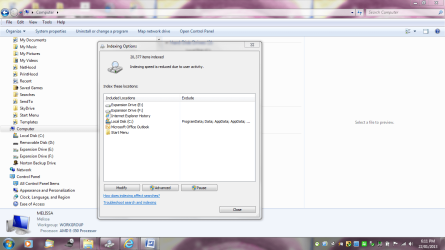
I am just wondering if the properties of some of the folders or files would change (such as read only and sharing) would affect if they do not come up in the search.

I have tried indexing. I have tried unhiding files.

I have tried everything prior to coming to here.

I also wish to include most of the files on my external hard drives - some files come up - some do not.

If someone could assist an old person like me - thank you:eek:
 

Attachments

  • Capture.PNG
    Capture.PNG
    35.7 KB · Views: 13

My Computer

Computer type
Laptop
Computer Manufacturer/Model Number
Sony VAIO / E Series VPCEB46FG
OS
Windows 7 Home Premium 64bit
CPU
Windows 7 Service Pack 1 x86 NTFS
Motherboard
AMD E-350 Processor
Memory
4 GB
Hard Drives
500GB
Other Info
1.6GHz
Welcome to SF Melissa!

Please check out this post and especially first link in it.

For external hard drivers I would use some 3rd party search tools like XSearch - Search files on your computer
It does not have indexing. And since it is a good old classic, it shouldn't let you down.
 

My Computer

Computer type
PC/Desktop
OS
Windows 8.1 ; Windows 7 x86 (Dec2008-Jan2013)
Other Info
"The scale icon at the top right of a post or tutorial is how you can give rep to the member."
How do you include everything in a search

How do you include everything in a search and how do you know it is working.

I also have some external hard drives and some files are missed.

I just need basic instructions as I am not that computer savvy

Thank you for this forum ;)
 

My Computer

Computer type
Laptop
Computer Manufacturer/Model Number
Sony VAIO / E Series VPCEB46FG
OS
Windows 7 Home Premium 64bit
CPU
Windows 7 Service Pack 1 x86 NTFS
Motherboard
AMD E-350 Processor
Memory
4 GB
Hard Drives
500GB
Other Info
1.6GHz
Hi Melissa, welcome to the Seven Forums.

Please give us some more information, an example what you are searching for instance pictures from last holiuday on external drive E: or a video you know you have it but do not know on which drive called Party.

Kari
 

My Computer

Computer type
Laptop
Computer Manufacturer/Model Number
HP ENVY 17-1150eg
OS
Windows 10 Pro x64 EN-GB
CPU
1.6 GHz Intel Core i7-720QM Processor
Memory
6 GB
Graphics Card(s)
ATI Mobility Radeon HD 5850 Graphics
Sound Card
Beats sound system with integrated subwoofer
Monitor(s) Displays
17" laptop display, 22" LED and 32" Full HD TV through HDMI
Screen Resolution
1600*900 (1), 1920*1080 (2&3)
Hard Drives
Internal: 2 x 500 GB SATA Hard Disk Drive 7200 rpm
External: 2TB for backups, 3TB USB3 network drive for media
Cooling
As Envy runs a bit warm, I have it on a Cooler Master pad
Keyboard
Logitech diNovo Media Desktop Laser (bluetooth)
Mouse
Logitech Performance Mouse MX
Internet Speed
50/10 Mbps VDSL
Antivirus
Windows Defender 4.3.9431.0
Browser
Maxthon 3.5.2., IE11
How do you include everything in a search and how do you know it is working.

I also have some external hard drives and some files are missed.

I just need basic instructions as I am not that computer savvy

Thank you for this forum ;)

I was never satisfied with the built-in Windows 7 search feature; I use Agent Ransack software instead. You can download the free version from the following site;

Agent Ransack - Free File Searching Utility

The above choice is a personal preference and there are many users that have no issue with the built-in search.

HTH
 

My Computer

Computer type
PC/Desktop
Computer Manufacturer/Model Number
Custom Built
OS
Windows 7 Professional x64
CPU
Intel i5 quad processor
Motherboard
DP67BG
Memory
16 GB
Graphics Card(s)
Radeon HD 5770
Sound Card
Realtek High Definition Audio
Monitor(s) Displays
Samsung SyncMaster
Screen Resolution
1920X1080
Hard Drives
WD 2TB (SATA Internal)
WD 1TB (USB External)
PSU
Corsair GS800
Case
Tower (Generic)
Cooling
3 Internal Fans
Keyboard
MS Wireless
Mouse
MS Optical Wired
Internet Speed
54 mbps
Antivirus
Emsisoft
Browser
IE-Version 9, Palemoon-Version 24.2.0
Errors in indexing and Windows 7 searches

I am currently having issues with indexing and now receiving advice that my 500GB Hard Drive requires formatting before I can use it - I have never had any issues prior to re-indexing.

I am also submitting what I mean by the properties of the folders and if that may be affecting the search.

I am trying to incorporate all hard drives that can be included.

My Hard Drive which is E: - that is the one that keeps on coming up that it requires formatting. But I do not wish to loose any information.

I hope that my screenshots are alright.

I just wish to know that I have the right properties with all the sharing etc.

I have used the portable hard drives on a couple machines - so a couple of documents may have sharing issues. I am not too sure
 

Attachments

  • format.PNG
    format.PNG
    82.7 KB · Views: 12
  • format1.PNG
    format1.PNG
    91.8 KB · Views: 11
  • format2.PNG
    format2.PNG
    84.3 KB · Views: 8
  • format3.PNG
    format3.PNG
    77.3 KB · Views: 7

My Computer

Computer type
Laptop
Computer Manufacturer/Model Number
Sony VAIO / E Series VPCEB46FG
OS
Windows 7 Home Premium 64bit
CPU
Windows 7 Service Pack 1 x86 NTFS
Motherboard
AMD E-350 Processor
Memory
4 GB
Hard Drives
500GB
Other Info
1.6GHz
It looks you have some issues with your E: drive. Before getting to your search issue we need to solve it.

Please tell is this E: drive an internal hard drive or external?

Kari
 

My Computer

Computer type
Laptop
Computer Manufacturer/Model Number
HP ENVY 17-1150eg
OS
Windows 10 Pro x64 EN-GB
CPU
1.6 GHz Intel Core i7-720QM Processor
Memory
6 GB
Graphics Card(s)
ATI Mobility Radeon HD 5850 Graphics
Sound Card
Beats sound system with integrated subwoofer
Monitor(s) Displays
17" laptop display, 22" LED and 32" Full HD TV through HDMI
Screen Resolution
1600*900 (1), 1920*1080 (2&3)
Hard Drives
Internal: 2 x 500 GB SATA Hard Disk Drive 7200 rpm
External: 2TB for backups, 3TB USB3 network drive for media
Cooling
As Envy runs a bit warm, I have it on a Cooler Master pad
Keyboard
Logitech diNovo Media Desktop Laser (bluetooth)
Mouse
Logitech Performance Mouse MX
Internet Speed
50/10 Mbps VDSL
Antivirus
Windows Defender 4.3.9431.0
Browser
Maxthon 3.5.2., IE11
It is an external hard dive. I am very sorry for not clarifying.

I am new to asking for virtual assistance.
 

My Computer

Computer type
Laptop
Computer Manufacturer/Model Number
Sony VAIO / E Series VPCEB46FG
OS
Windows 7 Home Premium 64bit
CPU
Windows 7 Service Pack 1 x86 NTFS
Motherboard
AMD E-350 Processor
Memory
4 GB
Hard Drives
500GB
Other Info
1.6GHz
OK, thank you.

Occasionally these read / write issues with an external drive can be caused by a problematic connection, malfunctioning USB port or cable. However, mostly it is because of a hardware failure. My recommendation for that would be to backup all data located on that drive, format it and try again. If it still gives the same error message, I would use the drive as shotgun practice target ;) and buy a new one.

Back to your search issue. Could you please do a test and tell us how it went? If it's OK for you, here's what I would like you to do. It looks complicated but it really is a simple test, you'll manage it without problems:
  • Create a new folder on both E: and F:. The name of the folder is not important, you can leave them having the default New Folder name
  • Open Notepad, type thisisatest ("this is a test" written without spaces, we need a text string that is most probably not found on your PC)
  • Save this file with name SearchTest on both of your newly created folders, E:\New Folder and F:\New folder
  • Open Windows Explorer in Computer view showing all your drives:
    .
    Search_1_Computer_View.png
    .
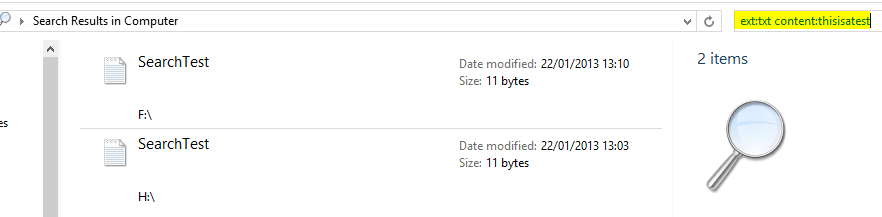
  • Type ext:txt content:thisisatest (exactly as written here!)on search field (highlighted in above screenshot) and hit Enter (ext:txt means search is looking for files with extension txt, which is the default Notepad extension, and content:thisisatest means search should only look for those txt files that contain a text string thisisatest)
  • Tell us if your search found both SearchTest files, the one on E: and one on F:
    .
    Search_2_Computer_View.png
This test tells us if your non-indexed location search is working as it should, and if your search is also set to search file content. Let's go further after this simple test.

Kari
 
Last edited:

My Computer

Computer type
Laptop
Computer Manufacturer/Model Number
HP ENVY 17-1150eg
OS
Windows 10 Pro x64 EN-GB
CPU
1.6 GHz Intel Core i7-720QM Processor
Memory
6 GB
Graphics Card(s)
ATI Mobility Radeon HD 5850 Graphics
Sound Card
Beats sound system with integrated subwoofer
Monitor(s) Displays
17" laptop display, 22" LED and 32" Full HD TV through HDMI
Screen Resolution
1600*900 (1), 1920*1080 (2&3)
Hard Drives
Internal: 2 x 500 GB SATA Hard Disk Drive 7200 rpm
External: 2TB for backups, 3TB USB3 network drive for media
Cooling
As Envy runs a bit warm, I have it on a Cooler Master pad
Keyboard
Logitech diNovo Media Desktop Laser (bluetooth)
Mouse
Logitech Performance Mouse MX
Internet Speed
50/10 Mbps VDSL
Antivirus
Windows Defender 4.3.9431.0
Browser
Maxthon 3.5.2., IE11
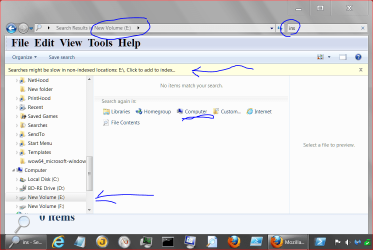
I might be way off base but this is what I do.
1. Windows Explorer and on the left side select the drive you want to search and tick on it.
2. In the upper right hand Search type in you search (in my case ins).
3. Select Computer, Enter. If it's not indexed it will inform you but still do the search.

today 1 22 Search..PNG
 

My Computer

Computer type
PC/Desktop
Computer Manufacturer/Model Number
Home made Desktop
OS
Windows 10 Pro. 64/ version 1709 Windows 7 Pro/64
CPU
Intel i7-6800K @ 4.3
Motherboard
ASUS X-99 Deluxe II
Memory
Corsair Platinum 16 gig @2400
Graphics Card(s)
EVGA GTX 1070 OC
Monitor(s) Displays
Asus 27" LED LCD/VE278Q
Screen Resolution
1920-1080 or 1280-720 HDMI
Hard Drives
INTEL SSD 730-240 Gb Sata 3.0/
PSU
EVGA Platium 1200W
Case
Phanteks Luxe Tempered Glass 8 fans/ one radiator
Cooling
XSPC/ Water Cooled CPU
Keyboard
Das 4 Professional
Mouse
Logitech M705/MX Anywhere 2-S
Internet Speed
100 mbits
Antivirus
Microsoft Security Essentials/ Malwarebytes Premium 3.0/ SAS
Browser
I.E. 11 default/Firefox/ ISP Time Warner Cable/Spectrum
Other Info
LG BluRay Burner/
Sound system-KLipsch-THX/
Icy Dock ssd Hot Swap bays.
WMDC and reindexing still - search problem

I am still struggling along and I am not very happy that I have lost all my Contacts from WMDC that I extracted from my old phone - exported to Outlook and Gmail - then I have x 4 the contacts - a lot of double up's. I just kept changing my SIM Card and re uploaded the data.
Looked at phone today and noticed that I have lost most of the data after the sync.
Don't know what to do.
It is a large volume that I require indexing - so I will get back to you lovely people - no more messing around with stuff you dont know what you are doing with.

I am just getting my head around the age of everything not being controlled by a cable - hence upgrading my data to a third party.

Thank you.

I also wish to search the data in the documents - how do you do that?

I moved the below pics from My Pictures folder and left this mess ---
 

Attachments

  • HIDDEN FOLDERS.PNG
    HIDDEN FOLDERS.PNG
    84.9 KB · Views: 4

My Computer

Computer type
Laptop
Computer Manufacturer/Model Number
Sony VAIO / E Series VPCEB46FG
OS
Windows 7 Home Premium 64bit
CPU
Windows 7 Service Pack 1 x86 NTFS
Motherboard
AMD E-350 Processor
Memory
4 GB
Hard Drives
500GB
Other Info
1.6GHz
Okay I'm lost. We went from a 500 gig external hard drive you had problems with indexing and doing a search to a card reader and a cell phone.
 

My Computer

Computer type
PC/Desktop
Computer Manufacturer/Model Number
Home made Desktop
OS
Windows 10 Pro. 64/ version 1709 Windows 7 Pro/64
CPU
Intel i7-6800K @ 4.3
Motherboard
ASUS X-99 Deluxe II
Memory
Corsair Platinum 16 gig @2400
Graphics Card(s)
EVGA GTX 1070 OC
Monitor(s) Displays
Asus 27" LED LCD/VE278Q
Screen Resolution
1920-1080 or 1280-720 HDMI
Hard Drives
INTEL SSD 730-240 Gb Sata 3.0/
PSU
EVGA Platium 1200W
Case
Phanteks Luxe Tempered Glass 8 fans/ one radiator
Cooling
XSPC/ Water Cooled CPU
Keyboard
Das 4 Professional
Mouse
Logitech M705/MX Anywhere 2-S
Internet Speed
100 mbits
Antivirus
Microsoft Security Essentials/ Malwarebytes Premium 3.0/ SAS
Browser
I.E. 11 default/Firefox/ ISP Time Warner Cable/Spectrum
Other Info
LG BluRay Burner/
Sound system-KLipsch-THX/
Icy Dock ssd Hot Swap bays.
How do you include everything in a search and how do you know it is working.

I also have some external hard drives and some files are missed.

I just need basic instructions as I am not that computer savvy

Thank you for this forum ;)

I was never satisfied with the built-in Windows 7 search feature; I use Agent Ransack software instead. You can download the free version from the following site;

Agent Ransack - Free File Searching Utility

The above choice is a personal preference and there are many users that have no issue with the built-in search.

HTH

Good advice, am a long time Agent Ransack user, always succeeds in all cases were w7 search fails, zero hassle, zero questions.

Try working out a fix for the w7 search, but if you need to find the files now, try Agent R. and dig them up. Good luck.
 

My Computer

Computer type
Laptop
Computer Manufacturer/Model Number
Dell \ Lenovo\ HP \ Toshiba
OS
W7, W8.1
Antivirus
MSE, Malwarebytes
Browser
FF
I have am sorry I got all excited about getting assistance - will post a separate forum for the WMDC - I am lost myself.

I will just stick to the search - my computer is still rebuilding the index

I will try and observe the rules of the forum
 

My Computer

Computer type
Laptop
Computer Manufacturer/Model Number
Sony VAIO / E Series VPCEB46FG
OS
Windows 7 Home Premium 64bit
CPU
Windows 7 Service Pack 1 x86 NTFS
Motherboard
AMD E-350 Processor
Memory
4 GB
Hard Drives
500GB
Other Info
1.6GHz
I am still struggling along and I am not very happy that I have lost all my Contacts from WMDC that I extracted from my old phone - exported to Outlook and Gmail - then I have x 4 the contacts - a lot of double up's. I just kept changing my SIM Card and re uploaded the data.
Looked at phone today and noticed that I have lost most of the data after the sync.
Don't know what to do.
It is a large volume that I require indexing - so I will get back to you lovely people - no more messing around with stuff you dont know what you are doing with.

I am just getting my head around the age of everything not being controlled by a cable - hence upgrading my data to a third party.

Thank you.

I also wish to search the data in the documents - how do you do that?

I moved the below pics from My Pictures folder and left this mess ---

Hi again,

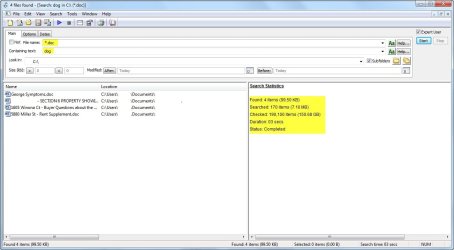
I don't use the Windows 7 search, as already mentioned, but using Agent Ransack I can search the entire hard drive for any document with the word "dog". See image below.

Agent Ransack - Search.jpg

That search took 3 seconds to complete.
 

My Computer

Computer type
PC/Desktop
Computer Manufacturer/Model Number
Custom Built
OS
Windows 7 Professional x64
CPU
Intel i5 quad processor
Motherboard
DP67BG
Memory
16 GB
Graphics Card(s)
Radeon HD 5770
Sound Card
Realtek High Definition Audio
Monitor(s) Displays
Samsung SyncMaster
Screen Resolution
1920X1080
Hard Drives
WD 2TB (SATA Internal)
WD 1TB (USB External)
PSU
Corsair GS800
Case
Tower (Generic)
Cooling
3 Internal Fans
Keyboard
MS Wireless
Mouse
MS Optical Wired
Internet Speed
54 mbps
Antivirus
Emsisoft
Browser
IE-Version 9, Palemoon-Version 24.2.0
Melissa, Windows Search finds everything when it is used correctly. Its user interface is absolutely the simplest, a text box in your Windows Explorer window. It's easy to use and flexible. The fact that some users have not learned it and will not know how to use it and instead of explaining it to you are offering some third party tools with their own learning curve does not mean Windows Search does not work.

We are here to help you, so please do not hesitate to ask. There is absolutely no need to download and install something when native Windows tools are making a better job.

Here's a good tutorial to read: http://www.sevenforums.com/tutorials/129437-windows-search-configure-use.html

Kari
 

My Computer

Computer type
Laptop
Computer Manufacturer/Model Number
HP ENVY 17-1150eg
OS
Windows 10 Pro x64 EN-GB
CPU
1.6 GHz Intel Core i7-720QM Processor
Memory
6 GB
Graphics Card(s)
ATI Mobility Radeon HD 5850 Graphics
Sound Card
Beats sound system with integrated subwoofer
Monitor(s) Displays
17" laptop display, 22" LED and 32" Full HD TV through HDMI
Screen Resolution
1600*900 (1), 1920*1080 (2&3)
Hard Drives
Internal: 2 x 500 GB SATA Hard Disk Drive 7200 rpm
External: 2TB for backups, 3TB USB3 network drive for media
Cooling
As Envy runs a bit warm, I have it on a Cooler Master pad
Keyboard
Logitech diNovo Media Desktop Laser (bluetooth)
Mouse
Logitech Performance Mouse MX
Internet Speed
50/10 Mbps VDSL
Antivirus
Windows Defender 4.3.9431.0
Browser
Maxthon 3.5.2., IE11
Melissa, Windows Search finds everything when it is used correctly. Its user interface is absolutely the simplest, a text box in your Windows Explorer window. It's easy to use and flexible. The fact that some users have not learned it and will not know how to use it and instead of explaining it to you are offering some third party tools with their own learning curve does not mean Windows Search does not work.

We are here to help you, so please do not hesitate to ask. There is absolutely no need to download and install something when native Windows tools are making a better job.

Here's a good tutorial to read: http://www.sevenforums.com/tutorials/129437-windows-search-configure-use.html

Kari

OUCH! Did you read my other post, #5, in this thread where I stated; "The above choice is a personal preference and there are many users that have no issue with the built-in search."
 

My Computer

Computer type
PC/Desktop
Computer Manufacturer/Model Number
Custom Built
OS
Windows 7 Professional x64
CPU
Intel i5 quad processor
Motherboard
DP67BG
Memory
16 GB
Graphics Card(s)
Radeon HD 5770
Sound Card
Realtek High Definition Audio
Monitor(s) Displays
Samsung SyncMaster
Screen Resolution
1920X1080
Hard Drives
WD 2TB (SATA Internal)
WD 1TB (USB External)
PSU
Corsair GS800
Case
Tower (Generic)
Cooling
3 Internal Fans
Keyboard
MS Wireless
Mouse
MS Optical Wired
Internet Speed
54 mbps
Antivirus
Emsisoft
Browser
IE-Version 9, Palemoon-Version 24.2.0
Yes, I have read your post. And then?

Our fellow member Melissa is asking how to do something with Windows Search, and of course our job is to try to provide a simple but functioning answer. Things become more complicated when we start getting these "Don't use it, download this" posts, to confuse OP even more.

Windows Search is simple, flexible and easy to use. I mean what I have said several times around Seven Forums: for some users it seems to be too difficult to learn, too complicated, and these users therefore need some help in form of third party tools. I do not believe Melissa belongs to this group, it looks to me she can easily understand what we are telling and instructions given, so in my opinion she does not need third party help in a task which is so easily done by native Windows tools.

Kari
 

My Computer

Computer type
Laptop
Computer Manufacturer/Model Number
HP ENVY 17-1150eg
OS
Windows 10 Pro x64 EN-GB
CPU
1.6 GHz Intel Core i7-720QM Processor
Memory
6 GB
Graphics Card(s)
ATI Mobility Radeon HD 5850 Graphics
Sound Card
Beats sound system with integrated subwoofer
Monitor(s) Displays
17" laptop display, 22" LED and 32" Full HD TV through HDMI
Screen Resolution
1600*900 (1), 1920*1080 (2&3)
Hard Drives
Internal: 2 x 500 GB SATA Hard Disk Drive 7200 rpm
External: 2TB for backups, 3TB USB3 network drive for media
Cooling
As Envy runs a bit warm, I have it on a Cooler Master pad
Keyboard
Logitech diNovo Media Desktop Laser (bluetooth)
Mouse
Logitech Performance Mouse MX
Internet Speed
50/10 Mbps VDSL
Antivirus
Windows Defender 4.3.9431.0
Browser
Maxthon 3.5.2., IE11
Yes, I have read your post. And then?

Our fellow member Melissa is asking how to do something with Windows Search, and of course our job is to try to provide a simple but functioning answer. Things become more complicated when we start getting these "Don't use it, download this" posts, to confuse OP even more.

Windows Search is simple, flexible and easy to use. I mean what I have said several times around Seven Forums: for some users it seems to be too difficult to learn, too complicated, and these users therefore need some help in form of third party tools. I do not believe Melissa belongs to this group, it looks to me she can easily understand what we are telling and instructions given, so in my opinion she does not need third party help in a task which is so easily done by native Windows tools.

Kari

OK, thanks for explaining your point of view.

There is a very good article on the How-To Geek web site regarding Windows 7's advanced search features which may be a good reference for those interested in using the built-in feature. You can view it at;

Learn How to Use Windows 7′s Advanced Search Operators - How-To Geek

After reading the article, please read the comments. You will see there is a mix of those who like it and those who don't. My suggestion regarding a 3rd party option is to provide the "don't like" with an alternative and not try to limit them to a "Hobson's Choice". That's my point of view.
 
Last edited:

My Computer

Computer type
PC/Desktop
Computer Manufacturer/Model Number
Custom Built
OS
Windows 7 Professional x64
CPU
Intel i5 quad processor
Motherboard
DP67BG
Memory
16 GB
Graphics Card(s)
Radeon HD 5770
Sound Card
Realtek High Definition Audio
Monitor(s) Displays
Samsung SyncMaster
Screen Resolution
1920X1080
Hard Drives
WD 2TB (SATA Internal)
WD 1TB (USB External)
PSU
Corsair GS800
Case
Tower (Generic)
Cooling
3 Internal Fans
Keyboard
MS Wireless
Mouse
MS Optical Wired
Internet Speed
54 mbps
Antivirus
Emsisoft
Browser
IE-Version 9, Palemoon-Version 24.2.0
Trouble with searching Windows 7

I am currently still having issues with my portable hard drive - but I am still having the issues with the search.

I am not too sure after seeing the posts on here whether or not to go to a third party search or just keep it simple first of all.

I put a few names into documents and they did not come up either.

I will try reindexing and thank everyone for there assistance.

What is the best way. I am going from memory in some cases - and that causes me issues.

I will rebuild the index again and post again.

I think it is the sharing
 

My Computer

Computer type
Laptop
Computer Manufacturer/Model Number
Sony VAIO / E Series VPCEB46FG
OS
Windows 7 Home Premium 64bit
CPU
Windows 7 Service Pack 1 x86 NTFS
Motherboard
AMD E-350 Processor
Memory
4 GB
Hard Drives
500GB
Other Info
1.6GHz
Back
Top