Windows Security Essentials, Strange Behavior

loboblanco

New member
Local time
10:35 AM
Messages
14
After the latest update from WSE (today, 6, July) WSE will not start up it's window, either from the taskbar pinned icon, or, by asking the file to open.

I have checked with the "troubleshooter" and no problems are listed.

Checking system security, states that everything is fine.

To repeat, nothing seems to open the WSE window, even tho' my system says everything is okay.

All the files are there, seen by checking with explorer.

Has anyone else experienced this problem?

Plus, any advice appreciated.

Thanks in advance for your help.
 

My Computer

Computer Manufacturer/Model Number
Custom Built PC
OS
Windows 7 Ultimate X 64
CPU
Intel Quad Core Code “Kentsfield”
Memory
4 GB
Graphics Card(s)
Nivida GTS 450
Sound Card
Nividia GTS 450
Monitor(s) Displays
ViewSonic VA 1948 Series
Screen Resolution
1440 X 900
Hard Drives
1 TB Hitachi
Cooling
Dual Fan
Keyboard
Standard PS/2
Mouse
Standard PS/2
start taskmanager and check if it´s already running.
 

My Computer

Computer Manufacturer/Model Number
Dell
OS
W7-Enterprise + WS-2008 (Converted to Workstation)
CPU
P4 2,4GHz (at 1,8GHz, "slow" RDRAM, only 400MHz FSB...)
Motherboard
Intel 850E
Memory
2GB
Graphics Card(s)
NVIDIA QUADRO2 PRO 64MB
Sound Card
Yes
Monitor(s) Displays
Dell 1702FP
Screen Resolution
1280x1024
Hard Drives
Yes
PSU
Yes
Case
Yes
Cooling
Yes
Keyboard
Yes
Mouse
Yes, and i also have Cats...
Internet Speed
University: 100 MBit/s, Home: UMTS 7,2 MBit/s
Other Info
W7 on a DINOSAUR: P2 with 266MHz CPU & 160MB RAM
.....

Checking system security, states that everything is fine.

To repeat, nothing seems to open the WSE window, even tho' my system says everything is okay.......

I have the opposite. MSE is running, but system security says its not turned on.?:rolleyes::what:
 

My Computer

Computer Manufacturer/Model Number
Optima
OS
Windows 7 home Premium x64
CPU
IntelDuoCore 2.85ghz
Memory
4GB
Graphics Card(s)
onboard
Sound Card
on board
Hard Drives
2x320GB SATA
Keyboard
Logitech
Mouse
Logitech
Other Info
Litescribe CD/DVD RW
.....

Checking system security, states that everything is fine.

To repeat, nothing seems to open the WSE window, even tho' my system says everything is okay.......

I have the opposite. MSE is running, but system security says its not turned on.?:rolleyes::what:
Have you tried going to > Settings, and turning on "Real time Protection"?

Edit > > >

For both loboblanco, and bnwrx

See:
I can't start the Microsoft Security Essentials service | Microsoft Security Essentials

Normal Colors at a quick glance:
On =Green
Off = Red
Needs updated = Orangish Brown
 
Last edited:

My Computer

Computer type
PC/Desktop
Computer Manufacturer/Model Number
Gateway DX4831-01e (Mid-Tower Desktop)
OS
Originally Win 7 Hm Prem x64 Ver 6.1.7600 Build 7601-SP1 | Upgraded to Windows 10 December 14, 2019
CPU
Intel i3 530 2.93GHz, 2933MHz 2 Cores 4 Logical Processors
Motherboard
Gateway H57M01 133 megahertz
Memory
6GB of 1,333MHz DDR3 SDRAM
Graphics Card(s)
32MB Intel Graphics Media Accelerator HD IGChip
Sound Card
Realtek High Definition Audio
Monitor(s) Displays
Gateway HX2000 20inch TFT active matrix TN
Screen Resolution
1600 x 900 x 59 hertz
Hard Drives
WDC WD10EADS-00M2B0 [HDD] (1000.20 GB) -- drive 0,
HL-DT-ST DVDRAM GH41N [CD-ROM dr]
Four card readers, and Four USB 2.0
PSU
300watts.
Case
Mid-Tower Desktop
Cooling
Stock from Gateway
Keyboard
Natural Ergonomic Keyboard 4000, see Other Info
Mouse
Orig. Gateway wore out now using Insignia USB wired optical
Internet Speed
Vz FIOS 10ms png 57.64Mbps down 65.53Mbps up Speedtest.org
Antivirus
Zamana Anti-logger with Anti-malware, MSE, Windows Firewall,
Browser
IE11.0.9600.19399-Upd ver11.0.135, Firefox 68.0.1 x64
Other Info
System Specs by Belarc.

BIOS: American Megatrends Inc. P01-A0 11/17/2009

Replaced the MS 'Natural' Standard PS/2 Enhanced 101-102 Keyboard with a new Natural Ergonomic Keyboard 4000 on August 1st 2014.

Canon Pixma MG3222 Printer.

Updated to IE11 on 12102015 | Fios Quantum Router g1100

Additional AV: SpywareBlaster, manual Mbam, SAS
hi !

Anak: loboblanco posted that "WSE will not start up it's window, either from the taskbar pinned icon, or, by asking the file to open."

the userinterface (main window) does not start.
WSE must be a misunderstanding, i suppose it should be MSE...

who said anything about realtime-protection ?
 

My Computer

Computer Manufacturer/Model Number
Dell
OS
W7-Enterprise + WS-2008 (Converted to Workstation)
CPU
P4 2,4GHz (at 1,8GHz, "slow" RDRAM, only 400MHz FSB...)
Motherboard
Intel 850E
Memory
2GB
Graphics Card(s)
NVIDIA QUADRO2 PRO 64MB
Sound Card
Yes
Monitor(s) Displays
Dell 1702FP
Screen Resolution
1280x1024
Hard Drives
Yes
PSU
Yes
Case
Yes
Cooling
Yes
Keyboard
Yes
Mouse
Yes, and i also have Cats...
Internet Speed
University: 100 MBit/s, Home: UMTS 7,2 MBit/s
Other Info
W7 on a DINOSAUR: P2 with 266MHz CPU & 160MB RAM
.....

Checking system security, states that everything is fine.

To repeat, nothing seems to open the WSE window, even tho' my system says everything is okay.......

I have the opposite. MSE is running, but system security says its not turned on.?:rolleyes::what:
Have you tried going to > Settings, and turning on "Real time Protection"?

Edit > > >

For both loboblanco, and bnwrx

See:
I can't start the Microsoft Security Essentials service | Microsoft Security Essentials

Normal Colors at a quick glance:
On =Green
Off = Red
Needs updated = Orangish Brown

Realtime is on,Taskbar icon is Green,all colors are Green, but Action Center reports that MSE is not on.
 

My Computer

Computer Manufacturer/Model Number
Optima
OS
Windows 7 home Premium x64
CPU
IntelDuoCore 2.85ghz
Memory
4GB
Graphics Card(s)
onboard
Sound Card
on board
Hard Drives
2x320GB SATA
Keyboard
Logitech
Mouse
Logitech
Other Info
Litescribe CD/DVD RW
hi !

Anak: loboblanco posted that "WSE will not start up it's window, either from the taskbar pinned icon, or, by asking the file to open."

the userinterface (main window) does not start.
WSE must be a misunderstanding, i suppose it should be MSE...

who said anything about realtime-protection ?
Hi!

It was an error on my part to include lobolanco in what could be a fix for bnwrx.

For lobolanco see:
Microsoft Security Essentials will not start (previously worked fine)

The first thing he needs to check is, He may have malware that is stopping his "WSE" also known as Microsoft Security Essentials (MSE) from running.

Then if that doesn't help the next step would be to remove, and then reinstall "WSE / MSE", and if he has to do that he has to make sure there are absolutly no remaining traces of any other security product.

It's all there in my previous link, and in the postings in the above link.

And I am the one who said something about realtime-protection.

As for bnwrx:
I have the opposite. MSE is running, but system security says its not turned on.?
When my MSE's "Real time Protection" is turned off it tells me I am not protected in the status bar just below the title bar, and it is in red.


~~~~~~~~~~~~~~~~~~~~

And if these suggestions don't work lobo, and bn may still have to uninstall MSE, clean their systems, and then reinstall MSE. because of mis-communication between the Security Center, MSE, and Windows Managment Instrumentation WMI


Borrowed from Aiscer post #5:
Report in Security ceneter says turned off but icon on taskbar says on?
Windows Defender is supposed to be turned off upon installation of MSE. So no worries on that.
If MSE is turned on as displayed by its green icon then MSE is not at fault.

This can be a communication gap between Security Center and MSE through WMI.
To fix the consistency of WMI kindly follow the procedure below (this is only for Vista and Windows 7):
1. Go to "Start", open Command Prompt by typing CMD in Start Search.
2. Right click on CMD from the result and choose "Run as Administrator".
3. In the Command Prompt console type the command below, hit enter after:
NET STOP WINMGMT
4. If prompted to stop other dependent services press "Y " then Enter.
5. Type the commands below, hit enter after each command:
WINMGMT /RESETREPOSITORY
WINMGMT /RESYNCPERF
WINMGMT /VERIFYREPOSITORY
6. The initial command could take some time before its done. The last command should state that its "consistent".
7. Reboot.

There would be instances that MSE should be reinstalled after the restart.
Though if Security Center now properly detects the state of MSE, there shouldn't be any need for re-installation.
 

My Computer

Computer type
PC/Desktop
Computer Manufacturer/Model Number
Gateway DX4831-01e (Mid-Tower Desktop)
OS
Originally Win 7 Hm Prem x64 Ver 6.1.7600 Build 7601-SP1 | Upgraded to Windows 10 December 14, 2019
CPU
Intel i3 530 2.93GHz, 2933MHz 2 Cores 4 Logical Processors
Motherboard
Gateway H57M01 133 megahertz
Memory
6GB of 1,333MHz DDR3 SDRAM
Graphics Card(s)
32MB Intel Graphics Media Accelerator HD IGChip
Sound Card
Realtek High Definition Audio
Monitor(s) Displays
Gateway HX2000 20inch TFT active matrix TN
Screen Resolution
1600 x 900 x 59 hertz
Hard Drives
WDC WD10EADS-00M2B0 [HDD] (1000.20 GB) -- drive 0,
HL-DT-ST DVDRAM GH41N [CD-ROM dr]
Four card readers, and Four USB 2.0
PSU
300watts.
Case
Mid-Tower Desktop
Cooling
Stock from Gateway
Keyboard
Natural Ergonomic Keyboard 4000, see Other Info
Mouse
Orig. Gateway wore out now using Insignia USB wired optical
Internet Speed
Vz FIOS 10ms png 57.64Mbps down 65.53Mbps up Speedtest.org
Antivirus
Zamana Anti-logger with Anti-malware, MSE, Windows Firewall,
Browser
IE11.0.9600.19399-Upd ver11.0.135, Firefox 68.0.1 x64
Other Info
System Specs by Belarc.

BIOS: American Megatrends Inc. P01-A0 11/17/2009

Replaced the MS 'Natural' Standard PS/2 Enhanced 101-102 Keyboard with a new Natural Ergonomic Keyboard 4000 on August 1st 2014.

Canon Pixma MG3222 Printer.

Updated to IE11 on 12102015 | Fios Quantum Router g1100

Additional AV: SpywareBlaster, manual Mbam, SAS
After the latest update from WSE (today, 6, July) WSE will not start up it's window, either from the taskbar pinned icon, or, by asking the file to open.

Hi, loboblanco.

I have several suggestions for you to try:

First, shutdown/restart the computer and see if you can launch MSE. If no joy, try stopping and restarting the service: Got to Control Panel\All Control Panel Items\Administrative Tools \Services and restart the following Service: Microsoft Antimalware Service.

Restart the computer and check if you can launch MSE.

If the problem continues, you may want to restore the system to a time/date prior to the update today and manually updating MSE. Should the same problem recur, I suggest uninstalling and reinstalling MSE.


I have the opposite. MSE is running, but system security says its not turned on.?

Hi, bnwrx.

I have seen others with this problem and it was reported that it is not a problem with MSE but will be addressed, perhaps in Windows 7 SP1. However, I have similar suggestions for you as loboblanco.

First, shutdown/restart the computer and see if MSE shows in the Security Center. If no joy, try stopping and restarting the services. Got to Control Panel\All Control Panel Items\Administrative Tools \Services and restart the following Services:

1) Microsoft Antimalware Service
2) Security Center

Restart the computer and check the Security Center again.

If MSE still doesn't show in the Security Center, I understand that sometimes this can be caused by WMI corruption. You can try the following steps or the above that Anak suggested:

Start / run / CMD > run as administrator

winmgmt /verifyrepository
winmgmt /salvagerepository


To both loboblanco and bnwrx:

If you continue with the same problem, I suggest you Submit a Support Case – Security Software Help | Microsoft Security Essentials.
 

My Computer

OS
Windows 7 & Windows Vista Ultimate
Thank you Corrine....Very well put.

Can there be more than one design of MSE, and the Action/Security Center?

I have looked, and can not find any smilier description like bnwrx described.
I have them, but evidently their not the same as bnwrx, an loboblanco.
Can there be a difference because loboblanco has a Toshiba, bnwrx has an Optima, and I have a Gateway?

I do seem to remember though, they were smilier before I installed MSE, and it took over and automatically stopped Windows Defender.
 

My Computer

Computer type
PC/Desktop
Computer Manufacturer/Model Number
Gateway DX4831-01e (Mid-Tower Desktop)
OS
Originally Win 7 Hm Prem x64 Ver 6.1.7600 Build 7601-SP1 | Upgraded to Windows 10 December 14, 2019
CPU
Intel i3 530 2.93GHz, 2933MHz 2 Cores 4 Logical Processors
Motherboard
Gateway H57M01 133 megahertz
Memory
6GB of 1,333MHz DDR3 SDRAM
Graphics Card(s)
32MB Intel Graphics Media Accelerator HD IGChip
Sound Card
Realtek High Definition Audio
Monitor(s) Displays
Gateway HX2000 20inch TFT active matrix TN
Screen Resolution
1600 x 900 x 59 hertz
Hard Drives
WDC WD10EADS-00M2B0 [HDD] (1000.20 GB) -- drive 0,
HL-DT-ST DVDRAM GH41N [CD-ROM dr]
Four card readers, and Four USB 2.0
PSU
300watts.
Case
Mid-Tower Desktop
Cooling
Stock from Gateway
Keyboard
Natural Ergonomic Keyboard 4000, see Other Info
Mouse
Orig. Gateway wore out now using Insignia USB wired optical
Internet Speed
Vz FIOS 10ms png 57.64Mbps down 65.53Mbps up Speedtest.org
Antivirus
Zamana Anti-logger with Anti-malware, MSE, Windows Firewall,
Browser
IE11.0.9600.19399-Upd ver11.0.135, Firefox 68.0.1 x64
Other Info
System Specs by Belarc.

BIOS: American Megatrends Inc. P01-A0 11/17/2009

Replaced the MS 'Natural' Standard PS/2 Enhanced 101-102 Keyboard with a new Natural Ergonomic Keyboard 4000 on August 1st 2014.

Canon Pixma MG3222 Printer.

Updated to IE11 on 12102015 | Fios Quantum Router g1100

Additional AV: SpywareBlaster, manual Mbam, SAS
Hey everybody! Thanks to all of you!! So quick, so correct, rechecked, restarted and bang, there it is!

And yes, I did enter MSE instead of WSE...too much Microsoft on my mind? No.

But thanks to all of you again!

LoboBlanco
 

My Computer

Computer Manufacturer/Model Number
Custom Built PC
OS
Windows 7 Ultimate X 64
CPU
Intel Quad Core Code “Kentsfield”
Memory
4 GB
Graphics Card(s)
Nivida GTS 450
Sound Card
Nividia GTS 450
Monitor(s) Displays
ViewSonic VA 1948 Series
Screen Resolution
1440 X 900
Hard Drives
1 TB Hitachi
Cooling
Dual Fan
Keyboard
Standard PS/2
Mouse
Standard PS/2
Thank you Corrine....Very well put.

Can there be more than one design of MSE, and the Action/Security Center?

I have looked, and can not find any smilier description like bnwrx described.
I have them, but evidently their not the same as bnwrx, an loboblanco.
Can there be a difference because loboblanco has a Toshiba, bnwrx has an Optima, and I have a Gateway?

I do seem to remember though, they were smilier before I installed MSE, and it took over and automatically stopped Windows Defender.

Thank you Anak.

I'm not sure what you mean regarding more than one design of MSE and the Action/Security Center. The "Security Center" was renamed "Action Center" in Windows 7 and includes access to both Security and Maintenance "actions". Is that what you mean? If not, please let me know.
 

My Computer

OS
Windows 7 & Windows Vista Ultimate
Hey everybody! Thanks to all of you!! So quick, so correct, rechecked, restarted and bang, there it is!

And yes, I did enter MSE instead of WSE...too much Microsoft on my mind? No.

But thanks to all of you again!

LoboBlanco

Fantastic! I'm glad to hear that the restart solved the problem.
 

My Computer

OS
Windows 7 & Windows Vista Ultimate
Thank you Corrine....Very well put.

Can there be more than one design of MSE, and the Action/Security Center?

I have looked, and can not find any smilier description like bnwrx described.
I have them, but evidently their not the same as bnwrx, an loboblanco.
Can there be a difference because loboblanco has a Toshiba, bnwrx has an Optima, and I have a Gateway?

I do seem to remember though, they were smilier before I installed MSE, and it took over and automatically stopped Windows Defender.

Thank you Anak.

I'm not sure what you mean regarding more than one design of MSE and the Action/Security Center. The "Security Center" was renamed "Action Center" in Windows 7 and includes access to both Security and Maintenance "actions". Is that what you mean? If not, please let me know.
Your welcome.


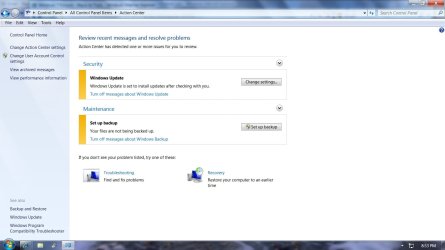
When I go to my Action Center what I see is there in the attachment to the left.

There is no reference to MSE only OS updates, and back-ups.

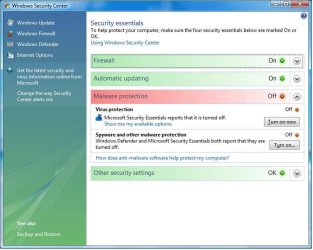
The attachment to the right is what I believe I saw before MSE took control, and shutdown Windows Defender.

Am I missing something?
 

Attachments

  • Win7 Action Center.jpg
    Win7 Action Center.jpg
    83.7 KB · Views: 7
  • Win Security Center.jpg
    Win Security Center.jpg
    53.9 KB · Views: 6

My Computer

Computer type
PC/Desktop
Computer Manufacturer/Model Number
Gateway DX4831-01e (Mid-Tower Desktop)
OS
Originally Win 7 Hm Prem x64 Ver 6.1.7600 Build 7601-SP1 | Upgraded to Windows 10 December 14, 2019
CPU
Intel i3 530 2.93GHz, 2933MHz 2 Cores 4 Logical Processors
Motherboard
Gateway H57M01 133 megahertz
Memory
6GB of 1,333MHz DDR3 SDRAM
Graphics Card(s)
32MB Intel Graphics Media Accelerator HD IGChip
Sound Card
Realtek High Definition Audio
Monitor(s) Displays
Gateway HX2000 20inch TFT active matrix TN
Screen Resolution
1600 x 900 x 59 hertz
Hard Drives
WDC WD10EADS-00M2B0 [HDD] (1000.20 GB) -- drive 0,
HL-DT-ST DVDRAM GH41N [CD-ROM dr]
Four card readers, and Four USB 2.0
PSU
300watts.
Case
Mid-Tower Desktop
Cooling
Stock from Gateway
Keyboard
Natural Ergonomic Keyboard 4000, see Other Info
Mouse
Orig. Gateway wore out now using Insignia USB wired optical
Internet Speed
Vz FIOS 10ms png 57.64Mbps down 65.53Mbps up Speedtest.org
Antivirus
Zamana Anti-logger with Anti-malware, MSE, Windows Firewall,
Browser
IE11.0.9600.19399-Upd ver11.0.135, Firefox 68.0.1 x64
Other Info
System Specs by Belarc.

BIOS: American Megatrends Inc. P01-A0 11/17/2009

Replaced the MS 'Natural' Standard PS/2 Enhanced 101-102 Keyboard with a new Natural Ergonomic Keyboard 4000 on August 1st 2014.

Canon Pixma MG3222 Printer.

Updated to IE11 on 12102015 | Fios Quantum Router g1100

Additional AV: SpywareBlaster, manual Mbam, SAS
Hi, Anak.

The image on the right is from Windows Vista (and MSE is shown as not turned on).

The image to the left is correct for Windows 7 and what I see as well. Just click on the down arrow on the right side in the line identified as "Security".
 

My Computer

OS
Windows 7 & Windows Vista Ultimate
Hi, Anak.

The image on the right is from Windows Vista (and MSE is shown as not turned on).

The image to the left is correct for Windows 7 and what I see as well. Just click on the down arrow on the right side in the line identified as "Security".
Duh!!!:o

Before I retired we use to have a saying at work............


"You have eyes, but you can not see"...:shock:
Who says you can not teach an old dog new tricks...:geek:...:party:


One last thing though. I noticed Network Access Protection is off on my system (NAP)
I read where its used mostly for Corporate situations. Would it pay to run it on my small home network? Win7 through to XP SP3.

If so how do you turn it on or does it work automatically?
 

My Computer

Computer type
PC/Desktop
Computer Manufacturer/Model Number
Gateway DX4831-01e (Mid-Tower Desktop)
OS
Originally Win 7 Hm Prem x64 Ver 6.1.7600 Build 7601-SP1 | Upgraded to Windows 10 December 14, 2019
CPU
Intel i3 530 2.93GHz, 2933MHz 2 Cores 4 Logical Processors
Motherboard
Gateway H57M01 133 megahertz
Memory
6GB of 1,333MHz DDR3 SDRAM
Graphics Card(s)
32MB Intel Graphics Media Accelerator HD IGChip
Sound Card
Realtek High Definition Audio
Monitor(s) Displays
Gateway HX2000 20inch TFT active matrix TN
Screen Resolution
1600 x 900 x 59 hertz
Hard Drives
WDC WD10EADS-00M2B0 [HDD] (1000.20 GB) -- drive 0,
HL-DT-ST DVDRAM GH41N [CD-ROM dr]
Four card readers, and Four USB 2.0
PSU
300watts.
Case
Mid-Tower Desktop
Cooling
Stock from Gateway
Keyboard
Natural Ergonomic Keyboard 4000, see Other Info
Mouse
Orig. Gateway wore out now using Insignia USB wired optical
Internet Speed
Vz FIOS 10ms png 57.64Mbps down 65.53Mbps up Speedtest.org
Antivirus
Zamana Anti-logger with Anti-malware, MSE, Windows Firewall,
Browser
IE11.0.9600.19399-Upd ver11.0.135, Firefox 68.0.1 x64
Other Info
System Specs by Belarc.

BIOS: American Megatrends Inc. P01-A0 11/17/2009

Replaced the MS 'Natural' Standard PS/2 Enhanced 101-102 Keyboard with a new Natural Ergonomic Keyboard 4000 on August 1st 2014.

Canon Pixma MG3222 Printer.

Updated to IE11 on 12102015 | Fios Quantum Router g1100

Additional AV: SpywareBlaster, manual Mbam, SAS
"You have eyes, but you can not see"...:shock:
Who says you can not teach an old dog new tricks...:geek:...:party:

I know that I'm still learning!

As to NAP, no, that isn't for your home network. In searching for something that describes NAP, the best I located was from the FAQs at Windows Server 2008 R2: Network Access Protection: FAQ

NAP provides a set of components to help customers protect their networks by inspecting client computer health state, limiting network access for noncompliant clients, and updating noncompliant clients for unlimited network access. NAP is a platform upon which health requirement policies are specified and by which those policies are enforced. Health requirement policies can include, but are not limited to: software update levels, antivirus signatures, specific configuration settings, open and closed ports, and firewall settings. NAP will work with existing Windows-based infrastructure, such as the Active Directory domain service, Group Policy, Microsoft Systems Center Configuration Manager (SCCM), Windows Update Services, and Microsoft Internet Security and Acceleration (ISA) Server. (Some upgrades may be required.)
 

My Computer

OS
Windows 7 & Windows Vista Ultimate
As to NAP, no, that isn't for your home network. In searching for something that describes NAP, the best I located was from the FAQs at Windows Server 2008 R2: Network Access Protection: FAQ
Thank You Corrine for checking on that for me.

"You have eyes, but you can not see"...:shock:
Who says you can not teach an old dog new tricks...:geek:...:party:

I know that I'm still learning!
Well, I'm off on that road less traveled, see you at the " Y "

Thanks again, Steve
 

My Computer

Computer type
PC/Desktop
Computer Manufacturer/Model Number
Gateway DX4831-01e (Mid-Tower Desktop)
OS
Originally Win 7 Hm Prem x64 Ver 6.1.7600 Build 7601-SP1 | Upgraded to Windows 10 December 14, 2019
CPU
Intel i3 530 2.93GHz, 2933MHz 2 Cores 4 Logical Processors
Motherboard
Gateway H57M01 133 megahertz
Memory
6GB of 1,333MHz DDR3 SDRAM
Graphics Card(s)
32MB Intel Graphics Media Accelerator HD IGChip
Sound Card
Realtek High Definition Audio
Monitor(s) Displays
Gateway HX2000 20inch TFT active matrix TN
Screen Resolution
1600 x 900 x 59 hertz
Hard Drives
WDC WD10EADS-00M2B0 [HDD] (1000.20 GB) -- drive 0,
HL-DT-ST DVDRAM GH41N [CD-ROM dr]
Four card readers, and Four USB 2.0
PSU
300watts.
Case
Mid-Tower Desktop
Cooling
Stock from Gateway
Keyboard
Natural Ergonomic Keyboard 4000, see Other Info
Mouse
Orig. Gateway wore out now using Insignia USB wired optical
Internet Speed
Vz FIOS 10ms png 57.64Mbps down 65.53Mbps up Speedtest.org
Antivirus
Zamana Anti-logger with Anti-malware, MSE, Windows Firewall,
Browser
IE11.0.9600.19399-Upd ver11.0.135, Firefox 68.0.1 x64
Other Info
System Specs by Belarc.

BIOS: American Megatrends Inc. P01-A0 11/17/2009

Replaced the MS 'Natural' Standard PS/2 Enhanced 101-102 Keyboard with a new Natural Ergonomic Keyboard 4000 on August 1st 2014.

Canon Pixma MG3222 Printer.

Updated to IE11 on 12102015 | Fios Quantum Router g1100

Additional AV: SpywareBlaster, manual Mbam, SAS
Back
Top