Solved Windows Security Updates Failed to Install.

paradroidx

New member
Local time
11:54 AM
Messages
7
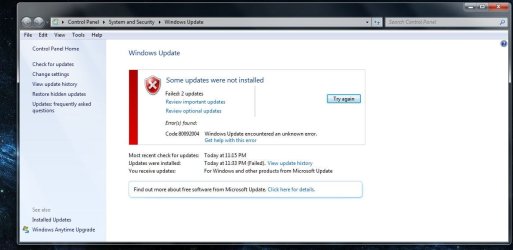
Trying to get the last of the security updates, before 2023.
Do remember them failing in 2019, conveniently before the EOL, and Windows 10 up0grade fiasco.
I think i just disabled them around 2019 or so, because some would fail, some would install, but cause issues.
Just reaching out here to see if anyone has successfully installed all the important security updates.
Iam running MSE, and need the critical updates for the virus/maleware definitions. Already had that issue with the update warning appearing on the shutdown button. So had to disable them.

system specs: Windows 7 SP1 64bit/IntelCorei5-2400/3.10ghz/8gigRam.
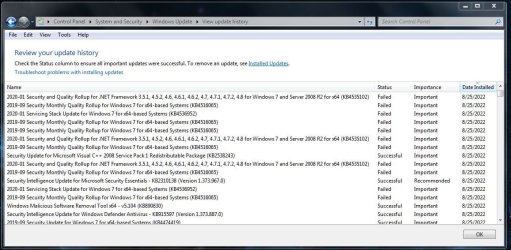
Attached a screen shot of failed/installed updates.

Thanks For Your time.
 

Attachments
  • Clipboard01.jpg
    Clipboard01.jpg
    148.2 KB · Views: 1

My Computers

System One System Two

  • Computer type
    PC/Desktop
    Computer Manufacturer/Model Number
    HP
    OS
    Windows 7 pro 64bit sp1
    CPU
    Intel Corei5. 3.10ghz
    Memory
    8gig
    Graphics Card(s)
    Intel-OnBoard gpu
    Hard Drives
    Hitachi/Toshiba external hd
    Antivirus
    mse
    Browser
    FF 91
  • Computer type
    PC/Desktop
    Antivirus
    MSE
Guess it/they never got installed. May have to manually dl it.
Weird that the critical one for the antivirus security essentials did though.
Just dont want to make things worse. Thats why i stopped updating awhile ago.
 

My Computers

System One System Two

  • Computer type
    PC/Desktop
    Computer Manufacturer/Model Number
    HP
    OS
    Windows 7 pro 64bit sp1
    CPU
    Intel Corei5. 3.10ghz
    Memory
    8gig
    Graphics Card(s)
    Intel-OnBoard gpu
    Hard Drives
    Hitachi/Toshiba external hd
    Antivirus
    mse
    Browser
    FF 91
  • Computer type
    PC/Desktop
    Antivirus
    MSE
The two SHA-2 Code required ones do not have the same status. KB4490628 being a Servicing Stack Update and being an actual prerequisite, too, makes it hard to be offered at Windows Update.
 

My Computer

Computer type
PC/Desktop
OS
Windows 7 Home Premium
Cool thanks for that. Now wonder if I want to actual install KB4490628.
I think after the year here , no more security updates anyway.
Is there a process to manually installing the updates that MS didnt include?
Seems like a lot of trouble shooting just for security updates.
 

My Computers

System One System Two

  • Computer type
    PC/Desktop
    Computer Manufacturer/Model Number
    HP
    OS
    Windows 7 pro 64bit sp1
    CPU
    Intel Corei5. 3.10ghz
    Memory
    8gig
    Graphics Card(s)
    Intel-OnBoard gpu
    Hard Drives
    Hitachi/Toshiba external hd
    Antivirus
    mse
    Browser
    FF 91
  • Computer type
    PC/Desktop
    Antivirus
    MSE
Why would you not want to install KB4490628, but want to install KB4536952? It's 4490628 missing that causes those later ones to fail.
 

My Computer

Computer type
PC/Desktop
OS
Windows 7 Home Premium
Oh OK. Didnt know that. So I need to manually install KB4490628, then the rest should install fine right?

- - - Updated - - -

Seems to be a loop...Clipboard01.jpg

- - - Updated - - -

Should i reset windows update in cmd prompt or anything?
I saw online and some Youtube tutorials there is a certain way to do it.
Some advice would be helpful.
Thanks
 

My Computers

System One System Two

  • Computer type
    PC/Desktop
    Computer Manufacturer/Model Number
    HP
    OS
    Windows 7 pro 64bit sp1
    CPU
    Intel Corei5. 3.10ghz
    Memory
    8gig
    Graphics Card(s)
    Intel-OnBoard gpu
    Hard Drives
    Hitachi/Toshiba external hd
    Antivirus
    mse
    Browser
    FF 91
  • Computer type
    PC/Desktop
    Antivirus
    MSE
It's actually as easy as dowloading and running the msu file.

Microsoft Update Catalog

The main issue you have with KB4490628 is its not being readily available at Windows Update. Windows Update will insist on offering it after everything else is installed (or hidden), while something else will insist on 4490628 being installed already.

It's just a regular update otherwise.
 

My Computer

Computer type
PC/Desktop
OS
Windows 7 Home Premium
Ok cool, think i get it now. Where there any issues after installing KB4490628?
I read sparsely that it caused failed boot and needed to reference the installation disk? Yikes..
 

My Computers

System One System Two

  • Computer type
    PC/Desktop
    Computer Manufacturer/Model Number
    HP
    OS
    Windows 7 pro 64bit sp1
    CPU
    Intel Corei5. 3.10ghz
    Memory
    8gig
    Graphics Card(s)
    Intel-OnBoard gpu
    Hard Drives
    Hitachi/Toshiba external hd
    Antivirus
    mse
    Browser
    FF 91
  • Computer type
    PC/Desktop
    Antivirus
    MSE
Again, if you don't mind installing KB4536952, there's no reason to mind installing KB4490628.
 

My Computer

Computer type
PC/Desktop
OS
Windows 7 Home Premium
Did you have any issues, or other members when manually installing KB4490628. ,
or with the SHA-2 Code? Dont want to brick my PC.
 

My Computers

System One System Two

  • Computer type
    PC/Desktop
    Computer Manufacturer/Model Number
    HP
    OS
    Windows 7 pro 64bit sp1
    CPU
    Intel Corei5. 3.10ghz
    Memory
    8gig
    Graphics Card(s)
    Intel-OnBoard gpu
    Hard Drives
    Hitachi/Toshiba external hd
    Antivirus
    mse
    Browser
    FF 91
  • Computer type
    PC/Desktop
    Antivirus
    MSE
Of course not. Would you feel more comfortable with installing it from Windows Update? Hide every important update Windows Update offers until KB4490628 appears. After installing KB4490628, unhide everything previously hidden.
 

My Computer

Computer type
PC/Desktop
OS
Windows 7 Home Premium
That makes sense to do it that way. Thanks
 

My Computers

System One System Two

  • Computer type
    PC/Desktop
    Computer Manufacturer/Model Number
    HP
    OS
    Windows 7 pro 64bit sp1
    CPU
    Intel Corei5. 3.10ghz
    Memory
    8gig
    Graphics Card(s)
    Intel-OnBoard gpu
    Hard Drives
    Hitachi/Toshiba external hd
    Antivirus
    mse
    Browser
    FF 91
  • Computer type
    PC/Desktop
    Antivirus
    MSE
This is a specific instance of an update not loading. I get the updates just about daily and get the failed to install a high percentage of the time. Quite a while ago, I got a Windows Update Troubleshooter from someone on these forums. In the times I have used it to troubleshoot the uninstalled update, it comes back saying it fixed any registry problems, but hardly ever fixes the problem with the install. For the most part, they are updates that are less than 1 MB. In other case, however, they are much larger and I get the feeling they are more important, yet won't load. My system is a 64 bit one. Can that be a part of my problems? Any ideas?
 

My Computer

Computer type
PC/Desktop
Computer Manufacturer/Model Number
Dell
OS
Windows 7 64 bit
CPU
Intel(R) Celeron(R) CPU G465 @ 1.90GHz
Motherboard
Dell Inc. 0478VN
Memory
8 gig
Graphics Card(s)
Intel(R) HD Graphics
Sound Card
(1) Intel(R) Display Audio (2) Realtek High Definition Aud
Monitor(s) Displays
Dell 19"
Hard Drives
(1) ST500DM002-1BD142 (2) Generic- Multi-Card USB Device
Mouse
Logitech marble mouse
Internet Speed
100
Antivirus
Spybot Search and Destroy, Malwarebytes,Security Essentials
Browser
Chrome with Duck Duck Go
Back
Top