Windows shutdown hanging for long periods

Davidk101

New member
Member
Local time
12:35 AM
Messages
47
With the pandemic upon us, I have just updated my system display to an HPe240c video conferencing monitor: 1920x1080 with integrated speakers, webcam, microphone. And that has shown (brought to light??) some disturbing/frustrating variability in windows shut down times. The display can be connected 2 ways; VGA and HDMI.
The issue details all revolve around the time the 'blue' shutting down screen is shown

1. when VGA connected
- normal shut down is the programs close screen is there too fast to even read, then the blue shutting down display: 20sec later, blank screen.
- really long shut down: the blue shutting down screen is there for around 200 or more sec (well over 3 minutes) before the screen goes blank.
2. When HDMI connected
- there isn't a normal shut down. The shut that does happen is really really long; well over 5 minutes for the blue screen. Patience ran out and just powered off; and that had abnormal start result the next time the PC is started up.


It is clear associated with the HDMI configuration of the display, but just how eludes me. For now, the VGA display image is no different from that on the HDMI display, so I've settled for a VGA connection until I can get this shut down issue sorted out.


I suspect that the long shut down time is related to software in use immediately before shutdown, eg, close a browser, open email, check it, close that, shut down.


But why is the long shut down happening and why is it so variable?? And can I fix it??:cry:
 

My Computer My Computer

Computer type
PC/Desktop
Computer Manufacturer/Model Number
custom build
OS
windows 7 home premium 64bit
CPU
Intel core i3-4700
Motherboard
Gigabyte GA-H97M-d3H
Memory
8gb
Hard Drives
1x256gb SSD
3x500gb HDD
Welcome to the Forum.

Is the startup normal?
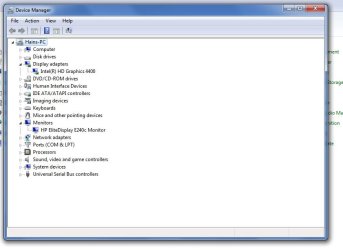
Open Device Manager. Is there any yellow alerts of missing drivers?
From your system specs, you're using internal graphics.
What resolutions you're using with VGA and HDMI?

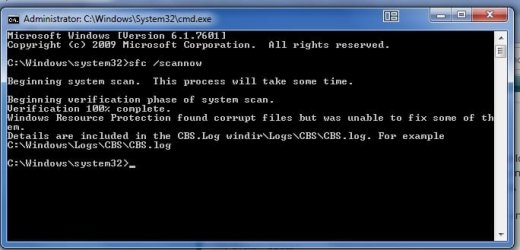
Open a CMD window as administrator and type:
sfc /scannow
 

My Computers My Computers

System One System Two

  • Computer type
    PC/Desktop
    Computer Manufacturer/Model Number
    custom build
    OS
    Windows 7 HP 64
    CPU
    i5 6600K - 800MHz to 4200MHz
    Motherboard
    GA-Z170-HD3P
    Memory
    4+4G GSkill DDR4 3000
    Graphics Card(s)
    IG - Intel 530
    Monitor(s) Displays
    Samsung 226BW
    Screen Resolution
    1680x1050
    Hard Drives
    (1) -1 SM951 – 128GB M.2 AHCI PCIe SSD drive for Windows 7 and Lubuntu
    (2) -1 WD SATA 3 - 1T for Data
    (3) -1 WD SATA 3 - 1T for backup
    PSU
    Thermaltake 450W TR2 gold
    Keyboard
    Old and good Chicony mechanical keyboard
    Mouse
    Logitech mX performance - 9 buttons (had to disable some)
    Internet Speed
    500Mb/s
    Browser
    Firefox 64
    Other Info
    TinyWall firewall
  • Computer type
    Laptop
    System Manufacturer/Model Number
    Asus Q550LF
    OS
    Windows 7 Pro
    CPU
    i7-4500U 800MHz to 3.0GHz
    Motherboard
    Asus Q550LF
    Memory
    (4+4)G DDR3 1600
    Graphics Card(s)
    IG intel 4400 + NVIDIA GeForce GT 745M
    Sound Card
    Realtek
    Monitor(s) Displays
    LG Display LP156WF4-SPH1
    Screen Resolution
    1920 x 1080
    Hard Drives
    BX500 120G SSD for Windows and programs +
    1T HDD for data
    Internet Speed
    500 Mb/s
    Browser
    Firefox
    Other Info
    TinyWall firewall
Hi,
1. Startup is normal: some time ago I had an exchange with MS about safe mode, and that resulted in implementing boot manager with a timeout; pressing F8 in that screen got the result I wanted. And that's survived several attempts at a win10 upgrade (abandoned after 3 tries, h'w runs it but the OS destroys the software environment parts I need). Nothing changed as part of startup when the screen was replaced.
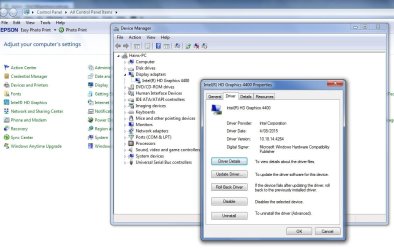
2. Device manager yellow alerts: none. screenshot available, I'll try to include it.
3. Yes, using internal graphics. The version is in the Device manager screenshot.
4. Resolution: 1920x1080 for both VGA and HDMI: see more info below

5. Scannow result is an 885K text file, cannot open it - even as an admin user, and 'open as admin' is not available in the context menu. Screenshot available, again I'll try to add it. Cannot add the actual log file


More info on the display.
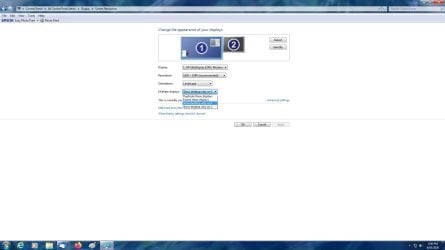
- In VGA it shows in CP as a single unit, but in HDMI, it shows as 2 screens: I re-set that to one, but that made no difference to shut down time. screenshots available.
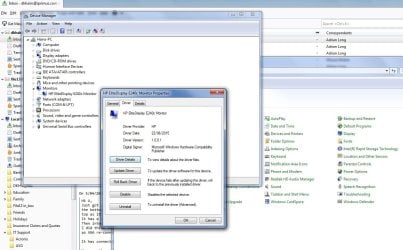
- e240c screen driver detail screenshot
 

Attachments

  • device mgr 10 May 20.jpg
    device mgr 10 May 20.jpg
    40.8 KB · Views: 0
  • scannow 10 may 20.jpg
    scannow 10 may 20.jpg
    29.8 KB · Views: 19
  • windows display hdmi e240c.jpg
    windows display hdmi e240c.jpg
    68 KB · Views: 2
  • windows display vga e240c.jpg
    windows display vga e240c.jpg
    21.8 KB · Views: 19
  • e240c monitor driver.jpg
    e240c monitor driver.jpg
    119.6 KB · Views: 0

My Computer My Computer

Computer type
PC/Desktop
Computer Manufacturer/Model Number
custom build
OS
windows 7 home premium 64bit
CPU
Intel core i3-4700
Motherboard
Gigabyte GA-H97M-d3H
Memory
8gb
Hard Drives
1x256gb SSD
3x500gb HDD
Run sfc /scannow two more times, restarting after each scan.
 

My Computers My Computers

System One System Two

  • Computer type
    PC/Desktop
    Computer Manufacturer/Model Number
    custom build
    OS
    Windows 7 HP 64
    CPU
    i5 6600K - 800MHz to 4200MHz
    Motherboard
    GA-Z170-HD3P
    Memory
    4+4G GSkill DDR4 3000
    Graphics Card(s)
    IG - Intel 530
    Monitor(s) Displays
    Samsung 226BW
    Screen Resolution
    1680x1050
    Hard Drives
    (1) -1 SM951 – 128GB M.2 AHCI PCIe SSD drive for Windows 7 and Lubuntu
    (2) -1 WD SATA 3 - 1T for Data
    (3) -1 WD SATA 3 - 1T for backup
    PSU
    Thermaltake 450W TR2 gold
    Keyboard
    Old and good Chicony mechanical keyboard
    Mouse
    Logitech mX performance - 9 buttons (had to disable some)
    Internet Speed
    500Mb/s
    Browser
    Firefox 64
    Other Info
    TinyWall firewall
  • Computer type
    Laptop
    System Manufacturer/Model Number
    Asus Q550LF
    OS
    Windows 7 Pro
    CPU
    i7-4500U 800MHz to 3.0GHz
    Motherboard
    Asus Q550LF
    Memory
    (4+4)G DDR3 1600
    Graphics Card(s)
    IG intel 4400 + NVIDIA GeForce GT 745M
    Sound Card
    Realtek
    Monitor(s) Displays
    LG Display LP156WF4-SPH1
    Screen Resolution
    1920 x 1080
    Hard Drives
    BX500 120G SSD for Windows and programs +
    1T HDD for data
    Internet Speed
    500 Mb/s
    Browser
    Firefox
    Other Info
    TinyWall firewall
Done. Why an extra 2 scans may help isn't obvious, although from the report text, that program does make some attempt at resolution.
However, the results after each scan did not in the general seem to change. I noted that the log files overwrite each other - there is only one on the logs folder. But I was able to run explorer as admin, copy the log file elsewhere and open it. Copy attached: this is the data from the last scan. The size of the log file exceeded the limit so I split it into 2 parts


Observation;
After each cmd session, the re-boot was normal, ie the blue screen only displayed for 25 sec (1st re-boot) and 30sec (2nd re-boot).
 

My Computer My Computer

Computer type
PC/Desktop
Computer Manufacturer/Model Number
custom build
OS
windows 7 home premium 64bit
CPU
Intel core i3-4700
Motherboard
Gigabyte GA-H97M-d3H
Memory
8gb
Hard Drives
1x256gb SSD
3x500gb HDD
How is Windows Update set?

Open services and set Windows update to Manual
Open WU page and set to never check

Run WU manually. See if it finds some driver update.

I would say that on shutdown it is trying to install some update and fail.
As the problem started when you changed the display, it can be related to the graphics driver (HD 4400)
You can also install the Intel Update driver search.
Have a look at this page Downloads for Intel(R) HD Graphics 4400
 

My Computers My Computers

System One System Two

  • Computer type
    PC/Desktop
    Computer Manufacturer/Model Number
    custom build
    OS
    Windows 7 HP 64
    CPU
    i5 6600K - 800MHz to 4200MHz
    Motherboard
    GA-Z170-HD3P
    Memory
    4+4G GSkill DDR4 3000
    Graphics Card(s)
    IG - Intel 530
    Monitor(s) Displays
    Samsung 226BW
    Screen Resolution
    1680x1050
    Hard Drives
    (1) -1 SM951 – 128GB M.2 AHCI PCIe SSD drive for Windows 7 and Lubuntu
    (2) -1 WD SATA 3 - 1T for Data
    (3) -1 WD SATA 3 - 1T for backup
    PSU
    Thermaltake 450W TR2 gold
    Keyboard
    Old and good Chicony mechanical keyboard
    Mouse
    Logitech mX performance - 9 buttons (had to disable some)
    Internet Speed
    500Mb/s
    Browser
    Firefox 64
    Other Info
    TinyWall firewall
  • Computer type
    Laptop
    System Manufacturer/Model Number
    Asus Q550LF
    OS
    Windows 7 Pro
    CPU
    i7-4500U 800MHz to 3.0GHz
    Motherboard
    Asus Q550LF
    Memory
    (4+4)G DDR3 1600
    Graphics Card(s)
    IG intel 4400 + NVIDIA GeForce GT 745M
    Sound Card
    Realtek
    Monitor(s) Displays
    LG Display LP156WF4-SPH1
    Screen Resolution
    1920 x 1080
    Hard Drives
    BX500 120G SSD for Windows and programs +
    1T HDD for data
    Internet Speed
    500 Mb/s
    Browser
    Firefox
    Other Info
    TinyWall firewall
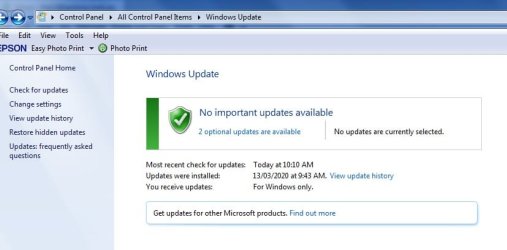
1. Windows update setting.
It was set for check but do nothing unless I approve. screenshot attached.
I changed it to never as suggested (another screenshot) and ran a manual scan: gave the same 2 optional results that have been popping up for months and I have ignored them; KB4493132 dated 23/7/19 which was the win10 nagger, and KB3102429 dated 29/1/16 about monetary units in Georgia and Azerbaijan - which I have no interest in ever visiting.


2. Intel 4400 graphics driver
I visited the site you linked, set for win7 64bit and got 3 hits. but frankly beyond the name (intel 4400) the descriptive detail seemed unlinked to the chipset in my motherboard. So I attach a screenshot of the driver detail device manager reports. Which of the Intel driver items on that webpage is relevant and if/how should I install it?


When I changed the display, I ran the install drivers from the HP CD that came with the device. Nothing on it about the display adapter.
 

Attachments

  • windows update normal.jpg
    windows update normal.jpg
    32.9 KB · Views: 18
  • windows update manual 12 may.jpg
    windows update manual 12 may.jpg
    34.6 KB · Views: 0
  • Intel HD graphics 4400 driver.jpg
    Intel HD graphics 4400 driver.jpg
    93.9 KB · Views: 0

My Computer My Computer

Computer type
PC/Desktop
Computer Manufacturer/Model Number
custom build
OS
windows 7 home premium 64bit
CPU
Intel core i3-4700
Motherboard
Gigabyte GA-H97M-d3H
Memory
8gb
Hard Drives
1x256gb SSD
3x500gb HDD
Hi

when you turn off the tower does the monitor display - No Signal


if not check your power settings comp and Bios
 

My Computer My Computer

Computer type
PC/Desktop
Computer Manufacturer/Model Number
medionl/Aspire 6930G/acer x55a
OS
W7 home premium 32bit/W7HP 64bit/w10 tp insider ring
CPU
E5300 dual core
Motherboard
medion MS7366
Memory
3gb
Graphics Card(s)
Nvidia Geforce 7100 Nforce 630i
Monitor(s) Displays
avixc
Internet Speed
n (isp resticted to 72)
Antivirus
mse/pands
Browser
palemoon
Other Info
Belkin Fd7050 n USB using Railink RT2870 drivers, more upto date
The i3-4700 has a GPU inside (HD 4400). You can install the 15.36 that is the latest driver for the HD 4400.

To check if all Intel drivers are up to date, run Intel® Driver & Support Assistant
 

My Computers My Computers

System One System Two

  • Computer type
    PC/Desktop
    Computer Manufacturer/Model Number
    custom build
    OS
    Windows 7 HP 64
    CPU
    i5 6600K - 800MHz to 4200MHz
    Motherboard
    GA-Z170-HD3P
    Memory
    4+4G GSkill DDR4 3000
    Graphics Card(s)
    IG - Intel 530
    Monitor(s) Displays
    Samsung 226BW
    Screen Resolution
    1680x1050
    Hard Drives
    (1) -1 SM951 – 128GB M.2 AHCI PCIe SSD drive for Windows 7 and Lubuntu
    (2) -1 WD SATA 3 - 1T for Data
    (3) -1 WD SATA 3 - 1T for backup
    PSU
    Thermaltake 450W TR2 gold
    Keyboard
    Old and good Chicony mechanical keyboard
    Mouse
    Logitech mX performance - 9 buttons (had to disable some)
    Internet Speed
    500Mb/s
    Browser
    Firefox 64
    Other Info
    TinyWall firewall
  • Computer type
    Laptop
    System Manufacturer/Model Number
    Asus Q550LF
    OS
    Windows 7 Pro
    CPU
    i7-4500U 800MHz to 3.0GHz
    Motherboard
    Asus Q550LF
    Memory
    (4+4)G DDR3 1600
    Graphics Card(s)
    IG intel 4400 + NVIDIA GeForce GT 745M
    Sound Card
    Realtek
    Monitor(s) Displays
    LG Display LP156WF4-SPH1
    Screen Resolution
    1920 x 1080
    Hard Drives
    BX500 120G SSD for Windows and programs +
    1T HDD for data
    Internet Speed
    500 Mb/s
    Browser
    Firefox
    Other Info
    TinyWall firewall
2 replies, in turn.
Torchwood
the shutdown sequence after clicking the start/shutdown button runs like:
- desktop display for about 3-5sec
- a black-background programs shutdown display for 5 sec, the option to force shutdown here
- the win7 blue shut down display, with rotating activity marker. This is the screen I've been concerned about, because the process here was normally 25-30 sec on the blue screen but as noted for vga and hdmi, can take well over 3 minutes before I started asking about it here.
- the actual shut down: processor stops (noticeable click in the tower, from the motherboard P/S??), front panel lights go out and display goes blank.
- normally I just turn the power off at this point. If I do that before the blue screen expires, I get an abnormal shutdown advice on the next start plus the option of running safe mode or start normally: avoiding that is why I'm pursuing why it stayed so long in the 'blue page' of the shutdown sequence.
- after the display goes blank, if I pause with power still on to both the PC tower and the display (same power switch via a power board to both devices), after about 5 sec the monitor shows a message saying 'no input signal', and that vanishes after another 5 sec and the power light on the display goes amber.


Megahertz
Made a restore point before doing anything with the display driver.
I downloaded the Intel tool and ran it; the scan failed, twice. So I just downloaded the 15.36 version for 64bit win7 that you indicated. Saw in the notes that it was a self-extracting file (good!!).
Ran the new driver exe. It turned out to be a 2 boot process: boot 1 took nearly 4 minutes in the blue shutdown page: that had me really concerned and was thankful I'd done a restore point first, but I waited it out. When the re-boot occurred, and the desktop appeared again, the 2nd part of the update appeared for the graphics driver. Another re-boot required; this time the blue page took only 25 sec.


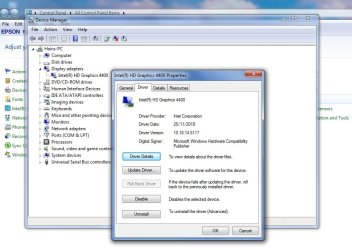
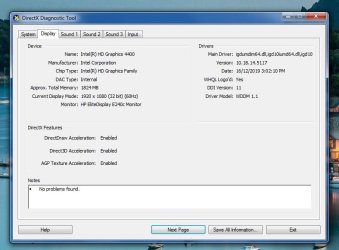
After boot 2, I checked the driver version detail; even tho Intel called it 15.36, the actual version numbers are quite different; the prior version was 10.18.14.4264 (screenshot of that previously posted), the new one is 10.18.14.5117 (screenshot attached).
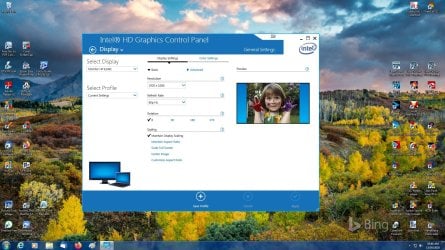
A rt-click on the desktop got me to the (new) graphics properties, screenshot attached. This shows the basic display parameters, there is a colour page, but the only significant item on it is the colour depth at 32bit.


An observation after the fact about the driver update: the long pause on the blue shutdown page as part of boot1 was the sort of pause that windows gave when installing a set of updates after a patch tuesday: but there was a message about the wait on the page. Pity Intel did not include a message about the wait in their update, it would have relieved the stress factor.
 

Attachments

  • Desktop graphics after drvr update.jpg
    Desktop graphics after drvr update.jpg
    312.5 KB · Views: 4
  • Device mgr after HD4400 update.jpg
    Device mgr after HD4400 update.jpg
    77.7 KB · Views: 0

My Computer My Computer

Computer type
PC/Desktop
Computer Manufacturer/Model Number
custom build
OS
windows 7 home premium 64bit
CPU
Intel core i3-4700
Motherboard
Gigabyte GA-H97M-d3H
Memory
8gb
Hard Drives
1x256gb SSD
3x500gb HDD
In the search box enter dxdiag and see if there are any errors in there and in the 64 bit version.

Just to clarify. This started to happen once you connected the new screen? And it only happens with HDMI and not VGA?
 

My Computer My Computer

Computer type
PC/Desktop
OS
Windows 7 Ultimate x64
F22 simpilot,
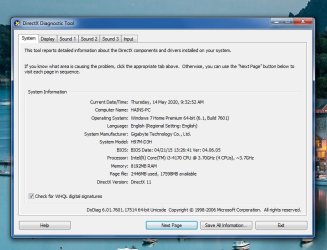
1. I ran the 64bit dxdiag as requested, 2 screenshots of the results attached: the main system result, and for the display. All the tabs had a no problem reported advice at the bottom, but I've omitted the sound tabs because there's no apparent issue with them.
2. Yes, the long hang times on shutdown were noticed when I changed the display, but they happened for both VGA and HDMI. It was just that the hang time for HDMI was more than twice the time noted for VGA. My apologies if that wasn't clear in my earlier posts about the problem.


So, thru this 'test and suggest' cycle, it seems clear that the shutdown 'blue screen' hang time reflects a timeout, or a series of them, in succession. And we haven't identified just why the HDMI connection made the shutdown time so much longer than with a VGA connection: the only difference is the presence or absence of a cable on one connector: no other change made to switch between one mode or the other.


I've been working on getting the shutdown times consistently short or normal for VGA, and when that seems to have some consistency, I'll give the HDMI connection to the display another shot. today.


I think everything suggested has helped, but the thing that made the most difference was setting windows update to "never". Which doesn't bother me at all - we are now past the extended support date and the only thing that's still coming out monthly is the malware removal tool; and I usually manually checked updates regularly 2 days after patch tuesday. Why 2days later? about 3-4 years ago I used to do it on the release night and one month a particular KB item borked the PC windows license key: it was withdrawn within 2 days after everyone screamed at MS, but for the early adopters, it was pain establishing which KB did it, and then reversing it out. So my manual update check habit changed . . . .
Altho why an update check should be being made during a routine windows shutdown process - when there are other quite specific things that do that - is mystifying.
 

Attachments

  • dxdiag_1 14 may 20.jpg
    dxdiag_1 14 may 20.jpg
    61.9 KB · Views: 0
  • dxdiag_2 14 may 20.jpg
    dxdiag_2 14 may 20.jpg
    52 KB · Views: 0

My Computer My Computer

Computer type
PC/Desktop
Computer Manufacturer/Model Number
custom build
OS
windows 7 home premium 64bit
CPU
Intel core i3-4700
Motherboard
Gigabyte GA-H97M-d3H
Memory
8gb
Hard Drives
1x256gb SSD
3x500gb HDD

My Computer My Computer

Computer type
PC/Desktop
OS
Windows 7 Ultimate x64
F22,
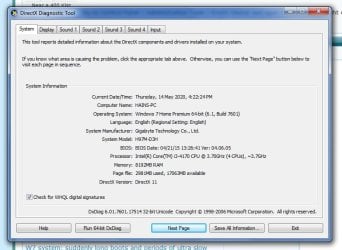
I've run the 32bit dxdiag as requested, screenshot attached, no change in results from the 64bit version.


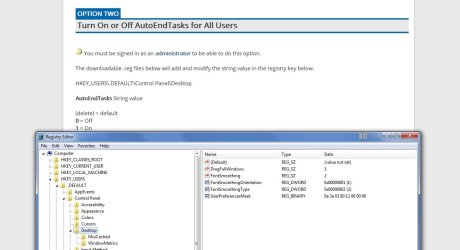
That AutoEndTasks item looks interesting. I've:
- exported a precautionary copy of the registry - all 1.081Gb of it !!
- taken a screenshot of the registry control/desktop item that is discussed in the tutorial link you supplied, attached. No entry at all for this AutoEndTasks variable

- downloaded the "Turn_On_AutoEndTasks_for_all_users.reg" file
but I have 2 questions about this before I go ahead.

q1 You said "it will work in 7". But tutorial is all about win10, and the action part - step 6 - talks about double click to merge it. It's the term merge that makes me edgy. I understand that to mean executing the file will insert an entry for AutoEndTasks=1 in the registry here, save and exit. Can you clarify please.
q2 this looks like an essential item, so why isn't it in the system and on as a default? Or maybe MS has not ever said?


System and application logs: zipped and attached.
 

Attachments

  • dxdiag-32bit 14 May.jpg
    dxdiag-32bit 14 May.jpg
    59.6 KB · Views: 0
  • registry_ AutoEndTasks.jpg
    registry_ AutoEndTasks.jpg
    64.9 KB · Views: 1

My Computer My Computer

Computer type
PC/Desktop
Computer Manufacturer/Model Number
custom build
OS
windows 7 home premium 64bit
CPU
Intel core i3-4700
Motherboard
Gigabyte GA-H97M-d3H
Memory
8gb
Hard Drives
1x256gb SSD
3x500gb HDD
Once I question why my computer was taking so long (20 sec) to shut down.
After tracking shutdown I found that it was due to antivirus (Avira).
Why it takes so long to shut down?

You didn't mentioned your antivirus but some can be set to do a scan of critical files on shut down.
Have a look at your antivirus settings.
 

My Computers My Computers

System One System Two

  • Computer type
    PC/Desktop
    Computer Manufacturer/Model Number
    custom build
    OS
    Windows 7 HP 64
    CPU
    i5 6600K - 800MHz to 4200MHz
    Motherboard
    GA-Z170-HD3P
    Memory
    4+4G GSkill DDR4 3000
    Graphics Card(s)
    IG - Intel 530
    Monitor(s) Displays
    Samsung 226BW
    Screen Resolution
    1680x1050
    Hard Drives
    (1) -1 SM951 – 128GB M.2 AHCI PCIe SSD drive for Windows 7 and Lubuntu
    (2) -1 WD SATA 3 - 1T for Data
    (3) -1 WD SATA 3 - 1T for backup
    PSU
    Thermaltake 450W TR2 gold
    Keyboard
    Old and good Chicony mechanical keyboard
    Mouse
    Logitech mX performance - 9 buttons (had to disable some)
    Internet Speed
    500Mb/s
    Browser
    Firefox 64
    Other Info
    TinyWall firewall
  • Computer type
    Laptop
    System Manufacturer/Model Number
    Asus Q550LF
    OS
    Windows 7 Pro
    CPU
    i7-4500U 800MHz to 3.0GHz
    Motherboard
    Asus Q550LF
    Memory
    (4+4)G DDR3 1600
    Graphics Card(s)
    IG intel 4400 + NVIDIA GeForce GT 745M
    Sound Card
    Realtek
    Monitor(s) Displays
    LG Display LP156WF4-SPH1
    Screen Resolution
    1920 x 1080
    Hard Drives
    BX500 120G SSD for Windows and programs +
    1T HDD for data
    Internet Speed
    500 Mb/s
    Browser
    Firefox
    Other Info
    TinyWall firewall
Mhz7,
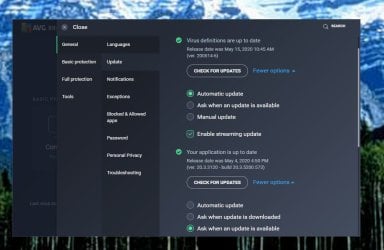
I run the AVG Internet security suite. It has 2 update settings for itself: 1 for virus definitions, and 1 for the application itself. screenshot attached. No other update settings apparent. Updates usually happen as part of startup. Which means I generally wait several minutes for all that to get done and out of the way.

BUT
Normally I notice that a software update is available thru a notification balloon on the program open page. However I now see that the app has been set for auto update - possibly as a result of recent update, on 4 may (the app update is dated 4 may and I would have downloaded it a day later). So I changed it to "ask when an update is available". We'll see how that pans out.
Not sure that would affect the shutdown process??


My normal shut down process is to close all the working apps (email, browser, etc), and then click the shutdown button. With a pretty fast cpu (3.7ghz), 8gb of RAM and a 250gb SSD for the C drive closing any background bits should not take that long: typically about 7-10 sec from button press to blue screen, including the black closing programs screen. From that point, the differences I have been experiencing are all about just how the new screen is connected to the PC motherboard - by VGA cable or HDMI.


As to shutdowns when HDMI connected to the screen after the various change suggestion you'all have made, yesterday I shutdown the VGA connection, plugged the HDMI cable into the screen and proceeded to test (boot, work, close), as indicated in the prior post. I did 4 shutdowns, spaced thru the morning, afternoon and evening. Timed each with particular reference to the period the blue shutdown screen was displayed. Happily surprised at the data: at 1030, shutdown took 30 sec, at 1155 it took 25 sec, at 1750 20 sec, and at 2115, 25 sec.


With the pandemic, the local broadband networks have been getting hammered all day, not just in the evenings, so network access might explain that sort of variability. Which gets to the question of what might be doing that: your AV query very relevant, answer at the top of this post. F22's data may also help that: not so much which process it is, but running the AutoEndTask to close whatever it is. Still waiting on his reply re my concerns . . .
 

Attachments

  • AVG Update settings 15 May 20.jpg
    AVG Update settings 15 May 20.jpg
    58.4 KB · Views: 0

My Computer My Computer

Computer type
PC/Desktop
Computer Manufacturer/Model Number
custom build
OS
windows 7 home premium 64bit
CPU
Intel core i3-4700
Motherboard
Gigabyte GA-H97M-d3H
Memory
8gb
Hard Drives
1x256gb SSD
3x500gb HDD
Okay, I'm seeing some application errors for AVG. As a test completely uninstall AVG. Uninstalling AVG Antivirus using AVG Clear | AVG Support

To answer your question. The registry key doesn't exist by default in Windows 7. I have added it myself to my computer's with no harm. Yes, it adds the values to the registry. If you want to see where you can open the .reg file with notepad or Notepad ++ and see.

You can create a system restore point in lieu of a registry backup.
 

My Computer My Computer

Computer type
PC/Desktop
OS
Windows 7 Ultimate x64
F22,
Thanks.
So, re AVG, what I think you want me to do is:
- uninstall
- cleanup the system and registry with cclean or similar
- reboot
- reinstall AVG (because I'm twitchy about being on the net without this sort of security security blanket).
- re-test as needed.
???


Re AutoEndTasks, the file I cited is the right one??
 

My Computer My Computer

Computer type
PC/Desktop
Computer Manufacturer/Model Number
custom build
OS
windows 7 home premium 64bit
CPU
Intel core i3-4700
Motherboard
Gigabyte GA-H97M-d3H
Memory
8gb
Hard Drives
1x256gb SSD
3x500gb HDD
Hi

had a look at the event logs,

You appear to have a "business" type setup with NAS
its creating problems all over the place

please give us your set-up, and are you dual booting?

please run the built in MS disk clean-up tool, less to look at


Roy
 

My Computer My Computer

Computer type
PC/Desktop
Computer Manufacturer/Model Number
medionl/Aspire 6930G/acer x55a
OS
W7 home premium 32bit/W7HP 64bit/w10 tp insider ring
CPU
E5300 dual core
Motherboard
medion MS7366
Memory
3gb
Graphics Card(s)
Nvidia Geforce 7100 Nforce 630i
Monitor(s) Displays
avixc
Internet Speed
n (isp resticted to 72)
Antivirus
mse/pands
Browser
palemoon
Other Info
Belkin Fd7050 n USB using Railink RT2870 drivers, more upto date
Torchwood,
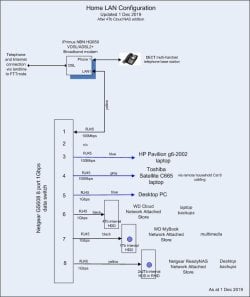
I would not call it a 'business' setup, but it's a way for 3 PC's to connect to the internet, and and some off-PC network storage they all might use, without specific windows peering. This configuration allows me to plug-n-replace capacity as needed once the stores have been mapped into explorer.
And that map into explorer need is one of the major reasons I abandoned a win10 upgrade (tried it 3 times!!) that I mentioned really early in this thread.
The home LAN configuration drawing attached.
The machine that's been hanging in the 'blue page' shutdown phase is the desktop in that drawing.
 

Attachments

  • Home LAN 20191201.jpg
    Home LAN 20191201.jpg
    43.6 KB · Views: 0

My Computer My Computer

Computer type
PC/Desktop
Computer Manufacturer/Model Number
custom build
OS
windows 7 home premium 64bit
CPU
Intel core i3-4700
Motherboard
Gigabyte GA-H97M-d3H
Memory
8gb
Hard Drives
1x256gb SSD
3x500gb HDD
Back
Top