
Hello
So after running Win 10 for a couple of months, I decided to downgrade today to Win 7 because my PC stopped working since today morning probably due to corrupt Win 10 sys files (I couldn't even get it to repair or reset)
Anyhow, I formatted my SSD and clean installed Windows 7 x64 today evening and since then it has installed a few updates. When I check for updates manually, it just goes on checking and checking....
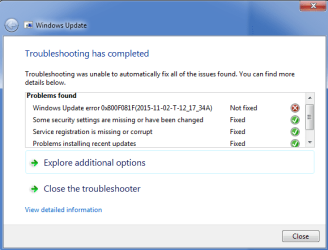
I downloaded and installed the Windows Update Troubleshooter Tool from https://support.microsoft.com/en-us/gp/windows-update-issues/en-us and ran it and it came up with an error.
Please check the attached screenshot.
Can someone kindly advise what this error is about and how do I resolve this
I saw many threads here about Windows getting stuck at Checking For Updates, but I thought of mentioning the error message here so that I can get some advise from the experts
Please help
Many thanks
UPDATE - I downloaded an ran the MS FixIt utility for update troubleshooting and even that is stuck at Checking for updates online
So after running Win 10 for a couple of months, I decided to downgrade today to Win 7 because my PC stopped working since today morning probably due to corrupt Win 10 sys files (I couldn't even get it to repair or reset)
Anyhow, I formatted my SSD and clean installed Windows 7 x64 today evening and since then it has installed a few updates. When I check for updates manually, it just goes on checking and checking....
I downloaded and installed the Windows Update Troubleshooter Tool from https://support.microsoft.com/en-us/gp/windows-update-issues/en-us and ran it and it came up with an error.
Please check the attached screenshot.
Can someone kindly advise what this error is about and how do I resolve this
I saw many threads here about Windows getting stuck at Checking For Updates, but I thought of mentioning the error message here so that I can get some advise from the experts
Please help
Many thanks
UPDATE - I downloaded an ran the MS FixIt utility for update troubleshooting and even that is stuck at Checking for updates online
Attachments
Last edited:
My Computer
- Computer type
- PC/Desktop
- Computer Manufacturer/Model Number
- Custom Build
- OS
- Win 7 Professional 64 bit
- CPU
- AMD FX-6100
- Motherboard
- M5A78L-M/USB3
- Memory
- Corsair Vengeance 1600 Mhz 8 GB
- Graphics Card(s)
- ATI Radeon HD 5450 1GB
- Sound Card
- On Board
- Monitor(s) Displays
- LG Flatron L177WSB
- Screen Resolution
- 1440 x 900
- Hard Drives
- Crucial MX 100 - 256 GB (Primary C:)
Seagate Barracuda - 160 GB
Seagate Barracuda - 500 GB
- PSU
- Cooler Master B500 Ver 2.0
- Case
- Cooler Master Elite 430
- Cooling
- Stock AMD Cooler
- Keyboard
- TVS Gold
- Mouse
- DELL USB
- Internet Speed
- 1 Mbps
- Antivirus
- Avast Home V 12.1
- Browser
- Chrome
- Other Info
- Lenovo ThinkPad - E420


