Windows suddenly says NOT GENUINE. but actually it is. Help me.

SAGhuman

New member
Local time
6:52 AM
Messages
21
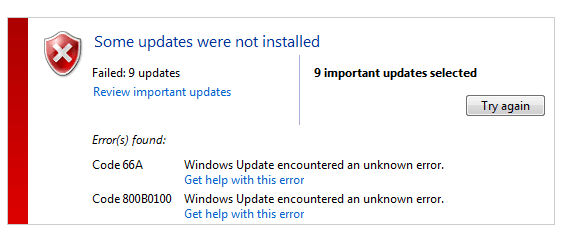
My Laptop was working fine. i bought it 4 years ago. It had genuine window which i activated myself. Now 3 days ago it suddenly started showing this annoying error. "WINDOWS IS NOT GENUINE". but it is absolutely genuine. furthermore i was continuously getting errors in installing NET framework updates help me here guys. Much appreciated.

Code:
Diagnostic Report (1.9.0027.0):
-----------------------------------------
Windows Validation Data-->

Validation Code: 50
Cached Online Validation Code: 0x0
Windows Product Key: *****-*****-WJ2H8-R6B6D-7QJB7
Windows Product Key Hash: ckKNc+BBPDWmo1LUlOkraNjlQ34=
Windows Product ID: 00359-OEM-8992687-00006
Windows Product ID Type: 2
Windows License Type: OEM SLP
Windows OS version: 6.1.7601.2.00010300.1.0.003
ID: {DD8C5CA0-5D1C-48AC-99B6-0426E87CB286}(3)
Is Admin: Yes
TestCab: 0x0
LegitcheckControl ActiveX: N/A, hr = 0x80070002
Signed By: N/A, hr = 0x80070002
Product Name: Windows 7 Home Premium
Architecture: 0x00000009
Build lab: 7601.win7sp1_gdr.150525-0603
TTS Error: 
Validation Diagnostic: 
Resolution Status: N/A

Vista WgaER Data-->
ThreatID(s): N/A, hr = 0x80070002
Version: N/A, hr = 0x80070002

Windows XP Notifications Data-->
Cached Result: N/A, hr = 0x80070002
File Exists: No
Version: N/A, hr = 0x80070002
WgaTray.exe Signed By: N/A, hr = 0x80070002
WgaLogon.dll Signed By: N/A, hr = 0x80070002

OGA Notifications Data-->
Cached Result: N/A, hr = 0x80070002
Version: N/A, hr = 0x80070002
OGAExec.exe Signed By: N/A, hr = 0x80070002
OGAAddin.dll Signed By: N/A, hr = 0x80070002

OGA Data-->
Office Status: 100 Genuine
Microsoft Office Enterprise 2007 - 100 Genuine
OGA Version: N/A, 0x80070002
Signed By: N/A, hr = 0x80070002
Office Diagnostics: 025D1FF3-364-80041010_025D1FF3-229-80041010_025D1FF3-230-1_025D1FF3-517-80040154_025D1FF3-237-80040154_025D1FF3-238-2_025D1FF3-244-80070002_025D1FF3-258-3_E2AD56EA-765-d003_E2AD56EA-766-0_E2AD56EA-134-80004005_E2AD56EA-765-b01a_E2AD56EA-766-0_E2AD56EA-148-80004005_16E0B333-89-80004005_B4D0AA8B-1029-80004005

Browser Data-->
Proxy settings: N/A
User Agent: Mozilla/4.0 (compatible; MSIE 8.0; Win32)
Default Browser: C:\Program Files (x86)\Google\Chrome\Application\chrome.exe
Download signed ActiveX controls: Prompt
Download unsigned ActiveX controls: Disabled
Run ActiveX controls and plug-ins: Allowed
Initialize and script ActiveX controls not marked as safe: Disabled
Allow scripting of Internet Explorer Webbrowser control: Disabled
Active scripting: Allowed
Script ActiveX controls marked as safe for scripting: Allowed

File Scan Data-->

Other data-->
Office Details: <GenuineResults><MachineData><UGUID>{DD8C5CA0-5D1C-48AC-99B6-0426E87CB286}</UGUID><Version>1.9.0027.0</Version><OS>6.1.7601.2.00010300.1.0.003</OS><Architecture>x64</Architecture><PKey>*****-*****-*****-*****-7QJB7</PKey><PID>00359-OEM-8992687-00006</PID><PIDType>2</PIDType><SID>S-1-5-21-368891800-3066650046-1979536018</SID><SYSTEM><Manufacturer>Acer</Manufacturer><Model>Aspire 5750</Model></SYSTEM><BIOS><Manufacturer>Acer</Manufacturer><Version>V1.14</Version><SMBIOSVersion major="2" minor="7"/><Date>20110907000000.000000+000</Date></BIOS><HWID>33A43407018400FE</HWID><UserLCID>0420</UserLCID><SystemLCID>0409</SystemLCID><TimeZone>Pakistan Standard Time(GMT+05:00)</TimeZone><iJoin>0</iJoin><SBID><stat>3</stat><msppid></msppid><name></name><model></model></SBID><OEM><OEMID>ACRSYS</OEMID><OEMTableID>ACRPRDCT</OEMTableID></OEM><GANotification/></MachineData><Software><Office><Result>100</Result><Products><Product GUID="{90120000-0030-0000-0000-0000000FF1CE}"><LegitResult>100</LegitResult><Name>Microsoft Office Enterprise 2007</Name><Ver>12</Ver><Val>64BC76978749586</Val><Hash>GW6PzcEVEDTVKeO5Ym5UUm41dBk=</Hash><Pid>89388-707-0441865-65420</Pid><PidType>14</PidType></Product></Products><Applications><App Id="15" Version="12" Result="100"/><App Id="16" Version="12" Result="100"/><App Id="18" Version="12" Result="100"/><App Id="19" Version="12" Result="100"/><App Id="1A" Version="12" Result="100"/><App Id="1B" Version="12" Result="100"/><App Id="44" Version="12" Result="100"/><App Id="A1" Version="12" Result="100"/><App Id="BA" Version="12" Result="100"/></Applications></Office></Software></GenuineResults>  

Spsys.log Content: 0x80070002

Licensing Data-->
C:\Windows\system32\slmgr.vbs(1131, 5) Microsoft VBScript runtime error: Permission denied

Windows Activation Technologies-->
HrOffline: 0x00000000
HrOnline: 0xC004C327
HealthStatus: 0x0000000000000000
Event Time Stamp: 7:2:2015 12:28
ActiveX: Registered, Version: 7.1.7600.16395
Admin Service: Registered, Version: 7.1.7600.16395
HealthStatus Bitmask Output:


HWID Data-->
HWID Hash Current: OAAAAAIAAQABAAEAAgABAAAABQABAAEA6GHoWBU/VOx2AKbSXIF39qit4tQGgbJszKNOqpDTLnM=

OEM Activation 1.0 Data-->
N/A

OEM Activation 2.0 Data-->
BIOS valid for OA 2.0: yes
Windows marker version: 0x20001
OEMID and OEMTableID Consistent: yes
BIOS Information: 
  ACPI Table Name	OEMID Value	OEMTableID Value
  APIC			ACRSYS		ACRPRDCT
  FACP			ACRSYS		ACRPRDCT
  HPET			ACRSYS		ACRPRDCT
  BOOT			ACRSYS		ACRPRDCT
  MCFG			ACRSYS		ACRPRDCT
  ASF!			ACRSYS		ACRPRDCT
  SLIC			ACRSYS		ACRPRDCT
  SSDT			ACRSYS		ACRPRDCT
  ASPT			ACRSYS		ACRPRDCT
  SSDT			ACRSYS		ACRPRDCT
  SSDT			ACRSYS		ACRPRDCT
 

My Computer My Computer

At a glance

Window 7 Home PremiumCore i34 GB
Computer type
PC/Desktop
Computer Manufacturer/Model Number
Acer
OS
Window 7 Home Premium
CPU
Core i3
Motherboard
intel
Memory
4 GB
Please first try recreating Licensing Store.
Recreate the Licensing Store
Go to Start >All Programs > Accessories
Right-Click on Command Prompt and select Run as Administrator - accept the UAC prompt
Run the following commands in the Command Prompt window, using the Enter key at the end of each

net stop sppsvc

(wait until the service has stopped before entering the following lines)

CD %windir%\ServiceProfiles\NetworkService\AppData\Roaming\Microsoft\SoftwareProtectionPlatform
REN tokens.dat tokens.bar
net start sppsvc
slui.exe

After a couple of seconds the Windows Activation dialog will appear.
You may be asked to re-activate and/or re-enter your product key, or Activation may occur automatically.
If you are asked for your Key, use the one on the COA sticker on the machine's case

Reboot and Postback with a new MGADiag report.


(Note:the Line 'CD %win......\SoftwareProtectionPlatform' is all on one line - it maybe broken in the Forum listing)
 
Last edited:

My Computer My Computer

At a glance

Win 7 x64 Home Premium (and x86 VirtualBox VM...i3 370M/i7 6500U8GB - finally :)/8GBit's an i3, dude!/dual Intel&nVidia
Computer type
Laptop
Computer Manufacturer/Model Number
Asus K52F or Lenovo B51-80
OS
Win 7 x64 Home Premium (and x86 VirtualBox VM)/Win10
CPU
i3 370M/i7 6500U
Motherboard
Asus/Lenovo
Memory
8GB - finally :)/8GB
Graphics Card(s)
it's an i3, dude!/dual Intel&nVidia
Sound Card
onboard
Monitor(s) Displays
15.6" built-in
Screen Resolution
1366x768/1920x1080
Hard Drives
750GB Seagate internal
Sundry external drives attached to other computers on the local network
1TB SSD on the Lenovo
PSU
n/a
Internet Speed
as much as I can get - usually on a dongle/phone, so <1MB/s
Antivirus
MSE/Defender
Browser
IE11/12/Edge/Chrome/FF(if I must)
Thanks for reply. I acted upon your instructions but I am facing this error in Command Prompt. Tried restarting. P.s i am running as administrator. Thanks.

ScreenShot_20150702214355.jpeg
 

My Computer My Computer

At a glance

Window 7 Home PremiumCore i34 GB
Computer type
PC/Desktop
Computer Manufacturer/Model Number
Acer
OS
Window 7 Home Premium
CPU
Core i3
Motherboard
intel
Memory
4 GB
Interesting! (you had a major error in the first attempt - and a common typo in the second (it took me a while to spot it myself!))

I recommend using this procedure to reduce errors...


Here are some instructions to make lifeeasier :)

1) To open anElevated Command Prompt Window (the ECP window), click on Start, All Programs,Accessories – then right-click on Command Prompt, and select Run asAdministrator. Accept the UAC prompt.

2) To run thecommands easier, highlight a block of commands, and right-click on thehighlight – select Copy. In the CP Window, click on the black/white icon at topleft – select Paste. The commands will run but may not complete the lastcommand, so hit the Enter Key once.

3) To copy theresults... click on the Black/White icon in the top left, and select Edit...'Select All', and hit the Enter key - then use Ctrl+V or r-click+Paste to pasteit into your response.
 

My Computer My Computer

At a glance

Win 7 x64 Home Premium (and x86 VirtualBox VM...i3 370M/i7 6500U8GB - finally :)/8GBit's an i3, dude!/dual Intel&nVidia
Computer type
Laptop
Computer Manufacturer/Model Number
Asus K52F or Lenovo B51-80
OS
Win 7 x64 Home Premium (and x86 VirtualBox VM)/Win10
CPU
i3 370M/i7 6500U
Motherboard
Asus/Lenovo
Memory
8GB - finally :)/8GB
Graphics Card(s)
it's an i3, dude!/dual Intel&nVidia
Sound Card
onboard
Monitor(s) Displays
15.6" built-in
Screen Resolution
1366x768/1920x1080
Hard Drives
750GB Seagate internal
Sundry external drives attached to other computers on the local network
1TB SSD on the Lenovo
PSU
n/a
Internet Speed
as much as I can get - usually on a dongle/phone, so <1MB/s
Antivirus
MSE/Defender
Browser
IE11/12/Edge/Chrome/FF(if I must)
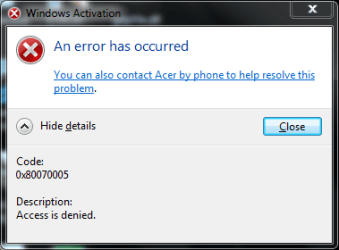
Thanks Mate. i did as you said. it was quite easy.:) but after the slui.exe command i got this error.
Further More "REN tokens" came back as "a duplicate file exists or file cannot be found"

ScreenShot_20150702234644.png
 

My Computer My Computer

At a glance

Window 7 Home PremiumCore i34 GB
Computer type
PC/Desktop
Computer Manufacturer/Model Number
Acer
OS
Window 7 Home Premium
CPU
Core i3
Motherboard
intel
Memory
4 GB
Please post a new MGADiag report
 

My Computer My Computer

At a glance

Win 7 x64 Home Premium (and x86 VirtualBox VM...i3 370M/i7 6500U8GB - finally :)/8GBit's an i3, dude!/dual Intel&nVidia
Computer type
Laptop
Computer Manufacturer/Model Number
Asus K52F or Lenovo B51-80
OS
Win 7 x64 Home Premium (and x86 VirtualBox VM)/Win10
CPU
i3 370M/i7 6500U
Motherboard
Asus/Lenovo
Memory
8GB - finally :)/8GB
Graphics Card(s)
it's an i3, dude!/dual Intel&nVidia
Sound Card
onboard
Monitor(s) Displays
15.6" built-in
Screen Resolution
1366x768/1920x1080
Hard Drives
750GB Seagate internal
Sundry external drives attached to other computers on the local network
1TB SSD on the Lenovo
PSU
n/a
Internet Speed
as much as I can get - usually on a dongle/phone, so <1MB/s
Antivirus
MSE/Defender
Browser
IE11/12/Edge/Chrome/FF(if I must)
here it is.

Code:
Diagnostic Report (1.9.0027.0):
-----------------------------------------
Windows Validation Data-->

Validation Code: 50
Cached Online Validation Code: 0x0
Windows Product Key: *****-*****-WJ2H8-R6B6D-7QJB7
Windows Product Key Hash: ckKNc+BBPDWmo1LUlOkraNjlQ34=
Windows Product ID: 00359-OEM-8992687-00006
Windows Product ID Type: 2
Windows License Type: OEM SLP
Windows OS version: 6.1.7601.2.00010300.1.0.003
ID: {DD8C5CA0-5D1C-48AC-99B6-0426E87CB286}(3)
Is Admin: Yes
TestCab: 0x0
LegitcheckControl ActiveX: N/A, hr = 0x80070002
Signed By: N/A, hr = 0x80070002
Product Name: Windows 7 Home Premium
Architecture: 0x00000009
Build lab: 7601.win7sp1_gdr.150525-0603
TTS Error: 
Validation Diagnostic: 
Resolution Status: N/A

Vista WgaER Data-->
ThreatID(s): N/A, hr = 0x80070002
Version: N/A, hr = 0x80070002

Windows XP Notifications Data-->
Cached Result: N/A, hr = 0x80070002
File Exists: No
Version: N/A, hr = 0x80070002
WgaTray.exe Signed By: N/A, hr = 0x80070002
WgaLogon.dll Signed By: N/A, hr = 0x80070002

OGA Notifications Data-->
Cached Result: N/A, hr = 0x80070002
Version: N/A, hr = 0x80070002
OGAExec.exe Signed By: N/A, hr = 0x80070002
OGAAddin.dll Signed By: N/A, hr = 0x80070002

OGA Data-->
Office Status: 100 Genuine
Microsoft Office Enterprise 2007 - 100 Genuine
OGA Version: N/A, 0x80070002
Signed By: N/A, hr = 0x80070002
Office Diagnostics: 025D1FF3-364-80041010_025D1FF3-229-80041010_025D1FF3-230-1_025D1FF3-517-80040154_025D1FF3-237-80040154_025D1FF3-238-2_025D1FF3-244-80070002_025D1FF3-258-3_E2AD56EA-765-d003_E2AD56EA-766-0_E2AD56EA-134-80004005_E2AD56EA-765-b01a_E2AD56EA-766-0_E2AD56EA-148-80004005_16E0B333-89-80004005_B4D0AA8B-1029-80004005

Browser Data-->
Proxy settings: N/A
User Agent: Mozilla/4.0 (compatible; MSIE 8.0; Win32)
Default Browser: C:\Program Files (x86)\Google\Chrome\Application\chrome.exe
Download signed ActiveX controls: Prompt
Download unsigned ActiveX controls: Disabled
Run ActiveX controls and plug-ins: Allowed
Initialize and script ActiveX controls not marked as safe: Disabled
Allow scripting of Internet Explorer Webbrowser control: Disabled
Active scripting: Allowed
Script ActiveX controls marked as safe for scripting: Allowed

File Scan Data-->

Other data-->
Office Details: <GenuineResults><MachineData><UGUID>{DD8C5CA0-5D1C-48AC-99B6-0426E87CB286}</UGUID><Version>1.9.0027.0</Version><OS>6.1.7601.2.00010300.1.0.003</OS><Architecture>x64</Architecture><PKey>*****-*****-*****-*****-7QJB7</PKey><PID>00359-OEM-8992687-00006</PID><PIDType>2</PIDType><SID>S-1-5-21-368891800-3066650046-1979536018</SID><SYSTEM><Manufacturer>Acer</Manufacturer><Model>Aspire 5750</Model></SYSTEM><BIOS><Manufacturer>Acer</Manufacturer><Version>V1.14</Version><SMBIOSVersion major="2" minor="7"/><Date>20110907000000.000000+000</Date></BIOS><HWID>33103307018400FE</HWID><UserLCID>0420</UserLCID><SystemLCID>0409</SystemLCID><TimeZone>Pakistan Standard Time(GMT+05:00)</TimeZone><iJoin>0</iJoin><SBID><stat>3</stat><msppid></msppid><name></name><model></model></SBID><OEM><OEMID>ACRSYS</OEMID><OEMTableID>ACRPRDCT</OEMTableID></OEM><GANotification/></MachineData><Software><Office><Result>100</Result><Products><Product GUID="{90120000-0030-0000-0000-0000000FF1CE}"><LegitResult>100</LegitResult><Name>Microsoft Office Enterprise 2007</Name><Ver>12</Ver><Val>64BC76978749586</Val><Hash>GW6PzcEVEDTVKeO5Ym5UUm41dBk=</Hash><Pid>89388-707-0441865-65420</Pid><PidType>14</PidType></Product></Products><Applications><App Id="15" Version="12" Result="100"/><App Id="16" Version="12" Result="100"/><App Id="18" Version="12" Result="100"/><App Id="19" Version="12" Result="100"/><App Id="1A" Version="12" Result="100"/><App Id="1B" Version="12" Result="100"/><App Id="44" Version="12" Result="100"/><App Id="A1" Version="12" Result="100"/><App Id="BA" Version="12" Result="100"/></Applications></Office></Software></GenuineResults>  

Spsys.log Content: 0x80070002

Licensing Data-->
C:\Windows\system32\slmgr.vbs(1131, 5) Microsoft VBScript runtime error: Permission denied

Windows Activation Technologies-->
HrOffline: 0x00000000
HrOnline: 0xC004C327
HealthStatus: 0x0000000000000000
Event Time Stamp: 7:2:2015 12:45
ActiveX: Registered, Version: 7.1.7600.16395
Admin Service: Registered, Version: 7.1.7600.16395
HealthStatus Bitmask Output:


HWID Data-->
HWID Hash Current: OAAAAAIAAQABAAEAAgABAAAABQABAAEA6GHoWBU/VOx2AKbSXIF39qit4tQGgbJszKNOqpDTLnM=

OEM Activation 1.0 Data-->
N/A

OEM Activation 2.0 Data-->
BIOS valid for OA 2.0: yes
Windows marker version: 0x20001
OEMID and OEMTableID Consistent: yes
BIOS Information: 
  ACPI Table Name	OEMID Value	OEMTableID Value
  APIC			ACRSYS		ACRPRDCT
  FACP			ACRSYS		ACRPRDCT
  HPET			ACRSYS		ACRPRDCT
  BOOT			ACRSYS		ACRPRDCT
  MCFG			ACRSYS		ACRPRDCT
  ASF!			ACRSYS		ACRPRDCT
  SLIC			ACRSYS		ACRPRDCT
  SSDT			ACRSYS		ACRPRDCT
  ASPT			ACRSYS		ACRPRDCT
  SSDT			ACRSYS		ACRPRDCT
  SSDT			ACRSYS		ACRPRDCT
 

My Computer My Computer

At a glance

Window 7 Home PremiumCore i34 GB
Computer type
PC/Desktop
Computer Manufacturer/Model Number
Acer
OS
Window 7 Home Premium
CPU
Core i3
Motherboard
intel
Memory
4 GB
Just wondering. The time stamps between the two reports.


11 hours ago

Event Time Stamp: 7:2:2015 12:28


14 minutes ago

Event Time Stamp: 7:2:2015 12:45
 

My Computer My Computer

At a glance

Windows 10 Pro. 64/ version 1709 Windows 7 Pr...Intel i7-6800K @ 4.3Corsair Platinum 16 gig @2400EVGA GTX 1070 OC
Computer type
PC/Desktop
Computer Manufacturer/Model Number
Home made Desktop
OS
Windows 10 Pro. 64/ version 1709 Windows 7 Pro/64
CPU
Intel i7-6800K @ 4.3
Motherboard
ASUS X-99 Deluxe II
Memory
Corsair Platinum 16 gig @2400
Graphics Card(s)
EVGA GTX 1070 OC
Monitor(s) Displays
Asus 27" LED LCD/VE278Q
Screen Resolution
1920-1080 or 1280-720 HDMI
Hard Drives
INTEL SSD 730-240 Gb Sata 3.0/
PSU
EVGA Platium 1200W
Case
Phanteks Luxe Tempered Glass 8 fans/ one radiator
Cooling
XSPC/ Water Cooled CPU
Keyboard
Das 4 Professional
Mouse
Logitech M705/MX Anywhere 2-S
Internet Speed
100 mbits
Antivirus
Microsoft Security Essentials/ Malwarebytes Premium 3.0/ SAS
Browser
I.E. 11 default/Firefox/ ISP Time Warner Cable/Spectrum
Other Info
LG BluRay Burner/
Sound system-KLipsch-THX/
Icy Dock ssd Hot Swap bays.
That's normal, Jack - that time stamp only changes when the system is manually validated, or the status changes.

The more interesting error is the one from the screenshot...

SAGhuman,

Open an ElevatedCommand Prompt, and run the following commands

sc sdshow plugplay
REG QUERY "HKEY_LOCAL_MACHINE\SOFTWARE\Microsoft\WindowsNT\CurrentVersion\ProfileList\S-1-5-18" /S
REG QUERY "HKEY_LOCAL_MACHINE\SOFTWARE\Microsoft\WindowsNT\CurrentVersion\ProfileList\S-1-5-19" /S
REG QUERY "HKEY_LOCAL_MACHINE\SOFTWARE\Microsoft\WindowsNT\CurrentVersion\ProfileList\S-1-5-20" /S

Copy and pastethe results to your reply

Here are some instructions to make lifeeasier :)

1) To open an Elevated Command Prompt Window (the ECP window), click on Start, All Programs, Accessories – then right-click on Command Prompt, and select Run as Administrator. Accept the UAC prompt.

2) To run the commands easier, highlight the block of commands, and right-click on the highlight – select Copy. In the CP Window, click on the black/white icon at topleft – select Paste. The commands will run but may not complete the last command, so hit the Enter Key once.

3) To copy the results... click on the Black/White icon in the top left, and select Edit...'Select All', and hit the Enter key - then use Ctrl+V or r-click+Paste to paste it into your response.
 

My Computer My Computer

At a glance

Win 7 x64 Home Premium (and x86 VirtualBox VM...i3 370M/i7 6500U8GB - finally :)/8GBit's an i3, dude!/dual Intel&nVidia
Computer type
Laptop
Computer Manufacturer/Model Number
Asus K52F or Lenovo B51-80
OS
Win 7 x64 Home Premium (and x86 VirtualBox VM)/Win10
CPU
i3 370M/i7 6500U
Motherboard
Asus/Lenovo
Memory
8GB - finally :)/8GB
Graphics Card(s)
it's an i3, dude!/dual Intel&nVidia
Sound Card
onboard
Monitor(s) Displays
15.6" built-in
Screen Resolution
1366x768/1920x1080
Hard Drives
750GB Seagate internal
Sundry external drives attached to other computers on the local network
1TB SSD on the Lenovo
PSU
n/a
Internet Speed
as much as I can get - usually on a dongle/phone, so <1MB/s
Antivirus
MSE/Defender
Browser
IE11/12/Edge/Chrome/FF(if I must)
Thanks Noel. I Googled and understand better.
 

My Computer My Computer

At a glance

Windows 10 Pro. 64/ version 1709 Windows 7 Pr...Intel i7-6800K @ 4.3Corsair Platinum 16 gig @2400EVGA GTX 1070 OC
Computer type
PC/Desktop
Computer Manufacturer/Model Number
Home made Desktop
OS
Windows 10 Pro. 64/ version 1709 Windows 7 Pro/64
CPU
Intel i7-6800K @ 4.3
Motherboard
ASUS X-99 Deluxe II
Memory
Corsair Platinum 16 gig @2400
Graphics Card(s)
EVGA GTX 1070 OC
Monitor(s) Displays
Asus 27" LED LCD/VE278Q
Screen Resolution
1920-1080 or 1280-720 HDMI
Hard Drives
INTEL SSD 730-240 Gb Sata 3.0/
PSU
EVGA Platium 1200W
Case
Phanteks Luxe Tempered Glass 8 fans/ one radiator
Cooling
XSPC/ Water Cooled CPU
Keyboard
Das 4 Professional
Mouse
Logitech M705/MX Anywhere 2-S
Internet Speed
100 mbits
Antivirus
Microsoft Security Essentials/ Malwarebytes Premium 3.0/ SAS
Browser
I.E. 11 default/Firefox/ ISP Time Warner Cable/Spectrum
Other Info
LG BluRay Burner/
Sound system-KLipsch-THX/
Icy Dock ssd Hot Swap bays.
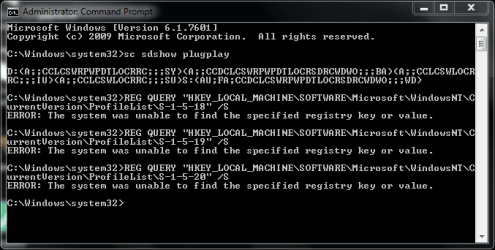
Just following your instructions. it says Registry is missing. here is screenshot of CP.

ScreenShot_20150703042109.png
 

My Computer My Computer

At a glance

Window 7 Home PremiumCore i34 GB
Computer type
PC/Desktop
Computer Manufacturer/Model Number
Acer
OS
Window 7 Home Premium
CPU
Core i3
Motherboard
intel
Memory
4 GB
SAGhuman is this problem computer a desktop, laptop, notebood ect.?
 

My Computer My Computer

At a glance

Windows 10 Pro. 64/ version 1709 Windows 7 Pr...Intel i7-6800K @ 4.3Corsair Platinum 16 gig @2400EVGA GTX 1070 OC
Computer type
PC/Desktop
Computer Manufacturer/Model Number
Home made Desktop
OS
Windows 10 Pro. 64/ version 1709 Windows 7 Pro/64
CPU
Intel i7-6800K @ 4.3
Motherboard
ASUS X-99 Deluxe II
Memory
Corsair Platinum 16 gig @2400
Graphics Card(s)
EVGA GTX 1070 OC
Monitor(s) Displays
Asus 27" LED LCD/VE278Q
Screen Resolution
1920-1080 or 1280-720 HDMI
Hard Drives
INTEL SSD 730-240 Gb Sata 3.0/
PSU
EVGA Platium 1200W
Case
Phanteks Luxe Tempered Glass 8 fans/ one radiator
Cooling
XSPC/ Water Cooled CPU
Keyboard
Das 4 Professional
Mouse
Logitech M705/MX Anywhere 2-S
Internet Speed
100 mbits
Antivirus
Microsoft Security Essentials/ Malwarebytes Premium 3.0/ SAS
Browser
I.E. 11 default/Firefox/ ISP Time Warner Cable/Spectrum
Other Info
LG BluRay Burner/
Sound system-KLipsch-THX/
Icy Dock ssd Hot Swap bays.
@laybackbear Laptop. Acer Aspire 5750 core i3
 

My Computer My Computer

At a glance

Window 7 Home PremiumCore i34 GB
Computer type
PC/Desktop
Computer Manufacturer/Model Number
Acer
OS
Window 7 Home Premium
CPU
Core i3
Motherboard
intel
Memory
4 GB
It appears that you have major problems - if that output was correct, I'd be surprised that the machine boots at all!
Unfortunately my post was full of typos and I missed the critical corrections. :(

Here's the corrected version

Open an Elevated Command Prompt, and run the following commands

sc sdshow plugplay
REG QUERY "HKEY_LOCAL_MACHINE\SOFTWARE\Microsoft\Windows NT\CurrentVersion\ProfileList\S-1-5-18" /S
REG QUERY "HKEY_LOCAL_MACHINE\SOFTWARE\Microsoft\Windows NT\CurrentVersion\ProfileList\S-1-5-19" /S
REG QUERY "HKEY_LOCAL_MACHINE\SOFTWARE\Microsoft\Windows NT\CurrentVersion\ProfileList\S-1-5-20" /S

Copy and paste the results to your reply

Here are some instructions to make life easier :)

1) To open an Elevated Command Prompt Window (the ECP window), click on Start, All Programs, Accessories – then right-click on Command Prompt, and select Run as Administrator. Accept the UAC prompt.

2) To run the commands easier, highlight the block of commands, and right-click on the highlight – select Copy. In the CP Window, click on the black/white icon at topleft – select Paste. The commands will run but may not complete the last command, so hit the Enter Key once.

3) To copy the results... click on the Black/White icon in the top left, and select Edit...'Select All', and hit the Enter key - then use Ctrl+V or r-click+Paste to paste it into your response.
 

My Computer My Computer

At a glance

Win 7 x64 Home Premium (and x86 VirtualBox VM...i3 370M/i7 6500U8GB - finally :)/8GBit's an i3, dude!/dual Intel&nVidia
Computer type
Laptop
Computer Manufacturer/Model Number
Asus K52F or Lenovo B51-80
OS
Win 7 x64 Home Premium (and x86 VirtualBox VM)/Win10
CPU
i3 370M/i7 6500U
Motherboard
Asus/Lenovo
Memory
8GB - finally :)/8GB
Graphics Card(s)
it's an i3, dude!/dual Intel&nVidia
Sound Card
onboard
Monitor(s) Displays
15.6" built-in
Screen Resolution
1366x768/1920x1080
Hard Drives
750GB Seagate internal
Sundry external drives attached to other computers on the local network
1TB SSD on the Lenovo
PSU
n/a
Internet Speed
as much as I can get - usually on a dongle/phone, so <1MB/s
Antivirus
MSE/Defender
Browser
IE11/12/Edge/Chrome/FF(if I must)
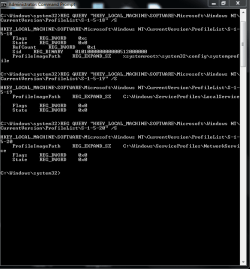
really? it doesn't show any of the major errors.. but sometime during booting up. a repair screen starts up. something like memory diagnostic. Anyway. thanks Noel. here are the results of CP.

ScreenShot_20150703183229.png
 

My Computer My Computer

At a glance

Window 7 Home PremiumCore i34 GB
Computer type
PC/Desktop
Computer Manufacturer/Model Number
Acer
OS
Window 7 Home Premium
CPU
Core i3
Motherboard
intel
Memory
4 GB
Those answers look normal - but please use the copy/past procedure from my earlier posts to post the results, as it reduces bandwidth and doesn't miss anything if the data rolls off the current screen.

We'll have to look elsewhere for the problem then...

Please open an Elevated Command Prompt ad run the following commands:

REG QUERY HKU
REG QUERY HKU\S-1-5-18
REG QUERY HKU\S-1-5-19
REG QUERY HKU\S-1-5-20

Post the results
 

My Computer My Computer

At a glance

Win 7 x64 Home Premium (and x86 VirtualBox VM...i3 370M/i7 6500U8GB - finally :)/8GBit's an i3, dude!/dual Intel&nVidia
Computer type
Laptop
Computer Manufacturer/Model Number
Asus K52F or Lenovo B51-80
OS
Win 7 x64 Home Premium (and x86 VirtualBox VM)/Win10
CPU
i3 370M/i7 6500U
Motherboard
Asus/Lenovo
Memory
8GB - finally :)/8GB
Graphics Card(s)
it's an i3, dude!/dual Intel&nVidia
Sound Card
onboard
Monitor(s) Displays
15.6" built-in
Screen Resolution
1366x768/1920x1080
Hard Drives
750GB Seagate internal
Sundry external drives attached to other computers on the local network
1TB SSD on the Lenovo
PSU
n/a
Internet Speed
as much as I can get - usually on a dongle/phone, so <1MB/s
Antivirus
MSE/Defender
Browser
IE11/12/Edge/Chrome/FF(if I must)
here are the results. hope this solves something.:p

Code:
Microsoft Windows [Version 6.1.7601]
Copyright (c) 2009 Microsoft Corporation.  All rights reserved.

C:\Windows\system32>REG QUERY HKU

HKEY_USERS\.DEFAULT
HKEY_USERS\S-1-5-19
HKEY_USERS\S-1-5-20
HKEY_USERS\S-1-5-21-368891800-3066650046-1979536018-1000
HKEY_USERS\S-1-5-21-368891800-3066650046-1979536018-1000_Classes
HKEY_USERS\S-1-5-18

C:\Windows\system32>REG QUERY HKU\S-1-5-18

HKEY_USERS\S-1-5-18\AppEvents
HKEY_USERS\S-1-5-18\Control Panel
HKEY_USERS\S-1-5-18\Environment
HKEY_USERS\S-1-5-18\EUDC
HKEY_USERS\S-1-5-18\Identities
HKEY_USERS\S-1-5-18\Keyboard Layout
HKEY_USERS\S-1-5-18\LAST_CALL_TIME
HKEY_USERS\S-1-5-18\Printers
HKEY_USERS\S-1-5-18\Software
HKEY_USERS\S-1-5-18\SYSTEM

C:\Windows\system32>REG QUERY HKU\S-1-5-19

HKEY_USERS\S-1-5-19\AppEvents
HKEY_USERS\S-1-5-19\Console
HKEY_USERS\S-1-5-19\Control Panel
HKEY_USERS\S-1-5-19\Environment
HKEY_USERS\S-1-5-19\EUDC
HKEY_USERS\S-1-5-19\Keyboard Layout
HKEY_USERS\S-1-5-19\Printers
HKEY_USERS\S-1-5-19\Software

C:\Windows\system32>REG QUERY HKU\S-1-5-20

HKEY_USERS\S-1-5-20\AppEvents
HKEY_USERS\S-1-5-20\Console
HKEY_USERS\S-1-5-20\Control Panel
HKEY_USERS\S-1-5-20\Environment
HKEY_USERS\S-1-5-20\EUDC
HKEY_USERS\S-1-5-20\Identities
HKEY_USERS\S-1-5-20\Keyboard Layout
HKEY_USERS\S-1-5-20\Network
HKEY_USERS\S-1-5-20\Printers
HKEY_USERS\S-1-5-20\Software
HKEY_USERS\S-1-5-20\System

C:\Windows\system32>
 

My Computer My Computer

At a glance

Window 7 Home PremiumCore i34 GB
Computer type
PC/Desktop
Computer Manufacturer/Model Number
Acer
OS
Window 7 Home Premium
CPU
Core i3
Motherboard
intel
Memory
4 GB
Those look normal as well - let's go back to basics and gather some general diagnostics...


Pleasefollow the WindowsUpdate Posting Instructions and postthe requested data


If thefile is too large (8MB compressed), remove the older CBSPersist cab files untilthe final file is below the limit - you can always post them separately afterzipping them. (the forum doesn't allow the upload of bare CAB files, for anumber of reasons)


Pleasealso post the C:\Windows\windowsudpate.log file

ALSO


Open Event Viewer

click on theWindows logs entry in the left pane to expand it.

Now click on theApplication entry - wait while it loads.

Click on 'File'in the menu bar and select Save...

Save the file asAppevt.evtx

Repeat for theSystem log

then zip both,and upload them.


My Computer My Computer

At a glance

Win 7 x64 Home Premium (and x86 VirtualBox VM...i3 370M/i7 6500U8GB - finally :)/8GBit's an i3, dude!/dual Intel&nVidia
Computer type
Laptop
Computer Manufacturer/Model Number
Asus K52F or Lenovo B51-80
OS
Win 7 x64 Home Premium (and x86 VirtualBox VM)/Win10
CPU
i3 370M/i7 6500U
Motherboard
Asus/Lenovo
Memory
8GB - finally :)/8GB
Graphics Card(s)
it's an i3, dude!/dual Intel&nVidia
Sound Card
onboard
Monitor(s) Displays
15.6" built-in
Screen Resolution
1366x768/1920x1080
Hard Drives
750GB Seagate internal
Sundry external drives attached to other computers on the local network
1TB SSD on the Lenovo
PSU
n/a
Internet Speed
as much as I can get - usually on a dongle/phone, so <1MB/s
Antivirus
MSE/Defender
Browser
IE11/12/Edge/Chrome/FF(if I must)

My Computer My Computer

At a glance

Window 7 Home PremiumCore i34 GB
Computer type
PC/Desktop
Computer Manufacturer/Model Number
Acer
OS
Window 7 Home Premium
CPU
Core i3
Motherboard
intel
Memory
4 GB
It looks to me as if you uploaded shortcuts rather than the needed files... please try again.
 

My Computer My Computer

At a glance

Win 7 x64 Home Premium (and x86 VirtualBox VM...i3 370M/i7 6500U8GB - finally :)/8GBit's an i3, dude!/dual Intel&nVidia
Computer type
Laptop
Computer Manufacturer/Model Number
Asus K52F or Lenovo B51-80
OS
Win 7 x64 Home Premium (and x86 VirtualBox VM)/Win10
CPU
i3 370M/i7 6500U
Motherboard
Asus/Lenovo
Memory
8GB - finally :)/8GB
Graphics Card(s)
it's an i3, dude!/dual Intel&nVidia
Sound Card
onboard
Monitor(s) Displays
15.6" built-in
Screen Resolution
1366x768/1920x1080
Hard Drives
750GB Seagate internal
Sundry external drives attached to other computers on the local network
1TB SSD on the Lenovo
PSU
n/a
Internet Speed
as much as I can get - usually on a dongle/phone, so <1MB/s
Antivirus
MSE/Defender
Browser
IE11/12/Edge/Chrome/FF(if I must)
Back
Top