
Windows System Image fail's using solid state drive. (SSD)

Donz

New member
Member
Local time
7:07 AM
Messages
49
I switched to a Samsung 850 EVO 500 Gig SSD.

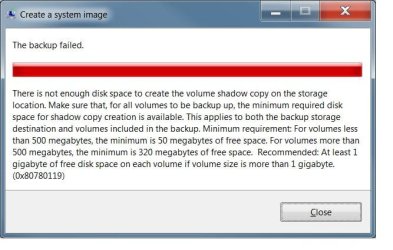
Now I'm unable to create a Windows system image.

While Googling, I found that it's due to the lack of free space on the small System or "Data" partition on my c: drive.

The 5% free space appears to be the problem.

The only work around is to use Macrium or other software to do my backup image file.

See photo's:
 

Attachments
  • Sys Image.jpg
    Sys Image.jpg
    42.7 KB · Views: 23
  • Disk0.jpg
    Disk0.jpg
    73.4 KB · Views: 3

My Computer

Computer type
PC/Desktop
Computer Manufacturer/Model Number
Hp p6608f
OS
Windows 7 Home Premium 64
CPU
Intel(R) Core(TM) i3 CPU
Memory
8.00 GB
Graphics Card(s)
ATI Radeon HD 4600 Series
Sound Card
(1) ATI High Definition Audio Device (2) Realtek High Defi
Monitor(s) Displays
one Asus VW266H one Samsung T260HD
Screen Resolution
1920 x 1200
Hard Drives
ST3750528AS
Other Info
BIOS Date: 04/09/10 10:04:52 Ver: 5.28
Here are my suggestions.
1. Use Macrium to make and restore images. There are too many issues with Win 7's imaging utility.
2. For system images, you want to have a system partition that contains your only system.
You can back up non-system data with FreeFileSync, SynchToy, et al.
64 gb should be plenty large enough for a system partition. Mine never exceeded 20 gb used.
3. You can use a utility (others can recommend one) to shrink your system partition and add another partition without reinstalling Win 7. You may have to change some pointers to the new partition.
 

My Computer

Computer Manufacturer/Model Number
Home Built
OS
Windows 7 Ultimate x64
CPU
QuadCore Intel Core i7 920, 2666 MHz (20 x 133)
Motherboard
Asus P6T
Memory
6134 MB (DDR3-1333 DDR3 SDRAM)
Graphics Card(s)
(2 - SLI) NVIDIA GeForce GTS 250 (1024 MB)
Sound Card
Onboard Realtek ALC888/1200 @ Intel 82801JB IC
Monitor(s) Displays
HDMII
Screen Resolution
1280 x 800
Hard Drives
Crucial M4 (64 GB SSD)
WD Caviar Blacks
WD5001AALS-00J7B1 ATA Device (465 GB)
WD5001AALS-00L3B2 ATA Device (465 GB)
WD Elements USB External (250 GB)
PSU
Corsair 550
Case
iStarUSA S-10000BL Black
Victor

Thanks for your reply.

All that I am looking for is a simple way to create a system image file of my C: drive.
As you can see above, all that I have is my HP (C) along with the small Data partition (usually named System)
Samsung Magician software renamed that partition to Data.


The Windows 7 backup system image software worked fine until I installed the Samsung SSD.

I would think that Microsoft and/or Samsung would create a fix for this issue with Windows system image.


Don
 

My Computer

Computer type
PC/Desktop
Computer Manufacturer/Model Number
Hp p6608f
OS
Windows 7 Home Premium 64
CPU
Intel(R) Core(TM) i3 CPU
Memory
8.00 GB
Graphics Card(s)
ATI Radeon HD 4600 Series
Sound Card
(1) ATI High Definition Audio Device (2) Realtek High Defi
Monitor(s) Displays
one Asus VW266H one Samsung T260HD
Screen Resolution
1920 x 1200
Hard Drives
ST3750528AS
Other Info
BIOS Date: 04/09/10 10:04:52 Ver: 5.28
Well, Win 7 system image isn't very "smart." I think your problem is the size of the C: partition. What was the previous size?
What is the size of your target drive?
 

My Computer

Computer Manufacturer/Model Number
Home Built
OS
Windows 7 Ultimate x64
CPU
QuadCore Intel Core i7 920, 2666 MHz (20 x 133)
Motherboard
Asus P6T
Memory
6134 MB (DDR3-1333 DDR3 SDRAM)
Graphics Card(s)
(2 - SLI) NVIDIA GeForce GTS 250 (1024 MB)
Sound Card
Onboard Realtek ALC888/1200 @ Intel 82801JB IC
Monitor(s) Displays
HDMII
Screen Resolution
1280 x 800
Hard Drives
Crucial M4 (64 GB SSD)
WD Caviar Blacks
WD5001AALS-00J7B1 ATA Device (465 GB)
WD5001AALS-00L3B2 ATA Device (465 GB)
WD Elements USB External (250 GB)
PSU
Corsair 550
Case
iStarUSA S-10000BL Black
Victor
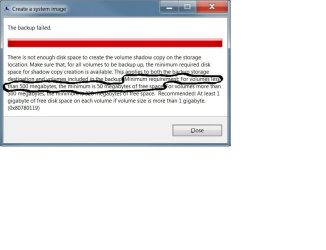
The problem is with the small size of my "Data" partition free space.
Poor name, it's usually named System. Samsung software renamed it.
Please read the error warning attached.

Don
 

Attachments

  • Sys Image3.jpg
    Sys Image3.jpg
    45.3 KB · Views: 0
Last edited:

My Computer

Computer type
PC/Desktop
Computer Manufacturer/Model Number
Hp p6608f
OS
Windows 7 Home Premium 64
CPU
Intel(R) Core(TM) i3 CPU
Memory
8.00 GB
Graphics Card(s)
ATI Radeon HD 4600 Series
Sound Card
(1) ATI High Definition Audio Device (2) Realtek High Defi
Monitor(s) Displays
one Asus VW266H one Samsung T260HD
Screen Resolution
1920 x 1200
Hard Drives
ST3750528AS
Other Info
BIOS Date: 04/09/10 10:04:52 Ver: 5.28
Back
Top