Windows Task Manager

Firestrider

New member
Power User
VIP
Local time
8:11 AM
Messages
333
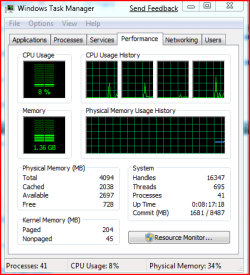
I noticed a new row for Physical Memory in W7 from Vista as "Available", so what is the difference between Cached, Available, and Free memory now?
 

Attachments

  • taskmanager.PNG
    taskmanager.PNG
    13.8 KB · Views: 1,280

My Computer

Computer Manufacturer/Model Number
Intel WBIBX10J
OS
Linux (Debian, Android)
CPU
Intel Core i7 860
Motherboard
Intel DP55WB
Memory
2x 2GB Kingston DDR3-1333
Graphics Card(s)
AMD Radeon HD 5750
Sound Card
Realtek ALC888
Monitor(s) Displays
2x Dell Inc. E248WFP
Screen Resolution
3840x1200
Hard Drives
Intel X25-V
Samsung HD103SJ
PSU
Corsair CX400
Case
Silverstone GD05
Cooling
Stock
Keyboard
Dell Inc. Bluetooth Wireless
Internet Speed
30 Mbps
Anyone know? Also what are your thoughts on new resource monitor? You can track individual processes now.
 

My Computer

Computer Manufacturer/Model Number
Intel WBIBX10J
OS
Linux (Debian, Android)
CPU
Intel Core i7 860
Motherboard
Intel DP55WB
Memory
2x 2GB Kingston DDR3-1333
Graphics Card(s)
AMD Radeon HD 5750
Sound Card
Realtek ALC888
Monitor(s) Displays
2x Dell Inc. E248WFP
Screen Resolution
3840x1200
Hard Drives
Intel X25-V
Samsung HD103SJ
PSU
Corsair CX400
Case
Silverstone GD05
Cooling
Stock
Keyboard
Dell Inc. Bluetooth Wireless
Internet Speed
30 Mbps
Hello Firestrider -

  • Total is the amount of RAM installed on your computer, listed in megabytes (MB).
  • Cached refers to the amount of physical memory used recently for system resources.
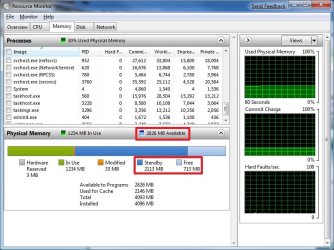
  • Available is the total of standby and free memory from the Resource Monitor.
  • Free is the amount of memory that is currently unused or doesn't contain useful information (unlike cached files, which do contain useful information).
Hope this helps,
Shawn
 

My Computer

Computer type
PC/Desktop
Computer Manufacturer/Model Number
Self built custom
OS
64-bit Windows 11 Pro for Workstations
CPU
Intel i7-8700K OC'd to 5 GHz
Motherboard
ASUS ROG Maximus XI Formula Z390
Memory
64 GB (4x16GB) G.SKILL TridentZ RGB DDR4 3600 MHz
Graphics Card(s)
ASUS ROG-STRIX-GTX1080TI-O11G-GAMING
Sound Card
Integrated
Monitor(s) Displays
2 x Samsung Odyssey G7 27"
Screen Resolution
2560x1440
Hard Drives
1TB Samsung 990 PRO M.2,
4TB Samsung 990 PRO PRO M.2,
TerraMaster F8 SSD Plus NAS
PSU
Seasonic Prime Titanium 850W
Case
Thermaltake Core P3
Cooling
Corsair Hydro H115i
Keyboard
Logitech wireless K800
Mouse
Logitech MX Master 4
Internet Speed
2 Gb/s Download and 100 Mb/s Upload
Antivirus
Malwarebyte Anti-Malware Premium
Browser
Google Chrome
Other Info
Logitech Z625 speaker system,
Logitech BRIO 4K Pro webcam,
HP Color LaserJet Pro MFP M477fdn,
APC SMART-UPS RT 1000 XL - SURT1000XLI,
Galaxy S23 Plus phone
Thanks for the response. Shouldn't Cached + Free = Total memory? What are all the other bytes in memory used for if they are not cached or free?
 

My Computer

Computer Manufacturer/Model Number
Intel WBIBX10J
OS
Linux (Debian, Android)
CPU
Intel Core i7 860
Motherboard
Intel DP55WB
Memory
2x 2GB Kingston DDR3-1333
Graphics Card(s)
AMD Radeon HD 5750
Sound Card
Realtek ALC888
Monitor(s) Displays
2x Dell Inc. E248WFP
Screen Resolution
3840x1200
Hard Drives
Intel X25-V
Samsung HD103SJ
PSU
Corsair CX400
Case
Silverstone GD05
Cooling
Stock
Keyboard
Dell Inc. Bluetooth Wireless
Internet Speed
30 Mbps
Firestrider,

After doing more research on it, it appears as Available is the total of standby and free memory for programs. It is shown better in the Resource Monitor. (updated post above)

Resource_Monitor.jpg
 

My Computer

Computer type
PC/Desktop
Computer Manufacturer/Model Number
Self built custom
OS
64-bit Windows 11 Pro for Workstations
CPU
Intel i7-8700K OC'd to 5 GHz
Motherboard
ASUS ROG Maximus XI Formula Z390
Memory
64 GB (4x16GB) G.SKILL TridentZ RGB DDR4 3600 MHz
Graphics Card(s)
ASUS ROG-STRIX-GTX1080TI-O11G-GAMING
Sound Card
Integrated
Monitor(s) Displays
2 x Samsung Odyssey G7 27"
Screen Resolution
2560x1440
Hard Drives
1TB Samsung 990 PRO M.2,
4TB Samsung 990 PRO PRO M.2,
TerraMaster F8 SSD Plus NAS
PSU
Seasonic Prime Titanium 850W
Case
Thermaltake Core P3
Cooling
Corsair Hydro H115i
Keyboard
Logitech wireless K800
Mouse
Logitech MX Master 4
Internet Speed
2 Gb/s Download and 100 Mb/s Upload
Antivirus
Malwarebyte Anti-Malware Premium
Browser
Google Chrome
Other Info
Logitech Z625 speaker system,
Logitech BRIO 4K Pro webcam,
HP Color LaserJet Pro MFP M477fdn,
APC SMART-UPS RT 1000 XL - SURT1000XLI,
Galaxy S23 Plus phone
Hi all,

What happens when you have 0 'Free' but loads of Available? How does the above work if 'Available' is supposed to be the total sum of Standby and Free!

Cheers
Nick.
 

My Computer

OS
Win7 & Linux FC8
Win7 caches memory that is not under demand. Should an app require memory, the OS will release the cached memory and make it available to the application. The idea is that if memory is not being used elsewhere, then might as well cache it so it can be used quickly when required. Thats what Superfetch is about.
Available is the sum total of the cache and free memory. So if your free mem is zero and available is plenty, it simply means that there is no active app taking up a lot of mem so the OS has cached it. It'll be freed immediately if required.

 

My Computer

Computer Manufacturer/Model Number
Too many to describe...
OS
Windows 7 x64 pro/ Windows 7 x86 Pro/ XP SP3 x86
Would you suggest disabling SuperFetch? I have read that doing this will free up more mem from the Cache and allow for smoother running. Opening applications quickly is not a concern, stability however is.

The issue is for example that when Photoshop is running (a huge file loaded in) it often leaves only 12MB in 'Free' however 'Available' is far higher with over 12GB. Loading anything else typically will crash. The only way to resolve is to reboot the machine.

What worries me is the 'on demand' that Cache seems to have? When Free is 0 Cache doesn't seem to release mem. I was wondering if disabling SuperFetch would help stabilise things?

Really appreciate the help. Thanks!

Cheers,
Nick.
 

My Computer

OS
Win7 & Linux FC8
Would you suggest disabling SuperFetch?
NO


I have read that doing this will free up more mem from the Cache
Pointless to do so.

and allow for smoother running.
If your computer is not running smoothly your problem is else where, not SuperFetch

Opening applications quickly is not a concern, stability however is.
SuperFetch does not effect stability.
 

My Computer

Computer type
PC/Desktop
Computer Manufacturer/Model Number
Alienware Aurora ALX R4
OS
Windows 10 Pro (x64)
CPU
Intel Core i7-3930K (3.2GHz - 4.5GHz)
Motherboard
Alienware Aurora-R4 x79
Memory
4x Samsung 4GB PC3-12800 DDR3 (16GB 1600MHz)
Graphics Card(s)
Nvidia Geforce GTX 690
Sound Card
SteelSeries Siberia Elite
Monitor(s) Displays
Dell UltraSharp U3011
Screen Resolution
2560x1600
Hard Drives
Samsung 850 Pro 256 GB, Seagate 1TB Desktop Hybrid HDD, 2x Western Digital 4TB Green HDD
PSU
875W Some Dell PSU <.<
Case
Alienware Aurora ALX
Cooling
Custom Liquid Cooling (EK CPU & GPU blocks) dual EK 480RAD
Keyboard
Logitech G710+ Mechanical
Mouse
Logitech G700s
Internet Speed
Verizon Fios (50 mbps average)
Other Info
Server: Intel NUC D54250WYK: i5-4250U, 16GB, 256 GB mSATA, Windows Server 2012 R2
Hi,

Ok great at least I know what it isn't so this all helps allot i.e. SuperFetch. ZBrush is the other app which causes the system to really struggle and is what was running when the attached image happened.

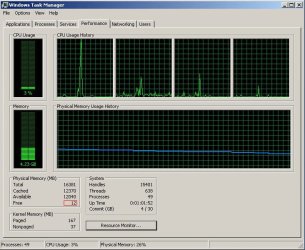
I've attached a screen capture of the Task Manager 'just' before ZBrush crashes. I can recreate this every time so my thoughts are just nothing left in the tank.

Would you infer based on the task manager (if you can) that the system is just simply out of resources or the application itself has hit its resource allocation limit! By the way ZBrush is only 32bit so limited to only 4GB, could this be why Free is VERY low and Available is VERY high?

Thanks,
Nick.
 

Attachments

  • TM_sysCrash.jpg
    TM_sysCrash.jpg
    79.6 KB · Views: 902

My Computer

OS
Win7 & Linux FC8
niic,
Your system has about 16 gb installed memory out of which about 4 gb i.e. 25% (26% to be exact) is being used. The remaining 12 gb is available for whatever apps you choose to run. I dont know much Zbrush but why do you think zbrush is crashing because of memory shortage?
On the other hand, the screenshot shows a massive cpu spike which may be the cause of the zbrush crash. I would be much more interested in investigating that cpu spike than any memory issues.
 

My Computer

Computer Manufacturer/Model Number
Too many to describe...
OS
Windows 7 x64 pro/ Windows 7 x86 Pro/ XP SP3 x86
Core Detection Usage Info?

Where in the Windows Task Manager (or another place) shows you how much in conjunction with the Memory being used, that the core processor is being used? I have a six processor, how do I know that too is being used to its max or minimum??


Thanks for this thread. Real helpful.
 

My Computer

OS
win7
Back
Top