Windows Unable to Format External Hard Drive

Drspoon57

New member
Local time
9:17 PM
Messages
2
Hi!

Simply as the title says, I was connecting my 1tb drive to my laptop when strangely it asks me to format my drive. I had assumed it had been disconnected improperly and decided to accept the loss and reformat.

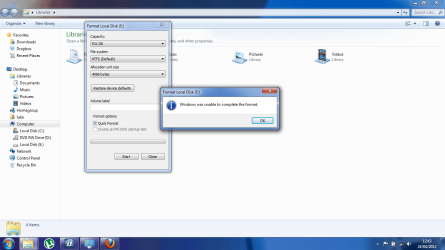
However, once commanding the drive to format Windows soon brings up an error message.

Any help would be greatly appreciated!
 

My Computer My Computer

Computer Manufacturer/Model Number
Dell
OS
windows 7 home premium 64bit
What error message did you get when you ok'd the FORMAT?

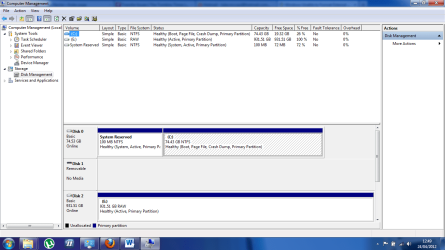
Also, can you post a screenshot from DISKMGMT showing that external drive? Full-screen please, with columns spread to show the contents of the columns.

Has this drive been used successfully before, and all of a sudden it asked to be formatted?

And yes, removable drives should be "safely removed" before disconnecting to ensure flushing out all data in buffers.
 

My Computer My Computer

Computer type
PC/Desktop
Computer Manufacturer/Model Number
Home-built, two systems (1) and (2)
OS
Windows 7 Pro x64 (1), Win7 Pro X64 (2)
CPU
i5-3350p 3.1Ghz/6MB-cache (1); E8400 3.0Ghz/6MB-cache (2)
Motherboard
ASUS P8Z77-V Pro (1); ASUS P5Q3 (2)
Memory
8GB PC3-12800 DDR3 (1); 4GB PC3-10600 DDR3 (2)
Graphics Card(s)
ATI HD7750 (1), (see TV cards); ATI R7 250 (2)
Sound Card
Realtek ALC892 HD Audio (1); Realtek ALC1200 HD Audio (2)
Monitor(s) Displays
Eizo HD2441W LCD, Eizo S2433W (1); Eizo 24" S2433W (2)
Screen Resolution
1920x1200, 1920x1200 (1); 1920x1200 (2)
Hard Drives
(1) 1TB SATA-II (7200RPM), 2x2TB SATA-III (7200RPM), 250GB SATA-III (10000RPM) for OS; 2x2TB external USB 3.0

(2) 320GB SATA-II (7200RPM), 750GB SATA-II (7200RPM), 150GB SATA-II (10000RPM) for OS; 2TB external USB 3.0
PSU
Nesteq ECS-6001 600W (1); Nesteq ECS-5001 500W (2)
Case
Acousti-Case 360 (1) and (2)
Cooling
Noctua NH-U12P SE2 for CPU, 2x120mm case fans (1) and (2)
Keyboard
IBM PS/2 (1) and (2)
Mouse
Logitech MX Revolution wireless (1); Microsoft wired (2)
Internet Speed
100mbps down / 10mbps up
Antivirus
Microsoft Security Essentials; Malwarebyte Anti-Malware Pro
Browser
Firefox
Other Info
Ceton InfiniTV 4-tuner cablecard-enabled TV card as well as Hauppauge HVR-2250 OTA/ATSC 2-tuner TV card in (1), running under Win7 WMC
Thanks for the quick reply!

It just, infuriatingly, says unable to format without any technical reason why.

I have been using this drive successfully for about a year now, always careful with handling and use. I have tried it on other computers since this format message but receive no different news
 

Attachments

  • Format.png
    Format.png
    66.8 KB · Views: 914
  • Manage.png
    Manage.png
    46.4 KB · Views: 691

My Computer My Computer

Computer Manufacturer/Model Number
Dell
OS
windows 7 home premium 64bit
Thanks for the quick reply!

It just, infuriatingly, says unable to format without any technical reason why.

I have been using this drive successfully for about a year now, always careful with handling and use. I have tried it on other computers since this format message but receive no different news
Well, the fact that you've at least started a FORMAT (although it ended prematurely and unsuccessfully) implies you might have gotten a certain distance along in the process, which means you may have already lost the data on the drive.

But it seems you've got nothing to lose by trying Partition Wizard's "partition recovery wizard" functionality. If there's enough left on that partition (which currently shows RAW) for PW to figure out what it once was, and then to see if the file system can be recovered, you might just luck out.

Got nothing to lose by trying.
 

My Computer My Computer

Computer type
PC/Desktop
Computer Manufacturer/Model Number
Home-built, two systems (1) and (2)
OS
Windows 7 Pro x64 (1), Win7 Pro X64 (2)
CPU
i5-3350p 3.1Ghz/6MB-cache (1); E8400 3.0Ghz/6MB-cache (2)
Motherboard
ASUS P8Z77-V Pro (1); ASUS P5Q3 (2)
Memory
8GB PC3-12800 DDR3 (1); 4GB PC3-10600 DDR3 (2)
Graphics Card(s)
ATI HD7750 (1), (see TV cards); ATI R7 250 (2)
Sound Card
Realtek ALC892 HD Audio (1); Realtek ALC1200 HD Audio (2)
Monitor(s) Displays
Eizo HD2441W LCD, Eizo S2433W (1); Eizo 24" S2433W (2)
Screen Resolution
1920x1200, 1920x1200 (1); 1920x1200 (2)
Hard Drives
(1) 1TB SATA-II (7200RPM), 2x2TB SATA-III (7200RPM), 250GB SATA-III (10000RPM) for OS; 2x2TB external USB 3.0

(2) 320GB SATA-II (7200RPM), 750GB SATA-II (7200RPM), 150GB SATA-II (10000RPM) for OS; 2TB external USB 3.0
PSU
Nesteq ECS-6001 600W (1); Nesteq ECS-5001 500W (2)
Case
Acousti-Case 360 (1) and (2)
Cooling
Noctua NH-U12P SE2 for CPU, 2x120mm case fans (1) and (2)
Keyboard
IBM PS/2 (1) and (2)
Mouse
Logitech MX Revolution wireless (1); Microsoft wired (2)
Internet Speed
100mbps down / 10mbps up
Antivirus
Microsoft Security Essentials; Malwarebyte Anti-Malware Pro
Browser
Firefox
Other Info
Ceton InfiniTV 4-tuner cablecard-enabled TV card as well as Hauppauge HVR-2250 OTA/ATSC 2-tuner TV card in (1), running under Win7 WMC
RAW suggests there is no partition on the drive. Also, the fact that it has been marked Active may be the reason you can't format it.

If you can get by without recovering whatever data is on it I'd remove the Active flag and partitions, then repartition it and use the Quick Format option.

Or you could, as dsperber suggests, use Partition Wizard's partition recovery wizard.

Do remove the Active flag, though, as I'm convinced that's part of the problem.

Partition Wizard, as mentioned, is an excellent partitioning utility.

http://www.sevenforums.com/tutorials/93322-partition-wizard-use-bootable-cd.html
 

My Computer My Computer

Computer Manufacturer/Model Number
HP Pavilion Elite 495UK
OS
Windows 7 Ultimate SP1 64-Bit
CPU
Intel Core i7 870 @ 2.93GHz
Motherboard
MSI 2A9C (CPU1)
Memory
8Gb Dual-Channel DDR3 @ 664MHz
Graphics Card(s)
nVidia GeForce GTX 460 1024MB dedicated RAM
Sound Card
Realtek HD Audio
Monitor(s) Displays
HP2310i
Screen Resolution
1920 x 1080
Hard Drives
1x1954GB Hitachi HDS22020ALA 330 (RAID), 1x1954GB Hitachi External for backup and storage
PSU
460W
Case
HP Elite
Cooling
Air cooled
Keyboard
Logitech K750 solar-powered keyboard
Mouse
Logitech Wireless M180 mouse
Internet Speed
2Mb
Other Info
Pure Avanti Flow Internet Radio with iPod Dock, 64Gb iPod, HP USB Speakers, Sony MDR-V500 Headphones, Sony Vaio F-Series Laptop
Back
Top