Windows Update 0x80070002 when manualy instaling an update

misterTwister22

New member
Local time
5:06 AM
Messages
4
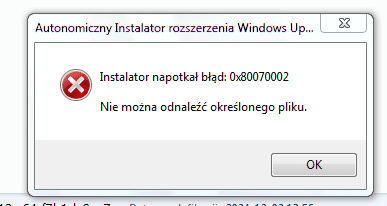
Yesterday I installed Windows 7 Ultimate 64-bit on my laptop. I'm trying to manually install the update to restore Windows Update functionality. However, I get error 0x80070002 and the message "The file specified cannot be found.". The file is complete and freshly downloaded. Does anyone know what to do with this?
 

Attachments
  • error.PNG
    error.PNG
    7.4 KB · Views: 15

My Computers My Computers

  • At a glance

    Windows 7 Home Prem / Pro / Ultimate 32/64-bit
    OS
    Windows 7 Home Prem / Pro / Ultimate 32/64-bit
  • Computer type
    PC/Desktop

My Computer My Computer

At a glance

Windows 7 x64 SP1AMD Athlon 64 X2 6000+ / 3.0 GHz6 GB
Computer type
PC/Desktop
Computer Manufacturer/Model Number
Gateway GT5656
OS
Windows 7 x64 SP1
CPU
AMD Athlon 64 X2 6000+ / 3.0 GHz
Motherboard
NVIDIA GeForce 6150 SE
Memory
6 GB
Monitor(s) Displays
Lenovo LED
Screen Resolution
1920 X 1080
Hard Drives
Windows on 500 GB spinner; Ubuntu 16 on Sandisk 250GB SSD; Bodhi5 on Samsung 250GB SSD; another old spinner for fooling around.
PSU
Original that came with computer
Keyboard
Logitech wireless
Mouse
Logitech wireless
Antivirus
Microsoft Sec Essentials
Browser
Vivaldi
Hi,
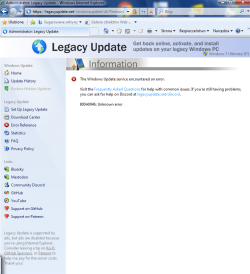
So I installed Legacy Update and also got the error. This time another "unknown" 800A0046. Has anyone else encountered this error? I will also add that Windows on this laptop is booted from a pendrive (made with Hasleo WinToUSB), because someone once broke the HDD drive socket.
legerr.PNG
 

My Computers My Computers

  • At a glance

    Windows 7 Home Prem / Pro / Ultimate 32/64-bit
    OS
    Windows 7 Home Prem / Pro / Ultimate 32/64-bit
  • Computer type
    PC/Desktop
Have you tried installing KB3138612 ?
 

My Computers My Computers

  • At a glance

    10 trying for 7x64i7 6th gen32G
    Computer type
    PC/Desktop
    Computer Manufacturer/Model Number
    Dell Opti 7050
    OS
    10 trying for 7x64
    CPU
    i7 6th gen
    Memory
    32G
    Hard Drives
    1T SSD; 2T HDD
  • Computer type
    PC/Desktop
Yes, unfortunately I get error 0x80070002 "The file specified cannot be found."
kb.PNG
 

My Computers My Computers

  • At a glance

    Windows 7 Home Prem / Pro / Ultimate 32/64-bit
    OS
    Windows 7 Home Prem / Pro / Ultimate 32/64-bit
  • Computer type
    PC/Desktop
Do you have Service Pack 1 (SP1) installed. Updates beyond a certain point will give errors if you don't. Also, Simplix also requires SP1 to be installed.
 

My Computers My Computers

  • At a glance

    Windows 7 Professional 64bit / Windows 10 Hom...AMD FX-8350GSKILL Ripjaw-X PC3 12800 12GB (2x4GB, 2x2GB)ASUS ENGTX560 DCII OC/2DI/1GD5 1GB
    Computer type
    PC/Desktop
    Computer Manufacturer/Model Number
    Custom build
    OS
    Windows 7 Professional 64bit / Windows 10 Home 64bit
    CPU
    AMD FX-8350
    Motherboard
    Gigabyte GA-990FXA-UD3 (AM3+) Rev. 4.0
    Memory
    GSKILL Ripjaw-X PC3 12800 12GB (2x4GB, 2x2GB)
    Graphics Card(s)
    ASUS ENGTX560 DCII OC/2DI/1GD5 1GB
    Sound Card
    Integrated
    Monitor(s) Displays
    Asus VE228H (21.5-in)
    Screen Resolution
    1920x1080 60Hz
    Hard Drives
    SAMSUNG 870 EVO 1TB (2.5" SATA SSD)
    SAMSUNG 870 EVO 500GB (2.5" SATA SSD)
    PSU
    Antec TruePower (new) TP-650 (650 watts)
    Case
    Antec Three Hundred
    Cooling
    AMD stock (plan to upgrade to Cooler Master Hyper 212 EVO)
    Keyboard
    Logitech K540 (wireless)
    Mouse
    Logitech M310 (wireless)
    Internet Speed
    Comcast Gigabit X2 Internet (2100Mbps down / 300Mbps up)
    Browser
    Firefox, Edge, Chrome
    Other Info
    Optical drive: ASUS DRW-24B3ST/BLK/G (Black) (24X)
    External hard drives: 2TB & 6TB
    Internet Gateway: Comcast XB8
  • Computer type
    PC/Desktop
Good news and bad news about Simplix. It was not too scary, since it only needed to install 5044011, 5056456, and 5061078, on my otherwise fully updated Win 7 system.

Bad news is that secure boot does not work, even though the aforementioned updates should have enabled secure boot.
 

My Computers My Computers

  • At a glance

    10 trying for 7x64i7 6th gen32G
    Computer type
    PC/Desktop
    Computer Manufacturer/Model Number
    Dell Opti 7050
    OS
    10 trying for 7x64
    CPU
    i7 6th gen
    Memory
    32G
    Hard Drives
    1T SSD; 2T HDD
  • Computer type
    PC/Desktop
Back
Top