Windows Update don't work anymore since Dec 16 ?

symetric

New member
Member
Local time
3:35 PM
Messages
57
Hello, I have a problem that I'm trying to fix...since 1 month. My first language is french so I decided to post my question on a French Tech Forum and nobody can help me... if you want to take a look what they ask me to do :

Probleme de MaJ avec Win 7 ??? - MicroClick-Québec.ca

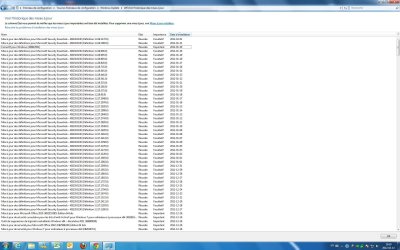
I attached a JPG and you can see which last update that is installed. Suddenly stop after December 16 ?!

I check this forum and try this :

For 64-bit Windows, the second line differs due to the location of the DLL file:
net stop wuauserv
regsvr32 %windir%\syswow64\wups2.dll
net start wuauserv


That didnt work.


I want to tell you guys that I have some BSOD sometime but I have BSOD before my Windows Update problem. We will try to fix my Windows Update problem and after we will try to fix the BSOD :)

I don't know where to start with you guys lol..

I have Win 7 Pro 64 bits, 8 gig RAM...

In my task bar I have the little flag with an "red x" on it... saying, I will try to translate from french to english "Windows could not search for automatic update (important)"

Thank you very very much for help !
 

Attachments

  • MaJ.jpg
    MaJ.jpg
    286 KB · Views: 36

My Computer

OS
Windows 7 64 Bits
CPU
Pentium 4 Quad Core 2.4 Ghz
Motherboard
ASUS Maximus Formula
Memory
8 gigs
Graphics Card(s)
ASUS EN8800 Ultra
Sound Card
SoundBlaster Audigy 2 ZS Platinum
Monitor(s) Displays
Samsung Syncmaster 24
Hello symetric, and Welcome to Sevenforums!

For windows update problems, you might try fixing common issues with these microsoft tools:
  1. Automatically diagnose and fix common problems with Windows Update
  2. Troubleshoot problems with installing updates - WindowsUpdate_dt000
  3. http://www.sevenforums.com/tutorials/91738-windows-update-reset.html
  4. Further reading: Support for Microsoft Update
And please follow this tutorial to post your BSOD problems here. You never know, they might be related (perhaps, though unlikely): http://www.sevenforums.com/crashes-debugging/96879-blue-screen-death-bsod-posting-instructions.html
 

My Computer

Computer type
PC/Desktop
Computer Manufacturer/Model Number
Custom Asus Build
OS
Microsoft Windows 8.1 Pro 64-bit
CPU
Intel(R) Core(TM) i3-4130 CPU @ 3.40GHz
Motherboard
B85M-E
Memory
8.00 GB
Graphics Card(s)
None
Sound Card
Realtek High Definition Audio
Monitor(s) Displays
Asus 23.6" Monitor
Screen Resolution
1920 x 1080 x 32 bits (4294967296 colors) @ 60 Hz
Hard Drives
INTEL SSDSC2BW180A4
Samsung SSD 840 PRO Series
PSU
Seasonic S12II-380Bronze
Case
Lian Li
Cooling
Fan, Passive
Keyboard
Logitech K120
Mouse
Microsoft Touch Mouse
Internet Speed
4ms Ping, 19.0 Mbps Download, 19.0 Mbps Upload
Antivirus
Eset Endpoint
Browser
Internet Explorer, Chrome

My Computer

OS
Windows 7 64 Bits
CPU
Pentium 4 Quad Core 2.4 Ghz
Motherboard
ASUS Maximus Formula
Memory
8 gigs
Graphics Card(s)
ASUS EN8800 Ultra
Sound Card
SoundBlaster Audigy 2 ZS Platinum
Monitor(s) Displays
Samsung Syncmaster 24
What error message do you get if you Check for Updates? - there are no failed installs, so you're either not detecting them, or not downloading them
 

My Computer

Computer type
Laptop
Computer Manufacturer/Model Number
Asus K52F or Lenovo B51-80
OS
Win 7 x64 Home Premium (and x86 VirtualBox VM)/Win10
CPU
i3 370M/i7 6500U
Motherboard
Asus/Lenovo
Memory
8GB - finally :)/8GB
Graphics Card(s)
it's an i3, dude!/dual Intel&nVidia
Sound Card
onboard
Monitor(s) Displays
15.6" built-in
Screen Resolution
1366x768/1920x1080
Hard Drives
750GB Seagate internal
Sundry external drives attached to other computers on the local network
1TB SSD on the Lenovo
PSU
n/a
Internet Speed
as much as I can get - usually on a dongle/phone, so <1MB/s
Antivirus
MSE/Defender
Browser
IE11/12/Edge/Chrome/FF(if I must)
What error message do you get if you Check for Updates? - there are no failed installs, so you're either not detecting them, or not downloading them


They are no error message ! They not detecting any new updates... when I try (I leave it for 7 hres) and nothing......
 

My Computer

OS
Windows 7 64 Bits
CPU
Pentium 4 Quad Core 2.4 Ghz
Motherboard
ASUS Maximus Formula
Memory
8 gigs
Graphics Card(s)
ASUS EN8800 Ultra
Sound Card
SoundBlaster Audigy 2 ZS Platinum
Monitor(s) Displays
Samsung Syncmaster 24
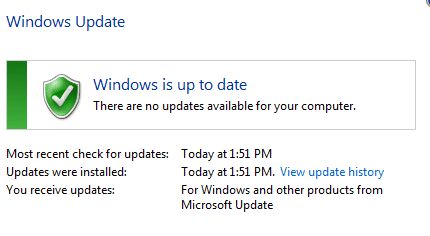
perhaps there aren't any new updates? Do you get this?:
Capture.PNG

If you get something else, please attach the picture.

If windows update is set to automatic, it is likely that it downloads a lot of updates on its own.
 

My Computer

Computer type
PC/Desktop
Computer Manufacturer/Model Number
Custom Asus Build
OS
Microsoft Windows 8.1 Pro 64-bit
CPU
Intel(R) Core(TM) i3-4130 CPU @ 3.40GHz
Motherboard
B85M-E
Memory
8.00 GB
Graphics Card(s)
None
Sound Card
Realtek High Definition Audio
Monitor(s) Displays
Asus 23.6" Monitor
Screen Resolution
1920 x 1080 x 32 bits (4294967296 colors) @ 60 Hz
Hard Drives
INTEL SSDSC2BW180A4
Samsung SSD 840 PRO Series
PSU
Seasonic S12II-380Bronze
Case
Lian Li
Cooling
Fan, Passive
Keyboard
Logitech K120
Mouse
Microsoft Touch Mouse
Internet Speed
4ms Ping, 19.0 Mbps Download, 19.0 Mbps Upload
Antivirus
Eset Endpoint
Browser
Internet Explorer, Chrome
perhaps there aren't any new updates? Do you get this?:
View attachment 198180

If you get something else, please attach the picture.

If windows update is set to automatic, it is likely that it downloads a lot of updates on its own.


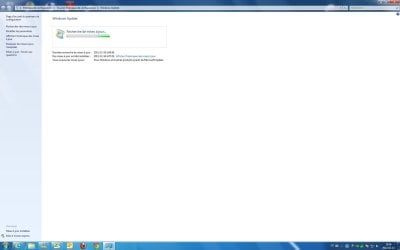
Hi, your picture that you attached is what I got before Dec 16..now look my picture... it stuck on "Searching for updated"
 

Attachments

  • Photo Seven Forum.jpg
    Photo Seven Forum.jpg
    59.6 KB · Views: 26

My Computer

OS
Windows 7 64 Bits
CPU
Pentium 4 Quad Core 2.4 Ghz
Motherboard
ASUS Maximus Formula
Memory
8 gigs
Graphics Card(s)
ASUS EN8800 Ultra
Sound Card
SoundBlaster Audigy 2 ZS Platinum
Monitor(s) Displays
Samsung Syncmaster 24

My Computer

Computer type
Laptop
Computer Manufacturer/Model Number
Asus K52F or Lenovo B51-80
OS
Win 7 x64 Home Premium (and x86 VirtualBox VM)/Win10
CPU
i3 370M/i7 6500U
Motherboard
Asus/Lenovo
Memory
8GB - finally :)/8GB
Graphics Card(s)
it's an i3, dude!/dual Intel&nVidia
Sound Card
onboard
Monitor(s) Displays
15.6" built-in
Screen Resolution
1366x768/1920x1080
Hard Drives
750GB Seagate internal
Sundry external drives attached to other computers on the local network
1TB SSD on the Lenovo
PSU
n/a
Internet Speed
as much as I can get - usually on a dongle/phone, so <1MB/s
Antivirus
MSE/Defender
Browser
IE11/12/Edge/Chrome/FF(if I must)
Obviously, the problem is that the search for updates never complete - the last successful search was on 19th December

this thread looks interesting...
Windows Update Hangs while searching for updates - Windows Server 2008 R2 Standard 64 bit
Athough it's a Server install, I believe that it should apply to Client versions as well


Humm, I just check my installed Update and something new appear... one on January 30....KB947821...and I have all the MSE Update every day.. maybe finally update install but I keep having my little flag with a red "x" on it saying that I have a problem ????

I;m a bit confused... I will check your thread right now
 

Attachments

  • Update for Seven Forum.jpg
    Update for Seven Forum.jpg
    285.6 KB · Views: 11

My Computer

OS
Windows 7 64 Bits
CPU
Pentium 4 Quad Core 2.4 Ghz
Motherboard
ASUS Maximus Formula
Memory
8 gigs
Graphics Card(s)
ASUS EN8800 Ultra
Sound Card
SoundBlaster Audigy 2 ZS Platinum
Monitor(s) Displays
Samsung Syncmaster 24
I believe MSE can update itself, despite windows update. The other update you have highlighted is one of the tools I had you download, no?

Try using this tool: Download: System Update Readiness Tool for Windows 7 for x64-based Systems (KB947821) [August 2011] - Microsoft Download Center - Download Details

What antivirus are you using? Computer viruses can mess with windows update. Here is a good thread for removing viruses: How to get rid of malware - Microsoft Answers

If you know what updates are causing the issue, try to uninstall them: http://www.sevenforums.com/tutorials/24373-windows-update-uninstall-update.html

Did you try this download that I gave you?: http://www.sevenforums.com/tutorials/91738-windows-update-reset.html

Attempt to restart the computer after all of this.

Credits:
"Windows Update - Reset" Tutorial from post #2 and post #10 created by Brink
"Windows Update - Uninstall an Update" Tutorial created by Brink
All other tutorials linked to created by Microsoft and/or others
 

My Computer

Computer type
PC/Desktop
Computer Manufacturer/Model Number
Custom Asus Build
OS
Microsoft Windows 8.1 Pro 64-bit
CPU
Intel(R) Core(TM) i3-4130 CPU @ 3.40GHz
Motherboard
B85M-E
Memory
8.00 GB
Graphics Card(s)
None
Sound Card
Realtek High Definition Audio
Monitor(s) Displays
Asus 23.6" Monitor
Screen Resolution
1920 x 1080 x 32 bits (4294967296 colors) @ 60 Hz
Hard Drives
INTEL SSDSC2BW180A4
Samsung SSD 840 PRO Series
PSU
Seasonic S12II-380Bronze
Case
Lian Li
Cooling
Fan, Passive
Keyboard
Logitech K120
Mouse
Microsoft Touch Mouse
Internet Speed
4ms Ping, 19.0 Mbps Download, 19.0 Mbps Upload
Antivirus
Eset Endpoint
Browser
Internet Explorer, Chrome
I believe MSE can update itself, despite windows update. The other update you have highlighted is one of the tools I had you download, no?

Try using this tool: Download: System Update Readiness Tool for Windows 7 for x64-based Systems (KB947821) [August 2011] - Microsoft Download Center - Download Details

What antivirus are you using? Computer viruses can mess with windows update. Here is a good thread for removing viruses: How to get rid of malware - Microsoft Answers

If you know what updates are causing the issue, try to uninstall them: http://www.sevenforums.com/tutorials/24373-windows-update-uninstall-update.html


I didnt download or install by myself the KB94821.... and my anti-virus is MSE < Microsoft Security Essential...I will check for virus with your thread.

and no I don't know wich one is bugging the Windows Update... because on Dec 16, it's install like 15 UPDATEs... maybe I should remove them all ??
 

My Computer

OS
Windows 7 64 Bits
CPU
Pentium 4 Quad Core 2.4 Ghz
Motherboard
ASUS Maximus Formula
Memory
8 gigs
Graphics Card(s)
ASUS EN8800 Ultra
Sound Card
SoundBlaster Audigy 2 ZS Platinum
Monitor(s) Displays
Samsung Syncmaster 24
I believe MSE can update itself, despite windows update. The other update you have highlighted is one of the tools I had you download, no?

...

What antivirus are you using? Computer viruses can mess with windows update. Here is a good thread for removing viruses: How to get rid of malware - Microsoft Answers
I am sorry, I wasn't thinking. This is pretty obvious lol

Did you try all of the tutorial links I've given you to date, including the KB947821 one? You should be able to do it by yourself. Unless you mean that someone helped you install it already.

Please let me know if you need help with any of the tutorials, but you really should try them all. Make sure you've followed all the advice I've given, otherwise let me know what you haven't tried yet (if you plan on not trying it).

I would hate for you to have to uninstall up to 15 updates. Lets hold off on that until someone more knowledgeable gives some advice on it.
 

My Computer

Computer type
PC/Desktop
Computer Manufacturer/Model Number
Custom Asus Build
OS
Microsoft Windows 8.1 Pro 64-bit
CPU
Intel(R) Core(TM) i3-4130 CPU @ 3.40GHz
Motherboard
B85M-E
Memory
8.00 GB
Graphics Card(s)
None
Sound Card
Realtek High Definition Audio
Monitor(s) Displays
Asus 23.6" Monitor
Screen Resolution
1920 x 1080 x 32 bits (4294967296 colors) @ 60 Hz
Hard Drives
INTEL SSDSC2BW180A4
Samsung SSD 840 PRO Series
PSU
Seasonic S12II-380Bronze
Case
Lian Li
Cooling
Fan, Passive
Keyboard
Logitech K120
Mouse
Microsoft Touch Mouse
Internet Speed
4ms Ping, 19.0 Mbps Download, 19.0 Mbps Upload
Antivirus
Eset Endpoint
Browser
Internet Explorer, Chrome
I don't know wich one is bugging the Windows Update... because on Dec 16, it's install like 15 UPDATEs... maybe I should remove them all ??

I don't think it's a problem with an update as such - since the system successfully checked for updates on 19th December, even though the last Update was installed on the 16th.

Check your Event Viewer for problems on the 19th -22nd December - are there any major problem in the Windows System logs, or the Application logs?
 

My Computer

Computer type
Laptop
Computer Manufacturer/Model Number
Asus K52F or Lenovo B51-80
OS
Win 7 x64 Home Premium (and x86 VirtualBox VM)/Win10
CPU
i3 370M/i7 6500U
Motherboard
Asus/Lenovo
Memory
8GB - finally :)/8GB
Graphics Card(s)
it's an i3, dude!/dual Intel&nVidia
Sound Card
onboard
Monitor(s) Displays
15.6" built-in
Screen Resolution
1366x768/1920x1080
Hard Drives
750GB Seagate internal
Sundry external drives attached to other computers on the local network
1TB SSD on the Lenovo
PSU
n/a
Internet Speed
as much as I can get - usually on a dongle/phone, so <1MB/s
Antivirus
MSE/Defender
Browser
IE11/12/Edge/Chrome/FF(if I must)
I don't know wich one is bugging the Windows Update... because on Dec 16, it's install like 15 UPDATEs... maybe I should remove them all ??

I don't think it's a problem with an update as such - since the system successfully checked for updates on 19th December, even though the last Update was installed on the 16th.

Check your Event Viewer for problems on the 19th -22nd December - are there any major problem in the Windows System logs, or the Application logs?


Where is the EVENT Viewer ?
 

My Computer

OS
Windows 7 64 Bits
CPU
Pentium 4 Quad Core 2.4 Ghz
Motherboard
ASUS Maximus Formula
Memory
8 gigs
Graphics Card(s)
ASUS EN8800 Ultra
Sound Card
SoundBlaster Audigy 2 ZS Platinum
Monitor(s) Displays
Samsung Syncmaster 24
I believe MSE can update itself, despite windows update. The other update you have highlighted is one of the tools I had you download, no?

...

What antivirus are you using? Computer viruses can mess with windows update. Here is a good thread for removing viruses: How to get rid of malware - Microsoft Answers
I am sorry, I wasn't thinking. This is pretty obvious lol

Did you try all of the tutorial links I've given you to date, including the KB947821 one? You should be able to do it by yourself. Unless you mean that someone helped you install it already.

Please let me know if you need help with any of the tutorials, but you really should try them all. Make sure you've followed all the advice I've given, otherwise let me know what you haven't tried yet (if you plan on not trying it).

I would hate for you to have to uninstall up to 15 updates. Lets hold off on that until someone more knowledgeable gives some advice on it.

LOL I have already the KB947821 file on my desktop, that why I have i installed on JAn 30... maybe someone on the french forum told me to install it lol... (I try many thing)

Right now, I will scan for malaware with Malawarebyte...

For this : Here is a good thread for removing viruses: How to get rid of malware - Microsoft Answers

This program didnt found anything on my computer.
 
Last edited:

My Computer

OS
Windows 7 64 Bits
CPU
Pentium 4 Quad Core 2.4 Ghz
Motherboard
ASUS Maximus Formula
Memory
8 gigs
Graphics Card(s)
ASUS EN8800 Ultra
Sound Card
SoundBlaster Audigy 2 ZS Platinum
Monitor(s) Displays
Samsung Syncmaster 24
Malawarebyte didnt find anything....
 

My Computer

OS
Windows 7 64 Bits
CPU
Pentium 4 Quad Core 2.4 Ghz
Motherboard
ASUS Maximus Formula
Memory
8 gigs
Graphics Card(s)
ASUS EN8800 Ultra
Sound Card
SoundBlaster Audigy 2 ZS Platinum
Monitor(s) Displays
Samsung Syncmaster 24
Event Viewer
Click on the Start button - in the Search box type EVENTVWR and hit the Enter key - it should come up.
 

My Computer

Computer type
Laptop
Computer Manufacturer/Model Number
Asus K52F or Lenovo B51-80
OS
Win 7 x64 Home Premium (and x86 VirtualBox VM)/Win10
CPU
i3 370M/i7 6500U
Motherboard
Asus/Lenovo
Memory
8GB - finally :)/8GB
Graphics Card(s)
it's an i3, dude!/dual Intel&nVidia
Sound Card
onboard
Monitor(s) Displays
15.6" built-in
Screen Resolution
1366x768/1920x1080
Hard Drives
750GB Seagate internal
Sundry external drives attached to other computers on the local network
1TB SSD on the Lenovo
PSU
n/a
Internet Speed
as much as I can get - usually on a dongle/phone, so <1MB/s
Antivirus
MSE/Defender
Browser
IE11/12/Edge/Chrome/FF(if I must)
Event Viewer
Click on the Start button - in the Search box type EVENTVWR and hit the Enter key - it should come up.


Hello NoelDP,

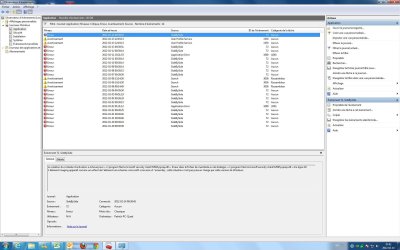
Here a screenshot of what I get... I don't know what is important for you , so I expend the "Critic" "Error" "Avetissement"
 

Attachments

  • Event Viewer.jpg
    Event Viewer.jpg
    251.9 KB · Views: 8

My Computer

OS
Windows 7 64 Bits
CPU
Pentium 4 Quad Core 2.4 Ghz
Motherboard
ASUS Maximus Formula
Memory
8 gigs
Graphics Card(s)
ASUS EN8800 Ultra
Sound Card
SoundBlaster Audigy 2 ZS Platinum
Monitor(s) Displays
Samsung Syncmaster 24
It looks as if you may have a problem with the SidebySide service - event number 72 - but assuming this is from MSE, it doesn't need any action. I can't see any other events that stand out. in that summary.
Try this -
Start a Check for Updates
Open Event Viewer
Open the Windows Logs - Application logs, and filter on Errors, Criticals, and Warnings -
Do you get any entries for the time at which you started the check?
If so, post the details.

one other thing that may help
Windows Update error 80072ee2
follow the advice there
 

My Computer

Computer type
Laptop
Computer Manufacturer/Model Number
Asus K52F or Lenovo B51-80
OS
Win 7 x64 Home Premium (and x86 VirtualBox VM)/Win10
CPU
i3 370M/i7 6500U
Motherboard
Asus/Lenovo
Memory
8GB - finally :)/8GB
Graphics Card(s)
it's an i3, dude!/dual Intel&nVidia
Sound Card
onboard
Monitor(s) Displays
15.6" built-in
Screen Resolution
1366x768/1920x1080
Hard Drives
750GB Seagate internal
Sundry external drives attached to other computers on the local network
1TB SSD on the Lenovo
PSU
n/a
Internet Speed
as much as I can get - usually on a dongle/phone, so <1MB/s
Antivirus
MSE/Defender
Browser
IE11/12/Edge/Chrome/FF(if I must)
It looks as if you may have a problem with the SidebySide service - event number 72 - but assuming this is from MSE, it doesn't need any action. I can't see any other events that stand out. in that summary.
Try this -
Start a Check for Updates
Open Event Viewer
Open the Windows Logs - Application logs, and filter on Errors, Criticals, and Warnings -
Do you get any entries for the time at which you started the check?
If so, post the details.

one other thing that may help
Windows Update error 80072ee2
follow the advice there

Hi, I started the Windows Update and still running but error for now.. (today) All my error is with MIcrosoft Security Essential... should I remove this anti-virus ?
 

Attachments

  • event error.jpg
    event error.jpg
    185 KB · Views: 5

My Computer

OS
Windows 7 64 Bits
CPU
Pentium 4 Quad Core 2.4 Ghz
Motherboard
ASUS Maximus Formula
Memory
8 gigs
Graphics Card(s)
ASUS EN8800 Ultra
Sound Card
SoundBlaster Audigy 2 ZS Platinum
Monitor(s) Displays
Samsung Syncmaster 24
Back
Top