
Windows update error 8007370a

PaaNooS

New member
Member
Local time
4:24 PM
Messages
72
I have to reinstall Windows to fix some errors.
I tried to do a repair installation but I took a message something like "Installation cannot continue. Please try to update windows and then try again".
I thought to reinstall only SP1 but just after installation starts I take the message "Installation was not successful - the value of an attribute in an identity is not within the legal range - Error: Error sxs invalid identity attribute value (0x8007370a)".

I've tried to run sfc/scannow but I take the error "Windows Resource Protection could not preform the scan"
I have run System Update Readiness Tool with success but errors still remain in CBS.log

I need some more help please
 

My Computer

Computer type
PC/Desktop
Computer Manufacturer/Model Number
Custom build
OS
Microsoft Windows 7 Professional 64-bit 7601 Multiprocessor Free Service Pack 1
CPU
Intel(R) Core(TM) i5-4460 CPU @ 3.20GHz
Motherboard
Gigabyte Technology Co., Ltd. H97M-HD3
Memory
16,00 GB
Graphics Card(s)
Intel(R) HD Graphics 4600
Sound Card
Realtek High Definition Audio
Screen Resolution
1280 x 1024 x 32 bits (4294967296 colors) @ 60 Hz
Hard Drives
Samsung SSD 850 EVO 250G SCSI Disk Device

My Computer

Computer type
PC/Desktop
Computer Manufacturer/Model Number
Home made Desktop
OS
Windows 10 Pro. 64/ version 1709 Windows 7 Pro/64
CPU
Intel i7-6800K @ 4.3
Motherboard
ASUS X-99 Deluxe II
Memory
Corsair Platinum 16 gig @2400
Graphics Card(s)
EVGA GTX 1070 OC
Monitor(s) Displays
Asus 27" LED LCD/VE278Q
Screen Resolution
1920-1080 or 1280-720 HDMI
Hard Drives
INTEL SSD 730-240 Gb Sata 3.0/
PSU
EVGA Platium 1200W
Case
Phanteks Luxe Tempered Glass 8 fans/ one radiator
Cooling
XSPC/ Water Cooled CPU
Keyboard
Das 4 Professional
Mouse
Logitech M705/MX Anywhere 2-S
Internet Speed
100 mbits
Antivirus
Microsoft Security Essentials/ Malwarebytes Premium 3.0/ SAS
Browser
I.E. 11 default/Firefox/ ISP Time Warner Cable/Spectrum
Other Info
LG BluRay Burner/
Sound system-KLipsch-THX/
Icy Dock ssd Hot Swap bays.
Hello L.B.

thank you for your quick reply.
Before complete the tutorial I have to inform you that I use "Classic Shell" (Classic Shell - Start menu and other Windows enhancements) for Windows Explorer and Internet Explorer.
Also I have uninstall my Antivirus program (Eset Nod 32) and I use "Selective Startup" to boot my Windows to reduce conflicts.
I'll be back soon with tutorial results.
 

My Computer

Computer type
PC/Desktop
Computer Manufacturer/Model Number
Custom build
OS
Microsoft Windows 7 Professional 64-bit 7601 Multiprocessor Free Service Pack 1
CPU
Intel(R) Core(TM) i5-4460 CPU @ 3.20GHz
Motherboard
Gigabyte Technology Co., Ltd. H97M-HD3
Memory
16,00 GB
Graphics Card(s)
Intel(R) HD Graphics 4600
Sound Card
Realtek High Definition Audio
Screen Resolution
1280 x 1024 x 32 bits (4294967296 colors) @ 60 Hz
Hard Drives
Samsung SSD 850 EVO 250G SCSI Disk Device
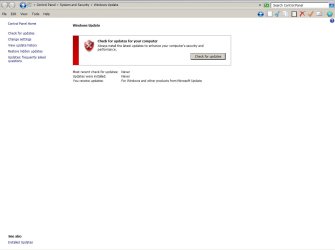
Tutorial Results.

1. System Update Readiness Tool completed successful with these status of services :
BITS (Background Intelligent Transfer Service) : Manual / Started
Cryptographic Services : Automatic / Started
Windows Modules Installer : Manual / Started
Windows Update : Automatic (Delayed Start) / Started

2. SFC /scannow
Just after System Update Readiness Tool completed (without restart) run SFC from Command Prompt (as Administrator) but had error "Windows Resource Protection could not perform the requested operation".
So I tried "Method two - Run the SFC /SCANNOW Command at Boot (via Diskpart)" as I have a dual/boot system but again had the error "Windows Resource Protection could not perform the requested operation".

3. Windows Update Error Codes
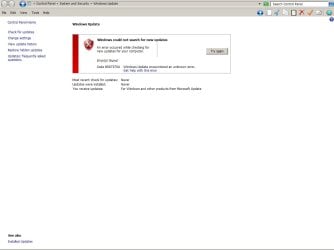
There is only one error code that I receive : 8007370A
(You can see it in attached files)

4. Log Collection
See attach files.

THank you very much
 

Attachments

  • Windows Update Error Screenshot.jpg
    Windows Update Error Screenshot.jpg
    53.5 KB · Views: 1
  • Windows Update Error 8007370A Screenshot.jpg
    Windows Update Error 8007370A Screenshot.jpg
    54.9 KB · Views: 0

My Computer

Computer type
PC/Desktop
Computer Manufacturer/Model Number
Custom build
OS
Microsoft Windows 7 Professional 64-bit 7601 Multiprocessor Free Service Pack 1
CPU
Intel(R) Core(TM) i5-4460 CPU @ 3.20GHz
Motherboard
Gigabyte Technology Co., Ltd. H97M-HD3
Memory
16,00 GB
Graphics Card(s)
Intel(R) HD Graphics 4600
Sound Card
Realtek High Definition Audio
Screen Resolution
1280 x 1024 x 32 bits (4294967296 colors) @ 60 Hz
Hard Drives
Samsung SSD 850 EVO 250G SCSI Disk Device
Hello again

I mentioned something else. I don't know if it is relevant with my issue. Boot from CD/DVD / press F8 / click "Repair your computer" do nothing. I mean it starts Windows normally instead of show "System Recovery Options".
 

My Computer

Computer type
PC/Desktop
Computer Manufacturer/Model Number
Custom build
OS
Microsoft Windows 7 Professional 64-bit 7601 Multiprocessor Free Service Pack 1
CPU
Intel(R) Core(TM) i5-4460 CPU @ 3.20GHz
Motherboard
Gigabyte Technology Co., Ltd. H97M-HD3
Memory
16,00 GB
Graphics Card(s)
Intel(R) HD Graphics 4600
Sound Card
Realtek High Definition Audio
Screen Resolution
1280 x 1024 x 32 bits (4294967296 colors) @ 60 Hz
Hard Drives
Samsung SSD 850 EVO 250G SCSI Disk Device
No suggestions yet ???
 

My Computer

Computer type
PC/Desktop
Computer Manufacturer/Model Number
Custom build
OS
Microsoft Windows 7 Professional 64-bit 7601 Multiprocessor Free Service Pack 1
CPU
Intel(R) Core(TM) i5-4460 CPU @ 3.20GHz
Motherboard
Gigabyte Technology Co., Ltd. H97M-HD3
Memory
16,00 GB
Graphics Card(s)
Intel(R) HD Graphics 4600
Sound Card
Realtek High Definition Audio
Screen Resolution
1280 x 1024 x 32 bits (4294967296 colors) @ 60 Hz
Hard Drives
Samsung SSD 850 EVO 250G SCSI Disk Device
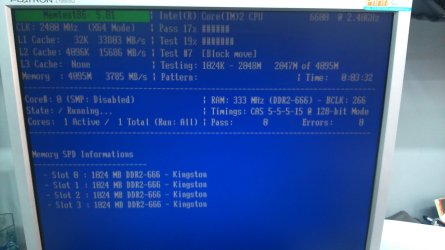
Your CheckSUR report shows the presence of Bitflips.
These can be caused by faulty hardware - usually RAM - so I suggest that you run MemTest86+ following this tutorial... http://www.sevenforums.com/tutorials/105647-ram-test-memtest86.html
Once you have a clear result over at least three full passes, then we can try fixing the existing problems
 

My Computer

Computer type
Laptop
Computer Manufacturer/Model Number
Asus K52F or Lenovo B51-80
OS
Win 7 x64 Home Premium (and x86 VirtualBox VM)/Win10
CPU
i3 370M/i7 6500U
Motherboard
Asus/Lenovo
Memory
8GB - finally :)/8GB
Graphics Card(s)
it's an i3, dude!/dual Intel&nVidia
Sound Card
onboard
Monitor(s) Displays
15.6" built-in
Screen Resolution
1366x768/1920x1080
Hard Drives
750GB Seagate internal
Sundry external drives attached to other computers on the local network
1TB SSD on the Lenovo
PSU
n/a
Internet Speed
as much as I can get - usually on a dongle/phone, so <1MB/s
Antivirus
MSE/Defender
Browser
IE11/12/Edge/Chrome/FF(if I must)
Hello Noel

as you can see in attach file I get many errors running Memtest.
I need some more time to complete the test
 

Attachments

  • DSC_0143.JPG
    DSC_0143.JPG
    319.3 KB · Views: 2
  • DSC_0144.JPG
    DSC_0144.JPG
    429 KB · Views: 0

My Computer

Computer type
PC/Desktop
Computer Manufacturer/Model Number
Custom build
OS
Microsoft Windows 7 Professional 64-bit 7601 Multiprocessor Free Service Pack 1
CPU
Intel(R) Core(TM) i5-4460 CPU @ 3.20GHz
Motherboard
Gigabyte Technology Co., Ltd. H97M-HD3
Memory
16,00 GB
Graphics Card(s)
Intel(R) HD Graphics 4600
Sound Card
Realtek High Definition Audio
Screen Resolution
1280 x 1024 x 32 bits (4294967296 colors) @ 60 Hz
Hard Drives
Samsung SSD 850 EVO 250G SCSI Disk Device
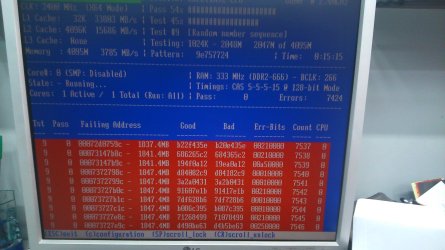
Thanks to you Noel I found that one memory slot of my motherboard runs to errors.
So I left this slot empty and now my system has 3x1GB of memory sticks but no memory errors.

So what's the next step ?
 

My Computer

Computer type
PC/Desktop
Computer Manufacturer/Model Number
Custom build
OS
Microsoft Windows 7 Professional 64-bit 7601 Multiprocessor Free Service Pack 1
CPU
Intel(R) Core(TM) i5-4460 CPU @ 3.20GHz
Motherboard
Gigabyte Technology Co., Ltd. H97M-HD3
Memory
16,00 GB
Graphics Card(s)
Intel(R) HD Graphics 4600
Sound Card
Realtek High Definition Audio
Screen Resolution
1280 x 1024 x 32 bits (4294967296 colors) @ 60 Hz
Hard Drives
Samsung SSD 850 EVO 250G SCSI Disk Device
My Computer

Computer type
PC/Desktop
Computer Manufacturer/Model Number
Home made Desktop
OS
Windows 10 Pro. 64/ version 1709 Windows 7 Pro/64
CPU
Intel i7-6800K @ 4.3
Motherboard
ASUS X-99 Deluxe II
Memory
Corsair Platinum 16 gig @2400
Graphics Card(s)
EVGA GTX 1070 OC
Monitor(s) Displays
Asus 27" LED LCD/VE278Q
Screen Resolution
1920-1080 or 1280-720 HDMI
Hard Drives
INTEL SSD 730-240 Gb Sata 3.0/
PSU
EVGA Platium 1200W
Case
Phanteks Luxe Tempered Glass 8 fans/ one radiator
Cooling
XSPC/ Water Cooled CPU
Keyboard
Das 4 Professional
Mouse
Logitech M705/MX Anywhere 2-S
Internet Speed
100 mbits
Antivirus
Microsoft Security Essentials/ Malwarebytes Premium 3.0/ SAS
Browser
I.E. 11 default/Firefox/ ISP Time Warner Cable/Spectrum
Other Info
LG BluRay Burner/
Sound system-KLipsch-THX/
Icy Dock ssd Hot Swap bays.
New Tutorial Results.

1. System Update Readiness Tool -as first time - completed successful with these status of services :
BITS (Background Intelligent Transfer Service) : Automatic (Delayed Start) / Started
Cryptographic Services : Automatic / Started
Windows Modules Installer : Manual / Started
Windows Update : Automatic (Delayed Start) / Started

2. SFC /scannow -as first time -
Just after System Update Readiness Tool completed (without restart) run SFC from Command Prompt (as Administrator) but had error "Windows Resource Protection could not perform the requested operation".
So I tried "Method two - Run the SFC /SCANNOW Command at Boot (via Diskpart)" as I have a dual/boot system but again had the error "Windows Resource Protection could not perform the requested operation".

3. Windows Update Error Codes
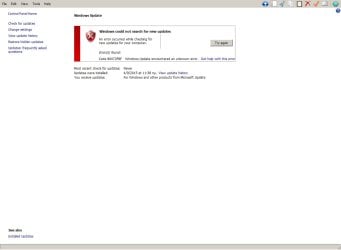
Error code changed to 80072F8F
(You can see it in attached files)

--Edit --
My system time was wrong.
After synchronizing date-time the Error Code 8007370A came back

4. Log Collection
See attach files.

THank you very much
 

Attachments

  • Windows Update Error 80072F8F Screenshot.jpg
    Windows Update Error 80072F8F Screenshot.jpg
    50 KB · Views: 1

My Computer

Computer type
PC/Desktop
Computer Manufacturer/Model Number
Custom build
OS
Microsoft Windows 7 Professional 64-bit 7601 Multiprocessor Free Service Pack 1
CPU
Intel(R) Core(TM) i5-4460 CPU @ 3.20GHz
Motherboard
Gigabyte Technology Co., Ltd. H97M-HD3
Memory
16,00 GB
Graphics Card(s)
Intel(R) HD Graphics 4600
Sound Card
Realtek High Definition Audio
Screen Resolution
1280 x 1024 x 32 bits (4294967296 colors) @ 60 Hz
Hard Drives
Samsung SSD 850 EVO 250G SCSI Disk Device
While we are waiting for Noel check your computer time, date, time zone.
 

My Computer

Computer type
PC/Desktop
Computer Manufacturer/Model Number
Home made Desktop
OS
Windows 10 Pro. 64/ version 1709 Windows 7 Pro/64
CPU
Intel i7-6800K @ 4.3
Motherboard
ASUS X-99 Deluxe II
Memory
Corsair Platinum 16 gig @2400
Graphics Card(s)
EVGA GTX 1070 OC
Monitor(s) Displays
Asus 27" LED LCD/VE278Q
Screen Resolution
1920-1080 or 1280-720 HDMI
Hard Drives
INTEL SSD 730-240 Gb Sata 3.0/
PSU
EVGA Platium 1200W
Case
Phanteks Luxe Tempered Glass 8 fans/ one radiator
Cooling
XSPC/ Water Cooled CPU
Keyboard
Das 4 Professional
Mouse
Logitech M705/MX Anywhere 2-S
Internet Speed
100 mbits
Antivirus
Microsoft Security Essentials/ Malwarebytes Premium 3.0/ SAS
Browser
I.E. 11 default/Firefox/ ISP Time Warner Cable/Spectrum
Other Info
LG BluRay Burner/
Sound system-KLipsch-THX/
Icy Dock ssd Hot Swap bays.
As you can see in my "edit" I have already checked and correct them
 

My Computer

Computer type
PC/Desktop
Computer Manufacturer/Model Number
Custom build
OS
Microsoft Windows 7 Professional 64-bit 7601 Multiprocessor Free Service Pack 1
CPU
Intel(R) Core(TM) i5-4460 CPU @ 3.20GHz
Motherboard
Gigabyte Technology Co., Ltd. H97M-HD3
Memory
16,00 GB
Graphics Card(s)
Intel(R) HD Graphics 4600
Sound Card
Realtek High Definition Audio
Screen Resolution
1280 x 1024 x 32 bits (4294967296 colors) @ 60 Hz
Hard Drives
Samsung SSD 850 EVO 250G SCSI Disk Device
Here's the summary...
Code:
Summary:
Seconds executed: 415
 Found 7 errors
  CSI Could Not Open file Total count: 3
  CSI Missing Deployment Key Total count: 1
  CSI Missing Identity Total count: 2
  CSI Corrupt Identity Total count: 1
  CSI Replacement File: CreateFile Failed Total count: 48
It's not actually as bad as it may look - CheckSUR makes multiple attempts to fix problems if necessary.

What it boils down to is ...
Code:
(f)	CSI Missing Identity	0x00000000	identity	msil_microsoft.mediacenter.itv_31bf3856ad364e35_6.1.7601.17514_none_8d0f382c5ed4789	
(f)	CSI Could Not Open file	0x0000007B	winsxs\Manifests\msil_microsoft.mediacenter.itv_31bf3856ad364e35_6.1.7601.17514_none_8d0f382c5ed4789.manifest	msil_microsoft.mediacenter.itv_31bf3856ad364e35_6.1.7601.17514_none_8d0f382c5ed4789	
(f)	CSI Missing Deployment Key	0x00000000	ccb3aa159d2..53a473e1121_31bf3856ad364e35_6.1.7601.22044_8eeb23f375ee78dc	HKLM\Components\CanonicalData\Deployments	
(f)	CSI Missing Identity	0x00000000	identity	x86_netathr.inf_31bf3856ad364e5_6.1.7600.1638_none_ad493f9a9f8a50c	
(f)	CSI Could Not Open file	0x0000007B	winsxs\Manifests\x86_netathr.inf_31bf3856ad364e5_6.1.7600.1638_none_ad493f9a9f8a50c.manifest	x86_netathr.inf_31bf3856ad364e5_6.1.7600.1638_none_ad493f9a9f8a50c	
(f)	CSI Corrupt Identity	0xC0150016	mcepg, Culture=neutral, Version=6..7601.17514, PuBlicKeyToken=31bB3856ad364e35, PRocessorArchitecture=msil, versionScope=NonSxS	msil_mBepg_31bf3856ad34e35_6.1.7601.1514_none_f6d2d2dc18ae53b	Bad identity
(f)	CSI Could Not Open file	0x0000007B	winsxs\Manifests\msil_mBepg_31bf3856ad34e35_6.1.7601.1514_none_f6d2d2dc18ae53b.manifest	msil_mBepg_31bf3856ad34e35_6.1.7601.1514_none_f6d2d2dc18ae53b
I need to have a look at your COMPONENTS registry hive

Please copy the C:\Windows\System32\config\COMPONENTS file (no extension) to your desktop and then compress it - upload the compressed file to your favoured fileshare site (preferably Dropbox or OneDrive) and post a link.
 

My Computer

Computer type
Laptop
Computer Manufacturer/Model Number
Asus K52F or Lenovo B51-80
OS
Win 7 x64 Home Premium (and x86 VirtualBox VM)/Win10
CPU
i3 370M/i7 6500U
Motherboard
Asus/Lenovo
Memory
8GB - finally :)/8GB
Graphics Card(s)
it's an i3, dude!/dual Intel&nVidia
Sound Card
onboard
Monitor(s) Displays
15.6" built-in
Screen Resolution
1366x768/1920x1080
Hard Drives
750GB Seagate internal
Sundry external drives attached to other computers on the local network
1TB SSD on the Lenovo
PSU
n/a
Internet Speed
as much as I can get - usually on a dongle/phone, so <1MB/s
Antivirus
MSE/Defender
Browser
IE11/12/Edge/Chrome/FF(if I must)
Here is COMPONENTS file
 

My Computer

Computer type
PC/Desktop
Computer Manufacturer/Model Number
Custom build
OS
Microsoft Windows 7 Professional 64-bit 7601 Multiprocessor Free Service Pack 1
CPU
Intel(R) Core(TM) i5-4460 CPU @ 3.20GHz
Motherboard
Gigabyte Technology Co., Ltd. H97M-HD3
Memory
16,00 GB
Graphics Card(s)
Intel(R) HD Graphics 4600
Sound Card
Realtek High Definition Audio
Screen Resolution
1280 x 1024 x 32 bits (4294967296 colors) @ 60 Hz
Hard Drives
Samsung SSD 850 EVO 250G SCSI Disk Device
I've uploaded a file - panaa.zip - to my OneDrive at Noel's OneDrive
Please download and save it to your desktop.
Right-click on the file and select Extract All, and save to the default destination (which should be a folder on the desktop)

Create a new System Restore point

Open an Elevated Command Prompt, and run the following commands.

Code:
IF EXIST C:\Windows\System32\config\COMPONENTS.OLD1 DEL C:\Windows\System32\config\COMPONENTS.OLD1
REN C:\Windows\System32\config\COMPONENTS COMPONENTS.OLD1
COPY "%userprofile%\desktop\panaa\COMPONENTS" C:\Windows\System32\config
 
.

If you get an error with any command, STOP THERE - do not reboot! - post for instructions.

Assuming all commands go OK, reboot, and run another CheckSUR scan - post the new CheckSUR.log file.
 

My Computer

Computer type
Laptop
Computer Manufacturer/Model Number
Asus K52F or Lenovo B51-80
OS
Win 7 x64 Home Premium (and x86 VirtualBox VM)/Win10
CPU
i3 370M/i7 6500U
Motherboard
Asus/Lenovo
Memory
8GB - finally :)/8GB
Graphics Card(s)
it's an i3, dude!/dual Intel&nVidia
Sound Card
onboard
Monitor(s) Displays
15.6" built-in
Screen Resolution
1366x768/1920x1080
Hard Drives
750GB Seagate internal
Sundry external drives attached to other computers on the local network
1TB SSD on the Lenovo
PSU
n/a
Internet Speed
as much as I can get - usually on a dongle/phone, so <1MB/s
Antivirus
MSE/Defender
Browser
IE11/12/Edge/Chrome/FF(if I must)
Sorry for my silly question.
"CheckSUR scan" means "System Update Readiness Tool" ?
Here is the new CheckSUR.log file
 

Attachments

My Computer

Computer type
PC/Desktop
Computer Manufacturer/Model Number
Custom build
OS
Microsoft Windows 7 Professional 64-bit 7601 Multiprocessor Free Service Pack 1
CPU
Intel(R) Core(TM) i5-4460 CPU @ 3.20GHz
Motherboard
Gigabyte Technology Co., Ltd. H97M-HD3
Memory
16,00 GB
Graphics Card(s)
Intel(R) HD Graphics 4600
Sound Card
Realtek High Definition Audio
Screen Resolution
1280 x 1024 x 32 bits (4294967296 colors) @ 60 Hz
Hard Drives
Samsung SSD 850 EVO 250G SCSI Disk Device
I need to have a look at your COMPONENTS registry hive

Please copy the C:\Windows\System32\config\COMPONENTS file (no extension) to your desktop and then compress it - upload the compressed file to your favoured fileshare site (preferably Dropbox or OneDrive) and post a link.
 

My Computer

Computer type
Laptop
Computer Manufacturer/Model Number
Asus K52F or Lenovo B51-80
OS
Win 7 x64 Home Premium (and x86 VirtualBox VM)/Win10
CPU
i3 370M/i7 6500U
Motherboard
Asus/Lenovo
Memory
8GB - finally :)/8GB
Graphics Card(s)
it's an i3, dude!/dual Intel&nVidia
Sound Card
onboard
Monitor(s) Displays
15.6" built-in
Screen Resolution
1366x768/1920x1080
Hard Drives
750GB Seagate internal
Sundry external drives attached to other computers on the local network
1TB SSD on the Lenovo
PSU
n/a
Internet Speed
as much as I can get - usually on a dongle/phone, so <1MB/s
Antivirus
MSE/Defender
Browser
IE11/12/Edge/Chrome/FF(if I must)
OK Noel
 

My Computer

Computer type
PC/Desktop
Computer Manufacturer/Model Number
Custom build
OS
Microsoft Windows 7 Professional 64-bit 7601 Multiprocessor Free Service Pack 1
CPU
Intel(R) Core(TM) i5-4460 CPU @ 3.20GHz
Motherboard
Gigabyte Technology Co., Ltd. H97M-HD3
Memory
16,00 GB
Graphics Card(s)
Intel(R) HD Graphics 4600
Sound Card
Realtek High Definition Audio
Screen Resolution
1280 x 1024 x 32 bits (4294967296 colors) @ 60 Hz
Hard Drives
Samsung SSD 850 EVO 250G SCSI Disk Device
No news Good news Noel ?
 

My Computer

Computer type
PC/Desktop
Computer Manufacturer/Model Number
Custom build
OS
Microsoft Windows 7 Professional 64-bit 7601 Multiprocessor Free Service Pack 1
CPU
Intel(R) Core(TM) i5-4460 CPU @ 3.20GHz
Motherboard
Gigabyte Technology Co., Ltd. H97M-HD3
Memory
16,00 GB
Graphics Card(s)
Intel(R) HD Graphics 4600
Sound Card
Realtek High Definition Audio
Screen Resolution
1280 x 1024 x 32 bits (4294967296 colors) @ 60 Hz
Hard Drives
Samsung SSD 850 EVO 250G SCSI Disk Device
Back
Top