Windows Update error 800B0100

blooglet

New member
Member
Local time
8:06 AM
Messages
26
I always get the error 800B0100 when I try to scan for updates. One of the updates is IE9, which I tried installing manually. Neither the online nor the offline installer worked.

I got this output from the System Update Readiness tool:

=================================
Checking System Update Readiness.
Binary Version 6.1.7601.21645
Package Version 11.0
2011-04-27 21:49

Checking Windows Servicing Packages

Checking Package Manifests and Catalogs
(f) CBS Catalog Corrupt 0x800B0100 servicing\Packages\Package_for_KB2506223_RTM~31bf3856ad364e35~x86~~6.1.1.1.cat

Checking Package Watchlist
(f) CBS Watchlist Package Missing 0x80070002 Microsoft-Windows-Foundation-Package~31bf3856ad364e35~x86~~0.0.0.0 Package_for_KB2497640_SP1~31bf3856ad364e35~x86~~6.1.1.2 Package registry presence failed, possibly an orphaned package on package watchlist

Checking Component Watchlist

Checking Packages
(f) CBS MUM Missing 0x00000002 servicing\Packages\Package_10_for_KB2497640~31bf3856ad364e35~x86~~6.1.1.2.mum
(f) CBS MUM Missing 0x00000002 servicing\Packages\Package_for_KB2497640_RTM~31bf3856ad364e35~x86~~6.1.1.2.mum
(f) CBS MUM Missing 0x00000002 servicing\Packages\Package_for_KB2497640~31bf3856ad364e35~x86~~6.1.1.2.mum

Checking Component Store

Summary:
Seconds executed: 475
Found 5 errors
CBS MUM Missing Total count: 3
CBS Catalog Corrupt Total count: 1
CBS Watchlist Package Missing Total count: 1

Unavailable repair files:
servicing\packages\Package_for_KB2506223_RTM~31bf3856ad364e35~x86~~6.1.1.1.mum
servicing\packages\Package_10_for_KB2497640~31bf3856ad364e35~x86~~6.1.1.2.mum
servicing\packages\Package_for_KB2497640_RTM~31bf3856ad364e35~x86~~6.1.1.2.mum
servicing\packages\Package_for_KB2497640~31bf3856ad364e35~x86~~6.1.1.2.mum
servicing\packages\Package_for_KB2506223_RTM~31bf3856ad364e35~x86~~6.1.1.1.cat
servicing\packages\Package_10_for_KB2497640~31bf3856ad364e35~x86~~6.1.1.2.cat
servicing\packages\Package_for_KB2497640_RTM~31bf3856ad364e35~x86~~6.1.1.2.cat
servicing\packages\Package_for_KB2497640~31bf3856ad364e35~x86~~6.1.1.2.cat

(w) Unable to get system disk properties 0x0000045D IOCTL_STORAGE_QUERY_PROPERTY Disk Cache


How do I fix this? I've been in touch with Windows Update's technical e-mail support (which operates from India, apparently) but they haven't been able to resolve the problem.
 

My Computer

OS
Windows 7 Ultimate 32-bit
Need this one installed for IE8 first. Manual install at below link. Restart if prompted.
Quote from your log- "f) CBS MUM Missing 0x00000002 servicing\Packages\Package_10_for_KB2497640"

KB2497640
http://www.microsoft.com/downloads/en/details.aspx?familyid=59676b71-8b9d-4230-a9e0-b20db3e3ec7e&displaylang=en
---------------------------------------------------------------------
I'll be working on the rest of them for you.

Unavailable repair files:
servicing\packages\Package_for_KB2506223_RTM~31bf3856ad364e35~x86~~6.1.1.1.mum Link below
servicing\packages\Package_10_for_KB2497640~31bf3856ad364e35~x86~~6.1.1.2.mum Link above

These are repeats of unavailable KB's.
servicing\packages\Package_for_KB2497640_RTM~31bf3856ad364e35~x86~~6.1.1.2.mum servicing\packages\Package_for_KB2497640~31bf3856ad364e35~x86~~6.1.1.2.mum
servicing\packages\Package_for_KB2506223_RTM~31bf3856ad364e35~x86~~6.1.1.1.cat
servicing\packages\Package_10_for_KB2497640~31bf3856ad364e35~x86~~6.1.1.2.cat
servicing\packages\Package_for_KB2497640_RTM~31bf3856ad364e35~x86~~6.1.1.2.cat
servicing\packages\Package_for_KB2497640~31bf3856ad364e35~x86~~6.1.1.2.cat

KB2506223- Manual download restart if prompted.
Download details: Security Update for Windows 7 (KB2506223)

You can re run Readiness tool if you wish and see if it finds anything else.
If good try the IE9 again.

Mike
 

My Computer

Computer Manufacturer/Model Number
Hopalong/ Godzilla
OS
Windows7 Pro 64bit SP-1; Windows XP Pro 32bit
CPU
Intel Core i7-870 Lynnfield 2.93GHz LGA 1156 95W Quad-Core
Motherboard
ASUS P7P55D-E PRO
Memory
8GB@1400MHz Crucial Ballistix DDR3-1600 4x2GB
Graphics Card(s)
ASUS ENGTX460 DirectCU/2DI/1GD5 1GB 256-bit GDDR5
Sound Card
VIA Onboard
Monitor(s) Displays
Asus VS248H-P 24"; Samsung SyncMaster 941BW 19"ws
Screen Resolution
1920x1080; 1440x900
Hard Drives
Samsung 830 120GB SSD
Intel 320 120GB SSD
Western Digital Caviar Black WD7501AALS 750GB 7200 RPM SATA 3.0Gb/s
Western Digital Caviar Black WD6401AALS 640GB 7200 RPM SATA 3.0Gb/s
PSU
COOLER MASTER Silent Pro RS850-AMBAJ3-US 850W Modular
Case
COOLER MASTER HAF 932 RC-932-KKN5-GP Black
Cooling
Scythe "Mugen-2 Rev.B" (2 ScytheKaze-Jyuni PWM fans)
Keyboard
Logitech K-320
Mouse
Kensington
Antivirus
Avast Inernet Suite
Browser
IE 9 ; Chrome
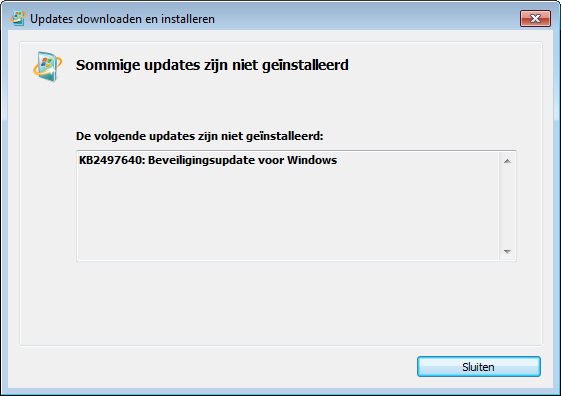
I got this message when I tried to install KB2497640 and KB2506223.

Bo3SE.png

"Some updates couldn't be installed."

No error code though. I should point out that I'm running Windows 7 in VMware Player, but I don't know if it makes a difference.
 

My Computer

OS
Windows 7 Ultimate 32-bit
VM player may be a problem. Never used one.

You are trying the manual downloads one at a time I hope. Do not try both at the same time.

Run the readiness tool and post the Checksur.log.
 

My Computer

Computer Manufacturer/Model Number
Hopalong/ Godzilla
OS
Windows7 Pro 64bit SP-1; Windows XP Pro 32bit
CPU
Intel Core i7-870 Lynnfield 2.93GHz LGA 1156 95W Quad-Core
Motherboard
ASUS P7P55D-E PRO
Memory
8GB@1400MHz Crucial Ballistix DDR3-1600 4x2GB
Graphics Card(s)
ASUS ENGTX460 DirectCU/2DI/1GD5 1GB 256-bit GDDR5
Sound Card
VIA Onboard
Monitor(s) Displays
Asus VS248H-P 24"; Samsung SyncMaster 941BW 19"ws
Screen Resolution
1920x1080; 1440x900
Hard Drives
Samsung 830 120GB SSD
Intel 320 120GB SSD
Western Digital Caviar Black WD7501AALS 750GB 7200 RPM SATA 3.0Gb/s
Western Digital Caviar Black WD6401AALS 640GB 7200 RPM SATA 3.0Gb/s
PSU
COOLER MASTER Silent Pro RS850-AMBAJ3-US 850W Modular
Case
COOLER MASTER HAF 932 RC-932-KKN5-GP Black
Cooling
Scythe "Mugen-2 Rev.B" (2 ScytheKaze-Jyuni PWM fans)
Keyboard
Logitech K-320
Mouse
Kensington
Antivirus
Avast Inernet Suite
Browser
IE 9 ; Chrome
You are trying the manual downloads one at a time I hope. Do not try both at the same time.

I didn't run them at the same time. Is there a way to uncover the exact error message that was generated by the installer? Perhaps that will give some insight.
 

My Computer

OS
Windows 7 Ultimate 32-bit
Just checking.

Post the checksur.log and I'll leave a message for our update specialist Niemiro.

If anyone can fix it he can but he will need the check.sur log to do so.

Mike
 

My Computer

Computer Manufacturer/Model Number
Hopalong/ Godzilla
OS
Windows7 Pro 64bit SP-1; Windows XP Pro 32bit
CPU
Intel Core i7-870 Lynnfield 2.93GHz LGA 1156 95W Quad-Core
Motherboard
ASUS P7P55D-E PRO
Memory
8GB@1400MHz Crucial Ballistix DDR3-1600 4x2GB
Graphics Card(s)
ASUS ENGTX460 DirectCU/2DI/1GD5 1GB 256-bit GDDR5
Sound Card
VIA Onboard
Monitor(s) Displays
Asus VS248H-P 24"; Samsung SyncMaster 941BW 19"ws
Screen Resolution
1920x1080; 1440x900
Hard Drives
Samsung 830 120GB SSD
Intel 320 120GB SSD
Western Digital Caviar Black WD7501AALS 750GB 7200 RPM SATA 3.0Gb/s
Western Digital Caviar Black WD6401AALS 640GB 7200 RPM SATA 3.0Gb/s
PSU
COOLER MASTER Silent Pro RS850-AMBAJ3-US 850W Modular
Case
COOLER MASTER HAF 932 RC-932-KKN5-GP Black
Cooling
Scythe "Mugen-2 Rev.B" (2 ScytheKaze-Jyuni PWM fans)
Keyboard
Logitech K-320
Mouse
Kensington
Antivirus
Avast Inernet Suite
Browser
IE 9 ; Chrome
Here's the current state of CheckSUR.log:

=================================
Checking System Update Readiness.
Binary Version 6.1.7601.21645
Package Version 11.0
2011-05-21 17:26

Checking Windows Servicing Packages

Checking Package Manifests and Catalogs
(f) CBS Catalog Corrupt 0x800B0100 servicing\Packages\Package_for_KB2506223_RTM~31bf3856ad364e35~x86~~6.1.1.1.cat

Checking Package Watchlist
(f) CBS Watchlist Package Missing 0x80070002 Microsoft-Windows-Foundation-Package~31bf3856ad364e35~x86~~0.0.0.0 Package_for_KB2497640_SP1~31bf3856ad364e35~x86~~6.1.1.2 Package registry presence failed, possibly an orphaned package on package watchlist

Checking Component Watchlist

Checking Packages
(f) CBS MUM Missing 0x00000002 servicing\Packages\Package_10_for_KB2497640~31bf3856ad364e35~x86~~6.1.1.2.mum
(f) CBS MUM Missing 0x00000002 servicing\Packages\Package_for_KB2497640_RTM~31bf3856ad364e35~x86~~6.1.1.2.mum
(f) CBS MUM Missing 0x00000002 servicing\Packages\Package_for_KB2497640~31bf3856ad364e35~x86~~6.1.1.2.mum

Checking Component Store

Summary:
Seconds executed: 219
Found 5 errors
CBS MUM Missing Total count: 3
CBS Catalog Corrupt Total count: 1
CBS Watchlist Package Missing Total count: 1

Unavailable repair files:
servicing\packages\Package_for_KB2506223_RTM~31bf3856ad364e35~x86~~6.1.1.1.mum
servicing\packages\Package_10_for_KB2497640~31bf3856ad364e35~x86~~6.1.1.2.mum
servicing\packages\Package_for_KB2497640_RTM~31bf3856ad364e35~x86~~6.1.1.2.mum
servicing\packages\Package_for_KB2497640~31bf3856ad364e35~x86~~6.1.1.2.mum
servicing\packages\Package_for_KB2506223_RTM~31bf3856ad364e35~x86~~6.1.1.1.cat
servicing\packages\Package_10_for_KB2497640~31bf3856ad364e35~x86~~6.1.1.2.cat
servicing\packages\Package_for_KB2497640_RTM~31bf3856ad364e35~x86~~6.1.1.2.cat
servicing\packages\Package_for_KB2497640~31bf3856ad364e35~x86~~6.1.1.2.cat

(w) Unable to get system disk properties 0x0000045D IOCTL_STORAGE_QUERY_PROPERTY Disk Cache
 

My Computer

OS
Windows 7 Ultimate 32-bit
I posted to Niemiro for assistance.
I don't know when he will get to check it. Might be today but might be tomorrow.

Mike
 

My Computer

Computer Manufacturer/Model Number
Hopalong/ Godzilla
OS
Windows7 Pro 64bit SP-1; Windows XP Pro 32bit
CPU
Intel Core i7-870 Lynnfield 2.93GHz LGA 1156 95W Quad-Core
Motherboard
ASUS P7P55D-E PRO
Memory
8GB@1400MHz Crucial Ballistix DDR3-1600 4x2GB
Graphics Card(s)
ASUS ENGTX460 DirectCU/2DI/1GD5 1GB 256-bit GDDR5
Sound Card
VIA Onboard
Monitor(s) Displays
Asus VS248H-P 24"; Samsung SyncMaster 941BW 19"ws
Screen Resolution
1920x1080; 1440x900
Hard Drives
Samsung 830 120GB SSD
Intel 320 120GB SSD
Western Digital Caviar Black WD7501AALS 750GB 7200 RPM SATA 3.0Gb/s
Western Digital Caviar Black WD6401AALS 640GB 7200 RPM SATA 3.0Gb/s
PSU
COOLER MASTER Silent Pro RS850-AMBAJ3-US 850W Modular
Case
COOLER MASTER HAF 932 RC-932-KKN5-GP Black
Cooling
Scythe "Mugen-2 Rev.B" (2 ScytheKaze-Jyuni PWM fans)
Keyboard
Logitech K-320
Mouse
Kensington
Antivirus
Avast Inernet Suite
Browser
IE 9 ; Chrome
Hello!

Sorry for the delay in responding! This one may require two passes to fix. We shall see.

N.B: There are no Manifest files for you.

WARNING! This fix was created specifically for this user! If you are not this user, do not follow these instructions!
@blooglet: Ignore the above :)

Download the attached .zip file. Inside it, will be two folders, Packages and Manifests.

Create these folders if they do not already exist: C:\Windows\Temp\CheckSur\Servicing\Packages\ and C:\Windows\Temp\CheckSur\winsxs\Manifests

Extract Packs.zip onto your Desktop. Please place the contents of my Desktop\Packages in C:\Windows\Temp\CheckSur\Servicing\Packages\ and my Desktop\Manifests in C:\Windows\Temp\CheckSur\winsxs\Manifests.

DO NOT place the .zip file in that folder, or the folders themselves. Make sure that a lot of files are in each of those Checksur folder.

Re-run the System Update Readiness Tool, and get me another copy of C:\Windows\Logs\CBS\CheckSUR.log.

I then wish you to use the standalone updates, and NOT to go through Windows Update. Mike has provided links above. I also wish you to try KB2497640 FIRST.

Thanks a lot!

Richard
 

Attachments

My Computer

Computer Manufacturer/Model Number
Dell XPS 420
OS
Vista Home Premium x86 SP2
CPU
Intel Core 2 Quad Q9300 2.50GHz
Motherboard
Stock Dell 0TP406
Memory
4 gb (DDR2 800) 400MHz
Graphics Card(s)
ATI Radeon HD 3870 (512 MBytes)
Monitor(s) Displays
1 x Dell 2007FP and 1 x (old) Sonic flat screen
Screen Resolution
1600 x 1200 and 1280 x 1204
Hard Drives
1 x 640Gb (SATA 300) Western Digital: WDC WD6400AAKS-75A7B0 1 x 1Tb (SATA 600) Western Digital: Caviar Black, SATA 6GB/S, 64Mb cache, 8ms Western Digital: WDC WD1002FAEX-00Z3A0 ATA Device
Case
Dell XPS 420
Cooling
Stock Fan
Keyboard
Dell Bluetooth
Mouse
Advent Optical ADE-WG01 (colour change light up)
Internet Speed
Varies from 10kb/s to 170kb/s. So unreliable it is not funny
Other Info
ASUS USB 3.0 5Gbps/SATA 6Gbps - PCI-Express Combo Controller Card (U3S6)
Internet Explorer 9 installed perfectly (which probably caused that IE8 update to go away), but the remaining update still won't install.

KB2506223: Beveiligingsupdate voor Windows 7

Right before I installed IE9 through Windows Update, I regenerated CheckSUR.log like you asked:

=================================
Checking System Update Readiness.
Binary Version 6.1.7601.21645
Package Version 11.0
2011-05-21 20:38

Checking Windows Servicing Packages

Checking Package Manifests and Catalogs
(f) CBS Catalog Corrupt 0x800B0100 servicing\Packages\Package_for_KB2506223_RTM~31bf3856ad364e35~x86~~6.1.1.1.cat
(fix) CBS Catalog Corrupt CBS File Replaced Package_for_KB2506223_RTM~31bf3856ad364e35~x86~~6.1.1.1.cat from Cabinet: C:\Windows\CheckSur\v1.0\windows6.1-7601-x86-cab2.cab.
(fix) CBS Paired File CBS File also Replaced Package_for_KB2506223_RTM~31bf3856ad364e35~x86~~6.1.1.1.mum from Cabinet: C:\Windows\CheckSur\v1.0\windows6.1-7601-x86-cab2.cab.

Checking Package Watchlist
(f) CBS Watchlist Package Missing 0x80070002 Microsoft-Windows-Foundation-Package~31bf3856ad364e35~x86~~0.0.0.0 Package_for_KB2497640_SP1~31bf3856ad364e35~x86~~6.1.1.2 Package registry presence failed, possibly an orphaned package on package watchlist

Checking Component Watchlist

Checking Packages
(f) CBS MUM Missing 0x00000002 servicing\Packages\Package_10_for_KB2497640~31bf3856ad364e35~x86~~6.1.1.2.mum
(fix) CBS MUM Missing CBS File Replaced Package_10_for_KB2497640~31bf3856ad364e35~x86~~6.1.1.2.mum from Cabinet: C:\Windows\CheckSur\v1.0\windows6.1-7601-x86-cab2.cab.
(fix) CBS Paired File CBS File also Replaced Package_10_for_KB2497640~31bf3856ad364e35~x86~~6.1.1.2.cat from Cabinet: C:\Windows\CheckSur\v1.0\windows6.1-7601-x86-cab2.cab.
(f) CBS MUM Missing 0x00000002 servicing\Packages\Package_for_KB2497640_RTM~31bf3856ad364e35~x86~~6.1.1.2.mum
(fix) CBS MUM Missing CBS File Replaced Package_for_KB2497640_RTM~31bf3856ad364e35~x86~~6.1.1.2.mum from Cabinet: C:\Windows\CheckSur\v1.0\windows6.1-7601-x86-cab2.cab.
(fix) CBS Paired File CBS File also Replaced Package_for_KB2497640_RTM~31bf3856ad364e35~x86~~6.1.1.2.cat from Cabinet: C:\Windows\CheckSur\v1.0\windows6.1-7601-x86-cab2.cab.
(f) CBS MUM Missing 0x00000002 servicing\Packages\Package_for_KB2497640~31bf3856ad364e35~x86~~6.1.1.2.mum
(fix) CBS MUM Missing CBS File Replaced Package_for_KB2497640~31bf3856ad364e35~x86~~6.1.1.2.mum from Cabinet: C:\Windows\CheckSur\v1.0\windows6.1-7601-x86-cab2.cab.
(fix) CBS Paired File CBS File also Replaced Package_for_KB2497640~31bf3856ad364e35~x86~~6.1.1.2.cat from Cabinet: C:\Windows\CheckSur\v1.0\windows6.1-7601-x86-cab2.cab.

Checking Component Store

Summary:
Seconds executed: 179
Found 5 errors
Fixed 4 errors
CBS MUM Missing Total count: 3
Fixed: CBS MUM Missing. Total count: 3
CBS Catalog Corrupt Total count: 1
Fixed: CBS Catalog Corrupt. Total count: 1
CBS Watchlist Package Missing Total count: 1
Fixed: CBS Paired File. Total count: 4
(w) Unable to get system disk properties 0x0000045D IOCTL_STORAGE_QUERY_PROPERTY Disk Cache

I should point out that the Manifests folder inside your ZIP file was empty. Is this normal? My own Manifests folder was empty too.
 

My Computer

OS
Windows 7 Ultimate 32-bit
Hello again!

Your error stems from this error in your log:

Code:
(f)    CBS Watchlist Package Missing    0x80070002     Microsoft-Windows-Foundation-Package~31bf3856ad364e35~x86~~0.0.0.0     Package_for_KB2497640_SP1~31bf3856ad364e35~x86~~6.1.1.2    Package registry  presence failed, possibly an orphaned package on package watchlist
This error means that the registry keys in the Component Based Servicing key do exist, but the files in C:\Windows\Servicing\Packages and C:\Windows\WinSxS which this key references do not exist.

The problem is that when IE9 was installed, the update did disappear, but it didn't truly fully install and then completely uninstall as it really needs to.

This error doesn't have a known solution, except a trivial Repair Install, and so it is very hard to solve! However, there is one technique which has had a lot of success in the past. Occasionally, something goes wrong. For you, we are only dealing with one very minor key, so I really think that there is almost 0 chance of it going wrong, and we have used these instructions on many, many people in the past, however, just in case, because in theory it can go wrong (never seen it in practice) please do the following (By the way, a Repair Install would probably be just as risky is this, you may as well use these instructions)

1: Update any backups you have. Disconnect your backup media.

2: Make sure that you have a Windows Disk, or create one here: Create a Recovery Disc - Vista Forums (this is only to access System Restore)

3: http://www.sevenforums.com/tutorials/697-system-restore-point-create.html

4: Make sure that you have a way of contacting us.

I think that we are being way over cautious here, but it is in my nature to be overcautious!

I repeat, the problems that can arise are only theoretical, and I have never seen one actually occur.

The Steps:

Please read through these steps in their entirety once first, before starting work. If you need any more assistance, please ask!

1: Download PSTools from here: PsTools

2: Extract PSExec.exe to your DESKTOP.

3: Open an Elevated Command Prompt.

4: Type in the following Commands exactly as shown, noting spaces, and press enter after each one:

cd %userprofile%\Desktop

<enter>

psexec -s -i -d regedit

<enter>

A copy of regedit will open. It will open under the local SYSTEM account, and not under your local split token admin user! Be even more careful that usual! You have unprotected SYSTEM level access to the registry at the moment!

Then select File > Export > Selected Branch, and put in:

HKEY_LOCAL_MACHINE\Software\Microsoft\Windows\CurrentVersion\Component Based Servicing\ComponentDetect\

and enter a name and press Save.

Then please navigate to the saved file > Send to > Compressed (zipped) folder, and upload that file here.

Thanks a lot!

Richard

P.S. In actual fact, I am doing nothing dangerous in these steps (I am not changing anything). I need an additional log to fathom out what to modify, and I am using PsExec just to give you a practice run.
 

My Computer

Computer Manufacturer/Model Number
Dell XPS 420
OS
Vista Home Premium x86 SP2
CPU
Intel Core 2 Quad Q9300 2.50GHz
Motherboard
Stock Dell 0TP406
Memory
4 gb (DDR2 800) 400MHz
Graphics Card(s)
ATI Radeon HD 3870 (512 MBytes)
Monitor(s) Displays
1 x Dell 2007FP and 1 x (old) Sonic flat screen
Screen Resolution
1600 x 1200 and 1280 x 1204
Hard Drives
1 x 640Gb (SATA 300) Western Digital: WDC WD6400AAKS-75A7B0 1 x 1Tb (SATA 600) Western Digital: Caviar Black, SATA 6GB/S, 64Mb cache, 8ms Western Digital: WDC WD1002FAEX-00Z3A0 ATA Device
Case
Dell XPS 420
Cooling
Stock Fan
Keyboard
Dell Bluetooth
Mouse
Advent Optical ADE-WG01 (colour change light up)
Internet Speed
Varies from 10kb/s to 170kb/s. So unreliable it is not funny
Other Info
ASUS USB 3.0 5Gbps/SATA 6Gbps - PCI-Express Combo Controller Card (U3S6)
Hello again!

Really well done!

Code:
 (f)    CBS Watchlist Package Missing    0x80070002     Microsoft-Windows-Foundation-Package~31bf3856ad364e35~x86~~0.0.0.0     Package_for_KB2497640_SP1~31bf3856ad364e35~x86~~6.1.1.2    Package registry  presence failed, possibly an orphaned package on package watchlist
No longer shows in your registry! Hopefully it is fixed. I notice that your CheckSUR.log regeneration was prior to your installation of IE9.

Can you please re-run the System Update Readiness Tool, and then please copy the C:\Windows\Logs\CBS folder to your Desktop, right click on it > Send to > Compressed (zipped) folder, and upload the new file which is created on your Desktop here.

Thanks a lot!

Richard

P.S. We are making progress. All original errors in your log are now fixed, I think. I just need to check that no new errors have appeared, and then kick start Windows Update.
 

My Computer

Computer Manufacturer/Model Number
Dell XPS 420
OS
Vista Home Premium x86 SP2
CPU
Intel Core 2 Quad Q9300 2.50GHz
Motherboard
Stock Dell 0TP406
Memory
4 gb (DDR2 800) 400MHz
Graphics Card(s)
ATI Radeon HD 3870 (512 MBytes)
Monitor(s) Displays
1 x Dell 2007FP and 1 x (old) Sonic flat screen
Screen Resolution
1600 x 1200 and 1280 x 1204
Hard Drives
1 x 640Gb (SATA 300) Western Digital: WDC WD6400AAKS-75A7B0 1 x 1Tb (SATA 600) Western Digital: Caviar Black, SATA 6GB/S, 64Mb cache, 8ms Western Digital: WDC WD1002FAEX-00Z3A0 ATA Device
Case
Dell XPS 420
Cooling
Stock Fan
Keyboard
Dell Bluetooth
Mouse
Advent Optical ADE-WG01 (colour change light up)
Internet Speed
Varies from 10kb/s to 170kb/s. So unreliable it is not funny
Other Info
ASUS USB 3.0 5Gbps/SATA 6Gbps - PCI-Express Combo Controller Card (U3S6)
The log is a lot shorter this time...

=================================
Checking System Update Readiness.
Binary Version 6.1.7601.21645
Package Version 11.0
2011-05-22 16:25

Checking Windows Servicing Packages

Checking Package Manifests and Catalogs

Checking Package Watchlist

Checking Component Watchlist

Checking Packages

Checking Component Store

Summary:
Seconds executed: 443
No errors detected
(w) Unable to get system disk properties 0x0000045D IOCTL_STORAGE_QUERY_PROPERTY Disk Cache

Full C:\Windows\Logs\CBS below!
 

My Computer

OS
Windows 7 Ultimate 32-bit

My Computer

Computer Manufacturer/Model Number
Dell XPS 420
OS
Vista Home Premium x86 SP2
CPU
Intel Core 2 Quad Q9300 2.50GHz
Motherboard
Stock Dell 0TP406
Memory
4 gb (DDR2 800) 400MHz
Graphics Card(s)
ATI Radeon HD 3870 (512 MBytes)
Monitor(s) Displays
1 x Dell 2007FP and 1 x (old) Sonic flat screen
Screen Resolution
1600 x 1200 and 1280 x 1204
Hard Drives
1 x 640Gb (SATA 300) Western Digital: WDC WD6400AAKS-75A7B0 1 x 1Tb (SATA 600) Western Digital: Caviar Black, SATA 6GB/S, 64Mb cache, 8ms Western Digital: WDC WD1002FAEX-00Z3A0 ATA Device
Case
Dell XPS 420
Cooling
Stock Fan
Keyboard
Dell Bluetooth
Mouse
Advent Optical ADE-WG01 (colour change light up)
Internet Speed
Varies from 10kb/s to 170kb/s. So unreliable it is not funny
Other Info
ASUS USB 3.0 5Gbps/SATA 6Gbps - PCI-Express Combo Controller Card (U3S6)
Awesome... my Windows Update screen finally lit up green again. I haven't seen that in a while! The only remaining update is Windows 7 SP1, so I should be good to go.

One more question about the service pack though... I've heard that people are having trouble with it. Would you recommend holding out for few more weeks?
 

My Computer

OS
Windows 7 Ultimate 32-bit
Hello!

That is excellent news! I am so glad!

Windows 7 Service Pack 1 has been more successful than any other Windows Service Pack I have worked with.

The majority of errors I am seeing are your 0x800B0100 errors. These are very easy to fix, much easier than what you have just done. And mainly, they are caused by luck. And I am on standby! lol.

Remember that you are looking at a forum to discuss problems in, and so is not representative! Remember to x100 and divide by Windows 7 sales!

As I have already mentioned, Windows 7 SP1 has been fantastic (far, far better than Vista, and that was so much better, yes better!, than XP). However, Microsoft have identified two SP1 issues at their end. Both are already fixed.

And I have just checked you over. Your logs are clean. There is nothing about to cause you failures. (some of the Driver Sweeper errors in particular come to mind - not an issue on your computer)

Out of the three serious errors that come to mind for SP1, none are too serious, two are fixed, one is fine on your computer, and that only leaves luck. And luck usually only corrupts a few files, and I can fix those for you!

I think that you are perfectly safe to install SP1, much safer than most. (and I am seeing no errors I suspect to be at Microsoft's end - I don't think that SP1 is going to change again)

Richard
 

My Computer

Computer Manufacturer/Model Number
Dell XPS 420
OS
Vista Home Premium x86 SP2
CPU
Intel Core 2 Quad Q9300 2.50GHz
Motherboard
Stock Dell 0TP406
Memory
4 gb (DDR2 800) 400MHz
Graphics Card(s)
ATI Radeon HD 3870 (512 MBytes)
Monitor(s) Displays
1 x Dell 2007FP and 1 x (old) Sonic flat screen
Screen Resolution
1600 x 1200 and 1280 x 1204
Hard Drives
1 x 640Gb (SATA 300) Western Digital: WDC WD6400AAKS-75A7B0 1 x 1Tb (SATA 600) Western Digital: Caviar Black, SATA 6GB/S, 64Mb cache, 8ms Western Digital: WDC WD1002FAEX-00Z3A0 ATA Device
Case
Dell XPS 420
Cooling
Stock Fan
Keyboard
Dell Bluetooth
Mouse
Advent Optical ADE-WG01 (colour change light up)
Internet Speed
Varies from 10kb/s to 170kb/s. So unreliable it is not funny
Other Info
ASUS USB 3.0 5Gbps/SATA 6Gbps - PCI-Express Combo Controller Card (U3S6)
Alright, thanks for all your help! :)
 

My Computer

OS
Windows 7 Ultimate 32-bit
No problem! It has been a pleasure to work with you! Thanks a lot for the +rep! Hopefully all will go smootly!

Richard
 

My Computer

Computer Manufacturer/Model Number
Dell XPS 420
OS
Vista Home Premium x86 SP2
CPU
Intel Core 2 Quad Q9300 2.50GHz
Motherboard
Stock Dell 0TP406
Memory
4 gb (DDR2 800) 400MHz
Graphics Card(s)
ATI Radeon HD 3870 (512 MBytes)
Monitor(s) Displays
1 x Dell 2007FP and 1 x (old) Sonic flat screen
Screen Resolution
1600 x 1200 and 1280 x 1204
Hard Drives
1 x 640Gb (SATA 300) Western Digital: WDC WD6400AAKS-75A7B0 1 x 1Tb (SATA 600) Western Digital: Caviar Black, SATA 6GB/S, 64Mb cache, 8ms Western Digital: WDC WD1002FAEX-00Z3A0 ATA Device
Case
Dell XPS 420
Cooling
Stock Fan
Keyboard
Dell Bluetooth
Mouse
Advent Optical ADE-WG01 (colour change light up)
Internet Speed
Varies from 10kb/s to 170kb/s. So unreliable it is not funny
Other Info
ASUS USB 3.0 5Gbps/SATA 6Gbps - PCI-Express Combo Controller Card (U3S6)
Back
Top