
Windows Update Error 80246008 in Windows 7 - Fix

Windows Update Error 80246008 in Windows 7 - Fix

   Information

Reasons

This error is caused by issues with Background Inteligence Transfer Service or with COM+ Event System


Troubleshooting

1.Go to Start>>Search>>Services.msc

and check below services exist, have correct settings and are working

COM+ Event System :Automatic (started)

Background Intelligent Transfer Service (BITS):Manual or Automatic(Delayed Start)

If you have another settings you have to correct it.If COM+ Event System is not started then please run it manually,next run manually BITS service.

   Note

Please save order with running services.BITS service dependce from COM+ Event System -if this service is not working BITS service will not work too.


If you have only issue with running BITS service

STEP I

Reset Windows Update backgrounds components

how,see Windows Update - Reset

STEP II

Make sure that following folder exist

C:\ProgramData\Microsoft\Network\Downloader

   Note

Folder C:\ProgramData is hidden.To see this folder you have to in Control panel>>Folder Options enable option "Show hidden files and folders" or use any good 3p file manager which can see everything independly from system settings


if you don't have this folders,create it manually.Check also permissions for this folder

Administrators group and System have full access (all checked) to this folder, no one else has permission to that.

//how to check & change permissions see this tutorial CLICK //

see also

STEP III

Empty folder C:\ProgramData\Microsoft\Network\Downloader.

STEP IV

Reset fully Windows Updates

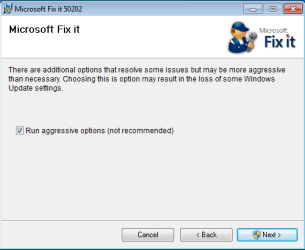
Please run this MS Fix 50202 in AGGRESSIVE MODE (image)
KB971058.png

STEP V

Uninstall all 3p security software,download accelerators and any program for managing and monitoring network connections.

If you have issue with COM+ Event System too...

As I said before if this service not working, BITS service will not work too. If unable to run this service or service doesn't exist please import this EventSystemWin7.reg fix to registry.


Download


and next restart computer

If you don't have BITS service or cannot to run it,none of previous method help...

Import BITSWin7.reg below fix for BITS service to registry.


Download


Because for some subkeys Administrators defaultly don't have full control to workaround this problem,import this fix from SYSTEM account

1.Download PsTools,extract from this psexec.exe file and put it in C:\Windows\System32
2.Download my fix for BITS service and unpack it anywhere e.g on your desktop
3..Run cmd.exe with administrative previlliges (right click on cmd.exe and choose "run as admin") and type:

psexec -s -i -d regedit


//This command run regedit from System account.//

4.Go to File>>Import choose location where you stored BITSWIN7.reg file,choose it and apply.

5.Restart Computer


Attachments

Last edited by a moderator:
Thank you

I have been fighting this problem since December 31 2010 when it occurred. My system no longer listed the BITS service at all. I had a bit locker but the service was not in the system.
Some of the updates you could download in a service pack a while back so I had a partial update.
We had a power failure here and that is what cause my error. Being the stubborn sort I was not willing to do the wipe it clean option unless I could no longer secure the system.
I installed both the registry keys and for the first time this year the win-update actually worked. THANK YOU!:D:D:D

BTW this was the first issue I have had with Windows 7. Thankfully we finally have an os that is more stable then win95 was. Can't say that about all the one's in-between them. LOL
 

My Computer

Computer Manufacturer/Model Number
hp p6350z
OS
windows 7 home premium 64 bit
CPU
amd x2 240
Motherboard
hp
Memory
4gb
Graphics Card(s)
nvidia geforce gt 240
Sound Card
nvidia high definition audio
Monitor(s) Displays
samsung
Hard Drives
seagate st3500418s
PSU
450
Case
hp
Cooling
i case fan
Success!

I just wanted to say thanks - I've been struggling for ages with Windows Update not working (it said the service wasn't running) and nothing seemed to work. The COM+ Event System and the BITS services seemed to be present and started but WU still wouldn't work. I used your instructions and bat files to carry out both stages of the method covered in Windows Update - Reset and after running both bat files and restarting my PC Windows Update started working again!

It looks like it's been broken for about 6 months (I don't know why the Windows Action Centre didn't flag up any problems!) but now all the necessary updates are downloading - so THANKS! :-)
 

My Computer

OS
Windows 7 Home Premium 64bit
Help

I've tried to delete items in Downloader file, but denied because says they are open somewhere else. How do I close these files (qmgr0 and qmgr1) so they can be deleted?
 

My Computer

OS
Windows 7 Home Premium
Bits service and updates restored

Thanks for the tutorial, Updates and bits service restored.

:):dinesh:
 

My Computer

Computer Manufacturer/Model Number
Dell/GX280
OS
Windows 7 ultimate
CPU
P4 3.0
Motherboard
Dell
Memory
2 GB
Graphics Card(s)
Ati 4350
Sound Card
ac97 soundmax
Monitor(s) Displays
Medion 24
Hard Drives
"Maxtor 250 gb
Samsung 1 TB
PSU
Dell
Case
Dell
Cooling
Dell
successful

Thank you so much!

The problem of mine is the BITS.reg missing. So I followed the steps: downloaded pstool and BITS Service, imported the BITSWIN7.reg into the registry. Restarted. Done!
 

My Computer

OS
windows 7
For some reason I can't see the attached download ( http://www.sevenforums.com/attachments/tutorials/99963d1285336088-windows-update-error-80246008-windows-7-fix-bitswin7.zip )
 

My Computer

OS
Windows 7 Pro x64
Hello Luckz,

Sorry about that. The download has been fixed. Please try again. :)
 

My Computer

Computer type
PC/Desktop
Computer Manufacturer/Model Number
Self built custom
OS
64-bit Windows 11 Pro for Workstations
CPU
Intel i7-8700K OC'd to 5 GHz
Motherboard
ASUS ROG Maximus XI Formula Z390
Memory
64 GB (4x16GB) G.SKILL TridentZ RGB DDR4 3600 MHz
Graphics Card(s)
ASUS ROG-STRIX-GTX1080TI-O11G-GAMING
Sound Card
Integrated
Monitor(s) Displays
2 x Samsung Odyssey G7 27"
Screen Resolution
2560x1440
Hard Drives
1TB Samsung 990 PRO M.2,
4TB Samsung 990 PRO PRO M.2,
TerraMaster F8 SSD Plus NAS
PSU
Seasonic Prime Titanium 850W
Case
Thermaltake Core P3
Cooling
Corsair Hydro H115i
Keyboard
Logitech wireless K800
Mouse
Logitech MX Master 4
Internet Speed
2 Gb/s Download and 100 Mb/s Upload
Antivirus
Malwarebyte Anti-Malware Premium
Browser
Google Chrome
Other Info
Logitech Z625 speaker system,
Logitech BRIO 4K Pro webcam,
HP Color LaserJet Pro MFP M477fdn,
APC SMART-UPS RT 1000 XL - SURT1000XLI,
Galaxy S23 Plus phone
Thank you so much for this tutorial! After a virus attack, BITS didnt start and wasnt present in the services. And of course I couldnt do any updates... Now all is back to normal! I used the BitsWin7 registry import and it worked like a charm!
 

My Computer

OS
windows 7 home premium 64bits
still having issues

I tried everything stated on here, and even imported the bitswin7.reg and I'm still have an issue with the missing bits service and windows update service
 

My Computer

OS
windows 7 professional 64 bit
Hello Heri, and welcome to Seven Forums.

You would just need to click on the blue Download button under that step for it. :)
 

My Computer

Computer type
PC/Desktop
Computer Manufacturer/Model Number
Self built custom
OS
64-bit Windows 11 Pro for Workstations
CPU
Intel i7-8700K OC'd to 5 GHz
Motherboard
ASUS ROG Maximus XI Formula Z390
Memory
64 GB (4x16GB) G.SKILL TridentZ RGB DDR4 3600 MHz
Graphics Card(s)
ASUS ROG-STRIX-GTX1080TI-O11G-GAMING
Sound Card
Integrated
Monitor(s) Displays
2 x Samsung Odyssey G7 27"
Screen Resolution
2560x1440
Hard Drives
1TB Samsung 990 PRO M.2,
4TB Samsung 990 PRO PRO M.2,
TerraMaster F8 SSD Plus NAS
PSU
Seasonic Prime Titanium 850W
Case
Thermaltake Core P3
Cooling
Corsair Hydro H115i
Keyboard
Logitech wireless K800
Mouse
Logitech MX Master 4
Internet Speed
2 Gb/s Download and 100 Mb/s Upload
Antivirus
Malwarebyte Anti-Malware Premium
Browser
Google Chrome
Other Info
Logitech Z625 speaker system,
Logitech BRIO 4K Pro webcam,
HP Color LaserJet Pro MFP M477fdn,
APC SMART-UPS RT 1000 XL - SURT1000XLI,
Galaxy S23 Plus phone
I tried everything stated on here, and even imported the bitswin7.reg and I'm still have an issue with the missing bits service and windows update service

Hello Deviaqua, and welcome to Seven Forums.

You might see if doing a system restore using a restore point (if available) dated before this happened may be able to help. :)

Hope this helps,
Shawn
 

My Computer

Computer type
PC/Desktop
Computer Manufacturer/Model Number
Self built custom
OS
64-bit Windows 11 Pro for Workstations
CPU
Intel i7-8700K OC'd to 5 GHz
Motherboard
ASUS ROG Maximus XI Formula Z390
Memory
64 GB (4x16GB) G.SKILL TridentZ RGB DDR4 3600 MHz
Graphics Card(s)
ASUS ROG-STRIX-GTX1080TI-O11G-GAMING
Sound Card
Integrated
Monitor(s) Displays
2 x Samsung Odyssey G7 27"
Screen Resolution
2560x1440
Hard Drives
1TB Samsung 990 PRO M.2,
4TB Samsung 990 PRO PRO M.2,
TerraMaster F8 SSD Plus NAS
PSU
Seasonic Prime Titanium 850W
Case
Thermaltake Core P3
Cooling
Corsair Hydro H115i
Keyboard
Logitech wireless K800
Mouse
Logitech MX Master 4
Internet Speed
2 Gb/s Download and 100 Mb/s Upload
Antivirus
Malwarebyte Anti-Malware Premium
Browser
Google Chrome
Other Info
Logitech Z625 speaker system,
Logitech BRIO 4K Pro webcam,
HP Color LaserJet Pro MFP M477fdn,
APC SMART-UPS RT 1000 XL - SURT1000XLI,
Galaxy S23 Plus phone
Thank You!

I'd been struggling with this forever and Windows is now updating. You are my new best friend.
 

My Computer

Computer Manufacturer/Model Number
Toshiba Satellite P755
OS
Windows 7 Home Premium 64bit
CPU
i7
Memory
6.00 RAM
Thank you so much

Hi flavian,

great fix, worked perfect after a heavy virus attack (rootkit). Thanks a lot an regards from Frankfurt, Germany

Andre
 

My Computer

OS
Win 7 Prof 32bit
THANK You~~~

Spent hours figuring out what nasty trojan hit my pc :cry: and I suppose in the process of aggressively sweeping the PC :confused: I may have broken a couple of the windows services (windows update and BITS). Thank you thank you for this tutorial, I spent hours trying to figure out how to get BITS to work again and had it figure down to registry setting but couldn't locate the proper values~ :D Thank you~ :3
 

My Computer

OS
Windows 7 Home Premium 64bit
Fix that works for Windows Update BITS problems

Great work! The BITSWin7.reg fix in part V followed by the Windows Fixit for Windows Update resolved my issues. The Fixit and other solutions did not work before.

Thanks and well done!
 

My Computer

OS
Vista 32, Win 7-32 &64, XP ( 8-PC's)
Glad to know it has helped others as well. Joined the forum just to share the fix.
I also sent it to Microsoft .... yea, right, like they will listen.
 

My Computer

OS
Vista 32, Win 7-32 &64, XP ( 8-PC's)
Back
Top