Solved Windows Update error code 800B0100

Merronsk

New member
Local time
2:07 PM
Messages
3
Hello SevenForums, the last couple of weeks I have had problems installing 2 Security Updates, published 10-2-2015. They are the following:
- Security Update for Windows 7 for x64-based Systems (KB3004375)
- Security Update for Windows 7 for x64-based Systems (KB3031432)

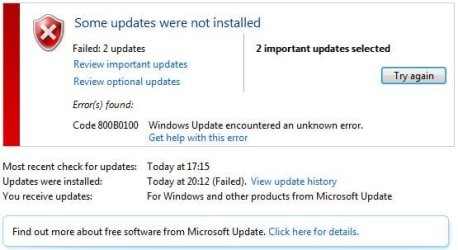
I have tried to install them several times since they was released, but every time I get the same Error Code: 800B0100.


Error Code.JPG


I have followed the steps from your "Windows Update Posting Instructions", and I have attached the logs to the thread as well.
View attachment 351107

Thank you in advance :)
 

My Computer

Computer type
PC/Desktop
OS
Windows 7 Professional x64
CPU
Intel(R) Core(TM) i5-4670 CPU @ 3.40GHz
Motherboard
Gigabyte GA-Z87MX-D3H
Memory
Kingston DDR3 HyperX 1600Mzh 2x8 - 16GB
Graphics Card(s)
NVIDIA GeForce GTX 770 & Intel(R) HD Graphics 4600
Monitor(s) Displays
Asus 27" LED VE278H
Screen Resolution
1920 x 1080
Hard Drives
ATA Corsair Force 3,
ATA SanDisk SDSSDX24,
ATA Hitachi HDT72101
PSU
Corsair CX750M, 750W
Case
Corsair Carbide 500R Mid Tower Black
Cooling
Arctic Cooling Freezer I30
Keyboard
Steelseries Apex Keyboard
Mouse
SteelSeries Sensei Pro Grade Laser Mouse
Internet Speed
Download 40Mbps - Upload 10Mbps
Antivirus
Microsoft Security Essentials & Malwarebytes Anti-Malware
Browser
Chrome
Here's the problem-list from CheckSUR...
Code:
Unavailable repair files:
 winsxs\manifests\amd64_microsoft-windows-b..os-loader.resources_31bf3856ad364e35_6.1.7601.22921_en-us_d53a7a6013cbe180.manifest
 winsxs\manifests\amd64_microsoft-windows-b..t-windows.resources_31bf3856ad364e35_6.1.7601.22921_en-us_7b1eb90e5ff15563.manifest
 winsxs\manifests\wow64_microsoft-windows-systemrestore-main_31bf3856ad364e35_6.1.7601.22921_none_afd63a941767cb31.manifest
 winsxs\manifests\amd64_microsoft-windows-systemrestore-main_31bf3856ad364e35_6.1.7601.22921_none_a5819041e3070936.manifest
 winsxs\manifests\amd64_microsoft-windows-c..integrity.resources_31bf3856ad364e35_6.1.7601.22921_en-us_57d640fb7d2291ba.manifest
 winsxs\manifests\amd64_microsoft-windows-smss_31bf3856ad364e35_6.1.7601.22921_none_0adc685748f9aac7.manifest
 winsxs\manifests\wow64_microsoft-windows-smss_31bf3856ad364e35_6.1.7601.22921_none_153112a97d5a6cc2.manifest
 winsxs\manifests\amd64_microsoft-windows-csrsrv_31bf3856ad364e35_6.1.7601.22921_none_2828f75fd525acd6.manifest
 winsxs\manifests\amd64_microsoft-windows-os-kernel_31bf3856ad364e35_6.1.7601.22921_none_cad221fae3eb1d75.manifest
 winsxs\manifests\wow64_microsoft-windows-csrsrv_31bf3856ad364e35_6.1.7601.22921_none_327da1b209866ed1.manifest
 winsxs\manifests\amd64_microsoft-windows-codeintegrity_31bf3856ad364e35_6.1.7601.22921_none_ff19b1983487ef53.manifest
 winsxs\manifests\amd64_microsoft-windows-b..vironment-os-loader_31bf3856ad364e35_6.1.7601.22921_none_b9c87a8c9c6eeb55.manifest
 winsxs\manifests\amd64_microsoft-windows-b..environment-windows_31bf3856ad364e35_6.1.7601.22921_none_c7da5784bc92a926.manifest
 winsxs\manifests\wow64_microsoft-windows-appid_31bf3856ad364e35_6.1.7601.22921_none_c0427af81650190e.manifest
 winsxs\manifests\x86_microsoft-windows-os-kernel_31bf3856ad364e35_6.1.7601.22921_none_6eb386772b8dac3f.manifest
 winsxs\manifests\amd64_microsoft-windows-appid_31bf3856ad364e35_6.1.7601.22921_none_b5edd0a5e1ef5713.manifest
 winsxs\manifests\amd64_microsoft-windows-os-kernel_31bf3856ad364e35_6.1.7601.18715_none_ca57545dcac1c9ef.manifest
 winsxs\manifests\x86_microsoft-windows-os-kernel_31bf3856ad364e35_6.1.7601.18715_none_6e38b8da126458b9.manifest
 winsxs\manifests\amd64_microsoft-windows-systemrestore-main_31bf3856ad364e35_6.1.7601.18715_none_a506c2a4c9ddb5b0.manifest
 winsxs\manifests\wow64_microsoft-windows-systemrestore-main_31bf3856ad364e35_6.1.7601.18715_none_af5b6cf6fe3e77ab.manifest
 servicing\packages\Package_29_for_KB3031432~31bf3856ad364e35~amd64~~6.1.1.0.mum
 servicing\packages\Package_29_for_KB3031432~31bf3856ad364e35~amd64~~6.1.1.0.mum
 servicing\packages\Package_30_for_KB3031432~31bf3856ad364e35~amd64~~6.1.1.0.mum
 servicing\packages\Package_30_for_KB3031432~31bf3856ad364e35~amd64~~6.1.1.0.mum
 servicing\packages\Package_31_for_KB3031432~31bf3856ad364e35~amd64~~6.1.1.0.mum
 servicing\packages\Package_31_for_KB3031432~31bf3856ad364e35~amd64~~6.1.1.0.mum
 servicing\packages\Package_32_for_KB3031432~31bf3856ad364e35~amd64~~6.1.1.0.mum
 servicing\packages\Package_32_for_KB3031432~31bf3856ad364e35~amd64~~6.1.1.0.mum
 servicing\packages\Package_33_for_KB3031432~31bf3856ad364e35~amd64~~6.1.1.0.mum
 servicing\packages\Package_33_for_KB3031432~31bf3856ad364e35~amd64~~6.1.1.0.mum
 servicing\packages\Package_56_for_KB3031432~31bf3856ad364e35~amd64~~6.1.1.0.mum
 servicing\packages\Package_56_for_KB3031432~31bf3856ad364e35~amd64~~6.1.1.0.mum
 servicing\packages\Package_57_for_KB3031432~31bf3856ad364e35~amd64~~6.1.1.0.mum
 servicing\packages\Package_57_for_KB3031432~31bf3856ad364e35~amd64~~6.1.1.0.mum
 servicing\packages\Package_58_for_KB3031432~31bf3856ad364e35~amd64~~6.1.1.0.mum
 servicing\packages\Package_58_for_KB3031432~31bf3856ad364e35~amd64~~6.1.1.0.mum
 servicing\packages\Package_for_KB3031432_SP1~31bf3856ad364e35~amd64~~6.1.1.0.mum
 servicing\packages\Package_for_KB3031432_SP1~31bf3856ad364e35~amd64~~6.1.1.0.mum
 servicing\packages\Package_for_KB3031432~31bf3856ad364e35~amd64~~6.1.1.0.mum

 servicing\packages\Package_for_KB3031432~31bf3856ad364e35~amd64~~6.1.1.0.mum

I'll post a fix protocol later.
 

My Computer

Computer type
Laptop
Computer Manufacturer/Model Number
Asus K52F or Lenovo B51-80
OS
Win 7 x64 Home Premium (and x86 VirtualBox VM)/Win10
CPU
i3 370M/i7 6500U
Motherboard
Asus/Lenovo
Memory
8GB - finally :)/8GB
Graphics Card(s)
it's an i3, dude!/dual Intel&nVidia
Sound Card
onboard
Monitor(s) Displays
15.6" built-in
Screen Resolution
1366x768/1920x1080
Hard Drives
750GB Seagate internal
Sundry external drives attached to other computers on the local network
1TB SSD on the Lenovo
PSU
n/a
Internet Speed
as much as I can get - usually on a dongle/phone, so <1MB/s
Antivirus
MSE/Defender
Browser
IE11/12/Edge/Chrome/FF(if I must)
Okay, thank you.
 

My Computer

Computer type
PC/Desktop
OS
Windows 7 Professional x64
CPU
Intel(R) Core(TM) i5-4670 CPU @ 3.40GHz
Motherboard
Gigabyte GA-Z87MX-D3H
Memory
Kingston DDR3 HyperX 1600Mzh 2x8 - 16GB
Graphics Card(s)
NVIDIA GeForce GTX 770 & Intel(R) HD Graphics 4600
Monitor(s) Displays
Asus 27" LED VE278H
Screen Resolution
1920 x 1080
Hard Drives
ATA Corsair Force 3,
ATA SanDisk SDSSDX24,
ATA Hitachi HDT72101
PSU
Corsair CX750M, 750W
Case
Corsair Carbide 500R Mid Tower Black
Cooling
Arctic Cooling Freezer I30
Keyboard
Steelseries Apex Keyboard
Mouse
SteelSeries Sensei Pro Grade Laser Mouse
Internet Speed
Download 40Mbps - Upload 10Mbps
Antivirus
Microsoft Security Essentials & Malwarebytes Anti-Malware
Browser
Chrome
I've uploaded a file - mskaa.zip - to my OneDrive at Noel's OneDrive
Please download and save it.
Right-click on the downloaded file, and select Extract all…
Extract to the default location - which will create a new folder mskaa in the same place.
Open this folder - there should be two folders inside it (Manifests, and Packages)

Copy the content of the Packages folder to the folder
C:\Windows\Temp\CheckSur\Servicing\Packages

And the content of the manifests folder (.manifest files) into this folder:

C:\Windows\Temp\CheckSur\Winsxs\Manifests

Now run the CheckSUR tool again (it may take a while)

Post the new CheckSUR.log file, and the CheckSUR.persist.log file.
 

My Computer

Computer type
Laptop
Computer Manufacturer/Model Number
Asus K52F or Lenovo B51-80
OS
Win 7 x64 Home Premium (and x86 VirtualBox VM)/Win10
CPU
i3 370M/i7 6500U
Motherboard
Asus/Lenovo
Memory
8GB - finally :)/8GB
Graphics Card(s)
it's an i3, dude!/dual Intel&nVidia
Sound Card
onboard
Monitor(s) Displays
15.6" built-in
Screen Resolution
1366x768/1920x1080
Hard Drives
750GB Seagate internal
Sundry external drives attached to other computers on the local network
1TB SSD on the Lenovo
PSU
n/a
Internet Speed
as much as I can get - usually on a dongle/phone, so <1MB/s
Antivirus
MSE/Defender
Browser
IE11/12/Edge/Chrome/FF(if I must)
Hello again NoelDP, thank you for the solution, it worked just fine and I have successfully installed the two updates now..
Here are the requested log files, if you wanna read them anyway - View attachment CheckSURLogs.rar

Thank you again NoelDP! :)
 

My Computer

Computer type
PC/Desktop
OS
Windows 7 Professional x64
CPU
Intel(R) Core(TM) i5-4670 CPU @ 3.40GHz
Motherboard
Gigabyte GA-Z87MX-D3H
Memory
Kingston DDR3 HyperX 1600Mzh 2x8 - 16GB
Graphics Card(s)
NVIDIA GeForce GTX 770 & Intel(R) HD Graphics 4600
Monitor(s) Displays
Asus 27" LED VE278H
Screen Resolution
1920 x 1080
Hard Drives
ATA Corsair Force 3,
ATA SanDisk SDSSDX24,
ATA Hitachi HDT72101
PSU
Corsair CX750M, 750W
Case
Corsair Carbide 500R Mid Tower Black
Cooling
Arctic Cooling Freezer I30
Keyboard
Steelseries Apex Keyboard
Mouse
SteelSeries Sensei Pro Grade Laser Mouse
Internet Speed
Download 40Mbps - Upload 10Mbps
Antivirus
Microsoft Security Essentials & Malwarebytes Anti-Malware
Browser
Chrome
Great! glad it worked for you.
Good luck.
 

My Computer

Computer type
Laptop
Computer Manufacturer/Model Number
Asus K52F or Lenovo B51-80
OS
Win 7 x64 Home Premium (and x86 VirtualBox VM)/Win10
CPU
i3 370M/i7 6500U
Motherboard
Asus/Lenovo
Memory
8GB - finally :)/8GB
Graphics Card(s)
it's an i3, dude!/dual Intel&nVidia
Sound Card
onboard
Monitor(s) Displays
15.6" built-in
Screen Resolution
1366x768/1920x1080
Hard Drives
750GB Seagate internal
Sundry external drives attached to other computers on the local network
1TB SSD on the Lenovo
PSU
n/a
Internet Speed
as much as I can get - usually on a dongle/phone, so <1MB/s
Antivirus
MSE/Defender
Browser
IE11/12/Edge/Chrome/FF(if I must)
Back
Top