Windows Update error during installation - Code 80073712

mlazzarotto

New member
Local time
6:22 PM
Messages
6
Hello,
I'm a sysadmin and now I've this problem with one of the pcs.
The system is a Dell Precision T1700, with Win 7 Pro x64 Sp1, with Office 2013 and Symantec Endpoint Protection installed.

Windows Update initially gave me 2 updates to install, but I couldn't install because it gave me error with code 80073712.
So, I hid them and a new update came out, the KB4480970. And this too is giving me the same error.

What I tried:
  • check disk
  • sfc /scannow
  • install of Windows Update Readiness Tool
  • Windows Update reset (see here)

For the Windows logs see here Nextcloud
 

Attachments

  • 2019-02-11 19_32_49-Remote Desktop Manager Free [AMORO].png
    2019-02-11 19_32_49-Remote Desktop Manager Free [AMORO].png
    35.9 KB · Views: 0
  • 2019-02-11 19_49_08-Remote Desktop Manager Free [AMORO].png
    2019-02-11 19_49_08-Remote Desktop Manager Free [AMORO].png
    57.3 KB · Views: 0
  • aggiornamenti falliti Moro.png
    aggiornamenti falliti Moro.png
    10.9 KB · Views: 0

My Computer

Computer type
PC/Desktop
OS
Win7, Win8, Win10, Ubuntu
Hi mlazzarotto,

Welcome to SevenForums!

Windows Update initially gave me 2 updates to install, but I couldn't install because it gave me error with code 80073712.
So, I hid them and a new update came out, the KB4480970. And this too is giving me the same error.

Do you normally install the Security Only updates or the Security Monthly Quality Rollup updates?

If you normally install the Security Only updates, then you only need to be concerned with 2018-12, 2019-01 and 2019-02 updates as these are not cumulative!

If you normally install the Security Monthly Quality Rollup, then out of the three updates that you have listed you only need to be concerned with the 2019-02 Security Monthly Quality Rollup because it is cumulative!
 

My Computer

Computer type
Laptop
Computer Manufacturer/Model Number
Fujitsu LIFEBOOK
OS
Win 7 HP SP1 64-bit Vista HB SP2 32-bit Linux Mint 18.3
CPU
Intel(R) Pentium(R) CPU P6200 @ 2.13GHz
Motherboard
FUJITSU FJNBB06
Memory
4.00 GB
Graphics Card(s)
Intel(R) Graphics Media Accelerator HD
Sound Card
[1] Realtek High Definition Audio [2] Intel(R) Display Audio
Screen Resolution
1366 x 768 x 32 bits (4294967296 colors) @ 59 Hz
Hard Drives
TOSHIBA MK5076GSX
Antivirus
AVG FREE
Hi mlazzarotto,

Welcome to SevenForums!


Do you normally install the Security Only updates or the Security Monthly Quality Rollup updates?

If you normally install the Security Only updates, then you only need to be concerned with Dec-18, Jan-19 and Feb-19 updates.

If you normally install the Security Monthly Quality Rollup, then out of the three updates that you have listed you only need to be concerned with the 2019-02 Security Monthly Quality Rollup!

Hi Paul, thank you for your reply.
There's a WSUS and a GPO that automatically installs the updates, but I can't recall at the moment which of the 2 are usually installed.

However, I get the same error even if I try to install one by one.
 

My Computer

Computer type
PC/Desktop
OS
Win7, Win8, Win10, Ubuntu
Hi mlazzarotto,

I think you posted as I was amending my post with additional information!

There's a WSUS and a GPO that automatically installs the updates, but I can't recall at the moment which of the 2 are usually installed.

It will make a difference. If you install the Security Monthly Quality Rollup which is cumulative, then you do not need to worry about the others.
 

My Computer

Computer type
Laptop
Computer Manufacturer/Model Number
Fujitsu LIFEBOOK
OS
Win 7 HP SP1 64-bit Vista HB SP2 32-bit Linux Mint 18.3
CPU
Intel(R) Pentium(R) CPU P6200 @ 2.13GHz
Motherboard
FUJITSU FJNBB06
Memory
4.00 GB
Graphics Card(s)
Intel(R) Graphics Media Accelerator HD
Sound Card
[1] Realtek High Definition Audio [2] Intel(R) Display Audio
Screen Resolution
1366 x 768 x 32 bits (4294967296 colors) @ 59 Hz
Hard Drives
TOSHIBA MK5076GSX
Antivirus
AVG FREE
Hi mlazzarotto,

You could find out by doing a search using wsus for the 2018-11 Security Only update and the 2018-12 Security Monthly Quality Rollup. That way you will know which of the two methods you use!
 

My Computer

Computer type
Laptop
Computer Manufacturer/Model Number
Fujitsu LIFEBOOK
OS
Win 7 HP SP1 64-bit Vista HB SP2 32-bit Linux Mint 18.3
CPU
Intel(R) Pentium(R) CPU P6200 @ 2.13GHz
Motherboard
FUJITSU FJNBB06
Memory
4.00 GB
Graphics Card(s)
Intel(R) Graphics Media Accelerator HD
Sound Card
[1] Realtek High Definition Audio [2] Intel(R) Display Audio
Screen Resolution
1366 x 768 x 32 bits (4294967296 colors) @ 59 Hz
Hard Drives
TOSHIBA MK5076GSX
Antivirus
AVG FREE
CheckSUR.log
Summary:
Seconds executed: 503
Found 76 errors
CSI Manifest All Zeros Total count: 76
 

My Computer

Computer type
PC/Desktop
Computer Manufacturer/Model Number
HP Desktop & Compaq Laptop
OS
Win 10 x64, Linux Lite, Win 7 x64, BlackArch, & Kali
Hard Drives
Samsung 850 Pro 256Gb,
Hitachi HDD 1Tb,
Crucial MX SSD 250Gb
Segate 3Tb USB 3.0 Ext. Backup HDD
Internet Speed
150Mbps dn, 20Mbps up
Antivirus
Avast Free, Malwarebytes Anti-Exploit & Anti-Ransomware
Browser
Firefox, Chrome, Opera, & VPN
Ok, so what are you suggesting?
 

My Computer

Computer type
PC/Desktop
OS
Win7, Win8, Win10, Ubuntu
You have 76 manifests that are all zeros, i.e. nothing in them. Then need to be replaced. I'll take some time this afternoon to attempt to locate all those missing manifests and have a good look at your CBS.log as well. I have over 400k mum, cat & manifests and most likely have them in my repository.
 

My Computer

Computer type
PC/Desktop
Computer Manufacturer/Model Number
HP Desktop & Compaq Laptop
OS
Win 10 x64, Linux Lite, Win 7 x64, BlackArch, & Kali
Hard Drives
Samsung 850 Pro 256Gb,
Hitachi HDD 1Tb,
Crucial MX SSD 250Gb
Segate 3Tb USB 3.0 Ext. Backup HDD
Internet Speed
150Mbps dn, 20Mbps up
Antivirus
Avast Free, Malwarebytes Anti-Exploit & Anti-Ransomware
Browser
Firefox, Chrome, Opera, & VPN
mlazzarotto,
I've been searching for your missing manifests with little luck.
I have less than 10% of your missing manifests.
Web search fruitless.
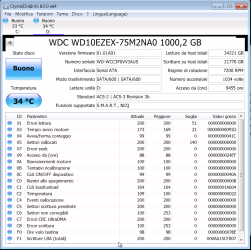
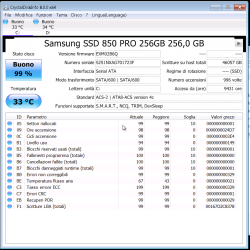
Please download, run CrystalDiskInfo8_0_0 and post screenshot.
 
Last edited:

My Computer

Computer type
PC/Desktop
Computer Manufacturer/Model Number
HP Desktop & Compaq Laptop
OS
Win 10 x64, Linux Lite, Win 7 x64, BlackArch, & Kali
Hard Drives
Samsung 850 Pro 256Gb,
Hitachi HDD 1Tb,
Crucial MX SSD 250Gb
Segate 3Tb USB 3.0 Ext. Backup HDD
Internet Speed
150Mbps dn, 20Mbps up
Antivirus
Avast Free, Malwarebytes Anti-Exploit & Anti-Ransomware
Browser
Firefox, Chrome, Opera, & VPN

Attachments

  • crystaldiskinfo.png
    crystaldiskinfo.png
    105.1 KB · Views: 0
  • crystaldiskinfo2.png
    crystaldiskinfo2.png
    95.6 KB · Views: 0

My Computer

Computer type
PC/Desktop
OS
Win7, Win8, Win10, Ubuntu
Both your drives are OK.

Per your CBS.log: [HRESULT = 0x80073712 - ERROR_SXS_COMPONENT_STORE_CORRUPT]

Easiest fix for you is a Repair Install. Please read through the attachment and watch Brian's Video. Create a full disk image (backup) of your drive that contains your Operating System (Windows 7) with component hive corruption there is a possibility it will fail irreversibly.

If you open the attachment in Word the hyperlinks are active and work by pressing the CTRL key and clicking on the link.

View attachment Repair Install Instructions.docx
 

My Computer

Computer type
PC/Desktop
Computer Manufacturer/Model Number
HP Desktop & Compaq Laptop
OS
Win 10 x64, Linux Lite, Win 7 x64, BlackArch, & Kali
Hard Drives
Samsung 850 Pro 256Gb,
Hitachi HDD 1Tb,
Crucial MX SSD 250Gb
Segate 3Tb USB 3.0 Ext. Backup HDD
Internet Speed
150Mbps dn, 20Mbps up
Antivirus
Avast Free, Malwarebytes Anti-Exploit & Anti-Ransomware
Browser
Firefox, Chrome, Opera, & VPN
Both your drives are OK.

Per your CBS.log: [HRESULT = 0x80073712 - ERROR_SXS_COMPONENT_STORE_CORRUPT]

Easiest fix for you is a Repair Install. Please read through the attachment and watch Brian's Video. Create a full disk image (backup) of your drive that contains your Operating System (Windows 7) with component hive corruption there is a possibility it will fail irreversibly.

If you open the attachment in Word the hyperlinks are active and work by pressing the CTRL key and clicking on the link.

View attachment 407116

Ok, thank you.
Since the pc is not mine, I don't know when I'm going to be able to do a repair install.
 

My Computer

Computer type
PC/Desktop
OS
Win7, Win8, Win10, Ubuntu
Whenever you get time to access th ailing computer, you can do it. Make sure you back up your drive (full disk image) that has the OS on it to another drive. Better safe than sorry! Sometimes, not very often, repair installs fail.

AOMEI Backupper free and Macrium Reflect free are routinely recommended on SevenForums, I found AOMEI a little more user friendly, i.e. the Graphical User Interface (GUI) is simpler. They both do an excellent job.
 

My Computer

Computer type
PC/Desktop
Computer Manufacturer/Model Number
HP Desktop & Compaq Laptop
OS
Win 10 x64, Linux Lite, Win 7 x64, BlackArch, & Kali
Hard Drives
Samsung 850 Pro 256Gb,
Hitachi HDD 1Tb,
Crucial MX SSD 250Gb
Segate 3Tb USB 3.0 Ext. Backup HDD
Internet Speed
150Mbps dn, 20Mbps up
Antivirus
Avast Free, Malwarebytes Anti-Exploit & Anti-Ransomware
Browser
Firefox, Chrome, Opera, & VPN
Back
Top