
Windows Update Errors 80073712 and 800B0100

dizlexik

New member
Local time
4:06 PM
Messages
5
I've seen others on this forum with similar errors and the only fix seems to be to wait for someone to post some sort of Packs.zip file with the files needed to replace the corrupted ones.
I'm also having an issue where my "Turn Windows features on or off" list is empty, which after some investigation appears to be related to this corrupted Windows Update issue.
I've attached my CheckSUR.log in hopes that someone can give me a hand with this. Any help would be GREATLY appreciated!
 

Attachments

My Computer

OS
Windows 7 Ultimate x64
Hello, dizlexik, and welcome to the Seven Forums!

Unfortunately, I do not have the time right now, because your log is reasonably complicated, however, I shall attend to it as a priority first thing tomorrow morning.

I thank you very much for your patience.

I shall be back before you know it!

Richard
 

My Computer

Computer Manufacturer/Model Number
Dell XPS 420
OS
Vista Home Premium x86 SP2
CPU
Intel Core 2 Quad Q9300 2.50GHz
Motherboard
Stock Dell 0TP406
Memory
4 gb (DDR2 800) 400MHz
Graphics Card(s)
ATI Radeon HD 3870 (512 MBytes)
Monitor(s) Displays
1 x Dell 2007FP and 1 x (old) Sonic flat screen
Screen Resolution
1600 x 1200 and 1280 x 1204
Hard Drives
1 x 640Gb (SATA 300) Western Digital: WDC WD6400AAKS-75A7B0 1 x 1Tb (SATA 600) Western Digital: Caviar Black, SATA 6GB/S, 64Mb cache, 8ms Western Digital: WDC WD1002FAEX-00Z3A0 ATA Device
Case
Dell XPS 420
Cooling
Stock Fan
Keyboard
Dell Bluetooth
Mouse
Advent Optical ADE-WG01 (colour change light up)
Internet Speed
Varies from 10kb/s to 170kb/s. So unreliable it is not funny
Other Info
ASUS USB 3.0 5Gbps/SATA 6Gbps - PCI-Express Combo Controller Card (U3S6)
Thank you sooooo much!!!
You really just made my day :)
 

My Computer

OS
Windows 7 Ultimate x64
Hey niemiro, so I got a little antsy and decided to give this all a shot myself. I copied all of the latest packages and manifests files from another computer I have that is working fine and ran Windows Update again. This time many of the previously failing updates installed, but not all. I am now left with only 3 updates that are corrupted. I re-ran the checksur tool and I have attached the new CheckSUR.log file to this post. It now has 29 errors instead of the 84 from before.
Hopefully this will make your job a little easier.
Thanks again, I very much appreciate your help with this!
 

Attachments

My Computer

OS
Windows 7 Ultimate x64
Alright so this issue has been killing me and I really wanted to get it solved so I did a little more research and ended up finding this awesome thread here in the forums. I downloaded the MSUs that I needed and expanded/renamed/etc and ended up getting everything working! Even my "Turn Windows features on or off" functionality is back.
Hopefully you read this before digging into that CheckSUR.log tomorrow. Thanks again for your help though.
I hope this issue doesn't continue to be a problem for all new updates. I'm still not sure what causes it in the first place.
 

My Computer

OS
Windows 7 Ultimate x64
Hello again!

I am really glad that all is well again! Really sorry that I was not of more assistance. :( I am really sorry that you had to manually source 84 files. I can do it really fast though. I really should have posted last night.
Just so that you know for next time, have a look at my tool here: http://www.sevenforums.com/tutorials/155584-windows-update-extract-update.html

That really speeds up the extraction of updates.

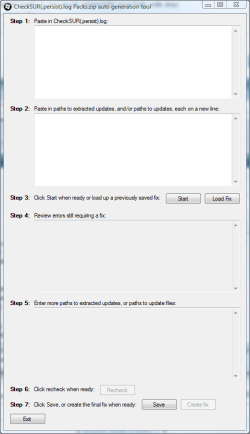
And then there is my other tool, still in beta, means that all I actually have to do is download your log, three .msus, and drag and drop on all four of these files and then click on the "Create Fix" button. I should have posted last night.

SURT_Fix_Generator.PNG

Ah well! What is done is done. I just feel quite bad for wasting your time.

Richard
 

My Computer

Computer Manufacturer/Model Number
Dell XPS 420
OS
Vista Home Premium x86 SP2
CPU
Intel Core 2 Quad Q9300 2.50GHz
Motherboard
Stock Dell 0TP406
Memory
4 gb (DDR2 800) 400MHz
Graphics Card(s)
ATI Radeon HD 3870 (512 MBytes)
Monitor(s) Displays
1 x Dell 2007FP and 1 x (old) Sonic flat screen
Screen Resolution
1600 x 1200 and 1280 x 1204
Hard Drives
1 x 640Gb (SATA 300) Western Digital: WDC WD6400AAKS-75A7B0 1 x 1Tb (SATA 600) Western Digital: Caviar Black, SATA 6GB/S, 64Mb cache, 8ms Western Digital: WDC WD1002FAEX-00Z3A0 ATA Device
Case
Dell XPS 420
Cooling
Stock Fan
Keyboard
Dell Bluetooth
Mouse
Advent Optical ADE-WG01 (colour change light up)
Internet Speed
Varies from 10kb/s to 170kb/s. So unreliable it is not funny
Other Info
ASUS USB 3.0 5Gbps/SATA 6Gbps - PCI-Express Combo Controller Card (U3S6)
Oh hey it's no problem, don't feel bad. It only ended up being a few MSUs to extract, no biggie really. I did download your KB Extractor tool though in case it happens again.
Thanks again for your guidance and willingness to help out a complete stranger. I definitely appreciate it!
 

My Computer

OS
Windows 7 Ultimate x64
Back
Top