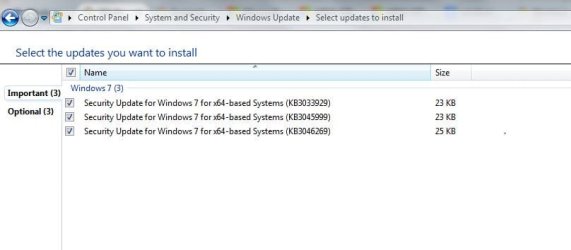
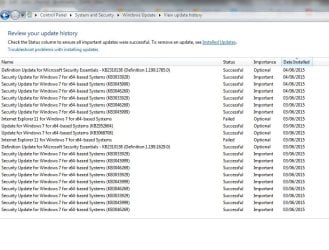
windows update installing same updates repeatedly

jayw1966

New member
Local time
4:38 PM
Messages
8
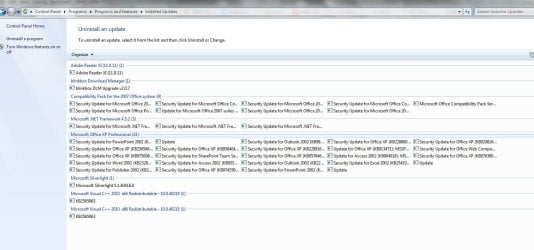
Hi forum. I'm hoping somebody can help with my pc issues. I have a toshiba sattelite running Windows 7 sp1 64 bit. For the last couple of weeks Ive had issues with updates not installing and now installing successfully but then installing again. One of the updates is IE 11 which fails to load but I have anyway running. I have tried lots of stuff like Fix it and microsofts hotfix and the latest thing was the repair thing from Tweaking.com all to no avail. My system appears clean as I have done lots of scans with all the recommended stuff. Any help would be greatly appreciated. I have uploaded some updates screen shots and some logs Thanks in advance Jay
 

Attachments
  • 3.JPG
    3.JPG
    119.9 KB · Views: 4
  • Capture.JPG
    Capture.JPG
    30.9 KB · Views: 0
  • Capture2.JPG
    Capture2.JPG
    105.8 KB · Views: 1
  • CheckSUR.zip
    CheckSUR.zip
    425 bytes · Views: 2

My Computer

Computer type
Laptop
Computer Manufacturer/Model Number
toshiba
OS
windows 7 home premium 64 bit sp1
Here's what is possibly the cause of your problem...
Code:
Checking Package Watchlist
(f) CBS Registry Error 0x00000002 Microsoft\Windows\CurrentVersion\Component Based Servicing\PackageDetect  Failed to open store key
Checking Component Watchlist
Checking Packages
Checking Component Store
Summary:
Seconds executed: 1287
 Found 1 errors
  CBS Registry Error Total count: 1

This error usually indicates corruption in the registry - and could be the thin end of the wedge. :(

I would suggest checking your RAM with Memtest86+, using the instructions here... http://www.sevenforums.com/tutorials/105647-ram-test-memtest86.html
Run at least 3 passes - ANY error is one too many!

post back with your results, and I'll see what I can do.
 

My Computer

Computer type
Laptop
Computer Manufacturer/Model Number
Asus K52F or Lenovo B51-80
OS
Win 7 x64 Home Premium (and x86 VirtualBox VM)/Win10
CPU
i3 370M/i7 6500U
Motherboard
Asus/Lenovo
Memory
8GB - finally :)/8GB
Graphics Card(s)
it's an i3, dude!/dual Intel&nVidia
Sound Card
onboard
Monitor(s) Displays
15.6" built-in
Screen Resolution
1366x768/1920x1080
Hard Drives
750GB Seagate internal
Sundry external drives attached to other computers on the local network
1TB SSD on the Lenovo
PSU
n/a
Internet Speed
as much as I can get - usually on a dongle/phone, so <1MB/s
Antivirus
MSE/Defender
Browser
IE11/12/Edge/Chrome/FF(if I must)
Thanks for your speedy reply. It sounds ominous but will do the scans now. Cheers J
 

My Computer

Computer type
Laptop
Computer Manufacturer/Model Number
toshiba
OS
windows 7 home premium 64 bit sp1
Hi, scanned overnight it did 6 passes and showed no errors. Thinking back it started after windows update that said critical update in the sytem restore point. After that it failed to update Itunes then gave error message 80080005. I went through a load of stuff to rectify that error code including repairing windows module installer as sfc /scannow would not run. (it runs now). Also after the critical update that was the only restore point available so could not go back any earlier.
 

My Computer

Computer type
Laptop
Computer Manufacturer/Model Number
toshiba
OS
windows 7 home premium 64 bit sp1
hello
 

My Computer

Computer type
Laptop
Computer Manufacturer/Model Number
toshiba
OS
windows 7 home premium 64 bit sp1
Sorry - got side-tracked.

I need to have a look at part of the SOFTWARE registry hive

Open Regedit - be careful here because registry errors can be fatal!

in the left pane, navigate to
HKey_Local_Machine\Software\Microsoft\Windows\CurrentVersion\Component Based Servicing
Right-click on the 'Component Based Servicing ' key and select Export
Select to export to the Desktop
in the File name box type 'jaycbs'
at the 'File Type' box, select 'Registry Hive Files'
and save the file
Close Regedit
Compress the jaycbs file and upload the compressed file to your reply.
That'll give me something to keep me awake tonight :)
 

My Computer

Computer type
Laptop
Computer Manufacturer/Model Number
Asus K52F or Lenovo B51-80
OS
Win 7 x64 Home Premium (and x86 VirtualBox VM)/Win10
CPU
i3 370M/i7 6500U
Motherboard
Asus/Lenovo
Memory
8GB - finally :)/8GB
Graphics Card(s)
it's an i3, dude!/dual Intel&nVidia
Sound Card
onboard
Monitor(s) Displays
15.6" built-in
Screen Resolution
1366x768/1920x1080
Hard Drives
750GB Seagate internal
Sundry external drives attached to other computers on the local network
1TB SSD on the Lenovo
PSU
n/a
Internet Speed
as much as I can get - usually on a dongle/phone, so <1MB/s
Antivirus
MSE/Defender
Browser
IE11/12/Edge/Chrome/FF(if I must)
Hi sorry for the delay, and thanks for getting back to me. file as requested .
 

My Computer

Computer type
Laptop
Computer Manufacturer/Model Number
toshiba
OS
windows 7 home premium 64 bit sp1
OUCH!!
You have major problems :(

Your file is about 105KB before compression - when I export the same branch of the registry from my machine, it's 22MB!!

I think your only choices are a repair install (which may or may not work anyhow) or a clean install.

Seeing as you have a Tosh, I assume that you only have Recovery media available (or a recovery partition). This probably means that the first option is not available, so you'll have to do a recovery to factory settings and reinstall all applications

BACK UP YOUR DATA FIRST!! - to external media
 

My Computer

Computer type
Laptop
Computer Manufacturer/Model Number
Asus K52F or Lenovo B51-80
OS
Win 7 x64 Home Premium (and x86 VirtualBox VM)/Win10
CPU
i3 370M/i7 6500U
Motherboard
Asus/Lenovo
Memory
8GB - finally :)/8GB
Graphics Card(s)
it's an i3, dude!/dual Intel&nVidia
Sound Card
onboard
Monitor(s) Displays
15.6" built-in
Screen Resolution
1366x768/1920x1080
Hard Drives
750GB Seagate internal
Sundry external drives attached to other computers on the local network
1TB SSD on the Lenovo
PSU
n/a
Internet Speed
as much as I can get - usually on a dongle/phone, so <1MB/s
Antivirus
MSE/Defender
Browser
IE11/12/Edge/Chrome/FF(if I must)
Hi, thanks for your efforts. I was afraid that would be the outcome and yes you're right i dont have the disk for a repair option. I did however think of buying a oem version from ebay to do the repair but not sure about that. I am assuming it will not upgrade to windows 10 in this state? Thanks again anyway!
 

My Computer

Computer type
Laptop
Computer Manufacturer/Model Number
toshiba
OS
windows 7 home premium 64 bit sp1
I wouldn't dare try an upgrade, even if it said it could!

Yes you could buy an OEM System Builder from eBay - BUT be aware that it's probably counterfeit and may be hacked.

If you hunt around a bit you can find full downloads out there (but I'm not allowed to link to them) which appear to be genuine. If you pick that option you MUST check the Hash of the downloaded ISO files against the known-good ones.

The above assumes that your COA sticker is readable still - if not, then the chances are that you'll have to buy an OEM System Builder from a reputable store, and use that.
 

My Computer

Computer type
Laptop
Computer Manufacturer/Model Number
Asus K52F or Lenovo B51-80
OS
Win 7 x64 Home Premium (and x86 VirtualBox VM)/Win10
CPU
i3 370M/i7 6500U
Motherboard
Asus/Lenovo
Memory
8GB - finally :)/8GB
Graphics Card(s)
it's an i3, dude!/dual Intel&nVidia
Sound Card
onboard
Monitor(s) Displays
15.6" built-in
Screen Resolution
1366x768/1920x1080
Hard Drives
750GB Seagate internal
Sundry external drives attached to other computers on the local network
1TB SSD on the Lenovo
PSU
n/a
Internet Speed
as much as I can get - usually on a dongle/phone, so <1MB/s
Antivirus
MSE/Defender
Browser
IE11/12/Edge/Chrome/FF(if I must)
Hi I will try and get a reputable copy thanks. Out of interest do you know what could have caused the damage toi the system so I can try and avoid in the future?
 

My Computer

Computer type
Laptop
Computer Manufacturer/Model Number
toshiba
OS
windows 7 home premium 64 bit sp1
The most likely scenario is a power-failure corrupting the file (possibly as it was being saved) - there'snot a lot you can do to legislate against that except have a UPS connected - and for the home user in the UK, the cost outweighs the benefits because we have (in most places) a very reliable supply.
Just don't force your machine to switch off unless there's been no indication of HD usage for a couple of minutes, and you should be OK.
 

My Computer

Computer type
Laptop
Computer Manufacturer/Model Number
Asus K52F or Lenovo B51-80
OS
Win 7 x64 Home Premium (and x86 VirtualBox VM)/Win10
CPU
i3 370M/i7 6500U
Motherboard
Asus/Lenovo
Memory
8GB - finally :)/8GB
Graphics Card(s)
it's an i3, dude!/dual Intel&nVidia
Sound Card
onboard
Monitor(s) Displays
15.6" built-in
Screen Resolution
1366x768/1920x1080
Hard Drives
750GB Seagate internal
Sundry external drives attached to other computers on the local network
1TB SSD on the Lenovo
PSU
n/a
Internet Speed
as much as I can get - usually on a dongle/phone, so <1MB/s
Antivirus
MSE/Defender
Browser
IE11/12/Edge/Chrome/FF(if I must)
Ok Thanks a lot.
 

My Computer

Computer type
Laptop
Computer Manufacturer/Model Number
toshiba
OS
windows 7 home premium 64 bit sp1
Back
Top