
Windows Update KB974431

Mark

AKA Mr GRiM
Guru
VIP
Local time
12:31 AM
Messages
4,282
Location
QLD, Cairns
Just installed an update from Windows Update and noticed that my Custom Start Button reverted to default so I knew straight away that there must have been a new explorer that replaced my old one and sure enough there was, this is the old version info.
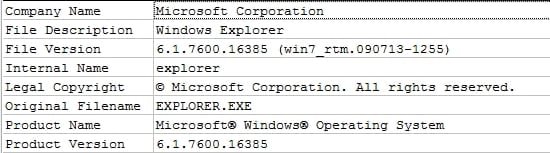
Explorer pre update.jpg

And this is the new version.

Explorer post update.jpg

Also note that the version info changed from being RTM to GDR

I also had a look on Microsoft's Help and Support site to see what other things may have been changed with this update and what it was for and this is what I found.

Update information

This update improves the stability and reliability of Windows 7 and of Windows Server 2008 R2.

To install the correct version of this update, you must know whether you are running the 32-bit or the 64-bit version of Windows 7 or of Windows Server 2008 R2. If you are not sure which version of the Windows operating system you are running, or whether it is a 32-bit version or 64-bit version, see the "How to determine whether you are running a 32-bit or a 64-bit edition of Windows" section.

The following files are available for download from the Microsoft Download Center:

Windows 7, 32-bit versions

Collapse this imageExpand this image
Download.gif

Download the Update for Windows 7 (KB974431) package now. (Download details: Update for Windows 7 (KB974431))
Windows 7, 64-bit versions

Collapse this imageExpand this image
Download.gif

Download the Update for Windows 7 for x64-based Systems (KB974431) package now. (Download details: Update for Windows 7 for x64-based Systems (KB974431))
Windows Server 2008 R2, 64 bit versions

Collapse this imageExpand this image
Download.gif

Download the Update for Windows Server 2008 R2 for x64-based Systems (KB974431) package now. (Download details: Update for Windows Server 2008 R2 x64 Edition (KB974431))

For more information about how to download Microsoft support files, click the following article number to view the article in the Microsoft Knowledge Base: 119591 (How to obtain Microsoft support files from online services ) How to obtain Microsoft support files from online services
Microsoft scanned this file for viruses. Microsoft used the most current virus-detection software that was available on the date that the file was posted. The file is stored on security-enhanced servers that help prevent any unauthorized changes to the file. Back to the top
How to determine whether you are running a 32-bit or a 64-bit edition of Windows

To determine which version of Windows you are running, follow these steps:
  1. Click Start, right-click Computer, and then click Properties.
  2. A window appears where you can view basic information about your computer. In the System type information under the System section, you can see whether a 32-bit or 64-bit version of Windows 7 or of Windows Server 2008 R2 is listed.
Back to the top
Information for advanced users and IT professionals

An update is available to resolve issues that affect some computers that are running Windows 7 or Windows Server 2008 R2. These issues are reported by customers who use the Error Reporting service or Microsoft Customer Support Services.

This update improves the stability and reliability of Windows 7 and of Windows Server 2008 R2 in various scenarios. This update resolves the following issues:
  • When you view a PDF file that was created by using a 2007 Microsoft Office system document, the PDF file is displayed on the screen correctly. However, when the document is printed, some characters are missing. This problem occurs in fonts such as Calibri, Cambria, Courier New or Gabriola, in which characters such as "fi", "ti", "fl", and other combinations are frequently presented as ligatures.
  • In certain scenarios, an Emergency Alert System (EAS) message does not automatically tune to the appropriate channel in Windows Media Center.
  • You connect a secondary monitor to a computer that is running Windows 7. When the computer resumes from hibernation, a black screen is displayed.
  • In certain scenarios, the Windows 7 Customer Experience Improvement Program (CEIP) diagnostic information settings are configured incorrectly for Windows Explorer. Only those users who are enrolled in the Windows 7 CEIP will be affected by this part of the update. This update limits the diagnostic information that can be collected by the CEIP.
  • You put an x86-based computer that does not have Physical Address Extension (PAE) enabled into hibernation. However, it does not enter hibernation correctly. When you try to resume the computer from hibernation, a black screen is displayed. This issue does not affect x64-based or Itanium-based computers, or computers that have the Data Execution Prevention (DEP) feature enabled.
  • A problem in Windows 7 affects the playback of certain media files in Windows Media Player, when Windows Media Player is started from Internet Explorer. Only those users whose media associations were changed incorrectly will be affected by this part of the update.
  • On a computer that is running Windows 7, you use Windows Internet Explorer to open the certificate enrollment Web page and to install an end entity certificate. However, the installation fails. This issue occurs if the certificate chain for the new certificate cannot be built, or if the root certification authority (CA) has not first been installed in the Trusted Roots on the computer.
Seems this was a big update as far addressing some of the problems people have encountered with Hibernation, I was hopeing with this update they might have also included a fix for another big issue that people are having with Auto Arrange in Explorer Windows but no luck with that one yet, I'm sure there will be allot of happy people when and if this does occur as I have read a few comments from people now who will refuse to purchase Windows 7 without it and I'm sure they are not alone.
 

My Computer

Computer Manufacturer/Model Number
Home Brew
OS
Windows 7 Ultimate Vista Ultimate x64
CPU
Core 2 Duo E8500 3.16Ghz @ 3.8Ghz
Motherboard
eVGA 750i FTW
Memory
2x2Gigs Patriot PC2-6400 LL
Graphics Card(s)
Inno3D GeForce GTX260 216 SP
Monitor(s) Displays
ASUS VW222U 22" 2ms Response time
Screen Resolution
1680x1050
Hard Drives
SATA 150GB
SATA II 250GB
USB IDE 750GB Ext.
PSU
HYTEC 600W & Thermaltake 650W Toughpower Power Exp
Case
Thermaltake Armor LCS (Liquid Cooling System)
Cooling
Liquid Cooling System
Keyboard
Logitech G15 Gaming Keyboard
Mouse
Logitech G9 Gaming Mouse
Interesting. I installed KB974431 on Friday via Windows Update, and mine is still showing as 16385 RTM, whereas yours updated to 16404 GDR.
 

My Computer

OS
Windows 7 Pro RTM
CPU
Intel Core i7-975E
Motherboard
Asus P6T Deluxe V2
Memory
12 GB Muskin Redline 998691 DDR3 1600
Graphics Card(s)
XFX GeForce 8800GTX XXX Edition
Sound Card
HT Omega Claro+
Monitor(s) Displays
Dell 1907FP
Screen Resolution
1280 x 1024
Hard Drives
Corsair P128 (CMFSSD-128GBG2D) SSD for OS and Programs
Seagate Barracuda 7200.10 HDD for user files
Seagate Barracuda 7200.9 HDD for games
PSU
Antec TruePower Quattro TPQ-1000
Cooling
Prolimatech Megahalem with dual 120 x 38mm Silenx fans
Mine shows 16404 too.

Process Hacker shows it a 16385
Process Explorer shows it as 16404
Autoruns shows it as 16404
AnVir Task Manager shows it as 16385

not sure why the two other apps still show it as 16385, but original file location is now 16404.
 

My Computer

Computer type
PC/Desktop
Computer Manufacturer/Model Number
Airbot 2.0
OS
Windows 7 Ultimate x64 SP1
CPU
Core i7 920 (D0) @ 4Ghz, *26c idle *65c full load on air
Motherboard
Asus P6X58D Premium - Sata 6Gb/s - USB 3.0
Memory
12GB DDR3 Corsair Dominator -CMD12GX3M6A1600C8 at 1600MHz
Graphics Card(s)
Zotac Geforce GTX 770
Sound Card
ASUS Xonar D2X
Monitor(s) Displays
1 LG 24" Flatron W2453V-PF 1 Samsung 24" P2450H both 2ms RT
Screen Resolution
1920x1080@60hz
Hard Drives
1 Samsung 250GB 840 Evo SSD
1 OCZ Vertex2 180GB SSD
1 TB Samsung Spinpoint F1 7200RPM 32MB cache
2 500GB WD Caviar Blacks 7200RPM 32MB cache (WD5001AALS)

Pioneer DVD Burner DVR-S18M
PSU
Corsair HX1000W
Case
Cooler Master HAF 932
Cooling
Case Fans *3 230mm, *1 140mm/CPU - *Tuniq Tower 120 Extreme
Keyboard
Logitech Wireless MK700
Mouse
Logitech Wireless MK700
Internet Speed
DL 15 Mbps UL 0.98 Mbps
Antivirus
None
Browser
Firefox Nightly
Other Info
Processor-7.7 *RAM- 7.9 *Graphics-7.9 *Gaming Graphics- 7.9 *SSD- 7.8 W.E.I final score= 7.7
*Phone- LG Nexus 5
Thanks.
I well try it
 

My Computer

Computer Manufacturer/Model Number
MSI G31TM-P21
OS
Windows 7 SP1 X64
CPU
Intel Core 2 Due E8400
Motherboard
MSI G31TM-P21
Memory
Kingestone DDR2-800MHZ 4GB 2x2 @ 6-6-6-18
Graphics Card(s)
Palit Ge-Force 9500GT Super Plus
Sound Card
Realtek High Definition
Monitor(s) Displays
Dual Monitor :LG 19" & Samsung 15" !
Screen Resolution
1440x900 @ LG 19" //1152x864 @ Samsung 15"
Hard Drives
Western Digital 320 GB Sata @8MB buffer @ 7200 RPM
Samsung HD502HI 500GB Sata @16MB @ 5400 RPM
Segate Barracuda 80 GB Sata @8MB buffer @ 7200 RPM
PSU
etek 570W
Case
Mercury KM-88
Cooling
Deep Cool Alpha 400 Plus
Keyboard
standard
Mouse
standard
Internet Speed
512 !! very bad :(
Thanks for the share. Much appreciated.

I downloaded and attempted to install and a message popup stating that it's already been installed. When I look at the version, nothing has changed.

7600.16385.amd64fre.win7_rtm.090713-1255

Thanks again.
 

My Computer

OS
Win7
Nice share Mr Grim ;)

how did you get the image ?
and what does it mean by win7_gdr in the File version ?
 

My Computer

Computer Manufacturer/Model Number
Intel
OS
Windows 7 Professional, Windows XP
CPU
Intel Dual Core
Motherboard
Intel D945GCNL
Memory
2GB
Graphics Card(s)
Intel 82945G Express
Monitor(s) Displays
HP Pavilion 1859m
Screen Resolution
1366x768
Hard Drives
Samsung 250GB SATA
Maxtor 80GB SATA
Case
High Tower
Cooling
Air
Keyboard
Delux
Mouse
A4Tech
Internet Speed
512kbps downlink and 128kbps uplink :(
gdr means General Distribution Release as opposed to Release to Manufacturing.
 

My Computer

Computer type
PC/Desktop
Computer Manufacturer/Model Number
Airbot 2.0
OS
Windows 7 Ultimate x64 SP1
CPU
Core i7 920 (D0) @ 4Ghz, *26c idle *65c full load on air
Motherboard
Asus P6X58D Premium - Sata 6Gb/s - USB 3.0
Memory
12GB DDR3 Corsair Dominator -CMD12GX3M6A1600C8 at 1600MHz
Graphics Card(s)
Zotac Geforce GTX 770
Sound Card
ASUS Xonar D2X
Monitor(s) Displays
1 LG 24" Flatron W2453V-PF 1 Samsung 24" P2450H both 2ms RT
Screen Resolution
1920x1080@60hz
Hard Drives
1 Samsung 250GB 840 Evo SSD
1 OCZ Vertex2 180GB SSD
1 TB Samsung Spinpoint F1 7200RPM 32MB cache
2 500GB WD Caviar Blacks 7200RPM 32MB cache (WD5001AALS)

Pioneer DVD Burner DVR-S18M
PSU
Corsair HX1000W
Case
Cooler Master HAF 932
Cooling
Case Fans *3 230mm, *1 140mm/CPU - *Tuniq Tower 120 Extreme
Keyboard
Logitech Wireless MK700
Mouse
Logitech Wireless MK700
Internet Speed
DL 15 Mbps UL 0.98 Mbps
Antivirus
None
Browser
Firefox Nightly
Other Info
Processor-7.7 *RAM- 7.9 *Graphics-7.9 *Gaming Graphics- 7.9 *SSD- 7.8 W.E.I final score= 7.7
*Phone- LG Nexus 5
I downloaded and attempted to install and a message popup stating that it's already been installed. When I look at the version, nothing has changed.

7600.16385.amd64fre.win7_rtm.090713-1255


I got it from Windows update. File version 16404

but the build string (for Windows itself) is still 16385...win7_rtm, so I don't think that is supposed to change.
 

My Computer

Computer Manufacturer/Model Number
Too many to list.
OS
XP, Seven, 2008R2
CPU
AMD, Intel, VIA
Motherboard
Various
Memory
Corsair, Kingston, etc.
Graphics Card(s)
ATI, NVIDIA
Monitor(s) Displays
Samsung
Hard Drives
Maxtor, Western Digital
Keyboard
qwerty
Internet Speed
22 Mb/s @ home, 1 Gb/s @ server
Other Info
All of my systems still run fastest on XP 32-bit for the most part. Win7 is fun to play with, but I still prefer XP for raw speed, security, and functionality.
Nice share Mr Grim ;)

how did you get the image ?
and what does it mean by win7_gdr in the File version ?


One of the recent advancements in delivering updates to all Microsoft’s customers is the advent of creating separate development environments in which updates are created from. So what does this really mean and how does it apply to my computers? Microsoft updates now offer packages for general distribution release as well as QFE (Quick Fix Engineering) also known as hotfixes, for specific issues. When you download a Windows Update you are downloading one of the following:
  • Security updates
  • Feature packs
  • Update roll-ups
  • Drivers
  • Critical updates
These are GDR (General Distribution Release) updates. GDR updates can be found on Windows Update site so as to be available to a wider audience. Another key item is GDRs are tested to a greater degree than LDRs (Limited Distribution Release). LDR, also known as hotfixes or QFEs, are created when a hardware, BIOS or a software issue is identified that needs a fix in a specific and small subset of customer environments. These fixes have not been tested for the same length of time for regressions or incompatibilities as what a GDR fix typically goes through. Another key point is LDRs generally contain all the prior fixes from both GDR and LDR while GDR releases do not contain LDR fixes.
We have all heard the adage; if it isn’t broken, then don't fix it. Well if you are connected to a network, sharing files, folders or any other activities that could expose your computer to viruses, trojan programs, and other conditions where your machine is vulnerable, or attaching the latest and greatest consumer device to your computer, installing the critical updates is something you should consider. That is why Windows Operating Systems offer the ability for users and administrators to set automatic updates to Microsoft Download Center. This has been designed to assist users in finding out what the latest GDR files for your version of Windows are. Many times, I hear and see requests for hotfixes. The first question will be, are you experiencing this problem, do you have that particular hardware or BIOS version or use that software mentioned in this hotfix. This is where the adage; if it isn’t broken, then don't fix it comes in. As mentioned above, LDRs are not tested to same levels as GDRs, so if you are not experiencing the problem then it’s best to stay with GDR updates you get from the Microsoft Download Center. If you need the LDR version then they are available from Microsoft Support, just don’t be surprised if they ask, are you seeing this problem?
If you are considering a choice between LDR or GDR updates, you may want to review the following article: http://support.microsoft.com/kb/824994. GDR branch fixes are available from the Microsoft Download Center and LDR branch fixes are available directly from Microsoft Support. Remember a hotfix is to fix a specific issue quickly while Microsoft Update GDRs are created to improve everyone's experience.
 

My Computer

Computer Manufacturer/Model Number
Asus
OS
Windows 7 x64 Ultimate SP1
CPU
I5 875K Unlocked
Motherboard
P7P55D-E-PRO
Memory
Kingston HyperX Genesis DDR3-1600MHz 9-9-9-27 @ 1.65V XMP
Graphics Card(s)
EVGA GeForce GTX 570 HD 732 MHz GPU 1280 MB, 152 GB Mem
Sound Card
Onboard Via 1828S
Monitor(s) Displays
Samsung T240 HD
Screen Resolution
Dual 1920X1200 1027X768
Hard Drives
OCZ Vertex II Extended Sandforce SSD 60 Gig 2X WD Black Caviar 1 terabyte 6GBS Transer Sata 3 Marvell Chip
PSU
Corsair Gold fully Modular 80 Plus 850
Case
Coolermaster Half X Full Tower
Cooling
Noctua NH-U12P
Keyboard
MS
Mouse
MS
Internet Speed
Fast enough
Other Info
My fridge has a water tap
gdr means General Distribution Release as opposed to Release to Manufacturing.

Nice share Mr Grim ;)

how did you get the image ?
and what does it mean by win7_gdr in the File version ?


One of the recent advancements in delivering updates to all Microsoft’s customers is the advent of creating separate development environments in which updates are created from. So what does this really mean and ..............................
.......

:thumbsup:
:shock: TYVM Guys, nice explanation. ;)
 

My Computer

Computer Manufacturer/Model Number
Intel
OS
Windows 7 Professional, Windows XP
CPU
Intel Dual Core
Motherboard
Intel D945GCNL
Memory
2GB
Graphics Card(s)
Intel 82945G Express
Monitor(s) Displays
HP Pavilion 1859m
Screen Resolution
1366x768
Hard Drives
Samsung 250GB SATA
Maxtor 80GB SATA
Case
High Tower
Cooling
Air
Keyboard
Delux
Mouse
A4Tech
Internet Speed
512kbps downlink and 128kbps uplink :(
It means update your computer and forget about it. :p
 

My Computer

Computer Manufacturer/Model Number
Too many to list.
OS
XP, Seven, 2008R2
CPU
AMD, Intel, VIA
Motherboard
Various
Memory
Corsair, Kingston, etc.
Graphics Card(s)
ATI, NVIDIA
Monitor(s) Displays
Samsung
Hard Drives
Maxtor, Western Digital
Keyboard
qwerty
Internet Speed
22 Mb/s @ home, 1 Gb/s @ server
Other Info
All of my systems still run fastest on XP 32-bit for the most part. Win7 is fun to play with, but I still prefer XP for raw speed, security, and functionality.
If you are considering a choice between LDR or GDR updates...

I'd suggest worrying about other issues. Anything else, in fact :)

The distinction between GDR and LDR code is only relevant to Microsoft teams which produce Windows hotfixes and updates, and to the largest of large corporate entities. Unless you find yourself in one of those categories, there's no need to worry about it in the slightest.
 

My Computer

Computer Manufacturer/Model Number
Multiple machines in various stages of decomposition.
OS
Win7x64
in buildlab, i see 7600.win7_rtm.090713-1255
and in buildlabex i see 7600.16385.amd64fre.win7_rtm.090713-1255

in winver i just see 6.1 7600

Install age:3 days
 

My Computer

OS
Windows 7 PRO x64
CPU
Phenom II 1090T @ 4.00GHz
Motherboard
Crosshair IV Formula
Memory
8gb DDR3
Graphics Card(s)
1x ATI Diamond 5850
Monitor(s) Displays
50in HDTV (HDMI)
Screen Resolution
1080P
Hard Drives
2x 1TB barracuda
1x 1TB WD Black
1x 2TB WD
1x OCZ Vertex 2 40GB
PSU
1000w Xion
Case
Armor+ VH6000BWS
Cooling
W/C
Internet Speed
60Mbps down, 7 up
in buildlab, i see 7600.win7_rtm.090713-1255
and in buildlabex i see 7600.16385.amd64fre.win7_rtm.090713-1255

in winver i just see 6.1 7600

Me too, with all of the latest updates. It seems normal.
 

My Computer

Computer Manufacturer/Model Number
Too many to list.
OS
XP, Seven, 2008R2
CPU
AMD, Intel, VIA
Motherboard
Various
Memory
Corsair, Kingston, etc.
Graphics Card(s)
ATI, NVIDIA
Monitor(s) Displays
Samsung
Hard Drives
Maxtor, Western Digital
Keyboard
qwerty
Internet Speed
22 Mb/s @ home, 1 Gb/s @ server
Other Info
All of my systems still run fastest on XP 32-bit for the most part. Win7 is fun to play with, but I still prefer XP for raw speed, security, and functionality.
in buildlab, i see 7600.win7_rtm.090713-1255
and in buildlabex i see 7600.16385.amd64fre.win7_rtm.090713-1255

in winver i just see 6.1 7600

Me too, with all of the latest updates. It seems normal.

I show no build number change. Where would you see this change? from cmd...?
 

My Computer

OS
Windows 7 PRO x64
CPU
Phenom II 1090T @ 4.00GHz
Motherboard
Crosshair IV Formula
Memory
8gb DDR3
Graphics Card(s)
1x ATI Diamond 5850
Monitor(s) Displays
50in HDTV (HDMI)
Screen Resolution
1080P
Hard Drives
2x 1TB barracuda
1x 1TB WD Black
1x 2TB WD
1x OCZ Vertex 2 40GB
PSU
1000w Xion
Case
Armor+ VH6000BWS
Cooling
W/C
Internet Speed
60Mbps down, 7 up
as far as I can tell there is no build number change other than for the file that was updated. In this case c:\windows\explorer.exe

right-click on the file and go to properties > file version. There you should see 16404
 

My Computer

Computer Manufacturer/Model Number
Too many to list.
OS
XP, Seven, 2008R2
CPU
AMD, Intel, VIA
Motherboard
Various
Memory
Corsair, Kingston, etc.
Graphics Card(s)
ATI, NVIDIA
Monitor(s) Displays
Samsung
Hard Drives
Maxtor, Western Digital
Keyboard
qwerty
Internet Speed
22 Mb/s @ home, 1 Gb/s @ server
Other Info
All of my systems still run fastest on XP 32-bit for the most part. Win7 is fun to play with, but I still prefer XP for raw speed, security, and functionality.
as far as I can tell there is no build number change other than for the file that was updated. In this case c:\windows\explorer.exe

right-click on the file and go to properties > file version. There you should see 16404
Gotch. Show 16404 too.
 

My Computer

OS
Windows 7 PRO x64
CPU
Phenom II 1090T @ 4.00GHz
Motherboard
Crosshair IV Formula
Memory
8gb DDR3
Graphics Card(s)
1x ATI Diamond 5850
Monitor(s) Displays
50in HDTV (HDMI)
Screen Resolution
1080P
Hard Drives
2x 1TB barracuda
1x 1TB WD Black
1x 2TB WD
1x OCZ Vertex 2 40GB
PSU
1000w Xion
Case
Armor+ VH6000BWS
Cooling
W/C
Internet Speed
60Mbps down, 7 up
I downloaded and attempted to install and a message popup stating that it's already been installed. When I look at the version, nothing has changed.

7600.16385.amd64fre.win7_rtm.090713-1255


I got it from Windows update. File version 16404

but the build string (for Windows itself) is still 16385...win7_rtm, so I don't think that is supposed to change.

Hi,

Thanks for the reply.


Regards,
 

My Computer

OS
Win7
My build fails to update this fix through Windows Update as well.... It reverts changes during startup...
 

My Computer

Computer Manufacturer/Model Number
Asus M51se notebook
OS
Windows 7 Ultimate build 7600.16385.RTM.X64
CPU
Intel Core 2 Duo T5750 / 2 GHz
Memory
4gb DDR2 SDRAM - 800 MHz
Graphics Card(s)
ATI Mobility Radeon HD 3470 (256 MB)
Sound Card
Realtek High Definition Audio
Monitor(s) Displays
15.4" TFT 1440 x 900 ( WXGA+ )
Screen Resolution
1440x900
Hard Drives
250 GB - Serial ATA-150 - 5400 rpm
Internet Speed
Cox 20mb cable, WRT320N Dual-Band Wireless-N Gigabit Router
Other Info
* DVD±RW / BD-ROM,
* 8 in 1 card reader supporting: SD Memory Card, Memory Stick, Memory Stick PRO, MultiMediaCard, Memory Stick Duo
Back
Top