Windows update keeps Downloading Windows 10 and not updating

Edhead

New member
Local time
12:22 AM
Messages
8
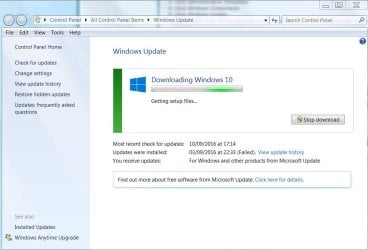
Hello, for some reason every time I try to update my laptop, it attempts to download windows 10 and gets stuck at "Getting start up files" Does anyone have any idea what the problem is with this?
 

My Computer My Computer

At a glance

Windows 7 Home Premium
Computer type
Laptop
Computer Manufacturer/Model Number
Custom Build
OS
Windows 7 Home Premium
Hi and welcome to SevenForums,
The free offer expired July 29th I believe so that might be why it's stalling.
Just right click the win-10 update and select Hide.
 

My Computer My Computer

At a glance

Win-7-Pro64bit 7-H-Prem-64biti7-5930K 2nd i9-9940x both water blocked VRM'...Trident-z 3200C14 2nd Trident-z 3600C16EVGA 1080ti ftw3 2nd Titan Xp both water blocked
Computer type
PC/Desktop
Computer Manufacturer/Model Number
Custom assembled by me :}
OS
Win-7-Pro64bit 7-H-Prem-64bit
CPU
i7-5930K 2nd i9-9940x both water blocked VRM's too
Motherboard
ASUS SABERTOOTH X99 2nd ASUS x299 Apex
Memory
Trident-z 3200C14 2nd Trident-z 3600C16
Graphics Card(s)
EVGA 1080ti ftw3 2nd Titan Xp both water blocked
Sound Card
Built-in Realtek
Monitor(s) Displays
1-AOC G2460PG 24"G-Sync 144Hz/ 2nd 1-ASUS VG248QE 24" 144Hz
Screen Resolution
1920 x 1080 144Hz
Hard Drives
2-Samsung M.2 Evo & Evo Plus
2-Samsung 850 EVO 500GB SSD's/ 3-2.5 W.D. Black 1tb-&3-1tb/3-3.5 WD Black 1tb hdd's
PSU
EVGA SuperNOVA 1000-P2 2nd 1200-P2
Case
2-Corsair Obsidian Series 450D Black ATX Mid Tower
Cooling
Custom water loops
Keyboard
Logitech G710+/ 2nd Logitech G910
Mouse
2-RedDragon M901 Perdition 16400 dpi Gaming mouse = wired
Internet Speed
Comcast Ping 19ms 89.31mbps download speed 6.12mbps upload
Antivirus
Malwarebytes Pro/ Superantispyware Pro
Browser
FireFox & Pale moon
Other Info
2nd ASUS X299 Apex/Intel i9-9940x with Custom water loop/7H-Prem-x64/Corsair 450D case/Ram Trident-z 3600C16 4x8gb / Samsung970Evo plus 500gb SSD/Dual ssd EZ swap evo/PSU EVGA SuperNova 1200w-P2 80+Platinum/GPU Titan Xp /8-ML-140 on push-pull on 2-280GTX rads
That is the problem though, it doesn't show anything, I try to install updates and it automatically attempts to download it.
 

My Computer My Computer

At a glance

Windows 7 Home Premium
Computer type
Laptop
Computer Manufacturer/Model Number
Custom Build
OS
Windows 7 Home Premium
Hi and welcome to SevenForums,
The free offer expired July 29th I believe so that might be why it's stalling.
Just right click the win-10 update and select Hide.

That is the problem though, it doesn't show anything, I try to install updates and it automatically attempts to download it.
 

My Computer My Computer

At a glance

Windows 7 Home Premium
Computer type
Laptop
Computer Manufacturer/Model Number
Custom Build
OS
Windows 7 Home Premium

My Computer My Computer

At a glance

Win-7-Pro64bit 7-H-Prem-64biti7-5930K 2nd i9-9940x both water blocked VRM'...Trident-z 3200C14 2nd Trident-z 3600C16EVGA 1080ti ftw3 2nd Titan Xp both water blocked
Computer type
PC/Desktop
Computer Manufacturer/Model Number
Custom assembled by me :}
OS
Win-7-Pro64bit 7-H-Prem-64bit
CPU
i7-5930K 2nd i9-9940x both water blocked VRM's too
Motherboard
ASUS SABERTOOTH X99 2nd ASUS x299 Apex
Memory
Trident-z 3200C14 2nd Trident-z 3600C16
Graphics Card(s)
EVGA 1080ti ftw3 2nd Titan Xp both water blocked
Sound Card
Built-in Realtek
Monitor(s) Displays
1-AOC G2460PG 24"G-Sync 144Hz/ 2nd 1-ASUS VG248QE 24" 144Hz
Screen Resolution
1920 x 1080 144Hz
Hard Drives
2-Samsung M.2 Evo & Evo Plus
2-Samsung 850 EVO 500GB SSD's/ 3-2.5 W.D. Black 1tb-&3-1tb/3-3.5 WD Black 1tb hdd's
PSU
EVGA SuperNOVA 1000-P2 2nd 1200-P2
Case
2-Corsair Obsidian Series 450D Black ATX Mid Tower
Cooling
Custom water loops
Keyboard
Logitech G710+/ 2nd Logitech G910
Mouse
2-RedDragon M901 Perdition 16400 dpi Gaming mouse = wired
Internet Speed
Comcast Ping 19ms 89.31mbps download speed 6.12mbps upload
Antivirus
Malwarebytes Pro/ Superantispyware Pro
Browser
FireFox & Pale moon
Other Info
2nd ASUS X299 Apex/Intel i9-9940x with Custom water loop/7H-Prem-x64/Corsair 450D case/Ram Trident-z 3600C16 4x8gb / Samsung970Evo plus 500gb SSD/Dual ssd EZ swap evo/PSU EVGA SuperNova 1200w-P2 80+Platinum/GPU Titan Xp /8-ML-140 on push-pull on 2-280GTX rads
Hi Edhead,

If ThrashZone's suggestion doesn't work, try this:

Open Start Menu

Type regedit in the search box

Navigate to this key:

HKEY_LOCAL_MACHINE\SOFTWARE\Policies\Microsoft\Windows\WindowsUpdate

Right Click the blank space on the right and select New 32-Bit DWORD

Name it:

DisableOSUpgrade

Set the value to 1

Reboot and run Windows Update. See if Windows update has reverted to the normal updates.
 

My Computer My Computer

At a glance

Win 7 Ultimate, Win 8.1 Pro, Linux Mint 19 Ci...Intel i5 4690KCorsair Vengeance LP 32GB DDR3MSI GTX 1060 GAMING X 6GB
Computer type
PC/Desktop
Computer Manufacturer/Model Number
Custom Build
OS
Win 7 Ultimate, Win 8.1 Pro, Linux Mint 19 Cinnamon (All 64-Bit)
CPU
Intel i5 4690K
Motherboard
Gigabyte Z97X-UD3H
Memory
Corsair Vengeance LP 32GB DDR3
Graphics Card(s)
MSI GTX 1060 GAMING X 6GB
Sound Card
Onboard
Hard Drives
Samsung 850 EVO 250GB SSD (x2)
Samsung 860 EVO 1TB SSD (x2)
Crucial MX300 525GB SSD
WD Blue 2TB 5400rpm Intellipark Disabled (x2)
PSU
Corsair HX750i
Case
Phanteks Enthoo Pro
Cooling
CM Hyper 212 EVO on CPU, Noctua Redux NF-P14S 1500rpm (x6)
Keyboard
Corsair K70 RGB LUX
Mouse
Corsair Sabre RGB
Antivirus
Avast Free, MalwareBytes, SAS & CryptoPrevent
Browser
Chrome
Other Info
StarTech PEXESAT322I 2 Port PCI-E SATA Card
ASUS PCE-AC56 Dual-band AC1300 Wireless Card
Akasa FC.Six Manual Fan Controller
And a Partridge in a Pear Tree!
As its allready in a loop,
follow the instructions in the screenshot.

Roy
 

Attachments

  • remove pendnig.PNG
    remove pendnig.PNG
    4.8 KB · Views: 28

My Computer My Computer

At a glance

W7 home premium 32bit/W7HP 64bit/w10 tp insid...E5300 dual core3gbNvidia Geforce 7100 Nforce 630i
Computer type
PC/Desktop
Computer Manufacturer/Model Number
medionl/Aspire 6930G/acer x55a
OS
W7 home premium 32bit/W7HP 64bit/w10 tp insider ring
CPU
E5300 dual core
Motherboard
medion MS7366
Memory
3gb
Graphics Card(s)
Nvidia Geforce 7100 Nforce 630i
Monitor(s) Displays
avixc
Internet Speed
n (isp resticted to 72)
Antivirus
mse/pands
Browser
palemoon
Other Info
Belkin Fd7050 n USB using Railink RT2870 drivers, more upto date
I have an IDontWantWindows10 script which comes in handy.
 

Attachments

Last edited:

My Computer My Computer

At a glance

Windows 7 Ultimate x64Core Duo4 GBIntel Mobile
Computer type
Laptop
Computer Manufacturer/Model Number
HP DV5 1132us
OS
Windows 7 Ultimate x64
CPU
Core Duo
Motherboard
Quanta
Memory
4 GB
Graphics Card(s)
Intel Mobile
Monitor(s) Displays
Host
Screen Resolution
1280x800
Mouse
USB
Browser
Mozilla Firefox
Hi
Why don't you resolved the very 1st issue, that is Windows 10.
Remove the Windows 10 from your laptop before update.
Since it is blocking your current updates.

After remove all components related to Windows 10.
Finally then do the updates.
 

My Computer My Computer

At a glance

Windows 7 x64
Computer type
Laptop
Computer Manufacturer/Model Number
Toshiba L630 and L735
OS
Windows 7 x64
Hard Drives
240 GB SSD
As its allready in a loop,
follow the instructions in the screenshot.

Roy

Thank you everyone for your tips, but none seem to be working. I get "Error: The system cannot find the file specified." When I try to follow the screenshot!

It keeps trying to download it, I don't know how to get rid of windows 10 from my computer completely.

Sorry for having to keep asking!
 

My Computer My Computer

At a glance

Windows 7 Home Premium
Computer type
Laptop
Computer Manufacturer/Model Number
Custom Build
OS
Windows 7 Home Premium
As its allready in a loop,
follow the instructions in the screenshot.

Roy

Thank you everyone for your tips, but none seem to be working. I get "Error: The system cannot find the file specified." When I try to follow the screenshot!

It keeps trying to download it, I don't know how to get rid of windows 10 from my computer completely.

Sorry for having to keep asking!

All I can recommend for this is to turn off windows update.

  1. Click Computer Configuration.
  2. Click Policies.
  3. Click Administrative Templates.
  4. Click Windows Components.
  5. Click Windows Update.
  6. Double-click Turn off the upgrade to the latest version of Windows through Windows Update.
 

My Computer My Computer

At a glance

Windows 7 Ultimate x64Core Duo4 GBIntel Mobile
Computer type
Laptop
Computer Manufacturer/Model Number
HP DV5 1132us
OS
Windows 7 Ultimate x64
CPU
Core Duo
Motherboard
Quanta
Memory
4 GB
Graphics Card(s)
Intel Mobile
Monitor(s) Displays
Host
Screen Resolution
1280x800
Mouse
USB
Browser
Mozilla Firefox
As its allready in a loop,
follow the instructions in the screenshot.

Roy

Thank you everyone for your tips, but none seem to be working. I get "Error: The system cannot find the file specified." When I try to follow the screenshot!

It keeps trying to download it, I don't know how to get rid of windows 10 from my computer completely.

Sorry for having to keep asking!

All I can recommend for this is to turn off windows update.

  1. Click Computer Configuration.
  2. Click Policies.
  3. Click Administrative Templates.
  4. Click Windows Components.
  5. Click Windows Update.
  6. Double-click Turn off the upgrade to the latest version of Windows through Windows Update.


Edhead is using Home Premium so unfortunately doesn't have Group Policy Editor. That setting just does the same as the registry setting I posted.

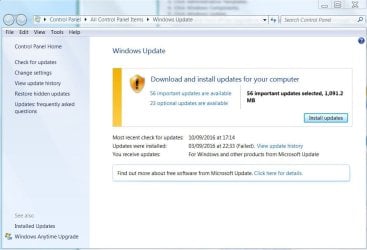
Edhead, can you post a screenshot of your windows update for us to look at.
 

My Computer My Computer

At a glance

Win 7 Ultimate, Win 8.1 Pro, Linux Mint 19 Ci...Intel i5 4690KCorsair Vengeance LP 32GB DDR3MSI GTX 1060 GAMING X 6GB
Computer type
PC/Desktop
Computer Manufacturer/Model Number
Custom Build
OS
Win 7 Ultimate, Win 8.1 Pro, Linux Mint 19 Cinnamon (All 64-Bit)
CPU
Intel i5 4690K
Motherboard
Gigabyte Z97X-UD3H
Memory
Corsair Vengeance LP 32GB DDR3
Graphics Card(s)
MSI GTX 1060 GAMING X 6GB
Sound Card
Onboard
Hard Drives
Samsung 850 EVO 250GB SSD (x2)
Samsung 860 EVO 1TB SSD (x2)
Crucial MX300 525GB SSD
WD Blue 2TB 5400rpm Intellipark Disabled (x2)
PSU
Corsair HX750i
Case
Phanteks Enthoo Pro
Cooling
CM Hyper 212 EVO on CPU, Noctua Redux NF-P14S 1500rpm (x6)
Keyboard
Corsair K70 RGB LUX
Mouse
Corsair Sabre RGB
Antivirus
Avast Free, MalwareBytes, SAS & CryptoPrevent
Browser
Chrome
Other Info
StarTech PEXESAT322I 2 Port PCI-E SATA Card
ASUS PCE-AC56 Dual-band AC1300 Wireless Card
Akasa FC.Six Manual Fan Controller
And a Partridge in a Pear Tree!
Thank you everyone for your tips, but none seem to be working. I get "Error: The system cannot find the file specified." When I try to follow the screenshot!

It keeps trying to download it, I don't know how to get rid of windows 10 from my computer completely.

Sorry for having to keep asking!

All I can recommend for this is to turn off windows update.

  1. Click Computer Configuration.
  2. Click Policies.
  3. Click Administrative Templates.
  4. Click Windows Components.
  5. Click Windows Update.
  6. Double-click Turn off the upgrade to the latest version of Windows through Windows Update.


Edhead is using Home Premium so unfortunately doesn't have Group Policy Editor. That setting just does the same as the registry setting I posted.

Edhead, can you post a screenshot of your windows update for us to look at.

2GWkia5


QDzsLXF
 

Attachments

  • Update 1.JPG
    Update 1.JPG
    63.7 KB · Views: 1
  • update 2.JPG
    update 2.JPG
    65.8 KB · Views: 0
Last edited:

My Computer My Computer

At a glance

Windows 7 Home Premium
Computer type
Laptop
Computer Manufacturer/Model Number
Custom Build
OS
Windows 7 Home Premium
Strange, that registry setting should prevent the 10 upgrade files from even downloading.

Have you tried GWX control panel?

Ultimate Outsider - Software Downloads

Seems to work well for a lot of users.
 

My Computer My Computer

At a glance

Win 7 Ultimate, Win 8.1 Pro, Linux Mint 19 Ci...Intel i5 4690KCorsair Vengeance LP 32GB DDR3MSI GTX 1060 GAMING X 6GB
Computer type
PC/Desktop
Computer Manufacturer/Model Number
Custom Build
OS
Win 7 Ultimate, Win 8.1 Pro, Linux Mint 19 Cinnamon (All 64-Bit)
CPU
Intel i5 4690K
Motherboard
Gigabyte Z97X-UD3H
Memory
Corsair Vengeance LP 32GB DDR3
Graphics Card(s)
MSI GTX 1060 GAMING X 6GB
Sound Card
Onboard
Hard Drives
Samsung 850 EVO 250GB SSD (x2)
Samsung 860 EVO 1TB SSD (x2)
Crucial MX300 525GB SSD
WD Blue 2TB 5400rpm Intellipark Disabled (x2)
PSU
Corsair HX750i
Case
Phanteks Enthoo Pro
Cooling
CM Hyper 212 EVO on CPU, Noctua Redux NF-P14S 1500rpm (x6)
Keyboard
Corsair K70 RGB LUX
Mouse
Corsair Sabre RGB
Antivirus
Avast Free, MalwareBytes, SAS & CryptoPrevent
Browser
Chrome
Other Info
StarTech PEXESAT322I 2 Port PCI-E SATA Card
ASUS PCE-AC56 Dual-band AC1300 Wireless Card
Akasa FC.Six Manual Fan Controller
And a Partridge in a Pear Tree!
Hi,
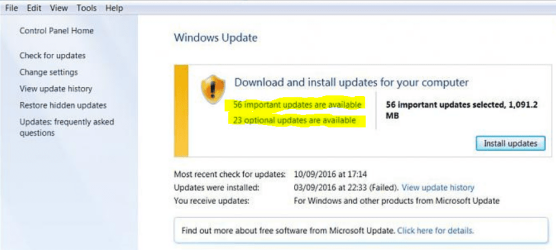
Click on either Important or Optional link highlighted in yellow to see what all is installing
Right click the win-10 update and select Hide
click on either.PNG
 

My Computer My Computer

At a glance

Win-7-Pro64bit 7-H-Prem-64biti7-5930K 2nd i9-9940x both water blocked VRM'...Trident-z 3200C14 2nd Trident-z 3600C16EVGA 1080ti ftw3 2nd Titan Xp both water blocked
Computer type
PC/Desktop
Computer Manufacturer/Model Number
Custom assembled by me :}
OS
Win-7-Pro64bit 7-H-Prem-64bit
CPU
i7-5930K 2nd i9-9940x both water blocked VRM's too
Motherboard
ASUS SABERTOOTH X99 2nd ASUS x299 Apex
Memory
Trident-z 3200C14 2nd Trident-z 3600C16
Graphics Card(s)
EVGA 1080ti ftw3 2nd Titan Xp both water blocked
Sound Card
Built-in Realtek
Monitor(s) Displays
1-AOC G2460PG 24"G-Sync 144Hz/ 2nd 1-ASUS VG248QE 24" 144Hz
Screen Resolution
1920 x 1080 144Hz
Hard Drives
2-Samsung M.2 Evo & Evo Plus
2-Samsung 850 EVO 500GB SSD's/ 3-2.5 W.D. Black 1tb-&3-1tb/3-3.5 WD Black 1tb hdd's
PSU
EVGA SuperNOVA 1000-P2 2nd 1200-P2
Case
2-Corsair Obsidian Series 450D Black ATX Mid Tower
Cooling
Custom water loops
Keyboard
Logitech G710+/ 2nd Logitech G910
Mouse
2-RedDragon M901 Perdition 16400 dpi Gaming mouse = wired
Internet Speed
Comcast Ping 19ms 89.31mbps download speed 6.12mbps upload
Antivirus
Malwarebytes Pro/ Superantispyware Pro
Browser
FireFox & Pale moon
Other Info
2nd ASUS X299 Apex/Intel i9-9940x with Custom water loop/7H-Prem-x64/Corsair 450D case/Ram Trident-z 3600C16 4x8gb / Samsung970Evo plus 500gb SSD/Dual ssd EZ swap evo/PSU EVGA SuperNova 1200w-P2 80+Platinum/GPU Titan Xp /8-ML-140 on push-pull on 2-280GTX rads

My Computer My Computer

At a glance

Windows 7 Home Premium
Computer type
Laptop
Computer Manufacturer/Model Number
Custom Build
OS
Windows 7 Home Premium
Hi,
Anything with a high KB or MB size listed ?
Post a screen shot of both sections please :)
 

My Computer My Computer

At a glance

Win-7-Pro64bit 7-H-Prem-64biti7-5930K 2nd i9-9940x both water blocked VRM'...Trident-z 3200C14 2nd Trident-z 3600C16EVGA 1080ti ftw3 2nd Titan Xp both water blocked
Computer type
PC/Desktop
Computer Manufacturer/Model Number
Custom assembled by me :}
OS
Win-7-Pro64bit 7-H-Prem-64bit
CPU
i7-5930K 2nd i9-9940x both water blocked VRM's too
Motherboard
ASUS SABERTOOTH X99 2nd ASUS x299 Apex
Memory
Trident-z 3200C14 2nd Trident-z 3600C16
Graphics Card(s)
EVGA 1080ti ftw3 2nd Titan Xp both water blocked
Sound Card
Built-in Realtek
Monitor(s) Displays
1-AOC G2460PG 24"G-Sync 144Hz/ 2nd 1-ASUS VG248QE 24" 144Hz
Screen Resolution
1920 x 1080 144Hz
Hard Drives
2-Samsung M.2 Evo & Evo Plus
2-Samsung 850 EVO 500GB SSD's/ 3-2.5 W.D. Black 1tb-&3-1tb/3-3.5 WD Black 1tb hdd's
PSU
EVGA SuperNOVA 1000-P2 2nd 1200-P2
Case
2-Corsair Obsidian Series 450D Black ATX Mid Tower
Cooling
Custom water loops
Keyboard
Logitech G710+/ 2nd Logitech G910
Mouse
2-RedDragon M901 Perdition 16400 dpi Gaming mouse = wired
Internet Speed
Comcast Ping 19ms 89.31mbps download speed 6.12mbps upload
Antivirus
Malwarebytes Pro/ Superantispyware Pro
Browser
FireFox & Pale moon
Other Info
2nd ASUS X299 Apex/Intel i9-9940x with Custom water loop/7H-Prem-x64/Corsair 450D case/Ram Trident-z 3600C16 4x8gb / Samsung970Evo plus 500gb SSD/Dual ssd EZ swap evo/PSU EVGA SuperNova 1200w-P2 80+Platinum/GPU Titan Xp /8-ML-140 on push-pull on 2-280GTX rads
Those screenshots are strange, its actually downloading 10,
stupid question did you hit the stop download icon?


as Brds7t7 said download that prog.

Then DISSABLE your internet and reset windows updates to never.

REBOOT

run gwx,
then this script

Net stop bits
Net stop wuauserv
Ipconfig /flushdns
cd \documents and settings\all users\application data\microsoft\network\downloader
Del qmgr0.dat
Del qmgr1.dat
Net start bits
Net start wuauserv

note as we have dissabled the internet you may get some not started warnings.
reset windows update to let me choose
REBOOT

Enable internet

open windows update
what do you get

Roy


.
 

My Computer My Computer

At a glance

W7 home premium 32bit/W7HP 64bit/w10 tp insid...E5300 dual core3gbNvidia Geforce 7100 Nforce 630i
Computer type
PC/Desktop
Computer Manufacturer/Model Number
medionl/Aspire 6930G/acer x55a
OS
W7 home premium 32bit/W7HP 64bit/w10 tp insider ring
CPU
E5300 dual core
Motherboard
medion MS7366
Memory
3gb
Graphics Card(s)
Nvidia Geforce 7100 Nforce 630i
Monitor(s) Displays
avixc
Internet Speed
n (isp resticted to 72)
Antivirus
mse/pands
Browser
palemoon
Other Info
Belkin Fd7050 n USB using Railink RT2870 drivers, more upto date
Hi,
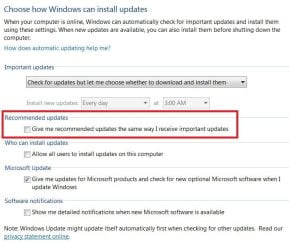
My post #5 should of gotten the update settings set well enough to stop the auto installation.
Now all that should be needed is to hide the correct update :confused:
 

My Computer My Computer

At a glance

Win-7-Pro64bit 7-H-Prem-64biti7-5930K 2nd i9-9940x both water blocked VRM'...Trident-z 3200C14 2nd Trident-z 3600C16EVGA 1080ti ftw3 2nd Titan Xp both water blocked
Computer type
PC/Desktop
Computer Manufacturer/Model Number
Custom assembled by me :}
OS
Win-7-Pro64bit 7-H-Prem-64bit
CPU
i7-5930K 2nd i9-9940x both water blocked VRM's too
Motherboard
ASUS SABERTOOTH X99 2nd ASUS x299 Apex
Memory
Trident-z 3200C14 2nd Trident-z 3600C16
Graphics Card(s)
EVGA 1080ti ftw3 2nd Titan Xp both water blocked
Sound Card
Built-in Realtek
Monitor(s) Displays
1-AOC G2460PG 24"G-Sync 144Hz/ 2nd 1-ASUS VG248QE 24" 144Hz
Screen Resolution
1920 x 1080 144Hz
Hard Drives
2-Samsung M.2 Evo & Evo Plus
2-Samsung 850 EVO 500GB SSD's/ 3-2.5 W.D. Black 1tb-&3-1tb/3-3.5 WD Black 1tb hdd's
PSU
EVGA SuperNOVA 1000-P2 2nd 1200-P2
Case
2-Corsair Obsidian Series 450D Black ATX Mid Tower
Cooling
Custom water loops
Keyboard
Logitech G710+/ 2nd Logitech G910
Mouse
2-RedDragon M901 Perdition 16400 dpi Gaming mouse = wired
Internet Speed
Comcast Ping 19ms 89.31mbps download speed 6.12mbps upload
Antivirus
Malwarebytes Pro/ Superantispyware Pro
Browser
FireFox & Pale moon
Other Info
2nd ASUS X299 Apex/Intel i9-9940x with Custom water loop/7H-Prem-x64/Corsair 450D case/Ram Trident-z 3600C16 4x8gb / Samsung970Evo plus 500gb SSD/Dual ssd EZ swap evo/PSU EVGA SuperNova 1200w-P2 80+Platinum/GPU Titan Xp /8-ML-140 on push-pull on 2-280GTX rads
Strange, that registry setting should prevent the 10 upgrade files from even downloading.

Have you tried GWX control panel?

Ultimate Outsider - Software Downloads

Seems to work well for a lot of users.

THAT WORKED! Thank you so much! Everything seems to be fine! Thank you so much to everyone for the help! I'll make sure to post again if anything goes wrong!
 

My Computer My Computer

At a glance

Windows 7 Home Premium
Computer type
Laptop
Computer Manufacturer/Model Number
Custom Build
OS
Windows 7 Home Premium
Back
Top