Solved Windows update never stops checking for updates

tim1mw

New member
Local time
9:48 AM
Messages
8
Hi All,

I've been having a major problem with windows update for the last week or so, it's getting stuck "Checking for updates". Not only that, but I'm seeing this problem on 3 different installations with different underlying hardware. The 3 systems are:

1- VitrualBox (Linux Host) running Win7 Pro 32bit. This was last used July 2015 and was fully updated then.
2- Thinkpad X61 with SSD (which does NOT report 4k physical sectors/advanced format). Clean install this week of W7 Pro 64bit SP1 from official Microsoft retail disc, so no manufacturer extras.
3 - VirtualBox (Linux Host, different underlying hardware to install 1) running Win7 Pro 32 Bit, clean install this week. I did this one as an experiment after the other 2 failed to work.

All 3 systems exhibit the same problem when trying to update, the "Checking for updates" process never completes and after a period of activity, the svchost.exe process will sit at the top of the process display with unchanging memory usage and it will consume 100% of a single processor core, indicating to me that it is stuck in a single thread race condition. This continues to be the case even if I leave the computers for several hours.

I have used the automatic Windows "Fixit" for windows update on all systems, it did no good.

I have followed all of the instructions on this page:

https://support.microsoft.com/en-gb/kb/971058

to no avail.

I have used the SURT tool and run sfc /scannow. There are no error codes to report. CBS Logs from system (2) attached.

I have spent probably 10 to 12 hours over several days trying to persuade the updates to install and have followed numerous suggestions from Google searches. Nothing makes any difference to any of the above installs.

The Linux installs on the VirtualBox based systems report no hardware problems and are working perfectly. I have one further Windows 7 native install (the only one I use regularly), which is successfully receiving updates, this is the only one which isn't trying to download more than one months worth of updates.

Since I'm experiencing this problem on multiple systems with different hardware and only seemingly where more than a months worth of updates are being looked for, I am seriously wondering if Microsoft have put out a combination of updates in the last few months which causes an endless loop of dependency resolution for some setups if you haven't been installing updates every month. Has this ever been known to happen? Linux update tools will sometimes fail for a similar reason, although they don't normally get stuck in endless loops, I can conceive of it happening.

I'd appreciate any suggestions, but I suspect that I may have to wait until the next patch Tuesday and hope that somebody at MS deals with this then. If this was just one system, I would assume a fault with the computer, but 3 installations (2 of them new) with the same fault makes me very suspicious.
 

My Computer

Computer type
PC/Desktop
OS
Windows 7 Pro, 32 and 64 Bit
...the "Checking for updates" process never completes and after a period of activity,
~~~
I'd appreciate any suggestions,
~~~
Patience :-)

Set the computer not to sleep.
Manually start the check for updates.
Leave the computer alone for at least 24 hours.

For some people, the check for updates ends after 20 minutes. For others, it takes many hours. Lots of speculation; but no hard facts as to why this is happening. Perhaps you are connecting to busy servers.

If you want, delete your experimental VM and create a fresh one. Before checking for updates, manually download/install the latest Windows Update client: https://support.microsoft.com/en-us/kb/3083324 Then manually check for updates and leave it alone.
 

My Computer

Computer type
Laptop
Computer Manufacturer/Model Number
Employer provided Dell Latitude
OS
W7 Pro SP1 64bit
CPU
i7
Memory
8GB
Graphics Card(s)
Intel HD Graphics
Hard Drives
crappy SSD
Antivirus
Employer mandated Symantec Endpoint Protection
Browser
Pale Moon 64bit, IE11 64bit & Chrome 64bit
Hi, thanks for the quick response.

> Set the computer not to sleep.
> Manually start the check for updates.
> Leave the computer alone for at least 24 hours.

I've not done a full 24 hours, but system 2 has been left over night, so it's had about 6-8 hours, with sleep mode off and a manual update check initiated. I'll try to set it off this evening and leave it as long as I can again. Unfortunatly finding a 24 hour block when I don't need to use my computers for work purposes isn't easy. I think I can manage without it tomorrow, so will give it a go.

> If you want, delete your experimental VM and create a fresh one. Before checking for updates, manually
> download/install the latest Windows Update client: https://support.microsoft.com/en-us/kb/3083324 Then manually
> check for updates and leave it alone.

I've tried the route of manually installing the update client several times and the VM has been re-installed at least twice to no avail.
 

My Computer

Computer type
PC/Desktop
OS
Windows 7 Pro, 32 and 64 Bit
There have been at least two threads where the list of updates did not come thru until the 20 hour mark. It will be interesting to see how long yours takes.

I've spent hours looking into this. In a VM, I watched Wireshark traffic during the entire process. Unfortunately, I got the list of updates (~200 of them) in about 20 minutes. This was very repeatable. I did connect to different updates servers during each test, but they all gave me the list relatively quick.
 

My Computer

Computer type
Laptop
Computer Manufacturer/Model Number
Employer provided Dell Latitude
OS
W7 Pro SP1 64bit
CPU
i7
Memory
8GB
Graphics Card(s)
Intel HD Graphics
Hard Drives
crappy SSD
Antivirus
Employer mandated Symantec Endpoint Protection
Browser
Pale Moon 64bit, IE11 64bit & Chrome 64bit
Updating the install.wim file before installing seems to work.

Alternatively, update the install.wim and then use it to perform a repair install on your existing installation.

Several ways to do it. All involve copy and paste the installation dvd to the hard drive, then mount the wim image and install updates using dism. Some programs will automate it for you.

Example:

UpdatePack7R2-15.8.20.exe /ie11 /WimFile=K:\GRMCULXFRER_EN_DVD\sources\install.wim /Index=3

The dvd has been copied to K: and the image to be updated is 3 (professional).


OR (probably easier for beginners)

Use WUD to download the updates into folders, then integrate into your install.wim using wintoolkit (easiest) or ntlite (free version will do, more complicated ) or similar.

Download WUD250B1002Setup.exe

wintoolkit

https://www.ntlite.com/download/

Update lists:

View attachment 2015-09-08b-Win7-Post-SP1 GDR-x64-MULTI.zip

View attachment 2015-09-08a-Win7-Post-SP1 GDR-x86-MULTI.zip
 
Last edited:

My Computers

System One System Two

  • Computer type
    PC/Desktop
    OS
    7 X64
    CPU
    i5 8400
    Motherboard
    gigabyte b365m ds3h
    Memory
    2x8gb 3200mhz
    Hard Drives
    various
    PSU
    pure power 11 400w cm
    Case
    Coolermaster
    Cooling
    cryorig m9i
  • Computer type
    PC/Desktop
    OS
    7x64
    CPU
    g5400
    Motherboard
    ga b365m ds3h
    Memory
    8gb ddr4 2400
    PSU
    xfx pro 450w
Hi,

Well I seem to have finally had some success. I set the updates running again last night on system 2 at about 11pm. When I checked this morning (about 11.30am), there was a huge list of available updates which I'm currently installing in stages. The "Most recent check for updates" time, which was previously showing as never now shows 4.44am, so I'm guessing that was the point at which whatever it was that was blocking the update process was finally resolved. I don't think I ever previously had a clean install windows system take much more than 30 minutes to find updates before, so this is a bit of a surprise. I'm guessing there is a bug somewhere in the update code which causes the delay.

I'll probably try again with my VM system 1 this evening, but this one is less critical. Thanks for the advice!

Tim W
 

My Computer

Computer type
PC/Desktop
OS
Windows 7 Pro, 32 and 64 Bit
Posting for reference, in case this is of use to others:

The first two batches of essential updates have installed normally. I'm now on to the "optional" updates and the stalling problem seems to have come back at the "Downloading updates - 0Kb total 0% complete" stage, with the svchost.exe process using 100% of a single processor core. I've tried selecting different combinations of updates to see if there was any specific update or group of updates that's causing the blockage, but this makes no difference, so the cause would appear to be a more general problem with the update process, not a specific update. I'm assuming that if I leave this running the update process will eventually complete like last time, so I'm going to just leave the laptop on till tomorrow morning and see what happens.

I'm hoping that this problem goes away once I'm fully updated, if windows update continues to take 6-8 hours to run each update cycle this is going to be a real bind. It's also going to wear out the processor fan on my laptop which is working at top speed for the entire time!
 

My Computer

Computer type
PC/Desktop
OS
Windows 7 Pro, 32 and 64 Bit
Sir. SIW2

I have always been integrated with your Windows Dism Tools.
But
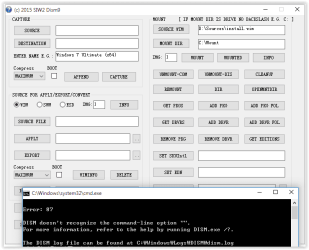
Your "2015 SIW2 Dism9.wcs" I could not have a Windows integration.
If, if you fixed a bug in the Dism9.wcs,
Can you provide me a Dism9.wcs which fixed the bug?
I want to integrate Windows into your Dism Tools.
 

Attachments

  • Dism9_2015.PNG
    Dism9_2015.PNG
    11.7 KB · Views: 20

My Computer

Computer type
PC/Desktop
OS
Windows 7 Ultimate x64
A quick update on my original problem, all updates were eventually installed (on both the native and VirtualBox installations) after some very long waits. I ran a registry checker after finishing the updates, this reported "9 WMI Conflicts", which may or may not have had something to do with this.

I'm keeping my finders crossed that the October patch tuesday stuff installs more quickly. In the mean time, thanks for your help.
 

My Computer

Computer type
PC/Desktop
OS
Windows 7 Pro, 32 and 64 Bit
FWIW I came to this forum with similar problems.

I have let two freshly installed laptops sit doing automatic updates over night... came back this morning to find one out of memory error (8gb page with 4gb of ram).

These are fresh SP1 installs on SSD's... apparently I am not the only one finding windows update taking forever recently... when I did this exact same thing a couple months ago they wizzed on through and onto Windows 10 they went. Can't seem to get anywhere today though.

Hopefully it's a Microsoft problem, not local problem. Fingers are also crossed.
 

My Computer

Computer type
PC/Desktop
OS
Windows 7 Pro x64; Windows 10 Pro x64
https://support.microsoft.com/en-us/kb/3102810 should speed things up. After installing this it took only a few minutes to scan for updates on a fresh Win7 SP1 install.

Many thanks... it works
i have same problem like Thread Starter.
just instaled windows 7 home premium, checking update took forever.

after installing this, just few minutes i it comes up with bunch of update lists, 1,98 GB update :thumbsup:

NB: i am registering to this forum just to say thank you ;)
 

My Computer

Computer type
PC/Desktop
OS
windows 7 Home Premium 64bit
I'm currently re-installing a laptop for a friend after a hard disk failure corrupted his system. The hardware is completely different to the systems I previously reported this problem with, but it appears to be suffering the same problem. Right now it's been trying to install the "update for windows update" which is necessary before you can even start to look for other updates for ~1.5 hours. I've also have quite a few instances of regular windows updates for systems which are mostly up to date taking hours at a time for only a handful of updates. Either MS have blacklisted my IP address or they are trying to force people onto Windows 10 by making updates for older versions so slow you switch through frustration.

Note, Linux running on the same hardware can find and install the same volume of updates in a fraction of the time.

No specific response to this post is needed, I'm posting this for informational purposes only. I'm just going to leave the laptop running in the expectation it will get there eventually.
 

My Computer

Computer type
PC/Desktop
OS
Windows 7 Pro, 32 and 64 Bit
...Right now it's been trying to install the "update for windows update" which is necessary before you can even start to look for other updates for ~1.5 hours....
That update can be skipped. I've skipped it many times. Just install the latest Windows Update Client instead.

I would do these steps...
http://www.sevenforums.com/tutorials/91738-windows-update-reset.html

...and then read/follow the info in this post:
http://www.sevenforums.com/windows-updates-activation/385734-update-issues.html#post3177298
 

My Computer

Computer type
Laptop
Computer Manufacturer/Model Number
Employer provided Dell Latitude
OS
W7 Pro SP1 64bit
CPU
i7
Memory
8GB
Graphics Card(s)
Intel HD Graphics
Hard Drives
crappy SSD
Antivirus
Employer mandated Symantec Endpoint Protection
Browser
Pale Moon 64bit, IE11 64bit & Chrome 64bit
https://support.microsoft.com/en-us/kb/3102810 should speed things up. After installing this it took only a few minutes to scan for updates on a fresh Win7 SP1 install.

I have just registered to say a big "Thank You" !

After I found out that the reset.bat file somewhere mentioned didn't work for me, I tried your trick.
At first it didn't work, but after a reboot and trying the same thing again, it finally worked! :D
 

My Computer

Computer type
PC/Desktop
OS
Windows 7 ultimate X64
My own laptop is currently being painfully slow running updates, it's been looking for an hour now and not gotten anywhere. Part of me wonders if this is Microsoft retribution for removing and blocking KB3035583 (The windows 10 update nag).

I also read here: Microsoft pushes Windows 10 upgrade to PCs without user consent | Computerworld that MS are now pushing out the Windows 10 installer to peoples computers whether they want it or not. I'm wondering if this partially explains the slowness of updates for new installations, since it adds quite a few GB to an already large download. I ran them new install updates overnight, so wasn't paying attention to bandwidth usage.
 

My Computer

Computer type
PC/Desktop
OS
Windows 7 Pro, 32 and 64 Bit
https://support.microsoft.com/en-us/kb/3102810 should speed things up. After installing this it took only a few minutes to scan for updates on a fresh Win7 SP1 install.

This Works !!!

I have done a LOT of research over the years, on many issues from win95 all the way up to win8. This is the best solution to the worst problem I have ever encountered. Thank you sooooo much.

Downloaded file for my version of 7 x64. installed, restarted, ran windows updates, found 207 of them :D downloading and installing now. will update thread once everything is complete.

P.S. registered just for this post, but will stay on as a member :D
 
Last edited:

My Computer

Computer type
PC/Desktop
OS
7 home premium x64
I have installed windows 7 twice on my laptop, dual boot.
On both installations I messed around to get fast updates, but without good results.
I just let the laptop on during night-time, and next morning I found out that updates had been installed.

Makes me wonder if it is MS, who created this delay, to pushing Windows 10 through the throat.
 

My Computer

Computer type
PC/Desktop
OS
Windows 7 ultimate X64

My Computer

Computer type
PC/Desktop
Computer Manufacturer/Model Number
Lenovo IdeaCenter 450
OS
Windows 10 Pro X64
CPU
Intel Quad Core i7-4770 @ 3.4Ghz
Memory
16.0GB PC3-12800 DDR3 SDRAM 1600 MHz
Graphics Card(s)
Intel Integrated HD Graphics
Sound Card
Realtek HD Audio
Monitor(s) Displays
HP 22" LCD
Screen Resolution
1680 x 1050
Hard Drives
250GB Samsung EVO SATA-3 SSD
2TB Seagate ST2000DM001 SATA-2
1.5TB Seagate ST3150041AS SATA
Keyboard
Dell USB
Mouse
Lenovo USB
Internet Speed
Cable via Road Runner 3MB Upload, 30MB Download
Antivirus
Windows Defender, MBAM Pro, MBAE
Browser
Seamonkey
Other Info
UEFI/GPT
PLDS DVD-RW DH16AERSH
KB3102810 didn't have much impact for me, after reading about it here I cancelled the update, installed KB3102810 manually (which took about 2 hours) and tried again. It still took a further 3-4 hours to install following ~12 updates.
 

My Computer

Computer type
PC/Desktop
OS
Windows 7 Pro, 32 and 64 Bit
Back
Top