Solved Windows update never stops checking for updates

OK, after a lot of testing, I can confirm that installing KB3020369 & KB3172605 will resolve the issue of the "forever updates" on my VMs. Once those KBs are installed, and I re-enable Windows Updates, I would see the list of needed updates in less than 15 minutes.

The inclusion of KB3125574 was a new one for me. I tested with and without it. Installing KB3125574 cuts the number of updates in half (from 78 important and 20 optional updates, to 36 important and 10 optional updates). The downloaded KB3125574 is some 476 MB in size, so I'm keeping it handy for the next old VM that I need to power up.

Thanks for the info you posted, ThrashZone. Much appreciated!

-Jim :)
 

My Computer

OS
Windows 7 Pro x64
I joined specifically because Im having this issue. Its like Microsoft is sabotaging all versions of Windows' Update so people will get fed up and install their spyware 10.

I have a Vista Pro, 7 Pro, 8.1 Pro and Home system that all sit there forever. Between this BS and 6GB of 10 or some of 10s spyware being installed on my 7 and 8 machines, Ive just had to completely disable Windows Update.

If Microsoft can back port telemetry and silently download 6GB of Windows Spyware 10 onto millions of computers youd think that Windows Update would work like it did for years before 10 was released.

Ive been using Windows since the early 90s and it was never this bad.
 

My Computer

Computer type
PC/Desktop
Computer Manufacturer/Model Number
Custom
OS
Windows Vista Pro, 7 Pro, 8.1 Pro and Home
CPU
i7-6700K
Motherboard
MSI Z170 Carbon
Memory
32GB Crucial Ballistix DDR4 XMP
Graphics Card(s)
Gigabyte 1070 G1
Hard Drives
Crucial MX200 1TB, Seagate 2 and 5TB
Antivirus
Stupid to publish your security setup
Browser
Chrome
KB3138612 did it for me as well. The problem was getting it installed because stuck searching for updates on this computer...
Double click on .msu uses wusa to install and wusa seems buggy. Disconnecting network cable is suggested workaround but I only had access via rdp. Then I found this blog post: https://blogs.technet.microsoft.com...dism-to-install-a-hotfix-from-within-windows/
I followed the post, extracted the .msu into temp folder and invoked
DISM.exe /Online /Add-Package /PackagePath:c:\temp\Windows6.1-KB3138612-x64.cab
Success! Installed in under a minute. After reboot, Windows Update found all updates in approx 10 minutes.
wusa is evil.

Big thank you to osxpert for this - it solved my problem. Extracting and using DISM on KB3138612 got Win Update running within minutes. (The 200+ updates took somewhat longer.)
 

My Computer

Computer type
PC/Desktop
OS
Win 7 64 Pro
I have a Vista Pro, 7 Pro, 8.1 Pro and Home system that all sit there forever. Between this BS and 6GB of 10 or some of 10s spyware being installed on my 7 and 8 machines, Ive just had to completely disable Windows Update.

I wouldn't suggest disabling it. On my main machines, everything has been working fine for years and years. I had trouble with machines that were VMs, and had been powered down for 15 and 17 months. It was the lack of regular updates that caused the issue. (And I can't fault Microsoft for not thoroughly testing scenarios where machines are left powered down for that long.)

As for the Win10 upgrade spam, I agree that it was over-the-top. (But, again, I understand why Microsoft chose to pursue that path.) Now that the free upgrade period has expired, I don't expect we'll be seeing a repeat any time soon.

In short, I wouldn't recommend that people turn off upgrades to avoid these two issues, as they are not likely to repeat. And it is very important to keep all 'net-connected machines updated with the latest security patches.

A final note on the Win10 upgrades & downloads: I highly recommend GWX Control Panel. It let's you disable the GWX upgrades, and it tells you if you have the Win10 downloads on your mahcine (and even offers to delete them for you). VERY cool tool.
 

My Computer

OS
Windows 7 Pro x64
I'm trying to update a friend's ASUS laptop with Windows 7 Starter. It showed many updates were available, but after several hours of trying to get them to install, it still showed 0%, but oddly when I shut the laptop down, it installed four updates before it shut off. I haven't had an opportunity to just let it sit overnight.

I also downloaded and tried to install KB3020369, but it stayed stuck on "searching for updates" (why would an update search for updates?).
 
Last edited:

My Computer

OS
Windows 7 Home Premium 64bit
Hi,
If the windows update service was already searching for updates it would stall a stand alone installer.
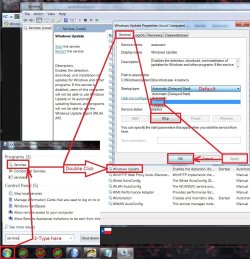
Best to go to services and stop the windows update service before attempting to manually install an update.

As far as I know KB3020369 & KB3172605 are the only required updates to shack the update system back to normal
A clean install do these three manually
KB3020369 & KB3172605 & KB3125574 from the catalog
Microsoft Update Catalog

I have all three updates needed on my OneDrive too if you can't or don't want to deal with the catalog
https://1drv.ms/f/s!AsjD7o6P3KLKj2TjShn8-SumV1rr
 

My Computer

Computer type
PC/Desktop
Computer Manufacturer/Model Number
Custom assembled by me :}
OS
Win-7-Pro64bit 7-H-Prem-64bit
CPU
i7-5930K 2nd i9-9940x both water blocked VRM's too
Motherboard
ASUS SABERTOOTH X99 2nd ASUS x299 Apex
Memory
Trident-z 3200C14 2nd Trident-z 3600C16
Graphics Card(s)
EVGA 1080ti ftw3 2nd Titan Xp both water blocked
Sound Card
Built-in Realtek
Monitor(s) Displays
1-AOC G2460PG 24"G-Sync 144Hz/ 2nd 1-ASUS VG248QE 24" 144Hz
Screen Resolution
1920 x 1080 144Hz
Hard Drives
2-Samsung M.2 Evo & Evo Plus
2-Samsung 850 EVO 500GB SSD's/ 3-2.5 W.D. Black 1tb-&3-1tb/3-3.5 WD Black 1tb hdd's
PSU
EVGA SuperNOVA 1000-P2 2nd 1200-P2
Case
2-Corsair Obsidian Series 450D Black ATX Mid Tower
Cooling
Custom water loops
Keyboard
Logitech G710+/ 2nd Logitech G910
Mouse
2-RedDragon M901 Perdition 16400 dpi Gaming mouse = wired
Internet Speed
Comcast Ping 19ms 89.31mbps download speed 6.12mbps upload
Antivirus
Malwarebytes Pro/ Superantispyware Pro
Browser
FireFox & Pale moon
Other Info
2nd ASUS X299 Apex/Intel i9-9940x with Custom water loop/7H-Prem-x64/Corsair 450D case/Ram Trident-z 3600C16 4x8gb / Samsung970Evo plus 500gb SSD/Dual ssd EZ swap evo/PSU EVGA SuperNova 1200w-P2 80+Platinum/GPU Titan Xp /8-ML-140 on push-pull on 2-280GTX rads
I have a Vista Pro, 7 Pro, 8.1 Pro and Home system that all sit there forever. Between this BS and 6GB of 10 or some of 10s spyware being installed on my 7 and 8 machines, Ive just had to completely disable Windows Update.

I wouldn't suggest disabling it. On my main machines, everything has been working fine for years and years. I had trouble with machines that were VMs, and had been powered down for 15 and 17 months. It was the lack of regular updates that caused the issue. (And I can't fault Microsoft for not thoroughly testing scenarios where machines are left powered down for that long.)

As for the Win10 upgrade spam, I agree that it was over-the-top. (But, again, I understand why Microsoft chose to pursue that path.) Now that the free upgrade period has expired, I don't expect we'll be seeing a repeat any time soon.

In short, I wouldn't recommend that people turn off upgrades to avoid these two issues, as they are not likely to repeat. And it is very important to keep all 'net-connected machines updated with the latest security patches.

A final note on the Win10 upgrades & downloads: I highly recommend GWX Control Panel. It let's you disable the GWX upgrades, and it tells you if you have the Win10 downloads on your mahcine (and even offers to delete them for you). VERY cool tool.

I selectively disabled all of the GWX BS myself and have written guides on how to do it before. I would never install a third party tool to "control" aspects of my operating system, which is also why I refuse to use the garbage that is Windows 10.

Disabling Windows Update is usually a bad idea in terms of security but Windows Update is behaving like malware itself.

My 8.1 Pro is fully updated up to this month and the machine is only a couple months old. The behavior is the same as on my 8.1 Home, 7 Pro and Vista machines. It just sits there forever checking, using a bunch of CPU and doing nothing.

I shouldn't need to hack my own computer to fix the sabotaged update system or download third party tools to block Windows 10 malware trying to install itself.
 

My Computer

Computer type
PC/Desktop
Computer Manufacturer/Model Number
Custom
OS
Windows Vista Pro, 7 Pro, 8.1 Pro and Home
CPU
i7-6700K
Motherboard
MSI Z170 Carbon
Memory
32GB Crucial Ballistix DDR4 XMP
Graphics Card(s)
Gigabyte 1070 G1
Hard Drives
Crucial MX200 1TB, Seagate 2 and 5TB
Antivirus
Stupid to publish your security setup
Browser
Chrome
Hi,
If the windows update service was already searching for updates it would stall a stand alone installer.
Best to go to services and stop the windows update service before attempting to manually install an update.

As far as I know KB3020369 & KB3172605 are the only required updates to shack the update system back to normal
A clean install do these three manually
KB3020369 & KB3172605 & KB3125574 from the catalog
Microsoft Update Catalog

I have all three updates needed on my OneDrive too if you can't or don't want to deal with the catalog
https://1drv.ms/f/s!AsjD7o6P3KLKj2TjShn8-SumV1rr
So the KB3020369 wouldn't install because the service was running?
 

My Computer

OS
Windows 7 Home Premium 64bit
Hi,
I said stop the service not disable it and that is before you attempt to manually install an update not during manually installing an update.
service stop windows update.jpg
 

My Computer

Computer type
PC/Desktop
Computer Manufacturer/Model Number
Custom assembled by me :}
OS
Win-7-Pro64bit 7-H-Prem-64bit
CPU
i7-5930K 2nd i9-9940x both water blocked VRM's too
Motherboard
ASUS SABERTOOTH X99 2nd ASUS x299 Apex
Memory
Trident-z 3200C14 2nd Trident-z 3600C16
Graphics Card(s)
EVGA 1080ti ftw3 2nd Titan Xp both water blocked
Sound Card
Built-in Realtek
Monitor(s) Displays
1-AOC G2460PG 24"G-Sync 144Hz/ 2nd 1-ASUS VG248QE 24" 144Hz
Screen Resolution
1920 x 1080 144Hz
Hard Drives
2-Samsung M.2 Evo & Evo Plus
2-Samsung 850 EVO 500GB SSD's/ 3-2.5 W.D. Black 1tb-&3-1tb/3-3.5 WD Black 1tb hdd's
PSU
EVGA SuperNOVA 1000-P2 2nd 1200-P2
Case
2-Corsair Obsidian Series 450D Black ATX Mid Tower
Cooling
Custom water loops
Keyboard
Logitech G710+/ 2nd Logitech G910
Mouse
2-RedDragon M901 Perdition 16400 dpi Gaming mouse = wired
Internet Speed
Comcast Ping 19ms 89.31mbps download speed 6.12mbps upload
Antivirus
Malwarebytes Pro/ Superantispyware Pro
Browser
FireFox & Pale moon
Other Info
2nd ASUS X299 Apex/Intel i9-9940x with Custom water loop/7H-Prem-x64/Corsair 450D case/Ram Trident-z 3600C16 4x8gb / Samsung970Evo plus 500gb SSD/Dual ssd EZ swap evo/PSU EVGA SuperNova 1200w-P2 80+Platinum/GPU Titan Xp /8-ML-140 on push-pull on 2-280GTX rads
OK, after a lot of testing, I can confirm that installing KB3020369 & KB3172605 will resolve the issue of the "forever updates" on my VMs. Once those KBs are installed, and I re-enable Windows Updates, I would see the list of needed updates in less than 15 minutes.

The inclusion of KB3125574 was a new one for me. I tested with and without it. Installing KB3125574 cuts the number of updates in half (from 78 important and 20 optional updates, to 36 important and 10 optional updates). The downloaded KB3125574 is some 476 MB in size, so I'm keeping it handy for the next old VM that I need to power up.

Thanks for the info you posted, ThrashZone. Much appreciated!

-Jim :)

Jim you are spot on there thank you so much. After dropping my laptop and destroying the harddrive I have had it replaced and spent 3 days re installing and setting it back up. I have been unable to get windows update to work at all. I have used WSUS and google over and over, installing the 470mb windows patch also but it just kept hanging and hanging.
After confirming I had one of the top two listed and then finally installing KB3172605 it found the updates in 5 minutes.

Im currently awaiting a call back tomorrow from Microsoft tech support, wont need that call now!

Thank you all

Liam

:cool:
 

My Computer

Computer type
Laptop
Computer Manufacturer/Model Number
Lenovo Z570
OS
Windows 7 Home Premium
Memory
8GB
Graphics Card(s)
Nvidia GeForce
Hard Drives
1TB upgrade
Antivirus
Norton
Browser
IE11 and Chrome
Hi and welcome to SevenForums Liam548,
Glad to help :)
Cheers.
 

My Computer

Computer type
PC/Desktop
Computer Manufacturer/Model Number
Custom assembled by me :}
OS
Win-7-Pro64bit 7-H-Prem-64bit
CPU
i7-5930K 2nd i9-9940x both water blocked VRM's too
Motherboard
ASUS SABERTOOTH X99 2nd ASUS x299 Apex
Memory
Trident-z 3200C14 2nd Trident-z 3600C16
Graphics Card(s)
EVGA 1080ti ftw3 2nd Titan Xp both water blocked
Sound Card
Built-in Realtek
Monitor(s) Displays
1-AOC G2460PG 24"G-Sync 144Hz/ 2nd 1-ASUS VG248QE 24" 144Hz
Screen Resolution
1920 x 1080 144Hz
Hard Drives
2-Samsung M.2 Evo & Evo Plus
2-Samsung 850 EVO 500GB SSD's/ 3-2.5 W.D. Black 1tb-&3-1tb/3-3.5 WD Black 1tb hdd's
PSU
EVGA SuperNOVA 1000-P2 2nd 1200-P2
Case
2-Corsair Obsidian Series 450D Black ATX Mid Tower
Cooling
Custom water loops
Keyboard
Logitech G710+/ 2nd Logitech G910
Mouse
2-RedDragon M901 Perdition 16400 dpi Gaming mouse = wired
Internet Speed
Comcast Ping 19ms 89.31mbps download speed 6.12mbps upload
Antivirus
Malwarebytes Pro/ Superantispyware Pro
Browser
FireFox & Pale moon
Other Info
2nd ASUS X299 Apex/Intel i9-9940x with Custom water loop/7H-Prem-x64/Corsair 450D case/Ram Trident-z 3600C16 4x8gb / Samsung970Evo plus 500gb SSD/Dual ssd EZ swap evo/PSU EVGA SuperNova 1200w-P2 80+Platinum/GPU Titan Xp /8-ML-140 on push-pull on 2-280GTX rads
Hi,
If the windows update service was already searching for updates it would stall a stand alone installer.
Best to go to services and stop the windows update service before attempting to manually install an update.

As far as I know KB3020369 & KB3172605 are the only required updates to shack the update system back to normal
A clean install do these three manually
KB3020369 & KB3172605 & KB3125574 from the catalog
Microsoft Update Catalog

I have all three updates needed on my OneDrive too if you can't or don't want to deal with the catalog
https://1drv.ms/f/s!AsjD7o6P3KLKj2TjShn8-SumV1rr
So the KB3020369 wouldn't install because the service was running?

Hi,
Sorry misunderstood you
Yes you can't manually install an update if the windows update service is already running
It will conflict with the stand alone installers 100% of the time so windows update service has to be stopped first.
It's usually stalled and why you can't find updates in the first place.
 

My Computer

Computer type
PC/Desktop
Computer Manufacturer/Model Number
Custom assembled by me :}
OS
Win-7-Pro64bit 7-H-Prem-64bit
CPU
i7-5930K 2nd i9-9940x both water blocked VRM's too
Motherboard
ASUS SABERTOOTH X99 2nd ASUS x299 Apex
Memory
Trident-z 3200C14 2nd Trident-z 3600C16
Graphics Card(s)
EVGA 1080ti ftw3 2nd Titan Xp both water blocked
Sound Card
Built-in Realtek
Monitor(s) Displays
1-AOC G2460PG 24"G-Sync 144Hz/ 2nd 1-ASUS VG248QE 24" 144Hz
Screen Resolution
1920 x 1080 144Hz
Hard Drives
2-Samsung M.2 Evo & Evo Plus
2-Samsung 850 EVO 500GB SSD's/ 3-2.5 W.D. Black 1tb-&3-1tb/3-3.5 WD Black 1tb hdd's
PSU
EVGA SuperNOVA 1000-P2 2nd 1200-P2
Case
2-Corsair Obsidian Series 450D Black ATX Mid Tower
Cooling
Custom water loops
Keyboard
Logitech G710+/ 2nd Logitech G910
Mouse
2-RedDragon M901 Perdition 16400 dpi Gaming mouse = wired
Internet Speed
Comcast Ping 19ms 89.31mbps download speed 6.12mbps upload
Antivirus
Malwarebytes Pro/ Superantispyware Pro
Browser
FireFox & Pale moon
Other Info
2nd ASUS X299 Apex/Intel i9-9940x with Custom water loop/7H-Prem-x64/Corsair 450D case/Ram Trident-z 3600C16 4x8gb / Samsung970Evo plus 500gb SSD/Dual ssd EZ swap evo/PSU EVGA SuperNova 1200w-P2 80+Platinum/GPU Titan Xp /8-ML-140 on push-pull on 2-280GTX rads
Searching for Updates fixed

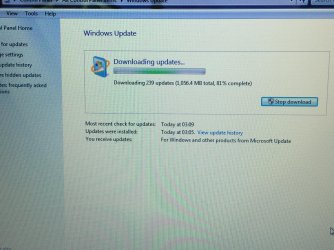
After reinstalling Windows seven on my dell Inspiron 1750 after the hard drive failed I installed service pack 1 then a message came up saying you are running an outdated version of Windows 7 upgrade to 10 or 8.1 or service pack 1 to receive updates witch I did. Then the searching for updates started to take long due to connection errors witch I was connected.then Me and my mum Then looked for how to solve this on the Internet toke us ages to find the answer then found this site with the KB3102810 and it worked found 239 updates. And Windows defender is working again to. And also signed up to say Thank you for the help.
 

Attachments

  • image.jpg
    image.jpg
    1.3 MB · Views: 2

My Computer

Computer type
Laptop
Computer Manufacturer/Model Number
Dell Inspiron 1750 and a HP DV7
OS
Windows 7 Home Premium 64bit
CPU
Pentium(R) Dual-Core T4300 @ 2.10Ghz
Motherboard
Dell Inc. 0F642T
Memory
4.096 MB
Graphics Card(s)
Mobile intel(R) 4 Series Express Chipset Family
Hard Drives
ST1000LM024 HN-M101MBB 1000.2GB
Antivirus
Norton Sercurity with Backup
Browser
Internet Explorer 11
This method worked for me as well. After hours of trying various other recommendations, this did the trick. MS has obviously made this process intentionally difficult and I'm done paying for windows on new machines because of this attitude. You want to treat people like children and force things on them, well now that's that much less money you'll receive from at least one of them. Robbing me of hours of my time was the last straw.

Again, thanks for the tip, I'm going with enterprise this time...just because I can...ZERO GUILT.
 

My Computer

OS
Windows 7 Ultimate
So I am posting my findings to hopefully save you some time, if the fix you need happens to be the same as mine. One thing to note is that the Windows Update service should be stopped first, before manually downloading and installing any of the updates listed below. Here goes:

KB3102810 did NOT fully solve my issue, though it did seem to help and provide some more updates. After that though, I encountered the same problem.

Here are the rest of the updates I tried (that didn't work for me), most were successful and some would not install; can't remember the message... As a heads up, some of these will likely be superseded by other updates:

KB3083710 (this one actually caused Windows Update error 80244019 for me)
KB3145739
KB3138612
KB947821
KB3020369
KB3161608
KB3153199

I had 3 other updates on my list I was going to try that might also have fixed the issue, they were:

KB3161647
KB3179573
KB3185330

HOWEVER, the update that fixed the seemingly endless 'Checking for Updates' was:

KB3172605

I hope you find one from these lists that works for you!!!
 
Last edited:

My Computer

Computer type
PC/Desktop
Computer Manufacturer/Model Number
Custom Build
OS
Windows 7 Professional 64-bit
This has worked for me every time:

The solution:

Stop the Windows Update Service (wuauserv).
Download and install KB3050265
reboot
Download and install KB3102810
Reboot and check for updates again. All of our machines found their required updates in less than 5 minutes.

I did this and now I get the updates to actually update. Thank you. :)
 

My Computer

Computer type
PC/Desktop
Computer Manufacturer/Model Number
Custom Built
OS
64 bit win 7 pro
CPU
Intel i5 skylake 6600k @ 4.2 Ghz OC
Motherboard
Asus maximus 8 ranger
Memory
16 Gig Corsair Dominator Platinum DDR4 3000Mhz
Graphics Card(s)
EVGA 960 FTW 4Gig edition
Hard Drives
SSD pny sata3
mechanical drive sata 2
mechanical drive usb 3.1
Antivirus
Homemade
Browser
Homemade
Long term effects

I would suggest to MS that they use a strategy that bends with market forces (customers wants) rather than the cattle herding approach. Supporting legacy software takes resources = so it would be reasonable to charge a reasonable recurring fee for that. Not having that and instead imposing wasted time penalties ... where is that lose-lose approach going to lead? MS's big advantage is that it is so many cows are used to it, so forcing the cows into something they are not used to kind of undermines that advantage.
 

My Computer

Computer type
PC/Desktop
Computer Manufacturer/Model Number
HP Pavillion dv4-1123us
OS
Vista 64
CPU
Core 2 Duo
To add,I had many problems with getting ALL updates this way...

What I ended up finding working out after almost a dozen installs...

I installed the KB3020369 update manually,
then immediately installed the kb3172605 update.
I was asked to restart.
Started the updates search, and immediately it started within 5 min I had updates to install.
The first go I got 200 some files. One failed. I restarted and attempted to search for updates again and got a few more to install, only this time I got a few more failed, I restarted and searched again and installed the last 7 and restarted and searched again for updates to get the green check and a note I have all updates installed.

Im just sorting out the .dll missing file thing for c++ which I have a thread going for that and seemingly for now, fixed it.

so just to add, I do have all the updates and everything now working perfectly first go except my startup, with a lan bug, I will uninstall the driver and reinstall it after Im dling my games n such.
 
Last edited:

My Computer

Computer type
PC/Desktop
Computer Manufacturer/Model Number
Custom Built
OS
64 bit win 7 pro
CPU
Intel i5 skylake 6600k @ 4.2 Ghz OC
Motherboard
Asus maximus 8 ranger
Memory
16 Gig Corsair Dominator Platinum DDR4 3000Mhz
Graphics Card(s)
EVGA 960 FTW 4Gig edition
Hard Drives
SSD pny sata3
mechanical drive sata 2
mechanical drive usb 3.1
Antivirus
Homemade
Browser
Homemade
KB3102810 seemed to fix this problem on my Win7 Dell laptop. Updates had been broken for a couple of months.
 

My Computer

OS
Windows 7 64-bit
Back
Top