Windows Update problems(Windows Update cannot crrently check for...)

slipknot56

New member
Local time
1:01 PM
Messages
7
Windows Update cannot crrently check for updates, becouse the service is not running.You may need to restart your computer.
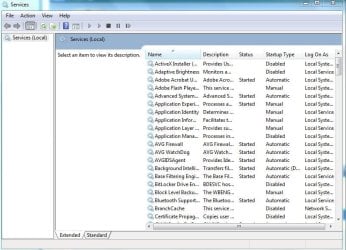
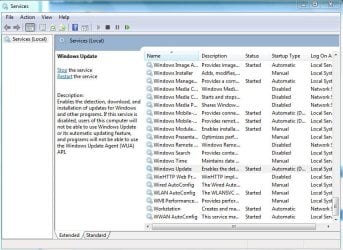
That the problem i have with my windows udate in services.msc i dont have Windows Update folder file or whatever, when i bought my computer i remeber that i asked not to enable windows update and he disabled it. Now when i need it so much becouse my net framework not instaling and others programs bugging like hell i cant enable it. I searched a lot of forums and didnt found anything. So please if you could help me it would be nice :).
 

My Computer My Computer

OS
Windows 7 Ultimate x32

My Computer My Computer

Computer type
PC/Desktop
Computer Manufacturer/Model Number
Self assembled
OS
Windows 10 Home 64Bit
CPU
Intel Core i5 10400 @ 2.90GHz
Motherboard
Intel Corporation DG41WV (PROCESSOR)
Memory
8.00GB Single-Channel Unknown @ 1329MHz (16-20-20-38)
Sound Card
Realtek High Definition Audio
Monitor(s) Displays
DELL E170S
Screen Resolution
1280x1024 pixels
Hard Drives
931GB TOSHIBA DT01ACA100 (SATA)
238GB TEAM TM8PS7256G (SATA SSD)
Case
Nothing Fancy
Cooling
Fans
Keyboard
A4 Tech Co LTD
Mouse
A4 Tech Co Ltd/Logitech
Internet Speed
25 Mbps
Click start>type services.msc or right click My Computer and select manage (select services and applications from left pane and then select services from right pane)> now serach for a service called Windows Update>right click windows update service and select properties>from "startup" type first select the option "manual" click apply and OK.
Now again select winodws update service>right click and select properties>now from "start up" type select "Automatic(delayed)" option>click apply and OK. In case "automatic(delayed)" option can not be selected, then simply select "automatic" and click OK. Close service manger window.

Restart your PC. Open control panel>system and security>windows update or start menu>all programs>windows update.
select the option change settings from left pane>a new windows opens up>check there that the option "install updates automatically (recommended) option is selected> and all other options below it are marked>click ok.
Now click on check for updates from the left pane. Windows will now search for the updates. Hope this helps you.
 

My Computer My Computer

OS
Microsoft Windows 7 Professional 64-bit Multiprocessor Free Service Pack 1
CPU
Intel(R) Core(TM) i5-3470 CPU @ 3.20GHz
Motherboard
Intel Corporation DB75EN
Memory
8.00 GB
Graphics Card(s)
NVIDIA GeForce GT 630
Sound Card
(1) Realtek High Definition Audio (2) NVIDIA High Definiti
Screen Resolution
1366 x 768 x 32 bits (4294967296 colors) @ 59 Hz
Hard Drives
WDC WD10EZRX-00A8LB0 ATA Device
Internet Speed
4Mbps
Antivirus
AVG Internet Security
Browser
Google Chrome
I dont have in services.msc that service or whatever with name WIndows Update i just dont have it and i downloaded that system update tool and it crashes.
System Update Readiness Tool shows me error when i launch him 0x80070424 The specified service does not exist as an installed device.
 

My Computer My Computer

OS
Windows 7 Ultimate x32
services.msc should be there. Its a prt of Operating system.
 

My Computer My Computer

OS
Microsoft Windows 7 Professional 64-bit Multiprocessor Free Service Pack 1
CPU
Intel(R) Core(TM) i5-3470 CPU @ 3.20GHz
Motherboard
Intel Corporation DB75EN
Memory
8.00 GB
Graphics Card(s)
NVIDIA GeForce GT 630
Sound Card
(1) Realtek High Definition Audio (2) NVIDIA High Definiti
Screen Resolution
1366 x 768 x 32 bits (4294967296 colors) @ 59 Hz
Hard Drives
WDC WD10EZRX-00A8LB0 ATA Device
Internet Speed
4Mbps
Antivirus
AVG Internet Security
Browser
Google Chrome
Did you run the file checker?
 

My Computer My Computer

Computer type
PC/Desktop
Computer Manufacturer/Model Number
Self assembled
OS
Windows 10 Home 64Bit
CPU
Intel Core i5 10400 @ 2.90GHz
Motherboard
Intel Corporation DG41WV (PROCESSOR)
Memory
8.00GB Single-Channel Unknown @ 1329MHz (16-20-20-38)
Sound Card
Realtek High Definition Audio
Monitor(s) Displays
DELL E170S
Screen Resolution
1280x1024 pixels
Hard Drives
931GB TOSHIBA DT01ACA100 (SATA)
238GB TEAM TM8PS7256G (SATA SSD)
Case
Nothing Fancy
Cooling
Fans
Keyboard
A4 Tech Co LTD
Mouse
A4 Tech Co Ltd/Logitech
Internet Speed
25 Mbps
Here is a step by step screenshot.

First type services.msc in the start menu. once the service manager opens serach for "windows Update" and then select it and click properties. Then change its start up to manula first and select OK. Then again select windows update>properties and change its startup type to "automatic (delayed)" or "automatic">click apply and OK. Restart your PC.
 

Attachments

  • 1.jpg
    1.jpg
    17.1 KB · Views: 27
  • 2.JPG
    2.JPG
    79.7 KB · Views: 26
  • 3.JPG
    3.JPG
    92.7 KB · Views: 30
  • 4.JPG
    4.JPG
    38.9 KB · Views: 26

My Computer My Computer

OS
Microsoft Windows 7 Professional 64-bit Multiprocessor Free Service Pack 1
CPU
Intel(R) Core(TM) i5-3470 CPU @ 3.20GHz
Motherboard
Intel Corporation DB75EN
Memory
8.00 GB
Graphics Card(s)
NVIDIA GeForce GT 630
Sound Card
(1) Realtek High Definition Audio (2) NVIDIA High Definiti
Screen Resolution
1366 x 768 x 32 bits (4294967296 colors) @ 59 Hz
Hard Drives
WDC WD10EZRX-00A8LB0 ATA Device
Internet Speed
4Mbps
Antivirus
AVG Internet Security
Browser
Google Chrome
Here is a step by step screenshot.

First type services.msc in the start menu. once the service manager opens serach for "windows Update" and then select it and click properties. Then change its start up to manula first and select OK. Then again select windows update>properties and change its startup type to "automatic (delayed)" or "automatic">click apply and OK. Restart your PC.

i just dont have it there
 

My Computer My Computer

OS
Windows 7 Ultimate x32
Why did you ask to have Windows Up Dates disabled? I can't think of any good reason to do that. It seem like instead of disabling the service it was removed.
If you have complete all the other recommendation previously posted and this
Error 0x80070424 ocurs when you use Windows Update, Microsoft Update, or Windows Firewall
all I can think of is a clean install. A couple of options.

http://www.sevenforums.com/tutorials/219487-clean-reinstall-factory-oem-windows-7-a.html

http://www.sevenforums.com/tutorials/1649-clean-install-windows-7-a.html
 

My Computer My Computer

Computer type
PC/Desktop
Computer Manufacturer/Model Number
Home made Desktop
OS
Windows 10 Pro. 64/ version 1709 Windows 7 Pro/64
CPU
Intel i7-6800K @ 4.3
Motherboard
ASUS X-99 Deluxe II
Memory
Corsair Platinum 16 gig @2400
Graphics Card(s)
EVGA GTX 1070 OC
Monitor(s) Displays
Asus 27" LED LCD/VE278Q
Screen Resolution
1920-1080 or 1280-720 HDMI
Hard Drives
INTEL SSD 730-240 Gb Sata 3.0/
PSU
EVGA Platium 1200W
Case
Phanteks Luxe Tempered Glass 8 fans/ one radiator
Cooling
XSPC/ Water Cooled CPU
Keyboard
Das 4 Professional
Mouse
Logitech M705/MX Anywhere 2-S
Internet Speed
100 mbits
Antivirus
Microsoft Security Essentials/ Malwarebytes Premium 3.0/ SAS
Browser
I.E. 11 default/Firefox/ ISP Time Warner Cable/Spectrum
Other Info
LG BluRay Burner/
Sound system-KLipsch-THX/
Icy Dock ssd Hot Swap bays.
Yes Layback Bear is right absolutely. That pesron has deleted the service instead of disabling it. Thats why you don't have Windows update service.
 

My Computer My Computer

OS
Microsoft Windows 7 Professional 64-bit Multiprocessor Free Service Pack 1
CPU
Intel(R) Core(TM) i5-3470 CPU @ 3.20GHz
Motherboard
Intel Corporation DB75EN
Memory
8.00 GB
Graphics Card(s)
NVIDIA GeForce GT 630
Sound Card
(1) Realtek High Definition Audio (2) NVIDIA High Definiti
Screen Resolution
1366 x 768 x 32 bits (4294967296 colors) @ 59 Hz
Hard Drives
WDC WD10EZRX-00A8LB0 ATA Device
Internet Speed
4Mbps
Antivirus
AVG Internet Security
Browser
Google Chrome
Yes Layblack Bear has pointed out the correct thing. That person deleted windows update service instead of disabling it.
 

My Computer My Computer

OS
Microsoft Windows 7 Professional 64-bit Multiprocessor Free Service Pack 1
CPU
Intel(R) Core(TM) i5-3470 CPU @ 3.20GHz
Motherboard
Intel Corporation DB75EN
Memory
8.00 GB
Graphics Card(s)
NVIDIA GeForce GT 630
Sound Card
(1) Realtek High Definition Audio (2) NVIDIA High Definiti
Screen Resolution
1366 x 768 x 32 bits (4294967296 colors) @ 59 Hz
Hard Drives
WDC WD10EZRX-00A8LB0 ATA Device
Internet Speed
4Mbps
Antivirus
AVG Internet Security
Browser
Google Chrome

My Computer My Computer

Computer type
PC/Desktop
Computer Manufacturer/Model Number
Home Built Desktop By DataTech
OS
Windows 7 Ultimate X64 SP1
CPU
Intel i5-2550K, Differing ~4.4-4.8GHz No built in GPU
Motherboard
ASUS P8Z68-V PRO/GEN3
Memory
16GB G.Skill Sniper 1866MHz @ 2133MHz 2x8GB
Graphics Card(s)
ASUS GTX650TIB-DC2OC-2GD5, (650TI Boost)
Sound Card
Onboard Realtek 5-1
Monitor(s) Displays
Samsung P2570HD
Screen Resolution
1920x1080
Hard Drives
Samsung 840 Pro 256GB SSD for OS, 500GB Seagate Constellation (Enterprise drive) for Data
PSU
Corsair HX650W
Case
Inwin Dragon Rider
Cooling
Hyper 212 EVO w/two Noctua fans, push-pull, @1300 RPM
Keyboard
E-Z Eyes, bright yellow keys with large characters
Mouse
steelseries SENSEI Laser Pro Gaming
Internet Speed
48-51Mbs Mbs down, 11 Mbs up Xfinity Cable
Antivirus
Norton Internet Security 2013
Browser
IE 10, Opera, Pale Moon if needed
Other Info
4 case fans, LG BluRay-RE, ASUS DVD-RW, Mr. Fusion power supply, 1.21 gigawatts.
Why did you ask to have Windows Up Dates disabled? I can't think of any good reason to do that. It seem like instead of disabling the service it was removed.
If you have complete all the other recommendation previously posted and this
Error 0x80070424 ocurs when you use Windows Update, Microsoft Update, or Windows Firewall
all I can think of is a clean install. A couple of options.

http://www.sevenforums.com/tutorials/219487-clean-reinstall-factory-oem-windows-7-a.html

http://www.sevenforums.com/tutorials/1649-clean-install-windows-7-a.html

yesi think it was removed becouse i dont have any files in services that others have so yep it was removed
 

My Computer My Computer

OS
Windows 7 Ultimate x32
Could you tell us why you didn't want Windows Up Dates? You can not have a safe proper working Windows 7 without Windows Up Dates. In Windows safety starts with Windows Up Dates.
 

My Computer My Computer

Computer type
PC/Desktop
Computer Manufacturer/Model Number
Home made Desktop
OS
Windows 10 Pro. 64/ version 1709 Windows 7 Pro/64
CPU
Intel i7-6800K @ 4.3
Motherboard
ASUS X-99 Deluxe II
Memory
Corsair Platinum 16 gig @2400
Graphics Card(s)
EVGA GTX 1070 OC
Monitor(s) Displays
Asus 27" LED LCD/VE278Q
Screen Resolution
1920-1080 or 1280-720 HDMI
Hard Drives
INTEL SSD 730-240 Gb Sata 3.0/
PSU
EVGA Platium 1200W
Case
Phanteks Luxe Tempered Glass 8 fans/ one radiator
Cooling
XSPC/ Water Cooled CPU
Keyboard
Das 4 Professional
Mouse
Logitech M705/MX Anywhere 2-S
Internet Speed
100 mbits
Antivirus
Microsoft Security Essentials/ Malwarebytes Premium 3.0/ SAS
Browser
I.E. 11 default/Firefox/ ISP Time Warner Cable/Spectrum
Other Info
LG BluRay Burner/
Sound system-KLipsch-THX/
Icy Dock ssd Hot Swap bays.
You should try some of the steps given you before we can really help you.
 

My Computer My Computer

Computer type
PC/Desktop
Computer Manufacturer/Model Number
Home Built Desktop By DataTech
OS
Windows 7 Ultimate X64 SP1
CPU
Intel i5-2550K, Differing ~4.4-4.8GHz No built in GPU
Motherboard
ASUS P8Z68-V PRO/GEN3
Memory
16GB G.Skill Sniper 1866MHz @ 2133MHz 2x8GB
Graphics Card(s)
ASUS GTX650TIB-DC2OC-2GD5, (650TI Boost)
Sound Card
Onboard Realtek 5-1
Monitor(s) Displays
Samsung P2570HD
Screen Resolution
1920x1080
Hard Drives
Samsung 840 Pro 256GB SSD for OS, 500GB Seagate Constellation (Enterprise drive) for Data
PSU
Corsair HX650W
Case
Inwin Dragon Rider
Cooling
Hyper 212 EVO w/two Noctua fans, push-pull, @1300 RPM
Keyboard
E-Z Eyes, bright yellow keys with large characters
Mouse
steelseries SENSEI Laser Pro Gaming
Internet Speed
48-51Mbs Mbs down, 11 Mbs up Xfinity Cable
Antivirus
Norton Internet Security 2013
Browser
IE 10, Opera, Pale Moon if needed
Other Info
4 case fans, LG BluRay-RE, ASUS DVD-RW, Mr. Fusion power supply, 1.21 gigawatts.
Do you have intel rapid storage technology drivers installed? If so, try uninstalling or updating them.
 

My Computer My Computer

Computer type
PC/Desktop
OS
Microsoft Windows 10 Professional / Windows 7 Professional
CPU
Intel i5-3570
Motherboard
Lenovo Mahobay
Memory
16GB DDR3
Graphics Card(s)
AMD Radeon HD 7850 2GB
Sound Card
(1) Realtek HD Audio (2) AMD HD Audio
Monitor(s) Displays
LG LS192WS
Screen Resolution
1440 x 900 @ 32bit color
Hard Drives
(1) SUV300S37A/120G (2) ST3500413AS SATA Disk Device AHCI mode enabled.
PSU
Corsair HX620
Case
Thermaltake V4 Black Edition
Cooling
Cooler Master Hyper 212 + Artic Silver 5 on CPU/GPU
Keyboard
Dell SK-8115
Mouse
Razer Copperhead with MAPED mat (awesome!)
Internet Speed
100 Mbps up/down
Browser
Chrome
i did all of them i think i can only reinstall windows 7 i asked him to disable updates not to remove them i didnt saw that he removed it
 

My Computer My Computer

OS
Windows 7 Ultimate x32
Can you call the tech to confirm he removed it?
Try this:
Type "msconfig" into the "Run" or "Search" box in the Start menu. This opens a window that contains your startup files. Click on the "Start Up" tab and scroll down to find "Windows Update." Click the box beside "Update. " Click on "Apply" and then choose "Close."
Let us know if it is there.
 

My Computer My Computer

Computer type
PC/Desktop
Computer Manufacturer/Model Number
Home Built Desktop By DataTech
OS
Windows 7 Ultimate X64 SP1
CPU
Intel i5-2550K, Differing ~4.4-4.8GHz No built in GPU
Motherboard
ASUS P8Z68-V PRO/GEN3
Memory
16GB G.Skill Sniper 1866MHz @ 2133MHz 2x8GB
Graphics Card(s)
ASUS GTX650TIB-DC2OC-2GD5, (650TI Boost)
Sound Card
Onboard Realtek 5-1
Monitor(s) Displays
Samsung P2570HD
Screen Resolution
1920x1080
Hard Drives
Samsung 840 Pro 256GB SSD for OS, 500GB Seagate Constellation (Enterprise drive) for Data
PSU
Corsair HX650W
Case
Inwin Dragon Rider
Cooling
Hyper 212 EVO w/two Noctua fans, push-pull, @1300 RPM
Keyboard
E-Z Eyes, bright yellow keys with large characters
Mouse
steelseries SENSEI Laser Pro Gaming
Internet Speed
48-51Mbs Mbs down, 11 Mbs up Xfinity Cable
Antivirus
Norton Internet Security 2013
Browser
IE 10, Opera, Pale Moon if needed
Other Info
4 case fans, LG BluRay-RE, ASUS DVD-RW, Mr. Fusion power supply, 1.21 gigawatts.
Can you call the tech to confirm he removed it?
Try this:
Type "msconfig" into the "Run" or "Search" box in the Start menu. This opens a window that contains your startup files. Click on the "Start Up" tab and scroll down to find "Windows Update." Click the box beside "Update. " Click on "Apply" and then choose "Close."
Let us know if it is there.

Nope its not there.
 

My Computer My Computer

OS
Windows 7 Ultimate x32
Back
Top