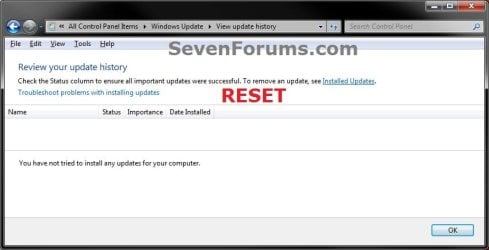
Windows Update - Reset

How to Reset Windows Update in Vista, Windows 7, and Windows 8


   Information
This will show you how to reset Windows Update view update history, and how to reset and re-register Windows Update Components if you are having a problem updating with Windows Update.


OPTION ONE

To Only Reset Windows Update History


   Note
Resetting Windows Update using this option will clear the view update history details list (cache).

This will not actually uninstall any of your currently installed Windows Update. They will just not be listed anymore. Any new Windows Update installed after the reset will show up in the view update history list as normal though.

1. Click/tap on the Download button below to download this file below.
Reset_Windows_Update_History.bat


Download


2. Save the .bat file to your Desktop.

3. Right click or press and hold on the downloaded .bat file, and click/tap on Run as administrator.

4. If prompted by UAC click/tap on Run, then Yes/Continue (if administrator) or type in administrator's password (if standard user).

5. You will now see an elevated command prompt open and run. When it's finished, it will close automatically.

6. If opened, close and reopen Windows Update to verify that it has been reset.
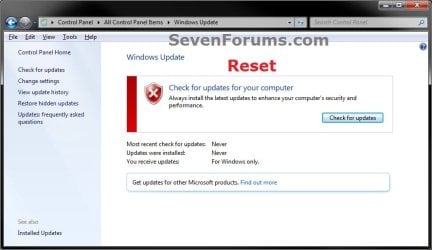
Reset.jpg

Update_History.jpg

7. Resetting the Windows Update history will also restore the default language packs being listed in Windows Upate again in the Windows 7 Ultimate and Enterprise editions after you check for updates next.
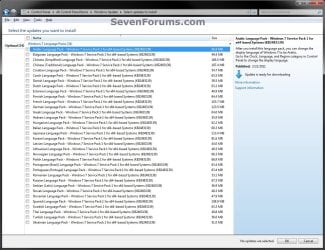
Language_Packs.jpg


OPTION TWO

To Reset and Re-register Windows Update Components


NOTE: This option is the Windows version of: How do I reset Windows Update components?. It will reset Windows Update Components and re-register the BITS files and the Windows Update files to help fix Windows Update errors. This option will not clear the view update history details list as it does in OPTION ONE above.
1. Click/tap on the Download button below to download this file below.
Reset_Reregister_Windows_Update_Components.bat


Download


2. Save the .bat file to your Desktop.

3. Right click or press and hold on the downloaded .bat file, and click/tap on Run as administrator.

4. If prompted by UAC click on Run, then Yes/Continue (if administrator) or type in administrator's password (if standard user).

5. You will now see an elevated command prompt open and run. When it's finished, it will close automatically.

6. Restart the computer afterwards to apply.

7. If this still does not help, then run the Microsoft Fix it tool here:
How do I reset Windows Update components?

See also: Unable to install updates in Windows Vista, Windows 7, Windows Server 2008 and Windows Server 2008 R2


OPTION THREE

To Reset and Re-register Windows Update Components AND Reset Update History in One Easy Click


   Note
This option combines OPTION ONE and OPTION TWO above in one .bat file.

1. Click/tap on the Download button below to download this file below.
Reset_Windows_Update_Full.bat


Download


2. Save the .bat file to your Desktop.

3. Right click or press and hold on the downloaded .bat file, and click/tap on Run as administrator.

4. If prompted by UAC click/tap on Run, then Yes/Continue (if administrator) or type in administrator's password (if standard user).

5. You will now see an elevated command prompt open and run. When it's finished, it will close automatically.

6. Restart the computer afterwards to apply.

7. If this still does not help, then run the Microsoft Fix it tool here:

Download


How do I reset Windows Update components?

See also: Unable to install updates in Windows Vista, Windows 7, Windows Server 2008 and Windows Server 2008 R2
That's it,
Shawn


Attachments

Last edited:
Hi, I downloaded and ran the Reset_Windows_Update_Full.bat file, and it worked wonderfully, immediately reducing my CPU usage back to a reasonable level (from 67% down to 2%)! Thank you so much. However, it seems that this state of low CPU usage only seems to last a few days, then it bounces backup again, usually around the 60% mark, with nothing else running. Manually stopping the Windows Update service drops it back down again, so I'm sure Windows Update is the problem. So I end up running the bat file at least once, sometimes twice, a week to bring the CPU usage down. Any ideas as to why I have to do this so often? Thank you.
 

My Computer

Computer type
PC/Desktop
Computer Manufacturer/Model Number
HP
OS
Windows 7 Professional 64bit
CPU
Intel dual core 3.16GHz 3.17GHz
Memory
4GB

My Computer

Computer type
PC/Desktop
Computer Manufacturer/Model Number
Custom assembled by me :}
OS
Win-7-Pro64bit 7-H-Prem-64bit
CPU
i7-5930K 2nd i9-9940x both water blocked VRM's too
Motherboard
ASUS SABERTOOTH X99 2nd ASUS x299 Apex
Memory
Trident-z 3200C14 2nd Trident-z 3600C16
Graphics Card(s)
EVGA 1080ti ftw3 2nd Titan Xp both water blocked
Sound Card
Built-in Realtek
Monitor(s) Displays
1-AOC G2460PG 24"G-Sync 144Hz/ 2nd 1-ASUS VG248QE 24" 144Hz
Screen Resolution
1920 x 1080 144Hz
Hard Drives
2-Samsung M.2 Evo & Evo Plus
2-Samsung 850 EVO 500GB SSD's/ 3-2.5 W.D. Black 1tb-&3-1tb/3-3.5 WD Black 1tb hdd's
PSU
EVGA SuperNOVA 1000-P2 2nd 1200-P2
Case
2-Corsair Obsidian Series 450D Black ATX Mid Tower
Cooling
Custom water loops
Keyboard
Logitech G710+/ 2nd Logitech G910
Mouse
2-RedDragon M901 Perdition 16400 dpi Gaming mouse = wired
Internet Speed
Comcast Ping 19ms 89.31mbps download speed 6.12mbps upload
Antivirus
Malwarebytes Pro/ Superantispyware Pro
Browser
FireFox & Pale moon
Other Info
2nd ASUS X299 Apex/Intel i9-9940x with Custom water loop/7H-Prem-x64/Corsair 450D case/Ram Trident-z 3600C16 4x8gb / Samsung970Evo plus 500gb SSD/Dual ssd EZ swap evo/PSU EVGA SuperNova 1200w-P2 80+Platinum/GPU Titan Xp /8-ML-140 on push-pull on 2-280GTX rads
ThrashZone, thank you. KB3172605 was missing, so I installed it. I'll see if everything's still OK after a week or so, and let you know. Thanks again.
 

My Computer

Computer type
PC/Desktop
Computer Manufacturer/Model Number
HP
OS
Windows 7 Professional 64bit
CPU
Intel dual core 3.16GHz 3.17GHz
Memory
4GB
Hi,
I'm pretty sure you're in good shape now :)
Cheers.
 

My Computer

Computer type
PC/Desktop
Computer Manufacturer/Model Number
Custom assembled by me :}
OS
Win-7-Pro64bit 7-H-Prem-64bit
CPU
i7-5930K 2nd i9-9940x both water blocked VRM's too
Motherboard
ASUS SABERTOOTH X99 2nd ASUS x299 Apex
Memory
Trident-z 3200C14 2nd Trident-z 3600C16
Graphics Card(s)
EVGA 1080ti ftw3 2nd Titan Xp both water blocked
Sound Card
Built-in Realtek
Monitor(s) Displays
1-AOC G2460PG 24"G-Sync 144Hz/ 2nd 1-ASUS VG248QE 24" 144Hz
Screen Resolution
1920 x 1080 144Hz
Hard Drives
2-Samsung M.2 Evo & Evo Plus
2-Samsung 850 EVO 500GB SSD's/ 3-2.5 W.D. Black 1tb-&3-1tb/3-3.5 WD Black 1tb hdd's
PSU
EVGA SuperNOVA 1000-P2 2nd 1200-P2
Case
2-Corsair Obsidian Series 450D Black ATX Mid Tower
Cooling
Custom water loops
Keyboard
Logitech G710+/ 2nd Logitech G910
Mouse
2-RedDragon M901 Perdition 16400 dpi Gaming mouse = wired
Internet Speed
Comcast Ping 19ms 89.31mbps download speed 6.12mbps upload
Antivirus
Malwarebytes Pro/ Superantispyware Pro
Browser
FireFox & Pale moon
Other Info
2nd ASUS X299 Apex/Intel i9-9940x with Custom water loop/7H-Prem-x64/Corsair 450D case/Ram Trident-z 3600C16 4x8gb / Samsung970Evo plus 500gb SSD/Dual ssd EZ swap evo/PSU EVGA SuperNova 1200w-P2 80+Platinum/GPU Titan Xp /8-ML-140 on push-pull on 2-280GTX rads
MSI Lappie

Update goes into lala land. Man I tried a whole list of things. Nothing seemed to work. Finally looked at this thread and got it to work. Thanks a lot guys.
 

My Computer

Computer Manufacturer/Model Number
BGC (Bob's Garage Crew)
OS
win 7 X64 Ultimate SP1
CPU
I3770K
Motherboard
Asus P8Z77-V Deluxe
Memory
G Skill F3-14900CL9-4GBXL x 4
Graphics Card(s)
NVIDIA GeForce GTX670 + Intel 4000
Sound Card
Realtek HD 5.1 (MOB)
Monitor(s) Displays
Asus VW224T (1)
Screen Resolution
1920 x 1080
Hard Drives
SATA Corsair Force GT 2.5" 180GB (System) Sata 3
OCZ Vertex3 120GB
OCZ Vertex 2 120GB 2.5" SATA II
ST31000524AS 1000.2GB
WD15EARS (External)
PSU
CoolerMaster 1000 Watt
Case
CoolerMaster HAF X
Cooling
CPU -- CoolerMaster 520N
Keyboard
MS Wireless 3000 V2
Mouse
MS Wireless 3000 V2
Internet Speed
Cable
Antivirus
Norton Internet Security
Browser
IE9
Other Info
AMI Bios 1805
OC'd 3%
Well, it's been 5 days since I installed KB3172605, and so far everything seems to be working great (fingers crossed)! I'll try to check in once more, in about a week, with an update. Thanks again ThrashZone.
 

My Computer

Computer type
PC/Desktop
Computer Manufacturer/Model Number
HP
OS
Windows 7 Professional 64bit
CPU
Intel dual core 3.16GHz 3.17GHz
Memory
4GB
Hi,
No problem glad to be of help :)
Cheers.
 

My Computer

Computer type
PC/Desktop
Computer Manufacturer/Model Number
Custom assembled by me :}
OS
Win-7-Pro64bit 7-H-Prem-64bit
CPU
i7-5930K 2nd i9-9940x both water blocked VRM's too
Motherboard
ASUS SABERTOOTH X99 2nd ASUS x299 Apex
Memory
Trident-z 3200C14 2nd Trident-z 3600C16
Graphics Card(s)
EVGA 1080ti ftw3 2nd Titan Xp both water blocked
Sound Card
Built-in Realtek
Monitor(s) Displays
1-AOC G2460PG 24"G-Sync 144Hz/ 2nd 1-ASUS VG248QE 24" 144Hz
Screen Resolution
1920 x 1080 144Hz
Hard Drives
2-Samsung M.2 Evo & Evo Plus
2-Samsung 850 EVO 500GB SSD's/ 3-2.5 W.D. Black 1tb-&3-1tb/3-3.5 WD Black 1tb hdd's
PSU
EVGA SuperNOVA 1000-P2 2nd 1200-P2
Case
2-Corsair Obsidian Series 450D Black ATX Mid Tower
Cooling
Custom water loops
Keyboard
Logitech G710+/ 2nd Logitech G910
Mouse
2-RedDragon M901 Perdition 16400 dpi Gaming mouse = wired
Internet Speed
Comcast Ping 19ms 89.31mbps download speed 6.12mbps upload
Antivirus
Malwarebytes Pro/ Superantispyware Pro
Browser
FireFox & Pale moon
Other Info
2nd ASUS X299 Apex/Intel i9-9940x with Custom water loop/7H-Prem-x64/Corsair 450D case/Ram Trident-z 3600C16 4x8gb / Samsung970Evo plus 500gb SSD/Dual ssd EZ swap evo/PSU EVGA SuperNova 1200w-P2 80+Platinum/GPU Titan Xp /8-ML-140 on push-pull on 2-280GTX rads
Dear Brink,

I am lost with this issue. In a fresh clean installation (using diskpart's clean command, etc.), Windows Update never worked. I tried many things, but no joy. Did not even work when installing KB files that look for updates on a stand alone installer. As I could never make it work regardless of what I tried, I clean reinstalled again, but for my astonishment I fell in the same dirty hole! :mad::cry:

I started with the Windows Update Troubleshooter (WindowsUpdate.diagcab) followed by
SFC /scannow, and they did not find errors.

Always exactly the very same first picture here on your tutorial with the red logo and bar. Then I followed your link (How do I reset Windows Update components?) and performed all operations there from the beginning to the end of the page. Here is a list of the errors I got from the command line part of it:

All these commands received the same error:
regsvr32.exe mshtml.dll
regsvr32.exe shdocvw.dll
regsvr32.exe browseui.dll
regsvr32.exe qmgr.dll
regsvr32.exe muweb.dll
The module "(module name as in the command)" was loaded but the entry-point DllRegisterServer was not found.

Make sure that "(same module nanme)" is a valid DLL or OCX file and then try again.
I tried and received the same error.


All these commands received the same error:
regsvr32.exe msxml.dll
regsvr32.exe gpkcsp.dll
regsvr32.exe sccbase.dll
regsvr32.exe slbcsp.dll
regsvr32.exe initpki.dll
regsvr32.exe wuaueng1.dll
regsvr32.exe wucltui.dll
regsvr32.exe wuweb.dll
The module "msxml.dll" failed to load

Make sure the binary is stored at the specified pathor debug it to check for problems with the binary or dependent .DLL files.

The specified modules could not be found.
I also tried to update the Windows Update Agent to the latest version from here.

After this fiasco I followed the links found on the same page you recommended (How do I reset Windows Update components?), but WU still not working and always with the red logo and bar. I ask your help because I believe that from the errors I mentioning maybe you know the culprit and show me what else to do. After two clean installations, maybe a third one will not solve the problem. In a new installation I cannot have any image or backup yet because it is like this since the beginning. However, in the updates history there was an update (cleared meanwhile) right after finishing installation or maybe very shortly after. It was the same with the preceding installation.

What would you advice apart from reinstalling, please?
 
Last edited:

My Computer

Computer type
PC/Desktop
Computer Manufacturer/Model Number
Home assembled
OS
Windows 7 Ultimate 64-bit SP1
CPU
AMD Athlon 64 II X3 440
Motherboard
M4A785TD-V EVO
Memory
Kingston kit 4GB DDR3 1333MHz (KVR1333D3N9K2/4)
Monitor(s) Displays
ASUS AS VH198S
Screen Resolution
1440x900
Hard Drives
Crucial MX300 2.5" SSD SATA,
Western Digital Caviar Black WD1002FAEX SATA-III,
Samsung HD161HJ SATA-II,
Seagate Barracuda ST3120022A ATA,
Western Digital WD800BB ATA.
Case
Standard
Cooling
Standard
Keyboard
Safeway SW-20
Mouse
Logitech Anywhere, Logitech MX Anywhere 2S, Technet M006
Internet Speed
130 Mbs fiber
Antivirus
Avast Premier
Browser
Firefox, Ice Dragon and Opera
Other Info
PCI ATA-133 Adapter,
Parallel Port Card PCI - PU005V2.
In a fresh clean installation (using diskpart's clean command, etc.), Windows Update never worked.

I think ThrashZone already posted the solution.

Anyway after a fresh install WU will not work as the way Windows Updates works has been changed since Windows 7 was released.

Basically you need:

Servicing Stack Update July 2016 https://support.microsoft.com/en-us/kb/3177467 [EDIT]


July 2016 Rollup http://download.windowsupdate.com/d..._2bb9bc55f347eee34b1454b50c436eb6fd9301fc.msu

Download links posted are for Window 7 64bit

Change update settings as per this post:

Windows Update will not update and I've tried multiple fixes

However to make it clear:

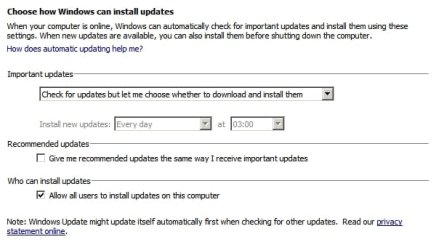
Start > Control Panel > System and Security > Windows Update > Change settings > "Never check for updates" then reboot.

Install the two updates you downloaded.

Reboot.

Re-enable automatic updates then select one of the options to check for updates automatically.

Change settings.jpg
 
Last edited:

My Computer

Computer type
Laptop
Computer Manufacturer/Model Number
ASUS
OS
Microsoft Windows 7 Home Premium 64-bit 7601 Multiprocessor Free Service Pack 1
CPU
AMD C-60 APU with Radeon(tm) HD Graphics
Motherboard
ASUSTeK COMPUTER INC. X501U
Memory
4.00 GB
Graphics Card(s)
AMD Radeon HD 6290 Graphics
Sound Card
(1) AMD High Definition Audio Device (2) Realtek High Defi
Screen Resolution
1366 x 768 x 32 bits (4294967296 colors) @ 60 Hz
Hard Drives
Hitachi HTS545050A7E380 SATA Disk Device
Antivirus
Comodo CIS & FW, SecureAplus App Whitelisting, Threatfire
Browser
Cyberfox 64bit, Opera 64bit, Airfox
Other Info
Spy-The-Spy, HitmanPro.Alert, Norton Connect Safe, MJRegWatcher, BitDefender TrafficLight, Voodoo Shield, Zemana AntiMalware
Thank you Callender, it is solved with your helpfulness. Can you imagine how many hours I spent turning around this problem? What I described on my previous post was just the last part after the second OS install. It downloaded over 200 important updates and forty something recommended ones. They are being installed right now.

I was running the same OS before. I had too many issues that made me want a clean reinstall, but Win Update was not one of them. I might have received those updates that made the change in due time, automatically and I didn't even perceive it. I couldn't find any reference to this change on any of the many MS pages I read! They should have added something on pages about stopped updating system issues.I hadn't found ThrashZone's post before because I headed straight to this tutorial, I just used your two firstlinks and it worked right away. Anyway, many thanks again for your help

By the way, I would like to add that some of the updates being installed now (still far from a half) also solved another issue, or so I believe. I have two ancient ATA disks, as per my specs. The OS did not find them when the BIOS were set to AHCI, as it is now, but only to IDE, and on IDE one SATA was not seen. They showed up just before I started this paragraph. They had stopped being seen since my first reinstall.
 

My Computer

Computer type
PC/Desktop
Computer Manufacturer/Model Number
Home assembled
OS
Windows 7 Ultimate 64-bit SP1
CPU
AMD Athlon 64 II X3 440
Motherboard
M4A785TD-V EVO
Memory
Kingston kit 4GB DDR3 1333MHz (KVR1333D3N9K2/4)
Monitor(s) Displays
ASUS AS VH198S
Screen Resolution
1440x900
Hard Drives
Crucial MX300 2.5" SSD SATA,
Western Digital Caviar Black WD1002FAEX SATA-III,
Samsung HD161HJ SATA-II,
Seagate Barracuda ST3120022A ATA,
Western Digital WD800BB ATA.
Case
Standard
Cooling
Standard
Keyboard
Safeway SW-20
Mouse
Logitech Anywhere, Logitech MX Anywhere 2S, Technet M006
Internet Speed
130 Mbs fiber
Antivirus
Avast Premier
Browser
Firefox, Ice Dragon and Opera
Other Info
PCI ATA-133 Adapter,
Parallel Port Card PCI - PU005V2.
Hi Brink,

Please Note: Sorry if this post is long winded, but I have made extensive detailed notes on EVERYTHING I have done to date, so I'm just providing the main jist.

I have used the information on this site many times to help resolve windows issues, most of the time with great success, so I'm hoping the same will happen this time.

My problem is I cannot get the damned Reset Batch file to work correctly. :mad:

A little info on the issue:

Computer was working ok for some time, then got flaky, ended up repeated crashing, freezing, etc. Turns out the motherboard was on it's last legs. So, since replacing the motherboard, all has been working fine. As can be gathered by my Nic, I can run various different OS's on the system for some time without issues. :geek:

So this is where the issue stands: Wipe drive and use OEM System Recovery Media to install Windows Vista Home Premium (No SP pack), run & install updates perfectly fine, until 2 days ago. System had a spaz attack while attempting to download the next load of Updates (I have it set to alert me, but I choose what & when to download, if any), I think it's the battery that caused that issue, as the status light for the battery don't always light up, or display the right colour. Any how, when I restarted the system, after leaving it charge for a while, there was a list of about 40 updates that all failed to install. I tried again, and success for all bar 1, KB972145. That update still refuses to install via Windows Update, 0% downloaded after 30 mins, then shows fail. I manually downloaded the update, install it with Right click/Admin priv, install takes time but completes to 100%, however once installation completed, WU says update failed, again. After multiple attempts, I've given up with trying to install that update, as the next update to install is Vista SP1, if it's needed, SP1 should resolve it.

The crux of the issue, is now I have well over 40 failed errors in the WU History list.

I have tried to use your Option 3 file, without success:
"Failed to reset windows update due to appidsvc failing to stop".

I've tried that Option 3 Batch File multiple times, same response, both from Explorer/Right click/Run as Admin, and from an elevated CP Box. I've read every post in all 27 pages of this thread, and nothing has worked. I noted a message somewhere suggested trying "net stop appidsvc" in an elevated CP Box, I tried that, twice, both times it returned an error saying that "appidsvc" is not installed on my system.

Does that mean because I don't seem to have it on my system, I can't get the fix to work? What does 'appidsvc' actually do?

Without much else to go on, I changed "goto loop3" to "goto loop4", and deleted (how to message out a line so it don't process it?) the "net start appidsvc" from the end section. Saved, and ran in elevated CP Box.

It worked a treat, everything seemed to go through correctly, just before dissapearing, it said I'd need to reboot to get the fix to finish working, which I did.

I can honestly say it worked, all the fails have gone, but so has everything else, WU says I don't have any Updates installed, and never checked, clicking on 'View update history' shows a completely blank page. I know for a fact the OEM Installer adds a good 30+ updates in the install routine.

I know I can run a system restore to some point yesterday (just checked to be sure I got some restore points). If I do a restore, I'll get the old list back, and the ruddy fails.

So, what do I need to do to resolve this issue. :confused:
 

My Computer

Computer type
Laptop
Computer Manufacturer/Model Number
Samsung NP-R60Y
OS
Windows Vista Home Premium (x86 32-bit)
CPU
Intel Core 2 Duo (T5550 @ 1.83GHz)
Motherboard
NP-R60Y BA92-* PRAHA-SRI Intel
Memory
2Gb
Graphics Card(s)
ATI Radeon X1250
Screen Resolution
1280x800
Hard Drives
Seagate Spinpoint M8 1TB 2.5" SATA
Mouse
Rajfoo Gaming Mouse
Internet Speed
50MBit
Antivirus
AVG Anti-Virus 16
Browser
Mozilla Firefox 50.1
Other Info
Firewall: Comodo Firewall 8.4
Hello CymruNix, and welcome to Seven Forums. :)

"appidsvc" is for the application identity service. Luckily, you were able to bypass it to finish running the .bat file from Option 3.

The .bat file completely resets Windows Update back to default which includes clearing the update history. This is nothing to worry about though.

If you are still unable to download and install Windows Update, then you might see if what's posted in the thread below may help.

Windows Update will not update and I've tried multiple fixes
 

My Computer

Computer type
PC/Desktop
Computer Manufacturer/Model Number
Self built custom
OS
64-bit Windows 11 Pro for Workstations
CPU
Intel i7-8700K OC'd to 5 GHz
Motherboard
ASUS ROG Maximus XI Formula Z390
Memory
64 GB (4x16GB) G.SKILL TridentZ RGB DDR4 3600 MHz
Graphics Card(s)
ASUS ROG-STRIX-GTX1080TI-O11G-GAMING
Sound Card
Integrated
Monitor(s) Displays
2 x Samsung Odyssey G7 27"
Screen Resolution
2560x1440
Hard Drives
1TB Samsung 990 PRO M.2,
4TB Samsung 990 PRO PRO M.2,
TerraMaster F8 SSD Plus NAS
PSU
Seasonic Prime Titanium 850W
Case
Thermaltake Core P3
Cooling
Corsair Hydro H115i
Keyboard
Logitech wireless K800
Mouse
Logitech MX Master 4
Internet Speed
2 Gb/s Download and 100 Mb/s Upload
Antivirus
Malwarebyte Anti-Malware Premium
Browser
Google Chrome
Other Info
Logitech Z625 speaker system,
Logitech BRIO 4K Pro webcam,
HP Color LaserJet Pro MFP M477fdn,
APC SMART-UPS RT 1000 XL - SURT1000XLI,
Galaxy S23 Plus phone
Thanks Brink, and thanks for the fast response.

I have been able to download & install other updates after that one that won't, it's just that one that refuses to install, in WU it won't get past 0%, but via manual install with elevated privs, it gets 1oo% then fails. I've had it before where either an update refuses to install, and later another update takes it's place, or it will completely disappear from the list, and eventually something else takes it's place, so I'm not too concerned about that one, because SP1 & SP2 are ready to go on next.

I actually have Vista SP1 ready to install next from WU after running the Check for Updates, but I know from previously that that is just cr@p, it's a 1.9Mb file that don't do jack. I've got the full SP1 & SP2 files previously downloaded, and ready to install.

As it stands, all bar that 1 file has installed, but currently nothing is in the history list, is there some way I can get the history list back, and delete the fails (reset)? I'd like to have a history list that I can use to check up on which actually shows what I've previously installed.

As that 'appidsvc' won't continue in the default file, only my edited version, is there something I need to check, add, delete, change, to get it to work correctly? I've had a look in 'Start/All Programs/Administrative Tools/Services', there is no Application Identity Service, the nearest is Application Information Service, right clicking that has Stop, but doing that comes back with:

"Windows could not stop the Application Information Service on Local Computer.
The service did not return an error. This could be an internal Windows error or an internal service error.
If the problem persists, contact your system administrator."

:(
 

My Computer

Computer type
Laptop
Computer Manufacturer/Model Number
Samsung NP-R60Y
OS
Windows Vista Home Premium (x86 32-bit)
CPU
Intel Core 2 Duo (T5550 @ 1.83GHz)
Motherboard
NP-R60Y BA92-* PRAHA-SRI Intel
Memory
2Gb
Graphics Card(s)
ATI Radeon X1250
Screen Resolution
1280x800
Hard Drives
Seagate Spinpoint M8 1TB 2.5" SATA
Mouse
Rajfoo Gaming Mouse
Internet Speed
50MBit
Antivirus
AVG Anti-Virus 16
Browser
Mozilla Firefox 50.1
Other Info
Firewall: Comodo Firewall 8.4

My Computer

Computer type
PC/Desktop
Computer Manufacturer/Model Number
Self built custom
OS
64-bit Windows 11 Pro for Workstations
CPU
Intel i7-8700K OC'd to 5 GHz
Motherboard
ASUS ROG Maximus XI Formula Z390
Memory
64 GB (4x16GB) G.SKILL TridentZ RGB DDR4 3600 MHz
Graphics Card(s)
ASUS ROG-STRIX-GTX1080TI-O11G-GAMING
Sound Card
Integrated
Monitor(s) Displays
2 x Samsung Odyssey G7 27"
Screen Resolution
2560x1440
Hard Drives
1TB Samsung 990 PRO M.2,
4TB Samsung 990 PRO PRO M.2,
TerraMaster F8 SSD Plus NAS
PSU
Seasonic Prime Titanium 850W
Case
Thermaltake Core P3
Cooling
Corsair Hydro H115i
Keyboard
Logitech wireless K800
Mouse
Logitech MX Master 4
Internet Speed
2 Gb/s Download and 100 Mb/s Upload
Antivirus
Malwarebyte Anti-Malware Premium
Browser
Google Chrome
Other Info
Logitech Z625 speaker system,
Logitech BRIO 4K Pro webcam,
HP Color LaserJet Pro MFP M477fdn,
APC SMART-UPS RT 1000 XL - SURT1000XLI,
Galaxy S23 Plus phone
I've just finished reading through that entire thread, I've saved notes on the essence of what to do for the failing update, I will attempt that later.

My question still stands with regard the history list disappearing although I attempted to use option 3 batch file. My understanding is that option 3 .bat should delete everything from the history list, as well as reset and re-register all previously installed updates, which means I should have the history list showing ONLY what was successfully installed? My history list is empty.

I know I can system restore, but if I then try option 3 .bat file, it WILL FAIL as appidsvc is not currently detected on my system, and using the edited version deletes all history, but not re-register.

What do I do to get the history list sorted? :confused:
 

My Computer

Computer type
Laptop
Computer Manufacturer/Model Number
Samsung NP-R60Y
OS
Windows Vista Home Premium (x86 32-bit)
CPU
Intel Core 2 Duo (T5550 @ 1.83GHz)
Motherboard
NP-R60Y BA92-* PRAHA-SRI Intel
Memory
2Gb
Graphics Card(s)
ATI Radeon X1250
Screen Resolution
1280x800
Hard Drives
Seagate Spinpoint M8 1TB 2.5" SATA
Mouse
Rajfoo Gaming Mouse
Internet Speed
50MBit
Antivirus
AVG Anti-Virus 16
Browser
Mozilla Firefox 50.1
Other Info
Firewall: Comodo Firewall 8.4
The .bat file will delete the history list as well as part of completely resetting Windows Update.

There's nothing that needs to be sorted. :)
 

My Computer

Computer type
PC/Desktop
Computer Manufacturer/Model Number
Self built custom
OS
64-bit Windows 11 Pro for Workstations
CPU
Intel i7-8700K OC'd to 5 GHz
Motherboard
ASUS ROG Maximus XI Formula Z390
Memory
64 GB (4x16GB) G.SKILL TridentZ RGB DDR4 3600 MHz
Graphics Card(s)
ASUS ROG-STRIX-GTX1080TI-O11G-GAMING
Sound Card
Integrated
Monitor(s) Displays
2 x Samsung Odyssey G7 27"
Screen Resolution
2560x1440
Hard Drives
1TB Samsung 990 PRO M.2,
4TB Samsung 990 PRO PRO M.2,
TerraMaster F8 SSD Plus NAS
PSU
Seasonic Prime Titanium 850W
Case
Thermaltake Core P3
Cooling
Corsair Hydro H115i
Keyboard
Logitech wireless K800
Mouse
Logitech MX Master 4
Internet Speed
2 Gb/s Download and 100 Mb/s Upload
Antivirus
Malwarebyte Anti-Malware Premium
Browser
Google Chrome
Other Info
Logitech Z625 speaker system,
Logitech BRIO 4K Pro webcam,
HP Color LaserJet Pro MFP M477fdn,
APC SMART-UPS RT 1000 XL - SURT1000XLI,
Galaxy S23 Plus phone
My understanding of 'reset and re-register' is that after deleting the history, it re-lists all completed/successful installs. Is that perception correct?

If that is the case, the the problem is, it isn't. It does delete the history, but once the computer has been rebooted (once, twice, and even three times), the history list doesn't show anything as being installed. Yes, I can install more updates after then, but only the new updates show up in the list, nothing previous.
 

My Computer

Computer type
Laptop
Computer Manufacturer/Model Number
Samsung NP-R60Y
OS
Windows Vista Home Premium (x86 32-bit)
CPU
Intel Core 2 Duo (T5550 @ 1.83GHz)
Motherboard
NP-R60Y BA92-* PRAHA-SRI Intel
Memory
2Gb
Graphics Card(s)
ATI Radeon X1250
Screen Resolution
1280x800
Hard Drives
Seagate Spinpoint M8 1TB 2.5" SATA
Mouse
Rajfoo Gaming Mouse
Internet Speed
50MBit
Antivirus
AVG Anti-Virus 16
Browser
Mozilla Firefox 50.1
Other Info
Firewall: Comodo Firewall 8.4
It'll show the history of any updates installed after resetting it, but everything before will be removed from the history list.
 

My Computer

Computer type
PC/Desktop
Computer Manufacturer/Model Number
Self built custom
OS
64-bit Windows 11 Pro for Workstations
CPU
Intel i7-8700K OC'd to 5 GHz
Motherboard
ASUS ROG Maximus XI Formula Z390
Memory
64 GB (4x16GB) G.SKILL TridentZ RGB DDR4 3600 MHz
Graphics Card(s)
ASUS ROG-STRIX-GTX1080TI-O11G-GAMING
Sound Card
Integrated
Monitor(s) Displays
2 x Samsung Odyssey G7 27"
Screen Resolution
2560x1440
Hard Drives
1TB Samsung 990 PRO M.2,
4TB Samsung 990 PRO PRO M.2,
TerraMaster F8 SSD Plus NAS
PSU
Seasonic Prime Titanium 850W
Case
Thermaltake Core P3
Cooling
Corsair Hydro H115i
Keyboard
Logitech wireless K800
Mouse
Logitech MX Master 4
Internet Speed
2 Gb/s Download and 100 Mb/s Upload
Antivirus
Malwarebyte Anti-Malware Premium
Browser
Google Chrome
Other Info
Logitech Z625 speaker system,
Logitech BRIO 4K Pro webcam,
HP Color LaserJet Pro MFP M477fdn,
APC SMART-UPS RT 1000 XL - SURT1000XLI,
Galaxy S23 Plus phone
OK, thank you for the clarification. Is there no way to remove the fails and keep the successful? Like a selective edit or some such?
 

My Computer

Computer type
Laptop
Computer Manufacturer/Model Number
Samsung NP-R60Y
OS
Windows Vista Home Premium (x86 32-bit)
CPU
Intel Core 2 Duo (T5550 @ 1.83GHz)
Motherboard
NP-R60Y BA92-* PRAHA-SRI Intel
Memory
2Gb
Graphics Card(s)
ATI Radeon X1250
Screen Resolution
1280x800
Hard Drives
Seagate Spinpoint M8 1TB 2.5" SATA
Mouse
Rajfoo Gaming Mouse
Internet Speed
50MBit
Antivirus
AVG Anti-Virus 16
Browser
Mozilla Firefox 50.1
Other Info
Firewall: Comodo Firewall 8.4
Option 2 can reset Windows Update without deleting the update history list.

However, once you use Option 3, the history is gone.
 

My Computer

Computer type
PC/Desktop
Computer Manufacturer/Model Number
Self built custom
OS
64-bit Windows 11 Pro for Workstations
CPU
Intel i7-8700K OC'd to 5 GHz
Motherboard
ASUS ROG Maximus XI Formula Z390
Memory
64 GB (4x16GB) G.SKILL TridentZ RGB DDR4 3600 MHz
Graphics Card(s)
ASUS ROG-STRIX-GTX1080TI-O11G-GAMING
Sound Card
Integrated
Monitor(s) Displays
2 x Samsung Odyssey G7 27"
Screen Resolution
2560x1440
Hard Drives
1TB Samsung 990 PRO M.2,
4TB Samsung 990 PRO PRO M.2,
TerraMaster F8 SSD Plus NAS
PSU
Seasonic Prime Titanium 850W
Case
Thermaltake Core P3
Cooling
Corsair Hydro H115i
Keyboard
Logitech wireless K800
Mouse
Logitech MX Master 4
Internet Speed
2 Gb/s Download and 100 Mb/s Upload
Antivirus
Malwarebyte Anti-Malware Premium
Browser
Google Chrome
Other Info
Logitech Z625 speaker system,
Logitech BRIO 4K Pro webcam,
HP Color LaserJet Pro MFP M477fdn,
APC SMART-UPS RT 1000 XL - SURT1000XLI,
Galaxy S23 Plus phone
Back
Top