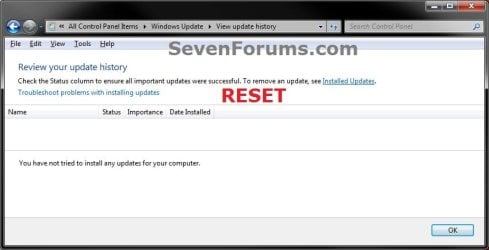
Windows Update - Reset

How to Reset Windows Update in Vista, Windows 7, and Windows 8


   Information
This will show you how to reset Windows Update view update history, and how to reset and re-register Windows Update Components if you are having a problem updating with Windows Update.


OPTION ONE

To Only Reset Windows Update History


   Note
Resetting Windows Update using this option will clear the view update history details list (cache).

This will not actually uninstall any of your currently installed Windows Update. They will just not be listed anymore. Any new Windows Update installed after the reset will show up in the view update history list as normal though.

1. Click/tap on the Download button below to download this file below.
Reset_Windows_Update_History.bat


Download


2. Save the .bat file to your Desktop.

3. Right click or press and hold on the downloaded .bat file, and click/tap on Run as administrator.

4. If prompted by UAC click/tap on Run, then Yes/Continue (if administrator) or type in administrator's password (if standard user).

5. You will now see an elevated command prompt open and run. When it's finished, it will close automatically.

6. If opened, close and reopen Windows Update to verify that it has been reset.
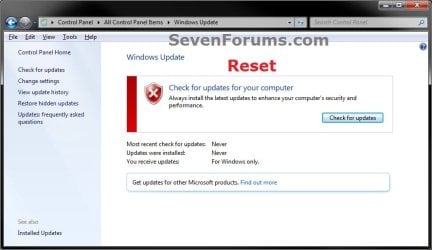
Reset.jpg

Update_History.jpg

7. Resetting the Windows Update history will also restore the default language packs being listed in Windows Upate again in the Windows 7 Ultimate and Enterprise editions after you check for updates next.
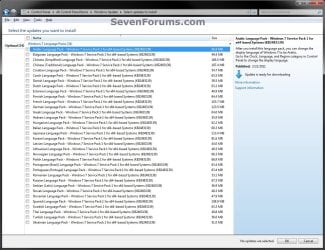
Language_Packs.jpg


OPTION TWO

To Reset and Re-register Windows Update Components


NOTE: This option is the Windows version of: How do I reset Windows Update components?. It will reset Windows Update Components and re-register the BITS files and the Windows Update files to help fix Windows Update errors. This option will not clear the view update history details list as it does in OPTION ONE above.
1. Click/tap on the Download button below to download this file below.
Reset_Reregister_Windows_Update_Components.bat


Download


2. Save the .bat file to your Desktop.

3. Right click or press and hold on the downloaded .bat file, and click/tap on Run as administrator.

4. If prompted by UAC click on Run, then Yes/Continue (if administrator) or type in administrator's password (if standard user).

5. You will now see an elevated command prompt open and run. When it's finished, it will close automatically.

6. Restart the computer afterwards to apply.

7. If this still does not help, then run the Microsoft Fix it tool here:
How do I reset Windows Update components?

See also: Unable to install updates in Windows Vista, Windows 7, Windows Server 2008 and Windows Server 2008 R2


OPTION THREE

To Reset and Re-register Windows Update Components AND Reset Update History in One Easy Click


   Note
This option combines OPTION ONE and OPTION TWO above in one .bat file.

1. Click/tap on the Download button below to download this file below.
Reset_Windows_Update_Full.bat


Download


2. Save the .bat file to your Desktop.

3. Right click or press and hold on the downloaded .bat file, and click/tap on Run as administrator.

4. If prompted by UAC click/tap on Run, then Yes/Continue (if administrator) or type in administrator's password (if standard user).

5. You will now see an elevated command prompt open and run. When it's finished, it will close automatically.

6. Restart the computer afterwards to apply.

7. If this still does not help, then run the Microsoft Fix it tool here:

Download


How do I reset Windows Update components?

See also: Unable to install updates in Windows Vista, Windows 7, Windows Server 2008 and Windows Server 2008 R2
That's it,
Shawn


Attachments

Last edited:
Thanks for the info Shawn! I have not had much luck with System Restore -only about 10% of the time have they corrected the issues I have run into. So I'll just bite the bullet for now...

I keep a journal on modifications I perform on my system(s) to include when updates are installed and there is nothing in the notes that could lead to this problem.

I worked 34 years on computers before retiring and some issues just escape identification as to the cause!

Bob
 

My Computer

Computer Manufacturer/Model Number
Dell Studio 435T/9000
OS
windows 7 Ultimate 64
I can understand that Bob. :)
 

My Computer

Computer type
PC/Desktop
Computer Manufacturer/Model Number
Self built custom
OS
64-bit Windows 11 Pro for Workstations
CPU
Intel i7-8700K OC'd to 5 GHz
Motherboard
ASUS ROG Maximus XI Formula Z390
Memory
64 GB (4x16GB) G.SKILL TridentZ RGB DDR4 3600 MHz
Graphics Card(s)
ASUS ROG-STRIX-GTX1080TI-O11G-GAMING
Sound Card
Integrated
Monitor(s) Displays
2 x Samsung Odyssey G7 27"
Screen Resolution
2560x1440
Hard Drives
1TB Samsung 990 PRO M.2,
4TB Samsung 990 PRO PRO M.2,
TerraMaster F8 SSD Plus NAS
PSU
Seasonic Prime Titanium 850W
Case
Thermaltake Core P3
Cooling
Corsair Hydro H115i
Keyboard
Logitech wireless K800
Mouse
Logitech MX Master 4
Internet Speed
2 Gb/s Download and 100 Mb/s Upload
Antivirus
Malwarebyte Anti-Malware Premium
Browser
Google Chrome
Other Info
Logitech Z625 speaker system,
Logitech BRIO 4K Pro webcam,
HP Color LaserJet Pro MFP M477fdn,
APC SMART-UPS RT 1000 XL - SURT1000XLI,
Galaxy S23 Plus phone
If none of this works... Try Intel Rapid Storage Technology Driver

Your tutorial described my symptoms, but none of the batch files helped. What finally resolved my issue was an Intel Storage driver.

Background: After installing a new hard drive in a HP desktop and going through the recovery process using the supplied disks, I had a system that refused to run Windows Update. I got errors running SFC, the Update Readiness tool, and SP1 refused to install too.

I spent 3 days looking for rootkits (the hdd had been exposed to other systems) and trying to repair what is essentially a fresh install of Windows 7 HP.

I finally found a site that described the same issues on a HP DV7 laptop, with a link to a HP page with the fix; but the link was invalid. It took a while but I found the page with the resolution. HP describes it as resolving issues with HP laptops with WD drives, but my system is a desktop (all-in-one) with a Seagate drive, and the fix worked. I've now installed SP1 and Windows Update is working fine.

This link is currently valid:

Error Messages Appear During Windows Update, When Inserting Card or Using Live Mail | HP® Support

If that doesn't work, search for SP47845 or Intel Rapid Storage Technology Driver.
 

My Computer

Computer type
PC/Desktop
Computer Manufacturer/Model Number
HP 200-5040a
OS
Windows 7 Home Premium 32bit
CPU
Core 2 Duo E7500 @ 2.94GHz
Motherboard
custom
Memory
4GB
Graphics Card(s)
Integrated (G45 Express Chipset)
Hard Drives
Seagate 2TB
Antivirus
Avast
Browser
assorted
Fantastic little batch file.... seemed to clean up 1GB worth of space too!
Does this work the same as the old vista method by clearing out left over files from the update store where windows update became corrupt?
 

My Computer

Computer Manufacturer/Model Number
Me :P
OS
Windows 7 Home Premium x64 SP1
CPU
Core 2 Quad Q6600
Motherboard
Abit IN9 32X MAX
Memory
8 GB OCZ PC2-6400 nVIDIA SLI-Ready Edition (4X2GB)
Graphics Card(s)
AMP! GeForce GTX 260² 896MB 448-bit GDDR3 (650MHz/2100MHz)
Sound Card
Realtek 7.1 CH HD Audio
Monitor(s) Displays
37" LG 1080p HD LCD TV
Screen Resolution
1280x1024 + 1360x768
Hard Drives
40GB Mushkin SSD
60GB Intel 520 SSD
150GB Raptor HDD
500GB Caviar HDD
PSU
Thermaltake W0133RB 1200W PSU
Case
Antec 900
Cooling
OCZ Vendetta 2 + Antec 900 case fans
Keyboard
Logitech G15 (full layout)
Mouse
R.A.T.9
Internet Speed
Not fast enough!
Hello ripbox,

Yep, that's correct. Part of what it does is clear the C:\Windows\SoftwareDistribution folder for that. :)
 

My Computer

Computer type
PC/Desktop
Computer Manufacturer/Model Number
Self built custom
OS
64-bit Windows 11 Pro for Workstations
CPU
Intel i7-8700K OC'd to 5 GHz
Motherboard
ASUS ROG Maximus XI Formula Z390
Memory
64 GB (4x16GB) G.SKILL TridentZ RGB DDR4 3600 MHz
Graphics Card(s)
ASUS ROG-STRIX-GTX1080TI-O11G-GAMING
Sound Card
Integrated
Monitor(s) Displays
2 x Samsung Odyssey G7 27"
Screen Resolution
2560x1440
Hard Drives
1TB Samsung 990 PRO M.2,
4TB Samsung 990 PRO PRO M.2,
TerraMaster F8 SSD Plus NAS
PSU
Seasonic Prime Titanium 850W
Case
Thermaltake Core P3
Cooling
Corsair Hydro H115i
Keyboard
Logitech wireless K800
Mouse
Logitech MX Master 4
Internet Speed
2 Gb/s Download and 100 Mb/s Upload
Antivirus
Malwarebyte Anti-Malware Premium
Browser
Google Chrome
Other Info
Logitech Z625 speaker system,
Logitech BRIO 4K Pro webcam,
HP Color LaserJet Pro MFP M477fdn,
APC SMART-UPS RT 1000 XL - SURT1000XLI,
Galaxy S23 Plus phone
To the one who post the fixes .... THANK YOU !!!!!!!!!!!!!!!!!!!!!!!!!!!!!!!!! I have finally solved this stupidity for problem ! Because I installed Windows in a partition of one of my 1TB HDDs in Intel system, the Windows update decided to stop functioning for no reason.... thanks again you guys.
 
Last edited by a moderator:

My Computer

Computer type
PC/Desktop
Computer Manufacturer/Model Number
Custom Build
OS
Windows 7 Ultimate 64bit
CPU
i5-4570
Motherboard
Gigabyte H87M-HD3
Memory
8GB Corsair Vengeance 1600Mhz 1DIMM
Graphics Card(s)
AMD RADEON R9 290X
Hard Drives
2x 1TB Westerd Digital Caviar Black

1x 2TB Western Digital Caviar Green
Antivirus
AVG Free Antivirus 2014
Browser
Chrome
Thank you! I was recovering from some malware that removed windows update capability. I ran your batch file to restore the services and it worked like a charm! God bless you.
 

My Computer

Computer type
PC/Desktop
Computer Manufacturer/Model Number
custom built
OS
Windows 7 Pro x64
Just wanted to add something else -- I'll be honest I didn't read all 15 pages.. But I tried a ton of the fixes here and nothing worked.

This was on a Sony Vaio -- The services were all running fine,.. but the update just didn't work (and said the service wasn't running).

Turns out it was the Intel Rapid Storage Technology drivers!

So I went into device manager and rolled back the driver on my Hard Drive, and problem solved. So you never know, that certainly didn't seem related but it was the issue for me.

May be something just to try even if you don't remember any Intel Rapid Storage Technology drivers...

Take care,
 

My Computer

Computer type
PC/Desktop
Computer Manufacturer/Model Number
Personal Build
OS
Windows 7 x64 + Windows 8.1 x64
CPU
i7-4770k Haswell
Motherboard
ASUS Z87-PRO
Memory
G.Skill DDR3 2400Mhz
Graphics Card(s)
ASUS GTX-780 384Bit GDDR 3GB OC'd
Hard Drives
Intel 530 - 240GB SSD
Western Digital Caviar Black 1TB 7200 (64MB Cache)
Western Digital Caviar Blue 1TB 7200 (64MB Cache)
Browser
Chrome + Firefox
Hello Logikos, and welcome to Seven Forums.

Thank you for posting your findings. :)
 

My Computer

Computer type
PC/Desktop
Computer Manufacturer/Model Number
Self built custom
OS
64-bit Windows 11 Pro for Workstations
CPU
Intel i7-8700K OC'd to 5 GHz
Motherboard
ASUS ROG Maximus XI Formula Z390
Memory
64 GB (4x16GB) G.SKILL TridentZ RGB DDR4 3600 MHz
Graphics Card(s)
ASUS ROG-STRIX-GTX1080TI-O11G-GAMING
Sound Card
Integrated
Monitor(s) Displays
2 x Samsung Odyssey G7 27"
Screen Resolution
2560x1440
Hard Drives
1TB Samsung 990 PRO M.2,
4TB Samsung 990 PRO PRO M.2,
TerraMaster F8 SSD Plus NAS
PSU
Seasonic Prime Titanium 850W
Case
Thermaltake Core P3
Cooling
Corsair Hydro H115i
Keyboard
Logitech wireless K800
Mouse
Logitech MX Master 4
Internet Speed
2 Gb/s Download and 100 Mb/s Upload
Antivirus
Malwarebyte Anti-Malware Premium
Browser
Google Chrome
Other Info
Logitech Z625 speaker system,
Logitech BRIO 4K Pro webcam,
HP Color LaserJet Pro MFP M477fdn,
APC SMART-UPS RT 1000 XL - SURT1000XLI,
Galaxy S23 Plus phone
Help needed please

Hi.
My name is Alex and I am writing from Saint-Tropez/FRANCE.
Sorry for syntaxes mistakes I didn't go to school far enough..

Very interesting help here and thank you it is working for me (second try actually).
What I do not underestand is after every update it is doing it again.blank screen in the windows update window so I have to start again and again using your method...
I would like very much to understand why it is happening and how to manage in repairing it forever?
Anyone?

Thanks.

Regards,
Alex
 

My Computer

Computer type
PC/Desktop
Computer Manufacturer/Model Number
custom build
OS
Windows 7 Enterprise x64
CPU
i7
Motherboard
ASUS
Memory
4 GB CORSAIR
Graphics Card(s)
ATI HD5760
Hard Drives
Tones
Antivirus
none
Browser
firefox latest
Hi.
My name is Alex and I am writing from Saint-Tropez/FRANCE.
Sorry for syntaxes mistakes I didn't go to school far enough..

Very interesting help here and thank you it is working for me (second try actually).
What I do not underestand is after every update it is doing it again.blank screen in the windows update window so I have to start again and again using your method...
I would like very much to understand why it is happening and how to manage in repairing it forever?
Anyone?

Thanks.

Regards,
Alex

Hello Alex, and welcome to Eight Forums.

Do you have a 3rd party AV or firewall program installed? If so, you might see if temporarily disabling or uninstalling it before doing the next Windows Update may help if it may be causing an issue.

For now, it wouldn't hurt to run a sfc /scannow command to see if it finds and repairs any corrupted or modified system files.

Hope this helps for now, :)
Shawn
 
Last edited:

My Computer

Computer type
PC/Desktop
Computer Manufacturer/Model Number
Self built custom
OS
64-bit Windows 11 Pro for Workstations
CPU
Intel i7-8700K OC'd to 5 GHz
Motherboard
ASUS ROG Maximus XI Formula Z390
Memory
64 GB (4x16GB) G.SKILL TridentZ RGB DDR4 3600 MHz
Graphics Card(s)
ASUS ROG-STRIX-GTX1080TI-O11G-GAMING
Sound Card
Integrated
Monitor(s) Displays
2 x Samsung Odyssey G7 27"
Screen Resolution
2560x1440
Hard Drives
1TB Samsung 990 PRO M.2,
4TB Samsung 990 PRO PRO M.2,
TerraMaster F8 SSD Plus NAS
PSU
Seasonic Prime Titanium 850W
Case
Thermaltake Core P3
Cooling
Corsair Hydro H115i
Keyboard
Logitech wireless K800
Mouse
Logitech MX Master 4
Internet Speed
2 Gb/s Download and 100 Mb/s Upload
Antivirus
Malwarebyte Anti-Malware Premium
Browser
Google Chrome
Other Info
Logitech Z625 speaker system,
Logitech BRIO 4K Pro webcam,
HP Color LaserJet Pro MFP M477fdn,
APC SMART-UPS RT 1000 XL - SURT1000XLI,
Galaxy S23 Plus phone
Shawn: Great!! Handy tutorial. Solved my problem!!! Didn't know you could erase the list; I don't like lists anyway:). Thanks!!! Hav'a Happy!!! Lawyer1973.
 

My Computer

OS
Windows 7 Ultimate x64
Glad it could help Lawyer1973. :)
 

My Computer

Computer type
PC/Desktop
Computer Manufacturer/Model Number
Self built custom
OS
64-bit Windows 11 Pro for Workstations
CPU
Intel i7-8700K OC'd to 5 GHz
Motherboard
ASUS ROG Maximus XI Formula Z390
Memory
64 GB (4x16GB) G.SKILL TridentZ RGB DDR4 3600 MHz
Graphics Card(s)
ASUS ROG-STRIX-GTX1080TI-O11G-GAMING
Sound Card
Integrated
Monitor(s) Displays
2 x Samsung Odyssey G7 27"
Screen Resolution
2560x1440
Hard Drives
1TB Samsung 990 PRO M.2,
4TB Samsung 990 PRO PRO M.2,
TerraMaster F8 SSD Plus NAS
PSU
Seasonic Prime Titanium 850W
Case
Thermaltake Core P3
Cooling
Corsair Hydro H115i
Keyboard
Logitech wireless K800
Mouse
Logitech MX Master 4
Internet Speed
2 Gb/s Download and 100 Mb/s Upload
Antivirus
Malwarebyte Anti-Malware Premium
Browser
Google Chrome
Other Info
Logitech Z625 speaker system,
Logitech BRIO 4K Pro webcam,
HP Color LaserJet Pro MFP M477fdn,
APC SMART-UPS RT 1000 XL - SURT1000XLI,
Galaxy S23 Plus phone
Didnt work :(
:cry:
 

My Computer

Computer type
PC/Desktop
Computer Manufacturer/Model Number
acer
OS
windows 7
Hello Candy, and welcome to Seven Forums. :)

What Windows Update error number and message are you getting? In addition, please provide more details about your issue.
 

My Computer

Computer type
PC/Desktop
Computer Manufacturer/Model Number
Self built custom
OS
64-bit Windows 11 Pro for Workstations
CPU
Intel i7-8700K OC'd to 5 GHz
Motherboard
ASUS ROG Maximus XI Formula Z390
Memory
64 GB (4x16GB) G.SKILL TridentZ RGB DDR4 3600 MHz
Graphics Card(s)
ASUS ROG-STRIX-GTX1080TI-O11G-GAMING
Sound Card
Integrated
Monitor(s) Displays
2 x Samsung Odyssey G7 27"
Screen Resolution
2560x1440
Hard Drives
1TB Samsung 990 PRO M.2,
4TB Samsung 990 PRO PRO M.2,
TerraMaster F8 SSD Plus NAS
PSU
Seasonic Prime Titanium 850W
Case
Thermaltake Core P3
Cooling
Corsair Hydro H115i
Keyboard
Logitech wireless K800
Mouse
Logitech MX Master 4
Internet Speed
2 Gb/s Download and 100 Mb/s Upload
Antivirus
Malwarebyte Anti-Malware Premium
Browser
Google Chrome
Other Info
Logitech Z625 speaker system,
Logitech BRIO 4K Pro webcam,
HP Color LaserJet Pro MFP M477fdn,
APC SMART-UPS RT 1000 XL - SURT1000XLI,
Galaxy S23 Plus phone
i did checked my links lately and found this article as part of the reset setting methods for the Windows Update error code numbers. Could it find a place near the Kb971058 that is already mentioned in a link of the tutorial at "Option Two"...or stay here as an informative purpose.

-Article ID: 2509997 - Last Review: May 15, 2014 - Revision: 6.0
Unable to install updates in Windows Vista, Windows 7, Windows Server 2008 and Windows Server 2008 R2.
Unable to install updates in Windows Vista, Windows 7, Windows Server 2008 and Windows Server 2008 R2
 

My Computer

Computer type
PC/Desktop
Computer Manufacturer/Model Number
Custom Build
OS
Windows 7 Professional SP1 - x64 [Non-UEFI Boot]
CPU
Ivy Bridge Core i5 3570K (Delidded)
Motherboard
Asus P8Z77-V LE PLUS
Memory
G.Skill "Ares" DDR3 PC3-12800 - 1600MHz (16Gb)
Graphics Card(s)
Asus Dual-RX480-O4G
Sound Card
Creative Sound Blaster Z w/5.1 sound system
Monitor(s) Displays
Asus IPS 23"
Screen Resolution
16/9
Hard Drives
Internal:
500Go Sata 6Gb/s (x2)
500Go Sata 3Gb/s (x2)
SSD 60Go Sata 6Gb/s
PSU
In Win C 900W Series 80+ Platinum
Case
Thermaltake Chaser A71
Cooling
Custom Water Cooling Loop
Keyboard
Cooler Master QuickFire XTi
Mouse
Razer Imperator 2012 (4G)
Antivirus
MSE
Browser
IE 11.0.xxx Rtm
Other Info
"Raid0" with Intel Smart Response Technology (HDD/SSD)
Thank you NoN. Most of that is already included in the .bat file, but I added the link at the bottom of Option Two and Three to help. :)
 

My Computer

Computer type
PC/Desktop
Computer Manufacturer/Model Number
Self built custom
OS
64-bit Windows 11 Pro for Workstations
CPU
Intel i7-8700K OC'd to 5 GHz
Motherboard
ASUS ROG Maximus XI Formula Z390
Memory
64 GB (4x16GB) G.SKILL TridentZ RGB DDR4 3600 MHz
Graphics Card(s)
ASUS ROG-STRIX-GTX1080TI-O11G-GAMING
Sound Card
Integrated
Monitor(s) Displays
2 x Samsung Odyssey G7 27"
Screen Resolution
2560x1440
Hard Drives
1TB Samsung 990 PRO M.2,
4TB Samsung 990 PRO PRO M.2,
TerraMaster F8 SSD Plus NAS
PSU
Seasonic Prime Titanium 850W
Case
Thermaltake Core P3
Cooling
Corsair Hydro H115i
Keyboard
Logitech wireless K800
Mouse
Logitech MX Master 4
Internet Speed
2 Gb/s Download and 100 Mb/s Upload
Antivirus
Malwarebyte Anti-Malware Premium
Browser
Google Chrome
Other Info
Logitech Z625 speaker system,
Logitech BRIO 4K Pro webcam,
HP Color LaserJet Pro MFP M477fdn,
APC SMART-UPS RT 1000 XL - SURT1000XLI,
Galaxy S23 Plus phone
Hello. First post here and longtime member of many other forums. I didn't read through all 11 pages but wanted to post my results from page 1. I have an Acer Aspire One, D255, silly little red thing running Windows 7 Starter. I found it in my son's room after missing for a year and decided to see if the thing would run.

Something was hogging the HD every time I tried to do anything...long story short, I upgraded from 1GB RAM to 2GB RAM and same result. Removed all Norton and McAfee programs, installed Malwarebytes, did the scan things, and tried to update Windows using Windows Update.

Windows Update would find updates, announce how many were available (146 in my case,) and I would then try to download them, all at once or one at a time. No matter how many I selected, I would time out, never showing anything other than 0% downloaded in the progress bar. (Windows Update error 80246008.)

After some internet reading, I found BITS (Background Intelligent Transfer Service) wasn't running. I was able to click the 'Start' feature from the Services/BITS application, but I don't think it ever really started as when I checked it many seconds later, it was off again.

After many checks, searches, overwrites, etc., what finally worked was using option 3 from page 1 of this post.

After a reboot, I immediately checked BITS and it was running. First time I had seen that since I powered this little laptop up.

Windows Update is running fine and downloading updates.

I like to make sure and detail my use of decent forums and this one fixed my issue.

Thanks!
 
Last edited:

My Computer

Computer type
PC/Desktop
OS
Varied...multiple Windows OS
Welcome to Seven Forums King Savage. I'm happy to hear that this tutorial was able to help you. :)
 

My Computer

Computer type
PC/Desktop
Computer Manufacturer/Model Number
Self built custom
OS
64-bit Windows 11 Pro for Workstations
CPU
Intel i7-8700K OC'd to 5 GHz
Motherboard
ASUS ROG Maximus XI Formula Z390
Memory
64 GB (4x16GB) G.SKILL TridentZ RGB DDR4 3600 MHz
Graphics Card(s)
ASUS ROG-STRIX-GTX1080TI-O11G-GAMING
Sound Card
Integrated
Monitor(s) Displays
2 x Samsung Odyssey G7 27"
Screen Resolution
2560x1440
Hard Drives
1TB Samsung 990 PRO M.2,
4TB Samsung 990 PRO PRO M.2,
TerraMaster F8 SSD Plus NAS
PSU
Seasonic Prime Titanium 850W
Case
Thermaltake Core P3
Cooling
Corsair Hydro H115i
Keyboard
Logitech wireless K800
Mouse
Logitech MX Master 4
Internet Speed
2 Gb/s Download and 100 Mb/s Upload
Antivirus
Malwarebyte Anti-Malware Premium
Browser
Google Chrome
Other Info
Logitech Z625 speaker system,
Logitech BRIO 4K Pro webcam,
HP Color LaserJet Pro MFP M477fdn,
APC SMART-UPS RT 1000 XL - SURT1000XLI,
Galaxy S23 Plus phone
after resetting when i check for updates it just continues to check without stopping
 

My Computer

Computer type
PC/Desktop
Computer Manufacturer/Model Number
Asus
OS
windows 7 64 bit
CPU
AMD FX(tm)-8320 eight-core processor 3.50 GHz
Memory
8192MB RAM
Graphics Card(s)
AMD Radeon HD 7700 Series
Hard Drives
System Manufacturer: BIOSTAR Group
System Model: TA970
Back
Top